

Integrazione di Salesforce con il Guest WiFi per l'Account Intelligence
Questa guida di riferimento tecnico descrive come i team IT e RevOps possono integrare gli eventi di autenticazione del WiFi ospite con Salesforce per generare intelligence sugli account azionabile. Copre l'architettura richiesta, la logica di risoluzione dell'identità e le configurazioni del modello di dati necessarie per trasformare le visite fisiche alle sedi in segnali CRM ad alta fedeltà.
🎧 Ascolta questa guida
Visualizza trascrizione
Riepilogo Esecutivo
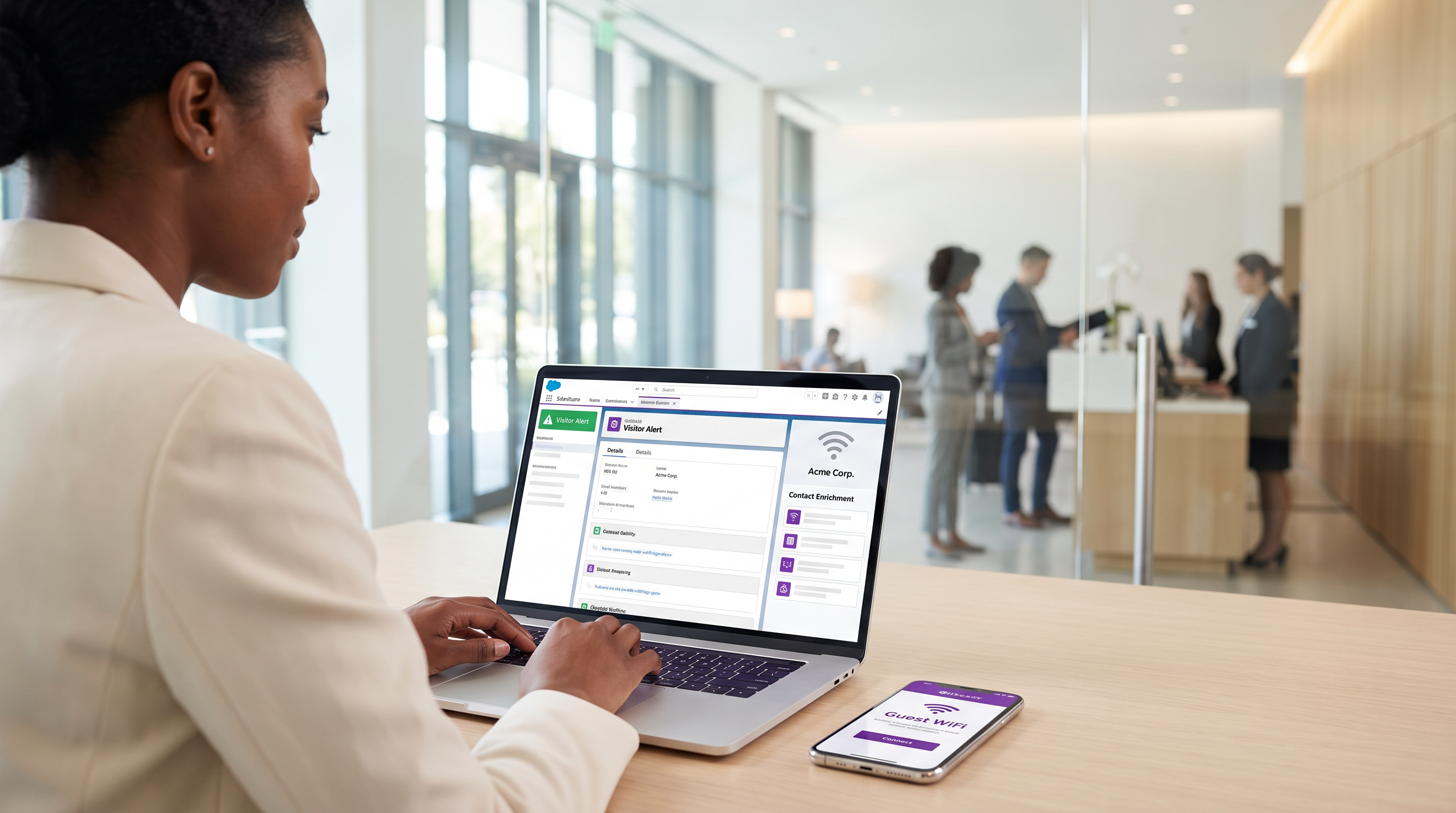
Per le sedi aziendali—dai centri congressi ai campus aziendali—il WiFi ospite rappresenta un serbatoio non sfruttato di dati di intento di prima parte. Ogni evento di autenticazione è un segnale fisico di coinvolgimento. Tuttavia, senza un collegamento strutturale al CRM, questi dati rimangono isolati, non offrendo alcuna utilità commerciale.
L'integrazione del Guest WiFi con Salesforce trasforma l'infrastruttura di rete passiva in un motore attivo di account intelligence. Instradando gli eventi di autenticazione in Salesforce, risolvendo le identità rispetto agli account esistenti e attivando avvisi automatici, le organizzazioni possono dotare i loro team di vendita di segnali di intento fisico ad alta fedeltà. Questa integrazione è particolarmente potente per l' Hospitality B2B e gli spazi per eventi, dove l'identificazione degli account target in loco può accelerare significativamente la velocità delle trattative.
Questa guida fornisce l'architettura tecnica, i requisiti del modello di dati e le migliori pratiche di implementazione per i leader IT e i team RevOps che implementano un'integrazione Salesforce WiFi. Va oltre la semplice acquisizione di lead per stabilire un framework robusto e conforme per l'intelligence basata sugli account.
Approfondimento Tecnico: Architettura e Risoluzione dell'Identità
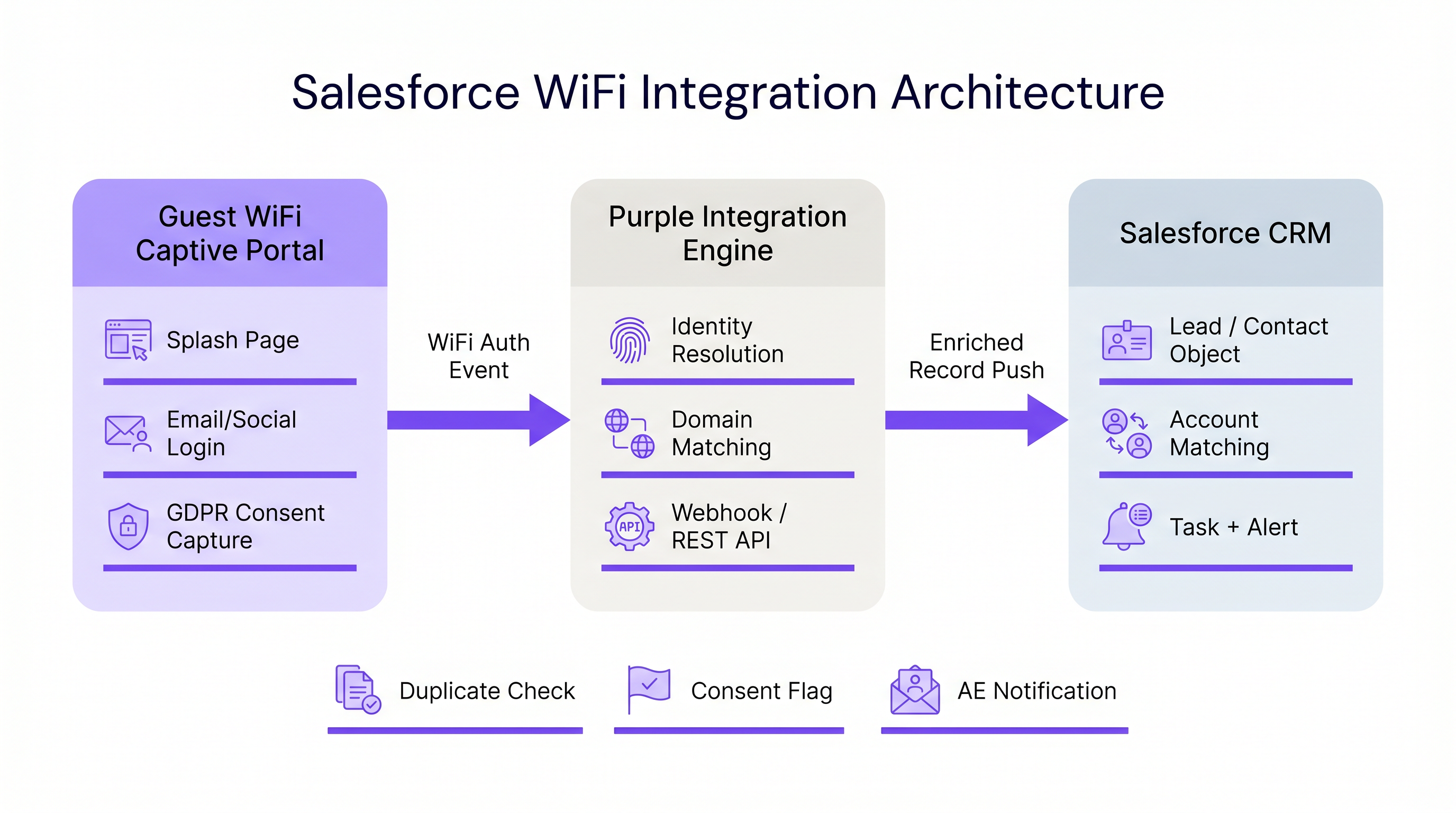
L'architettura di un'integrazione Salesforce WiFi si basa su tre livelli principali: il captive portal, il middleware di integrazione e il modello di dati CRM.
1. Il Livello del Captive Portal
Il captive portal è il punto di acquisizione dell'identità. Per l'intelligence B2B, l'autenticazione via email o il LinkedIn SSO sono strettamente richiesti. L'autenticazione click-through o solo SMS (come discusso in Verifica SMS vs Email per il Guest WiFi: Quale scegliere ) non fornisce l'identificatore persistente necessario per un robusto matching CRM.
Fondamentalmente, questo livello deve anche gestire la conformità. Secondo il GDPR, il consenso esplicito deve essere acquisito al punto di ingresso e trasmesso a valle. La piattaforma Purple gestisce questo in modo nativo, passando flag di consenso granulari insieme al payload dell'identità.
2. Middleware di Integrazione e Risoluzione dell'Identità
Il motore di integrazione riceve l'evento di autenticazione—tipicamente tramite un webhook—ed esegue la risoluzione dell'identità prima di eseguire un upsert di Salesforce. Questa logica previene la creazione di record duplicati e garantisce l'integrità dei dati.
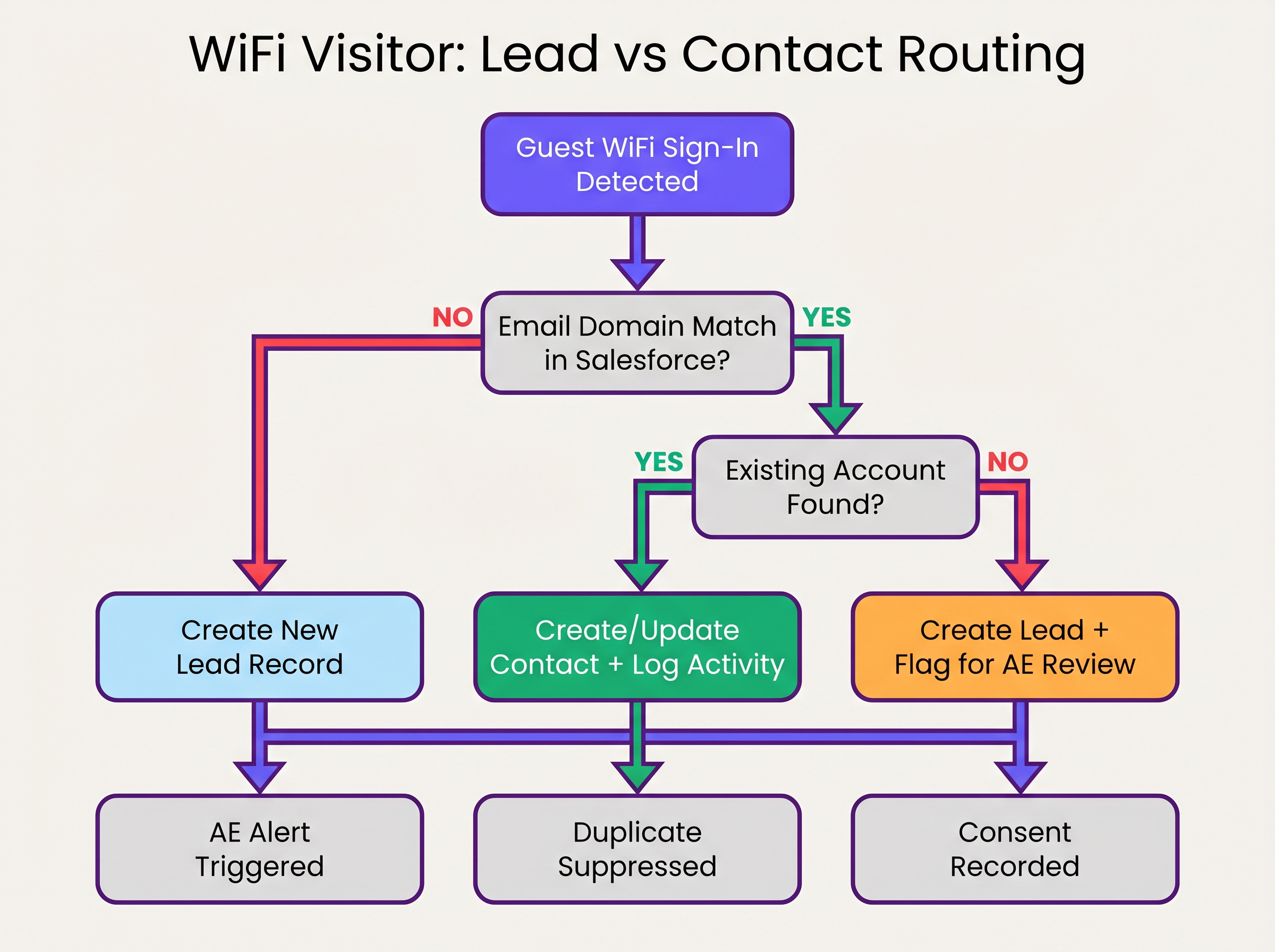
La sequenza di risoluzione dell'identità opera come segue:
- Estrazione del Dominio: Il middleware estrae il dominio dall'indirizzo email autenticato (es.
user@acmecorp.comdiventaacmecorp.com). - Corrispondenza Account: Una query SOQL controlla l'oggetto Account di Salesforce per un campo di dominio del sito web o dell'email corrispondente.
- Instradamento Contatto/Lead:
- Se esiste una corrispondenza Account, il sistema verifica l'esistenza di un Contatto. Se trovato, il Contatto viene aggiornato (data dell'ultima visualizzazione, conteggio delle visite incrementato). Se non trovato, viene creato un nuovo Contatto e associato all'Account.
- Se non esiste una corrispondenza Account, il sistema valuta il dominio rispetto a una blocklist (es. gmail.com). Se supera il controllo, viene creato un nuovo Lead.
3. Il Modello di Dati di Salesforce
Per estrarre valore da WiFi Analytics , il modello di dati di Salesforce deve essere configurato per ricevere e aggregare i dati di intento fisico.
Campi Personalizzati Richiesti:
- Oggetto Contatto/Lead:
WiFi_Venue_Name__c,First_Seen_Date__c,Last_Seen_Date__c,Visit_Count__c,Marketing_Consent__c. - Oggetto Account:
Total_WiFi_Contacts__c(Riepilogo di Roll-up),Last_Target_Account_Visit__c.
Guida all'Implementazione: Distribuzione Passo Dopo Passo
La distribuzione di un'integrazione Salesforce WiFi richiede coordinamento tra l'infrastruttura IT e RevOps. Seguire questa sequenza di distribuzione vendor-neutral:
Fase 1: Governance dei Dati Pre-Distribuzione
Prima di collegare i sistemi, stabilire le regole di ingaggio.
- Definire la Blocklist dei Domini: Compilare un elenco completo di domini email consumer (Gmail, Yahoo, iCloud) da escludere dalla corrispondenza Account e dalla creazione di Lead. Questo previene l'inquinamento del CRM.
- Stabilire le Soglie di Conversione: Definire quando un Lead dovrebbe convertirsi automaticamente in un Contatto. Una regola standard è: >2 visite entro 30 giorni da un dominio aziendale conosciuto attivano la conversione e l'associazione all'Account.
Fase 2: Configurazione del Middleware
Configurare il livello di integrazione per gestire il payload del webhook.
- Configurazione Webhook: Nel portale Purple, configurare un webhook in uscita per attivarsi sull'evento
user_authenticated. - Logica del Middleware: Implementare la logica di risoluzione dell'identità nel middleware scelto (es. MuleSoft, AWS Lambda, o una Connected App personalizzata).
- Limiti API: Per ambienti ad alta densità (fare riferimento a Progettazione WiFi ad Alta Densità: Best Practice per Stadi e Arene ), assicurarsi che il middleware raggruppi le richieste o utilizzi la Salesforce Bulk API per evitare di superare i limiti delle API REST.
Fase 3: Configurazione degli Avvisi
Configurare Salesforce Flow per attivare azioni commerciali basate sui dati arricchiti.
- Avviso Account Target: Attivare un'attività e una notifica Chatter al Proprietario dell'Account quando un Contatto associato a un account target di Livello 1 si connette alla rete.
- Re-engagement Dormiente: Avvisare il Proprietario dell'Account se un Contatto senza attività registrata da >90 giorni si connette al WiFi.
Best Practice e Mitigazione del Rischio
Gestione della Randomizzazione dell'Indirizzo MAC
I moderni sistemi operativi mobili (iOS 14+, Android 10+) implementano la randomizzazionion per impostazione predefinita. Ciò significa che il dispositivo presenta un indirizzo MAC diverso a ciascuna rete, rendendo inefficace il tracciamento persistente basato su MAC in diverse sedi o per periodi di tempo prolungati. L'integrazione deve basarsi sull'indirizzo email autenticato come identificatore primario, utilizzando l'indirizzo MAC solo per la gestione della sessione all'interno di una singola visita.
Evitare lo "scarico di lead"
La modalità di errore più comune nelle integrazioni CRM è l'inserimento di ogni evento di autenticazione direttamente nell'oggetto Lead. Ciò crea migliaia di record duplicati, frustra i team di vendita e oscura i segnali di intento genuini. È essenziale la stretta aderenza alla logica di corrispondenza 'Account-first' delineata sopra.
Conformità e Sincronizzazione del Consenso
Il consenso marketing acquisito tramite il Captive Portal deve essere trattato come la fonte di verità per quel canale specifico. L'integrazione deve mappare il flag booleano marketing_opt_in dal payload WiFi direttamente al campo di consenso corrispondente in Salesforce. Se un utente successivamente si disiscrive tramite una campagna email, la piattaforma di automazione del marketing deve sincronizzare tale preferenza con Salesforce.
ROI e Impatto sul Business
L'impatto sul business di un'integrazione Salesforce WiFi si misura nella velocità della pipeline e nel coinvolgimento dell'account.
Automatizzando la consegna dei segnali di intento fisici, le organizzazioni eliminano la latenza tra la visita di un potenziale cliente a una sede e l'avvio del contatto da parte del team di vendita. Per Retail e gli spazi per eventi B2B, questa capacità trasforma un centro di costo (WiFi per ospiti) in uno strumento misurabile per la generazione di pipeline.
Le organizzazioni che implementano questa architettura osservano tipicamente una significativa riduzione del tempo di contatto per i potenziali clienti in loco e un aumento del tasso di conversione dei lead qualificati per il marketing (MQL) provenienti da sedi fisiche.
Ascolta il Briefing
Per una panoramica completa dell'architettura e delle strategie di implementazione, ascolta il briefing del podcast di accompagnamento:
Termini chiave e definizioni
Identity Resolution
The process of matching an incoming authentication event (e.g., an email address) against existing CRM records to determine whether to update a Contact, associate with an Account, or create a new Lead.
Crucial for maintaining data hygiene and ensuring sales teams receive alerts tied to the correct accounts.
Captive Portal
The web page that users are directed to before they are granted access to the guest WiFi network. Used to capture identity and consent.
The primary interface for capturing first-party data and GDPR-compliant marketing consent.
MAC Address Randomisation
A privacy feature in modern mobile operating systems where the device generates a temporary MAC address for each network it connects to.
Forces IT teams to rely on authenticated credentials (like email) rather than device hardware addresses for persistent CRM tracking.
Salesforce Flow
An automation tool within Salesforce used to execute logic, update records, and send notifications based on specific trigger conditions.
Used to automate the routing of alerts to Account Executives when a target account connects to the WiFi.
Webhook
An automated HTTP push mechanism that sends real-time data from one application to another when a specific event occurs.
The standard method for transmitting WiFi authentication events from the network platform to the integration middleware.
Domain Blocklist
A maintained list of email domains (e.g., consumer providers like Gmail or Yahoo) that are explicitly excluded from certain integration actions.
Essential for preventing CRM pollution and ensuring only high-value B2B contacts are processed.
Roll-up Summary Field
A Salesforce field type that calculates values from related records, such as the total number of Contacts associated with an Account.
Used on the Account object to aggregate the total number of WiFi visits from all associated Contacts.
First-Party Data
Information a company collects directly from its customers or visitors, including demographics, behaviors, and consent.
Guest WiFi authentication is a primary source of high-quality first-party data for physical venues.
Casi di studio
A corporate conference centre hosts multiple B2B events weekly. The RevOps team wants to alert Account Executives immediately when a prospect from a target account connects to the venue WiFi, but they are concerned about flooding Salesforce with consumer email addresses (e.g., Gmail) from event staff and contractors.
- Implement a middleware layer between the WiFi platform (e.g., Purple) and Salesforce.
- Configure the middleware with a strict domain blocklist containing all known consumer email providers.
- When an authentication event occurs, the middleware extracts the email domain. If the domain is on the blocklist, the payload is discarded or logged to a custom object for analytics only, bypassing Lead/Contact creation.
- If the domain passes the filter, the middleware queries Salesforce for an Account match.
- If an Account match is found and it is flagged as a 'Target Account', the middleware upserts the Contact record and triggers a Salesforce Flow to generate a high-priority Task for the assigned Account Executive.
A B2B retail technology vendor offers free WiFi in their executive briefing centre. They need to ensure that marketing consent captured during WiFi sign-up is accurately reflected in Salesforce and complies with GDPR requirements.
- Configure the captive portal to present a clear, un-ticked checkbox for marketing communications, distinct from the terms of service.
- Ensure the WiFi platform captures the timestamp, IP address, and the boolean value of the consent checkbox.
- Map the consent boolean from the WiFi API payload to a custom
WiFi_Marketing_Consent__cfield on the Salesforce Contact/Lead object. - Configure Salesforce to map this custom field to the standard Individual object or the integrated marketing automation platform's consent management system.
- Establish a daily sync to ensure any opt-outs processed by the marketing automation platform update the central Salesforce record.
Analisi degli scenari
Q1. A hospital network wants to integrate their guest WiFi with Salesforce to track vendor and partner visits. However, they are concerned about inadvertently capturing patient data in the CRM. How should the integration architecture address this?
💡 Suggerimento:Consider how you can filter authentication events before they reach the CRM.
Mostra l'approccio consigliato
The architecture must implement strict filtering in the middleware layer. The captive portal should be configured to require corporate email addresses, and the middleware must employ a comprehensive domain blocklist to discard any authentication events from consumer email domains (which patients are most likely to use). Furthermore, the captive portal should clearly state its purpose (e.g., 'Vendor and Partner Access') and include specific terms of service to discourage patient use.
Q2. Your RevOps team reports that the new WiFi integration is creating duplicate Leads for individuals who already exist as Contacts under known Accounts. What is the most likely failure in the integration logic?
💡 Suggerimento:Review the sequence of identity resolution steps.
Mostra l'approccio consigliato
The integration logic is likely failing to perform an Account domain match before creating a Lead. The correct sequence must be: 1) Extract domain, 2) Query Account object for domain match, 3) If Account exists, query for Contact match, 4) If no Contact exists, create a new Contact linked to the Account. Creating a Lead should only occur if step 2 (Account match) fails.
Q3. A hotel chain's marketing team wants to track how often specific corporate clients visit their properties. They are currently relying on MAC addresses to identify returning visitors, but the data shows artificially low return rates. Why is this happening, and what is the architectural solution?
💡 Suggerimento:Consider how modern mobile operating systems handle network connections.
Mostra l'approccio consigliato
The artificially low return rates are caused by MAC address randomisation, a privacy feature in modern iOS and Android devices that generates a new MAC address for different networks or over time. The architectural solution is to shift reliance from the MAC address to the authenticated email address. The captive portal must require email authentication, and the integration middleware must use this email address as the persistent identifier to query and update the Salesforce Contact record.
Punti chiave
- ✓Integrating guest WiFi with Salesforce converts passive network events into active, actionable account intelligence.
- ✓Identity resolution must prioritize matching against existing Accounts and Contacts to prevent CRM data pollution.
- ✓Middleware should be used to filter out consumer email domains before data reaches Salesforce.
- ✓MAC address randomisation necessitates the use of authenticated email addresses as the primary persistent identifier.
- ✓Automated alerts via Salesforce Flow enable Account Executives to engage target accounts while they are physically on-site.
- ✓Explicit, granular marketing consent must be captured at the captive portal and synced to the CRM to ensure GDPR compliance.




