

Integração do Salesforce com Guest WiFi para Inteligência de Contas
Este guia de referência técnica detalha como as equipas de TI e RevOps podem integrar eventos de autenticação de Guest WiFi com o Salesforce para gerar inteligência de contas acionável. Abrange a arquitetura necessária, a lógica de resolução de identidade e as configurações do modelo de dados essenciais para transformar visitas a locais físicos em sinais de CRM de alta fidelidade.
🎧 Ouça este Guia
Ver Transcrição
Resumo Executivo
Para locais empresariais — desde centros de conferências a campus corporativos — o Guest WiFi representa um reservatório inexplorado de dados de intenção de primeira parte. Cada evento de autenticação é um sinal físico de envolvimento. No entanto, sem uma ligação estrutural ao CRM, estes dados permanecem isolados, não oferecendo utilidade comercial.
A integração do Guest WiFi com o Salesforce transforma a infraestrutura de rede passiva num motor ativo de inteligência de contas. Ao encaminhar eventos de autenticação para o Salesforce, resolvendo identidades contra contas existentes e acionando alertas automatizados, as organizações podem equipar as suas equipas de vendas com sinais de intenção física de alta fidelidade. Esta integração é particularmente potente para Hospitality B2B e espaços de eventos, onde a identificação de contas-alvo no local pode acelerar significativamente a velocidade dos negócios.
Este guia fornece a arquitetura técnica, os requisitos do modelo de dados e as melhores práticas de implementação para líderes de TI e equipas de RevOps que implementam uma integração Salesforce WiFi. Vai além da captura básica de leads para estabelecer uma estrutura robusta e compatível para inteligência baseada em contas.
Análise Técnica Aprofundada: Arquitetura e Resolução de Identidade
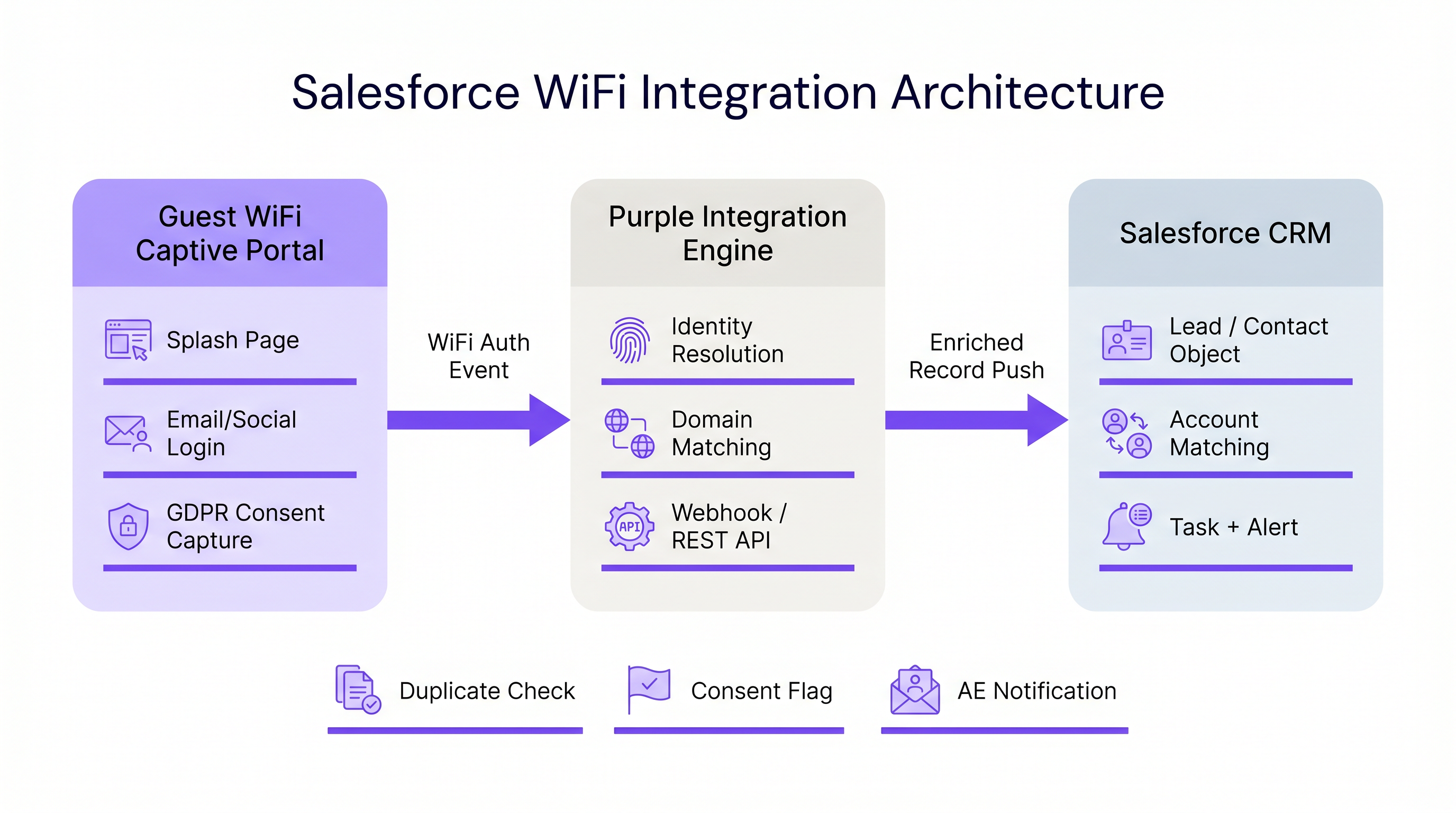
A arquitetura de uma integração Salesforce WiFi baseia-se em três camadas principais: o Captive Portal, o middleware de integração e o modelo de dados do CRM.
1. A Camada do Captive Portal
O Captive Portal é o ponto de captura de identidade. Para inteligência B2B, a autenticação por e-mail ou LinkedIn SSO é estritamente necessária. A autenticação por clique ou apenas por SMS (conforme discutido em SMS vs Email Verification for Guest WiFi: Which to Choose ) não fornece o identificador persistente necessário para uma correspondência robusta no CRM.
Crucialmente, esta camada também deve lidar com a conformidade. Sob o GDPR, o consentimento explícito deve ser capturado no ponto de entrada e transmitido a jusante. A plataforma da Purple lida com isso nativamente, transmitindo sinalizadores de consentimento granulares juntamente com o payload de identidade.
2. Middleware de Integração e Resolução de Identidade
O motor de integração recebe o evento de autenticação — tipicamente via webhook — e executa a resolução de identidade antes de executar um upsert no Salesforce. Esta lógica impede a criação de registos duplicados e garante a integridade dos dados.
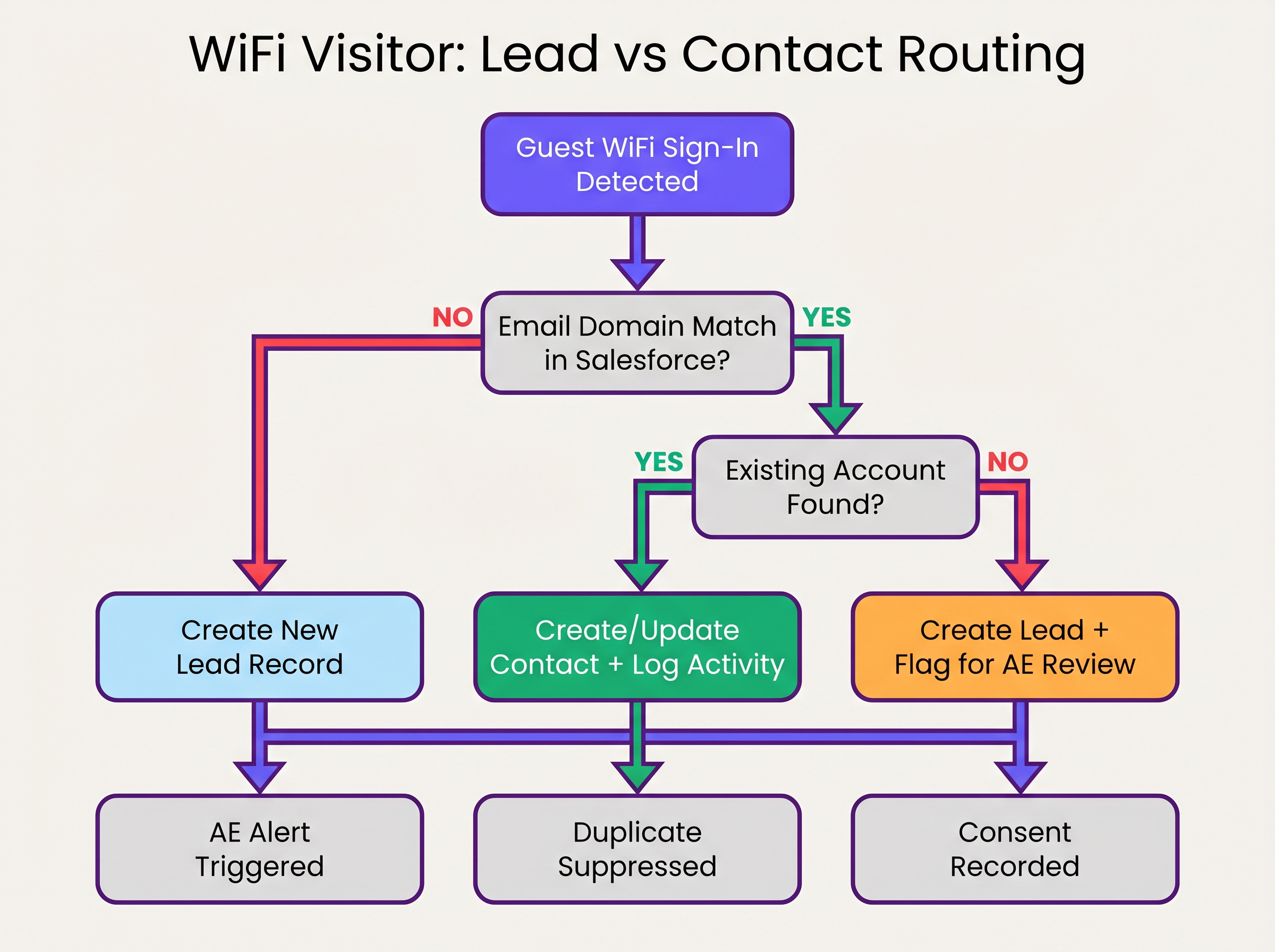
A sequência de resolução de identidade opera da seguinte forma:
- Extração de Domínio: O middleware extrai o domínio do endereço de e-mail autenticado (por exemplo,
user@acmecorp.comtorna-seacmecorp.com). - Correspondência de Contas: Uma consulta SOQL verifica o objeto Conta do Salesforce para um campo de domínio de website ou e-mail correspondente.
- Encaminhamento de Contacto/Lead:
- Se existir uma correspondência de Conta, o sistema verifica a existência de um Contacto. Se encontrado, o Contacto é atualizado (data da última visualização, contagem de visitas incrementada). Se não encontrado, um novo Contacto é criado e associado à Conta.
- Se não existir correspondência de Conta, o sistema avalia o domínio contra uma lista de bloqueio (por exemplo, gmail.com). Se passar, um novo Lead é criado.
3. O Modelo de Dados do Salesforce
Para extrair valor do WiFi Analytics , o modelo de dados do Salesforce deve ser configurado para receber e agregar dados de intenção física.
Campos Personalizados Necessários:
- Objeto Contacto/Lead:
WiFi_Venue_Name__c,First_Seen_Date__c,Last_Seen_Date__c,Visit_Count__c,Marketing_Consent__c. - Objeto Conta:
Total_WiFi_Contacts__c(Resumo de Agregação),Last_Target_Account_Visit__c.
Guia de Implementação: Implementação Passo a Passo
A implementação de uma integração Salesforce WiFi requer coordenação entre a infraestrutura de TI e as RevOps. Siga esta sequência de implementação neutra em relação ao fornecedor:
Fase 1: Governança de Dados Pré-Implementação
Antes de conectar os sistemas, estabeleça as regras de envolvimento.
- Defina a Lista de Bloqueio de Domínios: Compile uma lista abrangente de domínios de e-mail de consumidores (Gmail, Yahoo, iCloud) para excluir da correspondência de Contas e da criação de Leads. Isso evita a poluição do CRM.
- Estabeleça Limiares de Conversão: Defina quando um Lead deve converter automaticamente para um Contacto. Uma regra padrão é: >2 visitas dentro de 30 dias de um domínio corporativo conhecido aciona a conversão e a associação à Conta.
Fase 2: Configuração do Middleware
Configure a camada de integração para lidar com o payload do webhook.
- Configuração do Webhook: No portal da Purple, configure um webhook de saída para ser acionado no evento
user_authenticated. - Lógica do Middleware: Implemente a lógica de resolução de identidade no middleware escolhido (por exemplo, MuleSoft, AWS Lambda ou uma Connected App personalizada).
- Limites da API: Para ambientes de alta densidade (consulte High-Density WiFi Design: Stadium and Arena Best Practices ), certifique-se de que o middleware agrupa os pedidos ou utiliza a Salesforce Bulk API para evitar exceder os limites da REST API.
Fase 3: Configuração de Alertas
Configure o Salesforce Flow para acionar ações comerciais com base nos dados enriquecidos.
- Alerta de Conta Alvo: Acione uma Tarefa e uma notificação do Chatter para o Proprietário da Conta quando um Contacto associado a uma conta alvo de Nível 1 se conectar à rede.
- Reengajamento de Inativos: Alerte o Proprietário da Conta se um Contacto sem atividade registada há mais de 90 dias se conectar ao WiFi.
Melhores Práticas e Mitigação de Riscos
Gerir a Aleatorização de Endereços MAC
Sistemas operativos móveis modernos (iOS 14+, Android 10+) implementam a aleatorização de endereços MACão por predefinição. Isto significa que o dispositivo apresenta um endereço MAC diferente a cada rede, tornando o rastreamento persistente baseado em MAC ineficaz em diferentes locais ou períodos de tempo prolongados. A integração deve depender do endereço de e-mail autenticado como identificador principal, utilizando o endereço MAC apenas para gestão de sessão dentro de uma única visita.
Evitar o "Lead Dump"
O modo de falha mais comum nas integrações de CRM é empurrar cada evento de autenticação diretamente para o objeto Lead. Isto cria milhares de registos duplicados, frustra as equipas de vendas e obscurece os sinais de intenção genuínos. A adesão rigorosa à lógica de correspondência 'Account-first' descrita acima é essencial.
Conformidade e Sincronização de Consentimento
O consentimento de marketing capturado no Captive Portal deve ser tratado como a fonte de verdade para esse canal específico. A integração deve mapear o sinalizador booleano marketing_opt_in do payload do WiFi diretamente para o campo de consentimento correspondente no Salesforce. Se um utilizador posteriormente optar por não participar através de uma campanha de e-mail, a plataforma de automação de marketing deve sincronizar essa preferência de volta para o Salesforce.
ROI e Impacto no Negócio
O impacto no negócio de uma integração Salesforce WiFi é medido na velocidade do pipeline e no envolvimento da conta.
Ao automatizar a entrega de sinais de intenção física, as organizações eliminam a latência entre a visita de um potencial cliente a um local e a equipa de vendas a iniciar o contacto. Para Retalho e espaços de eventos B2B, esta capacidade transforma um centro de custos (WiFi de convidado) numa ferramenta mensurável de geração de pipeline.
As organizações que implementam esta arquitetura observam tipicamente uma redução significativa no tempo de contacto para potenciais clientes no local e um aumento na taxa de conversão de leads qualificadas de marketing (MQLs) provenientes de locais físicos.
Ouça o Briefing
Para uma visão geral abrangente da arquitetura e estratégias de implementação, ouça o briefing do podcast complementar:
Termos-Chave e Definições
Identity Resolution
The process of matching an incoming authentication event (e.g., an email address) against existing CRM records to determine whether to update a Contact, associate with an Account, or create a new Lead.
Crucial for maintaining data hygiene and ensuring sales teams receive alerts tied to the correct accounts.
Captive Portal
The web page that users are directed to before they are granted access to the guest WiFi network. Used to capture identity and consent.
The primary interface for capturing first-party data and GDPR-compliant marketing consent.
MAC Address Randomisation
A privacy feature in modern mobile operating systems where the device generates a temporary MAC address for each network it connects to.
Forces IT teams to rely on authenticated credentials (like email) rather than device hardware addresses for persistent CRM tracking.
Salesforce Flow
An automation tool within Salesforce used to execute logic, update records, and send notifications based on specific trigger conditions.
Used to automate the routing of alerts to Account Executives when a target account connects to the WiFi.
Webhook
An automated HTTP push mechanism that sends real-time data from one application to another when a specific event occurs.
The standard method for transmitting WiFi authentication events from the network platform to the integration middleware.
Domain Blocklist
A maintained list of email domains (e.g., consumer providers like Gmail or Yahoo) that are explicitly excluded from certain integration actions.
Essential for preventing CRM pollution and ensuring only high-value B2B contacts are processed.
Roll-up Summary Field
A Salesforce field type that calculates values from related records, such as the total number of Contacts associated with an Account.
Used on the Account object to aggregate the total number of WiFi visits from all associated Contacts.
First-Party Data
Information a company collects directly from its customers or visitors, including demographics, behaviors, and consent.
Guest WiFi authentication is a primary source of high-quality first-party data for physical venues.
Estudos de Caso
A corporate conference centre hosts multiple B2B events weekly. The RevOps team wants to alert Account Executives immediately when a prospect from a target account connects to the venue WiFi, but they are concerned about flooding Salesforce with consumer email addresses (e.g., Gmail) from event staff and contractors.
- Implement a middleware layer between the WiFi platform (e.g., Purple) and Salesforce.
- Configure the middleware with a strict domain blocklist containing all known consumer email providers.
- When an authentication event occurs, the middleware extracts the email domain. If the domain is on the blocklist, the payload is discarded or logged to a custom object for analytics only, bypassing Lead/Contact creation.
- If the domain passes the filter, the middleware queries Salesforce for an Account match.
- If an Account match is found and it is flagged as a 'Target Account', the middleware upserts the Contact record and triggers a Salesforce Flow to generate a high-priority Task for the assigned Account Executive.
A B2B retail technology vendor offers free WiFi in their executive briefing centre. They need to ensure that marketing consent captured during WiFi sign-up is accurately reflected in Salesforce and complies with GDPR requirements.
- Configure the captive portal to present a clear, un-ticked checkbox for marketing communications, distinct from the terms of service.
- Ensure the WiFi platform captures the timestamp, IP address, and the boolean value of the consent checkbox.
- Map the consent boolean from the WiFi API payload to a custom
WiFi_Marketing_Consent__cfield on the Salesforce Contact/Lead object. - Configure Salesforce to map this custom field to the standard Individual object or the integrated marketing automation platform's consent management system.
- Establish a daily sync to ensure any opt-outs processed by the marketing automation platform update the central Salesforce record.
Análise de Cenários
Q1. A hospital network wants to integrate their guest WiFi with Salesforce to track vendor and partner visits. However, they are concerned about inadvertently capturing patient data in the CRM. How should the integration architecture address this?
💡 Dica:Consider how you can filter authentication events before they reach the CRM.
Mostrar Abordagem Recomendada
The architecture must implement strict filtering in the middleware layer. The captive portal should be configured to require corporate email addresses, and the middleware must employ a comprehensive domain blocklist to discard any authentication events from consumer email domains (which patients are most likely to use). Furthermore, the captive portal should clearly state its purpose (e.g., 'Vendor and Partner Access') and include specific terms of service to discourage patient use.
Q2. Your RevOps team reports that the new WiFi integration is creating duplicate Leads for individuals who already exist as Contacts under known Accounts. What is the most likely failure in the integration logic?
💡 Dica:Review the sequence of identity resolution steps.
Mostrar Abordagem Recomendada
The integration logic is likely failing to perform an Account domain match before creating a Lead. The correct sequence must be: 1) Extract domain, 2) Query Account object for domain match, 3) If Account exists, query for Contact match, 4) If no Contact exists, create a new Contact linked to the Account. Creating a Lead should only occur if step 2 (Account match) fails.
Q3. A hotel chain's marketing team wants to track how often specific corporate clients visit their properties. They are currently relying on MAC addresses to identify returning visitors, but the data shows artificially low return rates. Why is this happening, and what is the architectural solution?
💡 Dica:Consider how modern mobile operating systems handle network connections.
Mostrar Abordagem Recomendada
The artificially low return rates are caused by MAC address randomisation, a privacy feature in modern iOS and Android devices that generates a new MAC address for different networks or over time. The architectural solution is to shift reliance from the MAC address to the authenticated email address. The captive portal must require email authentication, and the integration middleware must use this email address as the persistent identifier to query and update the Salesforce Contact record.
Principais Conclusões
- ✓Integrating guest WiFi with Salesforce converts passive network events into active, actionable account intelligence.
- ✓Identity resolution must prioritize matching against existing Accounts and Contacts to prevent CRM data pollution.
- ✓Middleware should be used to filter out consumer email domains before data reaches Salesforce.
- ✓MAC address randomisation necessitates the use of authenticated email addresses as the primary persistent identifier.
- ✓Automated alerts via Salesforce Flow enable Account Executives to engage target accounts while they are physically on-site.
- ✓Explicit, granular marketing consent must be captured at the captive portal and synced to the CRM to ensure GDPR compliance.




