

Salesforce Integration with Guest WiFi for Account Intelligence
This technical reference guide details how IT and RevOps teams can integrate guest WiFi authentication events with Salesforce to generate actionable account intelligence. It covers the required architecture, identity resolution logic, and data model configurations necessary to turn physical venue visits into high-fidelity CRM signals.
🎧 Listen to this Guide
View Transcript

Executive Summary
For enterprise venues—from conference centres to corporate campuses—guest WiFi represents an untapped reservoir of first-party intent data. Every authentication event is a physical signal of engagement. However, without a structural link to the CRM, this data remains siloed, offering no commercial utility.
Integrating Guest WiFi with Salesforce transforms passive network infrastructure into an active account intelligence engine. By routing authentication events into Salesforce, resolving identities against existing accounts, and triggering automated alerts, organisations can equip their sales teams with high-fidelity physical intent signals. This integration is particularly potent for B2B Hospitality and event spaces, where identifying target accounts on-site can significantly accelerate deal velocity.
This guide provides the technical architecture, data model requirements, and deployment best practices for IT leaders and RevOps teams implementing a Salesforce WiFi integration. It moves beyond basic lead capture to establish a robust, compliant framework for account-based intelligence.
Technical Deep-Dive: Architecture and Identity Resolution
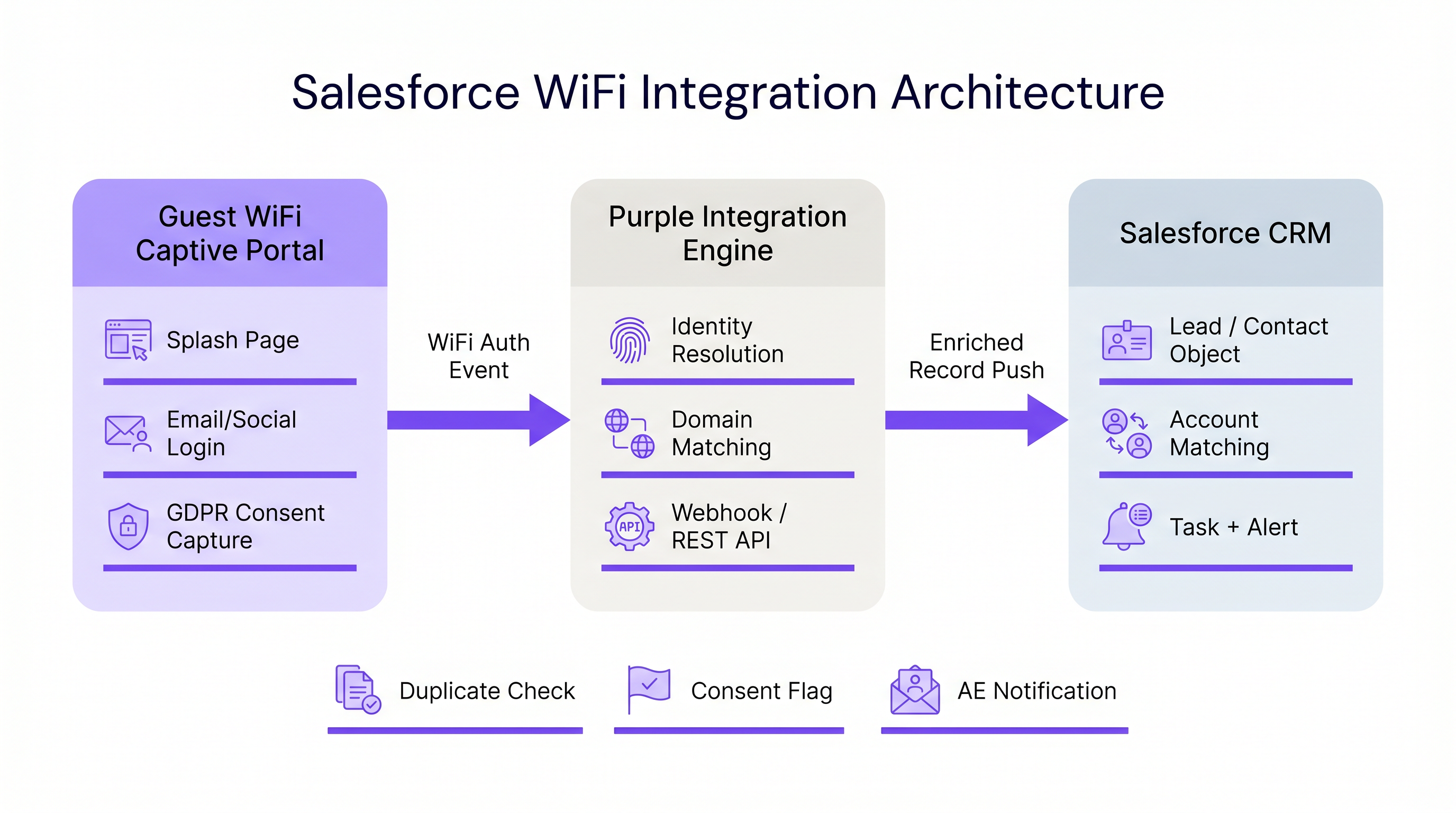
The architecture of a Salesforce WiFi integration relies on three core layers: the captive portal, the integration middleware, and the CRM data model.
1. The Captive Portal Layer
The captive portal is the point of identity capture. For B2B intelligence, email authentication or LinkedIn SSO is strictly required. Click-through or SMS-only authentication (as discussed in SMS vs Email Verification for Guest WiFi: Which to Choose ) does not provide the persistent identifier necessary for robust CRM matching.
Crucially, this layer must also handle compliance. Under GDPR, explicit consent must be captured at the point of entry and passed downstream. Purple's platform handles this natively, passing granular consent flags alongside the identity payload.
2. Integration Middleware and Identity Resolution
The integration engine receives the authentication event—typically via a webhook—and performs identity resolution before executing a Salesforce upsert. This logic prevents the creation of duplicate records and ensures data integrity.
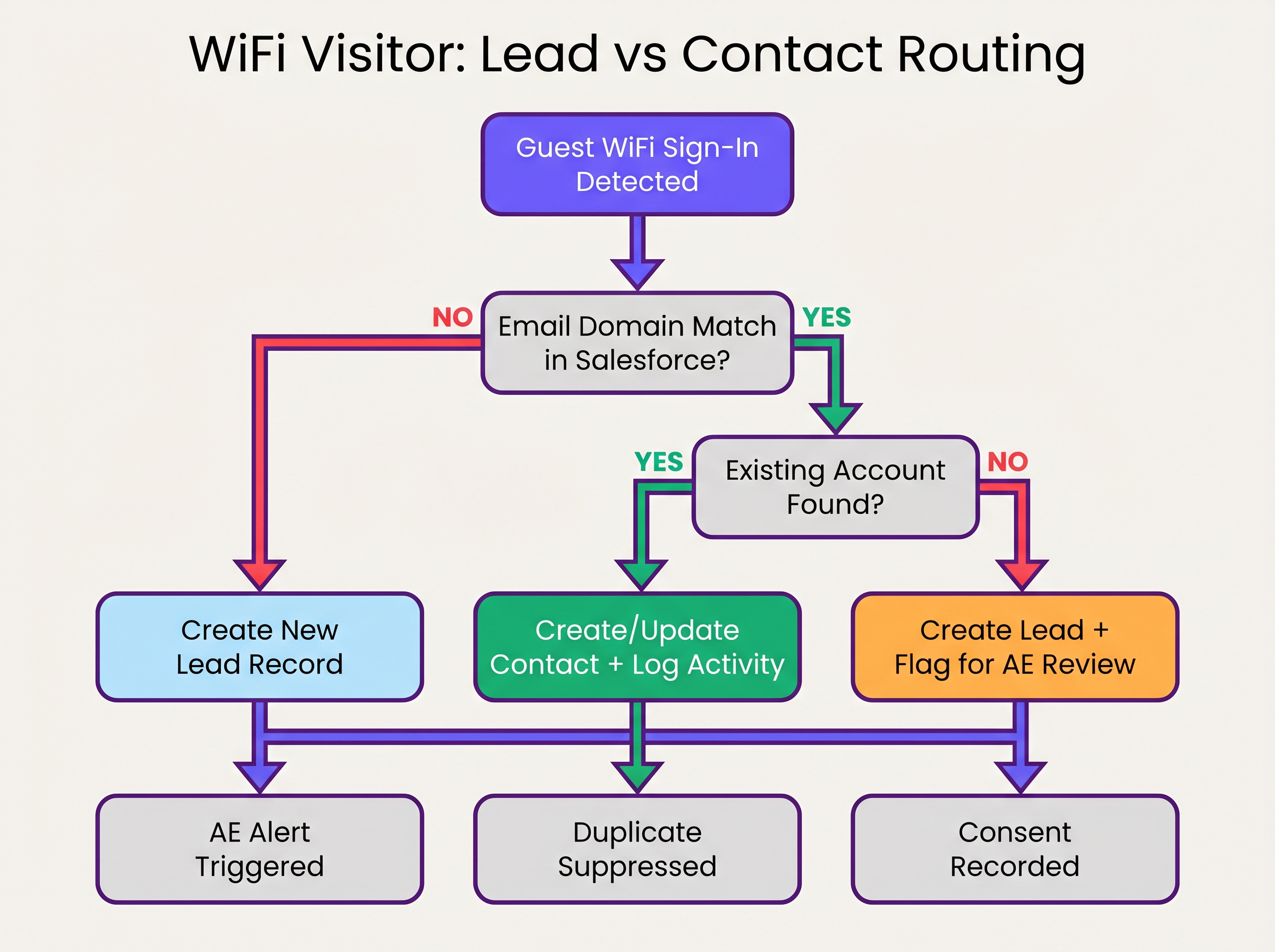
The identity resolution sequence operates as follows:
- Domain Extraction: The middleware extracts the domain from the authenticated email address (e.g.,
user@acmecorp.combecomesacmecorp.com). - Account Matching: A SOQL query checks the Salesforce Account object for a matching website or email domain field.
- Contact/Lead Routing:
- If an Account match exists, the system checks for an existing Contact. If found, the Contact is updated (last seen date, visit count incremented). If not found, a new Contact is created and associated with the Account.
- If no Account match exists, the system evaluates the domain against a blocklist (e.g., gmail.com). If it passes, a new Lead is created.
3. The Salesforce Data Model
To extract value from WiFi Analytics , the Salesforce data model must be configured to receive and roll up physical intent data.
Required Custom Fields:
- Contact/Lead Object:
WiFi_Venue_Name__c,First_Seen_Date__c,Last_Seen_Date__c,Visit_Count__c,Marketing_Consent__c. - Account Object:
Total_WiFi_Contacts__c(Roll-up Summary),Last_Target_Account_Visit__c.
Implementation Guide: Step-by-Step Deployment
Deploying a Salesforce WiFi integration requires coordination between IT infrastructure and RevOps. Follow this vendor-neutral deployment sequence:
Phase 1: Pre-Deployment Data Governance
Before connecting the systems, establish the rules of engagement.
- Define the Domain Blocklist: Compile a comprehensive list of consumer email domains (Gmail, Yahoo, iCloud) to exclude from Account matching and Lead creation. This prevents CRM pollution.
- Establish Conversion Thresholds: Define when a Lead should automatically convert to a Contact. A standard rule is: >2 visits within 30 days from a known corporate domain triggers conversion and Account association.
Phase 2: Middleware Configuration
Configure the integration layer to handle the webhook payload.
- Webhook Configuration: In the Purple portal, configure an outbound webhook to fire on the
user_authenticatedevent. - Middleware Logic: Implement the identity resolution logic in your chosen middleware (e.g., MuleSoft, AWS Lambda, or a custom Connected App).
- API Limits: For high-density environments (refer to High-Density WiFi Design: Stadium and Arena Best Practices ), ensure the middleware batches requests or utilises the Salesforce Bulk API to avoid exceeding REST API limits.
Phase 3: Alert Configuration
Configure Salesforce Flow to trigger commercial actions based on the enriched data.
- Target Account Alert: Trigger a Task and Chatter notification to the Account Owner when a Contact associated with a Tier 1 target account connects to the network.
- Dormant Re-engagement: Alert the Account Owner if a Contact with no logged activity in >90 days connects to the WiFi.
Best Practices and Risk Mitigation
Managing MAC Address Randomisation
Modern mobile operating systems (iOS 14+, Android 10+) implement MAC address randomisation by default. This means the device presents a different MAC address to each network, rendering MAC-based persistent tracking ineffective across different venues or extended timeframes. The integration must rely on the authenticated email address as the primary identifier, using the MAC address only for session management within a single visit.
Avoiding the "Lead Dump"
The most common failure mode in CRM integrations is pushing every authentication event directly into the Lead object. This creates thousands of duplicate records, frustrates sales teams, and obscures genuine intent signals. Strict adherence to the Account-first matching logic outlined above is essential.
Compliance and Consent Synchronization
Marketing consent captured at the captive portal must be treated as the source of truth for that specific channel. The integration must map the marketing_opt_in boolean flag from the WiFi payload directly to the corresponding consent field in Salesforce. If a user subsequently opts out via an email campaign, the marketing automation platform must sync that preference back to Salesforce.
ROI & Business Impact
The business impact of a Salesforce WiFi integration is measured in pipeline velocity and account engagement.
By automating the delivery of physical intent signals, organisations eliminate the latency between a prospect visiting a venue and the sales team initiating outreach. For Retail and B2B event spaces, this capability transforms a cost centre (guest WiFi) into a measurable pipeline generation tool.
Organisations deploying this architecture typically observe a significant reduction in time-to-contact for on-site prospects and an increase in the conversion rate of marketing qualified leads (MQLs) sourced from physical venues.
Listen to the Briefing
For a comprehensive overview of the architecture and deployment strategies, listen to the companion podcast briefing:
Key Terms & Definitions
Identity Resolution
The process of matching an incoming authentication event (e.g., an email address) against existing CRM records to determine whether to update a Contact, associate with an Account, or create a new Lead.
Crucial for maintaining data hygiene and ensuring sales teams receive alerts tied to the correct accounts.
Captive Portal
The web page that users are directed to before they are granted access to the guest WiFi network. Used to capture identity and consent.
The primary interface for capturing first-party data and GDPR-compliant marketing consent.
MAC Address Randomisation
A privacy feature in modern mobile operating systems where the device generates a temporary MAC address for each network it connects to.
Forces IT teams to rely on authenticated credentials (like email) rather than device hardware addresses for persistent CRM tracking.
Salesforce Flow
An automation tool within Salesforce used to execute logic, update records, and send notifications based on specific trigger conditions.
Used to automate the routing of alerts to Account Executives when a target account connects to the WiFi.
Webhook
An automated HTTP push mechanism that sends real-time data from one application to another when a specific event occurs.
The standard method for transmitting WiFi authentication events from the network platform to the integration middleware.
Domain Blocklist
A maintained list of email domains (e.g., consumer providers like Gmail or Yahoo) that are explicitly excluded from certain integration actions.
Essential for preventing CRM pollution and ensuring only high-value B2B contacts are processed.
Roll-up Summary Field
A Salesforce field type that calculates values from related records, such as the total number of Contacts associated with an Account.
Used on the Account object to aggregate the total number of WiFi visits from all associated Contacts.
First-Party Data
Information a company collects directly from its customers or visitors, including demographics, behaviors, and consent.
Guest WiFi authentication is a primary source of high-quality first-party data for physical venues.
Case Studies
A corporate conference centre hosts multiple B2B events weekly. The RevOps team wants to alert Account Executives immediately when a prospect from a target account connects to the venue WiFi, but they are concerned about flooding Salesforce with consumer email addresses (e.g., Gmail) from event staff and contractors.
- Implement a middleware layer between the WiFi platform (e.g., Purple) and Salesforce.
- Configure the middleware with a strict domain blocklist containing all known consumer email providers.
- When an authentication event occurs, the middleware extracts the email domain. If the domain is on the blocklist, the payload is discarded or logged to a custom object for analytics only, bypassing Lead/Contact creation.
- If the domain passes the filter, the middleware queries Salesforce for an Account match.
- If an Account match is found and it is flagged as a 'Target Account', the middleware upserts the Contact record and triggers a Salesforce Flow to generate a high-priority Task for the assigned Account Executive.
A B2B retail technology vendor offers free WiFi in their executive briefing centre. They need to ensure that marketing consent captured during WiFi sign-up is accurately reflected in Salesforce and complies with GDPR requirements.
- Configure the captive portal to present a clear, un-ticked checkbox for marketing communications, distinct from the terms of service.
- Ensure the WiFi platform captures the timestamp, IP address, and the boolean value of the consent checkbox.
- Map the consent boolean from the WiFi API payload to a custom
WiFi_Marketing_Consent__cfield on the Salesforce Contact/Lead object. - Configure Salesforce to map this custom field to the standard Individual object or the integrated marketing automation platform's consent management system.
- Establish a daily sync to ensure any opt-outs processed by the marketing automation platform update the central Salesforce record.
Scenario Analysis
Q1. A hospital network wants to integrate their guest WiFi with Salesforce to track vendor and partner visits. However, they are concerned about inadvertently capturing patient data in the CRM. How should the integration architecture address this?
💡 Hint:Consider how you can filter authentication events before they reach the CRM.
Show Recommended Approach
The architecture must implement strict filtering in the middleware layer. The captive portal should be configured to require corporate email addresses, and the middleware must employ a comprehensive domain blocklist to discard any authentication events from consumer email domains (which patients are most likely to use). Furthermore, the captive portal should clearly state its purpose (e.g., 'Vendor and Partner Access') and include specific terms of service to discourage patient use.
Q2. Your RevOps team reports that the new WiFi integration is creating duplicate Leads for individuals who already exist as Contacts under known Accounts. What is the most likely failure in the integration logic?
💡 Hint:Review the sequence of identity resolution steps.
Show Recommended Approach
The integration logic is likely failing to perform an Account domain match before creating a Lead. The correct sequence must be: 1) Extract domain, 2) Query Account object for domain match, 3) If Account exists, query for Contact match, 4) If no Contact exists, create a new Contact linked to the Account. Creating a Lead should only occur if step 2 (Account match) fails.
Q3. A hotel chain's marketing team wants to track how often specific corporate clients visit their properties. They are currently relying on MAC addresses to identify returning visitors, but the data shows artificially low return rates. Why is this happening, and what is the architectural solution?
💡 Hint:Consider how modern mobile operating systems handle network connections.
Show Recommended Approach
The artificially low return rates are caused by MAC address randomisation, a privacy feature in modern iOS and Android devices that generates a new MAC address for different networks or over time. The architectural solution is to shift reliance from the MAC address to the authenticated email address. The captive portal must require email authentication, and the integration middleware must use this email address as the persistent identifier to query and update the Salesforce Contact record.
Key Takeaways
- ✓Integrating guest WiFi with Salesforce converts passive network events into active, actionable account intelligence.
- ✓Identity resolution must prioritize matching against existing Accounts and Contacts to prevent CRM data pollution.
- ✓Middleware should be used to filter out consumer email domains before data reaches Salesforce.
- ✓MAC address randomisation necessitates the use of authenticated email addresses as the primary persistent identifier.
- ✓Automated alerts via Salesforce Flow enable Account Executives to engage target accounts while they are physically on-site.
- ✓Explicit, granular marketing consent must be captured at the captive portal and synced to the CRM to ensure GDPR compliance.




