

Intégration Salesforce avec le WiFi invité pour l'intelligence de compte
Ce guide de référence technique explique comment les équipes informatiques et RevOps peuvent intégrer les événements d'authentification WiFi invité à Salesforce pour générer une intelligence de compte exploitable. Il couvre l'architecture requise, la logique de résolution d'identité et les configurations du modèle de données nécessaires pour transformer les visites physiques de sites en signaux CRM de haute fidélité.
🎧 Écouter ce guide
Voir la transcription
Résumé Exécutif
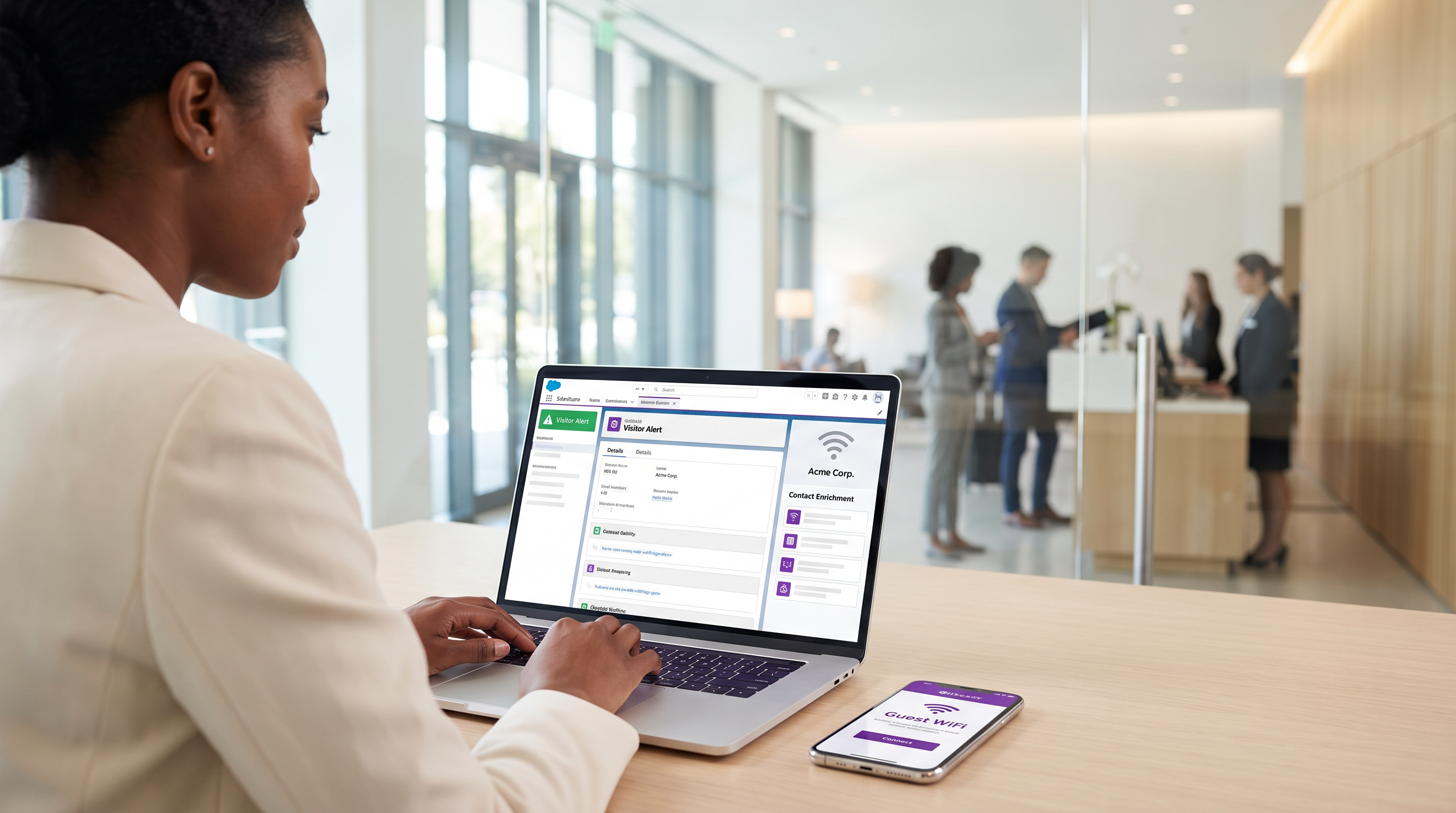
Pour les sites d'entreprise — des centres de conférence aux campus d'entreprise — le WiFi invité représente un réservoir inexploité de données d'intention de première partie. Chaque événement d'authentification est un signal physique d'engagement. Cependant, sans lien structurel avec le CRM, ces données restent cloisonnées, n'offrant aucune utilité commerciale.
L'intégration du Guest WiFi avec Salesforce transforme l'infrastructure réseau passive en un moteur d'intelligence de compte actif. En acheminant les événements d'authentification vers Salesforce, en résolvant les identités par rapport aux comptes existants et en déclenchant des alertes automatisées, les organisations peuvent doter leurs équipes de vente de signaux d'intention physique de haute fidélité. Cette intégration est particulièrement puissante pour les secteurs B2B de l' Hôtellerie et les espaces événementiels, où l'identification des comptes cibles sur site peut considérablement accélérer la vitesse des transactions.
Ce guide fournit l'architecture technique, les exigences du modèle de données et les meilleures pratiques de déploiement pour les responsables informatiques et les équipes RevOps mettant en œuvre une intégration Salesforce WiFi. Il va au-delà de la simple capture de leads pour établir un cadre robuste et conforme pour l'intelligence basée sur les comptes.
Plongée Technique : Architecture et Résolution d'Identité
L'architecture d'une intégration Salesforce WiFi repose sur trois couches principales : le captive portal, le middleware d'intégration et le modèle de données CRM.
1. La Couche du Captive Portal
Le captive portal est le point de capture de l'identité. Pour l'intelligence B2B, l'authentification par e-mail ou LinkedIn SSO est strictement requise. L'authentification par simple clic ou par SMS uniquement (comme discuté dans Vérification SMS vs E-mail pour le WiFi invité : Lequel choisir ) ne fournit pas l'identifiant persistant nécessaire pour une correspondance CRM robuste.
De manière cruciale, cette couche doit également gérer la conformité. Conformément au GDPR, le consentement explicite doit être recueilli au point d'entrée et transmis en aval. La plateforme de Purple gère cela nativement, transmettant des indicateurs de consentement granulaires avec la charge utile d'identité.
2. Middleware d'Intégration et Résolution d'Identité
Le moteur d'intégration reçoit l'événement d'authentification — généralement via un webhook — et effectue la résolution d'identité avant d'exécuter un upsert Salesforce. Cette logique empêche la création d'enregistrements en double et assure l'intégrité des données.
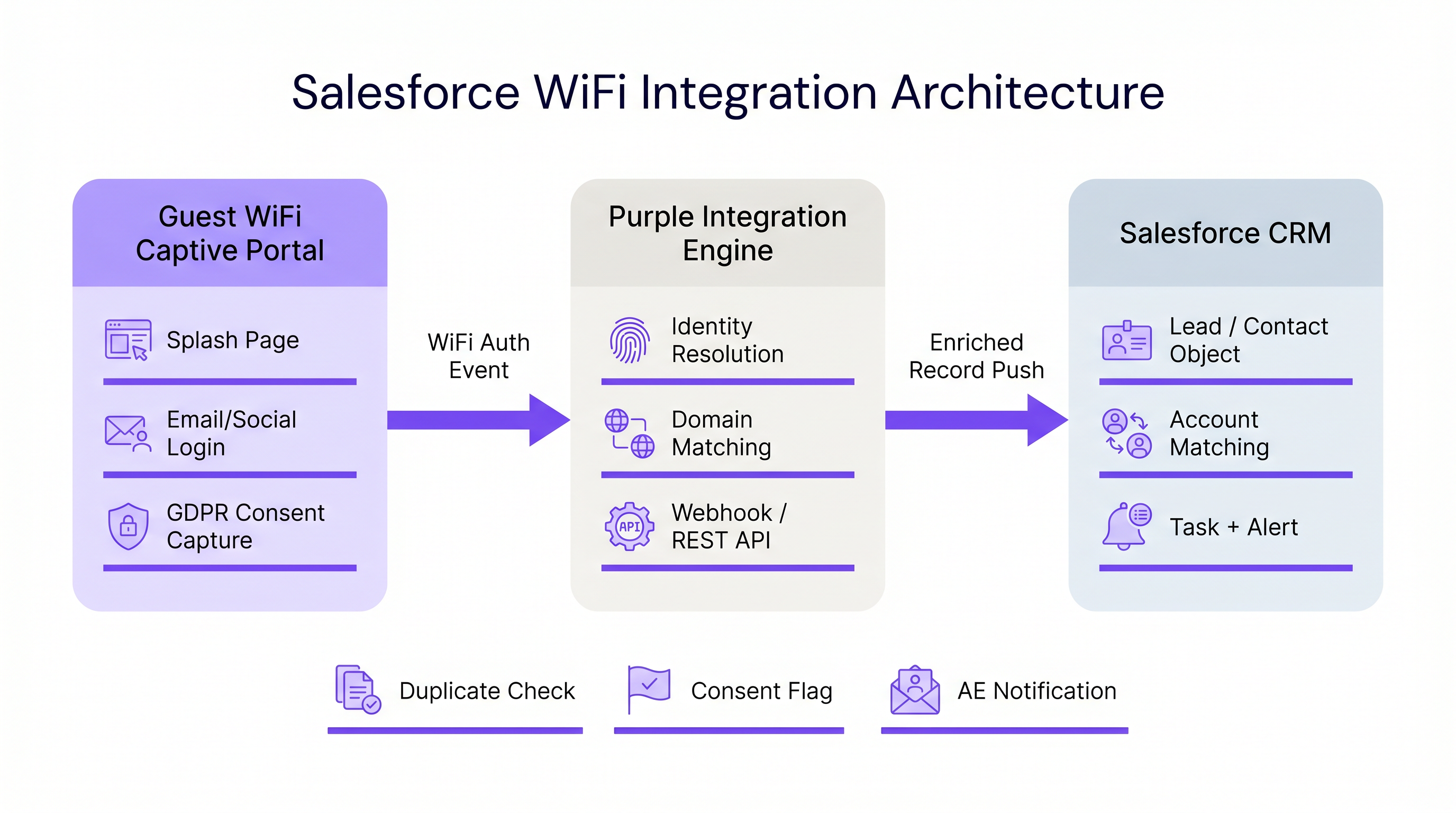
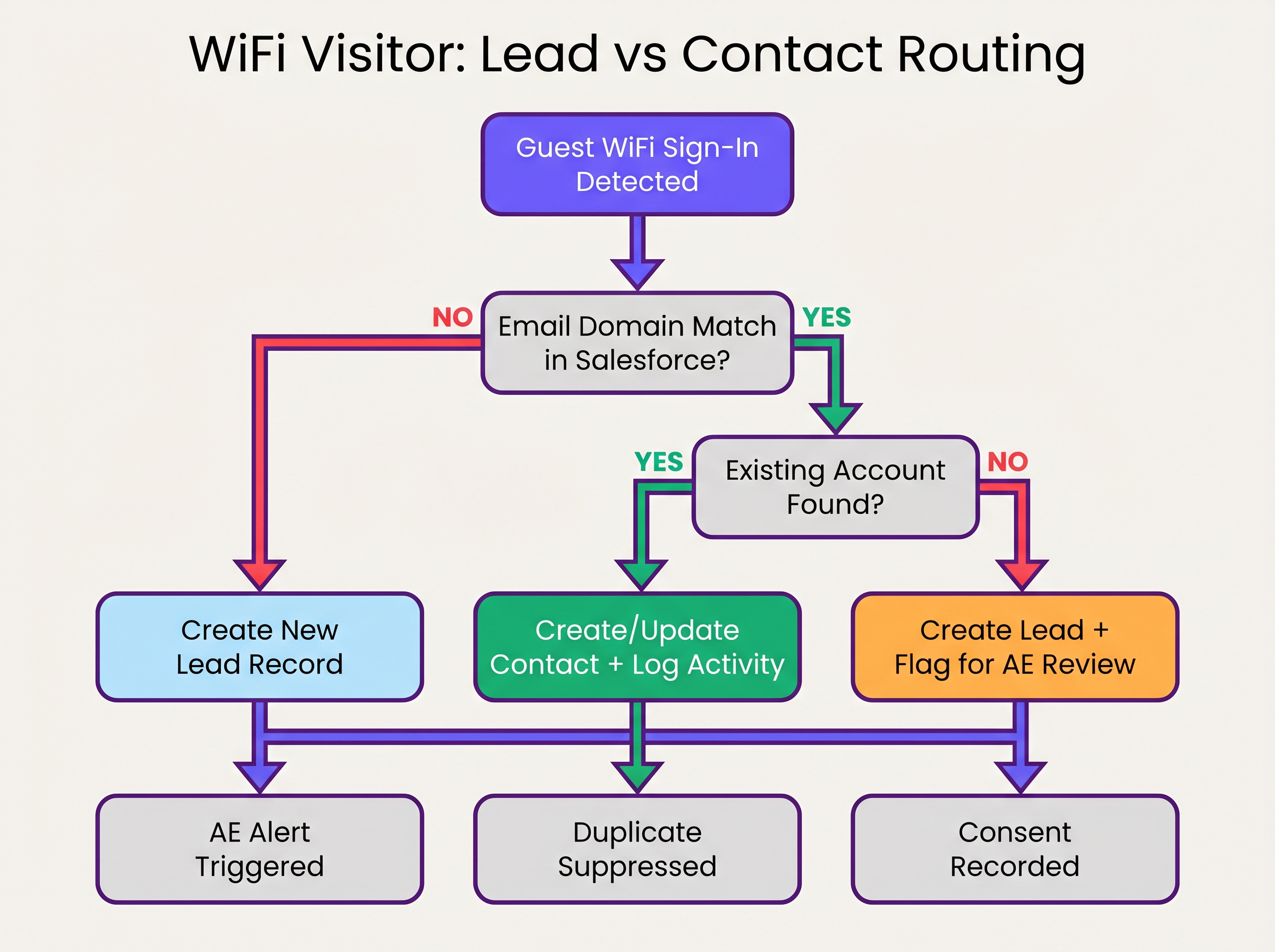
La séquence de résolution d'identité fonctionne comme suit :
- Extraction de Domaine : Le middleware extrait le domaine de l'adresse e-mail authentifiée (par exemple,
user@acmecorp.comdevientacmecorp.com). - Correspondance de Compte : Une requête SOQL vérifie l'objet Compte Salesforce pour un champ de site web ou de domaine d'e-mail correspondant.
- Routage Contact/Lead :
- Si une correspondance de Compte existe, le système vérifie l'existence d'un Contact. S'il est trouvé, le Contact est mis à jour (date de dernière consultation, nombre de visites incrémenté). S'il n'est pas trouvé, un nouveau Contact est créé et associé au Compte.
- Si aucune correspondance de Compte n'existe, le système évalue le domaine par rapport à une liste de blocage (par exemple, gmail.com). S'il passe, un nouveau Lead est créé.
3. Le Modèle de Données Salesforce
Pour extraire de la valeur de WiFi Analytics , le modèle de données Salesforce doit être configuré pour recevoir et agréger les données d'intention physique.
Champs Personnalisés Requis :
- Objet Contact/Lead :
WiFi_Venue_Name__c,First_Seen_Date__c,Last_Seen_Date__c,Visit_Count__c,Marketing_Consent__c. - Objet Compte :
Total_WiFi_Contacts__c(Résumé récapitulatif),Last_Target_Account_Visit__c.
Guide d'Implémentation : Déploiement Étape par Étape
Le déploiement d'une intégration Salesforce WiFi nécessite une coordination entre l'infrastructure informatique et les RevOps. Suivez cette séquence de déploiement neutre vis-à-vis des fournisseurs :
Phase 1 : Gouvernance des Données Pré-Déploiement
Avant de connecter les systèmes, établissez les règles d'engagement.
- Définir la Liste de Blocage de Domaines : Compilez une liste exhaustive de domaines d'e-mails grand public (Gmail, Yahoo, iCloud) à exclure de la correspondance de Compte et de la création de Lead. Cela évite la pollution du CRM.
- Établir les Seuils de Conversion : Définissez quand un Lead doit automatiquement être converti en Contact. Une règle standard est : >2 visites en 30 jours depuis un domaine d'entreprise connu déclenchent la conversion et l'association au Compte.
Phase 2 : Configuration du Middleware
Configurez la couche d'intégration pour gérer la charge utile du webhook.
- Configuration du Webhook : Dans le portail Purple, configurez un webhook sortant pour se déclencher sur l'événement
user_authenticated. - Logique du Middleware : Implémentez la logique de résolution d'identité dans le middleware choisi (par exemple, MuleSoft, AWS Lambda ou une application connectée personnalisée).
- Limites d'API : Pour les environnements à haute densité (voir Conception WiFi haute densité : Bonnes pratiques pour les stades et les arènes ), assurez-vous que le middleware regroupe les requêtes ou utilise l'API en masse de Salesforce pour éviter de dépasser les limites de l'API REST.
Phase 3 : Configuration des Alertes
Configurez Salesforce Flow pour déclencher des actions commerciales basées sur les données enrichies.
- Alerte de Compte Cible : Déclenchez une tâche et une notification Chatter au propriétaire du Compte lorsqu'un Contact associé à un compte cible de niveau 1 se connecte au réseau.
- Réengagement Dormant : Alertez le propriétaire du Compte si un Contact sans activité enregistrée depuis plus de 90 jours se connecte au WiFi.
Bonnes Pratiques et Atténuation des Risques
Gestion de la Randomisation des Adresses MAC
Les systèmes d'exploitation mobiles modernes (iOS 14+, Android 10+) implémentent la randomisation des adresses MACpar défaut. Cela signifie que l'appareil présente une adresse MAC différente à chaque réseau, rendant le suivi persistant basé sur l'adresse MAC inefficace sur différents sites ou sur des périodes prolongées. L'intégration doit s'appuyer sur l'adresse e-mail authentifiée comme identifiant principal, en utilisant l'adresse MAC uniquement pour la gestion de session lors d'une seule visite.
Éviter le « déversement de leads »
Le mode de défaillance le plus courant dans les intégrations CRM est de pousser chaque événement d'authentification directement dans l'objet Lead. Cela crée des milliers d'enregistrements en double, frustre les équipes de vente et obscurcit les signaux d'intention authentiques. Une adhésion stricte à la logique de correspondance « Account-first » décrite ci-dessus est essentielle.
Conformité et synchronisation des consentements
Le consentement marketing capturé au Captive Portal doit être traité comme la source de vérité pour ce canal spécifique. L'intégration doit mapper le drapeau booléen marketing_opt_in de la charge utile WiFi directement au champ de consentement correspondant dans Salesforce. Si un utilisateur se désabonne ultérieurement via une campagne e-mail, la plateforme d'automatisation marketing doit synchroniser cette préférence avec Salesforce.
ROI et impact commercial
L'impact commercial d'une intégration Salesforce WiFi se mesure en vélocité du pipeline et en engagement des comptes.
En automatisant la livraison des signaux d'intention physiques, les organisations éliminent la latence entre la visite d'un prospect sur un site et l'initiation de la prise de contact par l'équipe de vente. Pour le Retail et les espaces événementiels B2B, cette capacité transforme un centre de coûts (WiFi invité) en un outil mesurable de génération de pipeline.
Les organisations déployant cette architecture observent généralement une réduction significative du temps de contact pour les prospects sur site et une augmentation du taux de conversion des leads qualifiés marketing (MQLs) provenant de lieux physiques.
Écoutez le briefing
Pour un aperçu complet de l'architecture et des stratégies de déploiement, écoutez le briefing podcast complémentaire :
Termes clés et définitions
Identity Resolution
The process of matching an incoming authentication event (e.g., an email address) against existing CRM records to determine whether to update a Contact, associate with an Account, or create a new Lead.
Crucial for maintaining data hygiene and ensuring sales teams receive alerts tied to the correct accounts.
Captive Portal
The web page that users are directed to before they are granted access to the guest WiFi network. Used to capture identity and consent.
The primary interface for capturing first-party data and GDPR-compliant marketing consent.
MAC Address Randomisation
A privacy feature in modern mobile operating systems where the device generates a temporary MAC address for each network it connects to.
Forces IT teams to rely on authenticated credentials (like email) rather than device hardware addresses for persistent CRM tracking.
Salesforce Flow
An automation tool within Salesforce used to execute logic, update records, and send notifications based on specific trigger conditions.
Used to automate the routing of alerts to Account Executives when a target account connects to the WiFi.
Webhook
An automated HTTP push mechanism that sends real-time data from one application to another when a specific event occurs.
The standard method for transmitting WiFi authentication events from the network platform to the integration middleware.
Domain Blocklist
A maintained list of email domains (e.g., consumer providers like Gmail or Yahoo) that are explicitly excluded from certain integration actions.
Essential for preventing CRM pollution and ensuring only high-value B2B contacts are processed.
Roll-up Summary Field
A Salesforce field type that calculates values from related records, such as the total number of Contacts associated with an Account.
Used on the Account object to aggregate the total number of WiFi visits from all associated Contacts.
First-Party Data
Information a company collects directly from its customers or visitors, including demographics, behaviors, and consent.
Guest WiFi authentication is a primary source of high-quality first-party data for physical venues.
Études de cas
A corporate conference centre hosts multiple B2B events weekly. The RevOps team wants to alert Account Executives immediately when a prospect from a target account connects to the venue WiFi, but they are concerned about flooding Salesforce with consumer email addresses (e.g., Gmail) from event staff and contractors.
- Implement a middleware layer between the WiFi platform (e.g., Purple) and Salesforce.
- Configure the middleware with a strict domain blocklist containing all known consumer email providers.
- When an authentication event occurs, the middleware extracts the email domain. If the domain is on the blocklist, the payload is discarded or logged to a custom object for analytics only, bypassing Lead/Contact creation.
- If the domain passes the filter, the middleware queries Salesforce for an Account match.
- If an Account match is found and it is flagged as a 'Target Account', the middleware upserts the Contact record and triggers a Salesforce Flow to generate a high-priority Task for the assigned Account Executive.
A B2B retail technology vendor offers free WiFi in their executive briefing centre. They need to ensure that marketing consent captured during WiFi sign-up is accurately reflected in Salesforce and complies with GDPR requirements.
- Configure the captive portal to present a clear, un-ticked checkbox for marketing communications, distinct from the terms of service.
- Ensure the WiFi platform captures the timestamp, IP address, and the boolean value of the consent checkbox.
- Map the consent boolean from the WiFi API payload to a custom
WiFi_Marketing_Consent__cfield on the Salesforce Contact/Lead object. - Configure Salesforce to map this custom field to the standard Individual object or the integrated marketing automation platform's consent management system.
- Establish a daily sync to ensure any opt-outs processed by the marketing automation platform update the central Salesforce record.
Analyse de scénario
Q1. A hospital network wants to integrate their guest WiFi with Salesforce to track vendor and partner visits. However, they are concerned about inadvertently capturing patient data in the CRM. How should the integration architecture address this?
💡 Astuce :Consider how you can filter authentication events before they reach the CRM.
Afficher l'approche recommandée
The architecture must implement strict filtering in the middleware layer. The captive portal should be configured to require corporate email addresses, and the middleware must employ a comprehensive domain blocklist to discard any authentication events from consumer email domains (which patients are most likely to use). Furthermore, the captive portal should clearly state its purpose (e.g., 'Vendor and Partner Access') and include specific terms of service to discourage patient use.
Q2. Your RevOps team reports that the new WiFi integration is creating duplicate Leads for individuals who already exist as Contacts under known Accounts. What is the most likely failure in the integration logic?
💡 Astuce :Review the sequence of identity resolution steps.
Afficher l'approche recommandée
The integration logic is likely failing to perform an Account domain match before creating a Lead. The correct sequence must be: 1) Extract domain, 2) Query Account object for domain match, 3) If Account exists, query for Contact match, 4) If no Contact exists, create a new Contact linked to the Account. Creating a Lead should only occur if step 2 (Account match) fails.
Q3. A hotel chain's marketing team wants to track how often specific corporate clients visit their properties. They are currently relying on MAC addresses to identify returning visitors, but the data shows artificially low return rates. Why is this happening, and what is the architectural solution?
💡 Astuce :Consider how modern mobile operating systems handle network connections.
Afficher l'approche recommandée
The artificially low return rates are caused by MAC address randomisation, a privacy feature in modern iOS and Android devices that generates a new MAC address for different networks or over time. The architectural solution is to shift reliance from the MAC address to the authenticated email address. The captive portal must require email authentication, and the integration middleware must use this email address as the persistent identifier to query and update the Salesforce Contact record.
Points clés à retenir
- ✓Integrating guest WiFi with Salesforce converts passive network events into active, actionable account intelligence.
- ✓Identity resolution must prioritize matching against existing Accounts and Contacts to prevent CRM data pollution.
- ✓Middleware should be used to filter out consumer email domains before data reaches Salesforce.
- ✓MAC address randomisation necessitates the use of authenticated email addresses as the primary persistent identifier.
- ✓Automated alerts via Salesforce Flow enable Account Executives to engage target accounts while they are physically on-site.
- ✓Explicit, granular marketing consent must be captured at the captive portal and synced to the CRM to ensure GDPR compliance.




