
Wi-Fi 6 vs Wi-Fi 5: ¿Resuelve la interferencia de canales?
Esta guía ofrece un análisis técnico profundo sobre cómo Wi-Fi 6 (802.11ax) aborda la interferencia de canales en entornos empresariales de alta densidad mediante OFDMA y BSS Coloring. Proporciona a los directores de TI, arquitectos de red y CTO estrategias de despliegue prácticas, casos de estudio reales de los sectores de hostelería y salud, y un marco para evaluar el ROI de las actualizaciones de infraestructura en recintos donde el rendimiento inalámbrico es crítico para el negocio.
Escuchar esta guía
Ver transcripción del podcast
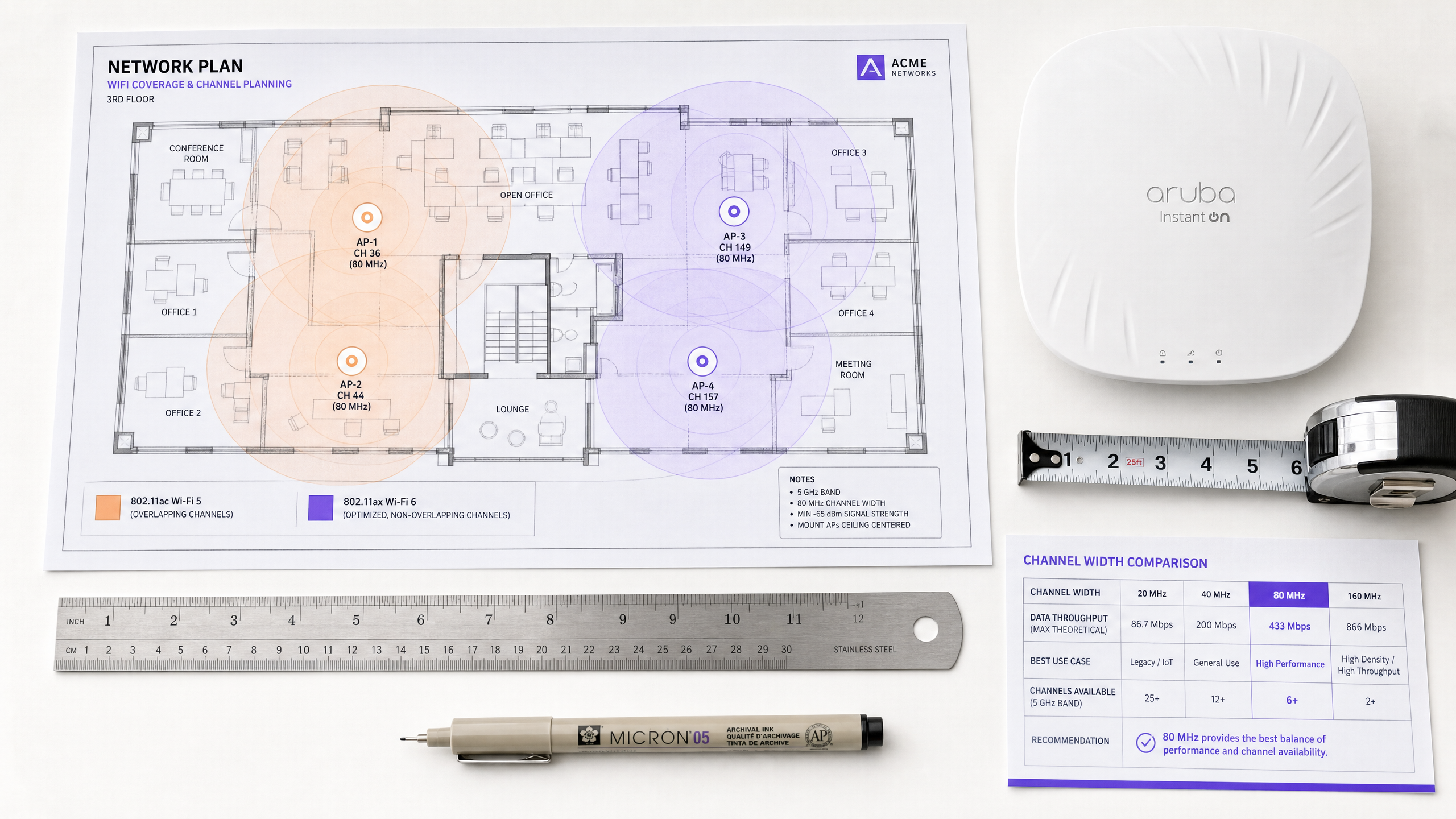
कार्यकारी सारांश (Executive Summary)
हाई-डेंसिटी (high-density) वातावरण का प्रबंधन करने वाले IT डायरेक्टर्स और नेटवर्क आर्किटेक्ट्स के लिए — चाहे वह हॉस्पिटैलिटी, रिटेल या बड़े सार्वजनिक स्थानों में हो — को-चैनल इंटरफेरेंस (co-channel interference) वायरलेस परफॉरमेंस के लिए प्राथमिक बाधा बना हुआ है। ट्रांसमिट पावर को कम करके या अल्टरनेटिंग एक्सेस पॉइंट्स पर 2.4 GHz रेडियो को डिसेबल करके इंटरफेरेंस को कम करने का पारंपरिक दृष्टिकोण अपनी तार्किक सीमा तक पहुँच गया है。
Wi-Fi 5 (802.11ac) से Wi-Fi 6 (802.11ax) में ट्रांज़िशन एक बुनियादी आर्किटेक्चरल बदलाव को दर्शाता है। केवल सैद्धांतिक थ्रूपुट (throughput) बढ़ाने के बजाय, Wi-Fi 6 को विशेष रूप से भीड़भाड़ वाले एयरस्पेस में कैपेसिटी और एफिशिएंसी को संबोधित करने के लिए इंजीनियर किया गया था। ऑर्थोगोनल फ्रीक्वेंसी-डिवीजन मल्टीपल एक्सेस (OFDMA) और बेसिक सर्विस सेट (BSS) कलरिंग की शुरुआत के माध्यम से, Wi-Fi 6 इंटरफेरेंस पर केवल प्रतिक्रिया देने के बजाय इसे प्रबंधित करने के लिए डिटरमिनिस्टिक मैकेनिज्म प्रदान करता है।
यह गाइड Wi-Fi 6 इंटरफेरेंस मिटिगेशन की तकनीकी वास्तविकताओं की पड़ताल करती है, जो एंटरप्राइज़ IT टीमों के लिए कार्रवाई योग्य डिप्लॉयमेंट रणनीतियाँ प्रदान करती है। हम जांच करते हैं कि ये मानक मिक्स्ड-क्लाइंट वातावरण में कैसे काम करते हैं और Guest WiFi एनालिटिक्स जैसे इंटेलिजेंस प्लेटफॉर्म को इंटीग्रेट करने से आपके इंफ्रास्ट्रक्चर रिफ्रेश के ROI को कैसे वैलिडेट किया जा सकता है।
तकनीकी डीप-डाइव: Wi-Fi 6 नियम कैसे बदलता है
Wi-Fi 6 इंटरफेरेंस को कैसे संबोधित करता है, यह समझने के लिए, हमें सबसे पहले इसके पूर्ववर्ती की सीमाओं की जांच करनी चाहिए।
Wi-Fi 5 कंटेंशन (Contention) की समस्या
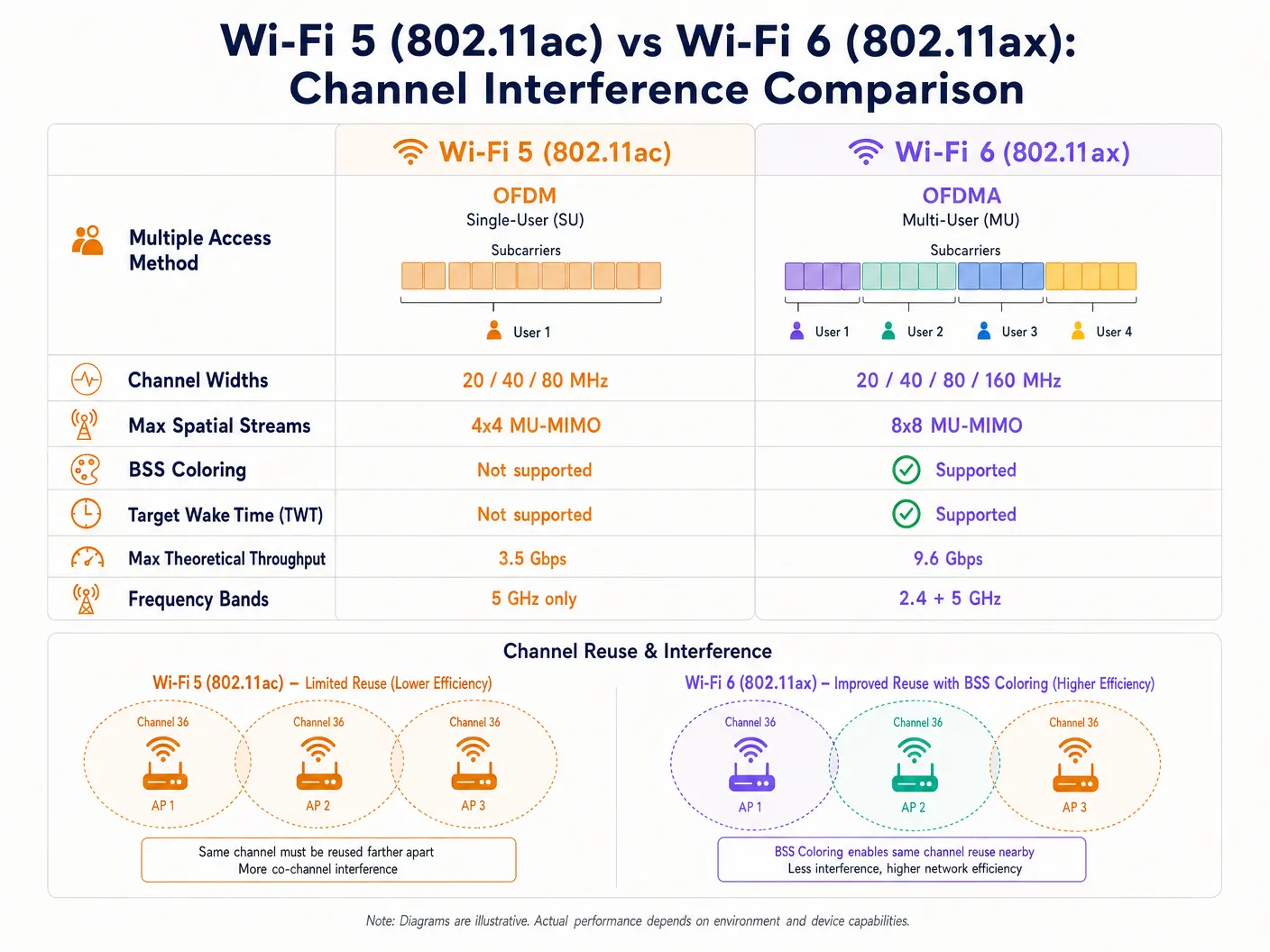
Wi-Fi 5 ऑर्थोगोनल फ्रीक्वेंसी-डिवीजन मल्टीप्लेक्सिंग (OFDM) पर निर्भर करता है। इस सिंगल-यूज़र मॉडल में, एक एक्सेस पॉइंट (AP) को किसी दिए गए ट्रांसमिशन के लिए एक ही क्लाइंट को संपूर्ण चैनल बैंडविड्थ — चाहे 20, 40, या 80 MHz हो — आवंटित करनी चाहिए, भले ही पेलोड का आकार कुछ भी हो। यह छोटे डेटा पैकेट के लिए अत्यधिक अक्षम है, जैसे कि IoT डिवाइस या रियल-टाइम टेलीमेट्री द्वारा उत्पन्न किए गए पैकेट।
इसके अलावा, Wi-Fi 5 एक सख्त कैरियर सेंस मल्टीपल एक्सेस विथ कोलिजन अवॉइडेंस (CSMA/CA) मैकेनिज्म का उपयोग करता है। यदि कोई AP या क्लाइंट अपने चैनल पर एक विशिष्ट सीमा (आमतौर पर -82 dBm) से ऊपर RF ऊर्जा का पता लगाता है, तो वह ट्रांसमिशन को टाल देता है। घने डिप्लॉयमेंट में, ओवरलैपिंग कवरेज क्षेत्रों के परिणामस्वरूप महत्वपूर्ण को-चैनल इंटरफेरेंस (CCI) होता है, जहां डिवाइस ट्रांसमिट करने की तुलना में प्रतीक्षा करने में अधिक समय व्यतीत करते हैं। यह वह मुख्य समस्या है जिसे हल करने के लिए Wi-Fi 6 को डिज़ाइन किया गया था।
OFDMA: ग्रैनुलर स्पेक्ट्रम एलोकेशन
Wi-Fi 6 OFDMA पेश करता है, जो चैनल को छोटे, अलग सब-कैरियर्स में विभाजित करता है जिन्हें रिसोर्स यूनिट्स (RUs) कहा जाता है। एक डिवाइस को पूरा 20 MHz चैनल समर्पित करने के बजाय, एक AP उस चैनल को नौ अलग-अलग RUs तक में विभाजित कर सकता है, जो एक साथ कई क्लाइंट्स को ट्रांसमिट या रिसीव कर सकता है। यह कंटेंशन ओवरहेड और लेटेंसी को काफी कम कर देता है। हालांकि OFDMA बाहरी इंटरफेरेंस को समाप्त नहीं करता है, यह नेटवर्क को काफी अधिक कुशल बनाता है, जिससे माध्यम के व्यस्त रहने का कुल समय कम हो जाता है और इसलिए टकराव (collision) की संभावना कम हो जाती है।
BSS कलरिंग: एक्शन में स्पैटियल रीयूज़ (Spatial Reuse)
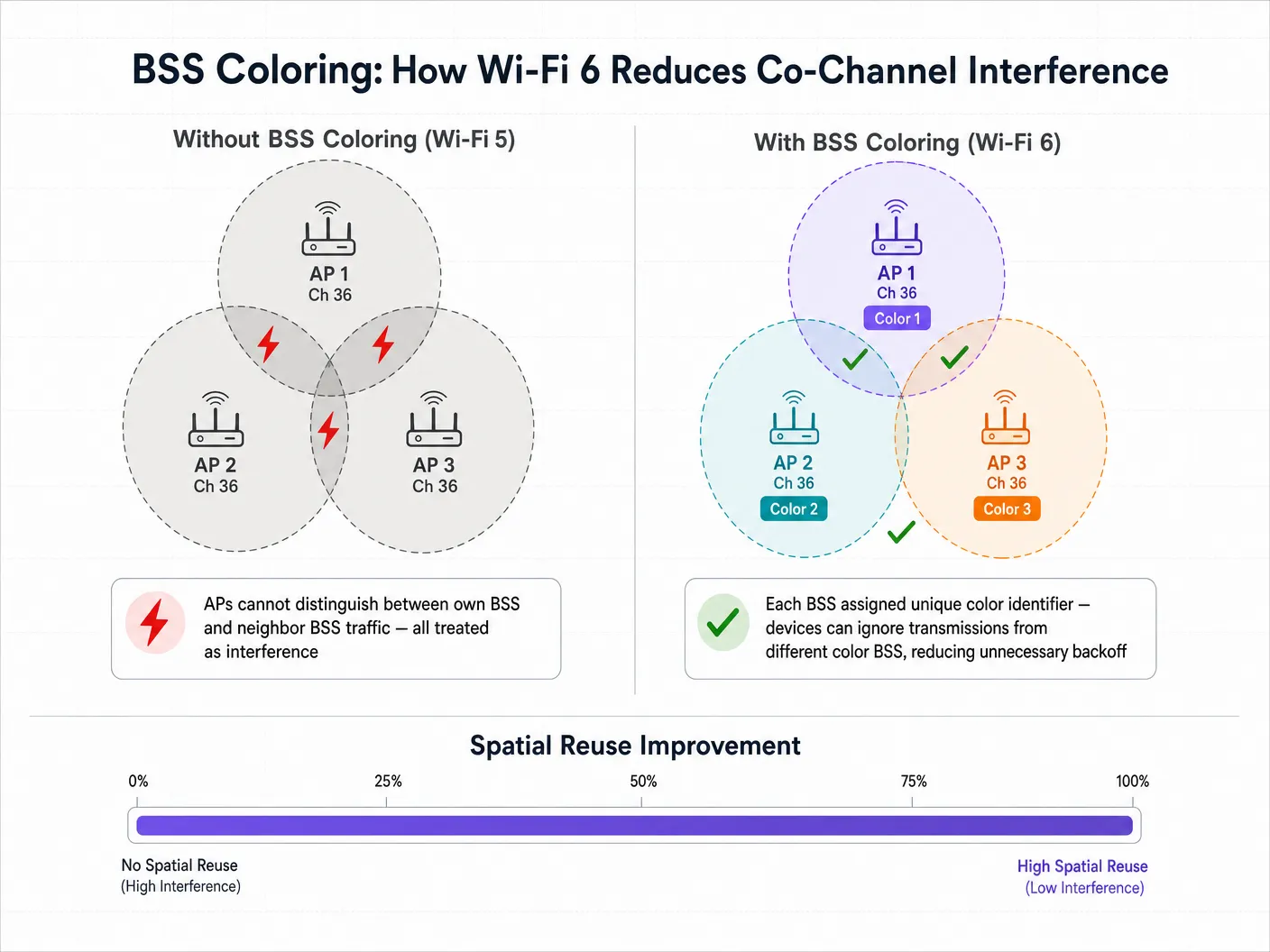
को-चैनल इंटरफेरेंस को सबसे सीधे लक्षित करने वाला फीचर BSS कलरिंग है, जिसे औपचारिक रूप से स्पैटियल रीयूज़ के रूप में जाना जाता है। एक घने डिप्लॉयमेंट में, सीमित स्पेक्ट्रम उपलब्धता के कारण कई AP अक्सर एक ही चैनल पर काम करते हैं। Wi-Fi 5 में, एक क्लाइंट डिवाइस अपने स्वयं के AP (इसके बेसिक सर्विस सेट) के लिए लक्षित ट्रैफ़िक और उसी चैनल पर पड़ोसी AP के ट्रैफ़िक के बीच अंतर नहीं कर सकता है। यह सभी ट्रैफ़िक को इंटरफेरेंस के रूप में मानता है और ट्रांसमिशन को टाल देता है, भले ही इंटरफेयर करने वाला सिग्नल वास्तव में कितना भी कमजोर क्यों न हो।
Wi-Fi 6 फिजिकल लेयर (PHY) हेडर में एक 6-बिट आइडेंटिफायर — "कलर" — जोड़ता है। डिवाइस अब इंट्रा-BSS ट्रैफ़िक (समान रंग) और इंटर-BSS ट्रैफ़िक (अलग रंग) के बीच अंतर कर सकते हैं। यदि कोई डिवाइस एक अलग रंग के साथ ट्रांसमिशन का पता लगाता है, तो वह एक एडेप्टिव क्लियर चैनल असेसमेंट (CCA) थ्रेशोल्ड लागू करता है। यदि इंटरफेयर करने वाला सिग्नल अपेक्षाकृत कमजोर है, तो डिवाइस इसे अनदेखा कर सकता है और एक साथ ट्रांसमिट कर सकता है, जिससे स्पैटियल रीयूज़ के माध्यम से समग्र नेटवर्क क्षमता में काफी वृद्धि होती है।
इम्प्लीमेंटेशन गाइड: हाई डेंसिटी के लिए डिप्लॉयमेंट
Wi-Fi 6 को डिप्लॉय करने के लिए कवरेज-केंद्रित डिज़ाइन से कैपेसिटी-केंद्रित आर्किटेक्चर में रणनीतिक बदलाव की आवश्यकता होती है। निम्नलिखित सिफारिशें Hospitality , Retail , और सार्वजनिक-क्षेत्र के वातावरण में लागू होती हैं।
1. चैनल विड्थ (Channel Width) रणनीति
हालांकि Wi-Fi 6 160 MHz चैनलों का समर्थन करता है, एंटरप्राइज़ वातावरण में उन्हें डिप्लॉय करने की सलाह शायद ही कभी दी जाती है। व्यापक चैनलों का मतलब है कि कम नॉन-ओवरलैपिंग चैनल उपलब्ध हैं, जिससे को-चैनल इंटरफेरेंस काफी बढ़ जाता है।
सिफारिश: स्टेडियमों और सम्मेलन केंद्रों जैसे हाई-डेंसिटी वाले वातावरण के लिए 5 GHz बैंड में 20 MHz या 40 MHz चैनलों पर मानकीकरण करें। व्यापक चैनलों के साथ इसे जबरदस्ती करने के बजाय, थ्रूपुट प्रदान करने के लिए OFDMA और उच्च मॉड्यूलेशन स्कीम (1024-QAM) पर भरोसा करें।
अपने स्पेक्ट्रम की योजना बनाते समय, DFS Channels: What They Are and When to Avoid Them का ध्यान रखें। हालांकि Wi-Fi 6 अधिक कुशल है, रडार डिटेक्शन इवेंट अभी भी चैनल परिवर्तन को बाध्य करेंगे, जिससे क्लाइंट कनेक्टिविटी बाधित होगी। इतालवी-भाषा की टीमों के लिए, यही मार्गदर्शन Canali DFS: Cosa sono e quando evitarli के रूप में उपलब्ध है।
2. मिक्स्ड-क्लाइंट वास्तविकता का प्रबंधन
OFDMA और BSS कलरिंग जैसे Wi-Fi 6 फीचर्स की प्राथमिक चेतावनी यह है कि उन्हें क्लाइंट सपोर्ट की आवश्यकता होती है। Retail या Hospitality जैसे सार्वजनिक-सामना वाले वातावरण में, आप क्लाइंट डिवाइस को नियंत्रित नहीं करते हैं। जब लिगेसी Wi-Fi 5 या Wi-Fi 4 डिवाइस कनेक्ट होते हैं, तो नेटवर्क को उन विशिष्ट ट्रांसमिशन के लिए मानक OFDM और लिगेसी कंटेंशन मैकेनिज्म पर वापस आना चाहिए। इसलिए Wi-Fi 6 के इंटरफेरेंस मिटिगेशन लाभ आपके वातावरण में Wi-Fi 6 क्लाइंट्स के प्रवेश के अनुपात में बढ़ते हैं।
3. नेटवर्क इंटेलिजेंस को इंटीग्रेट करना
Wi-Fi 6 अपग्रेड के पूंजीगत व्यय को सही ठहराने के लिए, IT लीडर्स को नेटवर्क उपयोग और क्लाइंट क्षमताओं में विज़िबिलिटी की आवश्यकता होती है। यहीं पर एक WiFi Analytics प्लेटफ़ॉर्म आवश्यक हो जाता है। Purple के एनालिटिक्स ओवरले को इंटीग्रेट करके, नेटवर्क आर्किटेक्ट्स अपने स्थानों में प्रवेश करने वाले Wi-Fi 6 सक्षम उपकरणों की एडॉप्शन दर को ट्रैक कर सकते हैं, फुटफॉल और ड्वेल टाइम डेटा के साथ नेटवर्क परफॉरमेंस मेट्रिक्स को सहसंबंधित कर सकते हैं, और उन विशिष्ट क्षेत्रों की पहचान कर सकते हैं जहां लिगेसी डिवाइस असंगत कंटेंशन पैदा कर रहे हैं।
बेस्ट प्रैक्टिस और सिक्योरिटी इंटीग्रेशन
बड़े पैमाने पर सीमलेस ऑनबोर्डिंग
जैसे-जैसे आप उच्च क्षमता को संभालने के लिए इंफ्रास्ट्रक्चर को अपग्रेड करते हैं, ऑनबोर्डिंग अनुभव को उसी के अनुसार स्केल करना चाहिए। Wi-Fi 6 WPA3 के लिए समर्थन अनिवार्य करता है, जो मजबूत एन्क्रिप्शन प्रदान करता है। सार्वजनिक Guest WiFi के लिए, उद्योग सीमलेस, सुरक्षित ऑथेंटिकेशन की ओर बढ़ रहा है। Purple कनेक्ट लाइसेंस के तहत OpenRoaming जैसी सेवाओं के लिए एक मुफ्त आइडेंटिटी प्रोवाइडर के रूप में कार्य करता है, जिससे उपयोगकर्ता एंटरप्राइज़-ग्रेड 802.1X ऑथेंटिकेशन का लाभ उठाते हुए Captive Portal के बिना स्वचालित और सुरक्षित रूप से कनेक्ट हो सकते हैं। यह विशेष रूप से प्रासंगिक है क्योंकि हम कनेक्टिविटी के भविष्य की ओर देखते हैं — How a wi fi assistant Enables Passwordless Access in 2026 पर हमारी हालिया इनसाइट्स देखें।
2.4 GHz बैंड को ऑप्टिमाइज़ करना
Wi-Fi 5 के विपरीत, जो केवल 5 GHz बैंड में संचालित होता था, Wi-Fi 6 2.4 GHz और 5 GHz दोनों पर लागू होता है। यह भीड़भाड़ वाले 2.4 GHz स्पेक्ट्रम में नई जान फूंकता है, जो Healthcare और लॉजिस्टिक्स में IoT डिप्लॉयमेंट के लिए महत्वपूर्ण है। नॉन-ओवरलैपिंग चैनलों (1, 6, और 11) की सीमित संख्या को देखते हुए, BSS कलरिंग यहाँ विशेष रूप से मूल्यवान है। टारगेट वेक टाइम (TWT) इस बैंड में काम करने वाले IoT सेंसर और मेडिकल टेलीमेट्री उपकरणों की बैटरी लाइफ को भी नाटकीय रूप से बढ़ाता है।
कंप्लायंस संबंधी विचार
विनियमित उद्योगों में डिप्लॉयमेंट के लिए, Wi-Fi 6 में सुरक्षा सुधार सीधे कंप्लायंस पोस्चर के लिए प्रासंगिक हैं। सिमल्टेनियस ऑथेंटिकेशन ऑफ इक्वल्स (SAE) के साथ WPA3 WPA2-Personal में उन कमजोरियों को दूर करता है जिनका ऑफ़लाइन डिक्शनरी हमलों के माध्यम से फायदा उठाया जा सकता था। PCI DSS (रिटेल पेमेंट प्रोसेसिंग) या GDPR (गेस्ट डेटा कैप्चर) के अधीन वातावरण के लिए, WPA3 वायरलेस नेटवर्क की एन्क्रिप्शन लेयर को मजबूत करता है, जिससे कंप्लायंस जोखिम का दायरा कम हो जाता है।
ट्रबलशूटिंग और रिस्क मिटिगेशन
सामान्य विफलता मोड (Failure Modes)
Wi-Fi 6 डिप्लॉयमेंट में सेल्फ-इंड्यूस्ड इंटरफेरेंस का सबसे आम कारण ट्रांसमिट पावर की ओवर-प्रोविज़निंग है। IT टीमें अक्सर AP ट्रांसमिट पावर को "Auto" पर छोड़ देती हैं, जिसके परिणामस्वरूप ओवरलैपिंग कवरेज सेल वाले AP एक-दूसरे के ऊपर चिल्लाते हैं। इसका शमन ट्रांसमिट पावर सीमाओं को मैन्युअल रूप से ट्यून करना है, यह सुनिश्चित करते हुए कि सेल ओवरलैप सीमलेस रोमिंग के लिए पर्याप्त है लेकिन को-चैनल इंटरफेरेंस को कम करने के लिए काफी टाइट है।
दूसरी आम विफलता यह मानकर नेटवर्क डिज़ाइन करना है कि सभी क्लाइंट Wi-Fi 6 का समर्थन करते हैं, जिससे लिगेसी डिवाइस की व्यापकता की वास्तविकता स्पष्ट होने पर कैपेसिटी बॉटलनेक पैदा होता है। इसका शमन RF डिज़ाइन को अंतिम रूप देने से पहले आपके विशिष्ट क्लाइंट मिक्स को समझने के लिए एनालिटिक्स का उपयोग करना है।
अंत में, गलत तरीके से कॉन्फ़िगर की गई BSS कलरिंग — जहां AP कलर आइडेंटिफायर्स को ठीक से असाइन या कोऑर्डिनेट नहीं कर रहे हैं — का मतलब है कि स्पैटियल रीयूज़ के लाभों को महसूस नहीं किया जा रहा है। सुनिश्चित करें कि आपका वायरलेस LAN कंट्रोलर या क्लाउड मैनेजमेंट प्लेटफ़ॉर्म नवीनतम फ़र्मवेयर चला रहा है और BSS कलरिंग स्पष्ट रूप से सक्षम है और मैनेजमेंट कंसोल के माध्यम से मॉनिटर की जा रही है।
ROI और बिज़नेस इम्पैक्ट
Wi-Fi 6 के लिए बिज़नेस केस IT मेट्रिक्स से आगे तक फैला हुआ है। बड़े स्थानों में, नेटवर्क परफॉरमेंस सीधे उपयोगकर्ता अनुभव और परिचालन दक्षता को प्रभावित करता है। उदाहरण के लिए, स्टेडियम के वातावरण में, सीमलेस कनेक्टिविटी सक्षम करने से इन-सीट ऑर्डरिंग और रियल-टाइम एंगेजमेंट की अनुमति मिलती है। Wi-Fi 6 इंफ्रास्ट्रक्चर को Purple के प्लेटफ़ॉर्म के साथ जोड़कर, स्थान स्थान-आधारित सेवाओं और इनडोर नेविगेशन का लाभ उठा सकते हैं — Purple ने हाल ही में Offline Maps Mode for Seamless, Secure Navigation to WiFi Hotspots लॉन्च किया है, जो सक्रिय इंटरनेट कनेक्शन के बिना भी इस क्षमता का विस्तार करता है।
इसके अलावा, नए क्षेत्रों में Purple का विस्तार — जिसमें हाल ही में Iain Fox as VP Growth for the Public Sector to Drive Digital Inclusion and Smart City Innovation की नियुक्ति शामिल है — नगरपालिका और Transport डिप्लॉयमेंट में मजबूत, इंटरफेरेंस-प्रतिरोधी कनेक्टिविटी की बढ़ती आवश्यकता पर प्रकाश डालता है, जहां नेटवर्क विश्वसनीयता सार्वजनिक सुरक्षा और सेवा वितरण का मामला है।
सफलता मापना: तकनीकी पक्ष पर, पीक आवर्स के दौरान चैनल उपयोग प्रतिशत में कमी और क्लाइंट रिट्राई दरों में कमी को ट्रैक करें। व्यावसायिक पक्ष पर, समवर्ती कनेक्टेड उपयोगकर्ताओं में वृद्धि, गेस्ट पोर्टल के माध्यम से उच्च डेटा कैप्चर दर और बेहतर गेस्ट संतुष्टि स्कोर को मापें। Wi-Fi 6 भौतिकी के नियमों को नहीं तोड़ता है — RF इंटरफेरेंस अभी भी मौजूद है। हालांकि, यह IT टीमों को उस इंटरफेरेंस को प्रबंधित करने के लिए परिष्कृत, डिटरमिनिस्टिक टूल प्रदान करता है, जो वायरलेस को बेस्ट-एफर्ट माध्यम से एक विश्वसनीय एंटरप्राइज़ यूटिलिटी में बदल देता है।
Definiciones clave
BSS Coloring (Reutilización espacial)
Un mecanismo de Wi-Fi 6 que añade un identificador de 6 bits a las cabeceras PHY, lo que permite a los dispositivos diferenciar entre el tráfico de su propia red y el tráfico superpuesto de las redes vecinas, reduciendo así los aplazamientos de transmisión innecesarios y permitiendo transmisiones simultáneas en el mismo canal.
Crítico para entornos de alta densidad (estadios, edificios multiinquilino) donde la interferencia de canal adyacente paralizaba anteriormente la capacidad de la red. Debe habilitarse explícitamente en el controlador de la LAN inalámbrica.
OFDMA (Acceso múltiple por división de frecuencias ortogonales)
Una tecnología multiusuario que subdivide un canal Wi-Fi en unidades de recursos (RU) más pequeñas, lo que permite a un AP comunicarse con múltiples clientes simultáneamente dentro de un único evento de ocupación del canal.
Resuelve la ineficiencia de Wi-Fi 5 OFDM, especialmente en entornos con muchos dispositivos que envían pequeñas cantidades de datos: sensores IoT, terminales de punto de venta minoristas y aplicaciones de mensajería móvil.
Unidad de recursos (RU)
La unidad más pequeña de asignación de frecuencia en OFDMA. Un canal de 20 MHz se puede dividir en hasta 9 RU, cada una de las cuales atiende a un cliente diferente de forma simultánea.
Los arquitectos de TI necesitan comprender las RU para entender cómo Wi-Fi 6 logra sus mejoras de capacidad sin requerir canales más anchos o espectro adicional.
Interferencia de canal adyacente (CCI)
Degradación del rendimiento que se produce cuando múltiples puntos de acceso y clientes operan exactamente en el mismo canal de frecuencia dentro del alcance de los demás, lo que los obliga a esperar un tiempo de transmisión libre mediante CSMA/CA.
El principal enemigo del diseño de Wi-Fi de alta densidad. Se mitiga mediante una planificación cuidadosa de los canales, la gestión del tamaño de las celdas y BSS Coloring de Wi-Fi 6.
Target Wake Time (TWT)
Una función de Wi-Fi 6 que permite a los AP negociar ventanas de activación programadas con los dispositivos clientes, definiendo exactamente cuándo se activarán para enviar o recibir datos.
Crucial para los despliegues de IoT en el sector sanitario y la logística minorista, ya que prolonga drásticamente la duración de la batería de los dispositivos y reduce la saturación general del medio al evitar que todos los dispositivos compitan por el tiempo de transmisión simultáneamente.
Clear Channel Assessment (CCA)
El mecanismo de "escuchar antes de hablar" que utilizan los dispositivos para determinar si el medio de RF está ocupado antes de transmitir. En Wi-Fi 5, se aplica un único umbral a toda la energía detectada. En Wi-Fi 6, BSS Coloring permite umbrales de CCA adaptativos basados en el color de la transmisión detectada.
BSS Coloring modifica los umbrales de CCA, lo que permite a los dispositivos ser más agresivos en la transmisión cuando la señal de interferencia se origina en un BSS de un color diferente.
1024-QAM (Modulación de amplitud en cuadratura)
Un esquema de modulación avanzado en Wi-Fi 6 que codifica 10 bits de datos por símbolo, un aumento del 25% con respecto al 256-QAM de Wi-Fi 5 (8 bits por símbolo).
Ofrece un mayor rendimiento máximo, pero requiere una relación señal/ruido (SNR) muy alta. Los clientes deben estar muy cerca del AP para beneficiarse, lo que lo hace más relevante para casos de uso de corto alcance y alto rendimiento.
OpenRoaming
Un estándar de federación basado en Passpoint (802.11u/Hotspot 2.0) que permite a los usuarios conectarse de forma fluida y segura a las redes Wi-Fi participantes sin Captive Portals, utilizando autenticación 802.1X y acuerdos de itinerancia entre proveedores de identidad.
El futuro del acceso de invitados empresarial. Purple actúa como un proveedor de identidad gratuito para este servicio bajo la licencia Connect, optimizando la experiencia del usuario al tiempo que mantiene la seguridad de nivel empresarial y permite la captura de datos de conformidad con el GDPR.
Ejemplos prácticos
Un gran centro de conferencias está actualizando su auditorio principal de Wi-Fi 5 a Wi-Fi 6. El despliegue actual utiliza canales de 80 MHz para maximizar las promesas de marketing de "velocidades gigabit", pero durante los discursos de apertura con 2.000 asistentes, la red se colapsa debido a la interferencia de cocanal. ¿Cómo se debería configurar la nueva arquitectura Wi-Fi 6?
Paso 1: Reducir el ancho de canal de 80 MHz a 20 MHz. Esto aumenta el número de canales no superpuestos disponibles en la banda de 5 GHz de 6 a 25, reduciendo drásticamente la interferencia de cocanal. Paso 2: Habilitar BSS Coloring en el controlador inalámbrico para permitir la reutilización espacial entre los AP que deben compartir un canal. Paso 3: Implementar OFDMA tanto para el enlace de subida como de bajada para gestionar de manera eficiente el alto volumen de paquetes pequeños (actualizaciones de redes sociales, mensajería) típico de los entornos de conferencias. Paso 4: Reducir la potencia de transmisión de los AP para crear microceldas más pequeñas y densas, minimizando la huella de RF de cada AP. Paso 5: Deshabilitar las tasas de datos heredadas (por debajo de 12 Mbps) para obligar a los clientes a utilizar una modulación más eficiente y liberar el tiempo de transmisión más rápido.
El director de TI de un hospital está desplegando una nueva flota de monitores de telemetría IoT Wi-Fi 6 en una planta. La planta ya cuenta con dispositivos de invitados heredados con Wi-Fi 4 que operan intensamente en la banda de 2.4 GHz. ¿Cómo ayuda Wi-Fi 6 y qué configuración se requiere?
Paso 1: A diferencia de Wi-Fi 5, Wi-Fi 6 opera en la banda de 2.4 GHz. Los nuevos monitores de telemetría pueden aprovechar OFDMA y Target Wake Time (TWT) en 2.4 GHz, prolongando drásticamente la duración de la batería. Paso 2: Configurar un SSID dedicado para los dispositivos IoT en una VLAN separada, dirigiéndolos a radios de AP específicos si el hardware es compatible con doble banda de 5 GHz o radios definidos por software. Paso 3: Habilitar BSS Coloring en la banda de 2.4 GHz para mitigar la interferencia de los dispositivos de invitados heredados y de las plantas vecinas. Paso 4: Aplicar estrictamente el plan de canales 1, 6, 11 con anchos de canal de 20 MHz en 2.4 GHz; no utilizar canales de 40 MHz. Paso 5: Integrar las analíticas de Purple para monitorizar la utilización del tiempo de transmisión de los dispositivos de invitados heredados y garantizar que no dejen sin recursos al tráfico crítico de IoT.
Preguntas de práctica
Q1. Está diseñando la red Wi-Fi para un centro comercial de alta densidad. Ha desplegado AP de Wi-Fi 6 en canales de 20 MHz. Sin embargo, su panel de analíticas muestra una alta latencia y utilización de canales durante las horas punta de actividad comercial. Verifica que BSS Coloring está activado y configurado correctamente. ¿Cuál es la causa más probable de la interferencia continua y cómo la investiga?
Sugerencia: Considere las capacidades de los dispositivos que realmente se conectan a la red en un espacio comercial público y cómo interactúan los dispositivos heredados con las funciones de eficiencia de Wi-Fi 6.
Ver respuesta modelo
La causa más probable es un alto porcentaje de dispositivos cliente heredados (Wi-Fi 4 o Wi-Fi 5). BSS Coloring y OFDMA solo mitigan las interferencias cuando los dispositivos cliente también son compatibles con Wi-Fi 6. En un entorno comercial público, la red debe recurrir a los mecanismos de contención CSMA/CA heredados para los dispositivos más antiguos, lo que anula muchas de las ventajas de eficiencia de Wi-Fi 6. Para investigarlo, utilice las analíticas de Purple para generar un desglose de las capacidades de los clientes, segmentando los dispositivos por generación de Wi-Fi. Si menos del 60-70 % de los clientes son compatibles con Wi-Fi 6, las mejoras en la mitigación de interferencias serán limitadas. La solución es aumentar la densidad de AP para crear celdas más pequeñas, reducir aún más la potencia de transmisión y, potencialmente, implementar band steering para dirigir los dispositivos compatibles a canales menos saturados.
Q2. El equipo de TI de un estadio tiene previsto utilizar canales de 80 MHz para admitir la transmisión de vídeo en 4K para los periodistas de la tribuna de prensa. La tribuna de prensa cuenta con 15 AP desplegados a muy poca distancia en un área de 400 metros cuadrados. ¿Por qué se trata de un diseño de alto riesgo, incluso con Wi-Fi 6, y cuál es la alternativa recomendada?
Sugerencia: Calcule cuántos canales de 80 MHz no superpuestos existen en la banda de 5 GHz y, a continuación, considere qué ocurre cuando 15 AP deben compartir esos canales.
Ver respuesta modelo
El uso de canales de 80 MHz en la banda de 5 GHz solo proporciona 6 canales no superpuestos (incluido DFS). Con 15 AP en un área de 400 metros cuadrados, cada canal debe reutilizarse varias veces a muy poca distancia. Incluso con BSS Coloring, el umbral de ruido se elevará hasta el punto de que el umbral adaptativo CCA no podrá proporcionar un beneficio de reutilización espacial suficiente: las señales serán sencillamente demasiado fuertes para ignorarlas. La alternativa recomendada es utilizar canales de 20 MHz (25 canales no superpuestos disponibles), confiar en OFDMA para gestionar el tráfico de vídeo multiflujo de forma eficiente y configurar los AP para una arquitectura de microceldas con potencia de transmisión reducida. Para el caso de uso específico de transmisión en 4K, el rendimiento garantizado de un canal OFDMA de 20 MHz que preste servicio a un número reducido de periodistas dedicados es más que suficiente.
Q3. Está configurando un nuevo despliegue de Wi-Fi 6 en un hospital. Los dispositivos de telemetría médica son heredados y solo funcionan en 2.4 GHz (802.11n / Wi-Fi 4). ¿Cómo debería configurar las radios de 2.4 GHz en los nuevos AP de Wi-Fi 6 para dar soporte a estos dispositivos minimizando al mismo tiempo las interferencias? ¿Qué consideraciones de cumplimiento normativo se aplican?
Sugerencia: Céntrese en los principios fundamentales de diseño de RF para la banda de 2.4 GHz, que solo tiene 3 canales no superpuestos, y considere el entorno normativo para los dispositivos médicos.
Ver respuesta modelo
Debe adherirse estrictamente al plan de canales 1, 6, 11 utilizando anchos de canal de 20 MHz; nunca utilice canales de 40 MHz en 2.4 GHz en un entorno sanitario. Ajuste cuidadosamente la potencia de transmisión a la baja para minimizar la superposición de celdas. Desactive las tasas de datos más bajas (1, 2, 5.5, 11 Mbps) para obligar a los clientes a utilizar esquemas de modulación más eficientes, liberando el tiempo de transmisión más rápidamente. Active BSS Coloring en las radios de 2.4 GHz para ayudar a gestionar las interferencias de las salas vecinas. Desde el punto de vista del cumplimiento normativo, los despliegues inalámbricos de dispositivos médicos deben cumplir la norma IEC 60601-1-2 (compatibilidad electromagnética para equipos electromédicos). Debe realizar un estudio de cobertura de RF formal antes y después del despliegue, y documentar el entorno de interferencias como parte de la evaluación de riesgos del dispositivo. Asegúrese de que los dispositivos de telemetría estén en una VLAN dedicada con priorización de QoS, y de que la red esté segmentada del tráfico general de invitados de acuerdo con su política de gobernanza de datos sanitarios.
Continúe leyendo esta serie
Comprensión de RSSI y la intensidad de la señal para una planificación de canales óptima
Esta guía ofrece un análisis técnico profundo y exhaustivo sobre RSSI, la relación señal-ruido (SNR) y los principios de propagación de RF para una planificación de canales óptima. Proporciona a los responsables de TI, arquitectos de redes y directores de operaciones de recintos estrategias prácticas para mitigar la interferencia de canal adyacente y cocanal, optimizar la ubicación de los puntos de acceso y aprovechar la analítica para lograr un impacto empresarial medible en entornos de hostelería, comercio minorista y sector público.
20MHz vs 40MHz vs 80MHz: ¿Qué ancho de canal debería utilizar?
Esta guía proporciona una referencia técnica definitiva e independiente del proveedor para directores de TI, arquitectos de red y directores de operaciones de espacios sobre cómo seleccionar el ancho de canal WiFi correcto (20MHz, 40MHz u 80MHz) en despliegues empresariales en los sectores de hostelería, retail, eventos y sector público. Cubre los mecanismos subyacentes de IEEE 802.11, las compensaciones de capacidad en el mundo real y una guía de despliegue paso a paso para ayudar a los equipos a tomar la decisión correcta este trimestre. Comprender la selección del ancho de canal es una de las decisiones de mayor impacto en cualquier diseño de LAN inalámbrica, ya que afecta directamente al rendimiento, las interferencias, la capacidad de densidad de clientes y la fiabilidad de los servicios orientados a los huéspedes.
Canales DFS: qué son y cuándo evitarlos
Esta guía autorizada desglosa las realidades técnicas y operativas de los canales de selección dinámica de frecuencias (DFS) en la banda de 5 GHz. Los operadores de recintos y los equipos de TI aprenderán a evaluar el riesgo de radar, configurar las comprobaciones de disponibilidad de canal (CAC) y desplegar planes de respaldo robustos para proteger los entornos inalámbricos de alta densidad frente a caídas repentinas de conectividad.