
Repetidor WiFi vs. Extensor: Casos de Uso Empresariales
Esta guía de referencia técnica proporciona una comparación definitiva entre repetidores WiFi y extensores para entornos empresariales. Equipa a los gestores de TI y arquitectos de red con los marcos de decisión necesarios para implementar el hardware adecuado según los requisitos específicos de cada ubicación, garantizando un rendimiento óptimo, cumplimiento normativo y ROI.
Escuchar esta guía
Ver transcripción del podcast
Resumen Ejecutivo
Para ubicaciones empresariales —desde estadios de alta densidad hasta amplias superficies comerciales— la decisión entre implementar un repetidor WiFi o un extensor WiFi (punto de acceso) es una elección de infraestructura crítica. Aunque a menudo se usan indistintamente en los mercados de consumo, estas tecnologías representan arquitecturas de red fundamentalmente diferentes. Un repetidor WiFi captura y retransmite una señal existente, reduciendo a la mitad el rendimiento de forma inherente. Por el contrario, un extensor WiFi, que funciona como un punto de acceso cableado, proporciona una conexión dedicada a la red central, asegurando la entrega de ancho de banda completo. Esta guía ofrece un análisis técnico profundo de ambas arquitecturas, proporcionando a los líderes de TI los marcos necesarios para optimizar la implementación, mantener el cumplimiento normativo (como PCI DSS y GDPR) y maximizar el ROI a través de una conectividad robusta.
Análisis Técnico Profundo: Arquitectura y Estándares
Comprender las capas físicas y lógicas de estos dispositivos es esencial para el diseño de redes empresariales.
La Arquitectura del Repetidor WiFi
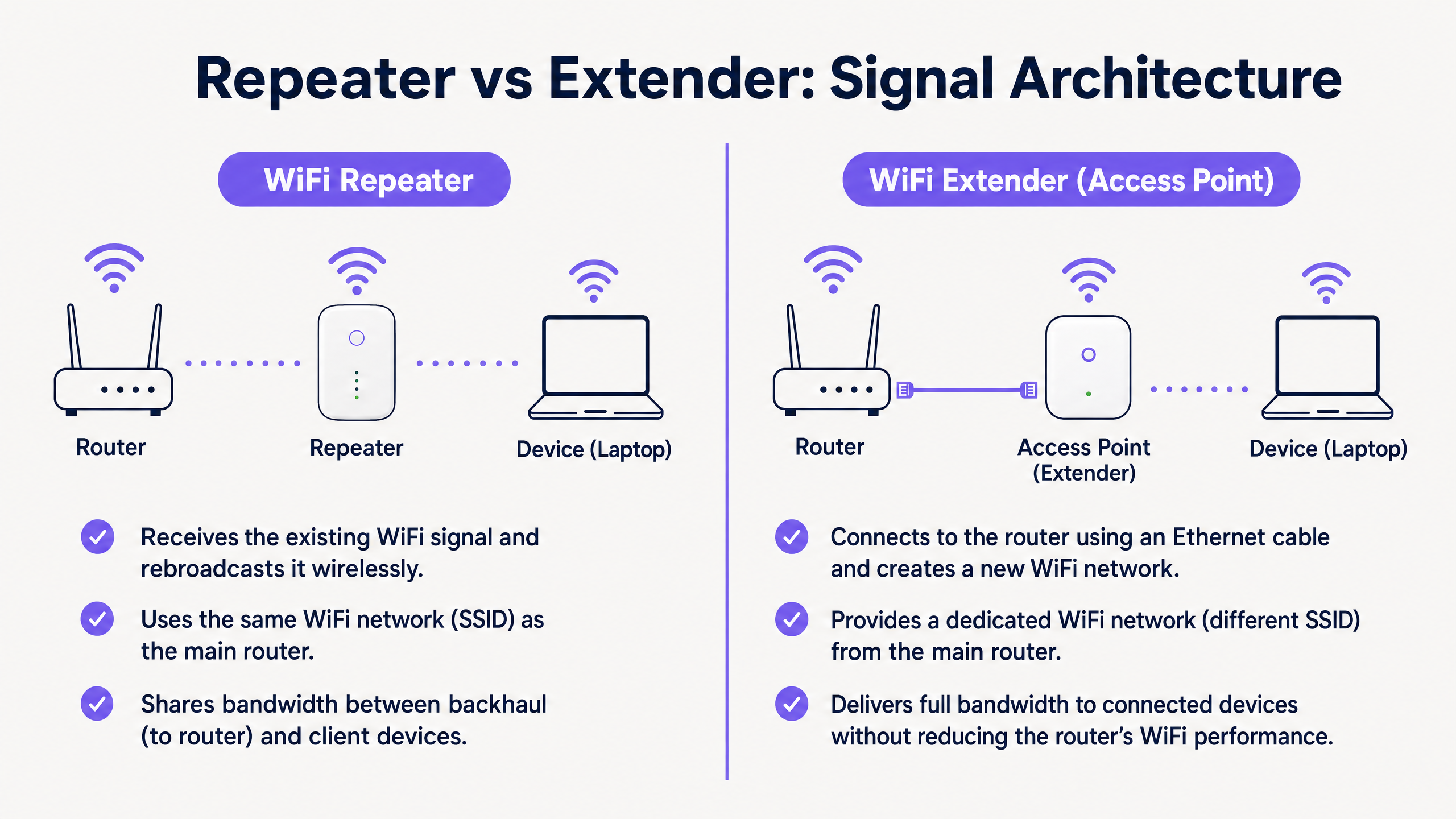
Un repetidor WiFi opera completamente de forma inalámbrica. Contiene dos radios inalámbricas (o a veces solo una, operando en modo semidúplex). Se conecta al router principal a través de WiFi y transmite simultáneamente a los dispositivos cliente.
Debido a que debe usar la misma radio tanto para recibir datos del router como para transmitirlos al cliente, el ancho de banda disponible se reduce efectivamente a la mitad. Esto se conoce como la penalización por semidúplex. En entornos de alta densidad, esta degradación de la latencia y el rendimiento es inaceptable.
La Arquitectura del Extensor WiFi (Punto de Acceso)
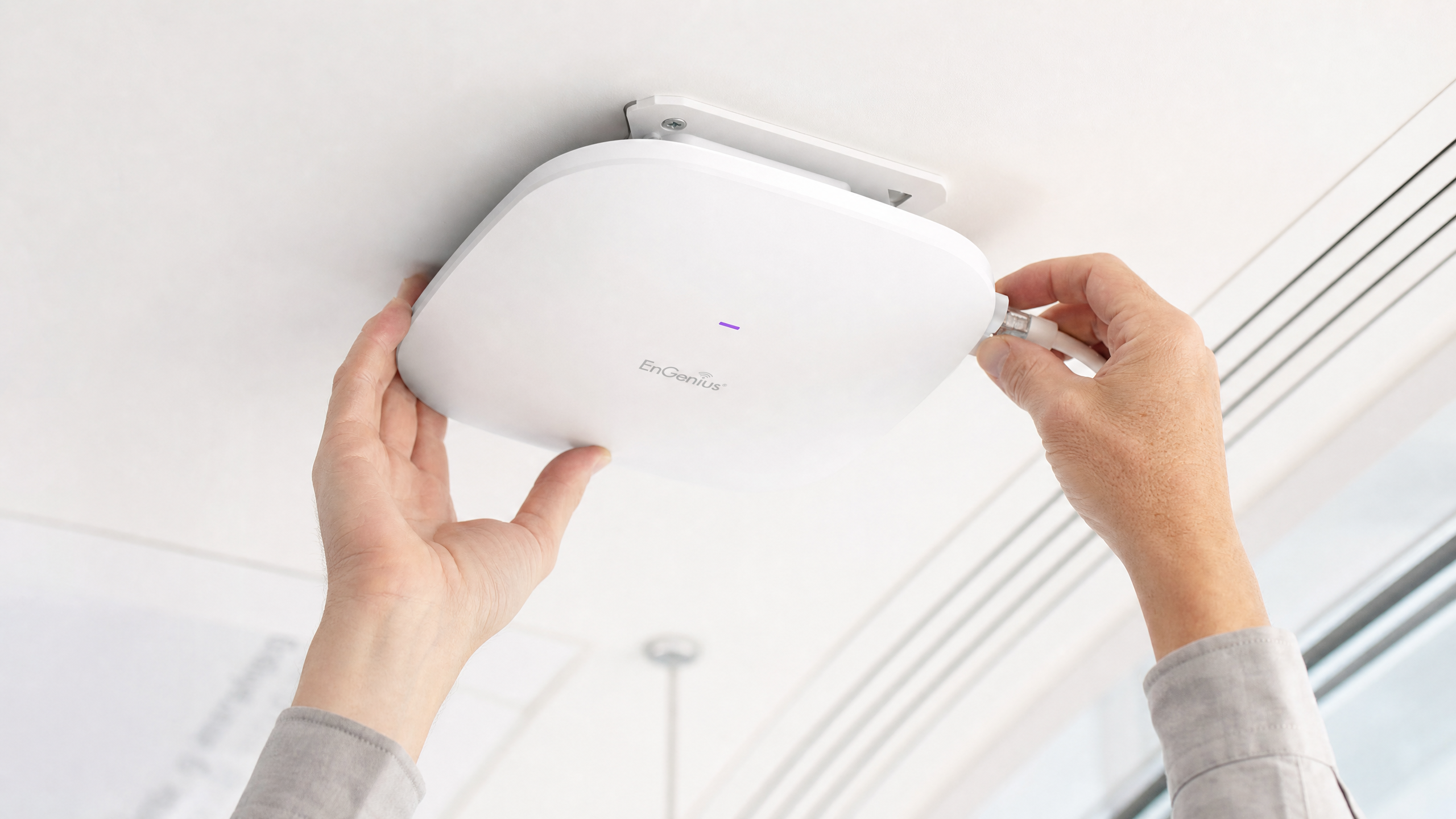
Un verdadero extensor WiFi empresarial es un Punto de Acceso (AP). Se conecta a la red central a través de un cable Ethernet físico (Cat6 o superior), a menudo utilizando Power over Ethernet (PoE) para una implementación simplificada.
Al utilizar un backhaul cableado, el AP dedica toda su capacidad inalámbrica a servir a los dispositivos cliente. Esta arquitectura soporta alto rendimiento, roaming sin interrupciones (utilizando estándares como IEEE 802.11r/k/v) y protocolos de seguridad robustos como WPA3-Enterprise y autenticación 802.1X.
Diferencias Clave de un Vistazo
| Característica | Repetidor WiFi | Extensor WiFi (Punto de Acceso) |
|---|---|---|
| Backhaul | Inalámbrico | Cableado (Ethernet) |
| Rendimiento | Reducido a la mitad (Semidúplex) | Capacidad total |
| SSID | Generalmente el mismo que el principal | Puede ser el mismo o distinto |
| Latencia | Alta | Baja |
| Idoneidad Empresarial | Solo temporal/Baja densidad | Permanente/Alta densidad |
Guía de Implementación
Al diseñar la red para una ubicación comercial, el entorno físico dicta la elección del hardware.
Escenario 1: El Estadio de Alta Densidad
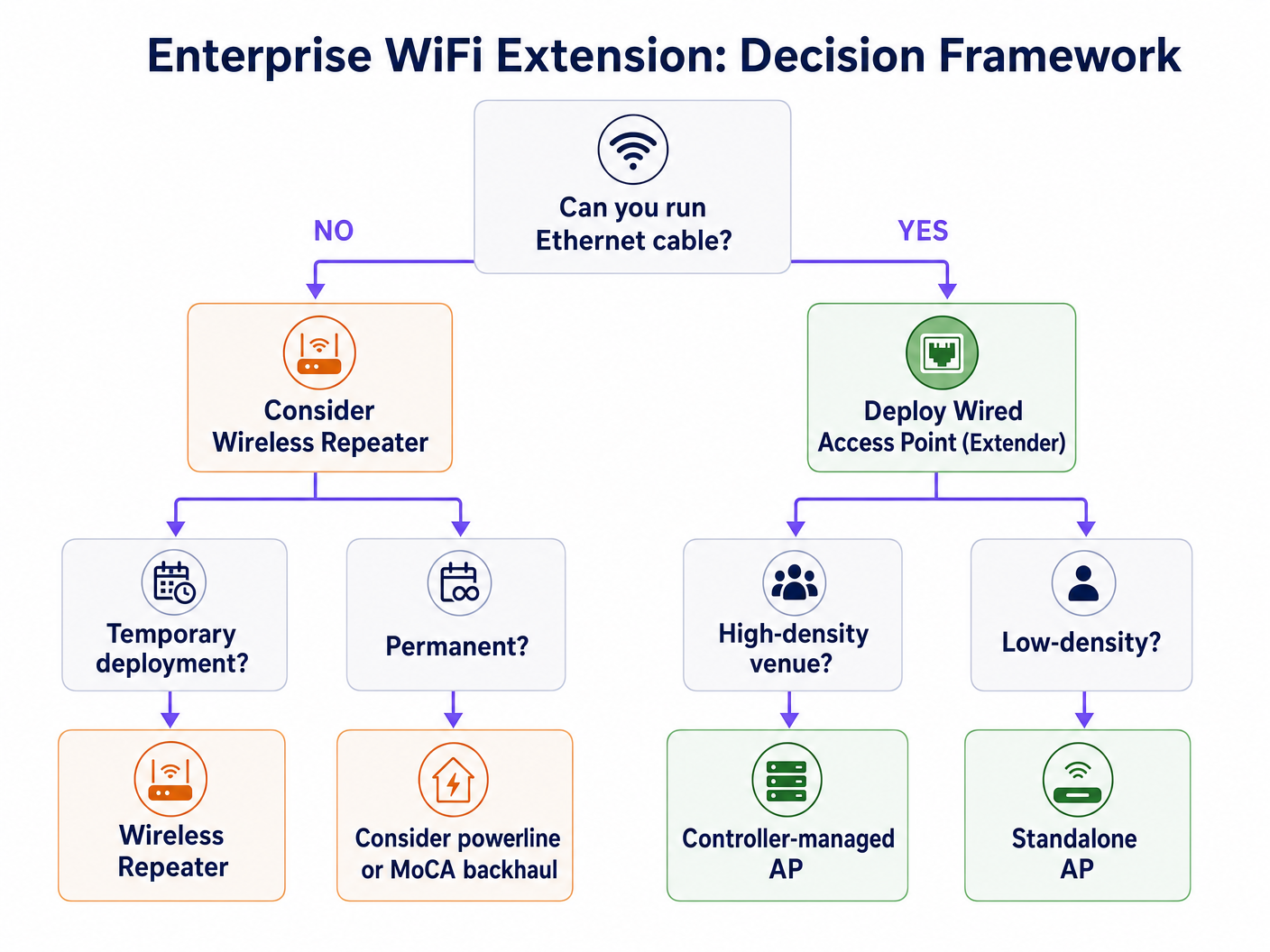
En un estadio, miles de conexiones concurrentes exigen el máximo rendimiento. La implementación de repetidores aquí resultaría en un colapso inmediato de la red debido a la interferencia de cocanal y la penalización por semidúplex.
Recomendación: Implementar Puntos de Acceso cableados (Extensores) en una configuración de alta densidad. Utilizar antenas direccionales y asegurar un backhaul cableado robusto. Esta infraestructura es crítica para soportar Análisis WiFi avanzados y servicios basados en la ubicación.
Escenario 2: El Hotel Histórico
En un hotel catalogado como patrimonio, donde tender nuevos cables Ethernet es físicamente imposible o legalmente restringido, la implementación tradicional de AP es un desafío.
Recomendación: Aunque un repetidor inalámbrico pueda parecer atractivo, a menudo es inadecuado para las expectativas de los huéspedes. Considerar sistemas de malla avanzados con bandas de backhaul inalámbricas dedicadas, o aprovechar la infraestructura coaxial existente (MoCA) para proporcionar un backhaul cableado a los AP locales. Si debe usar repetidores, asegúrese de que estén estratégicamente ubicados en el borde de la huella de la señal principal, no en zonas muertas. Lea más sobre Cómo Mejorar la Satisfacción del Huésped: La Guía Definitiva .
Mejores Prácticas e Integración
Independientemente del hardware elegido, la plataforma de gestión superpuesta es donde se materializa el valor empresarial.
- Gestión Independiente del Hardware: Asegúrese de que sus soluciones de análisis y Captive Portal sean independientes del hardware. La plataforma de Purple se integra perfectamente con los principales proveedores (Cisco, Aruba, Meraki), permitiéndole combinar APs y repetidores según lo exija el entorno físico sin perder visibilidad.
- Autenticación sin Interrupciones: Implemente mecanismos de autenticación robustos. La autenticación basada en perfiles, como OpenRoaming (donde Purple actúa como proveedor de identidad gratuito bajo la licencia Connect), proporciona un acceso seguro y sin fricciones para los usuarios, al tiempo que garantiza una seguridad de nivel empresarial. Obtenga más información sobre Cómo un asistente de Wi-Fi habilita el acceso sin contraseña en 2026 .
- Segregación de Datos: Para entornos de Retail y Hostelería , segregue estrictamente el tráfico de WiFi de Invitados del tráfico operativo (p. ej., sistemas PoS) utilizando VLANs para mantener el cumplimiento de PCI DSS.
Resolución de Problemas y Mitigación de Riesgos
- El Problema del 'Cliente Pegajoso': Los dispositivos a menudo se aferran a una señal débil de un AP distante en lugar de conectarse a uno más cercano. Asegúrese de que su infraestructura sea compatible con 802.11k/v para gestionar activamente el roaming de clientes.
- Interferencia de Cocanal: Los repetidores que transmiten en el mismo canal que el router principal aumentan el ruido. Una planificación cuidadosa de los canales es esencial.
- Vulnerabilidades de Seguridad: Los repetidores a menudo carecen de características de seguridad de nivel empresarial-características de seguridad de grado empresarial. Asegúrese de que todos los dispositivos sean compatibles con WPA3 y puedan integrarse con su servidor RADIUS central.
ROI e Impacto Empresarial
Invertir en la infraestructura correcta impacta directamente en los resultados finales. Una red AP cableada robusta permite análisis de ubicación avanzados. Comprender las Diferencias técnicas entre Heatmapping y Presence Analytics permite a los establecimientos optimizar la distribución del espacio y la asignación de personal. Además, una conexión estable es un requisito previo para monetizar la red a través de medios minoristas y engagement dirigido.
Definiciones clave
Half-Duplex
A communication mode where data can flow in both directions, but only one direction at a time.
This is the primary technical limitation of standard WiFi repeaters, resulting in halved throughput.
Backhaul
The connection between the access point/repeater and the core network router.
A wired backhaul (Ethernet) provides full capacity, while a wireless backhaul shares the radio spectrum with client devices.
SSID (Service Set Identifier)
The public name of a wireless network.
Repeaters often clone the primary SSID, while extenders can broadcast the same or a distinct SSID depending on the roaming configuration.
802.11r/k/v
A set of IEEE standards that facilitate fast and seamless roaming of client devices between different access points.
Essential for enterprise environments to prevent the 'sticky client' problem where devices cling to a weak signal.
PoE (Power over Ethernet)
A technology that allows network cables to carry electrical power.
Crucial for deploying wired access points in ceilings or high walls without requiring a separate electrical outlet.
RSSI (Received Signal Strength Indicator)
A measurement of the power present in a received radio signal.
Critical data point used by platforms like Purple for location analytics and heatmapping.
VLAN (Virtual Local Area Network)
A logical subnetwork that groups a collection of devices on a single physical LAN.
Mandatory for segregating guest traffic from operational traffic to maintain security and compliance (e.g., PCI DSS).
Mesh Network
A network topology where nodes connect directly, dynamically and non-hierarchically to as many other nodes as possible.
An advanced alternative to simple repeaters, often utilizing a dedicated radio band for the wireless backhaul to maintain throughput.
Ejemplos prácticos
A 200-room heritage hotel needs to provide seamless WiFi coverage. Running new Ethernet cables to the guest rooms is prohibited due to the building's listed status. The current setup uses standard wireless repeaters in the hallways, resulting in poor speeds and frequent disconnects.
- Conduct a comprehensive RF site survey to identify existing signal propagation and dead zones.
- Abandon the standard wireless repeaters, as the half-duplex penalty is exacerbating the poor performance.
- Implement a managed mesh WiFi system that utilizes a dedicated, discrete 5GHz or 6GHz radio exclusively for wireless backhaul between nodes.
- Where possible, leverage existing coaxial cabling (using MoCA adapters) to provide a wired backhaul to strategic access points without drilling new holes.
- Configure the network to support 802.11r/k/v for seamless client roaming between nodes.
A large retail chain is deploying a new Guest WiFi network across 50 locations to support an indoor mapping and location-based marketing initiative. The IT director is considering using high-end wireless repeaters to save on cabling costs.
- Reject the use of wireless repeaters for this deployment.
- Specify the installation of enterprise-grade, wired Access Points (Extenders) with PoE (Power over Ethernet).
- Ensure AP placement is optimized for location analytics, not just coverage, requiring a higher density of APs.
- Integrate the hardware with a hardware-agnostic analytics platform (like Purple) to normalize the location data across all 50 sites.
- Implement strict VLAN segregation between the Guest WiFi and the PoS/operational network.
Preguntas de práctica
Q1. Your organisation is deploying a temporary pop-up retail store in a leased space for three weeks. The landlord provides a primary router in the back office, but the signal does not reach the point-of-sale terminals at the front. Running cables is prohibited. What is the most appropriate hardware solution?
Sugerencia: Consider the duration of the deployment and the physical constraints.
Ver respuesta modelo
In this specific, temporary scenario with physical constraints, a high-quality wireless repeater or a simple mesh system is appropriate. While a wired AP is always preferred for throughput, the temporary nature and cabling restrictions make a wireless solution the pragmatic choice, provided the PoS systems do not require massive bandwidth.
Q2. A hospital IT director needs to ensure seamless roaming for mobile medical carts (WoWs) moving between wards. The current infrastructure uses a mix of older routers configured as repeaters. Staff complain of dropped connections when moving. What architectural change is required?
Sugerencia: Focus on the 'sticky client' problem and backhaul architecture.
Ver respuesta modelo
The hospital must rip and replace the repeater infrastructure. They need to deploy enterprise-grade wired Access Points (Extenders) with a unified controller. Crucially, the new system must support IEEE 802.11r/k/v to actively manage client hand-offs between APs, eliminating the dropped connections experienced with the disjointed repeater setup.
Q3. You are tasked with implementing Purple's location analytics in a large shopping centre. The centre management wants to use cheaper wireless repeaters to expand coverage to the car park. Why should you advise against this?
Sugerencia: Consider how location analytics platforms calculate device position.
Ver respuesta modelo
You must advise against repeaters because they obscure accurate RSSI (Received Signal Strength Indicator) data. When a device connects to a repeater, the core network often sees the MAC address and signal strength of the repeater, not the client device. This renders precise location tracking and heatmapping impossible. Wired APs are mandatory for accurate analytics.