
WiFi para estudiantes: Lo que las universidades deben implementar correctamente
Esta guía autorizada detalla la arquitectura crítica, los protocolos de seguridad y los análisis necesarios para ofrecer un servicio de WiFi para estudiantes de alto rendimiento a escala. Proporciona a los líderes de TI estrategias prácticas para gestionar la densidad de BYOD, implementar una autenticación sólida y aprovechar la inteligencia de red para la gestión de las instalaciones.
Video overview
Parte de nuestra serie principal: Guía de WiFi multiinquilino →
Resumen Ejecutivo

Ofrecer un WiFi para estudiantes robusto ya no es una función de TI secundaria; es una dependencia operativa crítica para las universidades modernas y los centros educativos a gran escala. La explosión en la densidad de Bring Your Own Device (BYOD) - que ahora promedia de 3 a 5 dispositivos por estudiante - exige un cambio fundamental de las redes planas heredadas a arquitecturas inteligentes y altamente segmentadas. Esta guía de referencia técnica proporciona a los CTO, arquitectos de red y directores de TI estrategias prácticas y neutrales respecto al proveedor para diseñar, implementar y gestionar conectividad de campus de alto rendimiento. Exploraremos la transición necesaria a 802.11ax (Wi-Fi 6) en zonas de alta densidad, la implementación de protocolos de autenticación rigurosos como 802.1X a través de eduroam y el papel crítico de la analítica de red en la planificación de capacidad y el cumplimiento de seguridad. Además, analizaremos cómo la integración de soluciones como WiFi de invitados y Analítica de WiFi puede transformar la red de un centro de costos a un activo estratégico para la gestión de instalaciones y la interacción con los usuarios.
Análisis Técnico Detallado: Arquitectura y Estándares
Topología de Red de Alta Densidad
La base de un WiFi de campus confiable es un diseño de red jerárquico de tres capas resiliente. Una red plana no puede escalar para satisfacer las demandas de miles de usuarios y dispositivos concurrentes.
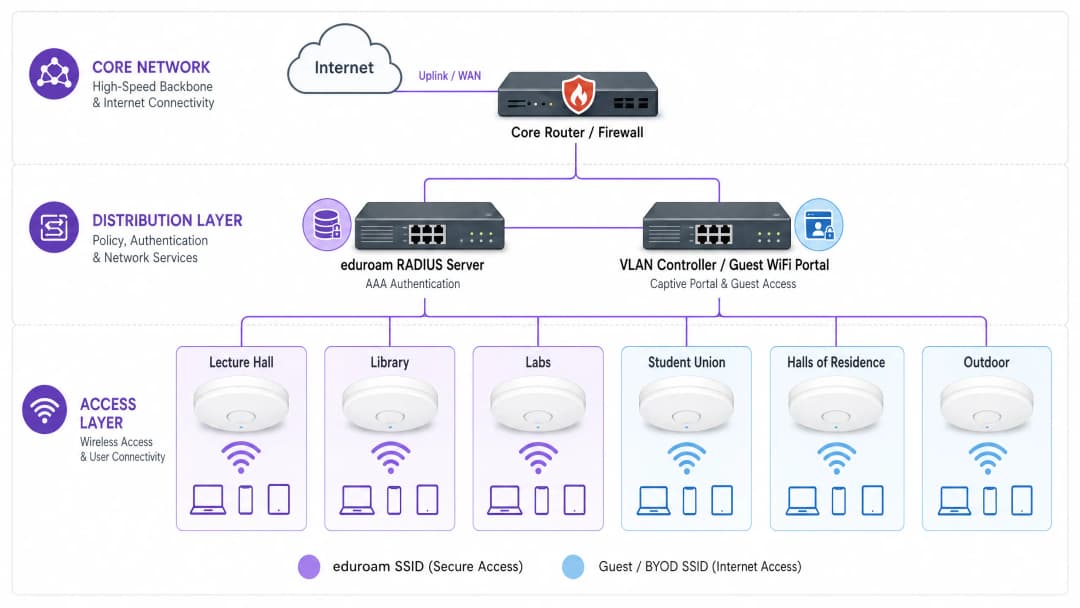
- Capa de Núcleo (Core Layer): El backbone de alta velocidad, que exige routers y firewalls redundantes con un rendimiento sustancial para manejar el tráfico agregado de la capa de distribución. Debe admitir enlaces ascendentes de alta capacidad (por ejemplo, 40Gbps o 100Gbps) a la WAN o al proveedor de servicios de internet. Considere soluciones de conectividad dedicadas como una línea arrendada para garantizar el ancho de banda y minimizar la latencia para las aplicaciones institucionales críticas.
- Capa de Distribución: Esta capa agrega los switches de acceso, aplica políticas de enrutamiento y proporciona servicios de red críticos. Aquí, se implementan una gestión inteligente de VLAN y listas de control de acceso (ACL) para segmentar el tráfico. Por ejemplo, segmentar el tráfico BYOD de los estudiantes de los sistemas administrativos y la infraestructura IoT es fundamental para la seguridad y el rendimiento.
- Capa de acceso: El límite de la red donde se conectan los usuarios. En el contexto de una universidad, esto implica despliegues densos de puntos de acceso (APs) inalámbricos. Actualizar a 802.11ax (WiFi 6) es esencial en áreas de alta densidad como salas de conferencias, bibliotecas y sindicatos de estudiantes. WiFi 6 introduce tecnologías como el acceso múltiple por división de frecuencias ortogonales (OFDMA) y la entrada múltiple y salida múltiple multiusuario (MU-MIMO), lo que mejora significativamente la eficiencia espectral y el rendimiento en entornos concurridos.
Marcos de autenticación y seguridad
Garantizar la seguridad de la red del campus requiere un enfoque de varias capas para la autenticación, equilibrando una seguridad rigurosa con la accesibilidad del usuario.
- 802.1X y eduroam: Para estudiantes y personal, IEEE 802.1X es el estándar de oro, proporcionando control de acceso a la red (NAC) basado en puertos. En la educación superior, esto se ofrece casi universalmente a través de eduroam, lo que permite a los usuarios autenticarse de forma segura utilizando sus credenciales institucionales en las instituciones globales participantes. Esto utiliza EAP (Protocolo de autenticación extensible) para proporcionar un acceso cifrado y autenticado.
- Incorporación de invitados y BYOD: eduroam no cubre todos los casos de uso. Los invitados, contratistas y dispositivos IoT sin interfaz (como consolas de videojuegos o altavoces inteligentes en las residencias de estudiantes) requieren una incorporación alternativa. Aquí es donde un Captive Portal robusto y la derivación de autenticación MAC (MAB) son fundamentales. Implementar una solución dedicada de Guest WiFi permite a los equipos de TI incorporar estos dispositivos de manera segura, aplicando políticas de uso aceptable y manteniendo la visibilidad sin comprometer la red segura 802.1X. Protect Your Network with Strong DNS and Security es crucial aquí para evitar que el tráfico malicioso se origine en dispositivos de invitados no administrados.
- OpenRoaming: Mirando hacia el futuro, OpenRoaming representa la próxima evolución en conectividad fluida. Purple actúa como un proveedor de identidad gratuito para OpenRoaming bajo la licencia Connect, lo que permite a los usuarios realizar la transición de forma segura y automática entre redes celulares y WiFi sin interacciones manuales en el Captive Portal.
¿Tiene preguntas sobre su configuración específica?
Nuestro equipo trabaja con gestores de espacios, responsables de TI e ingenieros de redes en 80 000 establecimientos. Reserve una llamada de 20 minutos y le mostraremos cómo lo resolvieron otros profesionales como usted.
Guía de implementación: Gestión del panorama de dispositivos
El desafío de BYOD
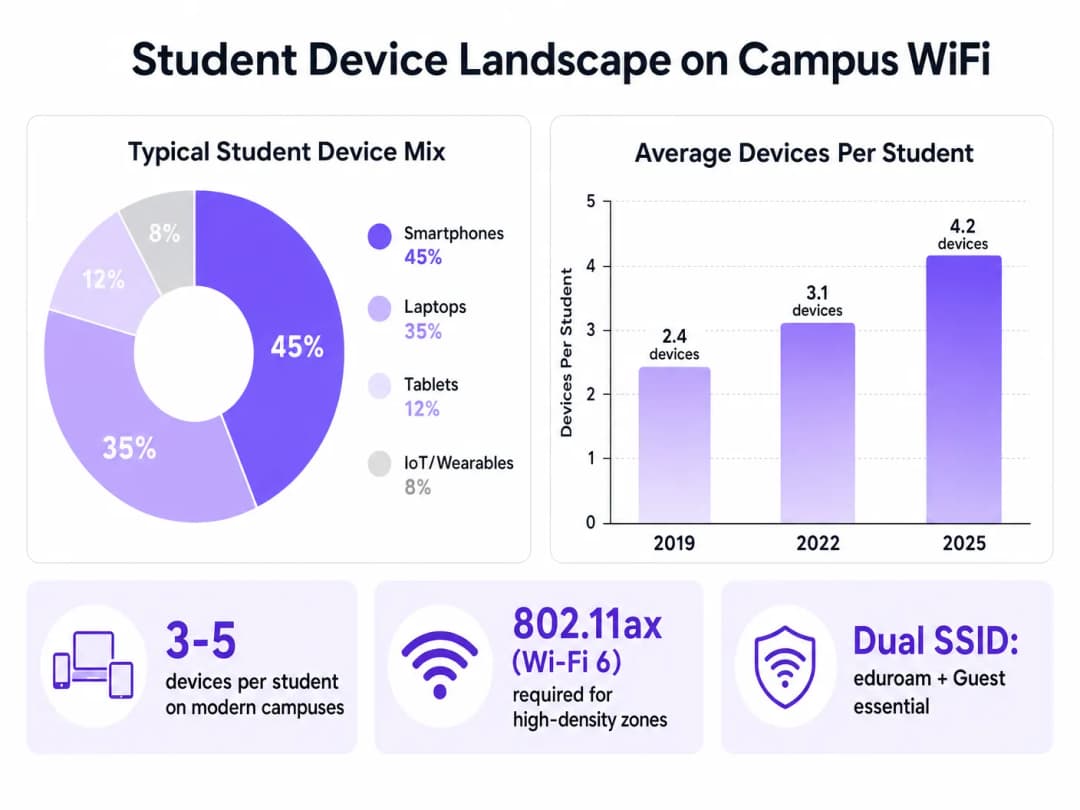
El enorme volumen y variedad de dispositivos presentan un desafío significativo. Los equipos de TI deben planificar la capacidad, no solo la cobertura.
- Planificación de RF y encuestas de sitio: El despliegue debe comenzar con encuestas de sitio predictivas y activas exhaustivas. Esto implica mapear la atenuación a través de diferentes materiales de construcción (por ejemplo, paredes de piedra gruesas en edificios históricos frente a estructuras de vidrio modernas) y planificar la ubicación de los AP para minimizar la interferencia de canal común y al mismo tiempo maximizar la relación señal a ruido (SNR).
- Segmentación de IoT y dispositivos sin pantalla: Las residencias estudiantiles presentan desafíos únicos debido a la proliferación de dispositivos IoT de consumo. Estos dispositivos a menudo carecen de soporte 802.1X. Los equipos de TI deben implementar portales de autoservicio donde los estudiantes puedan registrar las direcciones MAC de sus dispositivos, las cuales se asignan luego a VLANs específicas y aisladas a través de MAB. Esto evita tormentas de broadcast y aísla posibles vulnerabilidades de seguridad.
- Estrategia de SSID doble: Una mejor práctica estándar es transmitir un número mínimo de SSIDs para reducir los costos de gestión. Normalmente, esto implica un SSID seguro (eduroam/802.1X) y un SSID abierto con un captive portal para invitados y el onboarding de dispositivos heredados.
Mejores prácticas e inteligencia de red
Implementar la infraestructura es solo el primer paso; se requiere un monitoreo y una optimización continuos.
Aprovechamiento de WiFi Analytics
La telemetría de red proporciona información invaluable más allá de las métricas básicas de tiempo de actividad. Al utilizar WiFi Analytics, los equipos de TI y de gestión de instalaciones pueden comprender la utilización espacial y el comportamiento del usuario.
- Planificación de capacidad: Los mapas de calor y las analíticas de ubicación revelan qué áreas están constantemente por encima de su capacidad, lo que permite realizar actualizaciones de infraestructura dirigidas en lugar de despliegues generales.
- Gestión de instalaciones: Los datos sobre tiempos de permanencia y afluencia pueden informar las decisiones sobre la utilización de los edificios, los horarios de limpieza y la asignación de recursos en todo el campus.
Contextos de la industria
Aunque esta guía se centra en la educación superior, los principios del diseño de WiFi de alta densidad y el onboarding seguro se aplican por igual a otros sectores. Por ejemplo, los despliegues a gran escala en entornos de Retail dependen de analíticas similares para comprender el comportamiento de los compradores, mientras que los espacios de Hospitality requieren sistemas robustos de onboarding de invitados para gestionar a los asistentes a conferencias y a los huéspedes de hoteles de forma segura. Se pueden observar entornos complejos y de múltiples zonas similares en los centros de transporte; para obtener información sobre estos despliegues, consulte nuestra guía sobre Airport WiFi: How Operators Deliver Connectivity Across Terminals (o la versión en italiano: WiFi Aeroportuale: Come gli Operatori Forniscono Connettività tra i Terminal).
Resolución de problemas y mitigación de riesgos
- Interferencia cocanal (CCI): En despliegues densos, los APs que transmiten en el mismo canal pueden interferir entre sí, disminuyendo el rendimiento. Mitigación: Implemente la gestión dinámica de recursos de radio (RRM) para ajustar automáticamente las asignaciones de canales y los niveles de potencia de transmisión.
- Puntos de acceso no autorizados: Los estudiantes que conectan routers personales en las residencias pueden alterar el entorno de RF gestionado e introducir vulnerabilidades de seguridad. Mitigación: Despliegue sistemas de prevención de intrusiones inalámbricas (WIPS) para detectar y suprimir automáticamente los APs no autorizados.* Problemas con el Captive Portal: Un Captive Portal mal configurado puede provocar altas tasas de abandono y solicitudes de soporte técnico. Mitigación: Asegúrese de que el portal sea adaptable a dispositivos móviles, utilice certificados SSL válidos para evitar advertencias del navegador y se integre sin problemas con los sistemas RADIUS/Active Directory en el backend.
ROI e impacto empresarial
Invertir en WiFi para estudiantes de nivel empresarial ofrece retornos medibles:
- Reducción de costos de soporte: Un proceso de incorporación sólido y de autoservicio para dispositivos BYOD e IoT reduce significativamente las solicitudes de soporte técnico de Nivel 1.
- Optimización del uso de las instalaciones: Los análisis de red proporcionan los datos necesarios para optimizar el uso del espacio, lo que podría retrasar o evitar costosos proyectos de construcción nuevos.
- Mejora de la experiencia de los estudiantes: La conectividad confiable es una métrica clave en las encuestas de satisfacción de los estudiantes, lo que afecta directamente la atracción y retención. El reciente nombramiento de expertos de la industria resalta la importancia estratégica de este sector; consulte Purple Signals Higher Education Ambitions with Appointment of VP Education Tim Peers para obtener más contexto.
Al tratar la red como un activo estratégico y aprovechar los análisis inteligentes y las plataformas de incorporación seguras, las universidades pueden ofrecer la conectividad de alto rendimiento que exige la educación moderna.
Definiciones clave
802.11ax (WiFi 6)
El estándar más reciente en redes inalámbricas, diseñado específicamente para mejorar la eficiencia y el rendimiento en entornos de alta densidad a través de tecnologías como OFDMA.
Esencial para la implementación en áreas concurridas como aulas magnas y bibliotecas para gestionar el alto volumen de dispositivos de estudiantes simultáneos.
802.1X
Un estándar de IEEE para el control de acceso a la red (NAC) basado en puertos, que proporciona un mecanismo de autenticación para los dispositivos que desean conectarse a una LAN o WLAN.
El protocolo de seguridad subyacente utilizado por eduroam para garantizar que solo los estudiantes y el personal autenticados puedan acceder a la red segura del campus.
eduroam
Un servicio de roaming internacional para usuarios de investigación, educación superior y formación continua, que proporciona acceso seguro a la red utilizando las credenciales de su institución de origen.
El principal SSID seguro que se transmite en la mayoría de los campus universitarios a nivel mundial.
MAC Authentication Bypass (MAB)
Una técnica utilizada para autenticar dispositivos que no son compatibles con 802.1X (como consolas de videojuegos o impresoras) mediante el uso de su dirección MAC como credencial.
Crucial para la incorporación de dispositivos IoT de estudiantes sin interfaz de usuario en las residencias sin comprometer la red 802.1X principal.
VLAN (Virtual Local Area Network)
Una subred lógica que agrupa una colección de dispositivos de diferentes redes LAN físicas, permitiéndoles comunicarse como si estuvieran en la misma red física.
Se utiliza ampliamente para segmentar el tráfico de red, aislando los dispositivos BYOD de los estudiantes de los sistemas administrativos o financieros críticos.
Captive Portal
Una página web que el usuario de una red de acceso público está obligado a ver e interactuar con ella antes de que se le conceda el acceso.
Se utiliza en el SSID de invitados para presentar políticas de uso aceptable y autenticar a los visitantes o dispositivos que no son compatibles con 802.1X.
Interferencia de cocanal (CCI)
Interferencia que ocurre cuando dos o más puntos de acceso inalámbricos transmiten en el mismo canal de frecuencia dentro del rango de alcance mutuo.
Una de las causas principales del bajo rendimiento de la red en implementaciones densas, que se mitiga mediante una planeación de RF cuidadosa y la asignación dinámica de canales.
OpenRoaming
Una federación de redes WiFi que permite a los usuarios conectarse de forma automática y segura a las redes participantes sin necesidad de iniciar sesión manualmente ni de usar Captive Portals.
El futuro de la conectividad fluida en campus, que reduce la fricción para los usuarios que se desplazan entre redes celulares y redes WiFi.
Ejemplos resueltos
Una universidad está actualizando un aula magna histórica de 500 asientos de WiFi 4 a WiFi 6. Las paredes son de mampostería gruesa y las implementaciones anteriores sufrían de zonas sin señal graves y caídas de conexión durante las horas pico de clase. ¿Cómo debería abordar este despliegue el equipo de TI?
- Realizar un estudio de sitio activo previo a la implementación para medir la atenuación específica de las paredes de mampostería. 2. En lugar de colocar AP en los pasillos para penetrar las paredes, implementar AP de WiFi 6 direccionales de alta densidad dentro del aula, montados en el techo o en las paredes, apuntando hacia las zonas de asientos. 3. Configurar anchos de canal estrechos (por ejemplo, 20MHz) para maximizar el número de canales no superpuestos disponibles y reducir la interferencia de canal compartido en un entorno denso. 4. Habilitar las funciones OFDMA y MU-MIMO en el controlador para gestionar de manera eficiente el alto volumen de conexiones simultáneas de los clientes.
El soporte técnico de TI está saturado de reportes al inicio del periodo escolar por parte de estudiantes en las residencias que no pueden conectar sus consolas de videojuegos y pantallas inteligentes a la red eduroam con 802.1X.
- Implementar un SSID dedicado para invitados/BYOD junto con eduroam. 2. Implementar un portal de registro de dispositivos de autoservicio integrado con el sistema de control de acceso a la red (NAC). 3. Los estudiantes inician sesión en el portal utilizando sus credenciales universitarias y registran las direcciones MAC de sus dispositivos sin interfaz de usuario. 4. El sistema NAC utiliza MAC Authentication Bypass (MAB) para asignar estos dispositivos específicos a una VLAN aislada de "IoT de estudiantes", otorgándoles acceso a internet mientras los mantiene separados de la red académica segura.
Preguntas de práctica
Q1. Una universidad planea implementar WiFi en un nuevo edificio de la unión estudiantil con alta densidad de usuarios. El director de TI sugiere utilizar canales anchos de 80MHz para maximizar el ancho de banda anunciado por usuario. ¿Es este el enfoque correcto?
Sugerencia: Considere el impacto de los canales anchos en la cantidad de canales no superpuestos disponibles en un entorno de RF denso.
Ver respuesta modelo
No, esto no se recomienda para entornos de alta densidad. Aunque los canales de 80MHz ofrecen un rendimiento máximo teórico más alto para un solo cliente, reducen drásticamente la cantidad de canales no superpuestos disponibles. En un entorno denso como una unión estudiantil, esto provocará una grave interferencia de cocanal (CCI), degradando el rendimiento para todos. La mejor práctica es utilizar canales estrechos de 20MHz para maximizar la reutilización de canales y la capacidad general de la red.
Q2. El equipo de seguridad requiere que todos los dispositivos de los estudiantes en las residencias universitarias estén aislados entre sí para evitar el movimiento lateral en caso de una infección por malware. Sin embargo, los estudiantes se quejan de que no pueden transmitir contenido desde sus teléfonos a sus smart TVs. ¿Cómo puede resolver esto la arquitectura de red?
Sugerencia: Investigue las tecnologías que gestionan el tráfico de difusión/multidifusión a través de redes segmentadas.
Ver respuesta modelo
La red debe configurarse con el Aislamiento de Clientes (o aislamiento de AP) habilitado en la VLAN de estudiantes para evitar la comunicación directa entre dispositivos. Para resolver el problema de transmisión de contenido, el equipo de TI debe implementar un servicio de gateway mDNS (Multicast DNS) o Bonjour en el controlador de red. Este servicio funciona como un proxy selectivo para los protocolos de descubrimiento (como AirPlay o Chromecast) a través de los segmentos de red aislados, permitiendo a los estudiantes descubrir y transmitir contenido a sus propios dispositivos sin exponerlos a toda la subred.
Q3. Una universidad desea monetizar su red WiFi de invitados durante eventos deportivos masivos que se llevan a cabo en el estadio del campus, al mismo tiempo que garantiza que la red académica permanezca segura y sin afectaciones. ¿Qué arquitectura debería implementarse?
Sugerencia: Considere la integración de plataformas de analítica y una segmentación de red estricta.
Ver respuesta modelo
La universidad debe implementar un SSID de invitados dedicado para el estadio, completamente aislado de la red académica mediante VLANs y reglas de firewall. Este SSID debe enrutar el tráfico a través de un captive portal integrado con una plataforma como el Guest WiFi de Purple. El portal puede requerir la captura de datos (por ejemplo, autenticación por correo electrónico o SMS) o mostrar publicidad patrocinada antes de otorgar el acceso. De manera crucial, el tráfico debe enrutarse directamente a internet, evadiendo el enrutamiento interno, para garantizar que la red académica central esté protegida contra posibles picos en el tráfico de invitados.
Continúe leyendo esta serie
Cómo implementar iPSK en Cisco Meraki, HPE Aruba y Ruckus
Esta guía de referencia práctica muestra cómo implementar iPSK en Cisco Meraki, MPSK en HPE Aruba Central y DPSK en Ruckus SmartZone, con un breve apéndice para UniFi PPSK. Se centra en la emisión de claves, asignación de VLAN o políticas, flujos de decisión RADIUS y pruebas de revocación que demuestran el funcionamiento de una implementación en un entorno real.
Bulk internet agreement vs managed WiFi: qué modelo se adapta a su edificio
Una referencia práctica de adquisición para líderes de propiedades, TI y operaciones que compara la banda ancha minorista pagada por el residente, un bulk internet agreement y el managed WiFi. Aclara la propiedad, la mudanza del residente, la seguridad, el alcance de los costos y la salida contractual, utilizando el marco de bulk-internet de EE. UU. y sus equivalentes del Reino Unido.
Soluciones de WiFi para departamentos: una guía completa para empresas
Esta guía cubre la arquitectura, la implementación y el caso de negocio de las soluciones de WiFi para departamentos en propiedades Build to Rent (BTR) y unidades multi-residenciales (MDU). Explica cómo la tecnología Identity Pre-Shared Key (iPSK) crea burbujas de red seguras y aisladas para cada residente, al tiempo que admite dispositivos inteligentes e IoT. Los desarrolladores inmobiliarios, arrendadores y operadores de BTR encontrarán orientación práctica para la implementación, datos de ROI y escenarios de implementación resueltos.
¿Tiene preguntas sobre su configuración específica?
Nuestro equipo trabaja con gestores de espacios, responsables de TI e ingenieros de redes en 80 000 establecimientos. Reserve una llamada de 20 minutos y le mostraremos cómo lo resolvieron otros profesionales como usted.