
How to leverage SMS marketing net in to increase return visits
This guide explains how venue operators and IT teams can use existing Guest WiFi infrastructure to capture verified phone numbers with explicit consent, then automate SMS marketing campaigns via Purple Engage to drive measurable return visits. It covers the full technical architecture - from captive portal OTP verification to trigger-based campaign logic - alongside GDPR and TCPA compliance requirements. Marketing Directors, CRM Managers, and Retail Venue Operators will find concrete implementation steps, real-world case studies from hospitality and retail, and a clear ROI framework.
Listen to this guide
View podcast transcript
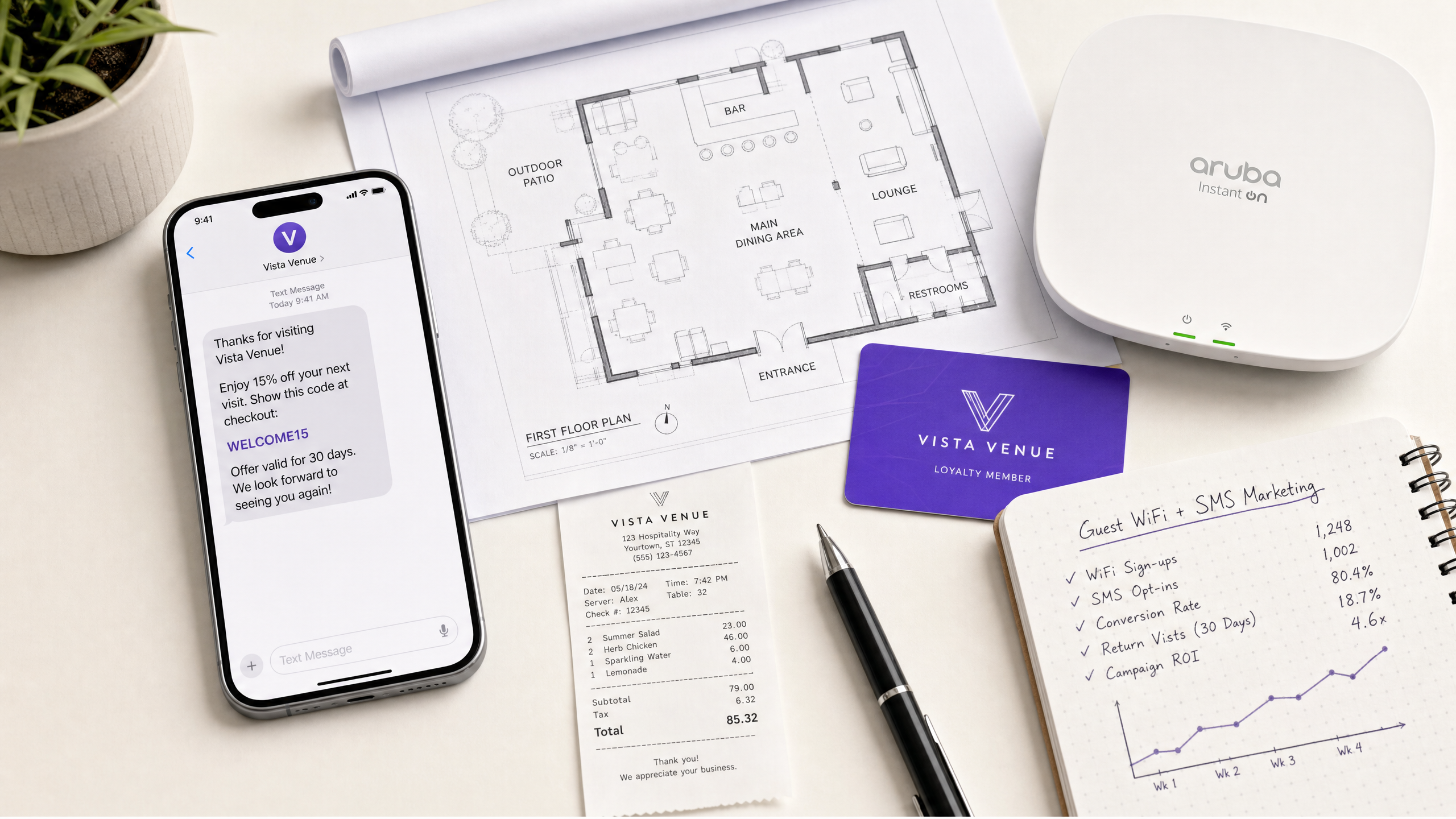
Executive summary
SMS messages carry a 98% open rate and are read within three minutes of delivery in 90% of cases (Sender, 2025). Email averages 20%. That gap is not a channel preference - it is a structural advantage. For venue operators running hotels, retail chains, stadiums, or conference centres, SMS is the fastest route back to a guest who has already visited once.
The challenge is data. You cannot run SMS marketing without verified phone numbers and explicit consent. Your Guest WiFi solves both problems. Every login through a captive portal is an opportunity to capture a mobile number, verify it via SMS OTP (One Time Password), and record consent in a GDPR-compliant audit trail. Purple Engage then automates the campaign logic - welcome messages, win-back sequences, loyalty rewards - triggered by real visit data from the network.
This guide covers the full architecture: how SMS OTP verification works at the captive portal layer, how Purple Engage segments and triggers campaigns, how to stay compliant under GDPR and TCPA, and how to measure return visit lift. Two worked examples - a 200-room hotel and a 40-store retail chain - show what deployment looks like in practice.
Technical deep-dive
What SMS marketing net in means in practice
The term "SMS marketing net in" describes the net new contacts entering your SMS marketing database through a specific acquisition event - in this context, a Guest WiFi login. Every time a visitor connects to your network and opts in to SMS marketing, that number is added to your reachable audience. The "net in" framing matters because it distinguishes new acquisitions from existing contacts, letting you track list growth rate as a key performance indicator alongside campaign conversion.
Purple processes 440 million logins per year across 80,000+ live venues (Purple internal data, 2024). A 30% SMS opt-in rate on that volume produces 132 million new verified contacts annually. The data quality is high because the phone number is verified at the point of capture via OTP, not self-reported and unverified.
Captive portal architecture and SMS OTP verification
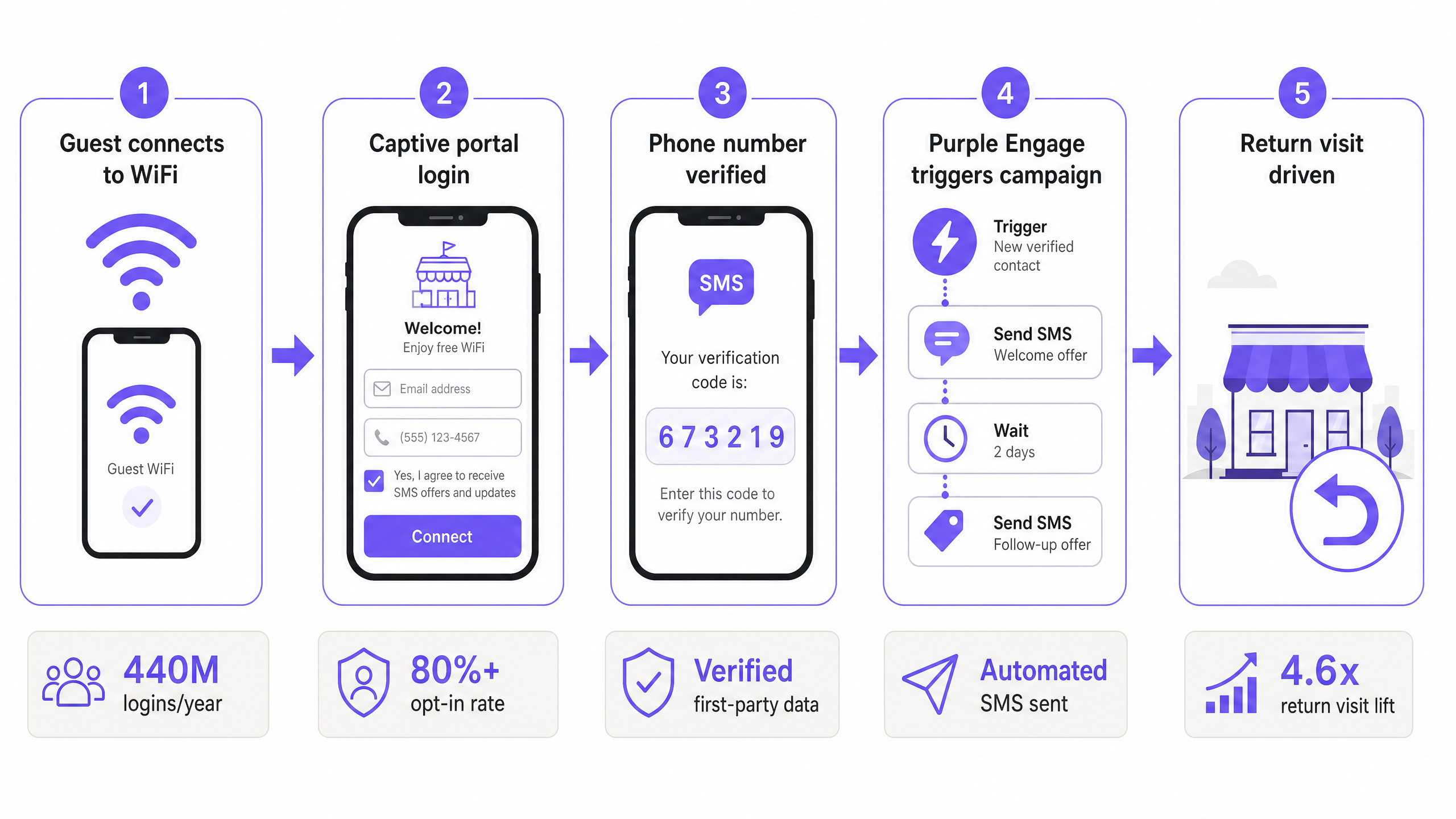
The capture flow begins at the Guest WiFi captive portal. When a visitor connects to the WiFi SSID, the network redirects their browser to the portal page. Purple's cloud overlay sits above the physical access point - whether that is Cisco Meraki, HPE Aruba, Ruckus, Juniper Mist, Ubiquiti UniFi, Cambium, Extreme, or Fortinet - and serves the portal page without requiring changes to the underlying hardware configuration.
The portal form requests a mobile number alongside the standard fields. On submission, Purple's platform fires an SMS containing a six-digit OTP to that number. The visitor enters the code to complete authentication and gain network access. This step serves two purposes: it verifies the number is real and belongs to the person logging in, and it establishes a documented consent event - the visitor actively engaged with an SMS from your brand before ticking the marketing opt-in.
The consent checkbox is separate from the authentication step. It must be unticked by default, clearly labelled, and not a condition of WiFi access. Purple records the consent timestamp, IP address, portal version, and opt-in language in the database. This record is the foundation of your GDPR compliance posture.
Purple Engage: automation architecture
Purple Engage is the marketing automation layer that sits on top of the captured data. It ingests visit events from the network - connection time, disconnection time, dwell duration, location (by access point), and visit frequency - and uses these as triggers for SMS campaigns.
The core automation primitives are:
| Trigger type | Description | Example use case |
|---|---|---|
| First visit | Fires on a contact's first recorded connection | Welcome message with first-visit offer |
| Post-visit | Fires N hours after disconnection | "Thanks for visiting" with return incentive |
| Lapsed visitor | Fires when a contact has not connected in X days | Win-back campaign at 30, 60, or 90 days |
| Frequency milestone | Fires when a contact reaches N visits | Loyalty reward at visit five or ten |
| Time-based | Fires at a scheduled time relative to visit | Pre-event reminder, post-event follow-up |
Each trigger feeds into a campaign sequence. A typical post-visit sequence for a hotel property looks like this: 24 hours after checkout, send an SMS thanking the guest and offering a direct booking discount for their next stay. If no booking is made within seven days, send a second message with a time-limited offer. If still no conversion after 14 days, add the contact to a monthly newsletter segment.
All of this runs without manual intervention once configured. The marketing team sets the logic once; the network data drives execution.
Segmentation and personalisation
Purple Engage segments contacts by location (venue or zone within a venue), visit frequency, recency, and any demographic data collected at login. For a retail chain with 40 stores, this means you can send a campaign specifically to shoppers who visited your Manchester location in the last 90 days, rather than broadcasting to your entire national database.
This precision matters for two reasons. First, relevance. Shoppers who visited a specific store respond better to messages referencing that location. Second, frequency management. Sending two messages per week to your entire database risks opt-outs. Sending one targeted message per week to a relevant segment keeps engagement high and unsubscribe rates low.
Research from SAP Engagement Cloud shows that 23% of consumers would stop supporting a brand if they felt spammed. Segmentation is the operational control that prevents that outcome.
Integration with existing CRM and marketing stack
Purple pushes captured data to external systems via webhooks and a REST API. Standard integrations include Salesforce, HubSpot, Klaviyo, and Mailchimp. For enterprise deployments, the API supports custom field mapping, allowing you to align Purple's contact schema with your existing CRM data model.
For retail operators already running loyalty programmes, Purple can append WiFi visit data to existing customer profiles, enriching the record with physical visit frequency and dwell time alongside transactional data. This creates a more complete picture of shopper behaviour than either system holds alone.
For hospitality operators, Purple integrates with property management systems (PMS) to correlate WiFi login events with reservation records, enabling post-stay SMS sequences that reference the guest's actual stay dates.
Implementation guide
Step 1: Audit your existing captive portal
Before adding SMS capture, review your current portal configuration. Check whether you already collect phone numbers. If you do, verify whether OTP verification is active and whether the consent language meets GDPR requirements - specifically that the marketing opt-in is a separate, unticked checkbox with clear language describing what the subscriber will receive.
If you are deploying Purple for the first time, the portal is configured in the Purple dashboard. Select your hardware vendor from the supported list (Cisco Meraki, HPE Aruba, Ruckus, Juniper Mist, Ubiquiti UniFi, Cambium, Extreme, Fortinet), enter your network credentials, and Purple's cloud overlay handles the redirect logic.
Step 2: Configure SMS OTP and opt-in flow
In Purple Engage, navigate to the portal builder and enable the phone number field. Set verification method to SMS OTP. Configure the opt-in checkbox with your chosen consent language. Purple provides template language that meets GDPR Article 7 requirements, but your legal team should review it for your specific jurisdiction and use case.
Test the flow end-to-end before going live. Connect a test device, complete the login, verify the OTP arrives, and confirm the consent record appears in the Purple dashboard with the correct timestamp and opt-in status.
Step 3: Build your first automated campaign
Start with a single post-visit win-back campaign. Set the trigger to fire 48 hours after a contact's first disconnection. Write a message of 160 characters or fewer - one SMS segment - with a clear offer and an opt-out instruction. Example: "Thanks for visiting [Venue]. Show this text for 15% off your next visit. Valid 30 days. Reply STOP to unsubscribe."
Do not start with a complex multi-step sequence. Run the single campaign for 30 days, measure the return visit rate among recipients versus non-recipients, and use that data to justify expanding the programme.
Step 4: Expand segmentation and sequences
Once the baseline campaign is running, add frequency-based segmentation. Create separate sequences for first-time visitors, repeat visitors (two to four visits), and loyal visitors (five or more visits). Each segment receives different messaging - acquisition-focused for first-timers, reward-focused for loyals.
For transport hubs and stadiums, add event-based triggers. A passenger who connected to WiFi at an airport lounge three days before a flight can receive a pre-departure offer. An attendee at a stadium event can receive a post-event follow-up with early-bird ticket access for the next fixture.
Step 5: Monitor, optimise, and maintain compliance
Track four metrics weekly: opt-in rate (percentage of logins that result in an SMS opt-in), delivery rate (percentage of messages successfully delivered), click-through rate (percentage of recipients who tap the link), and return visit rate (percentage of recipients who reconnect to the WiFi within the campaign window).
Review opt-out rates monthly. An opt-out rate above 2% per campaign indicates the message frequency or relevance needs adjustment. Purple's WiFi Analytics dashboard surfaces these metrics in real time.
For GDPR compliance, run a quarterly audit of your consent records. Verify that every contact in your SMS database has a corresponding consent event with a valid timestamp. Purge contacts whose consent records are incomplete or whose opt-out has not been processed.
Best practices
Consent architecture
GDPR Article 7 and the UK GDPR require that consent for direct marketing is freely given, specific, informed, and unambiguous. For SMS marketing via WiFi, this means the opt-in checkbox must be separate from the WiFi access button, unticked by default, and accompanied by a plain-language description of what the subscriber will receive. Purple's portal builder enforces these defaults, but operators must review the consent language for accuracy.
TCPA in the United States adds the requirement for prior express written consent for marketing texts. The OTP verification step - where the visitor actively responds to an SMS - strengthens the consent record by demonstrating that the subscriber engaged with a message before opting in.
Message frequency and content standards
Industry data from SimpleTexting (2025) shows that 53% of consumers cite excessive message frequency as the primary reason for opting out. Set a hard cap of two marketing messages per week per contact. Use suppression logic to prevent a contact from receiving messages from multiple campaigns simultaneously.
Every message must include an opt-out instruction. "Reply STOP to unsubscribe" is the standard. Purple processes STOP replies automatically and updates the contact's opt-in status within seconds.
Hardware and network configuration
SMS OTP verification adds a round-trip to the login flow - the visitor must receive and enter a code before gaining access. On networks with high concurrent login volumes, ensure your RADIUS (Remote Authentication Dial-In User Service) server and captive portal infrastructure can handle the additional authentication requests without degrading the login experience. Purple's cloud overlay is designed to handle this at scale, with 99.999% uptime across its network.
For multi-site deployments, configure a single Purple account to manage all locations. This gives you a unified contact database across venues, enabling cross-location segmentation - for example, targeting guests who have visited both your London and Manchester properties.
Data retention and purging
Under GDPR, you must not retain personal data beyond the period necessary for the stated purpose. Define a data retention policy before deployment. A common approach is to retain active contacts (those who have connected in the last 12 months) and purge inactive contacts after a defined period, with a re-consent campaign sent 30 days before purging.
Purple's platform supports automated purging rules. Configure these in the data management section of the dashboard before your first campaign goes live.
Troubleshooting and risk mitigation
Low SMS opt-in rates
If fewer than 20% of logins result in an SMS opt-in, review the portal design. The opt-in checkbox should be visible without scrolling, and the benefit of opting in should be stated clearly - for example, "Tick to receive exclusive offers and early access to events." A/B test the consent language. Purple's portal builder supports multiple portal variants for split testing.
OTP delivery failures
SMS OTP delivery failures typically stem from one of three causes: the visitor entered an incorrect number, the number is on a carrier blocklist, or there is a delay in the SMS gateway. Purple uses multiple SMS gateway providers to minimise delivery failures. If a visitor does not receive the OTP within 60 seconds, the portal should offer a resend option. Monitor OTP delivery rates in the Purple dashboard - a delivery rate below 95% warrants investigation with your SMS gateway provider.
GDPR enforcement risk
The most common GDPR risk in WiFi-based SMS marketing is tying marketing consent to WiFi access - making the opt-in a condition of getting online. This invalidates the consent. Ensure your portal configuration keeps the opt-in checkbox optional and that the WiFi access button is accessible regardless of whether the checkbox is ticked.
A secondary risk is inadequate record-keeping. If you cannot produce a consent record for a specific contact in response to a regulatory request, you cannot demonstrate compliance. Purple's consent audit log is exportable and should be backed up to your own data infrastructure quarterly.
Campaign deliverability issues
If your SMS campaigns show delivery rates below 90%, check whether your sender ID is registered with the relevant mobile networks. In the UK, unregistered sender IDs are increasingly filtered by carriers. Register your brand name as a sender ID through Purple's SMS settings. In the US, register your 10-digit long code (10DLC) with The Campaign Registry to avoid carrier filtering.
ROI and business impact
Measuring return visit lift
The primary metric for an SMS marketing net in programme is return visit rate: the percentage of SMS recipients who reconnect to your WiFi within a defined window (typically 30 or 90 days) compared to a control group of non-recipients. Purple's analytics dashboard calculates this automatically when you tag campaigns with a return visit goal.
A secondary metric is revenue per return visit. For hospitality operators, this is the average spend per return stay. For retail operators, it is the average basket value on a return visit. Multiply return visit rate by revenue per visit by the size of your SMS audience to calculate the revenue contribution of the programme.
Expected outcomes by vertical
| Vertical | Typical SMS opt-in rate | Expected return visit lift | Primary campaign type |
|---|---|---|---|
| Hospitality | 35-50% | 15-25% increase in direct bookings | Post-stay win-back |
| Retail | 25-40% | 10-20% footfall increase on campaign days | New collection / event alerts |
| Stadiums and events | 40-60% | 20-35% early-bird ticket conversion | Post-event follow-up |
| Healthcare | 30-45% | 15-20% appointment rebooking rate | Appointment reminder sequences |
Sources: Purple internal data; SimpleTexting SMS Marketing Report 2025; Omnisend omnichannel engagement data.
Cost-benefit framework
SMS marketing via WiFi has a low marginal cost per contact because the data capture infrastructure - the WiFi network - already exists. The incremental costs are the Purple Engage subscription, SMS gateway fees (typically £0.03-£0.07 per message in the UK), and staff time to configure and monitor campaigns.
Against these costs, set the revenue contribution of return visits. For a 200-room hotel with an average daily rate of £120 and a direct booking saving of 15% OTA commission, each incremental direct booking is worth £18 in commission saving plus the full room revenue. A programme that drives 50 additional direct bookings per month generates £900 in commission savings alone, before accounting for the revenue from the stays themselves.
SMS delivers between $21 and $41 ROI for every $1 spent (Upcity, 2023). For venue operators, the return is weighted towards the higher end because the data is first-party, verified, and tied to demonstrated purchase intent - the visitor already chose to come to your venue once.
Key Definitions
SMS marketing net in
The net new contacts added to an SMS marketing database through a specific acquisition event - in this context, a Guest WiFi login with SMS opt-in. Measured as a weekly or monthly rate to track list growth.
IT and marketing teams encounter this metric when reporting on the performance of a WiFi-based SMS capture programme. A declining net in rate signals a problem with the portal opt-in flow or a drop in WiFi login volume.
Captive portal
A web page that intercepts a device's HTTP traffic when it connects to a WiFi network, requiring the user to complete an action (login, registration, or payment) before granting full internet access. Purple's captive portal is served via a cloud overlay above the physical access point.
IT teams configure the captive portal in the Purple dashboard. The portal is the primary data capture surface for email addresses, phone numbers, and consent records.
SMS OTP (One Time Password)
A single-use numeric code sent via SMS to verify that a phone number is real and belongs to the person submitting it. The user enters the code into the captive portal to complete authentication.
OTP verification is the technical mechanism that distinguishes a verified phone number from an unverified one. It adds one round-trip to the login flow but eliminates fake or incorrect numbers from the database.
Conscious-choice opt-in
A consent mechanism where the user actively selects an unticked checkbox to agree to marketing communications, rather than having consent pre-selected or bundled with another action. Required by GDPR for marketing consent.
Purple's portal builder defaults to unticked opt-in checkboxes. Operators must not override this default. A pre-ticked checkbox does not constitute valid GDPR consent.
First-party data
Data collected directly from a user through your own channels - in this case, the captive portal login - with the user's knowledge and consent. Distinct from third-party data purchased from data brokers.
First-party data is the foundation of compliant SMS marketing. Because Purple captures data directly at the point of WiFi login, the data is first-party by definition. This is increasingly important as third-party cookie deprecation reduces the value of purchased data.
Trigger-based campaign
An automated marketing message that fires in response to a specific event or condition - for example, a visitor disconnecting from WiFi, reaching a visit frequency milestone, or going 60 days without returning. Distinct from broadcast campaigns sent to the entire database at a fixed time.
Purple Engage runs trigger-based campaigns using WiFi visit events as triggers. IT teams configure the trigger logic in the Engage dashboard. Trigger-based campaigns consistently outperform broadcast campaigns because they are sent at a contextually relevant moment.
GDPR (General Data Protection Regulation)
EU regulation (2016/679) governing the collection, processing, and storage of personal data for individuals in the European Economic Area. Applies to SMS marketing consent, data retention, and the right to erasure. The UK GDPR applies equivalent rules post-Brexit.
IT and legal teams must ensure the captive portal consent flow meets GDPR Article 7 requirements before any SMS marketing programme goes live. Purple is GDPR-certified and provides compliant default portal templates.
TCPA (Telephone Consumer Protection Act)
US federal law governing automated text message marketing. Requires prior express written consent before sending marketing SMS messages. Violations carry penalties of $500 - $1,500 per message.
US venue operators must ensure their SMS opt-in language meets TCPA requirements. The OTP verification step strengthens the consent record by demonstrating active engagement with an SMS before the marketing opt-in.
Win-back campaign
An automated SMS sequence sent to contacts who have not returned to a venue within a defined period - typically 30, 60, or 90 days. Designed to re-engage lapsed visitors with a time-limited offer.
Win-back campaigns are typically the highest-ROI campaign type in a venue SMS programme because they target contacts who have already demonstrated purchase intent by visiting once. Purple Engage configures win-back triggers by setting a 'days since last connection' threshold.
10DLC (10-digit long code)
A standard 10-digit US phone number registered with The Campaign Registry for business SMS messaging. Registration is required to avoid carrier filtering of marketing messages in the United States.
US operators deploying Purple Engage for SMS marketing must register their sender number as a 10DLC through Purple's SMS settings before launching campaigns. Unregistered numbers face increasing carrier filtering, reducing deliverability.
Worked Examples
A 200-room hotel group wants to reduce its dependency on OTA bookings and increase direct return visits. They have HPE Aruba access points across the property and currently collect email addresses at the captive portal but have no SMS capability. How should they architect and deploy an SMS marketing net in programme?
Start by enabling the phone number field in the Purple captive portal builder, configured on top of the existing HPE Aruba infrastructure via Purple's cloud overlay - no hardware changes required. Set the verification method to SMS OTP. Add a separate, unticked opt-in checkbox with the text: 'Tick to receive exclusive offers and early access to direct booking rates via SMS. You can unsubscribe at any time by replying STOP.' This language meets GDPR Article 7 requirements.
In Purple Engage, configure three automated sequences. First, a welcome sequence: 2 hours after check-in connection, send 'Welcome to [Hotel]. Enjoy complimentary WiFi. As a thank-you, here is 10% off your next direct booking: [link]. Reply STOP to unsubscribe.' Second, a post-stay sequence: 24 hours after checkout disconnection, send 'Thank you for staying at [Hotel]. Book direct for your next visit and save 15%: [link]. Offer valid 30 days. Reply STOP to unsubscribe.' Third, a win-back sequence: 60 days after last connection with no return booking, send 'We miss you at [Hotel]. Book this week and receive a complimentary room upgrade. [link]. Reply STOP to unsubscribe.'
Integrate Purple with the property management system via webhook to suppress messages to guests with an active reservation (they do not need a win-back campaign). Set a frequency cap of one message per week per contact across all sequences.
Measure return visit rate among SMS recipients versus email-only contacts over 90 days. Track direct booking conversion rate from SMS links versus the hotel website baseline.
A fashion retailer with 40 UK stores wants to drive footfall on new collection launch days. They currently have Cisco Meraki access points in all stores and use Purple Connect for basic WiFi analytics. They have not yet deployed Purple Engage. How do they build an SMS campaign that drives measurable in-store footfall on launch day?
Upgrade from Purple Connect to Purple Engage in the dashboard. The Cisco Meraki integration is already configured, so no network changes are needed. Enable SMS OTP verification on the captive portal across all 40 stores. Add the SMS opt-in checkbox with clear language referencing new collection alerts and exclusive in-store offers.
Build a location-based segmentation model. Purple tags each contact with the store location where they first connected and all subsequent locations. Create a segment called 'Active shoppers - last 90 days' filtered by last connection within 90 days. Within this segment, create sub-segments by store region (North, Midlands, South) to enable localised messaging.
For the launch campaign, schedule an SMS to fire at 08:00 on launch day to the relevant regional segment: 'The [Collection Name] collection is live in store today. First 50 shoppers get a 20% discount. Find your nearest store: [link]. Reply STOP to unsubscribe.' Send a follow-up at 12:00 to contacts who have not yet connected to any store WiFi that day: 'Still time to shop the new [Collection Name] collection. Stores open until 20:00. [link]. Reply STOP to unsubscribe.'
Track footfall by monitoring WiFi connections at each store on launch day versus the same day the previous week. Compare footfall among SMS recipients versus non-recipients using Purple's analytics dashboard.
Practice Questions
Q1. A conference centre operator wants to deploy SMS marketing net in across their venue. They have Juniper Mist access points and currently use a basic open WiFi network with no captive portal. Their legal team has flagged GDPR concerns. What are the three most important technical and compliance decisions they need to make before going live?
Hint: Consider the consent architecture, data verification method, and the relationship between WiFi access and marketing consent.
View model answer
The three critical decisions are: First, configure the captive portal with SMS OTP verification to ensure all captured phone numbers are verified and belong to the person logging in. This is the data quality foundation of the entire programme. Second, ensure the SMS marketing opt-in checkbox is separate from the WiFi access button, unticked by default, and not a condition of gaining internet access. GDPR requires freely given consent - bundling consent with access invalidates it. Third, configure Purple's consent audit log to record the timestamp, IP address, and opt-in language for every consent event. This audit trail is the operator's defence in a regulatory review. Without it, they cannot demonstrate compliance even if the consent flow is correctly designed.
Q2. A retail chain's SMS marketing programme has been running for 60 days. The opt-in rate at the captive portal is 18% - below the 25% target. Open rates on campaigns are 96% and click-through rates are 17%. What does this data tell you, and what should the operator change?
Hint: The problem is at the top of the funnel, not in the campaign itself. Focus on what happens before the opt-in decision.
View model answer
The data tells you that the campaign itself is performing well - 96% open rate and 17% click-through are strong results. The problem is at the acquisition stage: the captive portal is not converting enough logins into SMS opt-ins. The operator should A/B test the opt-in checkbox placement and language. Move the checkbox higher on the portal page so it is visible without scrolling. Test benefit-led language: 'Tick to receive exclusive in-store offers and new collection alerts' outperforms generic 'Tick to receive marketing communications'. Consider adding a brief value proposition near the checkbox: 'Join 10,000+ shoppers already saving with our SMS offers.' Do not make the opt-in mandatory - this would invalidate GDPR consent. The goal is to make the value of opting in clear enough that more visitors choose to do so.
Q3. A hotel group operates 12 properties across the UK and wants to run a single SMS marketing programme across all sites. Some properties run Cisco Meraki, others run Ruckus. The marketing team wants to send location-specific messages. How should the IT team configure Purple to support this?
Hint: Think about how Purple handles multi-site deployments and how location data is captured and used for segmentation.
View model answer
Configure a single Purple account with all 12 properties added as separate locations. Purple's cloud overlay supports both Cisco Meraki and Ruckus hardware under the same account - the hardware vendor does not affect the data model. Each property is assigned a location tag in Purple's dashboard. When a guest connects to WiFi at a specific property, their contact record is tagged with that location. In Purple Engage, create location-based segments: 'Guests who connected at [Property Name] in the last 90 days'. Build separate campaign sequences for each property, or use dynamic message fields to insert the property name and location-specific offer into a single campaign template. This approach gives the marketing team location-specific messaging without requiring the IT team to manage 12 separate Purple accounts. The unified contact database also enables cross-property insights - for example, identifying guests who visit multiple properties and targeting them with a multi-property loyalty offer.
Q4. An operator's SMS campaign is showing a 4.5% opt-out rate per campaign, well above the 2% threshold. Message frequency is currently set to three messages per week. What steps should they take to reduce opt-outs while maintaining campaign reach?
Hint: Frequency, relevance, and segmentation are the three levers. Consider which is most likely causing the problem given the data.
View model answer
A 4.5% opt-out rate with three messages per week strongly suggests frequency is the primary driver. Reduce to a maximum of two messages per week immediately. Then audit message relevance: are all three messages going to the entire database, or are they segmented? If the same contact is receiving three messages per week regardless of their visit frequency or preferences, the messages will feel like spam even if the content is relevant. Implement frequency capping at the contact level - no contact receives more than two messages in any seven-day period, regardless of how many campaigns are active. Then segment the database by engagement level: contacts who have clicked on at least one message in the last 30 days receive up to two messages per week; contacts who have not clicked in 30 days receive one message per week. Monitor opt-out rates by segment over the next 30 days. If opt-outs remain above 2% after frequency reduction, review message content for relevance and personalisation.