
Co-Working Spaces में Bandwidth Management और Quality of Service (QoS)
Co-working परिवेशों में मजबूत Bandwidth Management और Quality of Service (QoS) फ्रेमवर्क लागू करने पर IT मैनेजरों, नेटवर्क आर्किटेक्ट्स और वेन्यू ऑपरेशंस डायरेक्टरों के लिए एक प्रामाणिक तकनीकी संदर्भ गाइड। यह गाइड एंटरप्राइज-ग्रेड कनेक्टिविटी प्रदान करने के लिए नेटवर्क सेगमेंटेशन, ट्रैफ़िक प्राथमिकता, वेंडर-न्यूट्रल कॉन्फ़िगरेशन और वास्तविक दुनिया के ROI मेट्रिक्स का विवरण देती है। इसमें IEEE 802.11e/WMM मानकों, VLAN डिज़ाइन, प्रति-उपयोगकर्ता दर सीमित करने (rate limiting) और मापने योग्य व्यावसायिक परिणामों के साथ समस्या निवारण रणनीतियों को शामिल किया गया है।
Video overview
इस गाइड को सुनें
पॉडकास्ट ट्रांसक्रिप्ट देखें
हमारी मुख्य श्रृंखला का हिस्सा: Multi-Tenant WiFi गाइड →
Coworking WiFi QoS & Bandwidth Management Advisor
Model member concurrency, WMM 802.11e queuing, WAN oversubscription ratios, and per-tenant rate-limits to eliminate bufferbloat and guarantee Zoom/Teams quality across shared venues.
Tiered Rate Limit Architecture
Throughput & Network Sizing Summary
IEEE 802.11e WiFi Multimedia (WMM) Access Category Matrix
WMM establishes 4 hardware contention queues on the access point radio, ensuring voice and conferencing packets wait shorter contention windows before radio transmission.
| Access Category | Traffic Class | DSCP Marking | WAN Allocation | Contention Profile |
|---|---|---|---|---|
| AC_VO | VoIP & SIP Softphones | EF (DSCP 46) | 150 Mbps (15%) | CWmin=3, CWmax=7, AIFSN=2 |
| AC_VI | Zoom, Teams, Google Meet | AF41 (DSCP 34) | 400 Mbps (40%) | CWmin=7, CWmax=15, AIFSN=2 |
| AC_BE | Web browsing, SaaS, APIs | Default (DSCP 0) | 350 Mbps (35%) | CWmin=15, CWmax=1023, AIFSN=3 |
| AC_BK | File sync, cloud backups | CS1 (DSCP 8) | 100 Mbps (10%) | CWmin=15, CWmax=1023, AIFSN=7 |
Automated Member Onboarding & Passpoint
Purple automates the transition between guest day-pass visitors and permanent resident coworkers without manual IT intervention.
- Zero-Touch Passpoint / Hotspot 2.0: Resident members authenticate seamlessly via secure cryptographic profiles.
- Dynamic Bandwidth Upgrades: Members purchase premium high-bandwidth burst packs directly through the branded splash portal.
- Private Office Micro-VLAN Steering: Automatically steers corporate teams into isolated private VLANs using RADIUS attributes.
- GDPR & CCPA Compliant: Fully audited opt-in consent capturing, self-service privacy portals, and encrypted records.
Occupancy & Venue Analytics
Gain actionable intelligence on space utilisation, peak desk hours, and tenant dwell times to optimise lease pricing and facility layouts.
- Desk & Booth Dwell Time: Track real-time heatmaps of quiet work zones, hot-desk areas, and cafe lounges.
- Meeting Room Utilisation: Correlate booked conference rooms with actual wireless endpoint presence.
- Churn Risk Prediction: Flag declining member physical visitation frequencies before subscription renewals lapse.
! =========================================================
! Cisco Catalyst 9800 WLC & IOS-XE QoS Policy Configuration
! Coworking Multi-Tenant Bandwidth Shaping & WMM Profile
! =========================================================
! 1. Define DSCP Classification Classes
class-map match-any CM-VOICE
 match dscp ef cs5
!
class-map match-any CM-VIDEO-COLLAB
 match dscp af41 af42 af43
!
class-map match-any CM-BACKGROUND-BULK
 match dscp cs1 af11 af12
!
! 2. Build Queuing Policy-Map for Member WLANs
policy-map PM-COWORKING-QOS
 class CM-VOICE
  priority level 1
  police cir percent 15 conform-action transmit exceed-action drop
 class CM-VIDEO-COLLAB
  bandwidth remaining percent 47
  queue-limit 128 packets
 class CM-BACKGROUND-BULK
  bandwidth remaining percent 12
 class class-default
  bandwidth remaining percent 41
  fair-queue
  ! Flow-based fair queueing, the IOS-XE analogue of the fq_codel choice above:
  ! per-flow queues so one bulk transfer cannot own the buffer.
  random-detect dscp-based
!
! 3. Configure Per-Client Rate Limiting Profiles
wireless profile qos QOS-HOTDESK
 client-rate down 12000 up 6000
 edca-profile default-edca
 no call-snoop
!
wireless profile qos QOS-PRIVATE-SUITE
 client-rate down 80000 up 40000
 edca-profile voice-optimised
!
! 4. Apply to Coworking WLAN Profile
wlan Coworking-Member 10 Coworking-Member
 client vlan VLAN-POOL-MEMBERS
 quality-of-service PM-COWORKING-QOS
 radio policy all
 no call-snoop
 wmm require
 no shutdown
Need an enterprise multi-tenant WiFi architecture review?
Our wireless network engineers design custom QoS rate-limiters, dynamic VLAN steering, and Purple integrations for coworking operators.

कार्यकारी सारांश
सह-कार्यशील स्थान (co-working spaces) एक अद्वितीय और अस्थिर RF (रेडियो फ्रीक्वेंसी) और नेटवर्क वातावरण प्रस्तुत करते हैं। अनुमानित उपयोगकर्ता व्यवहार वाले पारंपरिक कॉर्पोरेट कार्यालयों, या कम बैंडविड्थ अपेक्षाओं वाले सार्वजनिक हॉटस्पॉट के विपरीत, सह-कार्यशील स्थानों को उच्च-घनत्व, बहु-किराएदार (multi-tenant) परिनियोजन का समर्थन करना चाहिए जहां उपयोगकर्ता एंटरप्राइज़-ग्रेड थ्रूपुट, कम विलंबता (latency) और असाधारण विश्वसनीयता की मांग करते हैं। एक बड़ा डेटा ट्रांसफर करने वाला या अप्रतिबंधित बैकअप सिंक चलाने वाला अकेला किराएदार पूरे स्थान के वायरलेस अनुभव को खराब कर सकता है, जिससे किराएदार का नुकसान और सीधा राजस्व नुकसान होता है।
यह गाइड नेटवर्क आर्किटेक्ट्स और IT निदेशकों को बैंडविड्थ प्रबंधन और सेवा की गुणवत्ता (QoS) नीतियों को लागू करने के लिए एक व्यावहारिक, विक्रेता-तटस्थ ढांचा प्रदान करती है। Guest WiFi और सुरक्षित VLANs के साथ उन्नत नेटवर्क विभाजन का लाभ उठाकर, वास्तविक समय के उपयोग की निगरानी के लिए WiFi Analytics को एकीकृत करके, और सख्त IEEE 802.11e/WMM मानकों को लागू करके, ऑपरेटर सामान्य आगंतुकों के लिए एक सहज बुनियादी अनुभव बनाए रखते हुए उच्च-मूल्य वाले किराएदारों के लिए सेवा स्तर समझौतों (SLAs) की गारंटी दे सकते हैं।
तकनीकी गहन विश्लेषण
बहु-किराएदार नेटवर्क दुविधा
एक बहु-किराएदार सह-कार्यशील वातावरण में, प्राथमिक चुनौती ट्रैफ़िक की अप्रत्याशितता है। किसी भी दिन, नेटवर्क को एक साथ विलंबता-संवेदनशील एकीकृत संचार सेवा के रूप में (UCaaS) (जैसे Zoom या Microsoft Teams), अत्यधिक फटने वाले क्लाउड डेटाबेस सिंक, उच्च-थ्रूपुट फ़ाइल ट्रांसफर, और मनोरंजक वीडियो स्ट्रीमिंग का समर्थन करना चाहिए। सक्रिय प्रबंधन के बिना, मानक नेटवर्क स्विच और एक्सेस पॉइंट्स का "पहले आओ, पहले पाओ" (FIFO) शेड्यूलिंग अनिवार्य रूप से बफ़रब्लोट (bufferbloat) का कारण बनेगा - एक ऐसी घटना जिसमें उच्च-बैंडविड्थ, गैर-वास्तविक-समय वाले पैकेट बफ़र कतारों को संतृप्त करते हैं, जिससे जिटर और विलंबता उत्पन्न होती है जो वास्तविक समय के अनुप्रयोगों की उपयोगिता को नष्ट कर देती है।
इसको कम करने के लिए, नेटवर्क प्रशासकों को सरल दर सीमित करने से आगे बढ़कर एक बहु-स्तरीय सेवा की गुणवत्ता (QoS) और ट्रैफ़िक-आकार देने वाले आर्किटेक्चर को अपनाना चाहिए। यह उचित भौतिक और तार्किक नेटवर्क डिज़ाइन के साथ शुरू होता है, जिसमें ट्रैफ़िक को विभाजित और प्राथमिकता देने के लिए एंटरप्राइज़-ग्रेड हार्डवेयर का लाभ उठाया जाता है।
नेटवर्क विभाजन और VLAN डिज़ाइन
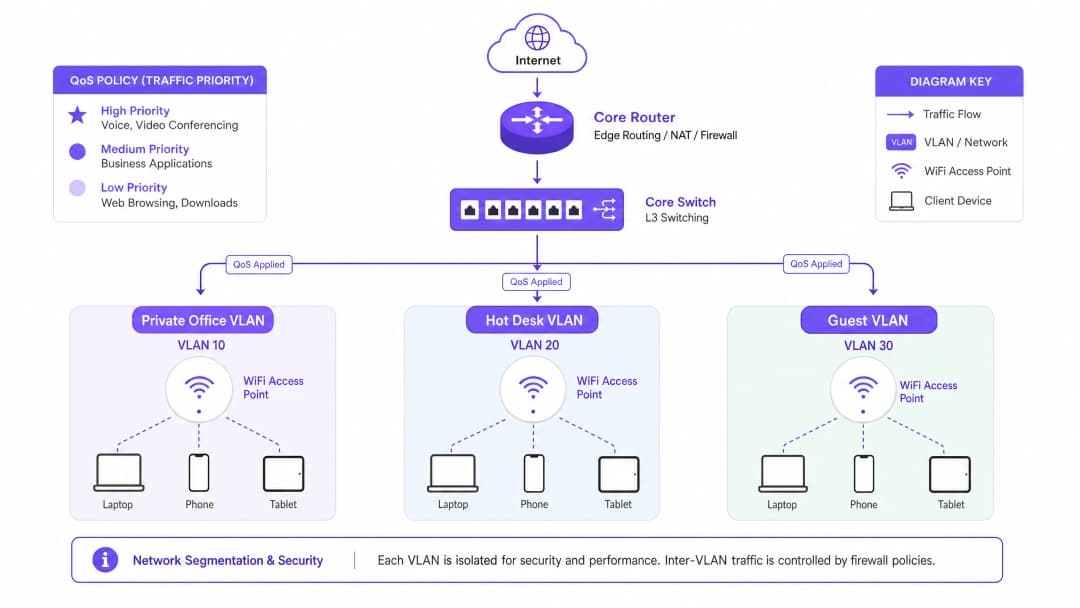
किराएदार समूहों के सख्त तार्किक अलगाव के बिना प्रभावी बैंडविड्थ प्रबंधन असंभव है। हम एंटरप्राइज़-ग्रेड Cisco Wireless APs या समान हार्डवेयर का उपयोग करके अलग-अलग SSIDs पर मैप किए गए न्यूनतम तीन अलग-अलग वर्चुअल लोकल एरिया नेटवर्क (VLANs) को तैनात करने की सलाह देते हैं:
| VLAN ID | SSID Name | लक्षित दर्शक | प्रमाणीकरण तंत्र | QoS प्रोफ़ाइल |
|---|---|---|---|---|
| VLAN 10 | CoWork_Private |
निजी कार्यालय किराएदार | WPA3-Enterprise (802.1X / Cloud RADIUS) | प्लेटिनम (आवाज/वीडियो प्राथमिकता) |
| VLAN 20 | CoWork_HotDesk |
हॉट-डेस्क / फ्लेक्सिबल मेंबर्स | WPA3-Enterprise या Portal के साथ WPA3-SAE | गोल्ड (बिजनेस एप्लीकेशन) |
| VLAN 30 | CoWork_Guest |
डे विजिटर्स / मेहमान | Guest WiFi के माध्यम से Captive Portal | ब्रॉन्ज (बेस्ट एफर्ट / रेट लिमिटेड) |
नेटवर्क को सेगमेंट करके, एडमिनिस्ट्रेटर VLAN सीमा पर अनुकूलित QoS प्रोफाइल लागू कर सकते हैं, जिससे यह सुनिश्चित होता है कि VLAN 30 पर गेस्ट ट्रैफ़िक कभी भी VLAN 10 और 20 पर बिजनेस-क्रिटिकल ट्रैफ़िक को प्रभावित न करे। इन सुरक्षा नीतियों को लागू करने के लिए यूजर क्रेडेंशियल्स के आधार पर VLAN को डायनामिक रूप से असाइन करने के लिए एक मजबूत Network Access Control (NAC) solution के साथ एकीकरण की आवश्यकता होती है। विस्तृत मार्गदर्शन के लिए, हमारी पूरी गाइड देखें: How to Implement 802.1X Authentication with Cloud RADIUS।
IEEE 802.11e और WiFi मल्टीमीडिया (WMM)
वायरलेस लेयर पर, QoS को IEEE 802.11e मानक द्वारा नियंत्रित किया जाता है, जिसे व्यावसायिक रूप से WiFi Multimedia (WMM) के रूप में जाना जाता है। WMM लेगेसी डिस्ट्रिब्यूटेड कोऑर्डिनेशन फंक्शन (DCF) को एन्हांस्ड डिस्ट्रिब्यूटेड चैनल एक्सेस (EDCA) से बदल देता है। EDCA चार एक्सेस कैटेगरीज (ACs) पेश करता है, जो मीडियम पर विभिन्न प्राथमिकता स्तरों के अनुरूप हैं:
Voice (WMM-AC_VO) की प्राथमिकता सबसे अधिक है और इसे VoIP और रियल-टाइम इंटरैक्टिव ऑडियो के लिए डिज़ाइन किया गया है। यह लेटेंसी को कम करने के लिए सबसे छोटे बैकऑफ़ टाइमर का उपयोग करता है। Video (WMM-AC_VI) की प्राथमिकता उच्च है और इसे वीडियो कॉन्फ्रेंसिंग और स्ट्रीमिंग मीडिया के लिए अनुकूलित किया गया है, जो कम लेटेंसी को उच्च थ्रूपुट के साथ संतुलित करता है। Best Effort (WMM-AC_BE) स्टैंडर्ड वेब ट्रैफ़िक, ईमेल और सामान्य एप्लिकेशन्स के लिए डिफॉल्ट कैटेगरी है। Background (WMM-AC_BK) की प्राथमिकता सबसे कम है और इसे नॉन-टाइम-सेंसिटिव डेटा ट्रांसफर, सिस्टम अपडेट और बैकग्राउंड बैकअप के लिए आरक्षित किया गया है।
हाई-डेंसिटी वाले वातावरण में वॉयस और वीडियो की स्पष्टता बनाए रखने के लिए, सभी एक्सेस पॉइंट्स पर विश्व स्तर पर WMM को सक्षम किया जाना चाहिए। इसके अलावा, DSCP (डिफरेंशिएटेड सर्विसेज कोड पॉइंट) मैपिंग को कॉन्फ़िगर किया जाना चाहिए ताकि वायरलेस WMM कैटेगरीज को वायर्ड IP पैकेट में अनुवादित किया जा सके क्योंकि वे स्विच और राउटर से गुजरते हैं।
इम्प्लीमेंटेशन गाइड
स्टेप-बाय-स्टेप ट्रैफ़िक शेपिंग और QoS डिप्लॉयमेंट
को-वर्किंग स्पेस में बैंडविड्थ मैनेजमेंट को लागू करने के लिए एक व्यवस्थित दृष्टिकोण की आवश्यकता होती है। एंटरप्राइज-ग्रेड ट्रैफ़िक-शेपिंग रणनीति स्थापित करने के लिए इन वेंडर-अज्ञेयवादी डिप्लॉयमेंट स्टेप्स का पालन करें।
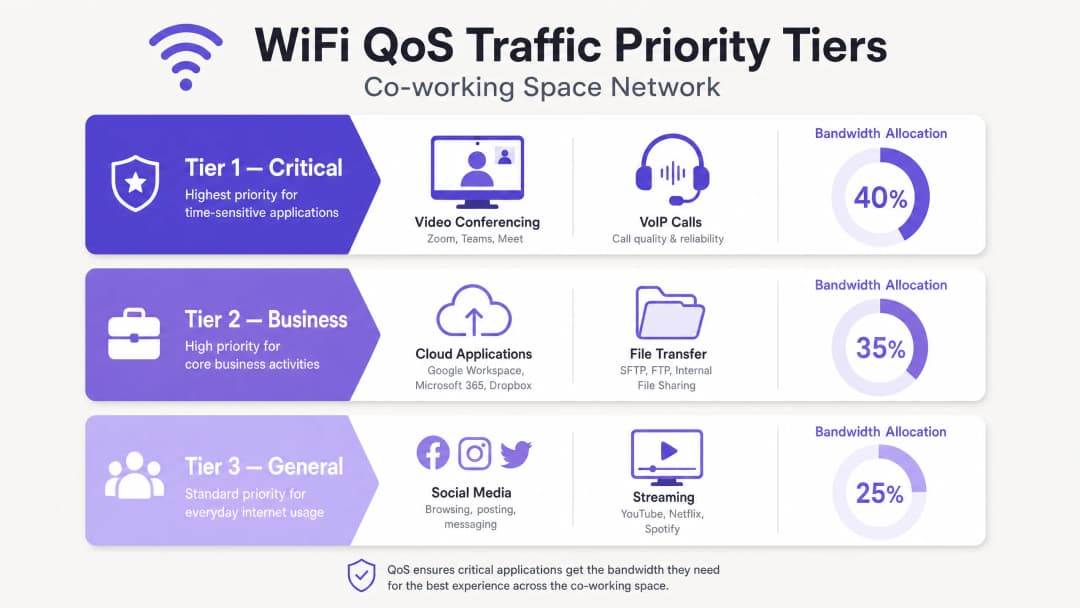
स्टेप 1: WAN बैंडविड्थ बजट स्थापित करें। आंतरिक सीमाओं को कॉन्फ़िगर करने से पहले, अपना कुल WAN थ्रूपुट निर्धारित करें। एक सामान्य 200 लोगों के को-वर्किंग स्पेस के लिए, एक सिमेट्रिकल 1 Gbps / 1 Gbps फाइबर कनेक्शन की सिफारिश की जाती है। इंटरफ़ेस सैचुरेशन और बफ़रब्लोट को रोकने के लिए WAN गेटवे पर एक हार्ड 10% ओवरहेड बफ़र आरक्षित रखें। इससे 900 Mbps एलोकेटेबल बैंडविड्थ बचती है। चरण 2: ट्रैफ़िक श्रेणियों और प्राथमिकता कतारों (priority queues) को परिभाषित करें। अपने कोर गेटवे/फ़ायरवॉल पर Class-Based Weighted Fair Queueing (CBWFQ) या Low Latency Queueing (LLQ) को कॉन्फ़िगर करें। सोर्स VLAN और एप्लिकेशन सिग्नेचर के आधार पर तीन मुख्य श्रेणियों को परिभाषित करें। टियर 1 (महत्वपूर्ण) VoIP और UCaaS ट्रैफ़िक को 40% गारंटीकृत बैंडविड्थ आवंटित करता है, जो DSCP EF पर मैप होता है। टियर 2 (बिजनेस) क्लाउड एप्लिकेशन्स और वेब ट्रैफ़िक को 35% आवंटित करता है, जो DSCP AF41 पर मैप होता है। टियर 3 (सामान्य/अतिथि) एक सख्त एग्रीगेट कैप के साथ 25% आवंटित करता है, जो DSCP CS1 पर मैप होता है।
चरण 3: प्रति-उपयोगकर्ता दर सीमा (डायनेमिक बैंडविड्थ आवंटन) कॉन्फ़िगर करें। "बैंडविड्थ का अत्यधिक उपयोग करने वाले उपयोगकर्ताओं" को नेटवर्क गुणवत्ता को खराब करने से रोकने के लिए, जहाँ भी संभव हो स्थिर (static) सीमाओं के बजाय डायनेमिक प्रति-उपयोगकर्ता दर सीमा को लागू करें। डायनेमिक सीमाएं उपयोगकर्ताओं को नेटवर्क खाली होने पर उच्च गति का उपयोग करने की अनुमति देती हैं, लेकिन व्यस्त समय के दौरान उन्हें वापस एक गारंटीकृत बेसलाइन पर सीमित कर देती हैं। हॉट-डेस्क/लचीले SSID के लिए, प्रति क्लाइंट 50 Mbps डाउनलोड / 20 Mbps अपलोड की डायनेमिक सीमा कॉन्फ़िगर करें, जिसमें व्यस्त समय के दौरान न्यूनतम 10 Mbps सिमेट्रिकल की गारंटी हो। अतिथि SSID के लिए, प्रति क्लाइंट 10 Mbps डाउनलोड / 5 Mbps अपलोड की सख्त स्थिर सीमा लागू करें।
चरण 4: एप्लिकेशन-लेयर (लेयर 7) फ़िल्टरिंग लागू करें। आधुनिक फ़ायरवॉल और APs पोर्ट की परवाह किए बिना एप्लिकेशन्स की पहचान करने के लिए Deep Packet Inspection (DPI) का लाभ उठाते हैं। पीयर-टू-पीयर (P2P) फ़ाइल शेयरिंग, BitTorrent डाउनलोड और व्यक्तिगत क्लाउड बैकअप को प्रति उपयोगकर्ता अधिकतम 2 Mbps तक सीमित करने के लिए लेयर 7 नियम कॉन्फ़िगर करें। सुनिश्चित करें कि ज्ञात UCaaS डोमेन (जैसे *.zoom.us, *.microsoft.com) स्वचालित रूप से DSCP EF या AF41 के रूप में टैग किए गए हों।
अपने विशिष्ट सेटअप को लेकर कोई सवाल हैं?
हमारी टीम 80,000 से अधिक वेन्यू में वेन्यू ऑपरेटरों, IT मैनेजरों और नेटवर्क इंजीनियरों के साथ काम करती है। 20 मिनट का कॉल बुक करें और हम आपको दिखाएंगे कि आपके जैसे अन्य लोगों ने इसे कैसे हल किया।
सर्वोत्तम प्रथाएं
कठोर RF योजना और चैनल पुन: उपयोग
जब एक ही चैनल पर कई एक्सेस पॉइंट काम करते हैं, तो उच्च-घनत्व वाले को-वर्किंग स्पेस Co-Channel Interference (CCI) से प्रभावित होते हैं। एक आधुनिक कार्यक्षेत्र में, पुराने उपकरणों को 5 GHz और 6 GHz बैंड पर माइग्रेट करें। यदि IoT के लिए 2.4 GHz को चालू रखना आवश्यक है, तो इसे न्यूनतम ट्रांसमिट पावर पर गैर-ओवरलैपिंग चैनलों (1, 6, 11) का उपयोग करके विशिष्ट APs की एक छोटी संख्या तक सीमित करें। नए खुले 6 GHz स्पेक्ट्रम का लाभ उठाने के लिए WiFi 6E या WiFi 7 को तैनात करें, जो 14 अतिरिक्त 80 MHz चैनलों तक की पेशकश करता है और CCI को पूरी तरह से समाप्त कर सकता है। चैनल उपलब्धता के साथ थ्रूपुट को संतुलित करने के लिए 5 GHz बैंड में 40 MHz चैनल चौड़ाई पर बने रहें।
एयरटाइम फेयरनेस (Airtime Fairness)
सभी एंटरप्राइज़-ग्रेड APs पर Airtime Fairness (ATF) सक्षम करें। ATF सभी क्लाइंट्स को पैकेटों की समान संख्या के बजाय समान चैनल एक्सेस समय आवंटित करता है। यह धीमे पुराने क्लाइंट्स (जो 802.11n या पुराने मानकों पर काम कर रहे हैं) को वायरलेस माध्यम पर एकाधिकार करने और आधुनिक हाई-स्पीड WiFi 6/7 क्लाइंट्स के प्रदर्शन को कम करने से रोकता है।
निरंतर विश्लेषण और निगरानी
किरायेदारों के व्यवहार, डिवाइस घनत्व और एप्लिकेशन उपयोग की गहरी समझ प्राप्त करने के लिए एंटरप्राइज़-ग्रेड WiFi Analytics का लाभ उठाएं। पुराने ट्रैफ़िक रुझानों का विश्लेषण करके, IT प्रबंधक भौतिक बाधाएं आने से पहले सक्रिय रूप से बैंडविड्थ आवंटन को समायोजित कर सकते हैं। यही बात Hospitality परिवेशों, Retail परिनियोजनों और Transport केंद्रों पर भी लागू होती है, जहाँ मल्टी-किरायेदार वायरलेस घनत्व एक निरंतर परिचालन चुनौती है।
समस्या निवारण और जोखिम न्यूनीकरण
एक मजबूत QoS कॉन्फ़िगरेशन के बावजूद, को-वर्किंग नेटवर्क में प्रदर्शन से जुड़ी विसंगतियां आ सकती हैं। नीचे दी गई तालिका सबसे आम बैंडविड्थ-संबंधित विफलताओं के लिए एक नैदानिक मैट्रिक्स प्रदान करती है।
| लक्षण | मूल कारण | नैदानिक कदम | न्यूनीकरण कार्रवाई |
|---|---|---|---|
| पीक ऑवर्स के दौरान Zoom/Teams कॉल का रुक-रुक कर चलना | WAN गेटवे पर बफरब्लोट या DSCP मैपिंग त्रुटियां | क्लाइंट डिवाइस से बफरब्लोट टेस्ट चलाएं; ड्रॉप किए गए इग्रेस पैकेट के लिए स्विच पोर्ट आंकड़े जांचें | राउटर पर UCaaS ट्रैफ़िक के लिए LLQ सक्षम करें; WAN ओवरहेड रिज़र्वेशन को 10% से बढ़ाकर 15% करें |
| 5 GHz बैंड पर हाई लेटेंसी और पैकेट लॉस | अत्यधिक AP ट्रांसमिट पावर या अत्यधिक चौड़े चैनलों के कारण होने वाला को-चैनल इंटरफेरेंस (CCI) | एक RF साइट सर्वे करें, या कंट्रोलर के चैनल मैप और इंटरफेरेंस मेट्रिक्स की समीक्षा करें | चैनल की चौड़ाई को 80 MHz से घटाकर 40 MHz करें; डायनेमिक चैनल असाइनमेंट (DCA) सक्षम करें |
| एक विशिष्ट किरायेदार द्वारा निजी कार्यालय के अंदर धीमी गति की रिपोर्ट करना | भौतिक बाधा या क्लाइंट डिवाइस का किसी दूर के AP से चिपके रहना (स्टिकी क्लाइंट) | वायरलेस कंट्रोलर डैशबोर्ड में क्लाइंट के RSSI और कनेक्टेड बैंड की जांच करें | 802.11k/r/v फास्ट रोमिंग सक्षम करें; न्यूनतम मूल दर को 12 Mbps या 24 Mbps पर समायोजित करें |
| अतिथि नेटवर्क के उपयोग में अचानक वृद्धि, जिससे कॉर्पोरेट किरायेदार प्रभावित हो रहे हैं | अतिथि दर सीमाओं को बायपास किया जा रहा है, या Captive Portal सत्र टाइमआउट बहुत लंबा सेट किया गया है | फ़ायरवॉल डैशबोर्ड में अतिथि VLAN की कुल बैंडविड्थ खपत को सत्यापित करें | अतिथि SSID पर सख्त प्रति-उपयोगकर्ता दर सीमा (10/5 Mbps) लागू करें; सत्र टाइमआउट को घटाकर 4 घंटे करें |
ROI और व्यावसायिक प्रभाव
किरायेदार प्रतिधारण और चर्न में कमी
को-वर्किंग स्थानों में सबसे पहली शिकायत खराब नेटवर्क कनेक्टिविटी की होती है। कम स्विचिंग लागत और प्रचुर मात्रा में लचीले-स्थान विकल्पों वाले उद्योग में, अस्थिर कनेक्टिविटी का केवल एक सप्ताह एक उच्च-मूल्य वाले कॉर्पोरेट किरायेदार को अपना पट्टा समाप्त करने के लिए प्रेरित कर सकता है। ठीक से लागू किए गए QoS आर्किटेक्चर के साथ, ऑपरेटर लगातार रिपोर्ट करते हैं कि वार्षिक किरायेदार चर्न उद्योग के औसत 18-22% से गिरकर 8% से नीचे आ गया है, जो महत्वपूर्ण रूप से बरकरार रखे गए रेंटल राजस्व को दर्शाता है।
प्रीमियम टियर के माध्यम से नया राजस्व
एक मजबूत नेटवर्क कोर का लाभ उठाकर, को-वर्किंग ऑपरेटर्स अपने WiFi इन्फ्रास्ट्रक्चर को एक लागत केंद्र से उच्च-मार्जिन वाले राजस्व स्ट्रीम में बदल सकते हैं। ऑपरेटर्स टेनेंट्स को मानक योजनाओं से प्रीमियम नेटवर्क पैकेजों में अपसेल कर सकते हैं, जिसमें मासिक प्रीमियम पर समर्पित VLANs, निजी SSIDs, गारंटीकृत सममित बैंडविड्थ और स्टेटिक आईपी पते की पेशकश की जाती है।
| योजना स्तर | विशेषताएं | सांकेतिक मूल्य निर्धारण |
|---|---|---|
| मानक | साझा हॉट-डेस्क SSID, 50/20 Mbps, सर्वोत्तम-प्रयास QoS, Captive Portal लॉगिन | आधार सदस्यता में शामिल |
| प्रीमियम | समर्पित VLAN/SSID, 100/100 Mbps, प्लैटिनम QoS (VoIP प्राथमिकता), WPA3 | +£150 प्रति माह |
| एंटरप्राइज़ | कस्टम निजी SSID, सममित 200 Mbps, क्लाउड RADIUS एकीकरण, स्टेटिक आईपी | +£450 प्रति माह |
परिचालन दक्षता
बैंडविड्थ आवंटन और ट्रैफिक शेपिंग को स्वचालित करके, "धीमे नेटवर्क" के आईटी सपोर्ट टिकटों की दैनिक मात्रा को 75% तक कम किया जा सकता है। यह ऑन-साइट कम्युनिटी प्रबंधकों को नेटवर्क की समस्याओं को हल करने के बजाय आतिथ्य और बिक्री पर ध्यान केंद्रित करने की अनुमति देता है। यही सिद्धांत स्वास्थ्य सेवा सुविधाओं और सार्वजनिक-क्षेत्र के स्थानों पर भी लागू होते हैं, जहाँ नेटवर्क विश्वसनीयता परिचालन रूप से महत्वपूर्ण है। उच्च-घनत्व वायरलेस परिनियोजन रणनीतियों पर अधिक पढ़ने के लिए, हमारी गाइड देखें: WiFi in Schools: The 2026 Guide for Administrators and IT।
-
सुनें: तकनीकी ब्रीफिंग पॉडकास्ट
-
संदर्भ
[1] Cisco Systems, "उच्च घनत्व WiFi परिनियोजन गाइड," 2025. [2] Internet Engineering Task Force (IETF), "नियंत्रित विलंब सक्रिय कतार प्रबंधन (CoDel)," RFC 8289, 2018. [3] IEEE Standards Association, "IEEE 802.11e-2005 - संशोधन 8: मीडियम एक्सेस कंट्रोल (MAC) सेवा की गुणवत्ता (QoS) संवर्द्धन," 2005. [4] Aruba Networks, "एयरटाइम फेयरनेस टेक्नोलॉजी व्हाइटपेपर," 2024.
मुख्य परिभाषाएं
Bufferbloat
नेटवर्क उपकरणों में, विशेष रूप से WAN सीमा पर पैकेटों के अत्यधिक बफ़रिंग के कारण होने वाली उच्च विलंबता और जिटर। जब उच्च-बैंडविड्थ वाला, नॉन-रियल-टाइम ट्रैफ़िक इन बफ़र्स को संतृप्त करता है, तो रियल-टाइम पैकेट (जैसे VoIP और वीडियो) विलंबित हो जाते हैं, जिससे प्रदर्शन में गंभीर गिरावट आती है।
IT टीमों को Bufferbloat का सामना तब करना पड़ता है जब उपयोगकर्ता हाई-स्पीड फ़ाइबर इंटरनेट होने के बावजूद वीडियो कॉल के रुक-रुक कर चलने की शिकायत करते हैं। इसे 10% WAN बैंडविड्थ ओवरहेड को आरक्षित करके और FQ-CoDel जैसे सक्रिय कतार प्रबंधन (AQM) को लागू करके कम किया जाता है।
Quality of Service (QoS)
विशिष्ट ट्रैफ़िक प्रकारों को प्राथमिकता देकर नेटवर्क संसाधनों का प्रबंधन करने के लिए उपयोग की जाने वाली तकनीकों और विधियों का एक सेट। QoS तंत्र प्रशासकों को महत्वपूर्ण अनुप्रयोगों के लिए बैंडविड्थ की गारंटी देने, विलंबता को कम करने और जिटर को नियंत्रित करने की अनुमति देते हैं।
मल्टी-टेनेंट को-वर्किंग स्पेस में यह सुनिश्चित करने के लिए आवश्यक है कि रियल-टाइम सहयोग टूल (Zoom, Teams) बैकग्राउंड फ़ाइल ट्रांसफर और मनोरंजक स्ट्रीमिंग पर प्राथमिकता लें।
WiFi Multimedia (WMM)
IEEE 802.11e मानक पर आधारित एक WiFi एलायंस इंटरऑपरेबिलिटी सर्टिफिकेशन। यह ट्रैफ़िक को चार एक्सेस श्रेणियों: वॉयस, वीडियो, बेस्ट एफ़र्ट और बैकग्राउंड में प्राथमिकता देकर WiFi नेटवर्क को Quality of Service (QoS) सुविधाएँ प्रदान करता है।
यह सुनिश्चित करने के लिए को-वर्किंग एक्सेस पॉइंट्स पर इसे विश्व स्तर पर सक्षम किया जाना चाहिए कि वायरलेस डिवाइस आवाज और वीडियो पैकेट को हवा में प्रसारित होने से पहले प्राथमिकता दे सकें।
Differentiated Services Code Point (DSCP)
लेयर 3 पर नेटवर्क ट्रैफ़िक को वर्गीकृत और प्राथमिकता देने के लिए उपयोग किए जाने वाले IP पैकेट के हेडर में एक 6-बिट फ़ील्ड। मानक मार्किंग में EF (आवाज के लिए एक्सपेडाइटेड फॉरवर्डिंग) और AF (वीडियो और व्यावसायिक ऐप्स के लिए एश्योर्ड फॉरवर्डिंग) शामिल हैं।
जैसे ही ट्रैफ़िक वायरलेस AP से वायर्ड स्विच के माध्यम से और WAN गेटवे राउटर से बाहर जाता है, QoS प्राथमिकता बनाए रखने के लिए उपयोग किया जाता है। QoS को सही ढंग से कार्य करने के लिए DSCP मार्किंग को एंड-टू-एंड संरक्षित किया जाना चाहिए।
Airtime Fairness (ATF)
एक एंटरप्राइज़ वायरलेस विशेषता जो कनेक्टेड क्लाइंट्स के बीच उनकी कनेक्शन गति या वायरलेस मानक की परवाह किए बिना चैनल ट्रांसमिशन समय (एयरटाइम) को समान रूप से आवंटित करती है।
खराब सिग्नल शक्ति वाले पुराने या दूर के डिवाइसों को अत्यधिक वायरलेस माध्यम समय लेने से रोकता है, जिससे उच्च-घनत्व वाले को-वर्किंग वातावरण में आधुनिक WiFi 6/7 डिवाइसों के थ्रूपुट की रक्षा होती है।
Dynamic Bandwidth Allocation
एक ट्रैफ़िक शेपिंग तकनीक जो रीयल-टाइम नेटवर्क उपयोग के आधार पर उपयोगकर्ता की बैंडविड्थ सीमाओं को गतिशील रूप से समायोजित करती है, जिससे नेटवर्क खाली होने पर उच्च बर्स्ट स्पीड मिलती है जबकि पीक ऑवर्स के दौरान सख्त बेसलाइन लागू होती है।
को-वर्किंग ऑपरेटरों को पीक बिजनेस ऑवर्स के दौरान कुल नेटवर्क संतृप्ति के जोखिम के बिना एक प्रतिक्रियाशील, उच्च गति वाला उपयोगकर्ता अनुभव प्रदान करने में सक्षम बनाता है।
Co-Channel Interference (CCI)
हस्तक्षेप जो तब होता है जब निकटता में दो या दो से अधिक वायरलेस एक्सेस पॉइंट एक ही फ्रीक्वेंसी चैनल पर काम करते हैं, जिससे उन्हें एयरटाइम साझा करने के लिए मजबूर होना पड़ता है और समग्र वायरलेस क्षमता काफी कम हो जाती है।
उच्च-घनत्व वाले को-वर्किंग स्थानों में एक प्रमुख समस्या। उचित चैनल योजना, चैनल की चौड़ाई को 40 MHz तक कम करने और WiFi 6E/7 परिनियोजन में 6 GHz बैंड का उपयोग करके इसे कम किया जाता है।
Client Isolation
वायरलेस एक्सेस पॉइंट्स पर एक सुरक्षा और प्रदर्शन विशेषता जो कनेक्टेड वायरलेस क्लाइंट्स को एक-दूसरे के साथ सीधे संवाद करने या एक ही सबनेट पर अन्य डिवाइसों को स्कैन करने से रोकती है।
किरायेदार सुरक्षा की रक्षा करने और एयरटाइम लेने वाले अनावश्यक वायरलेस ब्रॉडकास्ट ट्रैफ़िक (जैसे ARP और mDNS) को समाप्त करने के लिए अतिथि नेटवर्क और हॉट-डेस्किंग SSIDs के लिए अनिवार्य है।
हल किए गए उदाहरण
दो मंजिलों में 15,000 वर्ग फुट में फैला एक हाई-डेंसिटी co-working स्पेस 15 निजी कार्यालय किरायेदारों सहित 250 सक्रिय दैनिक सदस्यों को समायोजित करता है। पीक ऑवर्स (सुबह 10:00 बजे से दोपहर 3:00 बजे तक) के दौरान, उपयोगकर्ताओं को Microsoft Teams और Zoom कॉल पर गंभीर जिटर और पैकेट लॉस का अनुभव होता है। वेन्यू में एक सिमेट्रिक 500 Mbps फाइबर कनेक्शन है। इस समस्या को हल करने के लिए एक वेंडर-न्यूट्रल QoS और बैंडविड्थ आवंटन रणनीति तैयार करें।
पीक-ऑवर लेटेंसी और जिटर को हल करने के लिए, तीन-स्तरीय QoS रणनीति लागू करें: WAN-स्तर की कतार (queueing), वायरलेस ट्रैफ़िक शेपिंग और लॉजिकल सेगमेंटेशन।
WAN-स्तर दर सीमा (Rate Limiting) और कतार (Queueing): बफ़रब्लोट को रोकने के लिए गेटवे राउटर पर WAN बैंडविड्थ सीमा को 450 Mbps (500 Mbps सर्किट का 90%) पर सेट करें। WAN इंटरफ़ेस पर Low Latency Queueing (LLQ) को वॉयस और वीडियो कॉन्फ्रेंसिंग ट्रैफ़िक के लिए 50 Mbps की सख्त प्राथमिकता कतार के साथ कॉन्फ़िगर करें (Zoom, Teams और Webex के लिए Layer 7 DPI हस्ताक्षरों के माध्यम से पहचाना गया), जो DSCP EF पर मैप किया गया हो। शेष 400 Mbps के लिए CBWFQ कॉन्फ़िगर करें: क्लास-1 (निजी कार्यालय VLAN 10) को 50% बैंडविड्थ गारंटी (200 Mbps) मिलती है, जो 450 Mbps तक बढ़ सकती है, जो DSCP AF41 पर मैप की गई है; क्लास-2 (हॉट-डेस्क VLAN 20) को 35% गारंटी (140 Mbps) मिलती है, जो 300 Mbps तक बढ़ सकती है, जो DSCP AF21 पर मैप की गई है; क्लास-3 (अतिथि VLAN 30) को 15% गारंटी (60 Mbps) मिलती है, जो कुल मिलाकर 100 Mbps तक सीमित है, जो DSCP CS1 पर मैप की गई है।
वायरलेस लेयर कॉन्फ़िगरेशन (WMM और रोमिंग): वायरलेस वॉयस और वीडियो कतारों को सीधे वायर्ड DSCP EF और AF41 मैपिंग पर मैप करते हुए, सभी APs पर वैश्विक रूप से WiFi Multimedia (WMM) सक्षम करें। सभी APs पर Airtime Fairness (ATF) लागू करें। 5 GHz बैंड पर न्यूनतम मूल दर (Minimum Basic Rate) 24 Mbps सेट करें और 80% APs पर 2.4 GHz को अक्षम करें।
प्रति-उपयोगकर्ता दर सीमा (Per-User Rate Limiting): VLAN 20 (हॉट-डेस्क) पर प्रति-उपयोगकर्ता गतिशील दर सीमा लागू करें: 30 Mbps डाउनलोड / 10 Mbps अपलोड प्रति क्लाइंट, जब कुल नेटवर्क उपयोग 60% से कम हो तो 50 Mbps तक बढ़ सकता है। VLAN 30 (अतिथि) पर सख्त स्थिर प्रति-उपयोगकर्ता सीमाएं लागू करें: 10 Mbps डाउनलोड / 3 Mbps अपलोड।
एक एंटरप्राइज co-working ऑपरेटर एक उच्च-मूल्य वाले वित्तीय सेवा किरायेदार को अपसेल करना चाहता है, जिसे एक निजी कार्यालय सुइट के भीतर 30 कर्मचारियों के लिए एक समर्पित, अत्यधिक सुरक्षित नेटवर्क की आवश्यकता है। वे वित्तीय नियमों का अनुपालन करने के लिए गारंटीकृत सिमेट्रिक 100 Mbps थ्रूपुट, एक समर्पित SSID और अन्य सभी किरायेदारों से सख्त अलगाव की मांग करते हैं। साझा भौतिक बुनियादी ढांचे का उपयोग करके इस सेवा को प्रदान करने के लिए चरण-दर-चरण कॉन्फ़िगरेशन और परिनियोजन मॉडल का विवरण दें।
एक साझा बुनियादी ढांचे पर इस प्रीमियम एंटरप्राइज सेवा को सुरक्षित और विश्वसनीय रूप से प्रदान करने के लिए, डायनामिक VLAN स्टीयरिंग, समर्पित SSID प्रोविजनिंग और सख्त QoS बैंडविड्थ रिजर्वेशन का उपयोग करें।
लॉजिकल नेटवर्क सेगमेंटेशन और सुरक्षा: कोर स्विच और गेटवे फ़ायरवॉल पर एक समर्पित VLAN (VLAN 105) बनाएं। CoWork_FinSecure नाम से एक समर्पित SSID कॉन्फ़िगर करें जो केवल किरायेदार के निजी कार्यालय सुइट के आसपास के एक्सेस पॉइंट्स द्वारा प्रसारित किया जाए। क्लाउड RADIUS सर्वर के साथ एकीकृत WPA3-Enterprise प्रमाणीकरण का उपयोग करके SSID को सुरक्षित करें। प्रत्येक किरायेदार कर्मचारी को विशिष्ट 802.1X क्रेडेंशियल असाइन किए जाते हैं; सफल प्रमाणीकरण पर, RADIUS सर्वर 105 का Tunnel-Private-Group-ID एट्रिब्यूट लौटाता है, जो उपयोगकर्ता के डिवाइस को डायनामिक रूप से VLAN 105 में स्टीयर करता है। VLAN 105 और किसी भी अन्य किरायेदार VLAN के बीच सभी इंटर-VLAN ट्रैफ़िक को ब्लॉक करने के लिए गेटवे फ़ायरवॉल पर सख्त ACL कॉन्फ़िगर करें।
बैंडविड्थ रिजर्वेशन और QoS प्रोफाइलिंग: WAN गेटवे पर, VLAN 105 के लिए एक समर्पित ट्रैफ़िक क्लास बनाएं। एक CBWFQ पॉलिसी कॉन्फ़िगर करें जो विशेष रूप से VLAN 105 के लिए सममित 100 Mbps WAN थ्रूपुट की गारंटी देती है। किरायेदार को उनके SLA से अधिक होने से रोकने के लिए VLAN 105 पर 100 Mbps की हार्ड ट्रैफ़िक-शेपिंग सीमा निर्धारित करें। VLAN 105 के भीतर, QoS टैगिंग ट्रांसलेशन सक्षम करें: आने वाले क्लाइंट DSCP टैग्स (VoIP के लिए EF, वीडियो के लिए AF41) को सीधे संबंधित WAN कतारों में मैप करें।
क्लाइंट-स्तरीय ऑप्टिमाइज़ेशन: VLAN के भीतर डिवाइसों को एक-दूसरे को स्कैन करने या उनके साथ संवाद करने से रोकने के लिए CoWork_FinSecure SSID पर क्लाइंट आइसोलेशन सक्षम करें, जिससे नियामक अनुपालन की एक अतिरिक्त परत जुड़ जाती है।
एक को-वर्किंग स्पेस के इवेंट हॉल में आयोजित एक बड़े पैमाने के टेक कॉन्फ्रेंस के दौरान, 150 प्रतिभागी एक साथ Guest WiFi से जुड़ते हैं। 30 मिनट के भीतर, पूरा नेटवर्क पूरी तरह धीमा हो जाता है। इमारत के अन्य हिस्सों में हॉट-डेस्क सदस्य बुनियादी वेब पेज लोड नहीं कर पा रहे हैं, और कार्यक्रम स्थल का रिसेप्शन डेस्क क्रेडिट कार्ड भुगतान प्रोसेस नहीं कर पा रहा है। नेटवर्क की विफलता का निदान करें और तत्काल आपातकालीन शमन कदमों और दीर्घकालिक आर्किटेक्चरल समाधान की रूपरेखा तैयार करें।
यह एक क्लासिक ब्रॉडकास्ट स्टॉर्म और वायरलेस मीडियम स्टारवेशन विफलता है, जो WAN-स्तर के बैंडविड्थ आइसोलेशन की कमी के कारण और बढ़ गई है।
डायग्नोस्टिक विश्लेषण: इवेंट हॉल में एक ही गेस्ट AP पर 150 सक्रिय क्लाइंट वायरलेस मीडियम को संतृप्त कर देते हैं। यदि क्लाइंट 2.4 GHz बैंड पर जुड़े हैं या चौड़े 80 MHz चैनलों का उपयोग कर रहे हैं, तो को-चैनल इंटरफेरेंस (CCI) तेजी से बढ़ता है, जिससे बड़े पैमाने पर पैकेट रीट्रांसमिशन होता है। गेस्ट नेटवर्क से DHCP अनुरोधों और ब्रॉडकास्ट ट्रैफ़िक (ARP, mDNS) की बाढ़ कोर राउटर के CPU को संतृप्त कर देती है। गेस्ट नेटवर्क में कुल बैंडविड्थ सीमा का अभाव है, जिससे सम्मेलन में भाग लेने वाले लोगों के डिवाइस पूरे WAN सर्किट का उपभोग कर पाते हैं।
तत्काल आपातकालीन समाधान (15 मिनट का समाधान): कोर फ़ायरवॉल में लॉग इन करें और गेस्ट VLAN (VLAN 30) पर तुरंत कुल बैंडविड्थ सीमा लागू करें, इसे कुल 50 Mbps पर सीमित करें। गेस्ट SSID पर 3 Mbps डाउनलोड / 1 Mbps अपलोड की सख्त प्रति-उपयोगकर्ता सीमा निर्धारित करें। पीयर-टू-पीयर वायरलेस ट्रैफ़िक को ब्लॉक करने और ब्रॉडकास्ट पैकेट को हवा में प्रसारित होने से रोकने के लिए गेस्ट SSID पर क्लाइंट आइसोलेशन सक्षम करें।
दीर्घकालिक आर्किटेक्चरल समाधान: इवेंट हॉल के लिए विशेष रूप से एक अलग, समर्पित VLAN (VLAN 40 - इवेंट स्पेस) पर समर्पित हाई-डेंसिटी एक्सेस पॉइंट्स (दिशात्मक एंटेना वाले WiFi 6E/7 APs) तैनात करें। कोर फ़ायरवॉल को VLAN 90 (POS/ऑपरेशन्स) को गारंटीकृत 10 Mbps (DSCP CS5) और VLAN 20 (हॉट-डेस्क) को गारंटीकृत 200 Mbps के साथ प्राथमिकता देने के लिए कॉन्फ़िगर करें। इवेंट VLAN (VLAN 40) पर 150 Mbps की सख्त, नॉन-बर्स्ट होने वाली कुल सीमा लागू करें।
अभ्यास प्रश्न
Q1. एक को-वर्किंग ऑपरेटर नोटिस करता है कि उनके कोर गेटवे राउटर का CPU उपयोग हर मंगलवार और गुरुवार दोपहर को 95% तक बढ़ जाता है, जो सभी किरायेदारों के लिए नेटवर्क स्पीड में गिरावट के साथ मेल खाता है। उस समय कोई बड़ा फ़ाइल ट्रांसफर सक्रिय नहीं होता है। इसका सबसे संभावित कारण क्या है, और नेटवर्क आर्किटेक्ट को इसे कैसे संबोधित करना चाहिए?
संकेत: अतिथि और हॉट-डेस्क नेटवर्क पर सुरक्षा और प्रोटोकॉल सेटिंग्स को देखें। उच्च थ्रूपुट के बिना CPU में स्पाइक्स अक्सर ब्रॉडकास्ट ट्रैफ़िक या डिवाइस डिस्कवरी प्रोटोकॉल से उच्च पैकेट-प्रति-सेकंड (PPS) दरों की ओर इशारा करते हैं।
मॉडल उत्तर देखें
सबसे संभावित कारण अतिथि और हॉट-डेस्क SSIDs से उत्पन्न होने वाला ब्रॉडकास्ट स्टॉर्म या अत्यधिक मल्टीकास्ट ट्रैफ़िक (जैसे mDNS, ARP, या Bonjour डिस्कवरी प्रोटोकॉल) है। सैकड़ों डिवाइसों वाले उच्च-घनत्व वाले वातावरण में, बैकग्राउंड डिस्कवरी प्रोटोकॉल प्रति सेकंड हजारों पैकेट उत्पन्न कर सकते हैं। चूंकि प्रत्येक डिवाइस और कोर गेटवे द्वारा ब्रॉडकास्ट पैकेट को प्रोसेस किया जाना चाहिए, इसलिए यह महत्वपूर्ण बैंडविड्थ उपयोग उत्पन्न किए बिना राउटर के CPU को संतृप्त कर देता है।
इसे संबोधित करने के लिए: (1) अतिथि और हॉट-डेस्क SSIDs पर वैश्विक स्तर पर Client Isolation सक्षम करें। यह तुरंत पीयर-टू-पीयर वायरलेस संचार को ब्लॉक करता है और ब्रॉडकास्ट/मल्टीकास्ट पैकेट को वायरलेस माध्यम पर दोहराए जाने से रोकता है। (2) सभी स्विचों पर IGMP Snooping सक्षम करें ताकि मल्टीकास्ट ट्रैफ़िक को केवल उन पोर्ट तक सीमित किया जा सके जो सक्रिय रूप से इसका अनुरोध करते हैं, जिससे स्विच और राउटर CPU लोड कम हो जाता है। (3) वायरलेस कंट्रोलर को AP स्तर पर ARP और अन्य ब्रॉडकास्ट फ्रेम को छोड़ने के लिए कॉन्फ़िगर करें, जहां संभव हो ARP अनुरोधों को यूनिकास्ट में परिवर्तित करें।
Q2. एक IT प्रबंधक को-वर्किंग स्पेस के लिए QoS लागू करना चाहता है, लेकिन पता चलता है कि उनके पुराने स्विच DSCP मैपिंग का समर्थन नहीं करते हैं, केवल बुनियादी लेयर 2 CoS (क्लास ऑफ़ सर्विस) 802.1p टैगिंग का समर्थन करते हैं। ट्रैफ़िक प्राथमिकता को बनाए रखने के लिए उन्हें अपने QoS डिज़ाइन को कैसे अनुकूलित करना चाहिए?
संकेत: 802.1p CoS लेयर 2 (ईथरनेट फ्रेम) पर काम करता है, जबकि DSCP लेयर 3 (IP हेडर) पर काम करता है। जब लेयर 3 मैपिंग अनुपलब्ध हो, तो CoS मानों का उपयोग करके स्थानीय ब्रॉडकास्ट डोमेन के भीतर प्राथमिकता को बनाए रखा जाना चाहिए।
मॉडल उत्तर देखें
जब एज स्विच द्वारा Layer 3 DSCP मैपिंग समर्थित नहीं होती है, तो IT मैनेजर को Layer 2 802.1p Class of Service (CoS) टैगिंग पर निर्भर रहना होगा। जैसे ही ट्रैफ़िक वायर्ड नेटवर्क में प्रवेश करता है, वायरलेस Access Points को वायरलेस WMM Access Categories को सीधे Layer 2 802.1p CoS टैग पर मैप करने के लिए कॉन्फ़िगर करें। उदाहरण के लिए: WMM-AC_VO (Voice) CoS 6 पर मैप होता है; WMM-AC_VI (Video) CoS 5 पर मैप होता है; WMM-AC_BE (Best Effort) CoS 0 पर मैप होता है। लीगेसी स्विचों पर, स्विच अपलिंक पोर्ट्स पर Weighted Round Robin (WRR) या Strict Priority कतारबद्धता का उपयोग करके CoS मानों के आधार पर एग्रेस कतारबद्धता कॉन्फ़िगर करें, जिससे CoS 6 और 5 को उच्चतम-प्राथमिकता वाली कतारें असाइन की जा सकें। कोर गेटवे राउटर पर (जो Layer 3 का समर्थन करता है), इनकमिंग Layer 2 CoS टैग को पढ़ने के लिए इनबाउंड स्विचपोर्ट को कॉन्फ़िगर करें और WAN इंटरफ़ेस पर ट्रैफ़िक को रूट करने से पहले उन्हें संबंधित Layer 3 DSCP मानों (जैसे, CoS 6 को DSCP EF, CoS 5 को DSCP AF41) पर फिर से मार्क करें।
Q3. एक को-वर्किंग स्पेस में 1 Gbps सिमेट्रिक फाइबर कनेक्शन है। ऑपरेटर यह गारंटी देना चाहता है कि एक निजी सुइट में रहने वाली वर्चुअल रियलिटी (VR) डेवलपमेंट कंपनी को 5ms से कम लेटेंसी के साथ कम से कम 200 Mbps सिमेट्रिक थ्रूपुट मिले। हालांकि, वे यह भी सुनिश्चित करना चाहते हैं कि यदि VR कंपनी अपने बैंडविड्थ का उपयोग नहीं कर रही है, तो अन्य किरायेदार इसका उपयोग कर सकें। WAN गेटवे पर कौन सा विशिष्ट कतारबद्धता और ट्रैफ़िक शेपिंग कॉन्फ़िगरेशन लागू किया जाना चाहिए?
संकेत: ऐसे क्लास-आधारित कतारबद्धता तंत्रों पर विचार करें जो गारंटीकृत न्यूनतम (कमिटेड इंफॉर्मेशन रेट) और अधिकतम सीमा दोनों का समर्थन करते हैं, जिससे मूल पूल से अप्रयुक्त बैंडविड्थ को उधार लेने की अनुमति मिलती है।
मॉडल उत्तर देखें
WAN गेटवे पर Hierarchical Token Bucket (HTB) के साथ Class-Based Weighted Fair Queueing (CBWFQ) लागू करें। पैरेंट शेपर को 900 Mbps पर सेट करें (10% ओवरहेड नियम लागू करते हुए)। VR किरायेदार क्लास (VLAN 150) के लिए, 200 Mbps का Committed Information Rate (CIR) (गारंटीकृत बैंडविड्थ) और 500 Mbps का Peak Information Rate (PIR) (अधिकतम बर्स्ट सीमा) कॉन्फ़िगर करें, जिसे कम लेटेंसी विशेषताओं वाली उच्च-प्राथमिकता कतार में असाइन किया गया हो। साझा किरायेदार क्लास (VLANs 10, 20, 30) के लिए, 900 Mbps की बर्स्ट सीमा के साथ 700 Mbps का CIR कॉन्फ़िगर करें। HTB शेड्यूलर के तहत बैंडविड्थ शेयरिंग (उधार लेना) सक्षम करें ताकि जब VR कंपनी का उपयोग 200 Mbps से कम हो, तो अप्रयुक्त क्षमता उनके कॉन्फ़िगर किए गए वेट के आधार पर अन्य किरायेदार श्रेणियों के बीच स्वचालित रूप से वितरित हो जाए। जैसे ही VR कंपनी एक हाई-थ्रूपुट ट्रांसफर शुरू करती है, शेड्यूलर तुरंत गारंटीकृत 200 Mbps तक बैंडविड्थ को वापस ले लेता है, जिससे सक्रिय कनेक्शनों को छोड़े बिना अन्य ट्रैफ़िक श्रेणियों को प्राथमिकता से हटा दिया जाता है।
अक्सर पूछे जाने वाले प्रश्न
Why is Quality of Service (QoS) critical in multi-tenant coworking wireless networks?
Coworking spaces aggregate hundreds of independent professionals, remote teams, and high-bandwidth businesses sharing a common wireless medium. Without QoS, bandwidth-intensive activities such as raw video uploads or software updates consume disproportionate airtime, starving latency-sensitive applications like Zoom, Microsoft Teams, and VoIP. Implementing IEEE 802.11e WiFi Multimedia (WMM) and upstream Differentiated Services Code Point (DSCP) traffic shaping guarantees priority queueing for real-time collaboration tools, preventing jitter and dropped connections.
How does WMM (WiFi Multimedia / 802.11e) prioritize traffic over the wireless airtime?
WMM classifies wireless frames into four Access Categories (AC): Voice (AC_VO), Video (AC_VI), Best Effort (AC_BE), and Background (AC_BK). Each category uses distinct Enhanced Distributed Channel Access (EDCA) parameters - namely Arbitrary Inter-Frame Space Number (AIFSN) and Contention Window (CWmin/CWmax) timers. High-priority voice and video frames wait substantially shorter backoff intervals before transmitting, securing transmission rights ahead of background bulk downloads even during peak radio saturation.
What is the optimal oversubscription ratio for commercial coworking WAN connections?
In modern coworking environments, standard provisioning utilizes a 6:1 to 8:1 WAN oversubscription ratio for general hot-desk members, and a tighter 3:1 to 4:1 ratio for dedicated private office suites. Because member bandwidth usage is bursty rather than continuous, dynamic Token Bucket rate limiting and Fair Queueing (such as FQ-CoDel or Cake) ensure full utilization of the ISP uplink while guaranteeing that no single tenant monopolizes available throughput.
How do network engineers mitigate bufferbloat in congested coworking environments?
Bufferbloat occurs when oversized network buffers fill up during high-throughput downloads, creating hundreds of milliseconds of latency for real-time packets. Network engineers eliminate bufferbloat by enabling Active Queue Management (AQM) algorithms like FQ-CoDel or CAKE on edge routers and firewalls. AQM intelligently drops or marks packets before buffers saturate, keeping round-trip latency under 15ms even when the WAN connection operates at 100% link utilization.
Should coworking spaces configure per-user or per-SSID bandwidth limits?
Network architects recommend implementing per-user dynamic rate limiting rather than aggregate per-SSID caps. A single per-SSID limit allows a small cluster of devices to exhaust the total pool, whereas per-user limits ensure equitable airtime distribution across all connected endpoints. Advanced deployments combine per-user limits with dynamic role-based VLAN steering, automatically assigning higher bandwidth allowances to private office leases and enterprise tenants based on RADIUS authentication attributes.
How does Purple integrate with coworking networks to streamline bandwidth management and tenant access?
Purple integrates with enterprise wireless controllers (Cisco Meraki, HPE Aruba, Ruckus, Ubiquiti UniFi) to automate tenant and visitor network onboarding. Purple assigns members to role-specific VLANs and bandwidth tiers via 802.1X Passpoint or captive portal authentication, enforces fair-use policies, captures tenant feedback, and delivers real-time spatial analytics on desk occupancy and meeting room utilization without adding operational friction.
इस श्रृंखला में आगे पढ़ें
आवासीय भवनों में होटल-शैली का अतिथि WiFi क्यों विफल हो जाता है
आप यह निदान करने में सक्षम होंगे कि BTR ब्लॉक, छात्र हॉलों और MDUs में रहने वाले लोग लगातार WiFi दोषों की रिपोर्ट क्यों करते हैं, और उस प्रमाणीकरण मॉडल को चुन सकेंगे जो उन्हें ठीक करता है। इसका समाधान आपके मौजूदा एक्सेस पॉइंट्स पर प्रति-घर एक iPSK कुंजी है, जिसमें आगंतुकों के लिए एक अलग captive portal नेटवर्क रखा जाता है।
Multi-Tenant कार्यालय भवनों के लिए WiFi नेटवर्क डिजाइन करना
यह गाइड IT मैनेजरों, नेटवर्क आर्किटेक्ट्स और CTOs को multi-tenant कार्यालय भवनों में स्केलेबल, सुरक्षित और पृथक WiFi नेटवर्क डिजाइन करने के लिए एक वेंडर-न्यूट्रल ब्लूप्रिंट प्रदान करती है। इसमें IEEE 802.1Q के तहत VLAN सेगमेंटेशन, 802.1X और RADIUS के माध्यम से डायनेमिक VLAN असाइनमेंट, उच्च-घनत्व वाले वातावरण के लिए RF प्लानिंग, और GDPR और PCI-DSS के तहत अनुपालन संबंधी विचार शामिल हैं। वेन्यू ऑपरेटरों और बिल्डिंग मैनेजरों को डिप्लॉयमेंट से पहले कार्रवाई योग्य आर्किटेक्चर मार्गदर्शन, वास्तविक दुनिया के केस स्टडीज और कॉन्फ़िगरेशन की गलतियों से बचने के उपाय मिलेंगे।
Mean time to innocence: कैसे साबित करें कि समस्या WiFi की नहीं है
Mean time to innocence (MTTI) वह महत्वपूर्ण मीट्रिक है जो यह बताती है कि IT टीमें यह साबित करने में कितना समय खर्च करती हैं कि नेटवर्क की समस्या उनकी गलती नहीं है। यह गाइड मल्टी-टेनेंट वातावरण में आरोप-प्रत्यारोप को समाप्त करने के लिए पांच-चरणों वाली ऑब्जर्वेबिलिटी कार्यप्रणाली का विवरण देती है, जिससे आपसी दोषारोपण की जगह साझा साक्ष्यों को लाया जा सके और mean time to resolution (MTTR) को कम किया जा सके।
अपने विशिष्ट सेटअप को लेकर कोई सवाल हैं?
हमारी टीम 80,000 से अधिक वेन्यू में वेन्यू ऑपरेटरों, IT मैनेजरों और नेटवर्क इंजीनियरों के साथ काम करती है। 20 मिनट का कॉल बुक करें और हम आपको दिखाएंगे कि आपके जैसे अन्य लोगों ने इसे कैसे हल किया।