
Bandwidth Management and Quality of Service (QoS) in Co-Working Spaces
An authoritative technical reference guide for IT managers, network architects, and venue operations directors on implementing robust Bandwidth Management and Quality of Service (QoS) frameworks in co-working environments. This guide details network segmentation, traffic prioritization, vendor-neutral configurations, and real-world ROI metrics to deliver enterprise-grade connectivity. It covers IEEE 802.11e/WMM standards, VLAN design, per-user rate limiting, and troubleshooting strategies with measurable business outcomes.
Video overview
Listen to this guide
View podcast transcript
Part of our core series: Multi-Tenant WiFi Guide →
Coworking WiFi QoS & Bandwidth Management Advisor
Model member concurrency, WMM 802.11e queuing, WAN oversubscription ratios, and per-tenant rate-limits to eliminate bufferbloat and guarantee Zoom/Teams quality across shared venues.
Tiered Rate Limit Architecture
Throughput & Network Sizing Summary
IEEE 802.11e WiFi Multimedia (WMM) Access Category Matrix
WMM establishes 4 hardware contention queues on the access point radio, ensuring voice and conferencing packets wait shorter contention windows before radio transmission.
| Access Category | Traffic Class | DSCP Marking | WAN Allocation | Contention Profile |
|---|---|---|---|---|
| AC_VO | VoIP & SIP Softphones | EF (DSCP 46) | 150 Mbps (15%) | CWmin=3, CWmax=7, AIFSN=2 |
| AC_VI | Zoom, Teams, Google Meet | AF41 (DSCP 34) | 400 Mbps (40%) | CWmin=7, CWmax=15, AIFSN=2 |
| AC_BE | Web browsing, SaaS, APIs | Default (DSCP 0) | 350 Mbps (35%) | CWmin=15, CWmax=1023, AIFSN=3 |
| AC_BK | File sync, cloud backups | CS1 (DSCP 8) | 100 Mbps (10%) | CWmin=15, CWmax=1023, AIFSN=7 |
Automated Member Onboarding & Passpoint
Purple automates the transition between guest day-pass visitors and permanent resident coworkers without manual IT intervention.
- Zero-Touch Passpoint / Hotspot 2.0: Resident members authenticate seamlessly via secure cryptographic profiles.
- Dynamic Bandwidth Upgrades: Members purchase premium high-bandwidth burst packs directly through the branded splash portal.
- Private Office Micro-VLAN Steering: Automatically steers corporate teams into isolated private VLANs using RADIUS attributes.
- GDPR & CCPA Compliant: Fully audited opt-in consent capturing, self-service privacy portals, and encrypted records.
Occupancy & Venue Analytics
Gain actionable intelligence on space utilisation, peak desk hours, and tenant dwell times to optimise lease pricing and facility layouts.
- Desk & Booth Dwell Time: Track real-time heatmaps of quiet work zones, hot-desk areas, and cafe lounges.
- Meeting Room Utilisation: Correlate booked conference rooms with actual wireless endpoint presence.
- Churn Risk Prediction: Flag declining member physical visitation frequencies before subscription renewals lapse.
! =========================================================
! Cisco Catalyst 9800 WLC & IOS-XE QoS Policy Configuration
! Coworking Multi-Tenant Bandwidth Shaping & WMM Profile
! =========================================================
! 1. Define DSCP Classification Classes
class-map match-any CM-VOICE
 match dscp ef cs5
!
class-map match-any CM-VIDEO-COLLAB
 match dscp af41 af42 af43
!
class-map match-any CM-BACKGROUND-BULK
 match dscp cs1 af11 af12
!
! 2. Build Queuing Policy-Map for Member WLANs
policy-map PM-COWORKING-QOS
 class CM-VOICE
  priority level 1
  police cir percent 15 conform-action transmit exceed-action drop
 class CM-VIDEO-COLLAB
  bandwidth remaining percent 47
  queue-limit 128 packets
 class CM-BACKGROUND-BULK
  bandwidth remaining percent 12
 class class-default
  bandwidth remaining percent 41
  fair-queue
  ! Flow-based fair queueing, the IOS-XE analogue of the fq_codel choice above:
  ! per-flow queues so one bulk transfer cannot own the buffer.
  random-detect dscp-based
!
! 3. Configure Per-Client Rate Limiting Profiles
wireless profile qos QOS-HOTDESK
 client-rate down 12000 up 6000
 edca-profile default-edca
 no call-snoop
!
wireless profile qos QOS-PRIVATE-SUITE
 client-rate down 80000 up 40000
 edca-profile voice-optimised
!
! 4. Apply to Coworking WLAN Profile
wlan Coworking-Member 10 Coworking-Member
 client vlan VLAN-POOL-MEMBERS
 quality-of-service PM-COWORKING-QOS
 radio policy all
 no call-snoop
 wmm require
 no shutdown
Need an enterprise multi-tenant WiFi architecture review?
Our wireless network engineers design custom QoS rate-limiters, dynamic VLAN steering, and Purple integrations for coworking operators.

Executive Summary
Coworking spaces present a unique and volatile RF (radio frequency) and network environment. Unlike traditional corporate offices with predictable user behavior, or public hotspots with low bandwidth expectations, coworking spaces must support high-density, multi-tenant deployments where users demand enterprise-grade throughput, low latency, and exceptional reliability. A single tenant performing a large data transfer or running an unrestricted backup sync can degrade the wireless experience for the entire venue, leading to tenant churn and direct revenue loss.
This guide provides network architects and IT directors with an actionable, vendor-neutral framework for implementing Bandwidth Management and Quality of Service (QoS) policies. By leveraging advanced network segmentation with Guest WiFi and secure VLANs, integrating WiFi Analytics to monitor real-time utilization, and enforcing strict IEEE 802.11e/WMM standards, operators can guarantee Service Level Agreements (SLAs) for high-value tenants while maintaining a smooth baseline experience for casual visitors.
Technical Deep-Dive
The Multi-Tenant Network Dilemma
In a multi-tenant coworking environment, the primary challenge is traffic unpredictability. On any given day, the network must simultaneously support latency-sensitive Unified Communications as a Service (UCaaS) (such as Zoom or Microsoft Teams), highly bursty cloud database syncs, high-throughput file transfers, and recreational video streaming. Without active management, the "first-in, first-out" (FIFO) scheduling of standard network switches and access points will inevitably lead to bufferbloat - a phenomenon in which high-bandwidth, non-real-time packets saturate buffer queues, introducing jitter and latency that destroy the usability of real-time applications.
To mitigate this, network administrators must move beyond simple rate limiting to a multi-layered Quality of Service (QoS) and traffic-shaping architecture. This begins with proper physical and logical network design, leveraging enterprise-grade hardware to segment and prioritize traffic.
Network Segmentation and VLAN Design
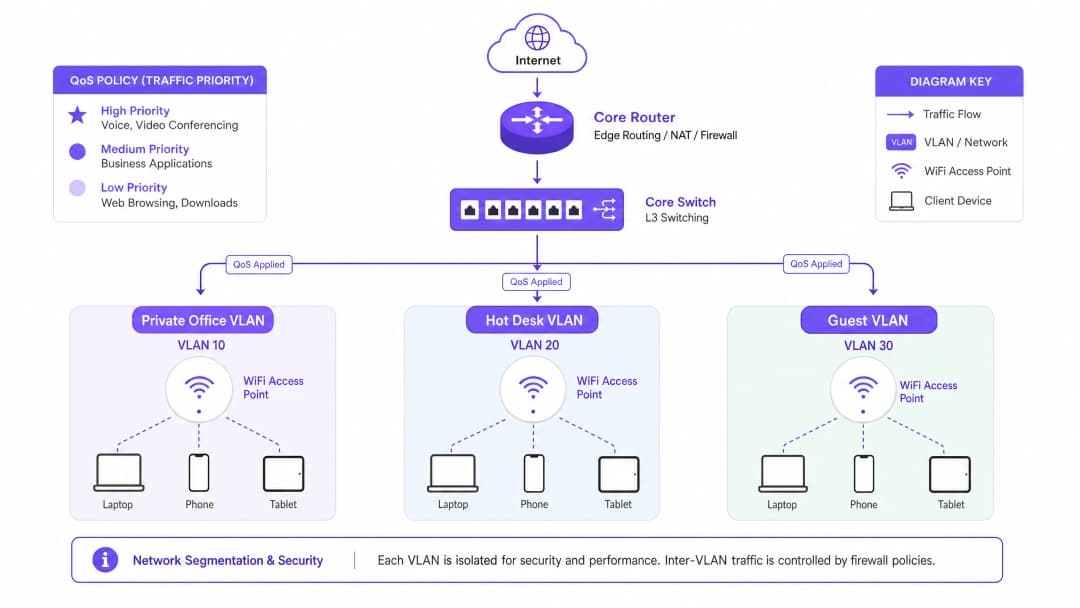
Effective bandwidth management is impossible without strict logical isolation of tenant groups. We recommend deploying a minimum of three distinct Virtual Local Area Networks (VLANs), mapped to separate SSIDs using enterprise-grade Cisco Wireless APs or similar hardware:
| VLAN ID | SSID Name | Target Audience | Authentication Mechanism | QoS Profile |
|---|---|---|---|---|
| VLAN 10 | CoWork_Private |
Private office tenants | WPA3-Enterprise (802.1X / Cloud RADIUS) | Platinum (Voice/Video priority) |
| VLAN 20 | CoWork_HotDesk |
Hot desk / flexible members | WPA3-Enterprise or WPA3-SAE with Portal | Gold (Business applications) |
| VLAN 30 | CoWork_Guest |
Day visitors / guests | Captive Portal via Guest WiFi | Bronze (Best effort / rate limited) |
By segmenting the network, administrators can apply tailored QoS profiles at the VLAN boundary, ensuring that guest traffic on VLAN 30 never crowds out business-critical traffic on VLANs 10 and 20. Implementing these security policies requires integration with a robust Network Access Control (NAC) solution to dynamically assign VLANs based on user credentials. For detailed guidance, see our complete guide: How to Implement 802.1X Authentication with Cloud RADIUS.
IEEE 802.11e and WiFi Multimedia (WMM)
At the wireless layer, QoS is governed by the IEEE 802.11e standard, known commercially as WiFi Multimedia (WMM). WMM replaces the legacy Distributed Coordination Function (DCF) with Enhanced Distributed Channel Access (EDCA). EDCA introduces four Access Categories (ACs), corresponding to different priority levels on the medium:
Voice (WMM-AC_VO) has the highest priority and is designed for VoIP and real-time interactive audio. It uses the shortest backoff timers to minimize latency. Video (WMM-AC_VI) has high priority and is optimized for video conferencing and streaming media, balancing low latency with high throughput. Best Effort (WMM-AC_BE) is the default category for standard web traffic, email and general applications. Background (WMM-AC_BK) has the lowest priority and is reserved for non-time-sensitive data transfers, system updates and background backups.
To maintain voice and video clarity in high-density environments, WMM must be enabled globally on all access points. In addition, DSCP (Differentiated Services Code Point) mappings must be configured so that wireless WMM categories are translated to wired IP packets as they traverse switches and routers.
-
Implementation Guide
Step-by-Step Traffic Shaping and QoS Deployment
Implementing bandwidth management in a coworking space requires a systematic approach. Follow these vendor-agnostic deployment steps to establish an enterprise-grade traffic-shaping strategy.
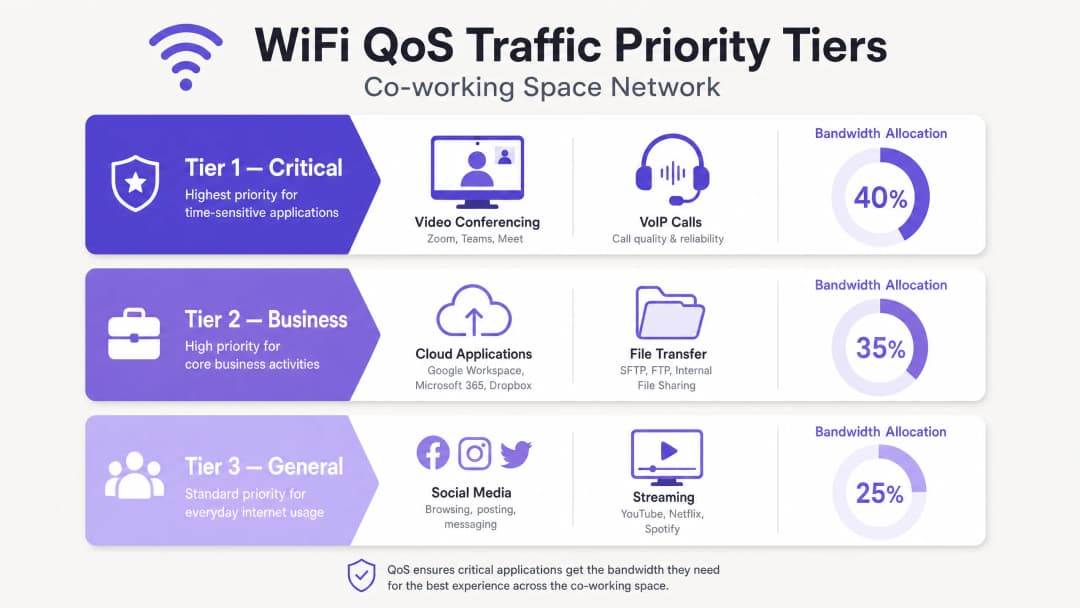
Step 1: Establish the WAN bandwidth budget. Before configuring internal limits, determine your total WAN throughput. For a typical 200-person coworking space, a symmetrical 1 Gbps / 1 Gbps fiber connection is recommended. Reserve a hard 10% overhead buffer at the WAN gateway to prevent interface saturation and bufferbloat. This leaves 900 Mbps of allocatable bandwidth. Step 2: Define traffic classes and priority queues. Configure Class-Based Weighted Fair Queueing (CBWFQ) or Low Latency Queueing (LLQ) on your core gateway/firewall. Define three primary classes based on source VLAN and application signatures. Tier 1 (Critical) allocates 40% guaranteed bandwidth to VoIP and UCaaS traffic, mapped to DSCP EF. Tier 2 (Business) allocates 35% to cloud applications and web traffic, mapped to DSCP AF41. Tier 3 (General/Guest) allocates 25% with a hard aggregate cap, mapped to DSCP CS1.
Step 3: Configure per-user rate limiting (dynamic bandwidth allocation). To prevent "bandwidth hogs" from degrading network quality, implement dynamic per-user rate limiting rather than static caps wherever possible. Dynamic limiting allows users to burst to higher speeds when the network is idle, but throttles them back to a guaranteed baseline during peak periods. For the hot-desk/flexible SSID, configure a dynamic limit of 50 Mbps download / 20 Mbps upload per client, with a guaranteed minimum of 10 Mbps symmetrical during peak usage. For the guest SSID, enforce a strict static cap of 10 Mbps download / 5 Mbps upload per client.
Step 4: Implement application-layer (Layer 7) filtering. Modern firewalls and APs leverage Deep Packet Inspection (DPI) to identify applications regardless of the ports they use. Configure Layer 7 rules to restrict peer-to-peer (P2P) file sharing, BitTorrent downloads, and personal cloud backups to a maximum of 2 Mbps per user. Ensure known UCaaS domains (e.g., *.zoom.us, *.microsoft.com) are automatically tagged as DSCP EF or AF41.
Got questions about your specific setup?
Our team works with venue operators, IT managers, and network engineers across 80,000 venues. Book a 20-minute call and we will show you how others like you solved it.
Best Practices
Rigorous RF Planning and Channel Reuse
High-density coworking spaces suffer from Co-Channel Interference (CCI) when multiple access points operate on the same channel. In a modern workspace, migrate legacy devices to the 5 GHz and 6 GHz bands. If 2.4 GHz must remain enabled for IoT, restrict it to a small number of specific APs using non-overlapping channels (1, 6, 11) at minimum transmit power. Deploy WiFi 6E or WiFi 7 to take advantage of the newly opened 6 GHz spectrum, which offers up to 14 additional 80 MHz channels and can eliminate CCI entirely. Stick to a 40 MHz channel width in the 5 GHz band to balance throughput against channel availability.
Airtime Fairness
Enable Airtime Fairness (ATF) on all enterprise-grade APs. ATF allocates all clients equal channel access time rather than an equal number of packets. This prevents slow legacy clients (operating on 802.11n or older standards) from monopolizing the wireless medium and dragging down the performance of modern high-speed WiFi 6/7 clients.
Continuous Analytics and Monitoring
Leverage enterprise-grade WiFi Analytics for deep insight into tenant behavior, device density and application usage. By analyzing historical traffic trends, IT managers can proactively adjust bandwidth allocations before physical bottlenecks occur. The same applies to Hospitality environments, Retail deployments and Transportation hubs, where multi-tenant wireless density is a constant operational challenge.
Troubleshooting and Risk Mitigation
Even with a robust QoS configuration, co-working networks will encounter performance anomalies. The table below provides a diagnostic matrix for the most common bandwidth-related failures.
| Symptom | Root Cause | Diagnostic Steps | Mitigation Action |
|---|---|---|---|
| Choppy Zoom/Teams calls during peak hours | Bufferbloat at the WAN gateway or DSCP mapping errors | Run a bufferbloat test from a client device; check switch port statistics for dropped egress packets | Enable LLQ for UCaaS traffic on the router; adjust the WAN overhead reservation from 10% to 15% |
| High latency and packet loss on the 5 GHz band | Co-Channel Interference (CCI) caused by excessive AP transmit power or overly wide channels | Conduct an RF site survey, or review the controller's channel map and interference metrics | Reduce channel width from 80 MHz to 40 MHz; enable Dynamic Channel Assignment (DCA) |
| A specific tenant reports slow speeds inside a private office | Physical obstruction or the client device sticking to a distant AP (sticky client) | Check the client's RSSI and connected band in the wireless controller dashboard | Enable 802.11k/r/v fast roaming; adjust the minimum basic rate to 12 Mbps or 24 Mbps |
| Guest network usage spikes, crowding out corporate tenants | Guest rate limits being bypassed, or Captive Portal session timeouts set too long | Verify aggregate bandwidth consumption of the guest VLAN in the firewall dashboard | Enforce strict per-user rate limits (10/5 Mbps) on the guest SSID; shorten session timeout to 4 hours |
ROI and Business Impact
Tenant Retention and Churn Reduction
The number one complaint in co-working spaces is poor network connectivity. In an industry with low switching costs and abundant flexible-space alternatives, just one week of unstable connectivity can prompt a high-value corporate tenant to terminate their lease. With a properly implemented QoS architecture, operators consistently report annual tenant churn falling from the industry average of 18-22% to below 8%, representing significant retained rental revenue.
New Revenue Through Premium Tiers
By leveraging a robust network core, coworking operators can transform their WiFi infrastructure from a cost center into a high-margin revenue stream. Operators can upsell tenants from standard plans to premium network packages, offering dedicated VLANs, private SSIDs, guaranteed symmetrical bandwidth, and static IP addresses for a monthly premium.
| Plan Tier | Features | Indicative Pricing |
|---|---|---|
| Standard | Shared hot-desk SSID, 50/20 Mbps, best-effort QoS, Captive Portal login | Included in base membership |
| Premium | Dedicated VLAN/SSID, 100/100 Mbps, Platinum QoS (VoIP priority), WPA3 | +$200 per month |
| Enterprise | Custom private SSID, symmetrical 200 Mbps, Cloud RADIUS integration, static IP | +$600 per month |
Operational Efficiency
By automating bandwidth allocation and traffic shaping, the daily volume of "slow network" IT support tickets can be reduced by up to 75%. This allows on-site community managers to focus on hospitality and sales rather than troubleshooting the network. The same principles apply to healthcare facilities and public-sector venues, where network reliability is operationally critical. For further reading on high-density wireless deployment strategies, see our guide: WiFi in Schools: The 2026 Guide for Administrators and IT.
-
Listen: The Technical Briefing Podcast
-
References
[1] Cisco Systems, "High Density WiFi Deployment Guide," 2025. [2] Internet Engineering Task Force (IETF), "Controlled Delay Active Queue Management (CoDel)," RFC 8289, 2018. [3] IEEE Standards Association, "IEEE 802.11e-2005 - Amendment 8: Medium Access Control (MAC) Quality of Service Enhancements," 2005. [4] Aruba Networks, "Airtime Fairness Technology Whitepaper," 2024.
Key Definitions
Bufferbloat
High latency and jitter caused by excessive buffering of packets in network equipment, particularly at the WAN boundary. When high-bandwidth, non-real-time traffic saturates these buffers, real-time packets (like VoIP and video) are delayed, causing severe performance degradation.
IT teams encounter bufferbloat when users complain of choppy video calls despite having high-speed fiber internet. It is mitigated by reserving a 10% WAN bandwidth overhead and implementing active queue management (AQM) like FQ-CoDel.
Quality of Service (QoS)
A set of technologies and techniques used to manage network resources by prioritizing specific traffic types. QoS mechanisms allow administrators to guarantee bandwidth, minimize latency, and control jitter for critical applications.
Essential in multi-tenant co-working spaces to ensure that real-time collaboration tools (Zoom, Teams) take precedence over background file transfers and recreational streaming.
WiFi Multimedia (WMM)
A WiFi Alliance interoperability certification based on the IEEE 802.11e standard. It provides Quality of Service (QoS) features to WiFi networks by prioritizing traffic into four Access Categories: Voice, Video, Best Effort, and Background.
Must be enabled globally on co-working access points to ensure that wireless devices can prioritize voice and video packets before they are transmitted over the air.
Differentiated Services Code Point (DSCP)
A 6-bit field in the header of an IP packet used to classify and prioritize network traffic at Layer 3. Standard markings include EF (Expedited Forwarding for voice) and AF (Assured Forwarding for video and business apps).
Used to maintain QoS priority as traffic moves from the wireless AP, across wired switches, and out through the WAN gateway router. DSCP markings must be preserved end-to-end for QoS to function correctly.
Airtime Fairness (ATF)
An enterprise wireless feature that allocates channel transmission time (airtime) equally among connected clients, regardless of their connection speed or wireless standard.
Prevents legacy or distant devices with poor signal strength from consuming excessive wireless medium time, protecting the throughput of modern WiFi 6/7 devices in high-density co-working environments.
Dynamic Bandwidth Allocation
A traffic shaping technique that dynamically adjusts a user's bandwidth limits based on real-time network utilization, allowing high burst speeds when the network is idle while enforcing strict baselines during peak hours.
Enables co-working operators to offer a responsive, high-speed user experience without risking total network saturation during peak business hours.
Co-Channel Interference (CCI)
Interference that occurs when two or more wireless access points in close proximity operate on the same frequency channel, forcing them to share airtime and drastically reducing overall wireless capacity.
A major issue in high-density co-working spaces. Mitigated by proper channel planning, reducing channel widths to 40 MHz, and utilizing the 6 GHz band in WiFi 6E/7 deployments.
Client Isolation
A security and performance feature on wireless access points that prevents connected wireless clients from communicating directly with each other or scanning other devices on the same subnet.
Mandatory for guest networks and hot-desking SSIDs to protect tenant security and eliminate unnecessary wireless broadcast traffic (like ARP and mDNS) from consuming airtime.
Worked Examples
A high-density co-working space spanning 15,000 square feet over two floors accommodates 250 active daily members, including 15 private office tenants. During peak hours (10:00 AM to 3:00 PM), users experience severe jitter and packet loss on Microsoft Teams and Zoom calls. The venue has a symmetric 500 Mbps fiber connection. Design a vendor-neutral QoS and bandwidth allocation strategy to resolve this issue.
To resolve the peak-hour latency and jitter, implement a three-pronged QoS strategy: WAN-level queueing, wireless traffic shaping, and logical segmentation.
WAN-Level Rate Limiting & Queueing: Set a WAN bandwidth limit on the gateway router to 450 Mbps (90% of the 500 Mbps circuit) to prevent bufferbloat. Configure Low Latency Queueing (LLQ) on the WAN interface with a strict priority queue of 50 Mbps for voice and video conferencing traffic (identified via Layer 7 DPI signatures for Zoom, Teams, and Webex), mapped to DSCP EF. Configure CBWFQ for the remaining 400 Mbps: Class-1 (Private Office VLAN 10) receives a 50% bandwidth guarantee (200 Mbps), burstable to 450 Mbps, mapped to DSCP AF41; Class-2 (Hot-Desk VLAN 20) receives a 35% guarantee (140 Mbps), burstable to 300 Mbps, mapped to DSCP AF21; Class-3 (Guest VLAN 30) receives a 15% guarantee (60 Mbps), capped strictly at 100 Mbps aggregate, mapped to DSCP CS1.
Wireless Layer Configuration (WMM & Roaming): Enable WiFi Multimedia (WMM) globally across all APs, mapping wireless voice and video queues directly to the wired DSCP EF and AF41 markings. Enforce Airtime Fairness (ATF) on all APs. Set the Minimum Basic Rate to 24 Mbps on the 5 GHz band and disable 2.4 GHz on 80% of the APs.
Per-User Rate Limiting: Apply dynamic per-user rate limiting on VLAN 20 (Hot-Desks): 30 Mbps download / 10 Mbps upload per client, burstable to 50 Mbps when total network utilization is below 60%. Apply strict static per-user limits on VLAN 30 (Guests): 10 Mbps download / 3 Mbps upload.
An enterprise co-working operator wants to upsell a high-value financial services tenant who requires a dedicated, highly secure network for 30 employees within a private office suite. They demand a guaranteed symmetric 100 Mbps throughput, a dedicated SSID, and strict isolation from all other tenants to comply with financial regulations. Detail the step-by-step configuration and deployment model to deliver this service using shared physical infrastructure.
To deliver this premium enterprise service securely and reliably on a shared infrastructure, utilize dynamic VLAN steering, dedicated SSID provisioning, and strict QoS bandwidth reservation.
Logical Network Segmentation & Security: Create a dedicated VLAN (VLAN 105) on the core switch and gateway firewall. Configure a dedicated SSID named CoWork_FinSecure broadcasted only by the access points in the vicinity of the tenant's private office suite. Secure the SSID using WPA3-Enterprise authentication integrated with a Cloud RADIUS server. Each tenant employee is assigned unique 802.1X credentials; upon successful authentication, the RADIUS server returns a Tunnel-Private-Group-ID attribute of 105, dynamically steering the user's device into VLAN 105. Configure strict ACLs on the gateway firewall to block all inter-VLAN traffic between VLAN 105 and any other tenant VLANs.
Bandwidth Reservation & QoS Profiling: On the WAN gateway, create a dedicated traffic class for VLAN 105. Configure a CBWFQ policy that guarantees a symmetric 100 Mbps of WAN throughput exclusively for VLAN 105. Set a hard traffic-shaping limit of 100 Mbps on VLAN 105 to prevent the tenant from exceeding their SLA. Within VLAN 105, enable QoS tagging translation: map incoming client DSCP tags (EF for VoIP, AF41 for video) directly to the corresponding WAN queues.
Client-Level Optimization: Enable client isolation on the CoWork_FinSecure SSID to prevent devices within the VLAN from scanning or communicating with each other, adding an extra layer of regulatory compliance.
During a large-scale tech conference hosted in a co-working space's event hall, 150 attendees connect to the Guest WiFi simultaneously. Within 30 minutes, the entire network grinds to a halt. Hot-desk members in other parts of the building cannot load basic web pages, and the venue's reception desk cannot process credit card payments. Diagnose the network failure and outline the immediate emergency mitigation steps and long-term architectural solution.
This is a classic broadcast storm and wireless medium starvation failure, compounded by a lack of WAN-level bandwidth isolation.
Diagnostic Analysis: 150 active clients on a single guest AP in the event hall saturate the wireless medium. If clients are connected on the 2.4 GHz band or using wide 80 MHz channels, co-channel interference (CCI) spikes, causing massive packet retransmissions. A flood of DHCP requests and broadcast traffic (ARP, mDNS) from the guest network saturates the CPU of the core router. The guest network lacks an aggregate bandwidth cap, allowing conference attendees' devices to consume the entire WAN circuit.
Immediate Emergency Mitigation (15-Minute Resolution): Log into the core firewall and immediately apply an aggregate bandwidth limit on the Guest VLAN (VLAN 30), capping it at 50 Mbps total. Set a strict per-user cap of 3 Mbps download / 1 Mbps upload on the Guest SSID. Enable Client Isolation on the Guest SSID to block peer-to-peer wireless traffic and stop broadcast packets from traversing the airwaves.
Long-Term Architectural Solution: Deploy dedicated high-density Access Points (WiFi 6E/7 APs with directional antennas) specifically for the event hall on a separate, dedicated VLAN (VLAN 40 - Event Space). Configure the core firewall to prioritize VLAN 90 (POS/Operations) with a guaranteed 10 Mbps (DSCP CS5) and VLAN 20 (Hot-Desks) with a guaranteed 200 Mbps. Apply a hard, non-burstable aggregate cap of 150 Mbps on the Event VLAN (VLAN 40).
Practice Questions
Q1. A co-working operator notices that their core gateway router's CPU utilization spikes to 95% every Tuesday and Thursday afternoon, coinciding with a drop in network speeds for all tenants. No large file transfers are active at the time. What is the most likely cause, and how should the network architect address it?
Hint: Look at the security and protocol settings on the guest and hot-desk networks. Spikes in CPU without high throughput often point to high packet-per-second (PPS) rates from broadcast traffic or device discovery protocols.
View model answer
The most likely cause is a broadcast storm or excessive multicast traffic (such as mDNS, ARP, or Bonjour discovery protocols) originating from the Guest and Hot-Desk SSIDs. In high-density environments with hundreds of devices, background discovery protocols can generate thousands of packets per second. Because broadcast packets must be processed by every device and the core gateway, this saturates the router's CPU without generating significant bandwidth utilization.
To address this: (1) Enable Client Isolation globally on the Guest and Hot-Desk SSIDs. This immediately blocks peer-to-peer wireless communication and prevents broadcast/multicast packets from being repeated across the wireless medium. (2) Enable IGMP Snooping on all switches to restrict multicast traffic only to the ports that actively request it, reducing switch and router CPU load. (3) Configure the wireless controller to drop ARP and other broadcast frames at the AP level, converting ARP requests to unicast where possible.
Q2. An IT manager wants to implement QoS for a co-working space but discovers their legacy switches do not support DSCP mapping, only basic Layer 2 CoS (Class of Service) 802.1p tagging. How should they adapt their QoS design to maintain traffic prioritization?
Hint: 802.1p CoS operates at Layer 2 (Ethernet frame), whereas DSCP operates at Layer 3 (IP header). When Layer 3 mapping is unavailable, prioritization must be maintained within the local broadcast domain using CoS values.
View model answer
When Layer 3 DSCP mapping is unsupported by edge switches, the IT manager must rely on Layer 2 802.1p Class of Service (CoS) tagging. Configure the wireless Access Points to map the wireless WMM Access Categories directly to Layer 2 802.1p CoS tags as traffic enters the wired network. For example: WMM-AC_VO (Voice) maps to CoS 6; WMM-AC_VI (Video) maps to CoS 5; WMM-AC_BE (Best Effort) maps to CoS 0. On the legacy switches, configure egress queuing based on CoS values using Weighted Round Robin (WRR) or Strict Priority queuing on the switch uplink ports, assigning CoS 6 and 5 to the highest-priority queues. At the core gateway router (which supports Layer 3), configure the inbound switchport to read the incoming Layer 2 CoS tags and re-mark them to corresponding Layer 3 DSCP values (e.g., CoS 6 to DSCP EF, CoS 5 to DSCP AF41) before routing the traffic over the WAN interface.
Q3. A co-working space has a 1 Gbps symmetric fiber connection. The operator wants to guarantee that a virtual reality (VR) development company occupying a private suite gets at least 200 Mbps symmetric throughput with less than 5ms latency. However, they also want to ensure that if the VR company is not using their bandwidth, other tenants can utilize it. What specific queuing and traffic shaping configuration should be applied on the WAN gateway?
Hint: Consider class-based queuing mechanisms that support both a guaranteed minimum (committed information rate) and a maximum limit, allowing borrowing of unused bandwidth from a parent pool.
View model answer
Implement Class-Based Weighted Fair Queueing (CBWFQ) with Hierarchical Token Bucket (HTB) on the WAN gateway. Set the parent shaper to 900 Mbps (enforcing the 10% overhead rule). For the VR Tenant Class (VLAN 150), configure a Committed Information Rate (CIR) of 200 Mbps (guaranteed bandwidth) and a Peak Information Rate (PIR) of 500 Mbps (maximum burst limit), assigned to a high-priority queue with low latency characteristics. For the Shared Tenant Class (VLANs 10, 20, 30), configure a CIR of 700 Mbps with a burst limit of 900 Mbps. Enable bandwidth sharing (borrowing) under the HTB scheduler so that when the VR company's utilization is below 200 Mbps, the unused capacity is automatically distributed among the other tenant classes based on their configured weights. As soon as the VR company initiates a high-throughput transfer, the scheduler immediately reclaims the bandwidth up to the guaranteed 200 Mbps, preempting other traffic classes without dropping active connections.
Frequently asked questions
Why is Quality of Service (QoS) critical in multi-tenant coworking wireless networks?
Coworking spaces aggregate hundreds of independent professionals, remote teams, and high-bandwidth businesses sharing a common wireless medium. Without QoS, bandwidth-intensive activities such as raw video uploads or software updates consume disproportionate airtime, starving latency-sensitive applications like Zoom, Microsoft Teams, and VoIP. Implementing IEEE 802.11e WiFi Multimedia (WMM) and upstream Differentiated Services Code Point (DSCP) traffic shaping guarantees priority queueing for real-time collaboration tools, preventing jitter and dropped connections.
How does WMM (WiFi Multimedia / 802.11e) prioritize traffic over the wireless airtime?
WMM classifies wireless frames into four Access Categories (AC): Voice (AC_VO), Video (AC_VI), Best Effort (AC_BE), and Background (AC_BK). Each category uses distinct Enhanced Distributed Channel Access (EDCA) parameters - namely Arbitrary Inter-Frame Space Number (AIFSN) and Contention Window (CWmin/CWmax) timers. High-priority voice and video frames wait substantially shorter backoff intervals before transmitting, securing transmission rights ahead of background bulk downloads even during peak radio saturation.
What is the optimal oversubscription ratio for commercial coworking WAN connections?
In modern coworking environments, standard provisioning utilizes a 6:1 to 8:1 WAN oversubscription ratio for general hot-desk members, and a tighter 3:1 to 4:1 ratio for dedicated private office suites. Because member bandwidth usage is bursty rather than continuous, dynamic Token Bucket rate limiting and Fair Queueing (such as FQ-CoDel or Cake) ensure full utilization of the ISP uplink while guaranteeing that no single tenant monopolizes available throughput.
How do network engineers mitigate bufferbloat in congested coworking environments?
Bufferbloat occurs when oversized network buffers fill up during high-throughput downloads, creating hundreds of milliseconds of latency for real-time packets. Network engineers eliminate bufferbloat by enabling Active Queue Management (AQM) algorithms like FQ-CoDel or CAKE on edge routers and firewalls. AQM intelligently drops or marks packets before buffers saturate, keeping round-trip latency under 15ms even when the WAN connection operates at 100% link utilization.
Should coworking spaces configure per-user or per-SSID bandwidth limits?
Network architects recommend implementing per-user dynamic rate limiting rather than aggregate per-SSID caps. A single per-SSID limit allows a small cluster of devices to exhaust the total pool, whereas per-user limits ensure equitable airtime distribution across all connected endpoints. Advanced deployments combine per-user limits with dynamic role-based VLAN steering, automatically assigning higher bandwidth allowances to private office leases and enterprise tenants based on RADIUS authentication attributes.
How does Purple integrate with coworking networks to streamline bandwidth management and tenant access?
Purple integrates with enterprise wireless controllers (Cisco Meraki, HPE Aruba, Ruckus, Ubiquiti UniFi) to automate tenant and visitor network onboarding. Purple assigns members to role-specific VLANs and bandwidth tiers via 802.1X Passpoint or captive portal authentication, enforces fair-use policies, captures tenant feedback, and delivers real-time spatial analytics on desk occupancy and meeting room utilization without adding operational friction.
Continue reading in this series
Why hotel-style guest WiFi fails in residential buildings
You will be able to diagnose why residents in Multi-Family properties, Student Housing, and MDUs keep reporting WiFi faults, and choose the authentication model that fixes them. The answer is a per-household iPSK key on your existing access points, with a separate captive portal network kept for visitors.
Designing WiFi Networks for Multi-Tenant Office Buildings
This guide provides IT managers, network architects, and CTOs with a vendor-neutral blueprint for designing scalable, secure, and isolated WiFi networks across multi-tenant office buildings. It covers VLAN segmentation under IEEE 802.1Q, Dynamic VLAN Assignment via 802.1X and RADIUS, RF planning for high-density environments, and compliance considerations under CCPA/CPRA and PCI-DSS. Venue operators and building managers will find actionable architecture guidance, real-world case studies, and configuration pitfalls to avoid before deployment.
Mean time to innocence: how to prove it's not the WiFi
Mean time to innocence (MTTI) is the critical metric defining how long IT teams spend proving a network issue is not their fault. This guide details a five-step observability methodology to eliminate the blame game in multi-tenant environments, replacing finger-pointing with shared evidence to drive down mean time to resolution (MTTR).
Got questions about your specific setup?
Our team works with venue operators, IT managers, and network engineers across 80,000 venues. Book a 20-minute call and we will show you how others like you solved it.