
पारिवारिक-अनुकूल WiFi: शॉपिंग सेंटरों के लिए सर्वोत्तम तौर-तरीके
यह तकनीकी संदर्भ गाइड रिटेल परिवेशों में गेस्ट WiFi नेटवर्क पर श्रेणी-आधारित URL फ़िल्टरिंग लागू करने के लिए व्यावहारिक कार्यप्रणाली प्रदान करती है। यह अनुपालन सुनिश्चित करने और ब्रांड की प्रतिष्ठा की रक्षा करने के लिए नेटवर्क आर्किटेक्चर, नीति परिभाषा और जोखिम न्यूनीकरण रणनीतियों का विवरण देती है।
Video overview
इस गाइड को सुनें
पॉडकास्ट ट्रांसक्रिप्ट देखें
हमारी मुख्य श्रृंखला का हिस्सा: गेस्ट WiFi गाइड →
कार्यकारी सारांश
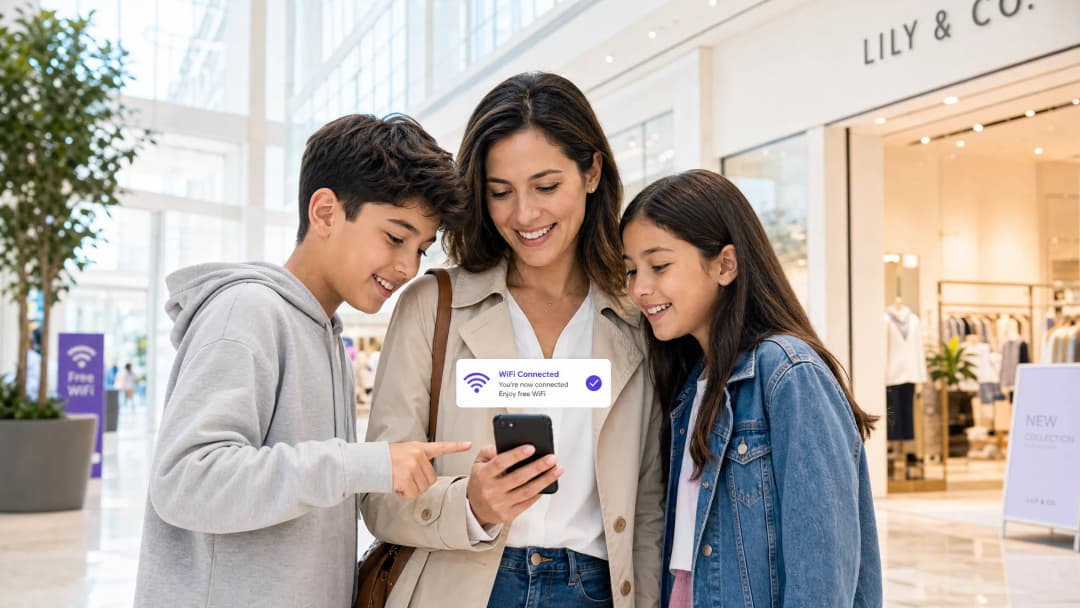
रिटेल परिवेश में सार्वजनिक WiFi प्रदान करने के लिए निर्बाध कनेक्टिविटी और मजबूत जोखिम शमन के बीच संतुलन की आवश्यकता होती है। शॉपिंग सेंटरों के लिए, पारिवारिक अनुकूल WiFi लागू करना केवल एक विशेषता नहीं है - यह स्थल संचालन के लिए एक मौलिक आवश्यकता है। यह गाइड अतिथि नेटवर्क पर श्रेणी आधारित URL फ़िल्टरिंग के लिए तकनीकी वास्तुकला, परिनियोजन पद्धतियों और परिचालन सर्वोत्तम प्रथाओं का विवरण देती है। DNS-स्तरीय सामग्री नियंत्रण लागू करके, IT प्रबंधक और नेटवर्क आर्किटेक्ट अनुपालन सुनिश्चित कर सकते हैं, ब्रांड की प्रतिष्ठा की रक्षा कर सकते हैं, और सभी आयु समूहों के लिए एक सुरक्षित ब्राउज़िंग वातावरण प्रदान कर सकते हैं। इसके अलावा, एक उचित रूप से संरचित Guest WiFi परिनियोजन एक लागत केंद्र को एक रणनीतिक संपत्ति में बदल देता है, जो प्रथम-पक्ष डेटा को कैप्चर करता है जो वफादारी और राजस्व को बढ़ाता है, जबकि दुर्भावनापूर्ण ट्रैफ़िक और अनुपयुक्त सामग्री पहुंच के जोखिम को कम करता है।
तकनीकी गहन विश्लेषण
DNS फ़िल्टरिंग आर्किटेक्चर
पारिवारिक अनुकूल नेटवर्क के केंद्र में श्रेणी आधारित DNS फ़िल्टरिंग है। एप्लिकेशन-लेयर URL फ़िल्टरिंग या डीप पैकेट इंस्पेक्शन (DPI) के विपरीत, जिसके लिए महत्वपूर्ण प्रोसेसिंग की आवश्यकता होती है और अक्सर SSL एन्क्रिप्शन टूट जाता है, DNS फ़िल्टरिंग नेटवर्क लेयर पर काम करती है। जब कोई क्लाइंट डिवाइस किसी डोमेन को हल करने का प्रयास करता है, तो क्वेरी को क्लाउड-आधारित DNS फ़िल्टरिंग इंजन द्वारा बीच में ही रोक दिया जाता है। इंजन श्रेणीबद्ध URL के लगातार अपडेट किए जाने वाले डेटाबेस के विरुद्ध अनुरोधित डोमेन की जाँच करता है। यदि डोमेन किसी प्रतिबंधित श्रेणी (जैसे मैलवेयर, वयस्क सामग्री) में आता है, तो रिज़ॉल्यूशन को अवरुद्ध कर दिया जाता है, और उपयोगकर्ता को एक ब्लॉक पेज पर रीडायरेक्ट कर दिया जाता है।
यह दृष्टिकोण उच्च थ्रूपुट और कम विलंबता प्रदान करता है, जिससे यह शॉपिंग सेंटरों जैसे घने वातावरण के लिए अत्यधिक स्केलेबल बन जाता है जहाँ हजारों समवर्ती कनेक्शन आम हैं। इसे सही ढंग से डिजाइन करने के लिए, What is DNS Filtering? How to Block Harmful Content on Guest WiFi को समझना अत्यंत महत्वपूर्ण है।

नेटवर्क विभाजन और अलगाव
कॉरपोरेट इन्फ्रास्ट्रक्चर से अतिथि नेटवर्क का पूर्ण अलगाव एक मौलिक सुरक्षा आवश्यकता है। अतिथि SSID को एक स्वतंत्र DHCP दायरे के साथ एक समर्पित VLAN पर काम करना चाहिए। इंटरनेट पर पहुँचने से पहले ट्रैफ़िक को DNS फ़िल्टरिंग इंजन के माध्यम से रूट किया जाना चाहिए। यह विभाजन अतिथि डिवाइस के साथ समझौता होने की स्थिति में पार्श्व गति को रोकता है और यह सुनिश्चित करता है कि अतिथि ट्रैफ़िक नीतियां अनजाने में बैक-ऑफिस संचालन को प्रभावित न करें।
एन्क्रिप्शन मानक और प्रमाणीकरण
वायरलेस इन्फ्रास्ट्रक्चर के लिए, robust एन्क्रिप्शन के लिए WPA3 वर्तमान मानक है, जो pre-shared keys पर ऑफलाइन डिक्शनरी हमलों से बचाता है। हालांकि WPA2 अभी भी प्रचलित है, नए डिप्लॉयमेंट में WPA3 सपोर्ट अनिवार्य होना चाहिए। ऑथेंटिकेशन को आमतौर पर Captive Portal के माध्यम से हैंडल किया जाता है, जो दोहरा उद्देश्य पूरा करता है: सेवा की शर्तों की स्वीकृति और डेटा कैप्चर। इसे एक WiFi Analytics प्लेटफॉर्म के साथ एकीकृत करने से वेन्यू ऑपरेटरों को GDPR और अन्य क्षेत्रीय गोपनीयता ढांचे के अनुपालन में सहमति-आधारित फर्स्ट-पार्टी डेटा एकत्र करने की अनुमति मिलती है।
अपने विशिष्ट सेटअप को लेकर कोई सवाल हैं?
हमारी टीम 80,000 से अधिक वेन्यू में वेन्यू ऑपरेटरों, IT मैनेजरों और नेटवर्क इंजीनियरों के साथ काम करती है। 20 मिनट का कॉल बुक करें और हम आपको दिखाएंगे कि आपके जैसे अन्य लोगों ने इसे कैसे हल किया।
कार्यान्वयन मार्गदर्शिका (Implementation Guide)
वैध ट्रैफ़िक में व्यवधान को कम करने के लिए श्रेणी-आधारित फ़िल्टरिंग को लागू करने के लिए चरणबद्ध दृष्टिकोण की आवश्यकता होती है।
1. ऑडिट और बेसलाइन
ब्लॉकिंग नियमों को लागू करने से पहले, उचित VLAN आइसोलेशन की पुष्टि करने के लिए मौजूदा नेटवर्क आर्किटेक्चर का ऑडिट करें। दो से चार सप्ताह के लिए 'मॉनिटरिंग मोड' में DNS फ़िल्टरिंग इंजन को डिप्लॉय करें। यह बेसलाइन अवधि गेस्ट नेटवर्क पर वास्तविक ट्रैफ़िक पैटर्न में विजिबिलिटी प्रदान करती है, जिससे IT टीमों को उन वैध सेवाओं की पहचान करने में मदद मिलती है जो अनजाने में गलत श्रेणी में आ सकती हैं।
2. श्रेणी नीति (Category Policy) को परिभाषित करना
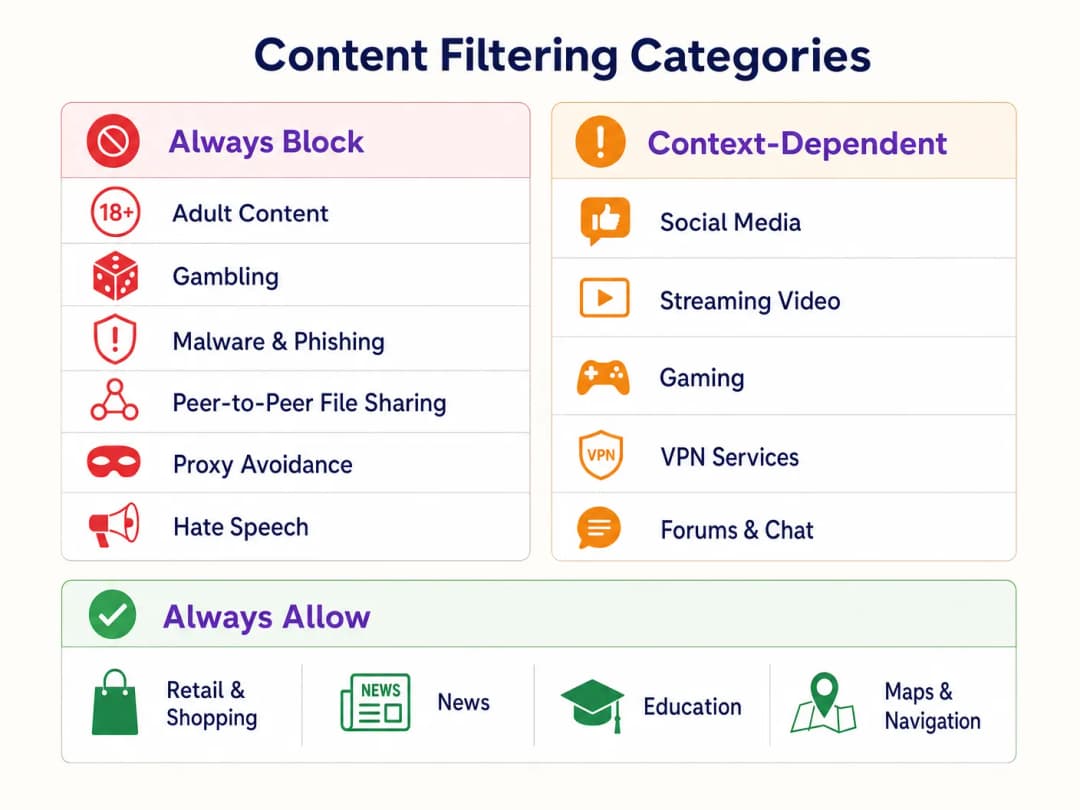
एक स्तरीय नीति ढांचा स्थापित करें:
- हमेशा ब्लॉक करें (Always Block): एडल्ट कंटेंट, गैंबलिंग, मैलवेयर, फ़िशिंग, पीयर-टू-पीयर (P2P) फ़ाइल शेयरिंग और प्रॉक्सी अवॉइडेंस टूल्स।
- संदर्भ-निर्भर (Context-Dependent): सोशल मीडिया, स्ट्रीमिंग वीडियो और गेमिंग। इसके लिए वेन्यू के परिचालन उद्देश्यों (जैसे बैंडविड्थ संरक्षण बनाम ड्वेल टाइम को बढ़ावा देना) के साथ संरेखण की आवश्यकता होती है।
- हमेशा अनुमति दें (Always Allow): Retail डोमेन, समाचार, शिक्षा और नेविगेशन।
3. DNS over HTTPS (DoH) को एड्रेस करना
आधुनिक ब्राउज़र तेजी से DNS over HTTPS (DoH) को डिफॉल्ट बना रहे हैं, DNS क्वेरीज़ को एन्क्रिप्ट कर रहे हैं और नेटवर्क-स्तरीय फ़िल्टरिंग को बायपास कर रहे हैं। फ़िल्टरिंग नीति को लागू करने के लिए, पेरिमीटर फ़ायरवॉल को ज्ञात DoH प्रदाताओं (जैसे Cloudflare का 1.1.1.1, Google का 8.8.8.8) पर आउटबाउंड पोर्ट 443 ट्रैफ़िक को ब्लॉक करने के लिए कॉन्फ़िगर किया जाना चाहिए। यह क्लाइंट डिवाइस को नेटवर्क-प्रदान किए गए DNS रिज़ॉल्वर पर वापस जाने के लिए मजबूर करता है।
4. प्रवर्तन और अपवाद हैंडलिंग (Enforcement and Exception Handling)
मॉनिटरिंग से एन्फोर्समेंट मोड में संक्रमण करें। एक स्पष्ट, ब्रांडेड ब्लॉक पेज कॉन्फ़िगर करें जो उपयोगकर्ता को सूचित करता है कि कंटेंट को क्यों प्रतिबंधित किया गया था और गलत पॉजिटिव की रिपोर्ट करने के लिए एक तंत्र प्रदान करता है। रिटेल किरायेदारों या वेन्यू प्रबंधन द्वारा अनुरोधित डोमेन की समीक्षा करने और उन्हें व्हाइटलिस्ट करने के लिए एक प्रलेखित वर्कफ़्लो स्थापित करें।
सर्वोत्तम प्रथाएं (Best Practices)
- सक्रिय संचार (Proactive Communication): रिटेल किरायेदारों के परिचालन अनुप्रयोगों में व्यवधान से बचने के लिए प्रवर्तन से पहले उन्हें फ़िल्टरिंग नीति के बारे में सूचित करें।
- नियमित नीति समीक्षा (Regular Policy Reviews): खतरे का परिदृश्य और इंटरनेट उपयोग के पैटर्न विकसित होते रहते हैं। श्रेणी नीति और फ़िल्टरिंग इंजन के डेटाबेस की सटीकता की त्रैमासिक समीक्षा निर्धारित करें।* Captive Portal का लाभ उठाएं: Captive Portal का उपयोग केवल एक्सेस कंट्रोल के लिए नहीं, बल्कि एक रणनीतिक टचपॉइंट के रूप में करें। सुनिश्चित करें कि पोर्टल डिज़ाइन वेन्यू के ब्रांड के अनुरूप हो और कंटेंट प्रतिबंधों के संबंध में उपयोग की शर्तों को स्पष्ट रूप से बताता हो।
- बैंडविड्थ उपयोग की निगरानी करें: हालांकि DNS फ़िल्टरिंग विशिष्ट कंटेंट तक पहुंच को प्रतिबंधित करती है, फिर भी बैंडविड्थ प्रबंधन आवश्यक है। संसाधनों का समान वितरण सुनिश्चित करने के लिए प्रति-क्लाइंट रेट लिमिटिंग लागू करें, विशेष रूप से उच्च-घनत्व वाले क्षेत्रों में। परफॉर्मेंस को ऑप्टिमाइज़ करने के बारे में अधिक जानकारी हमारे इस गाइड में पढ़ें: Office Wi-Fi: Optimize Your Modern Office Wi-Fi Network।
समस्या निवारण (Troubleshooting) और जोखिम शमन
ओवर-ब्लॉकिंग (False Positives)
सबसे आम विफलता मोड एक अत्यधिक आक्रामक प्रारंभिक पॉलिसी है जो वैध डोमेन को ब्लॉक कर देती है। शमन के लिए बेसलाइन ट्रैफ़िक की प्रारंभिक निगरानी चरण और एक त्वरित व्हाइटलिस्टिंग प्रक्रिया पर भरोसा करें।
DoH बाईपास
यदि उपयोगकर्ता ब्लॉक की गई कंटेंट तक सफलतापूर्वक पहुँच रहे हैं, तो सत्यापित करें कि ज्ञात DoH रिज़ॉल्वर को ब्लॉक करने वाले फ़ायरवॉल नियम सक्रिय और अपडेटेड हैं। DoH को ब्लॉक करने में विफलता नेटवर्क-स्तरीय DNS फ़िल्टरिंग को अप्रभावी बना देती है।
Captive Portal समस्याएं
जटिल RF विशेषताओं वाले वातावरण में, डिवाइस Captive Portal ऑथेंटिकेशन को पूरा करने के लिए पर्याप्त समय तक कनेक्शन बनाए रखने में संघर्ष कर सकते हैं। पर्याप्त AP घनत्व और इष्टतम चैनल योजना सुनिश्चित करें। विस्तृत RF योजना रणनीतियों के लिए Wi-Fi Frequencies: A Guide to Wi-Fi Frequencies in 2026 देखें।
ROI और व्यावसायिक प्रभाव
DNS फ़िल्टरिंग के माध्यम से फ़ैमिली-फ्रेंडली WiFi लागू करना मापने योग्य व्यावसायिक मूल्य प्रदान करता है:
- जोखिम शमन: वेन्यू के नेटवर्क पर अवैध या अनुचित कंटेंट तक पहुँच से जुड़े विनियामक जुर्मानों और प्रतिष्ठा को होने वाले नुकसान की संभावना को काफी कम करता है।
- बैंडविड्थ ऑप्टिमाइज़ेशन: P2P फ़ाइल शेयरिंग और अनधिकृत स्ट्रीमिंग वीडियो को ब्लॉक करने से वैध उपयोग के लिए बैंडविड्थ सुरक्षित रहती है, जिससे महंगे सर्किट अपग्रेड की आवश्यकता टल जाती है।
- बेहतर डेटा कैप्चर: एक सुरक्षित, विश्वसनीय गेस्ट नेटवर्क Captive Portal पर उच्च ऑप्ट-इन दरों को प्रोत्साहित करता है, जो लक्षित मार्केटिंग अभियानों के लिए वेन्यू के CRM को व्यावहारिक फर्स्ट-पार्टी डेटा से समृद्ध करता है।
- किरायेदार संतुष्टि: एक स्वच्छ, उच्च-प्रदर्शन नेटवर्क वातावरण प्रदान करना रिटेल किरायेदारों की डिजिटल पहलों का समर्थन करता है और समग्र ग्राहक अनुभव को बढ़ाता है।
डेप्लॉयमेंट रणनीतियों और सामान्य गलतियों के बारे में अधिक जानकारी के लिए नीचे हमारा तकनीकी ब्रीफिंग पॉडकास्ट सुनें:
मुख्य परिभाषाएं
DNS फ़िल्टरिंग
वर्गीकृत डेटाबेस के आधार पर डोमेन नामों को IP पतों में बदलने से रोककर विशिष्ट वेबसाइटों तक पहुंच को ब्लॉक करने की प्रक्रिया।
पैमाने पर पारिवारिक-अनुकूल सामग्री नीतियों को कुशलतापूर्वक लागू करने का प्राथमिक तंत्र।
VLAN आइसोलेशन
नेटवर्क ट्रैफ़िक को तार्किक रूप से अलग-अलग ब्रॉडकास्ट डोमेन में विभाजित करने का अभ्यास।
सुरक्षा के लिए आवश्यक, यह सुनिश्चित करना कि गेस्ट ट्रैफ़िक कॉर्पोरेट या बैक-ऑफिस सिस्टम के साथ इंटरैक्ट न कर सके।
Captive Portal
एक वेब पेज जिसे किसी उपयोगकर्ता को सार्वजनिक नेटवर्क तक पहुंच प्रदान करने से पहले देखना और उसके साथ इंटरैक्ट करना आवश्यक होता है।
सेवा की शर्तों की स्वीकृति और सहमति-आधारित फ़र्स्ट-पार्टी डेटा एकत्र करने के लिए उपयोग किया जाता है।
DNS over HTTPS (DoH)
HTTPS प्रोटोकॉल के माध्यम से रिमोट डोमेन नेम सिस्टम रिज़ॉल्यूशन करने के लिए एक प्रोटोकॉल।
नेटवर्क प्रशासकों के लिए एक महत्वपूर्ण चुनौती क्योंकि यह DNS प्रश्नों को एन्क्रिप्ट करता है, जिससे मानक नेटवर्क-स्तरीय फ़िल्टरिंग बाईपास हो जाती है।
WPA3
WiFi प्रोटेक्टेड एक्सेस की तीसरी पीढ़ी, जो बेहतर एन्क्रिप्शन और ऑफ़लाइन डिक्शनरी हमलों के खिलाफ सुरक्षा प्रदान करती है।
वायरलेस नेटवर्क को सुरक्षित करने के लिए वर्तमान मानक, विशेष रूप से सार्वजनिक या गेस्ट SSID के लिए महत्वपूर्ण।
फ़ॉल्स पॉजिटिव
सामग्री फ़िल्टरिंग के संदर्भ में, एक वैध वेबसाइट जो फ़िल्टरिंग इंजन द्वारा गलत तरीके से वर्गीकृत और ब्लॉक की जाती है।
स्थल संचालन या किरायेदार व्यवसायों के लिए व्यवधान को कम करने के लिए एक उत्तरदायी व्हाइटलिस्टिंग प्रक्रिया की आवश्यकता होती है।
डीप पैकेट इंस्पेक्शन (DPI)
कंप्यूटर नेटवर्क पैकेट फ़िल्टरिंग का एक रूप जो निरीक्षण बिंदु से गुजरते समय पैकेट के डेटा भाग की जांच करता है।
DNS फ़िल्टरिंग की तुलना में उच्च-घनत्व वाले गेस्ट नेटवर्क के लिए अक्सर बहुत अधिक संसाधन-गहन होता है।
फ़र्स्ट-पार्टी डेटा
वह जानकारी जो एक कंपनी सीधे अपने ग्राहकों से एकत्र करती है और उसकी मालिक होती है।
गेस्ट WiFi परिनियोजन के लिए एक प्रमुख ROI चालक, जिसे उपयोगकर्ता की सहमति से captive portal के माध्यम से कैप्चर किया जाता है।
हल किए गए उदाहरण
150 रिटेल इकाइयों वाले एक बड़े शॉपिंग सेंटर को नेटवर्क कंजेशन और खुले गेस्ट WiFi पर अनुचित सामग्री तक पहुंच के संबंध में माता-पिता से शिकायतों का सामना करना पड़ रहा है।
- गेस्ट SSID के लिए VLAN आइसोलेशन लागू करें। 2. क्लाउड-आधारित DNS फ़िल्टरिंग इंजन तैनात करें। 3. एडल्ट, गैंबलिंग, मैलवेयर और P2P श्रेणियों के लिए एक सख्त ब्लॉक नीति कॉन्फ़िगर करें। 4. फ़ायरवॉल पर आउटबाउंड DoH ट्रैफ़िक को ब्लॉक करें। 5. एक captive portal लागू करें जिसमें सेवा की शर्तों को स्वीकार करना आवश्यक हो।
एक होटल IT मैनेजर को सार्वजनिक क्षेत्रों में पारिवारिक-अनुकूल WiFi लागू करने की आवश्यकता है, लेकिन यह सुनिश्चित करना चाहिए कि कॉर्पोरेट मेहमान अभी भी आवश्यक VPN सेवाओं तक पहुंच सकें।
- एडल्ट, मैलवेयर और गैंबलिंग श्रेणियों को ब्लॉक करने वाली आधारभूत नीति के साथ DNS फ़िल्टरिंग तैनात करें। 2. फ़िल्टरिंग नीति में 'VPN Services' श्रेणी को स्पष्ट रूप से अनुमति दें। 3. किसी भी विशिष्ट कॉर्पोरेट VPN एंडपॉइंट की पहचान करने के लिए ट्रैफ़िक लॉग की निगरानी करें जो गलत श्रेणी में वर्गीकृत हो सकते हैं और उन्हें सक्रिय रूप से व्हाइटलिस्ट करें।
अभ्यास प्रश्न
Q1. एक रिटेल किरायेदार शिकायत करता है कि उनका नया इन्वेंट्री प्रबंधन वेब एप्लिकेशन शॉपिंग सेंटर के गेस्ट नेटवर्क पर ब्लॉक किया जा रहा है। तत्काल अगला कदम क्या है?
संकेत: फ़ॉल्स-पॉजिटिव रिज़ॉल्यूशन वर्कफ़्लो पर विचार करें।
मॉडल उत्तर देखें
यह पहचान करने के लिए DNS फ़िल्टरिंग लॉग की समीक्षा करें कि किरायेदार का एप्लिकेशन डोमेन वर्तमान में किस श्रेणी में असाइन किया गया है। यदि यह एक फ़ॉल्स पॉजिटिव है (उदा. गलत तरीके से 'Proxy Avoidance' के रूप में वर्गीकृत), तो विशिष्ट डोमेन को वैश्विक व्हाइटलिस्ट में जोड़ें और किरायेदार को सूचित करें।
Q2. एक नए DNS फ़िल्टरिंग परिनियोजन के मॉनिटरिंग चरण के दौरान, आप Cloudflare के 1.1.1.1 पर ट्रैफ़िक की एक बड़ी मात्रा देखते हैं। यह क्या दर्शाता है और आपको इस पर क्या प्रतिक्रिया देनी चाहिए?
संकेत: एन्क्रिप्टेड DNS प्रोटोकॉल के बारे में सोचें।
मॉडल उत्तर देखें
यह दर्शाता है कि क्लाइंट डिवाइस नेटवर्क के DNS रिज़ॉल्वर को बायपास करने के लिए DNS over HTTPS (DoH) का उपयोग कर रहे हैं। आपको मानक DNS पर वापस जाने के लिए मजबूर करने हेतु ज्ञात DoH प्रदाता IP पतों पर आउटबाउंड पोर्ट 443 ट्रैफ़िक को ब्लॉक करने के लिए पेरिमीटर फ़ायरवॉल को कॉन्फ़िगर करना होगा।
Q3. एक स्टेडियम के IT डायरेक्टर पारिवारिक-अनुकूल WiFi लागू करना चाहते हैं, लेकिन वे 50,000 समवर्ती उपयोगकर्ताओं वाले मैच के दिन सभी ट्रैफ़िक का निरीक्षण करने के प्रदर्शन प्रभाव के बारे में चिंतित हैं। आप किस आर्किटेक्चर की सिफारिश करते हैं?
संकेत: नेटवर्क-लेयर बनाम एप्लीकेशन-लेयर फ़िल्टरिंग की तुलना करें।
मॉडल उत्तर देखें
ऑन-प्रिमाइसेस डीप पैकेट इंस्पेक्शन (DPI) के बजाय क्लाउड-आधारित DNS फ़िल्टरिंग की सिफारिश करें। DNS फ़िल्टरिंग केवल प्रारंभिक डोमेन रिज़ॉल्यूशन अनुरोध को बीच में रोकता है, जिससे नगण्य विलंबता (latency) जुड़ती है, जबकि DPI को प्रत्येक पैकेट के पेलोड का निरीक्षण करने के लिए महत्वपूर्ण प्रोसेसिंग ओवरहेड की आवश्यकता होती है, जो स्टेडियम-घनत्व के लोड के तहत बाधा बन जाएगा।
इस श्रृंखला में आगे पढ़ें
Guest WiFi पर समय और बैंडविड्थ प्रतिबंध कैसे लागू करें
एंटरप्राइज guest WiFi नेटवर्क पर समय और बैंडविड्थ प्रतिबंधों को लागू करने पर एक आधिकारिक तकनीकी संदर्भ मार्गदर्शिका। यह मार्गदर्शिका IT लीडर्स को नेटवर्क प्रदर्शन, सुरक्षा अनुपालन और आगंतुक अनुभव को संतुलित करने में मदद करने के लिए व्यावहारिक आर्किटेक्चरल ब्लूप्रिंट, वेंडर-न्यूट्रल कॉन्फ़िगरेशन और वास्तविक दुनिया के केस स्टडी प्रदान करती है।
सुरक्षित अतिथि एक्सेस: अनमैनेज्ड डिवाइसों के लिए NAC लागू करना
यह आधिकारिक तकनीकी संदर्भ गाइड अनमैनेज्ड अतिथि डिवाइसों को सुरक्षित करने के लिए नेटवर्क एक्सेस कंट्रोल (NAC) लागू करने के आर्किटेक्चर, डिप्लॉयमेंट और अनुपालन संबंधी विचारों का विवरण देती है। यह IT लीडर्स को कॉर्पोरेट इंफ्रास्ट्रक्चर से समझौता किए बिना सुरक्षित अतिथि एक्सेस प्राप्त करने के लिए कार्रवाई योग्य मार्गदर्शन प्रदान करती है।
सुरक्षित Guest WiFi नेटवर्क: सर्वोत्तम अभ्यास और कार्यान्वयन
यह आधिकारिक तकनीकी संदर्भ मार्गदर्शिका सुरक्षित एंटरप्राइज guest WiFi को तैनात करने के लिए आवश्यक आर्किटेक्चर, ऑथेंटिकेशन और परिचालन नियंत्रणों की रूपरेखा तैयार करती है। यह IT लीडर्स के लिए नेटवर्क सेगमेंटेशन लागू करने, बैंडविड्थ प्रबंधित करने और डेटा कैप्चर को अधिकतम करते हुए अनुपालन सुनिश्चित करने के लिए व्यावहारिक सर्वोत्तम अभ्यास प्रदान करती है।
अपने विशिष्ट सेटअप को लेकर कोई सवाल हैं?
हमारी टीम 80,000 से अधिक वेन्यू में वेन्यू ऑपरेटरों, IT मैनेजरों और नेटवर्क इंजीनियरों के साथ काम करती है। 20 मिनट का कॉल बुक करें और हम आपको दिखाएंगे कि आपके जैसे अन्य लोगों ने इसे कैसे हल किया।