
Family-Friendly WiFi: Best Practices for Shopping Malls
This technical reference guide provides actionable methodologies for implementing category-based URL filtering on guest WiFi networks in retail environments. It details network architecture, policy definition, and risk mitigation strategies to ensure compliance and protect brand reputation.
Video overview
Listen to this guide
View podcast transcript
Part of our core series: Guest WiFi Guide →
Executive Summary
Providing public WiFi in retail environments requires a balance between seamless connectivity and robust risk mitigation. For shopping centers, implementing family-friendly WiFi is not just a feature - it is a fundamental requirement for venue operations. This guide details the technical architecture, deployment methodologies, and operational best practices for category-based URL filtering on guest networks. By implementing DNS-level content controls, IT managers and network architects can ensure compliance, protect brand reputation, and provide a safe browsing environment for all age groups. Furthermore, a properly structured Guest WiFi deployment transforms a cost center into a strategic asset, capturing first-party data that drives loyalty and revenue, while reducing the risk of malicious traffic and inappropriate content access.
Technical Deep Dive
DNS Filtering Architecture
At the heart of a family-friendly network is category-based DNS filtering. Unlike application-layer URL filtering or deep packet inspection (DPI), which require significant processing and often break SSL encryption, DNS filtering operates at the network layer. When a client device attempts to resolve a domain, the query is intercepted by a cloud-based DNS filtering engine. The engine checks the requested domain against a continuously updated database of categorized URLs. If the domain falls into a restricted category (e.g. malware, adult content), the resolution is blocked, and the user is redirected to a block page.
This approach delivers high throughput and low latency, making it highly scalable for dense environments like shopping centers where thousands of concurrent connections are common. To architect this correctly, understanding What is DNS Filtering? How to Block Harmful Content on Guest WiFi is crucial.

Network Segmentation and Isolation
Complete isolation of the guest network from corporate infrastructure is a fundamental security requirement. The guest SSID must operate on a dedicated VLAN with an independent DHCP scope. Traffic must be routed through the DNS filtering engine before reaching the internet. This segmentation prevents lateral movement in the event of a guest device compromise and ensures that guest traffic policies do not inadvertently impact back-office operations.
Encryption Standards and Authentication
For wireless infrastructure, WPA3 is the current standard for robust encryption, protecting against offline dictionary attacks on pre-shared keys. Although WPA2 is still prevalent, WPA3 support should be mandatory in new deployments. Authentication is typically handled via a Captive Portal, which serves a dual purpose: acceptance of terms of service and data capture. Integrating this with a WiFi Analytics platform allows venue operators to collect consent-based first-party data in compliance with CCPA/CPRA and other regional privacy frameworks.
Got questions about your specific setup?
Our team works with venue operators, IT managers, and network engineers across 80,000 venues. Book a 20-minute call and we will show you how others like you solved it.
Implementation Guide
A phased approach is required to deploy category-based filtering to minimize disruption to legitimate traffic.
1. Audit and Baseline
Before enforcing blocking rules, audit the existing network architecture to confirm proper VLAN isolation. Deploy the DNS filtering engine in 'monitoring mode' for two to four weeks. This baseline period provides visibility into actual traffic patterns on the guest network, allowing IT teams to identify legitimate services that might inadvertently be miscategorized.
2. Define Category Policy
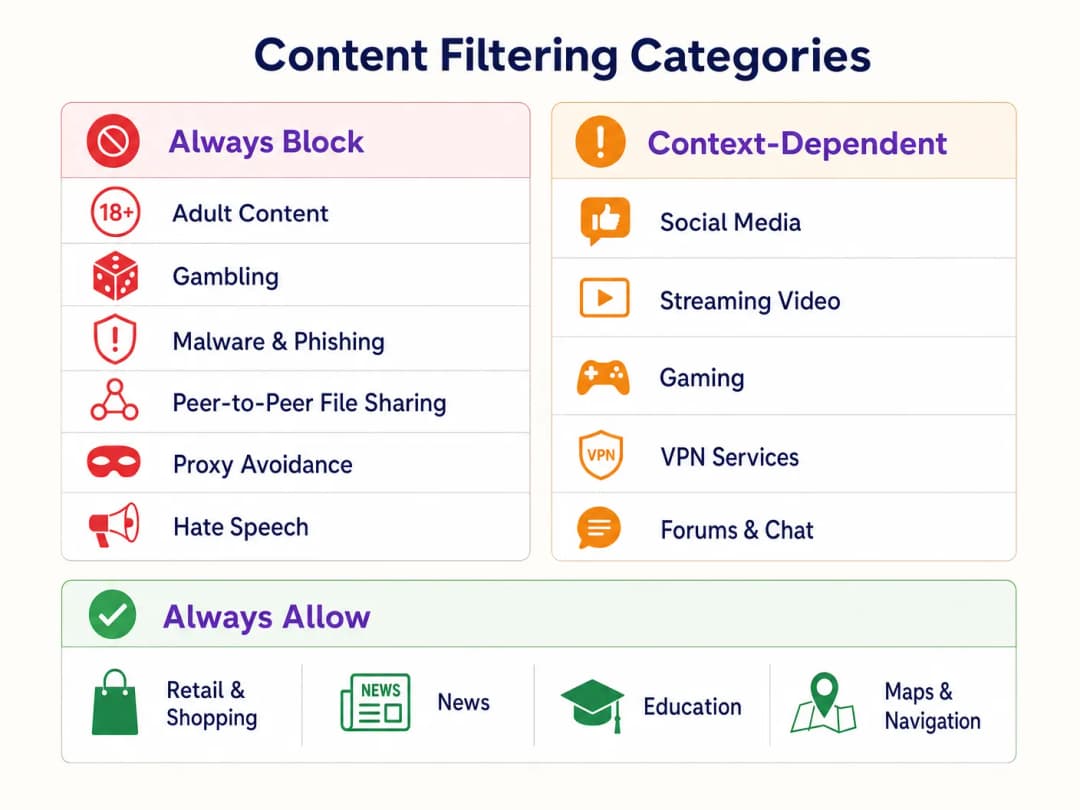
Establish a tiered policy framework:
- Always Block: Adult content, gambling, malware, phishing, peer-to-peer (P2P) file sharing, and proxy avoidance tools.
- Context-Dependent: Social media, streaming video, and gaming. This requires alignment with the venue's operational objectives (e.g. bandwidth conservation vs. dwell time encouragement).
- Always Allow: Retail domains, news, education, and navigation.
3. Address DNS over HTTPS (DoH)
Modern browsers increasingly default to DNS over HTTPS (DoH), encrypting DNS queries and bypassing network-level filtering. To enforce the filtering policy, the perimeter firewall must be configured to block outbound port 443 traffic to known DoH providers (e.g. Cloudflare's 1.1.1.1, Google's 8.8.8.8). This forces client devices to fall back to the network-provided DNS resolver.
4. Enforcement and Exception Handling
Transition from monitoring to enforcement mode. Configure a clear, branded block page that informs the user why the content was restricted and provides a mechanism to report false positives. Establish a documented workflow for reviewing and whitelisting domains requested by retail tenants or venue management.
Best Practices
- Proactive Communication: Inform retail tenants of the filtering policy prior to enforcement to avoid disruption to their operational applications.
- Regular Policy Reviews: Threat landscapes and internet usage patterns evolve. Schedule a quarterly review of the category policy and the filtering engine's database accuracy.
- Leverage the Captive Portal: Use the Captive Portal not just for access control, but as a strategic touchpoint. Ensure the portal design aligns with the venue's brand and clearly states the terms of use regarding content restrictions.
- Monitor Bandwidth Usage: Although DNS filtering restricts access to specific content, bandwidth management is still necessary. Implement per-client rate limiting to ensure equitable distribution of resources, especially in high-density areas. Read more about optimizing performance in our guide on Office WiFi: Optimize Your Modern Office WiFi Network.
Troubleshooting and Risk Mitigation
Over-Blocking (False Positives)
The most common failure mode is an overly aggressive initial policy that blocks legitimate domains. Mitigation relies on the initial monitoring phase for baseline traffic and a responsive whitelisting process.
DoH Bypass
If users are successfully accessing blocked content, verify that firewall rules blocking known DoH resolvers are active and updated. Failure to block DoH renders network-level DNS filtering ineffective.
Captive Portal Issues
In environments with complex RF characteristics, devices may struggle to maintain a connection long enough to complete Captive Portal authentication. Ensure adequate AP density and optimal channel planning. See WiFi Frequencies: A Guide to WiFi Frequencies in 2026 for detailed RF planning strategies.
ROI and Business Impact
Implementing family-friendly WiFi through DNS filtering delivers measurable business value:
- Risk Mitigation: Significantly reduces the likelihood of regulatory fines and reputational damage associated with illegal or inappropriate content being accessed on the venue's network.
- Bandwidth Optimization: Blocking P2P file sharing and unauthorized streaming video preserves bandwidth for legitimate use, deferring expensive circuit upgrades.
- Enhanced Data Capture: A safe, reliable guest network encourages higher opt-in rates on the Captive Portal, enriching the venue's CRM with actionable first-party data for targeted marketing campaigns.
- Tenant Satisfaction: Providing a clean, high-performance network environment supports retail tenants' digital initiatives and enhances the overall customer experience.
Listen to our technical briefing podcast below for more information on deployment strategies and common pitfalls:
Key Definitions
DNS Filtering
The process of blocking access to specific websites by preventing the resolution of their domain names into IP addresses based on categorized databases.
The primary mechanism for enforcing family-friendly content policies efficiently at scale.
VLAN Isolation
The practice of logically separating network traffic into distinct broadcast domains.
Essential for security, ensuring guest traffic cannot interact with corporate or back-office systems.
Captive Portal
A web page that a user must view and interact with before access is granted to a public network.
Used for terms-of-service acceptance and collecting consent-based first-party data.
DNS over HTTPS (DoH)
A protocol for performing remote Domain Name System resolution via the HTTPS protocol.
A significant challenge for network administrators as it encrypts DNS queries, bypassing standard network-level filtering.
WPA3
The third generation of Wi-Fi Protected Access, offering improved encryption and protection against offline dictionary attacks.
The current standard for securing wireless networks, particularly important for public or guest SSIDs.
False Positive
In the context of content filtering, a legitimate website that is incorrectly categorized and blocked by the filtering engine.
Requires a responsive whitelisting process to minimize disruption to venue operations or tenant businesses.
Deep Packet Inspection (DPI)
A form of computer network packet filtering that examines the data part of a packet as it passes an inspection point.
Often too resource-intensive for high-density guest networks compared to DNS filtering.
First-Party Data
Information a company collects directly from its customers and owns.
A key ROI driver for guest WiFi deployments, captured via the captive portal with user consent.
Worked Examples
A large shopping mall with 150 retail units is experiencing network congestion and complaints from parents regarding inappropriate content access on the open guest WiFi.
- Implement VLAN isolation for the guest SSID. 2. Deploy a cloud-based DNS filtering engine. 3. Configure a strict block policy for Adult, Gambling, Malware, and P2P categories. 4. Block outbound DoH traffic at the firewall. 5. Implement a captive portal requiring terms-of-service acceptance.
A hotel IT manager needs to implement family-friendly WiFi across public areas but must ensure corporate guests can still access necessary VPN services.
- Deploy DNS filtering with a baseline policy blocking Adult, Malware, and Gambling categories. 2. Explicitly allow the 'VPN Services' category in the filtering policy. 3. Monitor traffic logs to identify any specific corporate VPN endpoints that might be miscategorized and whitelist them proactively.
Practice Questions
Q1. A retail tenant complains that their new inventory management web application is being blocked on the shopping mall's guest network. What is the immediate next step?
Hint: Consider the false-positive resolution workflow.
View model answer
Review the DNS filtering logs to identify which category the tenant's application domain is currently assigned to. If it is a false positive (e.g., miscategorized as 'Proxy Avoidance'), add the specific domain to the global whitelist and notify the tenant.
Q2. During the monitoring phase of a new DNS filtering deployment, you notice a high volume of traffic to Cloudflare's 1.1.1.1. What does this indicate and how should you respond?
Hint: Think about encrypted DNS protocols.
View model answer
This indicates client devices are using DNS over HTTPS (DoH) to bypass the network's DNS resolver. You must configure the perimeter firewall to block outbound port 443 traffic to known DoH provider IP addresses to force fallback to standard DNS.
Q3. A stadium IT director wants to implement family-friendly WiFi but is concerned about the performance impact of inspecting all traffic during a game day with 50,000 concurrent users. What architecture do you recommend?
Hint: Compare network-layer vs. application-layer filtering.
View model answer
Recommend cloud-based DNS filtering rather than on-premises Deep Packet Inspection (DPI). DNS filtering only intercepts the initial domain resolution request, adding negligible latency, whereas DPI requires significant processing overhead to inspect the payload of every packet, which would bottleneck under stadium-density loads.
Continue reading in this series
How to Implement Time and Bandwidth Restrictions on Guest WiFi
An authoritative technical reference guide on implementing time and bandwidth restrictions on enterprise guest WiFi networks. This guide provides actionable architectural blueprints, vendor-neutral configurations, and real-world case studies to help IT leaders balance network performance, security compliance, and visitor experience.
Secure Guest Access: Implementing NAC for Unmanaged Devices
This authoritative technical reference guide details the architecture, deployment, and compliance considerations for implementing Network Access Control (NAC) to secure unmanaged guest devices. It provides actionable guidance for IT leaders to achieve secure guest access without compromising corporate infrastructure.
Securing Guest WiFi Networks: Best Practices and Implementation
This authoritative technical reference guide outlines the architecture, authentication, and operational controls required to deploy secure enterprise guest WiFi. It provides actionable best practices for IT leaders to enforce network segmentation, manage bandwidth, and ensure compliance while maximizing data capture.
Got questions about your specific setup?
Our team works with venue operators, IT managers, and network engineers across 80,000 venues. Book a 20-minute call and we will show you how others like you solved it.