
WiFi Familiar: Boas Práticas para Centros Comerciais
Este guia de referência técnica fornece metodologias acionáveis para implementar a filtragem de URL baseada em categorias em redes WiFi de convidados em ambientes de retalho. Detalha a arquitetura de rede, a definição de políticas e as estratégias de mitigação de riscos para garantir a conformidade e proteger a reputação da marca.
Video overview
Ouça este guia
Ver transcrição do podcast
Parte da nossa série principal: Guia de WiFi de Convidados →
Resumo Executivo
Disponibilizar WiFi público em ambientes de retalho exige um equilíbrio entre conectividade fluida e uma forte mitigação de riscos. Para os centros comerciais, a implementação de um WiFi familiar não é apenas uma funcionalidade - é um requisito fundamental para as operações do espaço. Este guia detalha a arquitetura técnica, as metodologias de implementação e as melhores práticas operacionais para a filtragem de URLs baseada em categorias em redes de convidados. Ao implementar controlos de conteúdo ao nível do DNS, os gestores de TI e os arquitetos de rede podem garantir a conformidade, proteger a reputação da marca e fornecer um ambiente de navegação seguro para todas as faixas etárias. Além disso, uma implementação de Guest WiFi devidamente estruturada transforma um centro de custos num ativo estratégico, capturando dados primários (first-party) que impulsionam a fidelização e a receita, ao mesmo tempo que reduzem o risco de tráfego malicioso e de acesso a conteúdos inadequados.
Análise Técnica Detalhada
Arquitetura de Filtragem de DNS
No centro de uma rede familiar está a filtragem de DNS baseada em categorias. Ao contrário da filtragem de URLs na camada de aplicação ou da inspeção profunda de pacotes (DPI), que exigem um processamento significativo e muitas vezes quebram a encriptação SSL, a filtragem de DNS opera na camada de rede. Quando um dispositivo de um cliente tenta resolver um domínio, a consulta é intercetada por um motor de filtragem de DNS baseado na nuvem. O motor verifica o domínio solicitado face a uma base de dados continuamente atualizada de URLs categorizados. Se o domínio pertencer a uma categoria restrita (por exemplo, malware, conteúdo para adultos), a resolução é bloqueada e o utilizador é redirecionado para uma página de bloqueio.
Esta abordagem oferece um elevado desempenho (throughput) e baixa latência, tornando-a altamente escalável para ambientes densos como centros comerciais, onde são comuns milhares de ligações simultâneas. Para desenhar esta arquitetura corretamente, compreender What is DNS Filtering? How to Block Harmful Content on Guest WiFi é crucial.

Segmentação e Isolamento de Rede
O isolamento completo da rede de convidados face à infraestrutura corporativa é um requisito de segurança fundamental. O SSID de convidados deve operar numa VLAN dedicada com um intervalo de DHCP independente. O tráfego deve ser encaminhado através do motor de filtragem de DNS antes de chegar à internet. Esta segmentação impede o movimento lateral no caso de comprometimento do dispositivo de um convidado e garante que as políticas de tráfego de convidados não afetam inadvertidamente as operações administrativas (back-office).
Padrões de Encriptação e Autenticação
Para infraestruturas sem fios, o WPA3 é o padrão atual para uma encriptação robusta, protegendo contra ataques de dicionário offline em chaves pré-partilhadas. Embora o WPA2 ainda seja prevalente, o suporte WPA3 deve ser obrigatório em novas implementações. A autenticação é normalmente gerida através de um Captive Portal, que serve um duplo propósito: aceitação dos termos de serviço e captura de dados. A integração deste com uma plataforma de WiFi Analytics permite aos operadores dos espaços recolher dados primários baseados em consentimento, em conformidade com o GDPR e outros enquadramentos de privacidade regionais.
Tem dúvidas sobre a sua configuração específica?
A nossa equipa trabalha com operadores de espaços, gestores de TI e engenheiros de rede em 80.000 espaços. Agende uma chamada de 20 minutos e mostraremos como outros profissionais na sua área o resolveram.
Guia de Implementação
É necessária uma abordagem faseada para implementar a filtragem baseada em categorias, de modo a minimizar a interrupção do tráfego legítimo.
1. Auditoria e Linha de Base
Antes de aplicar regras de bloqueio, audite a arquitetura de rede existente para confirmar o isolamento adequado de VLAN. Implemente o motor de filtragem de DNS em "modo de monitorização" durante duas a quatro semanas. Este período de linha de base oferece visibilidade sobre os padrões reais de tráfego na rede de convidados, permitindo que as equipas de TI identifiquem serviços legítimos que possam ser incorretamente categorizados por engano.
2. Definir Política de Categorias
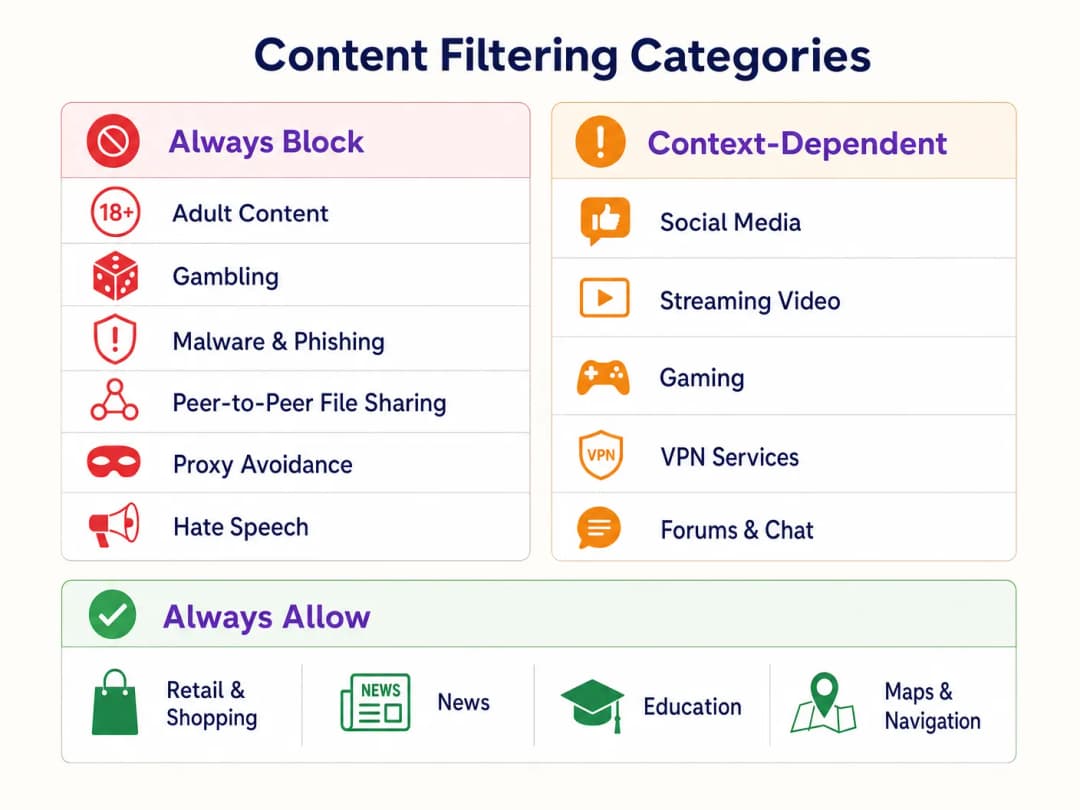
Estabeleça uma estrutura de política em níveis:
- Bloquear Sempre: Conteúdo para adultos, apostas, malware, phishing, partilha de ficheiros peer-to-peer (P2P) e ferramentas de evasão de proxy.
- Dependente do Contexto: Redes sociais, streaming de vídeo e jogos. Isto requer alinhamento com os objetivos operacionais do espaço (ex.: conservação de largura de banda vs. incentivo ao tempo de permanência).
- Permitir Sempre: Domínios de Retail, notícias, educação e navegação.
3. Abordar DNS over HTTPS (DoH)
Os browsers modernos utilizam cada vez mais o DNS over HTTPS (DoH) por predefinição, encriptando as consultas de DNS e contornando a filtragem ao nível da rede. Para aplicar a política de filtragem, o firewall de perímetro deve ser configurado para bloquear o tráfego da porta de saída 443 para fornecedores de DoH conhecidos (ex.: 1.1.1.1 da Cloudflare, 8.8.8.8 da Google). Isto força os dispositivos dos clientes a recorrer ao resolvedor de DNS fornecido pela rede.
4. Aplicação e Gestão de Exceções
Transite do modo de monitorização para o modo de aplicação. Configure uma página de bloqueio clara e personalizada com a marca que informe o utilizador sobre o motivo de restrição do conteúdo e disponibilize um mecanismo para reportar falsos positivos. Estabeleça um fluxo de trabalho documentado para analisar e colocar em lista branca domínios solicitados por lojistas ou pela gestão do espaço.
Boas Práticas
- Comunicação Proativa: Informe os lojistas sobre a política de filtragem antes da aplicação para evitar a interrupção das suas aplicações operacionais.
- Revisões Periódicas da Política: Os cenários de ameaças e os padrões de utilização da internet evoluem. Agende uma revisão trimestral da política de categorias e da precisão da base de dados do motor de filtragem.
- Aproveite o Captive Portal: Utilize o Captive Portal não apenas para controlo de acessos, mas como um ponto de contacto estratégico. Garanta que o design do portal está alinhado com a marca do espaço e que define claramente os termos de utilização relativos a restrições de conteúdo.
- Monitorize a Utilização da Largura de Banda: Embora o filtro de DNS restrinja o acesso a conteúdos específicos, a gestão da largura de banda continua a ser necessária. Implemente a limitação de largura de banda por cliente para garantir uma distribuição equitativa dos recursos, especialmente em áreas de elevada densidade. Leia mais sobre como otimizar o desempenho no nosso guia sobre Office WiFi: Otimize a Sua Rede WiFi de Escritório Moderna.
Resolução de Problemas e Mitigação de Riscos
Bloqueio Excessivo (Falsos Positivos)
O modo de falha mais comum é uma política inicial excessivamente agressiva que bloqueia domínios legítimos. A mitigação baseia-se na fase de monitorização inicial para estabelecer o tráfego de referência e num processo de lista de permissões ágil.
Desvio de DoH
Se os utilizadores conseguirem aceder a conteúdos bloqueados com sucesso, verifique se as regras de firewall que bloqueiam resoluidores de DoH conhecidos estão ativas e atualizadas. A falha no bloqueio de DoH torna ineficaz o filtro de DNS ao nível da rede.
Problemas no Captive Portal
Em ambientes com características de RF complexas, os dispositivos podem ter dificuldade em manter uma ligação estável durante o tempo suficiente para concluir a autenticação no Captive Portal. Garanta uma densidade de AP adequada e um planeamento de canais otimizado. Consulte Frequências WiFi: Um Guia sobre Frequências WiFi em 2026 para estratégias detalhadas de planeamento de RF.
ROI e Impacto no Negócio
A implementação de um WiFi familiar através do filtro de DNS proporciona um valor comercial mensurável:
- Mitigação de Riscos: Reduz significativamente a probabilidade de coimas regulamentares e danos na reputação associados ao acesso a conteúdos ilegais ou inadequados na rede do espaço.
- Otimização de Largura de Banda: O bloqueio de partilha de ficheiros P2P e de streaming de vídeo não autorizado preserva a largura de banda para uma utilização legítima, adiando atualizações de circuitos dispendiosas.
- Captura de Dados Melhorada: Uma rede de convidados segura e fiável incentiva taxas de adesão mais elevadas no Captive Portal, enriquecendo o CRM do espaço com dados primários acionáveis para campanhas de marketing direcionadas.
- Satisfação dos Inquilinos: Oferecer um ambiente de rede limpo e de elevado desempenho apoia as iniciativas digitais dos lojistas e melhora a experiência geral do cliente.
Oiça o nosso podcast de briefing técnico abaixo para obter mais informações sobre estratégias de implementação e erros comuns:
Definições Principais
Filtragem de DNS
O processo de bloquear o acesso a sites específicos através da prevenção da resolução dos seus nomes de domínio em endereços IP com base em bases de dados categorizadas.
O mecanismo principal para aplicar políticas de conteúdo familiar de forma eficiente e à escala.
Isolamento de VLAN
A prática de separar logicamente o tráfego de rede em domínios de transmissão distintos.
Essencial para a segurança, garantindo que o tráfego de convidados não possa interagir com sistemas corporativos ou de back-office.
Captive Portal
Uma página web que um utilizador deve visualizar e com a qual deve interagir antes de lhe ser concedido acesso a uma rede pública.
Utilizado para aceitação de termos de serviço e recolha de dados primários baseados no consentimento.
DNS sobre HTTPS (DoH)
Um protocolo para realizar a resolução remota do Domain Name System através do protocolo HTTPS.
Um desafio significativo para os administradores de rede, pois encripta as consultas DNS, contornando a filtragem padrão ao nível da rede.
WPA3
A terceira geração de Wi-Fi Protected Access, oferecendo encriptação melhorada e proteção contra ataques de dicionário offline.
O padrão atual para segurança de redes sem fios, particularmente importante para SSIDs públicos ou de convidados.
Falso Positivo
No contexto da filtragem de conteúdo, um site legítimo que é categorizado incorretamente e bloqueado pelo motor de filtragem.
Requer um processo de lista branca ágil para minimizar a interrupção das operações do local ou dos negócios dos lojistas.
Deep Packet Inspection (DPI)
Uma forma de filtragem de pacotes de rede informática que examina a parte de dados de um pacote à medida que este passa por um ponto de inspeção.
Muitas vezes exige demasiados recursos para redes de convidados de alta densidade em comparação com a filtragem de DNS.
Dados Primários
Informações que uma empresa recolhe diretamente dos seus clientes e das quais é proprietária.
Um motor de ROI essencial para implementações de WiFi de convidados, capturado através do Captive Portal com o consentimento do utilizador.
Exemplos Práticos
Um grande centro comercial com 150 unidades de retalho está a registar congestionamento de rede e queixas de pais relativamente ao acesso a conteúdos inadequados na rede WiFi pública de convidados.
- Implementar o isolamento de VLAN para o SSID de convidados. 2. Implementar um motor de filtragem de DNS baseado na nuvem. 3. Configurar uma política de bloqueio estrita para as categorias de Adultos, Jogos de Azar, Malware e P2P. 4. Bloquear o tráfego DoH de saída na firewall. 5. Implementar um Captive Portal que exija a aceitação dos termos de serviço.
Um gestor de TI de um hotel necessita de implementar WiFi familiar em áreas públicas, mas deve garantir que os hóspedes corporativos continuam a conseguir aceder a serviços VPN necessários.
- Implementar filtragem de DNS com uma política de base que bloqueie as categorias de Adultos, Malware e Jogos de Azar. 2. Permitir explicitamente a categoria "Serviços VPN" na política de filtragem. 3. Monitorizar os registos de tráfego para identificar quaisquer endpoints de VPN corporativos específicos que possam estar incorretamente categorizados e adicioná-los preventivamente à lista branca.
Perguntas de Prática
Q1. Um lojista queixa-se de que a sua nova aplicação web de gestão de inventário está a ser bloqueada na rede de convidados do centro comercial. Qual é o passo seguinte imediato?
Dica: Considere o fluxo de trabalho de resolução de falsos positivos.
Ver resposta modelo
Rever os registos de filtragem de DNS para identificar a que categoria o domínio da aplicação do lojista está atualmente atribuído. Se for um falso positivo (por exemplo, incorretamente categorizado como "Proxy Avoidance"), adicione o domínio específico à lista branca global e notifique o lojista.
Q2. Durante a fase de monitorização de uma nova implementação de filtragem DNS, nota um elevado volume de tráfego para o IP 1.1.1.1 da Cloudflare. O que é que isto indica e como deve responder?
Dica: Pense em protocolos DNS encriptados.
Ver resposta modelo
Isto indica que os dispositivos cliente estão a utilizar DNS over HTTPS (DoH) para contornar o resolvedor DNS da rede. Deve configurar o firewall perimetral para bloquear o tráfego de saída na porta 443 para os endereços IP de provedores DoH conhecidos, de modo a forçar o recuo para o DNS padrão.
Q3. O diretor de TI de um estádio deseja implementar um WiFi familiar, mas está preocupado com o impacto no desempenho ao inspecionar todo o tráfego durante um dia de jogo com 50.000 utilizadores simultâneos. Que arquitetura recomenda?
Dica: Compare a filtragem ao nível da camada de rede com a filtragem na camada de aplicação.
Ver resposta modelo
Recomende a filtragem DNS baseada na nuvem em vez da Inspeção Profunda de Pacotes (DPI) local. A filtragem DNS apenas intercetará a solicitação inicial de resolução do domínio, adicionando uma latência insignificante, ao passo que a DPI exige um processamento significativo para inspecionar o conteúdo de cada pacote, o que criaria um estrangulamento sob cargas de densidade de um estádio.
Continue a ler esta série
Como Implementar Restrições de Tempo e de Largura de Banda em WiFi de Convidados
Um guia de referência técnica de autoridade sobre a implementação de restrições de tempo e de largura de banda em redes WiFi de convidados empresariais. Este guia fornece esquemas de arquitetura práticos, configurações neutras de fornecedor e casos de estudo reais para ajudar os líderes de TI a equilibrar o desempenho da rede, a conformidade de segurança e a experiência do visitante.
Acesso Seguro de Convidados: Implementar NAC para Dispositivos Não Geridos
Este guia de referência técnica autoritário detalha a arquitetura, a implementação e as considerações de conformidade para a implementação de Network Access Control (NAC) para proteger dispositivos de convidados não geridos. Fornece orientações práticas para que os líderes de TI consigam um acesso de convidados seguro sem comprometer a infraestrutura corporativa.
Proteger Redes WiFi de Convidados: Melhores Práticas e Implementação
Este guia de referência técnica autoritário descreve a arquitetura, autenticação e controlos operacionais necessários para implementar WiFi de convidados empresarial seguro. Fornece melhores práticas acionáveis para líderes de TI imporem a segmentação de rede, gerirem a largura de banda e garantirem a conformidade enquanto maximizam a recolha de dados.
Tem dúvidas sobre a sua configuração específica?
A nossa equipa trabalha com operadores de espaços, gestores de TI e engenheiros de rede em 80.000 espaços. Agende uma chamada de 20 minutos e mostraremos como outros profissionais na sua área o resolveram.