
SCEP के लिए एंटरप्राइज गाइड: ऑटोमेटेड कैंपस WiFi सुरक्षा के लिए Simple Certificate Enrollment Protocol को लागू करना
यह तकनीकी संदर्भ गाइड SCEP का उपयोग करके एंटरप्राइज WiFi सर्टिफिकेट डिप्लॉयमेंट के लिए एक निश्चित आर्किटेक्चरल ब्लूप्रिंट और चरण-दर-चरण कार्यान्वयन रणनीति प्रदान करती है। इसमें SCEP और PKCS के बीच महत्वपूर्ण अंतर, सफलता के लिए आवश्यक सटीक डिप्लॉयमेंट अनुक्रम और IT लीडर्स के लिए वास्तविक दुनिया की जोखिम न्यूनीकरण रणनीतियाँ शामिल हैं।
इस गाइड को सुनें
पॉडकास्ट ट्रांसक्रिप्ट देखें

कार्यकारी सारांश
एंटरप्राइज स्थानों के लिए, चाहे वह व्यस्त हॉस्पिटैलिटी वातावरण हो, मल्टी-साइट रिटेल ऑपरेशन हो, या एक आधुनिक कॉर्पोरेट कैंपस हो, स्टाफ WiFi के लिए प्री-शेयर्ड कीज़ (pre-shared keys) या बुनियादी Captive Portals पर भरोसा करना एक सुरक्षा भेद्यता (security vulnerability) और एक परिचालन बाधा (operational bottleneck) है। आधुनिक नेटवर्क आर्किटेक्चर EAP-TLS का उपयोग करके 802.1X ऑथेंटिकेशन की मांग करता है, जिससे यह सुनिश्चित होता है कि नेटवर्क तक पहुंचने से पहले प्रत्येक डिवाइस को क्रिप्टोग्राफिक रूप से सत्यापित किया गया है।
चुनौती वितरण में है: आप अपने हेल्पडेस्क को सपोर्ट टिकटों में दबाए बिना हजारों Windows, iOS और Android डिवाइसों पर अद्वितीय क्लाइंट सर्टिफिकेट कैसे डिप्लॉय करते हैं? Microsoft Intune और अन्य MDM प्लेटफॉर्म ऑटोमेटेड सर्टिफिकेट लाइफसाइकिल मैनेजमेंट के माध्यम से इसे हल करते हैं। Simple Certificate Enrollment Protocol (SCEP) प्रोफाइल को डिप्लॉय करके, IT टीमें प्रबंधित एंडपॉइंट्स पर चुपचाप विश्वसनीय रूट और क्लाइंट सर्टिफिकेट भेजती हैं।
यह गाइड एंटरप्राइज WiFi सर्टिफिकेट डिप्लॉयमेंट के लिए एक निश्चित आर्किटेक्चरल ब्लूप्रिंट और चरण-दर-चरण कार्यान्वयन रणनीति प्रदान करती है। हम SCEP और PKCS के बीच महत्वपूर्ण अंतरों का पता लगाते हैं, सफलता के लिए आवश्यक सटीक डिप्लॉयमेंट अनुक्रम का विवरण देते हैं, और यह सुनिश्चित करने के लिए वास्तविक दुनिया की जोखिम न्यूनीकरण रणनीतियों की रूपरेखा तैयार करते हैं कि आपका Guest WiFi और कॉर्पोरेट नेटवर्क सुरक्षित और प्रदर्शन-उन्मुख बने रहें।
ब्रीफिंग सुनें
तकनीकी गहन विश्लेषण: SCEP आर्किटेक्चर
अपनी एंटरप्राइज WiFi सर्टिफिकेट डिप्लॉयमेंट रणनीति को डिजाइन करते समय, पहला आर्किटेक्चरल निर्णय सर्टिफिकेट डिलीवरी मैकेनिज्म का चयन करना होता है। मोबाइल डिवाइस मैनेजमेंट प्लेटफॉर्म SCEP और PKCS दोनों का समर्थन करते हैं, लेकिन वे मौलिक रूप से भिन्न तरीके से काम करते हैं।
Simple Certificate Enrollment Protocol (SCEP)
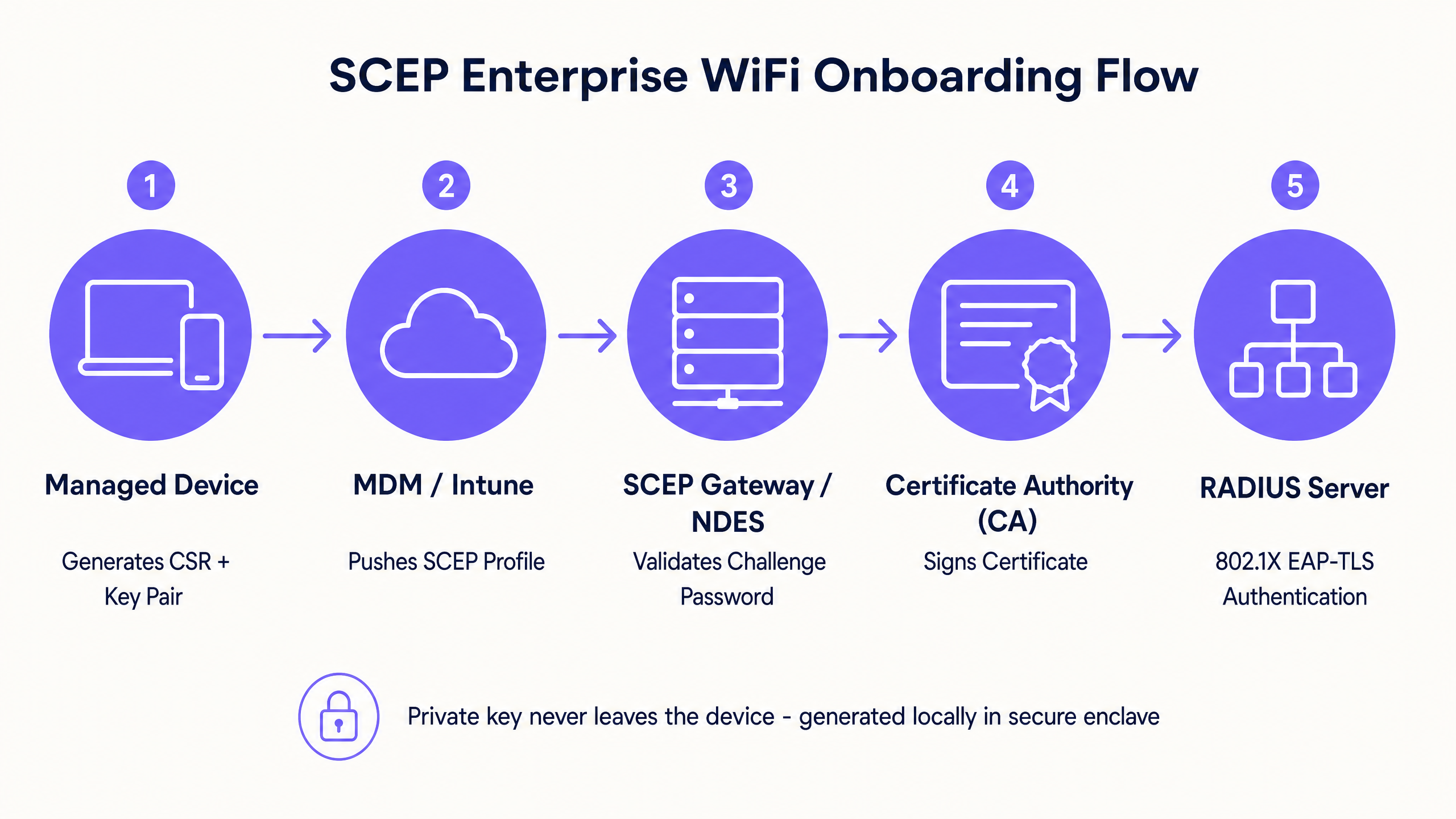
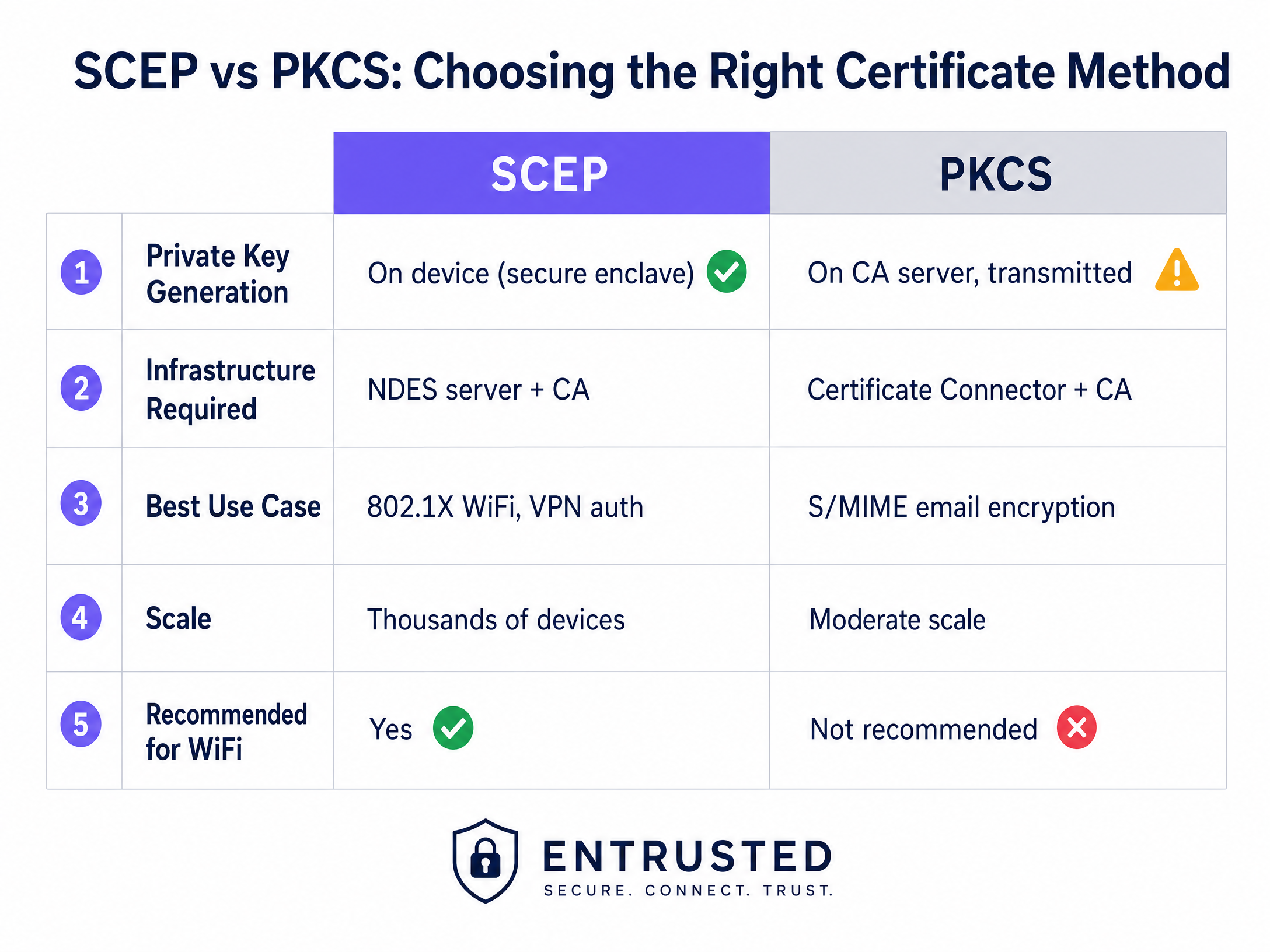
SCEP एंटरप्राइज डिवाइस एनरोलमेंट के लिए उद्योग मानक है। SCEP वर्कफ़्लो में, मैनेजमेंट सर्विस एंडपॉइंट को अपनी खुद की प्राइवेट और पब्लिक की (key) जोड़ी बनाने का निर्देश देती है। डिवाइस एक Certificate Signing Request (CSR) बनाता है और इसे Network Device Enrollment Service (NDES) सर्वर के माध्यम से आपके Certificate Authority (CA) को भेजता है। CA अनुरोध पर हस्ताक्षर करता है और डिवाइस को पब्लिक सर्टिफिकेट वापस कर देता है।
SCEP का महत्वपूर्ण सुरक्षा लाभ यह है कि प्राइवेट की (private key) कभी भी डिवाइस से बाहर नहीं जाती है। यह स्थानीय रूप से उत्पन्न होती है, डिवाइस के सुरक्षित एन्क्लेव (जैसे Windows पर TPM या iOS पर Secure Enclave) में संग्रहीत होती है, और इसे कभी भी नेटवर्क पर प्रसारित नहीं किया जाता है। यह SCEP को 802.1X ऑथेंटिकेशन के लिए दृढ़ता से अनुशंसित दृष्टिकोण बनाता है।
Public Key Cryptography Standards (PKCS)
इसके विपरीत, PKCS के साथ, Certificate Authority केंद्रीय रूप से पब्लिक और प्राइवेट दोनों की (keys) उत्पन्न करता है। सर्टिफिकेट कनेक्टर इस की (key) जोड़ी को सुरक्षित रूप से निर्यात करता है और इसे लक्षित डिवाइस पर भेजता।
हालांकि PKCS एक NDES सर्वर को डिप्लॉय करने और बनाए रखने की आवश्यकता को समाप्त करता है, जिससे इन्फ्रास्ट्रक्चर का आकार सरल हो जाता है, लेकिन यह एक सैद्धांतिक सुरक्षा जोखिम पैदा करता है क्योंकि प्राइवेट की (private key) नेटवर्क पर प्रसारित होती है। PKCS आम तौर पर उन उपयोग के मामलों के लिए बेहतर अनुकूल है जहां की एस्क्रो (key escrow) की आवश्यकता होती है, जैसे कि S/MIME ईमेल एन्क्रिप्शन, न कि नेटवर्क ऑथेंटिकेशन के लिए।
कार्यान्वयन गाइड: डिप्लॉयमेंट अनुक्रम
802.1X के लिए प्रबंधित WiFi प्रोफाइल को सफलतापूर्वक कॉन्फ़िगर करने के लिए एक विशिष्ट डिप्लॉयमेंट अनुक्रम का कड़ाई से पालन करना आवश्यक है। प्रोफाइल निर्भरताएं यह तय करती हैं कि ऑथेंटिकेशन कॉन्फ़िगर करने से पहले विश्वास (trust) स्थापित किया जाना चाहिए।
चरण 1: विश्वसनीय रूट सर्टिफिकेट प्रोफाइल डिप्लॉय करें
इससे पहले कि कोई भी डिवाइस क्लाइंट सर्टिफिकेट का अनुरोध कर सके या आपके RADIUS सर्वर पर भरोसा कर सके, उसे जारी करने वाले Certificate Authority पर भरोसा करना चाहिए।
- अपने Root CA सर्टिफिकेट और किसी भी Intermediate CA सर्टिफिकेट को .cer फाइलों के रूप में निर्यात करें।
- अपने MDM कंसोल में, एक नया कॉन्फ़िगरेशन प्रोफाइल बनाएं।
- लक्षित प्लेटफॉर्म का चयन करें और विश्वसनीय सर्टिफिकेट प्रोफाइल प्रकार चुनें।
- .cer फ़ाइल अपलोड करें और इस प्रोफाइल को अपने लक्षित डिवाइस समूहों में डिप्लॉय करें।
चरण 2: SCEP सर्टिफिकेट प्रोफाइल कॉन्फ़िगर करें
एक बार विश्वास स्थापित हो जाने के बाद, डिवाइसों को उनके क्लाइंट सर्टिफिकेट प्राप्त करने के निर्देश देने के लिए SCEP प्रोफाइल को कॉन्फ़िगर करें।
- एक नया कॉन्फ़िगरेशन प्रोफाइल बनाएं और SCEP सर्टिफिकेट चुनें।
- सब्जेक्ट नाम फॉर्मेट कॉन्फ़िगर करें। यूजर-चालित ऑथेंटिकेशन के लिए,
CN={{UserPrincipalName}}मानक है। डिवाइस ऑथेंटिकेशन के लिए,CN={{AAD_Device_ID}}का उपयोग करें। - की (key) के उपयोग को डिजिटल सिग्नेचर और की एन्साइफरमेंट (key encipherment) पर सेट करें।
- विस्तारित की (key) उपयोग के अंतर्गत, क्लाइंट ऑथेंटिकेशन (OID: 1.3.6.1.5.5.7.3.2) निर्दिष्ट करें।
- इस प्रोफाइल को चरण 1 में बनाए गए विश्वसनीय रूट सर्टिफिकेट प्रोफाइल से लिंक करें।
- अपने SCEP गेटवे या NDES सर्वर का बाहरी URL प्रदान करें।
चरण 3: 802.1X WiFi प्रोफाइल डिप्लॉय करें
अंतिम चरण WiFi कॉन्फ़िगरेशन को पुश करना है जो सर्टिफिकेट को नेटवर्क SSID से जोड़ता है।
- एक WiFi कॉन्फ़िगरेशन प्रोफाइल बनाएं।
- नेटवर्क का नाम ठीक वैसे ही दर्ज करें जैसे यह आपके वायरलेस एक्सेस पॉइंट्स द्वारा प्रसारित किया जाता है।
- सुरक्षा प्रकार के रूप में WPA2-Enterprise या WPA3-Enterprise चुनें।
- EAP प्रकार को EAP-TLS पर सेट करें।
- ऑथेंटिकेशन सेटिंgs, Step 2 में बनाए गए SCEP certificate profile को क्लाइंट ऑथेंटिकेशन सर्टिफिकेट के रूप में चुनें।
- सर्वर वैलिडेशन के लिए ट्रस्टेड रूट सर्टिफिकेट निर्दिष्ट करें ताकि यह सुनिश्चित हो सके कि डिवाइस केवल आपके वैध RADIUS सर्वर से ही कनेक्ट हो।
सर्वोत्तम प्रथाएं और उद्योग मानक
SCEP certificate डिप्लॉयमेंट को लागू करते समय, अनुपालन और विश्वसनीयता सुनिश्चित करने के लिए निम्नलिखित वेंडर-न्यूट्रल सर्वोत्तम प्रथाओं का पालन करें।
SCEP Gateway प्लेसमेंट और सुरक्षा
रिमोट डिवाइसेस को ऑन-साइट आने से पहले सर्टिफिकेट प्रोविज़न करने की अनुमति देने के लिए SCEP gateway इंटरनेट से एक्सेसिबल होना चाहिए। किसी इंटरनल सर्वर को सीधे इंटरनेट पर एक्सपोज़ करना एक बड़ा सुरक्षा जोखिम है। एप्लिकेशन प्रॉक्सी या रिवर्स प्रॉक्सी का उपयोग करके SCEP URL को पब्लिश करें। यह इनबाउंड फ़ायरवॉल पोर्ट खोले बिना सुरक्षित रिमोट एक्सेस प्रदान करता है और आपको एनरोलमेंट फ़्लो पर कंडीशनल एक्सेस नीतियां लागू करने की अनुमति देता है।
RADIUS और CRL चेकिंग
सर्टिफिकेट डिप्लॉयमेंट सुरक्षा समीकरण का केवल आधा हिस्सा है; रिवोकेशन (निरस्तीकरण) भी उतना ही महत्वपूर्ण है। यदि किसी कर्मचारी को टर्मिनेट कर दिया जाता है, तो उनके डायरेक्टरी अकाउंट को डिसेबल करने से उनका WiFi एक्सेस तुरंत रिवोक नहीं हो सकता है यदि उनका क्लाइंट सर्टिफिकेट वैलिड रहता है और RADIUS सर्वर सर्टिफिकेट रिवोकेशन लिस्ट (CRL) की कड़ाई से जांच नहीं कर रहा है।
सख्त CRL चेकिंग लागू करने के लिए अपने RADIUS सर्वर को कॉन्फ़िगर करें। सुनिश्चित करें कि आपके CRL डिस्ट्रीब्यूशन पॉइंट्स अत्यधिक उपलब्ध (highly available) हों; यदि RADIUS सर्वर CRL तक नहीं पहुंच पाता है, तो ऑथेंटिकेशन विफल हो जाएगा, जिससे बड़े पैमाने पर आउटेज हो सकता है।
आधुनिक कनेक्टिविटी पर व्यापक विचारों के लिए, Bandwidth Management: A Practical Guide for 2026 पर हमारा मार्गदर्शन देखें।
ट्रबलशूटिंग और जोखिम न्यूनीकरण
सावधानीपूर्वक योजना बनाने के बाद भी, सर्टिफिकेट डिप्लॉयमेंट में समस्याएं आ सकती हैं। यहाँ सामान्य विफलता मोड और उनके समाधान की रणनीतियाँ दी गई हैं।
WiFi Profile लागू होने में विफल
डिवाइस को ट्रस्टेड रूट और SCEP सर्टिफिकेट प्राप्त होते हैं, लेकिन MDM कंसोल में WiFi profile त्रुटि (error) या लागू नहीं (not applicable) के रूप में दिखाई देता है। यह लगभग हमेशा ग्रुप टारगेटिंग में मिसमैच के कारण होता है। यदि SCEP profile किसी यूजर ग्रुप को असाइन किया गया है, लेकिन WiFi profile किसी डिवाइस ग्रुप को असाइन किया गया है, तो MDM डिपेंडेंसी को हल नहीं कर सकता है। अपने असाइनमेंट का ऑडिट करें। सुनिश्चित करें कि ट्रस्टेड रूट, SCEP और WiFi profiles सभी बिल्कुल एक ही ग्रुप में डिप्लॉय किए गए हैं।
Gateway 403 Forbidden त्रुटियाँ
डिवाइस SCEP सर्टिफिकेट प्राप्त करने में विफल रहते हैं, और गेटवे लॉग HTTP 403 त्रुटियाँ दिखाते हैं। कनेक्टर सर्विस अकाउंट के पास सर्टिफिकेट टेम्पलेट पर आवश्यक अनुमतियाँ नहीं हैं, या आपके फ़ायरवॉल पर URL फ़िल्टरिंग SCEP द्वारा उपयोग किए जाने वाले विशिष्ट क्वेरी स्ट्रिंग पैरामीटर को ब्लॉक कर रही है। सत्यापित करें कि कनेक्टर अकाउंट के पास CA टेम्पलेट पर रीड और एनरोल अनुमतियाँ हैं। यह सुनिश्चित करने के लिए फ़ायरवॉल लॉग की जाँच करें कि ?operation=GetCACaps वाले URL ब्लॉक नहीं किए जा रहे हैं।
ROI और व्यावसायिक प्रभाव
SCEP-संचालित 802.1X सर्टिफिकेट डिप्लॉयमेंट पर स्विच करने से सुरक्षा और संचालन दोनों में मापने योग्य लाभ मिलते हैं।
- हेल्पडेस्क टिकटों में कमी: पासवर्ड-आधारित WiFi पासवर्ड समाप्त होने, लॉकआउट और टाइपो के संबंध में बड़ी संख्या में सपोर्ट टिकट उत्पन्न करता है। सर्टिफिकेट-आधारित ऑथेंटिकेशन यूजर के लिए अदृश्य होता है, जो आमतौर पर WiFi-संबंधित हेल्पडेस्क वॉल्यूम को 70% तक कम कर देता है।
- बेहतर सुरक्षा स्थिति: EAP-TLS क्रेडेंशियल हार्वेस्टिंग और मैन-इन-द-मिडल (Man-in-the-Middle) हमलों के जोखिम को समाप्त करता है। यह PCI DSS और GDPR जैसे फ्रेमवर्क के अनुपालन के लिए महत्वपूर्ण है, विशेष रूप से Retail और Healthcare परिवेशों में।
- निर्बाध ऑनबोर्डिंग: मौजूदा MDM वर्कफ़्लो के साथ सर्टिफिकेट डिप्लॉयमेंट को एकीकृत करना पहले दिन से ही एक एकीकृत, ज़ीरो-टच प्रोविज़निंग अनुभव सुनिश्चित करता है।
जबकि SCEP आपके प्रबंधित कॉर्पोरेट डिवाइसेस को सुरक्षित करता है, गेस्ट और विज़िटर नेटवर्क के लिए एक अलग दृष्टिकोण की आवश्यकता होती है। अप्रबंधित डिवाइसेस के लिए, सोशल लॉगिन या SMS वेरिफिकेशन वाला Captive Portal फ़र्स्ट-पार्टी डेटा लेयर में फीड होता है, जिससे आपको व्यावहारिक अंतर्दृष्टि (actionable insights) मिलती है। यह देखने के लिए कि यह डेटा कैसे राजस्व बढ़ाता है, हमारे WiFi Analytics प्लेटफ़ॉर्म को एक्सप्लोर करें।
मुख्य परिभाषाएं
SCEP (Simple Certificate Enrollment Protocol)
A protocol that allows devices to request digital certificates from a Certificate Authority, where the private key is generated and stored securely on the device itself.
The recommended method for deploying WiFi authentication certificates due to its high security and scalability across enterprise fleets.
PKCS (Public Key Cryptography Standards)
A set of standards where both the public and private keys are generated by the Certificate Authority and then securely delivered to the endpoint.
Often used for S/MIME email encryption, but less ideal for WiFi authentication due to the network transmission of the private key.
NDES (Network Device Enrollment Service)
A Microsoft Windows Server role that acts as a bridge, allowing devices without domain credentials to obtain certificates via SCEP.
A required infrastructure component when implementing SCEP certificate deployment with on-premises Microsoft PKI.
EAP-TLS (Extensible Authentication Protocol - Transport Layer Security)
The most secure 802.1X authentication method, requiring both the server and the client to present valid digital certificates.
The target authentication protocol that MDM WiFi and certificate profiles are designed to enable, eliminating password-based access.
CRL (Certificate Revocation List)
A list published by the Certificate Authority containing the serial numbers of certificates that have been revoked before their scheduled expiration date.
RADIUS servers must check the CRL during authentication to ensure terminated employees cannot access the network using a previously valid certificate.
CSR (Certificate Signing Request)
A block of encoded text given to a Certificate Authority when applying for an SSL/TLS certificate, containing the public key and identity information.
Generated locally by the managed device during the SCEP flow to request its unique identity credential.
802.1X
An IEEE standard for port-based network access control that provides an authentication mechanism to devices wishing to attach to a LAN or WLAN.
The foundational framework that enforces the requirement for EAP-TLS certificate validation before granting network access.
RADIUS (Remote Authentication Dial-In User Service)
A networking protocol that provides centralized authentication, authorization, and accounting management for users who connect and use a network service.
The server that evaluates the client certificate against the CA and CRL to make the final allow or deny decision for WiFi access.
हल किए गए उदाहरण
A 150-property hotel group needs to secure their staff network across a mix of Windows laptops for front-of-house, iOS devices for housekeeping, and Android tablets for restaurant point-of-sale. They currently use WPA2-Personal with a shared password rotated quarterly, generating massive helpdesk volume.
The hotel group deploys three Intune profiles in sequence to a unified device group. First, a Trusted Root Certificate profile establishes trust with the corporate CA. Second, a SCEP Certificate profile instructs devices to request a unique client certificate. Third, a WiFi profile configures the corporate SSID with WPA3-Enterprise and EAP-TLS, pointing to the SCEP certificate for authentication. The RADIUS server enforces strict CRL checking to revoke access instantly upon employee termination.
A fashion retailer with 200 stores requires PCI DSS compliance for their Windows-based point-of-sale systems managed through Intune. They must ensure strong authentication and strict network segmentation for any device handling cardholder data.
The retailer implements SCEP-based EAP-TLS for device-level authentication on the staff SSID. The RADIUS policy drives VLAN assignment, placing authenticated POS terminals onto a strictly isolated, PCI-scoped VLAN automatically. Guest WiFi is handled on a completely separate SSID with its own captive portal authentication flow, ensuring the two networks never intersect.
अभ्यास प्रश्न
Q1. Your Intune deployment shows the Trusted Root and SCEP profiles successfully applied to a user's laptop, but the WiFi profile shows an 'Error' state. The user cannot connect to the corporate SSID. What is the most likely architectural cause?
संकेत: Consider how MDM platforms resolve dependencies between related configuration profiles.
मॉडल उत्तर देखें
A group targeting mismatch. The SCEP profile is likely assigned to a User group, while the WiFi profile is assigned to a Device group (or vice versa). Intune cannot resolve the dependency across different group types, causing the WiFi profile deployment to fail. Audit the assignments and ensure all three profiles target the exact same Azure AD group.
Q2. A newly acquired subsidiary requires 802.1X authentication for their staff devices. Their security team mandates that private keys must never traverse the network and must be generated within the hardware TPM of the endpoint. Which certificate deployment method must you use?
संकेत: Compare where the private key is generated in the SCEP workflow versus the PKCS workflow.
मॉडल उत्तर देखें
You must use SCEP (Simple Certificate Enrollment Protocol). In a SCEP workflow, the device generates its own private and public key pair locally within its secure enclave (TPM) and only sends a Certificate Signing Request (CSR) across the network. PKCS generates the private key centrally on the CA and transmits it over the network, which violates the security team's mandate.
Q3. An employee is terminated and their Active Directory account is disabled. However, their laptop remains connected to the corporate WiFi network for several hours before losing access. How do you resolve this security gap?
संकेत: Disabling an account does not invalidate an existing certificate. What mechanism does the RADIUS server use to check certificate validity?
मॉडल उत्तर देखें
You must configure the RADIUS server to enforce strict Certificate Revocation List (CRL) checking. When an employee is terminated, their certificate must be explicitly revoked in the Certificate Authority. The RADIUS server will then check the CRL during the next authentication cycle and immediately deny access, regardless of the Active Directory account status.
इस श्रृंखला में आगे पढ़ें
मेरा गेस्ट WiFi कनेक्ट क्यों नहीं हो रहा है? कैप्टिव पोर्टल समस्याओं का निवारण
यह आधिकारिक तकनीकी संदर्भ गाइड कैप्टिव पोर्टल डिटेक्शन के अंतर्निहित तंत्र को समझाती है और उन छह प्राथमिक विफलता मोड का विवरण देती है जो गेस्ट WiFi को कनेक्ट होने से रोकते हैं। यह IT प्रबंधकों और नेटवर्क आर्किटेक्ट्स को HTTP रीडायरेक्ट समस्याओं, DNS संघर्षों और MAC रैंडमाइजेशन चुनौतियों को हल करने के लिए एक व्यावहारिक समस्या निवारण ढांचा प्रदान करती है।
स्वचालित WiFi प्रमाणपत्र नामांकन के लिए SCEP को कैसे लागू करें
यह गाइड बताती है कि एंटरप्राइज स्थलों पर स्वचालित WiFi प्रमाणपत्र नामांकन के लिए SCEP (सिंपल सर्टिफिकेट एनरोलमेंट प्रोटोकॉल) को कैसे लागू किया जाए। इसमें पूर्ण आर्किटेक्चरल ब्लूप्रिंट शामिल है - PKI डिज़ाइन और MDM एकीकरण से लेकर अनिवार्य तीन-चरणीय परिनियोजन अनुक्रम तक - और IT प्रबंधकों और नेटवर्क आर्किटेक्ट्स को दिखाता है कि साझा क्रेडेंशियल्स को कैसे समाप्त किया जाए, प्रमाणपत्र जीवनचक्र प्रबंधन को स्वचालित किया जाए, और बड़े पैमाने पर PCI DSS और GDPR आवश्यकताओं को पूरा किया जाए।
GDPR और गेस्ट WiFi: वेन्यू मार्केटर्स और IT के लिए अनुपालन गाइड
यह गाइड IT प्रबंधकों और वेन्यू ऑपरेटरों को यह सुनिश्चित करने के लिए एक व्यावहारिक ढांचा प्रदान करती है कि गेस्ट WiFi सेवाएं पूरी तरह से GDPR के अनुपालन में हैं। इसमें तकनीकी आर्किटेक्चर, सहमति तंत्र, डेटा प्रतिधारण, और अनुपालन को एक सुरक्षित प्रथम-पक्ष डेटा संपत्ति में बदलने का तरीका शामिल है।