
Le guide de l'entreprise sur SCEP : Déployer Simple Certificate Enrollment Protocol pour une sécurité WiFi automatisée des campus
Ce guide de référence technique fournit un schéma d'architecture définitif et une stratégie de mise en œuvre étape par étape pour le déploiement de certificats WiFi d'entreprise via SCEP. Il aborde les différences critiques entre SCEP et PKCS, la séquence de déploiement exacte requise pour réussir, ainsi que les stratégies de mitigation des risques réels pour les responsables IT.
Écouter ce guide
Voir la transcription du podcast
Fait partie de notre série principale : Guide de sécurité WiFi pour les entreprises →

Résumé exécutif
Pour les sites d'entreprise, qu'il s'agisse d'un environnement hôtelier animé, d'un réseau de vente au détail multi sites ou d'un campus d'entreprise moderne, s'appuyer sur des clés pré-partagées ou des Captive Portal basiques pour le WiFi des employés représente une vulnérabilité de sécurité et un goulot d'étranglement opérationnel. Les architectures réseau modernes exigent une authentification 802.1X via EAP-TLS, garantissant que chaque appareil est vérifié par cryptographie avant d'accéder au réseau.
Le défi réside dans le déploiement : comment installer des certificats clients uniques sur des milliers d'appareils Windows, iOS et Android sans submerger votre service d'assistance de tickets de support ? Microsoft Intune et les autres plateformes MDM résolvent ce problème grâce à la gestion automatisée du cycle de vie des certificats. En déployant des profils Simple Certificate Enrollment Protocol (SCEP), les équipes informatiques transmettent silencieusement des certificats racines et clients de confiance aux terminaux gérés.
Ce guide fournit un plan architectural précis et une stratégie de mise en œuvre étape par étape pour le déploiement de certificats WiFi d'entreprise. Nous explorerons les différences clés entre SCEP et PKCS, détaillerons l'ordre de déploiement exact requis pour réussir, et présenterons des stratégies concrètes d'atténuation des risques pour garantir que votre Guest WiFi et vos réseaux d'entreprise restent sécurisés et performants.
Écouter le briefing
Analyse technique approfondie : architecture SCEP
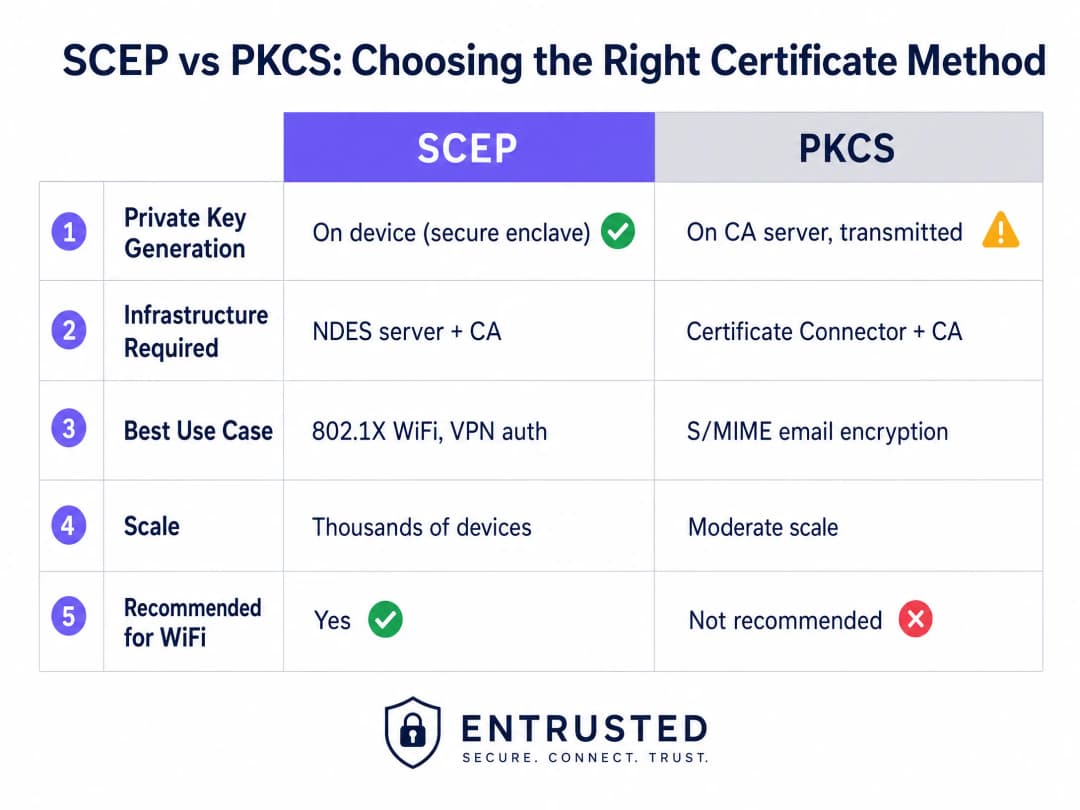
Lors de la conception de votre stratégie de déploiement de certificats WiFi d'entreprise, la première décision architecturale consiste à sélectionner le mécanisme de distribution des certificats. Les plateformes de gestion des appareils mobiles prennent en charge SCEP et PKCS, mais fonctionnent de manière fondamentalement différente.
Simple Certificate Enrollment Protocol (SCEP)
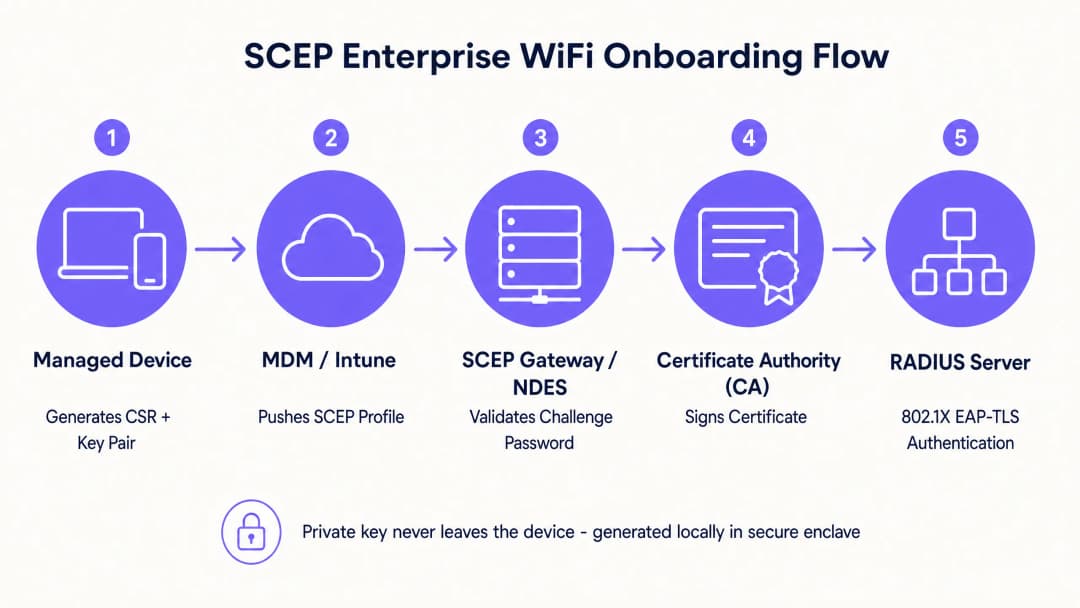
Le protocole SCEP est la norme de l'industrie pour l'enrôlement des appareils d'entreprise. Dans un flux de travail SCEP, le service de gestion ordonne au terminal de générer sa propre paire de clés privée et publique. L'appareil crée une demande de signature de certificat (CSR) et l'envoie à votre autorité de certification (CA) via un serveur NDES (Network Device Enrollment Service). La CA signe la demande et renvoie le certificat public à l'appareil.
L'avantage de sécurité le plus critique de SCEP est que la clé privée ne quitte jamais l'appareil. Elle est générée localement, stockée dans l'enclave sécurisée de l'appareil (comme le TPM sous Windows ou la Secure Enclave sous iOS) et n'est jamais transférée sur le réseau. C'est pourquoi SCEP est fortement recommandé pour l'authentification 802.1X.
Public Key Cryptography Standards (PKCS)
À l'inverse, avec PKCS, l'autorité de certification génère de manière centralisée les clés publique et privée. Le connecteur de certificat exporte ensuite en toute sécurité cette paire de clés et la pousse vers l'appareil cible.
Bien que PKCS réduise la complexité de l'infrastructure en éliminant le besoin de déployer et de maintenir un serveur NDES, il présente un risque de sécurité théorique car la clé privée est transférée sur le réseau. PKCS est généralement mieux adapté aux cas d'utilisation nécessitant le séquestre de clés (key escrow), comme le chiffrement des e-mails S/MIME, plutôt qu'à l'authentification réseau.
Vous avez des questions sur votre configuration spécifique ?
Notre équipe collabore avec des exploitants de sites, des responsables informatiques et des ingénieurs réseau au sein de 80 000 sites. Réservez un appel de 20 minutes et nous vous montrerons comment d'autres professionnels comme vous ont résolu ce problème.
Guide d'implémentation : séquence de déploiement
La configuration réussie d'un profil WiFi géré pour le 802.1X nécessite le respect strict d'une séquence de déploiement spécifique. En raison des dépendances de profil, la confiance doit être établie avant de tenter de configurer l'authentification.
Étape 1 : Déploiement du profil de certificat racine approuvé
Avant qu'un appareil ne puisse demander un certificat client ou faire confiance à votre serveur RADIUS, il doit faire confiance à l'autorité de certification émettrice.
- Exportez votre certificat de CA racine et tous les certificats de CA intermédiaires sous forme de fichiers .cer.
- Créez un nouveau profil de configuration dans votre console MDM.
- Sélectionnez la plateforme cible et choisissez le type de profil de certificat approuvé.
- Téléversez le fichier .cer et déployez ce profil sur vos groupes d'appareils cibles.
Étape 2 : Configurer le profil de certificat SCEP
Une fois la confiance établie, configurez le profil SCEP pour indiquer comment les appareils doivent obtenir leur certificat client.
- Créez un nouveau profil de configuration et sélectionnez Certificat SCEP.
- Configurez le format du nom de l'objet (Subject Name). Pour l'authentification basée sur l'utilisateur,
CN={{UserPrincipalName}}est la norme. Pour l'authentification de l'appareil, utilisezCN={{AAD_Device_ID}}. - Définissez l'utilisation de la clé sur Signature numérique et Chiffrement de la clé.
- Sous Utilisation étendue de la clé (Extended Key Usage), spécifiez l'authentification client (OID : 1.3.6.1.5.5.7.3.2).
- Liez ce profil au profil de certificat racine approuvé créé à l'étape 1.
- Saisissez l'URL externe de votre passerelle SCEP ou de votre serveur NDES.
Étape 3 : Déployer le profil WiFi 802.1X
La dernière étape consiste à pousser la configuration WiFi qui associe les certificats au SSID du réseau.
- Créez un profil de configuration WiFi.
- Saisissez le nom du réseau exactement tel qu'il est diffusé par vos points d'accès sans fil.
- Sélectionnez WPA2-Enterprise ou WPA3-Enterprise comme type de sécurité.
- Définissez le type EAP sur EAP-TLS.
- Dans les paramètres d'authentification, sélectionnez le profil de certificat SCEP créé à l'étape 2 comme certificat d'authentification client.
- Spécifiez le certificat racine approuvé pour la validation du serveur afin que l'appareil se connecte uniquement à votre serveur RADIUS légitime.
Bonnes pratiques et normes du secteur
Lors de la mise en œuvre d'un déploiement de certificats SCEP, respectez les bonnes pratiques indépendantes des fournisseurs suivantes pour garantir la conformité et la fiabilité.
Placement et sécurité de la passerelle SCEP
La passerelle SCEP doit être accessible depuis Internet pour permettre le provisionnement des certificats pour les appareils distants avant même qu'ils n'arrivent sur site. Exposer directement un serveur interne sur Internet présente un risque de sécurité majeur. Utilisez un proxy d'application ou un reverse proxy pour publier l'URL SCEP. Cela permet un accès distant sécurisé sans ouvrir de ports de pare-feu entrants et vous permet d'appliquer des politiques d'accès conditionnel sur le flux d'enregistrement.
RADIUS et vérification CRL
Le déploiement de certificats ne représente que la moitié de l'équation de sécurité ; la révocation est tout aussi cruciale. Si un employé quitte l'entreprise, la désactivation de son compte d'annuaire peut ne pas révoquer immédiatement son accès WiFi si son certificat client reste valide et que le serveur RADIUS ne vérifie pas strictement les listes de révocation de certificats (CRL).Configurez votre serveur RADIUS pour appliquer une vérification stricte de la CRL. Assurez-vous que vos points de distribution CRL sont hautement disponibles ; si le serveur RADIUS ne peut pas accéder à la CRL, l'authentification échouera, entraînant des pannes généralisées.
Pour des considérations plus détaillées sur la connectivité moderne, consultez notre guide Bandwidth Management: A Practical Guide for 2026.
Dépannage et atténuation des risques
Même avec une planification rigoureuse, le déploiement de certificats peut rencontrer des problèmes. Voici les types d'échecs courants et les stratégies pour les atténuer.
Échec de l'application du profil WiFi
L'appareil reçoit la racine de confiance et les certificats SCEP, mais le profil WiFi s'affiche comme défectueux ou non applicable dans la console MDM. Cela est presque toujours dû à une non-concordance du ciblage de groupe. Si le profil SCEP est attribué à un groupe d'utilisateurs, mais que le profil WiFi est attribué à un groupe d'appareils, le MDM ne peut pas résoudre cette dépendance. Auditez vos attributions. Assurez-vous que la racine de confiance, le SCEP et les profils WiFi sont tous déployés exactement sur le même groupe.
Erreur de passerelle 403 Forbidden
Les appareils ne parviennent pas à récupérer les certificats SCEP et les journaux de la passerelle affichent des erreurs HTTP 403. Le compte de service du connecteur ne dispose pas des autorisations requises sur le modèle de certificat, ou le filtrage d'URL de votre pare-feu bloque les paramètres de chaîne de requête spécifiques utilisés par SCEP. Vérifiez que le compte du connecteur dispose des autorisations de lecture et d'inscription sur le modèle de CA. Examinez les journaux du pare-feu pour vous assurer que les URL contenant ?operation=GetCACaps ne sont pas bloquées.
ROI et impact commercial
La transition vers un déploiement de certificats 802.1X basé sur SCEP offre des rendements mesurables en matière de sécurité et d'opérations.
- Réduction des tickets d'assistance : Le WiFi basé sur mot de passe génère un volume important de tickets d'assistance liés aux expirations de mots de passe, aux verrouillages et aux fautes de frappe. L'authentification par certificat est invisible pour l'utilisateur, ce qui réduit généralement la charge de travail du support technique liée au WiFi de 70%.
- Sécurité renforcée : EAP-TLS élimine le risque de vol d'identifiants et d'attaques Man-in-the-Middle. C'est un élément crucial pour la conformité avec des cadres réglementaires tels que PCI-DSS et GDPR, en particulier pour les environnements Retail et Healthcare.
- Intégration simplifiée : L'intégration du déploiement de certificats aux flux de travail MDM existants garantit une expérience de provisionnement unifiée et sans intervention dès le premier jour.
Bien que SCEP sécurise vos appareils d'entreprise gérés, les réseaux d'invités et de visiteurs nécessitent une approche différente. Pour les appareils non gérés, un Captive Portal avec authentification via réseaux sociaux ou validation par SMS alimente un référentiel de données de première partie, vous offrant des informations exploitables. Pour découvrir comment ces données génèrent des opportunités de revenus, explorez notre plateforme WiFi Analytics.
Définitions clés
SCEP (Simple Certificate Enrollment Protocol)
Un protocole qui permet aux appareils de demander des certificats numériques à une autorité de certification, où la clé privée est générée et stockée de manière sécurisée sur l'appareil lui-même.
La méthode recommandée pour déployer des certificats d'authentification WiFi en raison de son haut niveau de sécurité et de sa scalabilité sur les parcs d'appareils d'entreprise.
PKCS (Public Key Cryptography Standards)
Un ensemble de normes où la clé publique et la clé privée sont toutes deux générées par l'autorité de certification, puis transmises de manière sécurisée au terminal.
Souvent utilisé pour le chiffrement des e-mails S/MIME, mais moins adapté pour l'authentification WiFi en raison de la transmission de la clé privée sur le réseau.
NDES (Network Device Enrollment Service)
Un rôle de serveur Microsoft Windows Server qui fait office de passerelle, permettant aux appareils sans identifiants de domaine d'obtenir des certificats via SCEP.
Un composant d'infrastructure requis lors de la mise en œuvre du déploiement de certificats SCEP avec une infrastructure PKI Microsoft sur site.
EAP-TLS (Extensible Authentication Protocol - Transport Layer Security)
La méthode d'authentification 802.1X la plus sécurisée, exigeant que le serveur et le client présentent tous deux des certificats numériques valides.
Le protocole d'authentification cible que les profils de certificat et de WiFi MDM sont conçus à activer, éliminant ainsi les accès basés sur un mot de passe.
CRL (Certificate Revocation List)
Une liste publiée par l'Autorité de Certification contenant les numéros de série des certificats qui ont été révoqués avant leur date d'expiration prévue.
Les serveurs RADIUS doivent vérifier la CRL lors de l'authentification pour s'assurer que les employés ayant quitté l'entreprise ne puissent pas accéder au réseau à l'aide d'un certificat précédemment valide.
CSR (Certificate Signing Request)
Un bloc de texte encodé transmis à une Autorité de Certification lors de la demande d'un certificat SSL/TLS, contenant la clé publique et les informations d'identité.
Généré localement par l'appareil managé pendant le flux SCEP pour demander son identifiant unique.
802.1X
Une norme IEEE pour le contrôle d'accès réseau basé sur les ports, qui fournit un mécanisme d'authentification aux appareils souhaitant se connecter à un LAN ou un WLAN.
Le framework fondamental qui impose la validation du certificat EAP-TLS avant d'accorder l'accès au réseau.
RADIUS (Remote Authentication Dial-In User Service)
Un protocole réseau qui fournit une gestion centralisée de l'authentification, de l'autorisation et de la comptabilité pour les utilisateurs qui se connectent et utilisent un service réseau.
Le serveur qui évalue le certificat client par rapport à la CA et à la CRL pour prendre la décision finale d'autoriser ou de refuser l'accès WiFi.
Exemples concrets
Un groupe hôtelier de 150 établissements doit sécuriser le réseau de son personnel, composé d'un mélange d'ordinateurs portables Windows pour la réception, d'appareils iOS pour le service d'étage et de tablettes Android pour les points de vente des restaurants. Ils utilisent actuellement WPA2-Personal avec un mot de passe partagé renouvelé chaque trimestre, ce qui génère un volume d'appels considérable pour le support technique.
Le groupe hôtelier déploie trois profils Intune séquentiellement sur un groupe d'appareils unifié. Premièrement, un profil de certificat de racine de confiance établit la liaison avec l'autorité de certification de l'entreprise. Deuxièmement, un profil de certificat SCEP ordonne aux appareils de demander un certificat client unique. Troisièmement, un profil WiFi configure l'SSID de l'entreprise avec WPA3-Enterprise et EAP-TLS, en ciblant le certificat SCEP pour l'authentification. Le serveur RADIUS applique une vérification stricte de la CRL afin de révoquer instantanément l'accès en cas de départ d'un employé.
Une enseigne de mode comptant 200 boutiques doit se conformer à la norme PCI DSS pour ses systèmes de point de vente sous Windows gérés via Intune. Elle doit garantir une authentification forte et une segmentation réseau stricte pour tout appareil traitant des données de titulaires de cartes.
Le détaillant met en œuvre EAP-TLS basé sur SCEP pour l'authentification au niveau des appareils sur l'SSID du personnel. La politique RADIUS gère l'attribution des VLAN, plaçant automatiquement les terminaux de point de vente authentifiés sur un VLAN strictement isolé et dédié au périmètre PCI. Le WiFi invité est géré sur un SSID totalement distinct doté de son propre flux d'authentification par Captive Portal, garantissant que les deux réseaux ne se croisent jamais.
Questions d'entraînement
Q1. Votre déploiement Intune indique que les profils de certificat racine de confiance (Trusted Root) et SCEP ont été appliqués avec succès sur l'ordinateur d'un utilisateur, mais le profil WiFi affiche un état "Erreur". L'utilisateur ne peut pas se connecter au SSID de l'entreprise. Quelle est la cause architecturale la plus probable ?
Conseil : Examinez comment les plateformes MDM résolvent les dépendances entre les profils de configuration associés.
Voir la réponse type
Un problème de ciblage de groupe. Le profil SCEP est probablement attribué à un groupe d'utilisateurs, tandis que le profil WiFi est attribué à un groupe d'appareils (ou vice versa). Intune ne peut pas résoudre la dépendance entre différents types de groupes, ce qui entraîne l'échec du déploiement du profil WiFi. Inspectez les attributions et assurez-vous que les trois profils ciblent exactement le même groupe Microsoft Entra ID (anciennement Azure AD).
Q2. Une filiale nouvellement acquise exige une authentification 802.1X pour les appareils de ses collaborateurs. Leur équipe de sécurité exige que les clés privées ne transitent jamais sur le réseau et soient générées au sein du TPM matériel de l'appareil. Quelle méthode de déploiement de certificats devez-vous utiliser ?
Conseil : Comparez l'endroit où la clé privée est générée dans le workflow SCEP par rapport au workflow PKCS.
Voir la réponse type
Vous devez utiliser SCEP (Simple Certificate Enrollment Protocol). Dans un workflow SCEP, l'appareil génère sa propre paire de clés privée et publique localement au sein de son enclave sécurisée (TPM) et envoie uniquement une demande de signature de certificat (CSR) sur le réseau. PKCS génère la clé privée de manière centralisée sur la CA et la transmet sur le réseau, ce qui enfreint la directive de l'équipe de sécurité.
Q3. Un employé est licencié et son compte Active Directory est désactivé. Cependant, son ordinateur portable reste connecté au réseau WiFi de l'entreprise pendant plusieurs heures avant de perdre l'accès. Comment résolvez-vous cette faille de sécurité ?
Conseil : La désactivation d'un compte n'invalide pas un certificat existant. Quel mécanisme le serveur RADIUS utilise-t-il pour vérifier la validité du certificat ?
Voir la réponse type
Vous devez configurer le serveur RADIUS pour appliquer une vérification stricte de la liste de révocation de certificats (CRL). Lorsqu'un employé est licencié, son certificat doit être explicitement révoqué au sein de l'Autorité de Certification. Le serveur RADIUS consultera ensuite la CRL lors du prochain cycle d'authentification et refusera immédiatement l'accès, quel que soit le statut du compte Active Directory.
Continuer la lecture de cette série
Conformité CIPA : liste de contrôle de conformité pour les exploitants de sites
Vous serez en mesure de déterminer si la CIPA s'applique à votre WiFi, puis de segmenter les réseaux, d'acheminer le DNS via Purple Shield et de bloquer les voies de contournement. Vous saurez également quelles preuves conserver pour la certification du Form 486 ou du Form 479. La liste de contrôle attribue un responsable à chaque exigence, afin de garantir que rien ne manque pour la certification de votre prochaine année de financement.
Échecs de connexion en mode de transition WPA3 : une checklist de déploiement pour Cisco Meraki, HPE Aruba et Ruckus
Utilisez cette checklist pour diagnostiquer pourquoi des appareils échouent à se connecter sur un SSID en mode de transition WPA3 SAE et résoudre le problème sur Cisco Meraki, HPE Aruba ou Ruckus. Vous ferez correspondre les codes d'état 802.11 aux causes, isolerez les problèmes de PMF, 802.11r et 6GHz, et déciderez quand passer à un SSID WPA3 uniquement.
Meilleur filtrage DNS : un guide complet pour les entreprises
Ce guide de référence technique explique comment le filtrage DNS d'entreprise sécurise les réseaux publics en bloquant les domaines malveillants au niveau de la couche de résolution - avant même qu'une connexion ne soit établie. Il fournit aux directeurs informatiques, aux architectes réseau et aux équipes d'exploitation des sites l'architecture de déploiement, la configuration du pare-feu et le contexte de conformité nécessaires pour protéger le WiFi invité dans les secteurs de l'hôtellerie, de la vente au détail et du secteur public. Purple Shield bloque les logiciels malveillants, les botnets et les contenus inappropriés au niveau du DNS sur plus de 80 000 sites actifs.
Vous avez des questions sur votre configuration spécifique ?
Notre équipe collabore avec des exploitants de sites, des responsables informatiques et des ingénieurs réseau au sein de 80 000 sites. Réservez un appel de 20 minutes et nous vous montrerons comment d'autres professionnels comme vous ont résolu ce problème.