
O Guia Corporativo de SCEP: Implantando o Simple Certificate Enrollment Protocol para Segurança Automatizada de WiFi de Campus
Este guia de referência técnica fornece um modelo de arquitetura definitivo e uma estratégia de implementação passo a passo para a implantação de certificados de WiFi corporativos usando SCEP. Ele aborda as diferenças críticas entre SCEP e PKCS, a sequência exata de implantação necessária para o sucesso e estratégias reais de mitigação de riscos para líderes de TI.
Ouça este guia
Ver transcrição do podcast
Parte da nossa série principal: Guia de Segurança de WiFi Corporativo →

Resumo Executivo
Para locais corporativos, seja um ambiente hoteleiro movimentado, uma operação de varejo multiclientes ou um campus corporativo moderno, depender de chaves pré-compartilhadas ou de um Captive Portal básico para o WiFi de funcionários representa uma vulnerabilidade de segurança e um gargalo operacional. Arquiteturas de rede modernas exigem autenticação 802.1X usando EAP-TLS, o que garante que cada dispositivo seja verificado criptograficamente antes de obter acesso à rede.
O desafio reside na distribuição: como implantar certificados de cliente exclusivos em milhares de dispositivos Windows, iOS e Android sem sobrecarregar sua equipe de suporte com chamados? O Microsoft Intune e outras plataformas de MDM resolvem isso por meio do gerenciamento automatizado do ciclo de vida dos certificados. Ao implantar perfis SCEP (Simple Certificate Enrollment Protocol), as equipes de TI distribuem silenciosamente certificados raiz e de cliente confiáveis para endpoints gerenciados.
Este guia fornece um modelo arquitetônico definitivo e uma estratégia de implementação passo a passo para a implantação de certificados WiFi corporativos. Exploraremos as diferenças críticas entre SCEP e PKCS, detalharemos a sequência de implantação correta necessária para o sucesso e descreveremos estratégias reais de mitigação de riscos para garantir que seu Guest WiFi e suas redes corporativas permaneçam seguros e operacionais.
Ouça o Briefing
Detalhamento Técnico: Arquitetura SCEP
Ao planejar a estratégia de implantação de certificados de WiFi corporativos, a primeira decisão arquitetônica é selecionar o mecanismo de entrega de certificados. As plataformas de Gerenciamento de Dispositivos Móveis (MDM) suportam SCEP e PKCS, mas operam de maneiras fundamentalmente diferentes.
Simple Certificate Enrolment Protocol (SCEP)
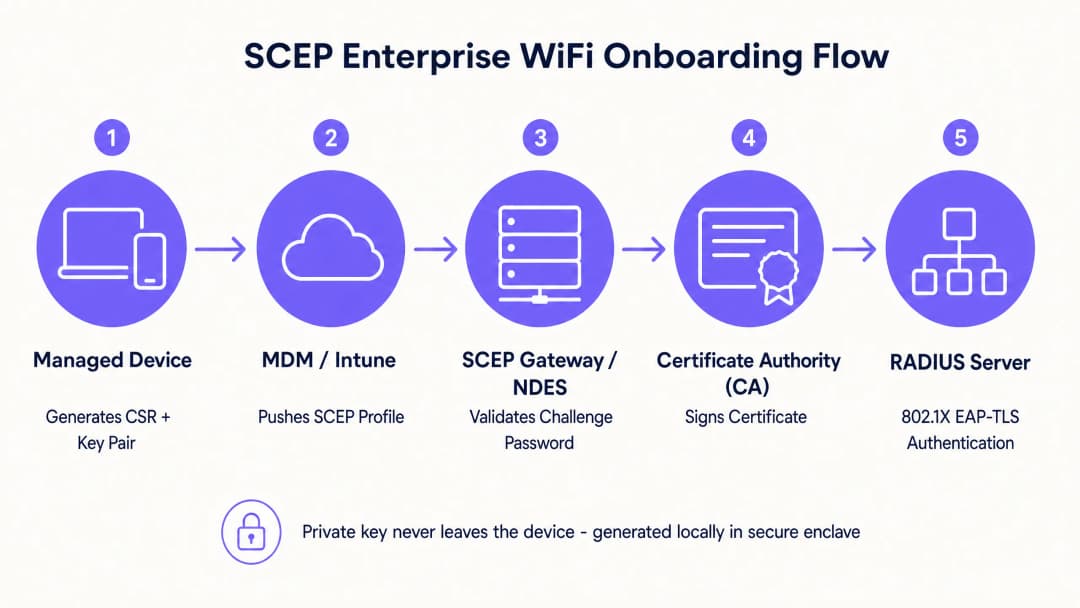
O SCEP é o padrão da indústria para registro de dispositivos corporativos. Em um fluxo de trabalho SCEP, o serviço de gerenciamento instrui o endpoint a gerar seu próprio par de chaves pública e privada. O dispositivo gera uma Solicitação de Assinatura de Certificado (CSR) e a envia à sua Autoridade Certificadora (CA) por meio de um servidor Network Device Enrollment Service (NDES). A CA assina a solicitação e retorna o certificado público ao dispositivo.
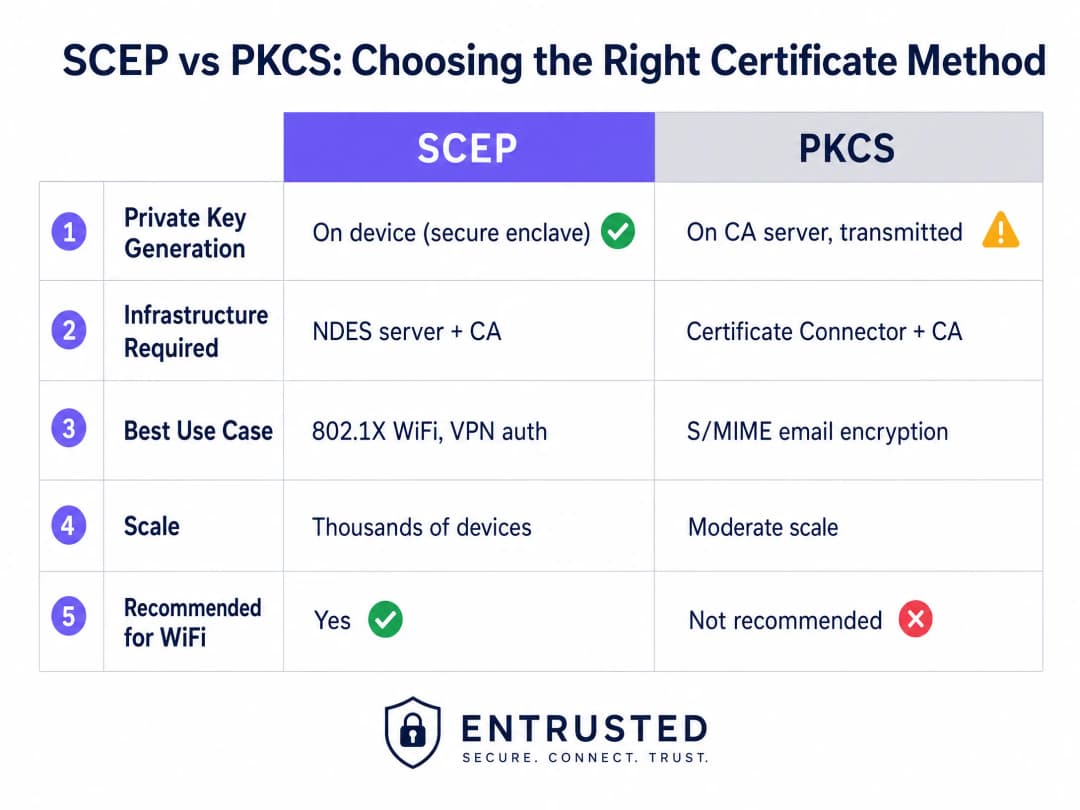
O benefício de segurança mais crítico do SCEP é que a chave privada nunca sai do dispositivo. Ela é gerada localmente, armazenada no enclave seguro do dispositivo (como TPM para Windows ou Secure Enclave para iOS) e nunca é transmitida pela rede. Por esse motivo, o SCEP é altamente recomendado para autenticação 802.1X.
Public Key Cryptography Standards (PKCS)
Por outro lado, com o PKCS, a Autoridade Certificadora gera as chaves pública e privada de forma centralizada. Um conector de certificado exporta com segurança esse par de chaves e o envia para o dispositivo de destino.
Embora o PKCS reduza a complexidade da infraestrutura ao eliminar a necessidade de implantar e manter um servidor NDES, ele introduz um risco teórico de segurança porque a chave privada é transmitida pela rede. Em vez de autenticação de rede, o PKCS é normalmente mais adequado para casos de uso em que a custódia de chaves é necessária, como a criptografia de e-mail S/MIME.
Tem dúvidas sobre a sua configuração específica?
A nossa equipa trabalha com operadores de espaços, gestores de TI e engenheiros de rede em 80.000 locais. Agende uma chamada de 20 minutos e mostraremos como outros profissionais na sua situação o resolveram.
Guia de Implementação: Sequência de Implantação
A configuração bem-sucedida de um perfil de WiFi gerenciado para 802.1X exige a adesão estrita a uma sequência de implantação específica. Devido às regras de dependência de perfil, a confiança deve ser estabelecida antes que a autenticação possa ser configurada.
Passo 1: Implantando o Perfil de Certificado de Raiz Confiável
Antes que qualquer dispositivo possa solicitar um certificado de cliente ou confiar em seu servidor RADIUS, ele deve confiar na Autoridade Certificadora emissora.
- Exporte o certificado da sua CA Raiz e quaisquer certificados de CA Intermediária como arquivos .cer.
- Crie um novo perfil de configuração no console do seu MDM.
- Selecione a plataforma de destino e escolha o tipo de perfil de Certificado Confiável.
- Faça o upload do arquivo .cer e implante este perfil nos seus grupos de dispositivos de destino.
Passo 2: Configurando o Perfil de Certificado SCEP
Assim que a relação de confiança for estabelecida, configure o perfil SCEP para definir como os dispositivos recuperam seus certificados de cliente.
- Crie um novo perfil de configuração e selecione Certificado SCEP.
- Configure o Formato do Nome do Assunto. Para autenticação baseada no usuário,
CN={{UserPrincipalName}}é o padrão. Para autenticação de dispositivo, useCN={{AAD_Device_ID}}. - Defina o Uso da Chave para Assinatura Digital e Criptografia de Chave.
- Em Uso Avançado da Chave, especifique Autenticação do Cliente (OID: 1.3.6.1.5.5.7.3.2).
- Vincule este perfil ao perfil de Certificado de Raiz Confiável criado no Passo 1.
- Forneça a URL externa do seu gateway SCEP ou servidor NDES.
Passo 3: Implantando o Perfil WiFi 802.1X
O passo final é enviar a configuração de WiFi que associa os certificados ao SSID da rede.
- Crie um perfil de configuração de WiFi.
- Insira o nome da rede exatamente como ele é transmitido pelos seus pontos de acesso sem fio.
- Selecione WPA2-Enterprise ou WPA3-Enterprise como o tipo de segurança.
- Defina o tipo de EAP para EAP-TLS.
- Nas configurações de autenticação, selecione o perfil de certificado SCEP criado no Passo 2 como o certificado de Autenticação do Cliente.
- Especifique o Certificado de Raiz Confiável para validação do servidor para garantir que o dispositivo se conecte apenas ao seu servidor RADIUS legítimo.
Melhores Práticas e Padrões do Setor
Ao implementar implantações de certificados SCEP, siga estas melhores práticas neutras de fornecedor para garantir a conformidade e a confiabilidade.
Posicionamento e Segurança do Gateway SCEP
Para permitir que dispositivos remotos provisionem certificados antes de chegarem ao local, o gateway SCEP deve estar acessível pela internet. Expor um servidor interno diretamente à internet é um grande risco de segurança. Publique a URL do SCEP usando um proxy de aplicativo ou proxy reverso. Isso fornece acesso remoto seguro sem abrir portas de entrada no firewall e permite aplicar políticas de Acesso Condicional ao fluxo de registro.
Verificação de RADIUS e CRL
A implantação de certificados é apenas metade da equação de segurança; a revogação é igualmente crítica. Se um funcionário sair da organização, desativar sua conta de diretório pode não revogar imediatamente seu acesso WiFi se o certificado de cliente continuar válido e o servidor RADIUS não verificar rigidamente a Lista de Revogação de Certificados (CRL).
Configure seu servidor RADIUS para impor uma verificação rígida de CRL. Certifique-se de que seus pontos de distribuição de CRL estejam altamente disponíveis; se o servidor RADIUS não conseguir alcançar a CRL, a autenticação falhará, causando interrupções generalizadas.
Para uma análise mais detalhada sobre conectividade moderna, revise nosso guia Gerenciamento de Largura de Banda: Um Guia Prático para 2026.
Solução de Problemas e Mitigação de Riscos
Mesmo com um planejamento meticuloso, as implantações de certificados podem apresentar problemas. Aqui estão os modos de falha comuns e suas estratégias de mitigação.
Falha ao Aplicar o Perfil WiFi
O dispositivo recebe os certificados Trusted Root e SCEP, mas o perfil de WiFi é exibido como com falha ou não aplicável no console MDM. Isso é quase sempre causado por uma incompatibilidade de direcionamento de grupo. Se o perfil SCEP for atribuído a um grupo de usuários, mas o perfil de WiFi for atribuído a um grupo de dispositivos, o MDM não conseguirá resolver a dependência. Audite suas atribuições. Garanta que os perfis Trusted Root, SCEP e de WiFi sejam todos implantados exatamente nos mesmos grupos.
Erro de Gateway 403 Forbidden
Os dispositivos falham ao recuperar os certificados SCEP e os logs do gateway exibem erros HTTP 403. A conta de serviço do conector não possui as permissões necessárias no modelo de certificado ou a filtragem de URL do seu firewall está bloqueando parâmetros específicos de query string usados pelo SCEP. Verifique se a conta do conector possui permissões de Read e Enrol no modelo de CA. Verifique os logs do firewall para garantir que as URLs que contêm ?operation=GetCACaps não estejam sendo bloqueadas.
ROI e Impacto nos Negócios
A transição para a implantação de certificados 802.1X orientada por SCEP oferece retornos mensuráveis em segurança e operações.
- Redução nos Chamados de Suporte: O WiFi baseado em senha gera um alto volume de chamados de suporte devido a senhas expiradas, bloqueios e erros de digitação. A autenticação baseada em certificado é invisível para o usuário, reduzindo normalmente as cargas de trabalho de suporte relacionadas ao WiFi em 70%.
- Postura de Segurança Aprimorada: O EAP-TLS elimina o risco de colheita de credenciais e ataques Man-in-the-Middle. Isso é crítico para a conformidade com frameworks como PCI-DSS e GDPR, especialmente em ambientes de Varejo e Saúde.
- Integração Simplificada: A integração da implantação de certificados com os fluxos de trabalho existentes do MDM garante uma experiência de provisionamento unificada e sem toque desde o primeiro dia.
Embora o SCEP proteja seus dispositivos corporativos gerenciados, as redes de convidados e visitantes exigem uma abordagem diferente. Para dispositivos não gerenciados, um Captive Portal com login social ou verificação por SMS alimenta uma camada de dados proprietários, fornecendo insights práticos. Explore nossa plataforma de WiFi Analytics para ver como esses dados geram receita.
Definições principais
SCEP (Simple Certificate Enrollment Protocol)
Um protocolo que permite aos dispositivos solicitar certificados digitais de uma Autoridade de Certificação, onde a chave privada é gerada e armazenada com segurança no próprio dispositivo.
O método recomendado para implantar certificados de autenticação de WiFi devido à sua alta segurança e escalabilidade em frotas corporativas.
PKCS (Public Key Cryptography Standards)
Um conjunto de padrões onde tanto a chave pública quanto a privada são geradas pela Autoridade de Certificação e depois entregues com segurança ao dispositivo final.
Frequentemente usado para criptografia de e-mail S/MIME, mas menos ideal para autenticação de WiFi devido à transmissão da chave privada pela rede.
NDES (Network Device Enrollment Service)
Uma função do Microsoft Windows Server que atua como uma ponte, permitindo que dispositivos sem credenciais de domínio obtenham certificados via SCEP.
Um componente de infraestrutura obrigatório ao implementar a implantação de certificados SCEP com Microsoft PKI local.
EAP-TLS (Extensible Authentication Protocol - Transport Layer Security)
O método de autenticação 802.1X mais seguro, que exige que tanto o servidor quanto o cliente apresentem certificados digitais válidos.
O protocolo de autenticação de destino que os perfis de WiFi e de certificado MDM são projetados para habilitar, eliminando o acesso baseado em senha.
CRL (Certificate Revocation List)
Uma lista publicada pela Autoridade Certificadora contendo os números de série dos certificados que foram revogados antes da sua data de expiração agendada.
Os servidores RADIUS devem verificar a CRL durante a autenticação para garantir que funcionários desligados não possam acessar a rede usando um certificado anteriormente válido.
CSR (Certificate Signing Request)
Um bloco de texto codificado enviado a uma Autoridade Certificadora ao solicitar um certificado SSL/TLS, contendo a chave pública e as informações de identidade.
Gerado localmente pelo dispositivo gerenciado durante o fluxo SCEP para solicitar sua credencial de identidade exclusiva.
802.1X
Um padrão IEEE para controle de acesso à rede baseado em porta que fornece um mecanismo de autenticação para dispositivos que desejam se conectar a uma LAN ou WLAN.
O framework fundamental que impõe a exigência de validação de certificado EAP-TLS antes de conceder acesso à rede.
RADIUS (Remote Authentication Dial-In User Service)
Um protocolo de rede que fornece gerenciamento centralizado de autenticação, autorização e tarifação para usuários que se conectam e usam um serviço de rede.
O servidor que avalia o certificado do cliente em relação à CA e à CRL para tomar a decisão final de permitir ou negar o acesso WiFi.
Exemplos práticos
Um grupo hoteleiro de 150 propriedades precisa proteger a rede de seus funcionários em uma combinação de notebooks Windows para a recepção, dispositivos iOS para a governança e tablets Android para o ponto de venda do restaurante. Eles usam atualmente WPA2-Personal com uma senha compartilhada rotacionada trimestralmente, gerando um volume enorme de chamados no suporte.
O grupo hoteleiro implanta três perfis do Intune em sequência para um grupo unificado de dispositivos. Primeiro, um perfil de Certificado de Raiz Confiável estabelece confiança com a CA corporativa. Segundo, um perfil de Certificado SCEP instrui os dispositivos a solicitar um certificado de cliente exclusivo. Terceiro, um perfil de WiFi configura o SSID corporativo com WPA3-Enterprise e EAP-TLS, apontando para o certificado SCEP para autenticação. O servidor RADIUS impõe uma verificação rigorosa de CRL para revogar o acesso instantaneamente após o desligamento de um funcionário.
Uma rede de varejo de moda com 200 lojas exige conformidade com o PCI DSS para seus sistemas de ponto de venda baseados em Windows gerenciados através do Intune. Eles devem garantir uma autenticação forte e uma segmentação de rede rigorosa para qualquer dispositivo que processe dados de portadores de cartão.
A rede de varejo implementa EAP-TLS baseado em SCEP para autenticação em nível de dispositivo no SSID da equipe. A política RADIUS direciona a atribuição de VLAN, colocando automaticamente os terminais de PDV autenticados em uma VLAN estritamente isolada e no escopo do PCI. O WiFi de convidados é tratado em um SSID totalmente separado com seu próprio fluxo de autenticação de Captive Portal, garantindo que as duas redes nunca se cruzem.
Questões práticas
Q1. Sua implantação do Intune mostra os perfis de Trusted Root e SCEP aplicados com sucesso ao laptop de um usuário, mas o perfil de WiFi mostra um estado de "Erro". O usuário não consegue se conectar ao SSID corporativo. Qual é a causa arquitetônica mais provável?
Dica: Considere como as plataformas de MDM resolvem dependências entre perfis de configuração relacionados.
Ver resposta modelo
Uma divergência no direcionamento de grupos. O perfil SCEP provavelmente está atribuído a um grupo de Usuários, enquanto o perfil de WiFi está atribuído a um grupo de Dispositivos (ou vice-versa). O Intune não consegue resolver a dependência entre tipos de grupos diferentes, fazendo com que a implantação do perfil de WiFi falhe. Audite as atribuições e garanta que todos os três perfis tenham como alvo exatamente o mesmo grupo do Azure AD.
Q2. Uma subsidiária recém-adquirida exige autenticação 802.1X para os dispositivos de seus funcionários. A equipe de segurança deles exige que as chaves privadas nunca trafeguem pela rede e sejam geradas dentro do TPM de hardware do dispositivo. Qual método de implantação de certificado você deve usar?
Dica: Compare onde a chave privada é gerada no fluxo de trabalho SCEP em relação ao fluxo de trabalho PKCS.
Ver resposta modelo
Você deve usar SCEP (Simple Certificate Enrollment Protocol). Em um fluxo de trabalho SCEP, o dispositivo gera seu próprio par de chaves pública e privada localmente em seu enclave seguro (TPM) e envia apenas uma Solicitação de Assinatura de Certificado (CSR) pela rede. O PKCS gera a chave privada de forma centralizada na CA e a transmite pela rede, o que viola a exigência da equipe de segurança.
Q3. Um funcionário é desligado e sua conta do Active Directory é desativada. No entanto, seu laptop permanece conectado à rede WiFi corporativa por várias horas antes de perder o acesso. Como você resolve essa lacuna de segurança?
Dica: Desativar uma conta não invalida um certificado existente. Qual mecanismo o servidor RADIUS usa para verificar a validade do certificado?
Ver resposta modelo
Você deve configurar o servidor RADIUS para impor uma verificação rigorosa da Lista de Revogação de Certificados (CRL). Quando um funcionário é desligado, seu certificado deve ser explicitamente revogado na Autoridade Certificadora. O servidor RADIUS verificará a CRL durante o próximo ciclo de autenticação e negará o acesso imediatamente, independentemente do status da conta no Active Directory.
Continue a ler esta série
Conformidade com a CIPA: checklist de conformidade para operadores de locais
Você será capaz de decidir se a CIPA se aplica ao seu WiFi, depois segmentar redes, rotear o DNS através do Purple Shield e fechar rotas de desvio. Você também saberá quais evidências guardar para a certificação do Formulário 486 ou Formulário 479. O checklist atribui cada requisito a um responsável, para que sua certificação do próximo ano de financiamento não tenha nenhuma pendência.
Falhas de conexão no modo de transição WPA3: um checklist de implantação para Cisco Meraki, HPE Aruba e Ruckus
Use este checklist para diagnosticar por que os dispositivos falham em um SSID de modo de transição WPA3 SAE e corrija o problema no Cisco Meraki, HPE Aruba ou Ruckus. Você associará códigos de status 802.11 às causas, isolará problemas de PMF, 802.11r e 6GHz, e decidirá quando migrar para um SSID exclusivo WPA3.
Melhor filtragem de DNS: um guia completo para empresas
Este guia de referência técnica explica como a filtragem de DNS corporativa protege redes públicas bloqueando domínios maliciosos na camada de resolução - antes mesmo que uma conexão seja estabelecida. Ele oferece aos diretores de TI, arquitetos de rede e equipes de operações de locais a arquitetura de implantação, a configuração do firewall e o contexto de conformidade necessários para proteger o WiFi de convidados em ambientes de hotelaria, varejo e setor público. O Purple Shield bloqueia malware, botnets e conteúdo inadequado no nível de DNS em mais de 80.000 locais ativos.
Tem dúvidas sobre a sua configuração específica?
A nossa equipa trabalha com operadores de espaços, gestores de TI e engenheiros de rede em 80.000 locais. Agende uma chamada de 20 minutos e mostraremos como outros profissionais na sua situação o resolveram.