

WiFi नेटवर्क सेगमेंटेशन: VLANs, SSIDs और गेस्ट ट्रैफ़िक
यह आधिकारिक गाइड VLANs और कई SSIDs का उपयोग करके WiFi नेटवर्क सेगमेंटेशन की महत्वपूर्ण भूमिका की पड़ताल करता है। यह आतिथ्य, खुदरा और सार्वजनिक क्षेत्रों में IT लीडर्स के लिए नेटवर्क को सुरक्षित करने, गेस्ट ट्रैफ़िक को अलग करने और प्रदर्शन का त्याग किए बिना अनुपालन सुनिश्चित करने के लिए कार्रवाई योग्य कार्यान्वयन रणनीतियाँ प्रदान करता है।
🎧 इस गाइड को सुनें
ट्रांसक्रिप्ट देखें
कार्यकारी सारांश
एंटरप्राइज़ स्थानों के लिए—चाहे वह एक हलचल भरा Retail वातावरण हो, एक मल्टी-साइट Hospitality श्रृंखला हो, या एक जटिल Healthcare कैंपस हो—फ्लैट वायरलेस नेटवर्क के दिन अब चले गए हैं। आज के नेटवर्क आर्किटेक्ट्स को प्रतिस्पर्धी मांगों की एक श्रृंखला का सामना करना पड़ता है: हजारों समवर्ती गेस्ट डिवाइसों का समर्थन करना, संवेदनशील कॉर्पोरेट डेटा को सुरक्षित करना, पॉइंट-ऑफ़-सेल सिस्टम को सक्षम करना, और IoT सेंसर के तेजी से बढ़ते बेड़े को ऑनबोर्ड करना।
इन विभिन्न ट्रैफ़िक क्लासों को एक ही, अनसेगमेंटेड नेटवर्क पर चलाने का प्रयास करना न केवल अक्षम है; यह एक महत्वपूर्ण सुरक्षा भेद्यता भी है। वर्चुअल लोकल एरिया नेटवर्क्स (VLANs) और सर्विस सेट आइडेंटिफ़ायर (SSIDs) के माध्यम से लागू WiFi नेटवर्क सेगमेंटेशन, पार्श्व गति के जोखिमों को कम करने, नियामक अनुपालन (जैसे PCI DSS और GDPR) सुनिश्चित करने और अनुमानित प्रदर्शन प्रदान करने के लिए आवश्यक मूलभूत आर्किटेक्चर है।
यह गाइड वरिष्ठ IT पेशेवरों को एक सेगमेंटेड वायरलेस नेटवर्क को डिज़ाइन करने, डिप्लॉय करने और मान्य करने के लिए एक व्यापक, विक्रेता-तटस्थ ब्लूप्रिंट प्रदान करता है। हम अंतर्निहित लेयर 2 यांत्रिकी का पता लगाते हैं, चरण-दर-चरण कार्यान्वयन प्रक्रिया का विवरण देते हैं, और इस बात पर प्रकाश डालते हैं कि Purple जैसे प्रबंधित Guest WiFi प्लेटफ़ॉर्म को एकीकृत करना सुरक्षा और वेन्यू एनालिटिक्स दोनों को कैसे सुपरचार्ज कर सकता है।
तकनीकी गहन-विश्लेषण: सेगमेंटेशन की यांत्रिकी
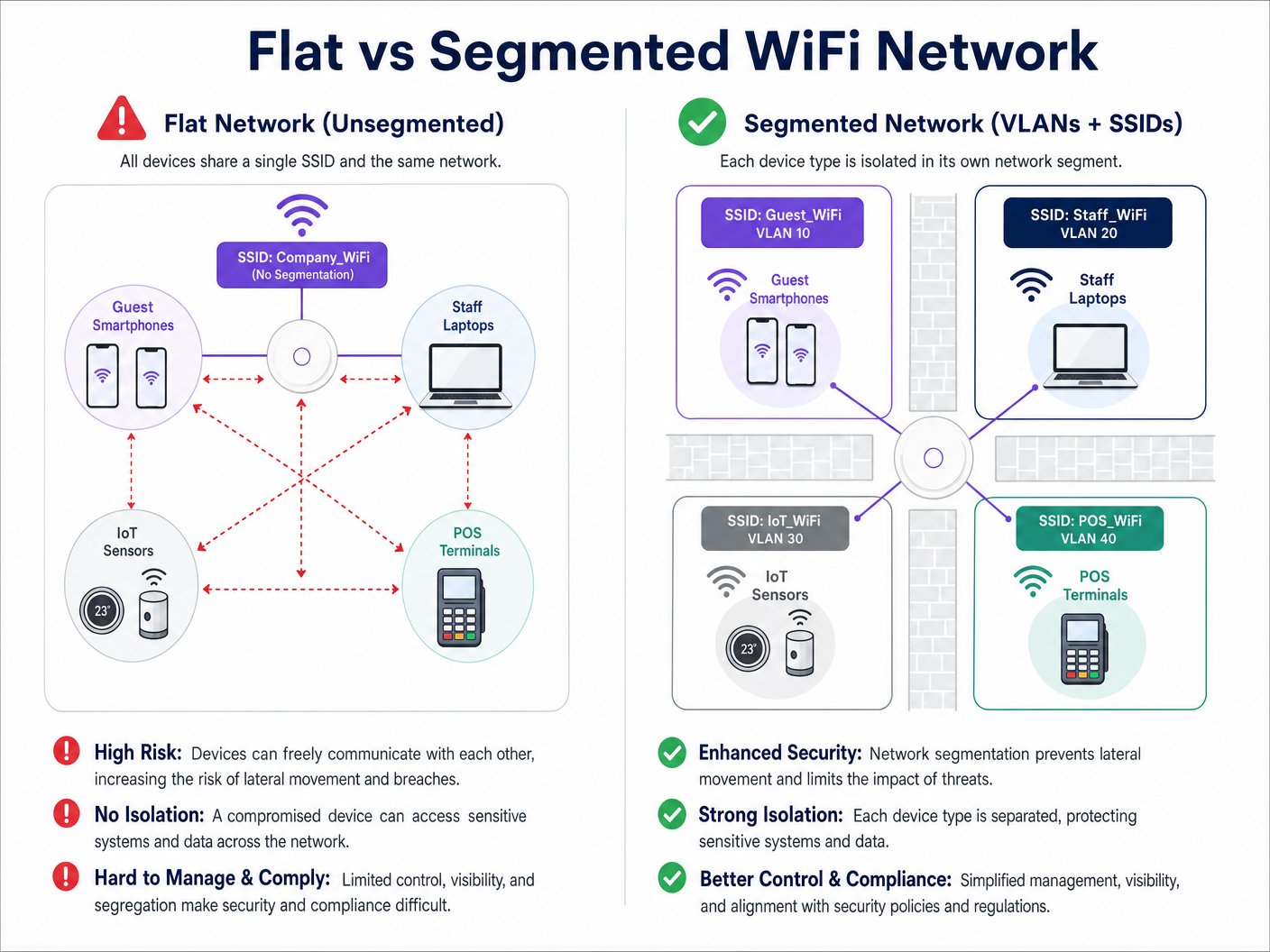
अपने मूल में, WiFi नेटवर्क सेगमेंटेशन एक एकल भौतिक वायरलेस इन्फ्रास्ट्रक्चर को कई तार्किक रूप से अलग-थलग ब्रॉडकास्ट डोमेन में विभाजित करने की प्रथा है। यह अलगाव सुनिश्चित करता है कि एक सेगमेंट से ट्रैफ़िक—जैसे कि एक गेस्ट का स्मार्टफोन—दूसरे सेगमेंट पर मौजूद डिवाइसों, जैसे कि एक कॉर्पोरेट लैपटॉप या एक क्लिनिकल डिवाइस, के साथ इंटरैक्ट नहीं कर सकता है।
VLANs (IEEE 802.1Q) की भूमिका
इस तार्किक पृथक्करण के लिए प्राथमिक तंत्र VLAN है, जिसे IEEE 802.1Q मानक द्वारा परिभाषित किया गया है। एक VLAN नेटवर्क प्रशासकों को एक एकल भौतिक स्विच या एक्सेस पॉइंट को कई अलग-अलग नेटवर्कों में विभाजित करने की अनुमति देता है। जैसे ही डेटा पैकेट नेटवर्क से गुजरते हैं, उन्हें एक विशिष्ट VLAN ID (1 से 4094 तक) के साथ टैग किया जाता है। यह टैग पैकेट की रूटिंग को निर्धारित करता है और सुनिश्चित करता है कि यह अपने निर्दिष्ट तार्किक पथ तक ही सीमित रहे।
एक विशिष्ट एंटरप्राइज़ डिप्लॉयमेंट में, ट्रैफ़िक को विशिष्ट VLANs में वर्गीकृत किया जाता है। उदाहरण के लिए:
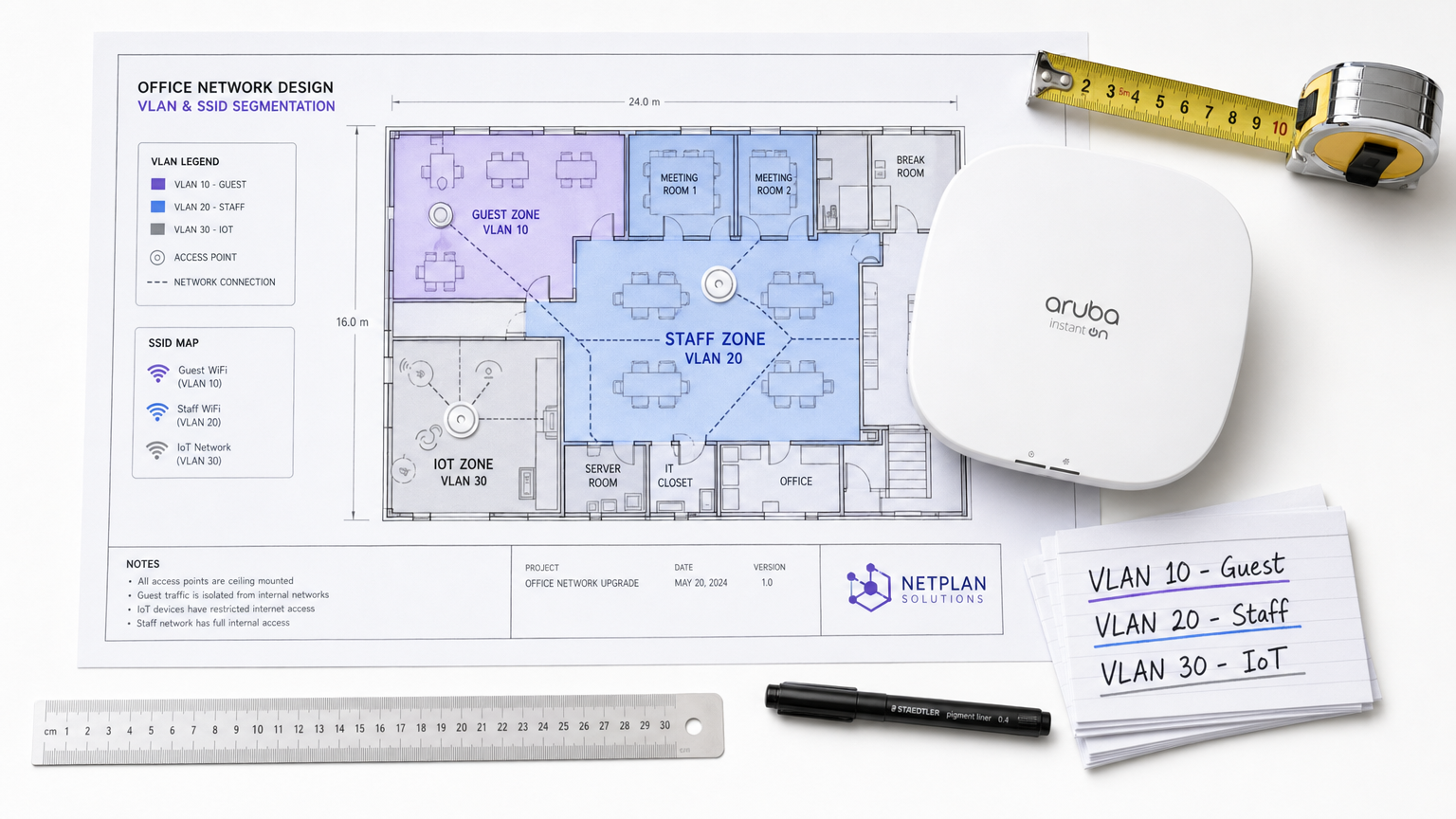
- VLAN 10: Guest WiFi
- VLAN 20: कॉर्पोरेट/स्टाफ
- VLAN 30: IoT और बिल्डिंग मैनेजमेंट
- VLAN 40: पॉइंट ऑफ़ सेल (POS) टर्मिनल
SSIDs को VLANs से मैप करना
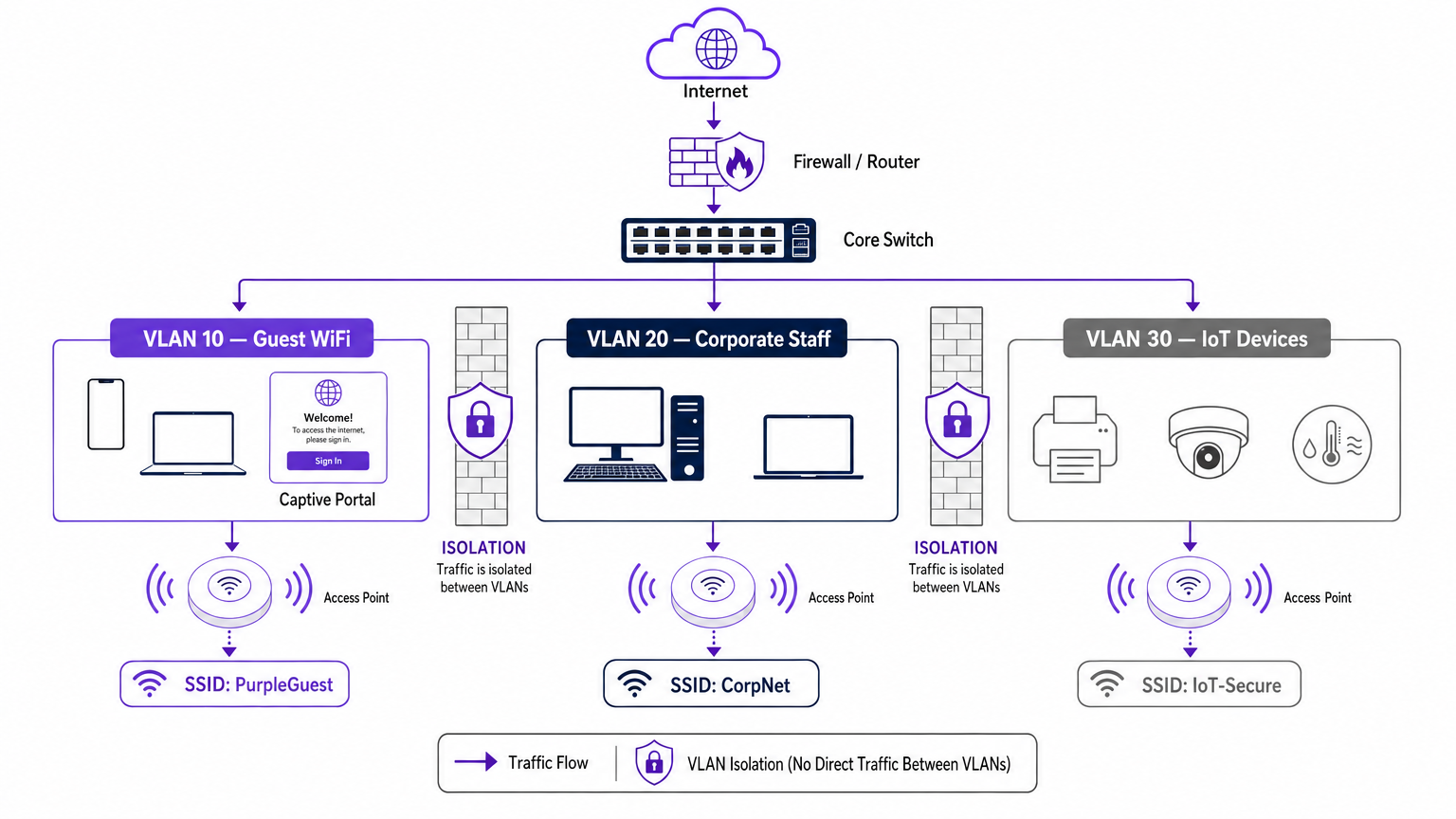
जबकि VLANs वायर्ड बैकहॉल और तार्किक रूटिंग को संभालते हैं, SSID (सर्विस सेट आइडेंटिफ़ायर) नेटवर्क का वायरलेस चेहरा है। आधुनिक एंटरप्राइज़ एक्सेस पॉइंट एक साथ कई SSIDs को ब्रॉडकास्ट कर सकते हैं। सेगमेंटेशन में महत्वपूर्ण कदम प्रत्येक SSID को उसके संबंधित VLAN से मैप करना है।
जब कोई उपयोगकर्ता "Guest_WiFi" SSID से कनेक्ट होता है, तो एक्सेस पॉइंट स्वचालित रूप से उस डिवाइस से सभी ट्रैफ़िक को गेस्ट नेटवर्क (उदाहरण के लिए, VLAN 10) को असाइन किए गए VLAN ID के साथ टैग करता है। इस ट्रैफ़िक को फिर कोर स्विच और फ़ायरवॉल पर वापस ट्रंक किया जाता है, जहाँ सख्त एक्सेस कंट्रोल लिस्ट (ACLs) इसके प्रवाह को निर्धारित करती हैं—आमतौर पर केवल आउटबाउंड इंटरनेट एक्सेस की अनुमति देती हैं और सभी आंतरिक रूटिंग को ब्लॉक करती हैं।
सुरक्षा और अनुपालन के प्रेरक
नेटवर्क सेगमेंटेशन का प्राथमिक प्रेरक जोखिम न्यूनीकरण है। एक फ्लैट नेटवर्क में, एक समझौता किया गया IoT डिवाइस या गेस्ट नेटवर्क पर एक दुर्भावनापूर्ण एक्टर आसानी से आंतरिक सिस्टम की जांच कर सकता है, संवेदनशील डेटा तक पहुंचने के लिए पार्श्व रूप से आगे बढ़ सकता है। सेगमेंटेशन इस पार्श्व गति को रोकता है।
इसके अलावा, अनुपालन फ्रेमवर्क अलगाव की मांग करते हैं:
- PCI DSS: कार्डहोल्डर डेटा एनवायरनमेंट (CDE) को अन्य सभी नेटवर्क ट्रैफ़िक से सख्त अलगाव की आवश्यकता है।
- GDPR: डिज़ाइन द्वारा डेटा सुरक्षा अनिवार्य करता है; गेस्ट ट्रैफ़िक को अलग करना सुनिश्चित करता है कि सार्वजनिक उपयोगकर्ता व्यक्तिगत रूप से पहचान योग्य जानकारी (PII) वाले सिस्टम तक नहीं पहुंच सकते हैं।
- हेल्थकेयर मानक: WiFi in Hospitals: A Guide to Secure Clinical Networks पर हमारी गाइड में विस्तृत रूप से बताया गया है, क्लिनिकल डिवाइसों को रोगी और आगंतुक नेटवर्कों से सख्ती से अलग किया जाना चाहिए।
कार्यान्वयन गाइड: एक चरणबद्ध दृष्टिकोण
एक सेगमेंटेड वायरलेस आर्किटेक्चर को डिप्लॉय करने के लिए कठोर योजना की आवश्यकता होती है। एक सुरक्षित, उच्च-प्रदर्शन डिप्लॉयमेंट सुनिश्चित करने के लिए इस चरणबद्ध दृष्टिकोण का पालन करें।
चरण 1: ट्रैफ़िक वर्गीकरण और ऑडिटिंग
किसी भी स्विच पोर्ट को कॉन्फ़िगर करने से पहले, वेन्यू के भीतर संचालित सभी डिवाइस प्रकारों का एक व्यापक ऑडिट करें। इन डिवाइसों को तार्किक समूहों में वर्गीकृत करें: गेस्ट, कॉर्पोरेट स्टाफ, अधिकारी, IoT सेंसर, POS सिस्टम और बिल्डिंग मैनेजमेंट। प्रत्येक श्रेणी एक विशिष्ट ट्रैफ़िक क्लास का प्रतिनिधित्व करती है जिसके लिए अपने स्वयं के VLAN और सुरक्षा नीति की आवश्यकता होती है।
चरण 2: VLAN और सबनेट डिज़ाइन
प्रत्येक ट्रैफ़िक क्लास को एक अद्वितीय VLAN ID और एक समर्पित IP सबनेट असाइन करें। महत्वपूर्ण रूप से, सुनिश्चित करें कि गेस्ट VLAN आपके आंतरिक RFC 1918 एड्रेस स्पेस से पूरी तरह से अलग सबनेट पर संचालित होता है।
फ़ायरवॉल स्तर पर, इंटर-VLAN रूटिंग के लिए एक डिफ़ॉल्ट-अस्वीकार नीति लागू करें। गेस्ट VLAN में इंटरनेट पर आउटबाउंड ट्रैफ़िक (पोर्ट 80 और 443) की अनुमति देने वाला एक स्पष्ट नियम और सभी आंतरिक सबनेट तक पहुंच को अस्वीकार करने वाले स्पष्ट नियम होने चाहिए।
चरण 3: SSID कॉन्फ़िगरेशन और क्लाइंट अलगाव
अपने वायरलेस LAN कंट्रोलर या क्लाउड मैनेजमेंट प्लेटफ़ॉर्म पर आवश्यक SSIDs को कॉन्फ़िगर करें।
- SSID संख्या सीमित करें: प्रति रेडियो बैंड में तीन या चार से अधिक SSIDs को ब्रॉडकास्ट न करें। अत्यधिक SSIDs महत्वपूर्ण प्रबंधन फ्रेम ओवरहेड (बीकनिंग) उत्पन्न करते हैं, जो समग्र एयरटाइम और थ्रूपुट को कम करता है। के लिएAP performance को ऑप्टिमाइज़ करने के बारे में अधिक जानकारी के लिए, देखें वायरलेस एक्सेस पॉइंट रकस के लिए आपकी मार्गदर्शिका ।
- क्लाइंट आइसोलेशन सक्षम करें: गेस्ट SSID पर, क्लाइंट आइसोलेशन (जिसे कभी-कभी AP आइसोलेशन या पीयर-टू-पीयर ब्लॉकिंग भी कहा जाता है) को सक्षम करना अनिवार्य है। यह एक ही गेस्ट नेटवर्क से जुड़े उपकरणों को एक-दूसरे से संचार करने से रोकता है, जिससे मेहमानों को पीयर-टू-पीयर हमलों से बचाया जा सकता है।
चरण 4: प्रमाणीकरण और एक्सेस कंट्रोल
सेगमेंट के अनुसार प्रमाणीकरण विधि को अनुकूलित करें:
- कॉर्पोरेट/स्टाफ: RADIUS सर्वर (जैसे, Active Directory) के विरुद्ध IEEE 802.1X प्रमाणीकरण का उपयोग करके WPA3-Enterprise लागू करें। यह प्रति-उपयोगकर्ता प्रमाणीकरण और डायनामिक VLAN असाइनमेंट प्रदान करता है। व्यक्तिगत उपकरणों के लिए, हमारी BYOD WiFi सुरक्षा: अपने नेटवर्क पर व्यक्तिगत उपकरणों को सुरक्षित रूप से कैसे अनुमति दें मार्गदर्शिका की समीक्षा करें।
- गेस्ट WiFi: एक खुले SSID का उपयोग करें जिसे एक captive portal के साथ जोड़ा गया हो। यहीं पर Purple प्लेटफॉर्म उत्कृष्ट प्रदर्शन करता है, जो सहज प्रमाणीकरण, GDPR-अनुरूप डेटा कैप्चर और समृद्ध WiFi Analytics प्रदान करता है।
- IoT: MAC एड्रेस फ़िल्टरिंग और सख्त फ़ायरवॉल ACLs के साथ WPA3-SAE (या एक मजबूत, रोटेटेड पासफ्रेज़ के साथ WPA2-PSK) का उपयोग करें, क्योंकि अधिकांश IoT डिवाइस 802.1X का समर्थन नहीं करते हैं।
चरण 5: बैंडविड्थ प्रबंधन
किसी एक उपयोगकर्ता या उपयोगकर्ताओं के एक छोटे समूह को वेन्यू के इंटरनेट अपलिंक को संतृप्त करने से रोकने के लिए, गेस्ट VLAN पर प्रति-क्लाइंट दर सीमित करें। गेस्ट बैंडविड्थ को सीमित करना (उदाहरण के लिए, प्रति डिवाइस 5-10 Mbps पर) सभी उपयोगकर्ताओं के लिए एक सुसंगत आधारभूत अनुभव सुनिश्चित करता है, जबकि महत्वपूर्ण परिचालन ट्रैफ़िक के लिए क्षमता को संरक्षित रखता है।
एंटरप्राइज़ वेन्यू के लिए सर्वोत्तम अभ्यास
- डिफ़ॉल्ट-डिनाई पोस्चर अपनाएं: सुरक्षित सेगमेंटेशन का आधार फ़ायरवॉल है। यदि व्यावसायिक कार्यों के लिए किसी ट्रैफ़िक प्रवाह की स्पष्ट रूप से आवश्यकता नहीं है, तो उसे अस्वीकार कर दिया जाना चाहिए।
- वायर्ड इंफ्रास्ट्रक्चर को सुरक्षित करें: यदि अंतर्निहित वायर्ड नेटवर्क सपाट है, तो वायरलेस सेगमेंटेशन को आसानी से बायपास किया जा सकता है। सुनिश्चित करें कि सार्वजनिक क्षेत्रों (जैसे, होटल के कमरे, सम्मेलन केंद्र) में सभी भौतिक स्विच पोर्ट गेस्ट VLAN को असाइन किए गए हैं या 802.1X पोर्ट-आधारित प्रमाणीकरण द्वारा संरक्षित हैं।
- गेस्ट पहचान के लिए Purple का लाभ उठाएं: गेस्ट सेगमेंट को डिप्लॉय करते समय, Purple के captive portal को एकीकृत करें। कनेक्ट लाइसेंस के तहत, Purple OpenRoaming जैसी सेवाओं के लिए एक मुफ्त पहचान प्रदाता के रूप में कार्य करता है, जो मूल्यवान फर्स्ट-पार्टी डेटा कैप्चर करते हुए सुरक्षित गेस्ट ऑनबोर्डिंग को सुव्यवस्थित करता है।
- ट्रंक पोर्ट्स का नियमित रूप से ऑडिट करें: एक सामान्य विफलता मोड एक ट्रंक पोर्ट (जो कई VLANs को वहन करता है) को एक्सेस पोर्ट के रूप में गलत तरीके से कॉन्फ़िगर करना है। यह VLAN टैग को हटा देता है और ट्रैफ़िक को एक ही नेटवर्क पर समेट देता है। नियमित कॉन्फ़िगरेशन ऑडिट आवश्यक हैं।
समस्या निवारण और जोखिम न्यूनीकरण
एक मजबूत डिज़ाइन के साथ भी, सेगमेंटेशन डिप्लॉयमेंट में समस्याएँ आ सकती हैं। यहाँ सामान्य विफलता मोड और न्यूनीकरण रणनीतियाँ दी गई हैं:
| विफलता मोड | लक्षण | न्यूनीकरण रणनीति |
|---|---|---|
| SSID ओवरहेड | उच्च चैनल उपयोग, धीमी क्लाइंट गति, कनेक्शन ड्रॉप होना। | SSIDs को समेकित करें। गेस्ट, कॉर्पोरेट और IoT तक सीमित करें। पुराने या अप्रयुक्त SSIDs को हटा दें। |
| VLAN ब्लीड | गेस्ट डिवाइस को कॉर्पोरेट DHCP स्कोप से IP एड्रेस प्राप्त हो रहे हैं। | स्विच पोर्ट कॉन्फ़िगरेशन का ऑडिट करें। सुनिश्चित करें कि AP अपलिंक को टैग किए गए ट्रंक पोर्ट के रूप में कॉन्फ़िगर किया गया है, न कि अनटैग किए गए एक्सेस पोर्ट के रूप में। |
| Captive Portal विफलता | मेहमान WiFi से कनेक्ट होते हैं लेकिन पोर्टल लोड नहीं होता है। | फ़ायरवॉल ACLs की जाँच करें। सुनिश्चित करें कि गेस्ट VLAN बाहरी DNS सर्वर और Purple captive portal IP एड्रेस तक पहुँच सकता है। |
| IoT कनेक्टिविटी समस्याएँ | हेडलेस डिवाइस नेटवर्क से जुड़ने में विफल रहते हैं। | प्रमाणीकरण संगतता सत्यापित करें। यदि डिवाइस में 802.1X समर्थन नहीं है, तो सुनिश्चित करें कि यह WPA2/3-PSK IoT SSID से कनेक्ट हो रहा है। |
ROI और व्यावसायिक प्रभाव
एक खंडित WiFi आर्किटेक्चर को लागू करने से सुरक्षा, अनुपालन और मार्केटिंग संचालन में मापने योग्य रिटर्न मिलता है।
सुरक्षा के दृष्टिकोण से, ROI को जोखिम से बचाव में मापा जाता है। पार्श्व गति को समाप्त करके, वेन्यू डेटा उल्लंघन से होने वाले संभावित वित्तीय और प्रतिष्ठा संबंधी नुकसान को नाटकीय रूप से कम करते हैं। इसके अलावा, सेगमेंटेशन PCI DSS और GDPR के लिए अनुपालन ऑडिट को सरल बनाता है, जिससे प्रमाणन बनाए रखने के लिए आवश्यक परिचालन ओवरहेड कम हो जाता है।
व्यावसायिक रूप से, सेगमेंटेशन एक समर्पित, उच्च-प्रदर्शन वाले गेस्ट नेटवर्क की तैनाती को सक्षम बनाता है। इस ट्रैफ़िक को Purple के प्लेटफॉर्म के माध्यम से रूट करके, वेन्यू एक लागत केंद्र को राजस्व-उत्पादक संपत्ति में बदल देते हैं। अलग-थलग गेस्ट नेटवर्क समृद्ध जनसांख्यिकीय और व्यवहार संबंधी डेटा कैप्चर करता है, जिससे व्यक्तिगत मार्केटिंग अभियान चलते हैं, फुटफॉल बढ़ता है, और ग्राहक वफादारी को बढ़ावा मिलता है—यह सब कॉर्पोरेट नेटवर्क को पूरी तरह से सील रखते हुए।
ब्रीफिंग सुनें
इस मार्गदर्शिका में चर्चा की गई डिप्लॉयमेंट रणनीतियों में गहराई से जानने के लिए, हमारे 10 मिनट के तकनीकी ब्रीफिंग पॉडकास्ट को सुनें।
मुख्य शब्द और परिभाषाएं
VLAN (Virtual Local Area Network)
A logical grouping of network devices that behave as if they are on the same physical network, regardless of their actual physical location.
Used by IT teams to isolate different types of traffic (e.g., guest vs. corporate) on the same physical switches and cabling.
SSID (Service Set Identifier)
The public name of a wireless network that users see on their devices when searching for WiFi.
Enterprise APs broadcast multiple SSIDs, mapping each one to a specific VLAN to enforce segmentation at the wireless edge.
Client Isolation
A wireless controller setting that prevents devices connected to the same SSID from communicating directly with each other.
Crucial for Guest WiFi networks to prevent a malicious user's device from attacking another guest's device on the same network.
Lateral Movement
The technique used by cyber attackers to move through a network, searching for sensitive data or high-value assets after gaining initial access.
Network segmentation is the primary defence against lateral movement, stopping a breach in the guest network from reaching the corporate servers.
Trunk Port
A switch port configured to carry traffic for multiple VLANs simultaneously by using 802.1Q tags.
The connection between a network switch and an enterprise access point must be a trunk port to support multiple SSIDs mapped to different VLANs.
802.1X
An IEEE standard for port-based network access control that provides an authentication mechanism to devices wishing to attach to a LAN or WLAN.
The gold standard for corporate network authentication, ensuring only authorised staff with valid credentials can access the internal VLAN.
Captive Portal
A web page that the user of a public-access network is obliged to view and interact with before access is granted.
Used on the Guest VLAN to capture user consent, present terms of service, and collect marketing data via platforms like Purple.
PCI DSS
Payment Card Industry Data Security Standard; a set of security standards designed to ensure that all companies that accept, process, store or transmit credit card information maintain a secure environment.
Requires strict network segmentation to isolate point-of-sale terminals from general corporate and guest traffic.
केस स्टडीज
A 300-room hotel currently operates a single flat network for guests, back-office staff, and smart room thermostats. The IT Director needs to secure the network to achieve PCI DSS compliance for the front desk while ensuring guests cannot access the thermostats.
The IT team must implement a segmented architecture using three distinct VLANs. VLAN 10 (Guest) is mapped to the 'Hotel_Guest' SSID with client isolation enabled and a captive portal for authentication. VLAN 20 (Corporate/POS) is mapped to a hidden SSID using WPA3-Enterprise (802.1X) for staff and POS terminals. VLAN 30 (IoT) is mapped to a hidden 'Hotel_IoT' SSID using WPA3-SAE for the thermostats. The core firewall is configured to block all routing between VLAN 10, 20, and 30, with VLAN 10 only permitted outbound internet access.
A large retail chain is deploying Purple Guest WiFi across 50 stores. They want to capture customer data via a captive portal but are concerned that guests might consume all available bandwidth, disrupting the store's inventory scanners.
The network architect deploys two VLANs: VLAN 50 for the inventory scanners (mapped to a WPA3-Enterprise SSID) and VLAN 60 for Guest WiFi (mapped to an open SSID with the Purple captive portal). On the wireless LAN controller, the architect configures a per-client rate limit of 5 Mbps downstream and 2 Mbps upstream specifically for the Guest SSID. Furthermore, QoS (Quality of Service) tags are applied at the switch level to prioritize traffic from VLAN 50 over VLAN 60.
परिदृश्य विश्लेषण
Q1. A stadium IT team wants to deploy a new fleet of wireless digital signage screens. They currently have a Guest SSID (VLAN 10) and a Staff SSID (VLAN 20). The signage vendor requests the screens be put on the Guest network so they can easily pull updates from the internet. What is the correct architectural decision?
💡 संकेत:Consider the security implications of placing unmanaged devices on a public network, and the impact of client isolation.
अनुशंसित दृष्टिकोण दिखाएं
Do not place the screens on the Guest VLAN. Create a new, dedicated IoT/Signage VLAN (e.g., VLAN 30) and map it to a hidden SSID. The Guest network has client isolation enabled, which might interfere with local management of the screens. More importantly, placing corporate assets on a public network exposes them to tampering from guests. The new VLAN 30 should have firewall rules allowing outbound internet access for updates, but blocking inbound traffic from the Guest network.
Q2. After deploying a new segmented network, the network administrator notices that devices connected to the 'Corp_Secure' SSID are receiving IP addresses in the 192.168.10.x range, which is the subnet designated for the Guest VLAN. What is the most likely configuration error?
💡 संकेत:Think about how VLAN tags are processed between the access point and the switch.
अनुशंसित दृष्टिकोण दिखाएं
The switch port connecting to the access point is likely misconfigured as an 'Access' port on VLAN 10, rather than a 'Trunk' port. Because it is not operating as a trunk, it is stripping the 802.1Q VLAN tags from the AP's traffic and dumping all traffic (from both the Guest and Corp SSIDs) onto the native VLAN configured on that port (in this case, the Guest VLAN).
Q3. A retail client wants to broadcast 8 different SSIDs to cater to various internal departments (Sales, Management, Warehouse, etc.) in addition to Guest WiFi. How should the Senior Solutions Architect advise them?
💡 संकेत:Consider the impact of management frame overhead on wireless performance.
अनुशंसित दृष्टिकोण दिखाएं
The architect should advise against this. Broadcasting 8 SSIDs will consume a massive amount of airtime just for beacon frames, severely degrading actual data throughput for all users. The solution is to consolidate the internal departments onto a single 'Corporate' SSID using WPA3-Enterprise (802.1X). The RADIUS server can then dynamically assign users to different VLANs (Sales VLAN, Warehouse VLAN) based on their Active Directory credentials, keeping the SSID count to a maximum of 3 or 4.




