

Segmentazione della rete WiFi: VLAN, SSID e traffico guest
This authoritative guide explores the critical role of WiFi network segmentation using VLANs and multiple SSIDs. It provides actionable implementation strategies for IT leaders across hospitality, retail, and public sectors to secure networks, isolate guest traffic, and ensure compliance without sacrificing performance.
🎧 Ascolta questa guida
Visualizza trascrizione
Riepilogo esecutivo
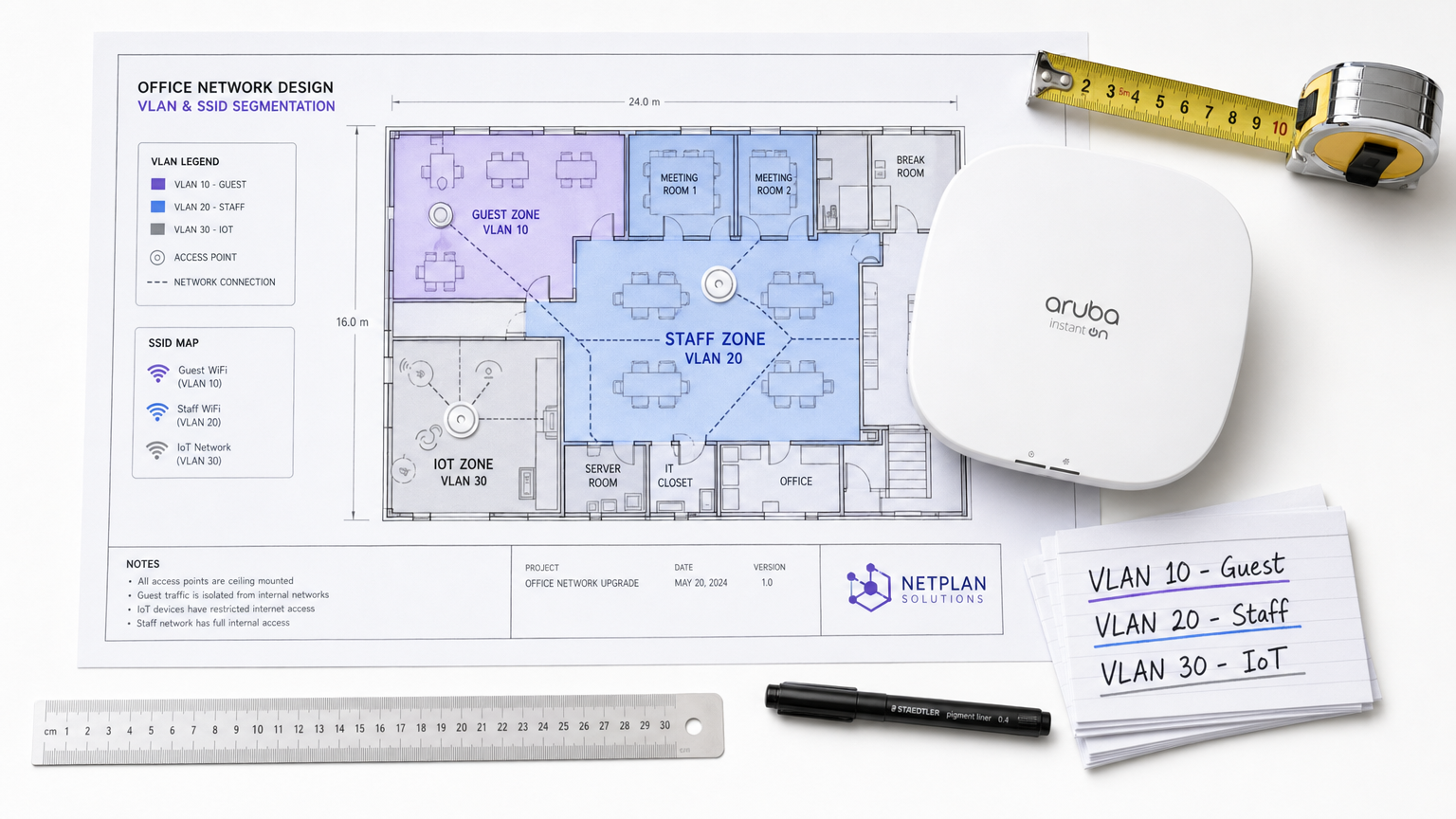
Per le strutture enterprise, che si tratti di un vivace ambiente Retail , di una catena Hospitality multi-sede o di un complesso campus Healthcare , i giorni della rete wireless piatta sono ormai lontani. Gli architetti di rete odierni affrontano una serie di esigenze contrastanti: supportare migliaia di dispositivi guest simultanei, proteggere i dati aziendali sensibili, abilitare i sistemi per i punti vendita (POS) e integrare una flotta in rapida crescita di sensori IoT.
Tentare di gestire queste classi di traffico eterogenee su un'unica rete non segmentata non è solo inefficiente; rappresenta una vulnerabilità di sicurezza critica. La segmentazione della rete WiFi, implementata tramite Virtual Local Area Network (VLAN) e Service Set Identifier (SSID), è l'architettura fondamentale necessaria per mitigare i rischi di movimento laterale, garantire la conformità normativa (come PCI DSS e GDPR) e offrire prestazioni prevedibili.
Questa guida fornisce ai professionisti IT senior un modello completo e indipendente dal fornitore per la progettazione, l'implementazione e la convalida di una rete wireless segmentata. Esploriamo le meccaniche Layer 2 sottostanti, descriviamo in dettaglio il processo di implementazione passo dopo passo ed evidenziamo come l'integrazione di una piattaforma Guest WiFi gestita come Purple possa potenziare sia la sicurezza che le analisi della struttura.
Approfondimento tecnico: le meccaniche della segmentazione
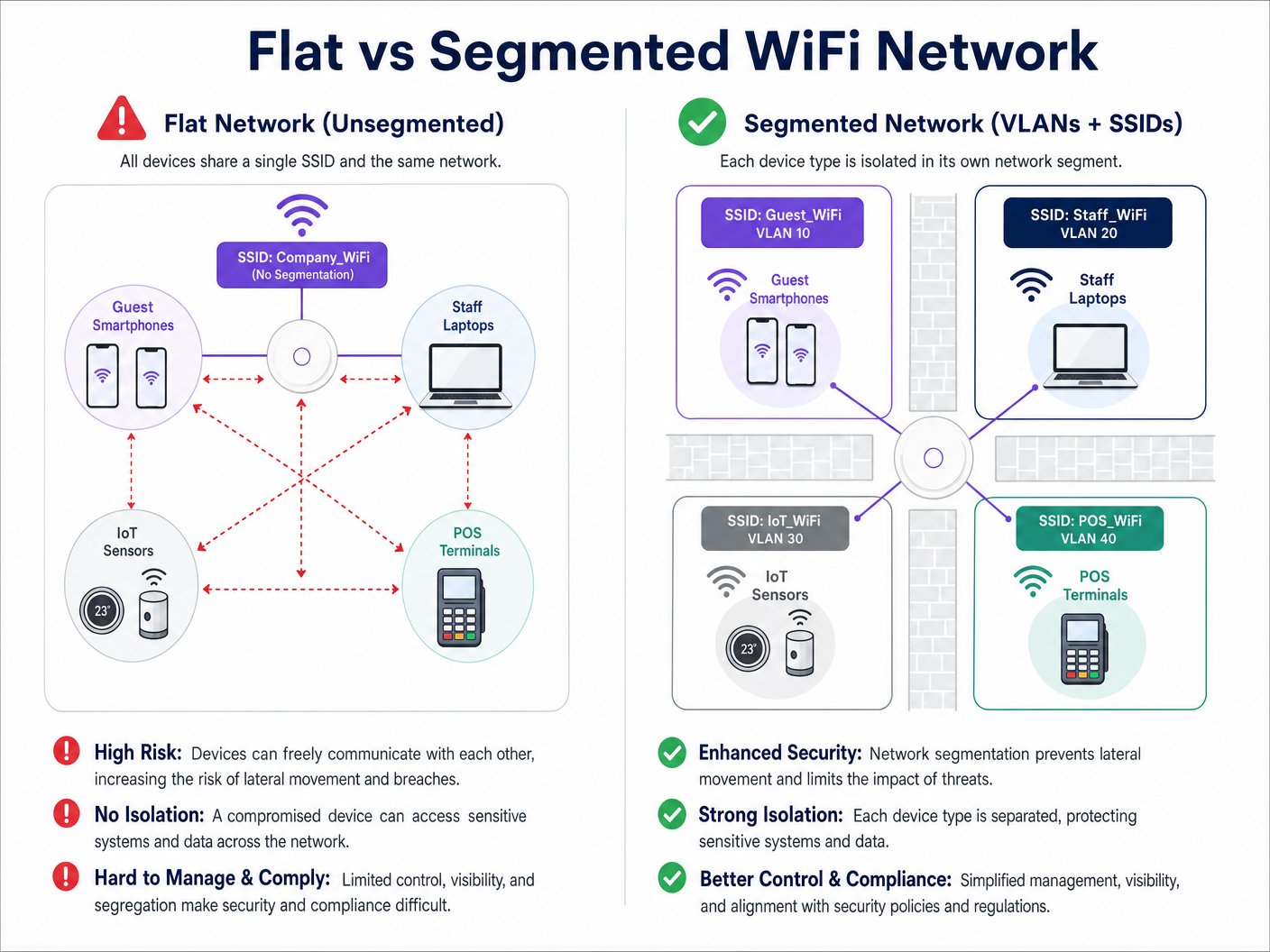
Fondamentalmente, la segmentazione della rete WiFi è la pratica di dividere una singola infrastruttura wireless fisica in più domini di broadcast isolati logicamente. Questo isolamento garantisce che il traffico di un segmento, come lo smartphone di un ospite, non possa interagire con i dispositivi di un altro segmento, come un laptop aziendale o un dispositivo clinico.
Il ruolo delle VLAN (IEEE 802.1Q)
Il meccanismo principale per questa separazione logica è la VLAN, definita dallo standard IEEE 802.1Q. Una VLAN consente agli amministratori di rete di partizionare un singolo switch fisico o access point in più reti distinte. Man mano che i pacchetti di dati attraversano la rete, vengono etichettati con un ID VLAN specifico (che va da 1 a 4094). Questo tag determina l'instradamento del pacchetto e garantisce che rimanga confinato al suo percorso logico designato.
In una tipica implementazione enterprise, il traffico è categorizzato in VLAN specifiche. Ad esempio:
- VLAN 10: Guest WiFi
- VLAN 20: Aziendale/Personale
- VLAN 30: IoT e Gestione degli edifici
- VLAN 40: Terminali Point of Sale (POS)
Mappatura degli SSID sulle VLAN
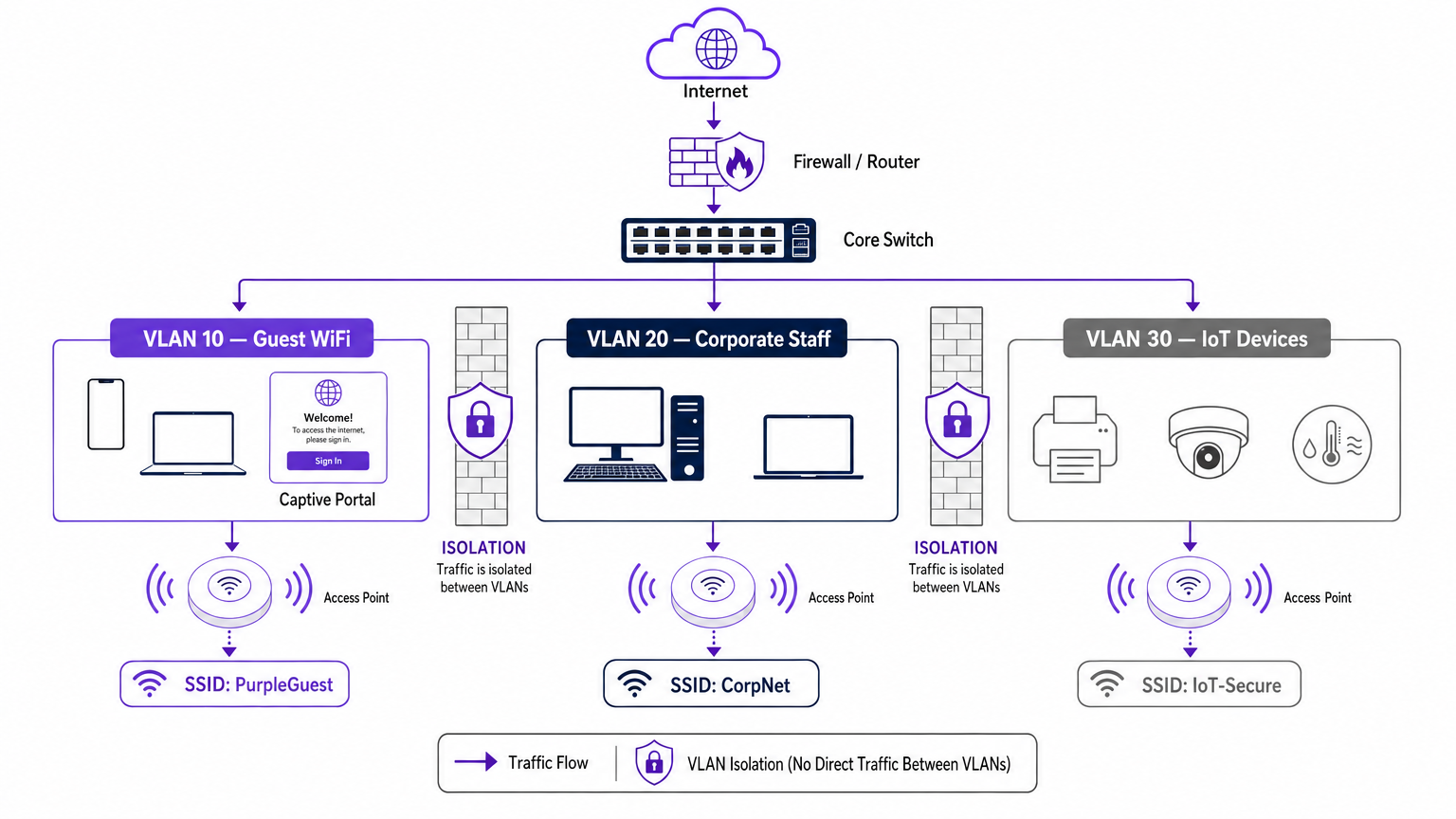
Mentre le VLAN gestiscono il backhaul cablato e l'instradamento logico, l'SSID (Service Set Identifier) è il volto wireless della rete. I moderni access point enterprise possono trasmettere più SSID contemporaneamente. Il passaggio cruciale nella segmentazione è la mappatura di ciascun SSID alla VLAN corrispondente.
Quando un utente si connette all'SSID "Guest_WiFi", l'access point etichetta automaticamente tutto il traffico proveniente da quel dispositivo con l'ID VLAN assegnato alla rete guest (es. VLAN 10). Questo traffico viene quindi instradato tramite trunk verso il core switch e il firewall, dove rigide liste di controllo degli accessi (ACL) ne dettano il flusso, in genere consentendo solo l'accesso a Internet in uscita e bloccando tutto l'instradamento interno.
Fattori trainanti per sicurezza e conformità
Il fattore principale per la segmentazione della rete è la mitigazione del rischio. In una rete piatta, un dispositivo IoT compromesso o un utente malintenzionato sulla rete guest può facilmente sondare i sistemi interni, muovendosi lateralmente per accedere a dati sensibili. La segmentazione blocca questo movimento laterale.
Inoltre, i framework di conformità richiedono l'isolamento:
- PCI DSS: richiede un rigoroso isolamento del Cardholder Data Environment (CDE) da tutto il resto del traffico di rete.
- GDPR: impone la protezione dei dati fin dalla progettazione (data protection by design); l'isolamento del traffico guest garantisce che gli utenti pubblici non possano accedere ai sistemi che ospitano informazioni di identificazione personale (PII).
- Standard sanitari: come descritto nella nostra guida WiFi negli ospedali: una guida alle reti cliniche sicure , i dispositivi clinici devono essere rigorosamente separati dalle reti dei pazienti e dei visitatori.
Guida all'implementazione: un approccio graduale
L'implementazione di un'architettura wireless segmentata richiede una pianificazione rigorosa. Segui questo approccio graduale per garantire un'implementazione sicura e performante.
Fase 1: Classificazione del traffico e auditing
Prima di configurare qualsiasi porta dello switch, conduci un audit completo di tutti i tipi di dispositivi che operano all'interno della struttura. Categorizza questi dispositivi in gruppi logici: ospiti, personale aziendale, dirigenti, sensori IoT, sistemi POS e gestione degli edifici. Ogni categoria rappresenta una classe di traffico distinta che richiede la propria VLAN e policy di sicurezza.
Fase 2: Progettazione di VLAN e subnet
Assegna un ID VLAN univoco e una subnet IP dedicata a ciascuna classe di traffico. È fondamentale garantire che la VLAN guest operi su una subnet completamente separata dal tuo spazio di indirizzamento interno RFC 1918.
A livello di firewall, implementa una policy di negazione predefinita (default-deny) per l'instradamento inter-VLAN. La VLAN guest dovrebbe avere una regola esplicita che consenta il traffico in uscita verso Internet (porte 80 e 443) e regole esplicite che neghino l'accesso a tutte le subnet interne.
Fase 3: Configurazione degli SSID e isolamento dei client
Configura gli SSID richiesti sul tuo controller LAN wireless o sulla piattaforma di gestione cloud.
- Limita il numero di SSID: non trasmettere più di tre o quattro SSID per banda radio. Un numero eccessivo di SSID genera un notevole sovraccarico dei frame di gestione (beaconing), che degrada l'airtime e il throughput complessivi. Per ulteriori informazioni sull'ottimizzazione delle prestazioni degli AP, consulta La tua guida ai Wireless Access Point Ruckus .
- Abilita l'isolamento dei client: sull'SSID guest, è imperativo abilitare l'isolamento dei client (a volte chiamato isolamento AP o blocco peer-to-peer). Ciò impedisce ai dispositivi connessi alla stessa rete guest di comunicare tra loro, proteggendo gli ospiti dagli attacchi peer-to-peer.
Fase 4: Autenticazione e controllo degli accessi
Adatta il metodo di autenticazione al segmento:
- Aziendale/Personale: implementa WPA3-Enterprise utilizzando l'autenticazione IEEE 802.1X su un server RADIUS (es. Active Directory). Ciò fornisce un'autenticazione per utente e un'assegnazione dinamica della VLAN. Per i dispositivi personali, consulta la nostra guida Sicurezza WiFi BYOD: come consentire l'accesso ai dispositivi personali sulla tua rete in modo sicuro .
- Guest WiFi: utilizza un SSID aperto abbinato a un Captive Portal. È qui che la piattaforma Purple eccelle, fornendo un'autenticazione fluida, un'acquisizione dei dati conforme al GDPR e ricche Analisi WiFi .
- IoT: utilizza WPA3-SAE (o WPA2-PSK con una passphrase complessa e a rotazione) in combinazione con il filtraggio degli indirizzi MAC e rigide ACL del firewall, poiché la maggior parte dei dispositivi IoT non supporta 802.1X.
Fase 5: Gestione della larghezza di banda
Per evitare che un singolo utente o un piccolo gruppo di utenti saturi l'uplink Internet della struttura, implementa un limite di velocità per client (rate limiting) sulla VLAN guest. Limitare la larghezza di banda guest (es. a 5-10 Mbps per dispositivo) garantisce un'esperienza di base coerente per tutti gli utenti, preservando al contempo la capacità per il traffico operativo critico.
Best practice per le strutture enterprise
- Adotta un approccio Default-Deny: le fondamenta di una segmentazione sicura risiedono nel firewall. Se un flusso di traffico non è esplicitamente richiesto per le operazioni aziendali, deve essere negato.
- Proteggi l'infrastruttura cablata: la segmentazione wireless viene facilmente aggirata se la rete cablata sottostante è piatta. Assicurati che tutte le porte fisiche degli switch nelle aree pubbliche (es. camere d'albergo, centri congressi) siano assegnate alla VLAN guest o siano protette dall'autenticazione basata su porta 802.1X.
- Sfrutta Purple per l'identità dei guest: durante l'implementazione del segmento guest, integra il Captive Portal di Purple. Con la licenza Connect, Purple funge da provider di identità gratuito per servizi come OpenRoaming, semplificando l'onboarding sicuro dei guest e acquisendo al contempo preziosi dati di prima parte.
- Controlla regolarmente le porte trunk: un errore comune è l'errata configurazione di una porta trunk (che trasporta più VLAN) come porta di accesso. Questo rimuove i tag VLAN e fa collassare il traffico su un'unica rete. Controlli regolari della configurazione sono essenziali.
Risoluzione dei problemi e mitigazione dei rischi
Anche con una progettazione solida, le implementazioni di segmentazione possono riscontrare problemi. Ecco le modalità di errore più comuni e le strategie di mitigazione:
| Modalità di errore | Sintomo | Strategia di mitigazione |
|---|---|---|
| Sovraccarico degli SSID | Elevato utilizzo del canale, velocità dei client ridotta, connessioni interrotte. | Consolida gli SSID. Limita a Guest, Aziendale e IoT. Rimuovi gli SSID obsoleti o inutilizzati. |
| VLAN Bleed | I dispositivi guest ricevono indirizzi IP dall'ambito DHCP aziendale. | Controlla le configurazioni delle porte dello switch. Assicurati che gli uplink degli AP siano configurati come porte trunk con tag, non come porte di accesso senza tag. |
| Errore del Captive Portal | I guest si connettono al WiFi ma il portale non si carica. | Controlla le ACL del firewall. Assicurati che la VLAN guest possa raggiungere i server DNS esterni e gli indirizzi IP del Captive Portal di Purple. |
| Problemi di connettività IoT | I dispositivi headless non riescono a unirsi alla rete. | Verifica la compatibilità dell'autenticazione. Se il dispositivo non supporta 802.1X, assicurati che si stia connettendo all'SSID IoT WPA2/3-PSK. |
ROI e impatto aziendale
L'implementazione di un'architettura WiFi segmentata offre ritorni misurabili in termini di sicurezza, conformità e operazioni di marketing.
Dal punto di vista della sicurezza, il ROI si misura nell'evitamento dei rischi. Eliminando il movimento laterale, le strutture riducono drasticamente i potenziali danni finanziari e reputazionali di una violazione dei dati. Inoltre, la segmentazione semplifica gli audit di conformità per PCI DSS e GDPR, riducendo il carico operativo necessario per mantenere la certificazione.
A livello commerciale, la segmentazione consente l'implementazione di una rete guest dedicata e ad alte prestazioni. Instradando questo traffico attraverso la piattaforma Purple, le strutture trasformano un centro di costo in un asset che genera entrate. La rete guest isolata acquisisce ricchi dati demografici e comportamentali, guidando campagne di marketing personalizzate, aumentando l'affluenza e potenziando la fedeltà dei clienti, il tutto mantenendo la rete aziendale ermeticamente sigillata.
Ascolta il briefing
Per un approfondimento sulle strategie di implementazione discusse in questa guida, ascolta il nostro podcast di briefing tecnico di 10 minuti.
Termini chiave e definizioni
VLAN (Virtual Local Area Network)
A logical grouping of network devices that behave as if they are on the same physical network, regardless of their actual physical location.
Used by IT teams to isolate different types of traffic (e.g., guest vs. corporate) on the same physical switches and cabling.
SSID (Service Set Identifier)
The public name of a wireless network that users see on their devices when searching for WiFi.
Enterprise APs broadcast multiple SSIDs, mapping each one to a specific VLAN to enforce segmentation at the wireless edge.
Client Isolation
A wireless controller setting that prevents devices connected to the same SSID from communicating directly with each other.
Crucial for Guest WiFi networks to prevent a malicious user's device from attacking another guest's device on the same network.
Lateral Movement
The technique used by cyber attackers to move through a network, searching for sensitive data or high-value assets after gaining initial access.
Network segmentation is the primary defence against lateral movement, stopping a breach in the guest network from reaching the corporate servers.
Trunk Port
A switch port configured to carry traffic for multiple VLANs simultaneously by using 802.1Q tags.
The connection between a network switch and an enterprise access point must be a trunk port to support multiple SSIDs mapped to different VLANs.
802.1X
An IEEE standard for port-based network access control that provides an authentication mechanism to devices wishing to attach to a LAN or WLAN.
The gold standard for corporate network authentication, ensuring only authorised staff with valid credentials can access the internal VLAN.
Captive Portal
A web page that the user of a public-access network is obliged to view and interact with before access is granted.
Used on the Guest VLAN to capture user consent, present terms of service, and collect marketing data via platforms like Purple.
PCI DSS
Payment Card Industry Data Security Standard; a set of security standards designed to ensure that all companies that accept, process, store or transmit credit card information maintain a secure environment.
Requires strict network segmentation to isolate point-of-sale terminals from general corporate and guest traffic.
Casi di studio
A 300-room hotel currently operates a single flat network for guests, back-office staff, and smart room thermostats. The IT Director needs to secure the network to achieve PCI DSS compliance for the front desk while ensuring guests cannot access the thermostats.
The IT team must implement a segmented architecture using three distinct VLANs. VLAN 10 (Guest) is mapped to the 'Hotel_Guest' SSID with client isolation enabled and a captive portal for authentication. VLAN 20 (Corporate/POS) is mapped to a hidden SSID using WPA3-Enterprise (802.1X) for staff and POS terminals. VLAN 30 (IoT) is mapped to a hidden 'Hotel_IoT' SSID using WPA3-SAE for the thermostats. The core firewall is configured to block all routing between VLAN 10, 20, and 30, with VLAN 10 only permitted outbound internet access.
A large retail chain is deploying Purple Guest WiFi across 50 stores. They want to capture customer data via a captive portal but are concerned that guests might consume all available bandwidth, disrupting the store's inventory scanners.
The network architect deploys two VLANs: VLAN 50 for the inventory scanners (mapped to a WPA3-Enterprise SSID) and VLAN 60 for Guest WiFi (mapped to an open SSID with the Purple captive portal). On the wireless LAN controller, the architect configures a per-client rate limit of 5 Mbps downstream and 2 Mbps upstream specifically for the Guest SSID. Furthermore, QoS (Quality of Service) tags are applied at the switch level to prioritize traffic from VLAN 50 over VLAN 60.
Analisi degli scenari
Q1. A stadium IT team wants to deploy a new fleet of wireless digital signage screens. They currently have a Guest SSID (VLAN 10) and a Staff SSID (VLAN 20). The signage vendor requests the screens be put on the Guest network so they can easily pull updates from the internet. What is the correct architectural decision?
💡 Suggerimento:Consider the security implications of placing unmanaged devices on a public network, and the impact of client isolation.
Mostra l'approccio consigliato
Do not place the screens on the Guest VLAN. Create a new, dedicated IoT/Signage VLAN (e.g., VLAN 30) and map it to a hidden SSID. The Guest network has client isolation enabled, which might interfere with local management of the screens. More importantly, placing corporate assets on a public network exposes them to tampering from guests. The new VLAN 30 should have firewall rules allowing outbound internet access for updates, but blocking inbound traffic from the Guest network.
Q2. After deploying a new segmented network, the network administrator notices that devices connected to the 'Corp_Secure' SSID are receiving IP addresses in the 192.168.10.x range, which is the subnet designated for the Guest VLAN. What is the most likely configuration error?
💡 Suggerimento:Think about how VLAN tags are processed between the access point and the switch.
Mostra l'approccio consigliato
The switch port connecting to the access point is likely misconfigured as an 'Access' port on VLAN 10, rather than a 'Trunk' port. Because it is not operating as a trunk, it is stripping the 802.1Q VLAN tags from the AP's traffic and dumping all traffic (from both the Guest and Corp SSIDs) onto the native VLAN configured on that port (in this case, the Guest VLAN).
Q3. A retail client wants to broadcast 8 different SSIDs to cater to various internal departments (Sales, Management, Warehouse, etc.) in addition to Guest WiFi. How should the Senior Solutions Architect advise them?
💡 Suggerimento:Consider the impact of management frame overhead on wireless performance.
Mostra l'approccio consigliato
The architect should advise against this. Broadcasting 8 SSIDs will consume a massive amount of airtime just for beacon frames, severely degrading actual data throughput for all users. The solution is to consolidate the internal departments onto a single 'Corporate' SSID using WPA3-Enterprise (802.1X). The RADIUS server can then dynamically assign users to different VLANs (Sales VLAN, Warehouse VLAN) based on their Active Directory credentials, keeping the SSID count to a maximum of 3 or 4.




