

Segmentación de redes WiFi: VLANs, SSIDs y tráfico de invitados
Esta guía autorizada explora el papel fundamental de la segmentación de redes WiFi utilizando VLANs y múltiples SSIDs. Ofrece estrategias de implementación prácticas para líderes de TI en los sectores de hostelería, comercio minorista y público, con el fin de asegurar redes, aislar el tráfico de invitados y garantizar el cumplimiento normativo sin sacrificar el rendimiento.
🎧 Escuchar esta guía
Ver transcripción
Resumen Ejecutivo
Para los entornos empresariales —ya sea un ajetreado entorno de Comercio minorista , una cadena de Hostelería con múltiples ubicaciones o un complejo campus de Atención sanitaria — los días de la red inalámbrica plana han quedado atrás. Los arquitectos de redes actuales se enfrentan a una avalancha de demandas contrapuestas: dar soporte a miles de dispositivos de invitados concurrentes, proteger datos corporativos sensibles, habilitar sistemas de punto de venta e incorporar una flota de sensores IoT en rápido crecimiento.
Intentar ejecutar estas clases de tráfico dispares sobre una única red no segmentada no solo es ineficiente; es una vulnerabilidad de seguridad crítica. La segmentación de redes WiFi, implementada a través de Redes de Área Local Virtuales (VLANs) e Identificadores de Conjunto de Servicios (SSIDs), es la arquitectura fundamental necesaria para mitigar los riesgos de movimiento lateral, garantizar el cumplimiento normativo (como PCI DSS y GDPR) y ofrecer un rendimiento predecible.
Esta guía proporciona a los profesionales de TI sénior un plan integral y neutral respecto al proveedor para diseñar, implementar y validar una red inalámbrica segmentada. Exploramos la mecánica subyacente de la Capa 2, detallamos el proceso de implementación paso a paso y destacamos cómo la integración de una plataforma gestionada de Guest WiFi como Purple puede potenciar tanto la seguridad como el análisis del lugar.
Análisis Técnico Detallado: La Mecánica de la Segmentación
En su esencia, la segmentación de redes WiFi es la práctica de dividir una única infraestructura inalámbrica física en múltiples dominios de difusión lógicamente aislados. Este aislamiento garantiza que el tráfico de un segmento —como el smartphone de un invitado— no pueda interactuar con dispositivos de otro segmento, como un portátil corporativo o un dispositivo clínico.
El Papel de las VLANs (IEEE 802.1Q)
El mecanismo principal para esta separación lógica es la VLAN, definida por el estándar IEEE 802.1Q. Una VLAN permite a los administradores de red particionar un único switch físico o punto de acceso en múltiples redes distintas. A medida que los paquetes de datos atraviesan la red, se etiquetan con un ID de VLAN específico (que va de 1 a 4094). Esta etiqueta dicta el enrutamiento del paquete y asegura que permanezca confinado a su ruta lógica designada.
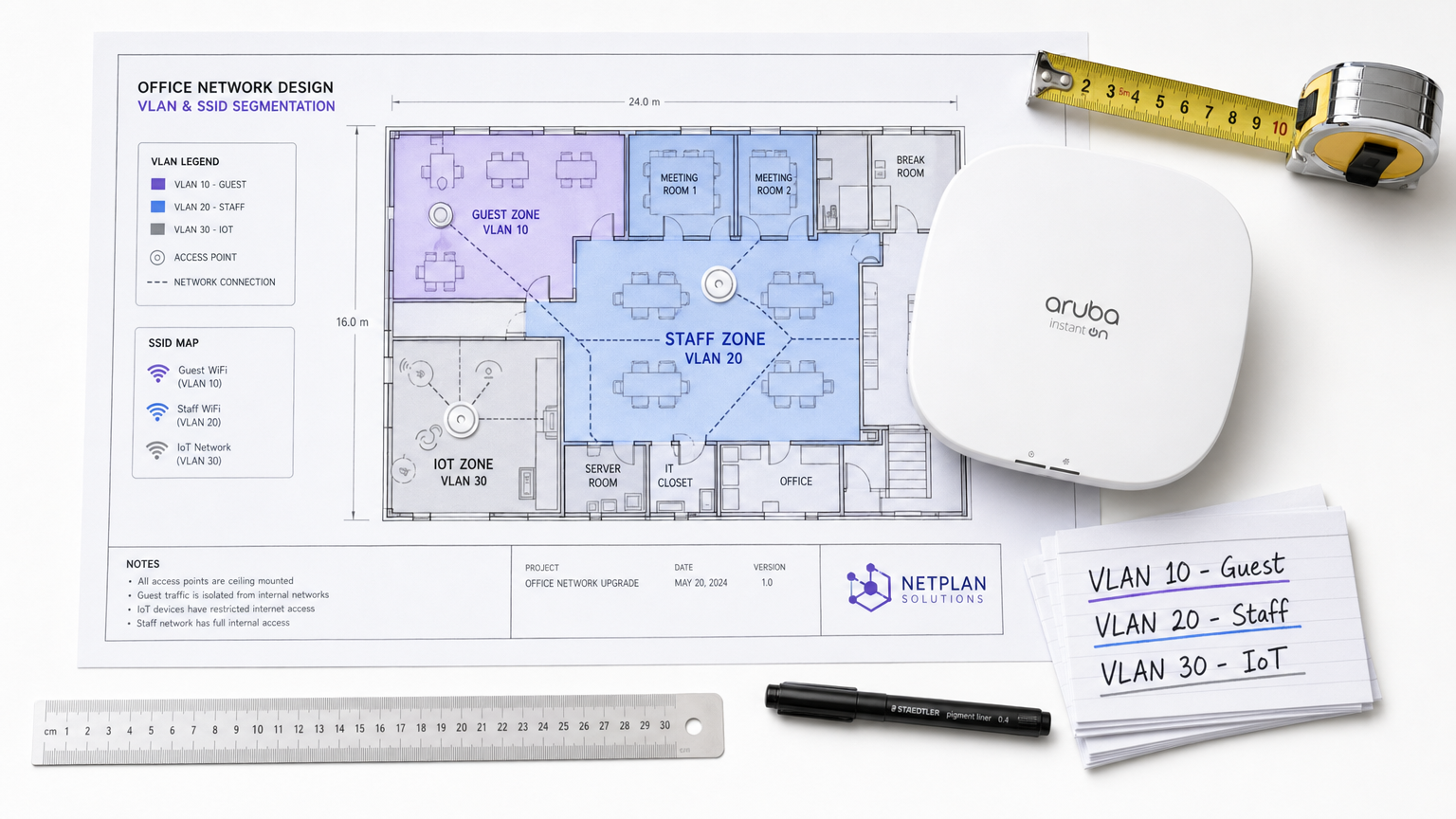
En una implementación empresarial típica, el tráfico se clasifica en VLANs específicas. Por ejemplo:
- VLAN 10: Guest WiFi
- VLAN 20: Corporativo/Personal
- VLAN 30: IoT y Gestión de Edificios
- VLAN 40: Terminales de Punto de Venta (POS)
Mapeo de SSIDs a VLANs
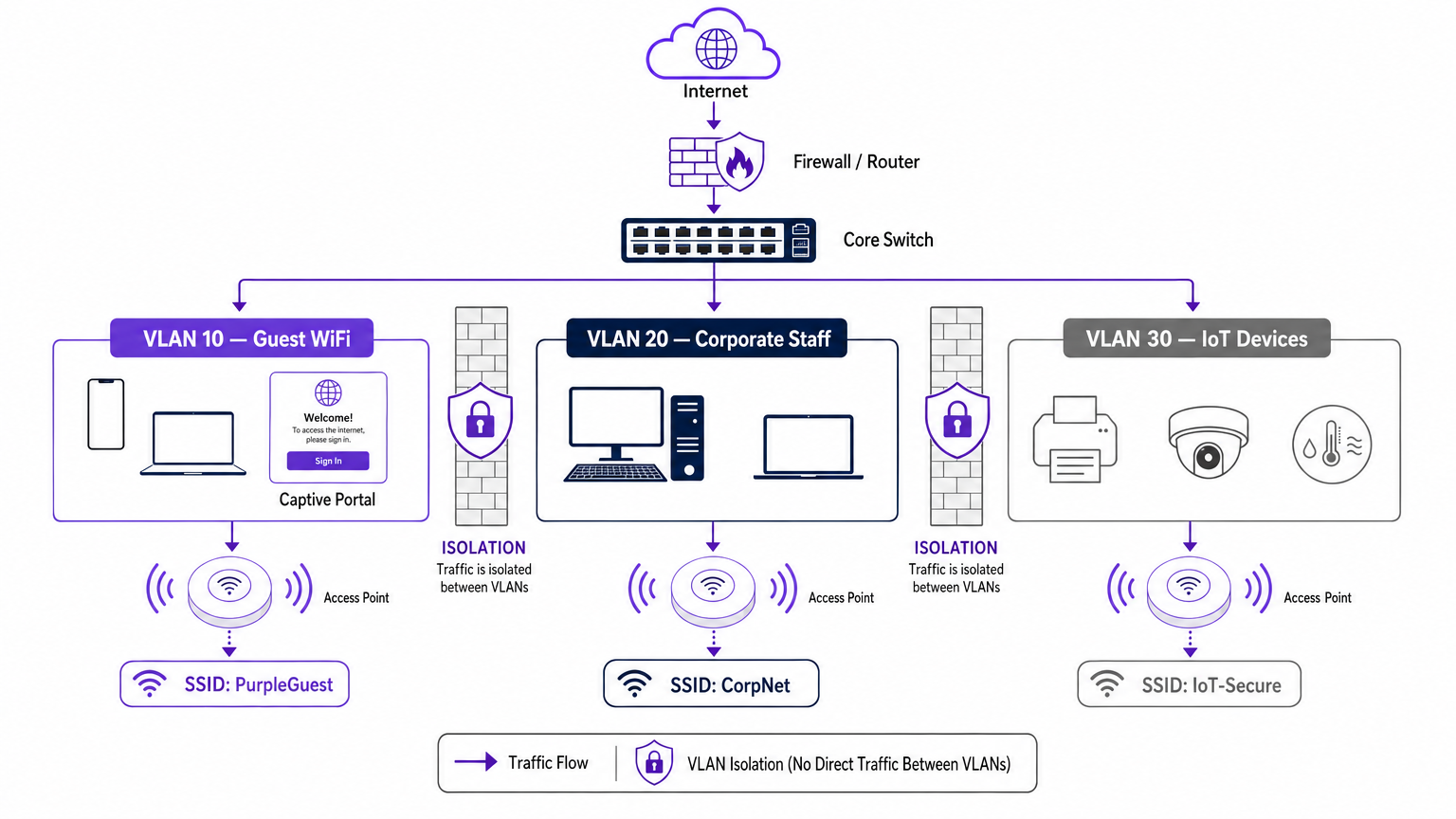
Mientras que las VLANs gestionan el backhaul cableado y el enrutamiento lógico, el SSID (Service Set Identifier) es la cara inalámbrica de la red. Los puntos de acceso empresariales modernos pueden emitir múltiples SSIDs simultáneamente. El paso crucial en la segmentación es mapear cada SSID a su VLAN correspondiente.
Cuando un usuario se conecta al SSID "Guest_WiFi", el punto de acceso etiqueta automáticamente todo el tráfico de ese dispositivo con el ID de VLAN asignado a la red de invitados (por ejemplo, VLAN 10). Este tráfico se envía luego al switch central y al firewall, donde las listas de control de acceso (ACLs) estrictas dictan su flujo —normalmente permitiendo solo el acceso saliente a internet y bloqueando todo el enrutamiento interno.
Impulsores de Seguridad y Cumplimiento
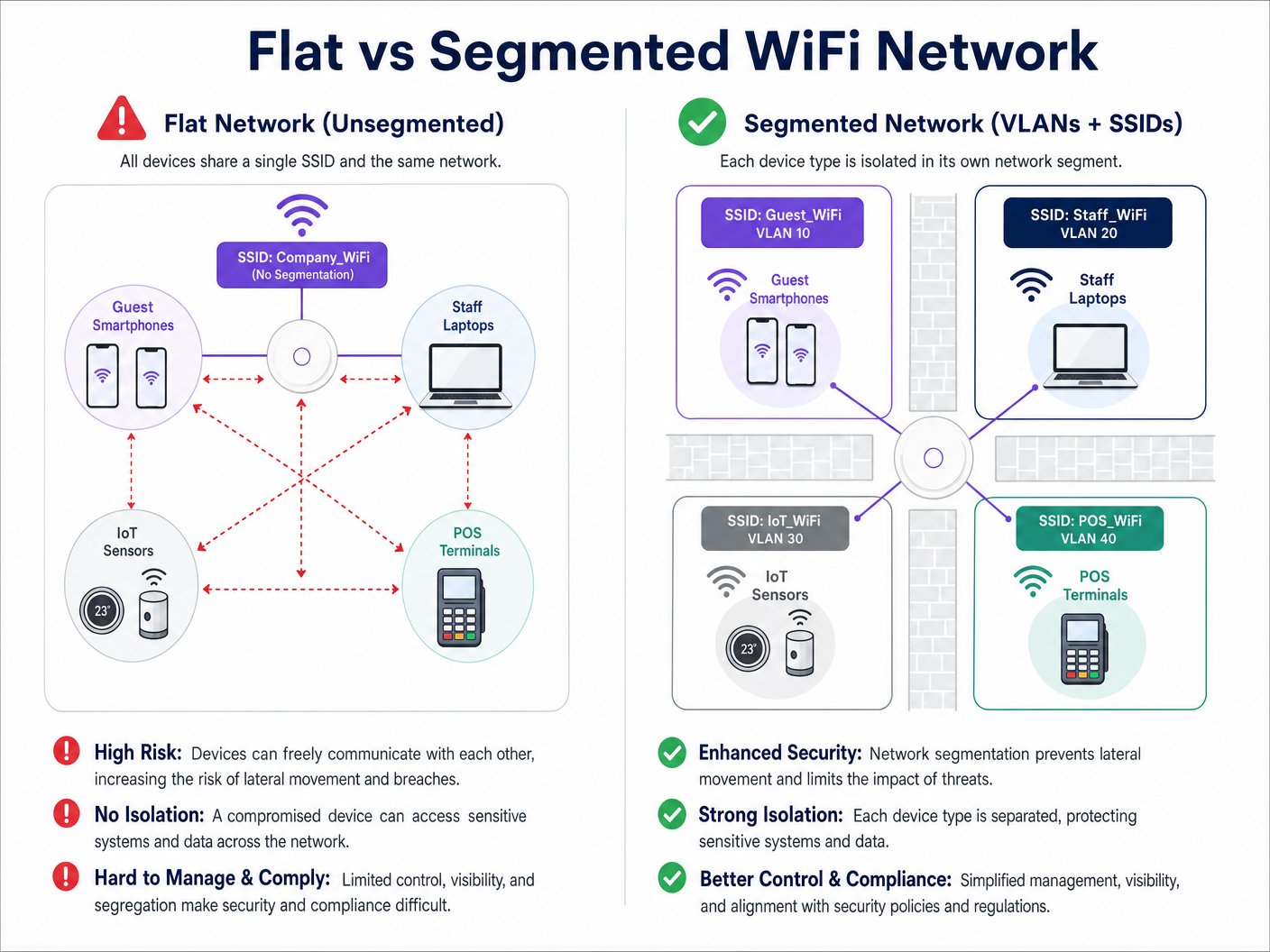
El principal impulsor de la segmentación de redes es la mitigación de riesgos. En una red plana, un dispositivo IoT comprometido o un actor malicioso en la red de invitados puede sondear fácilmente los sistemas internos, moviéndose lateralmente para acceder a datos sensibles. La segmentación detiene este movimiento lateral.
Además, los marcos de cumplimiento exigen aislamiento:
- PCI DSS: Requiere un aislamiento estricto del Entorno de Datos del Titular de la Tarjeta (CDE) de todo el demás tráfico de red.
- GDPR: Exige la protección de datos desde el diseño; aislar el tráfico de invitados garantiza que los usuarios públicos no puedan acceder a sistemas que contengan información de identificación personal (PII).
- Estándares Sanitarios: Como se detalla en nuestra guía sobre WiFi en Hospitales: Una Guía para Redes Clínicas Seguras , los dispositivos clínicos deben estar estrictamente segregados de las redes de pacientes y visitantes.
Guía de Implementación: Un Enfoque por Fases
La implementación de una arquitectura inalámbrica segmentada requiere una planificación rigurosa. Siga este enfoque por fases para asegurar una implementación segura y de alto rendimiento.
Fase 1: Clasificación y Auditoría del Tráfico
Antes de configurar cualquier puerto de switch, realice una auditoría exhaustiva de todos los tipos de dispositivos que operan en el lugar. Clasifique estos dispositivos en grupos lógicos: invitados, personal corporativo, ejecutivos, sensores IoT, sistemas POS y gestión de edificios. Cada categoría representa una clase de tráfico distinta que requiere su propia VLAN y política de seguridad.
Fase 2: Diseño de VLAN y Subred
Asigne un ID de VLAN único y una subred IP dedicada a cada clase de tráfico. Fundamentalmente, asegúrese de que la VLAN de invitados opere en una subred completamente separada de su espacio de direcciones RFC 1918 interno.
A nivel de firewall, implemente una política de denegación por defecto para el enrutamiento entre VLANs. La VLAN de invitados debe tener una regla explícita que permita el tráfico saliente a internet (puertos 80 y 443) y reglas explícitas que denieguen el acceso a todas las subredes internas.
Fase 3: Configuración de SSID y Aislamiento de Clientes
Configure los SSIDs requeridos en su controlador de LAN inalámbrica o plataforma de gestión en la nube.
- Limite el número de SSIDs: No emita más de tres o cuatro SSIDs por banda de radio. Un número excesivo de SSIDs genera una sobrecarga significativa de tramas de gestión (beaconing), lo que degrada el tiempo de emisión y el rendimiento general. Paramás sobre la optimización del rendimiento de los AP, consulta Tu guía para un punto de acceso inalámbrico Ruckus .
- Habilitar el aislamiento de clientes: En la SSID de invitados, es imperativo habilitar el aislamiento de clientes (a veces llamado aislamiento de AP o bloqueo de punto a punto). Esto evita que los dispositivos conectados a la misma red de invitados se comuniquen entre sí, protegiendo a los invitados de ataques de punto a punto.
Fase 4: Autenticación y control de acceso
Adapta el método de autenticación al segmento:
- Corporativo/Personal: Implementa WPA3-Enterprise utilizando autenticación IEEE 802.1X contra un servidor RADIUS (por ejemplo, Active Directory). Esto proporciona autenticación por usuario y asignación dinámica de VLAN. Para dispositivos personales, revisa nuestra guía Seguridad WiFi BYOD: Cómo permitir de forma segura dispositivos personales en tu red .
- WiFi de invitados: Utiliza una SSID abierta emparejada con un Captive Portal. Aquí es donde la plataforma Purple destaca, proporcionando autenticación sin interrupciones, captura de datos compatible con GDPR y WiFi Analytics completos.
- IoT: Utiliza WPA3-SAE (o WPA2-PSK con una frase de contraseña fuerte y rotada) combinado con filtrado de direcciones MAC y ACLs de firewall estrictas, ya que la mayoría de los dispositivos IoT no son compatibles con 802.1X.
Fase 5: Gestión del ancho de banda
Para evitar que un solo usuario o un pequeño grupo de usuarios sature el enlace de internet del recinto, implementa la limitación de velocidad por cliente en la VLAN de invitados. Limitar el ancho de banda de los invitados (por ejemplo, a 5-10 Mbps por dispositivo) garantiza una experiencia base consistente para todos los usuarios, al tiempo que preserva la capacidad para el tráfico operativo crítico.
Mejores prácticas para recintos empresariales
- Adoptar una postura de denegación por defecto: La base de una segmentación segura es el firewall. Si un flujo de tráfico no es explícitamente requerido para las operaciones comerciales, debe ser denegado.
- Asegurar la infraestructura cableada: La segmentación inalámbrica se puede eludir fácilmente si la red cableada subyacente es plana. Asegúrate de que todos los puertos de switch físicos en áreas públicas (por ejemplo, habitaciones de hotel, centros de conferencias) estén asignados a la VLAN de invitados o estén protegidos por autenticación 802.1X basada en puerto.
- Aprovechar Purple para la identidad de invitados: Al implementar el segmento de invitados, integra el Captive Portal de Purple. Bajo la licencia Connect, Purple actúa como un proveedor de identidad gratuito para servicios como OpenRoaming, agilizando la incorporación segura de invitados mientras captura valiosos datos de primera parte.
- Auditar regularmente los puertos troncales: Un modo de fallo común es la configuración incorrecta de un puerto troncal (que transporta múltiples VLANs) como un puerto de acceso. Esto elimina las etiquetas de VLAN y colapsa el tráfico en una única red. Las auditorías de configuración regulares son esenciales.
Solución de problemas y mitigación de riesgos
Incluso con un diseño robusto, las implementaciones de segmentación pueden encontrar problemas. Aquí se presentan los modos de fallo comunes y las estrategias de mitigación:
| Modo de fallo | Síntoma | Estrategia de mitigación |
|---|---|---|
| Sobrecarga de SSID | Alta utilización del canal, velocidades de cliente lentas, conexiones caídas. | Consolidar SSIDs. Limitar a Invitados, Corporativo e IoT. Eliminar SSIDs heredadas o no utilizadas. |
| Fuga de VLAN | Dispositivos de invitados que reciben direcciones IP del ámbito DHCP corporativo. | Auditar las configuraciones de los puertos del switch. Asegurarse de que los enlaces ascendentes de los AP estén configurados como puertos troncales etiquetados, no como puertos de acceso sin etiquetar. |
| Fallo del Captive Portal | Los invitados se conectan a WiFi pero el portal no carga. | Comprobar las ACLs del firewall. Asegurarse de que la VLAN de invitados pueda alcanzar los servidores DNS externos y las direcciones IP del Captive Portal de Purple. |
| Problemas de conectividad IoT | Los dispositivos sin interfaz fallan al unirse a la red. | Verificar la compatibilidad de autenticación. Si el dispositivo carece de soporte 802.1X, asegurarse de que se está conectando a la SSID IoT WPA2/3-PSK. |
ROI e impacto empresarial
La implementación de una arquitectura WiFi segmentada ofrece retornos medibles en seguridad, cumplimiento y operaciones de marketing.
Desde el punto de vista de la seguridad, el ROI se mide en la evitación de riesgos. Al eliminar el movimiento lateral, los recintos reducen drásticamente el daño financiero y reputacional potencial de una violación de datos. Además, la segmentación simplifica las auditorías de cumplimiento para PCI DSS y GDPR, reduciendo la sobrecarga operativa necesaria para mantener la certificación.
Comercialmente, la segmentación permite el despliegue de una red de invitados dedicada y de alto rendimiento. Al enrutar este tráfico a través de la plataforma de Purple, los recintos transforman un centro de costes en un activo generador de ingresos. La red de invitados aislada captura datos demográficos y de comportamiento ricos, impulsando campañas de marketing personalizadas, aumentando la afluencia y potenciando la lealtad del cliente, todo ello manteniendo la red corporativa herméticamente sellada.
Escucha el resumen
Para una inmersión más profunda en las estrategias de despliegue discutidas en esta guía, escucha nuestro podcast de resumen técnico de 10 minutos.
Términos clave y definiciones
VLAN (Virtual Local Area Network)
A logical grouping of network devices that behave as if they are on the same physical network, regardless of their actual physical location.
Used by IT teams to isolate different types of traffic (e.g., guest vs. corporate) on the same physical switches and cabling.
SSID (Service Set Identifier)
The public name of a wireless network that users see on their devices when searching for WiFi.
Enterprise APs broadcast multiple SSIDs, mapping each one to a specific VLAN to enforce segmentation at the wireless edge.
Client Isolation
A wireless controller setting that prevents devices connected to the same SSID from communicating directly with each other.
Crucial for Guest WiFi networks to prevent a malicious user's device from attacking another guest's device on the same network.
Lateral Movement
The technique used by cyber attackers to move through a network, searching for sensitive data or high-value assets after gaining initial access.
Network segmentation is the primary defence against lateral movement, stopping a breach in the guest network from reaching the corporate servers.
Trunk Port
A switch port configured to carry traffic for multiple VLANs simultaneously by using 802.1Q tags.
The connection between a network switch and an enterprise access point must be a trunk port to support multiple SSIDs mapped to different VLANs.
802.1X
An IEEE standard for port-based network access control that provides an authentication mechanism to devices wishing to attach to a LAN or WLAN.
The gold standard for corporate network authentication, ensuring only authorised staff with valid credentials can access the internal VLAN.
Captive Portal
A web page that the user of a public-access network is obliged to view and interact with before access is granted.
Used on the Guest VLAN to capture user consent, present terms of service, and collect marketing data via platforms like Purple.
PCI DSS
Payment Card Industry Data Security Standard; a set of security standards designed to ensure that all companies that accept, process, store or transmit credit card information maintain a secure environment.
Requires strict network segmentation to isolate point-of-sale terminals from general corporate and guest traffic.
Casos de éxito
A 300-room hotel currently operates a single flat network for guests, back-office staff, and smart room thermostats. The IT Director needs to secure the network to achieve PCI DSS compliance for the front desk while ensuring guests cannot access the thermostats.
The IT team must implement a segmented architecture using three distinct VLANs. VLAN 10 (Guest) is mapped to the 'Hotel_Guest' SSID with client isolation enabled and a captive portal for authentication. VLAN 20 (Corporate/POS) is mapped to a hidden SSID using WPA3-Enterprise (802.1X) for staff and POS terminals. VLAN 30 (IoT) is mapped to a hidden 'Hotel_IoT' SSID using WPA3-SAE for the thermostats. The core firewall is configured to block all routing between VLAN 10, 20, and 30, with VLAN 10 only permitted outbound internet access.
A large retail chain is deploying Purple Guest WiFi across 50 stores. They want to capture customer data via a captive portal but are concerned that guests might consume all available bandwidth, disrupting the store's inventory scanners.
The network architect deploys two VLANs: VLAN 50 for the inventory scanners (mapped to a WPA3-Enterprise SSID) and VLAN 60 for Guest WiFi (mapped to an open SSID with the Purple captive portal). On the wireless LAN controller, the architect configures a per-client rate limit of 5 Mbps downstream and 2 Mbps upstream specifically for the Guest SSID. Furthermore, QoS (Quality of Service) tags are applied at the switch level to prioritize traffic from VLAN 50 over VLAN 60.
Análisis de escenarios
Q1. A stadium IT team wants to deploy a new fleet of wireless digital signage screens. They currently have a Guest SSID (VLAN 10) and a Staff SSID (VLAN 20). The signage vendor requests the screens be put on the Guest network so they can easily pull updates from the internet. What is the correct architectural decision?
💡 Sugerencia:Consider the security implications of placing unmanaged devices on a public network, and the impact of client isolation.
Mostrar enfoque recomendado
Do not place the screens on the Guest VLAN. Create a new, dedicated IoT/Signage VLAN (e.g., VLAN 30) and map it to a hidden SSID. The Guest network has client isolation enabled, which might interfere with local management of the screens. More importantly, placing corporate assets on a public network exposes them to tampering from guests. The new VLAN 30 should have firewall rules allowing outbound internet access for updates, but blocking inbound traffic from the Guest network.
Q2. After deploying a new segmented network, the network administrator notices that devices connected to the 'Corp_Secure' SSID are receiving IP addresses in the 192.168.10.x range, which is the subnet designated for the Guest VLAN. What is the most likely configuration error?
💡 Sugerencia:Think about how VLAN tags are processed between the access point and the switch.
Mostrar enfoque recomendado
The switch port connecting to the access point is likely misconfigured as an 'Access' port on VLAN 10, rather than a 'Trunk' port. Because it is not operating as a trunk, it is stripping the 802.1Q VLAN tags from the AP's traffic and dumping all traffic (from both the Guest and Corp SSIDs) onto the native VLAN configured on that port (in this case, the Guest VLAN).
Q3. A retail client wants to broadcast 8 different SSIDs to cater to various internal departments (Sales, Management, Warehouse, etc.) in addition to Guest WiFi. How should the Senior Solutions Architect advise them?
💡 Sugerencia:Consider the impact of management frame overhead on wireless performance.
Mostrar enfoque recomendado
The architect should advise against this. Broadcasting 8 SSIDs will consume a massive amount of airtime just for beacon frames, severely degrading actual data throughput for all users. The solution is to consolidate the internal departments onto a single 'Corporate' SSID using WPA3-Enterprise (802.1X). The RADIUS server can then dynamically assign users to different VLANs (Sales VLAN, Warehouse VLAN) based on their Active Directory credentials, keeping the SSID count to a maximum of 3 or 4.




