

WiFi-Netzwerksegmentierung: VLANs, SSIDs und Gast-Traffic
Dieser maßgebliche Leitfaden untersucht die entscheidende Rolle der WiFi-Netzwerksegmentierung mittels VLANs und mehrerer SSIDs. Er bietet umsetzbare Implementierungsstrategien für IT-Führungskräfte in den Bereichen Gastgewerbe, Einzelhandel und öffentlicher Sektor, um Netzwerke zu sichern, Gast-Traffic zu isolieren und die Einhaltung von Vorschriften ohne Leistungseinbußen zu gewährleisten.
🎧 Diesen Leitfaden anhören
Transkript anzeigen
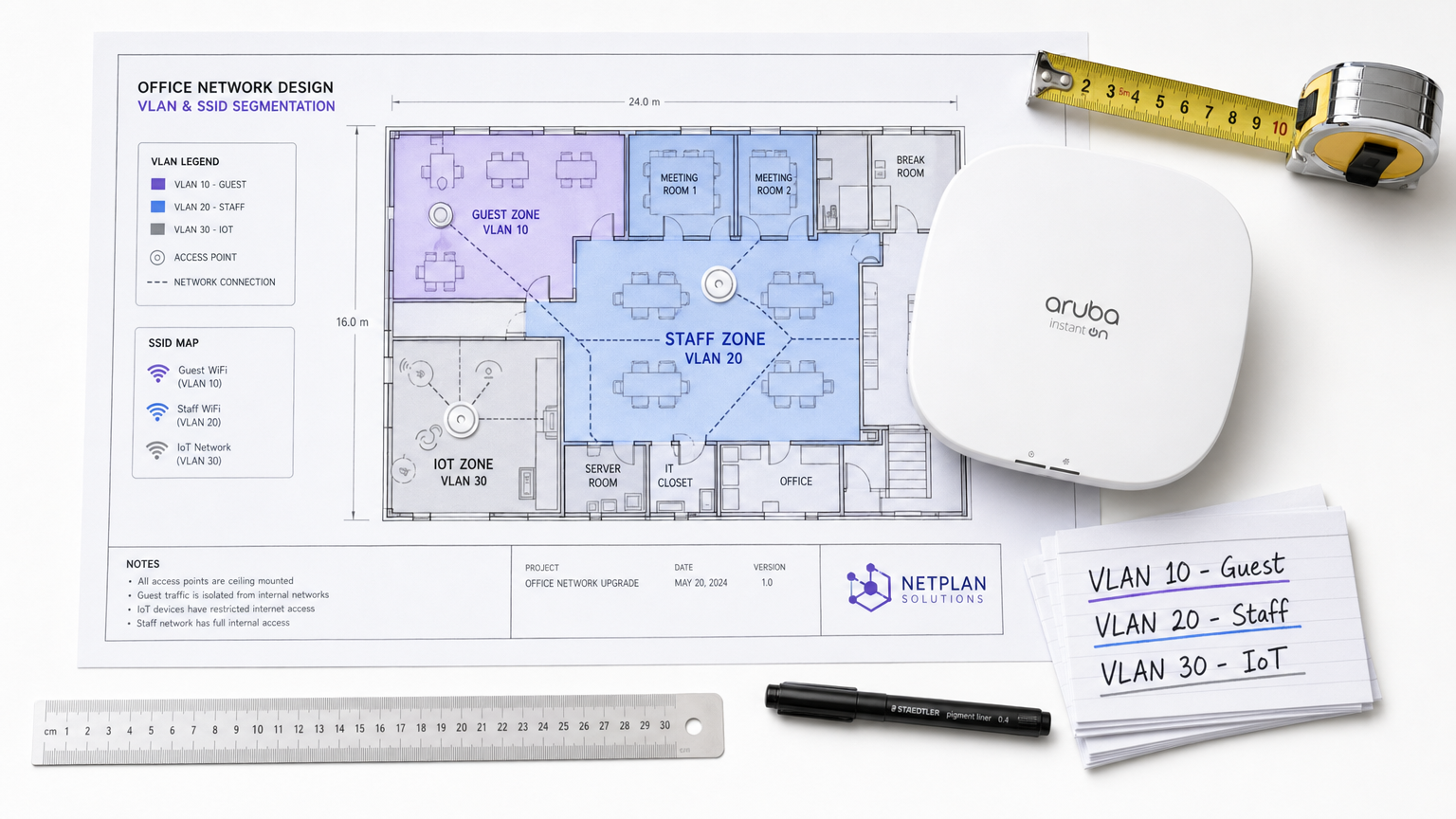
Zusammenfassung für Führungskräfte
Für Unternehmensstandorte – sei es ein geschäftiges Einzelhandelsumfeld , eine Gastgewerbekette mit mehreren Standorten oder ein komplexer Gesundheitscampus – sind die Zeiten des flachen drahtlosen Netzwerks längst vorbei. Heutige Netzwerkarchitekten stehen vor einer Vielzahl konkurrierender Anforderungen: die Unterstützung Tausender gleichzeitiger Gastgeräte, die Sicherung sensibler Unternehmensdaten, die Ermöglichung von Point-of-Sale-Systemen und die Integration einer schnell wachsenden Flotte von IoT-Sensoren.
Der Versuch, diese unterschiedlichen Traffic-Klassen über ein einziges, unsegmentiertes Netzwerk zu betreiben, ist nicht nur ineffizient; es ist eine kritische Sicherheitslücke. WiFi-Netzwerksegmentierung, implementiert über Virtual Local Area Networks (VLANs) und Service Set Identifiers (SSIDs), ist die grundlegende Architektur, die erforderlich ist, um Risiken der lateralen Bewegung zu mindern, die Einhaltung gesetzlicher Vorschriften (wie PCI DSS und GDPR) zu gewährleisten und eine vorhersehbare Leistung zu liefern.
Dieser Leitfaden bietet erfahrenen IT-Fachleuten einen umfassenden, herstellerneutralen Entwurf für die Planung, Bereitstellung und Validierung eines segmentierten drahtlosen Netzwerks. Wir untersuchen die zugrunde liegende Layer-2-Mechanik, beschreiben den schrittweisen Implementierungsprozess und zeigen auf, wie die Integration einer verwalteten Guest WiFi -Plattform wie Purple sowohl die Sicherheit als auch die Standortanalysen erheblich verbessern kann.
Technischer Deep-Dive: Die Mechanik der Segmentierung
Im Kern ist die WiFi-Netzwerksegmentierung die Praxis, eine einzige physische drahtlose Infrastruktur in mehrere logisch isolierte Broadcast-Domänen zu unterteilen. Diese Isolation stellt sicher, dass der Traffic von einem Segment – wie dem Smartphone eines Gastes – nicht mit Geräten in einem anderen Segment, wie einem Firmenlaptop oder einem klinischen Gerät, interagieren kann.
Die Rolle von VLANs (IEEE 802.1Q)
Der primäre Mechanismus für diese logische Trennung ist das VLAN, definiert durch den IEEE 802.1Q-Standard. Ein VLAN ermöglicht es Netzwerkadministratoren, einen einzelnen physischen Switch oder Access Point in mehrere separate Netzwerke zu unterteilen. Wenn Datenpakete das Netzwerk durchqueren, werden sie mit einer spezifischen VLAN ID (im Bereich von 1 bis 4094) getaggt. Dieses Tag bestimmt das Routing des Pakets und stellt sicher, dass es auf seinem zugewiesenen logischen Pfad bleibt.
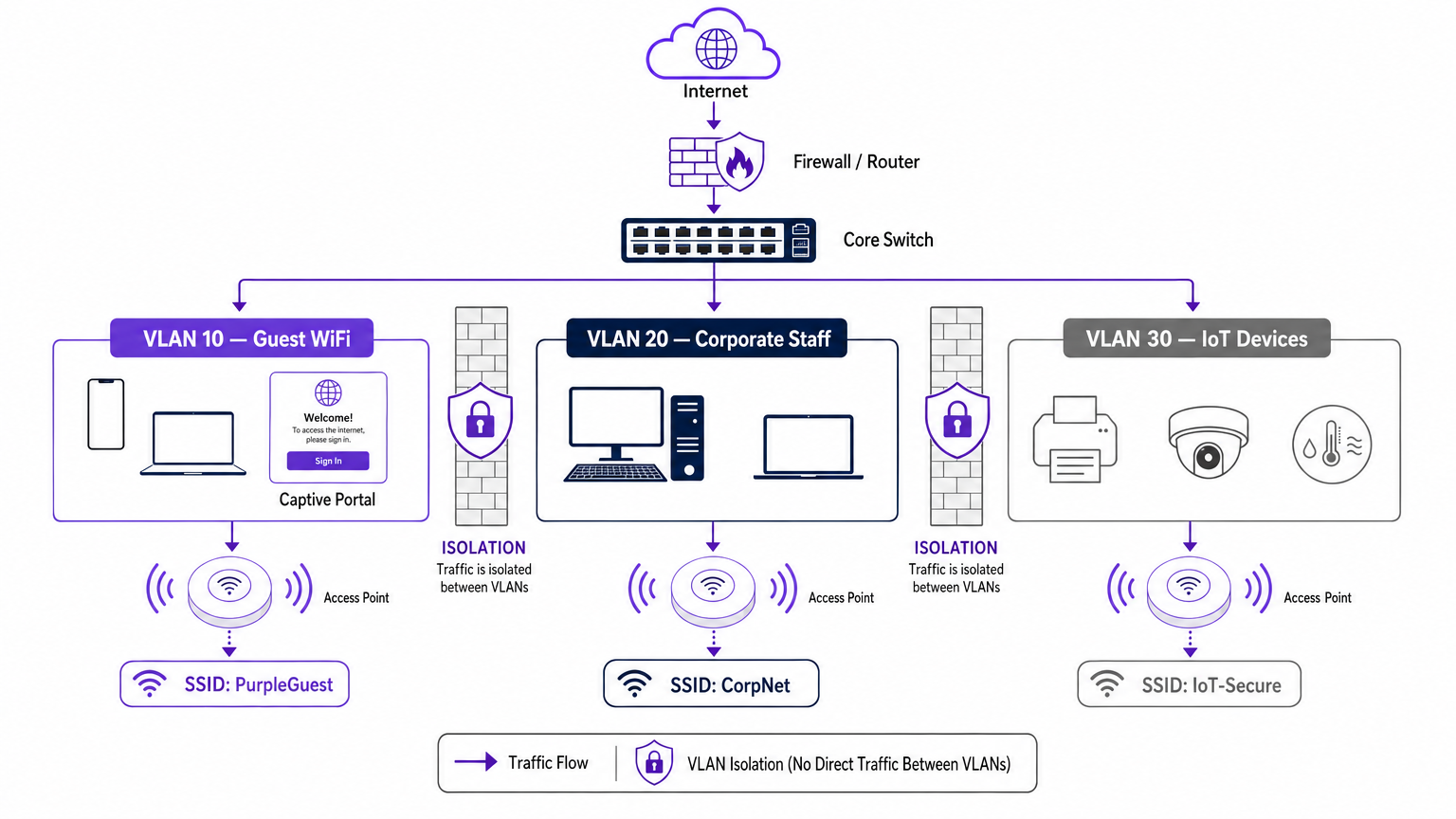
In einer typischen Unternehmensbereitstellung wird der Traffic in spezifische VLANs kategorisiert. Zum Beispiel:
- VLAN 10: Gast-WiFi
- VLAN 20: Unternehmen/Mitarbeiter
- VLAN 30: IoT und Gebäudemanagement
- VLAN 40: Point of Sale (POS)-Terminals
Zuordnung von SSIDs zu VLANs
Während VLANs das kabelgebundene Backhaul und das logische Routing übernehmen, ist die SSID (Service Set Identifier) das drahtlose Gesicht des Netzwerks. Moderne Unternehmens-Access Points können mehrere SSIDs gleichzeitig senden. Der entscheidende Schritt bei der Segmentierung ist die Zuordnung jeder SSID zu ihrem entsprechenden VLAN.
Wenn sich ein Benutzer mit der „Guest_WiFi“-SSID verbindet, versieht der Access Point automatisch den gesamten Traffic von diesem Gerät mit der VLAN ID, die dem Gastnetzwerk zugewiesen ist (z. B. VLAN 10). Dieser Traffic wird dann an den Core-Switch und die Firewall zurückgeleitet, wo strenge Access Control Lists (ACLs) seinen Fluss bestimmen – typischerweise nur ausgehenden Internetzugang erlauben und jegliches interne Routing blockieren.
Sicherheits- und Compliance-Treiber
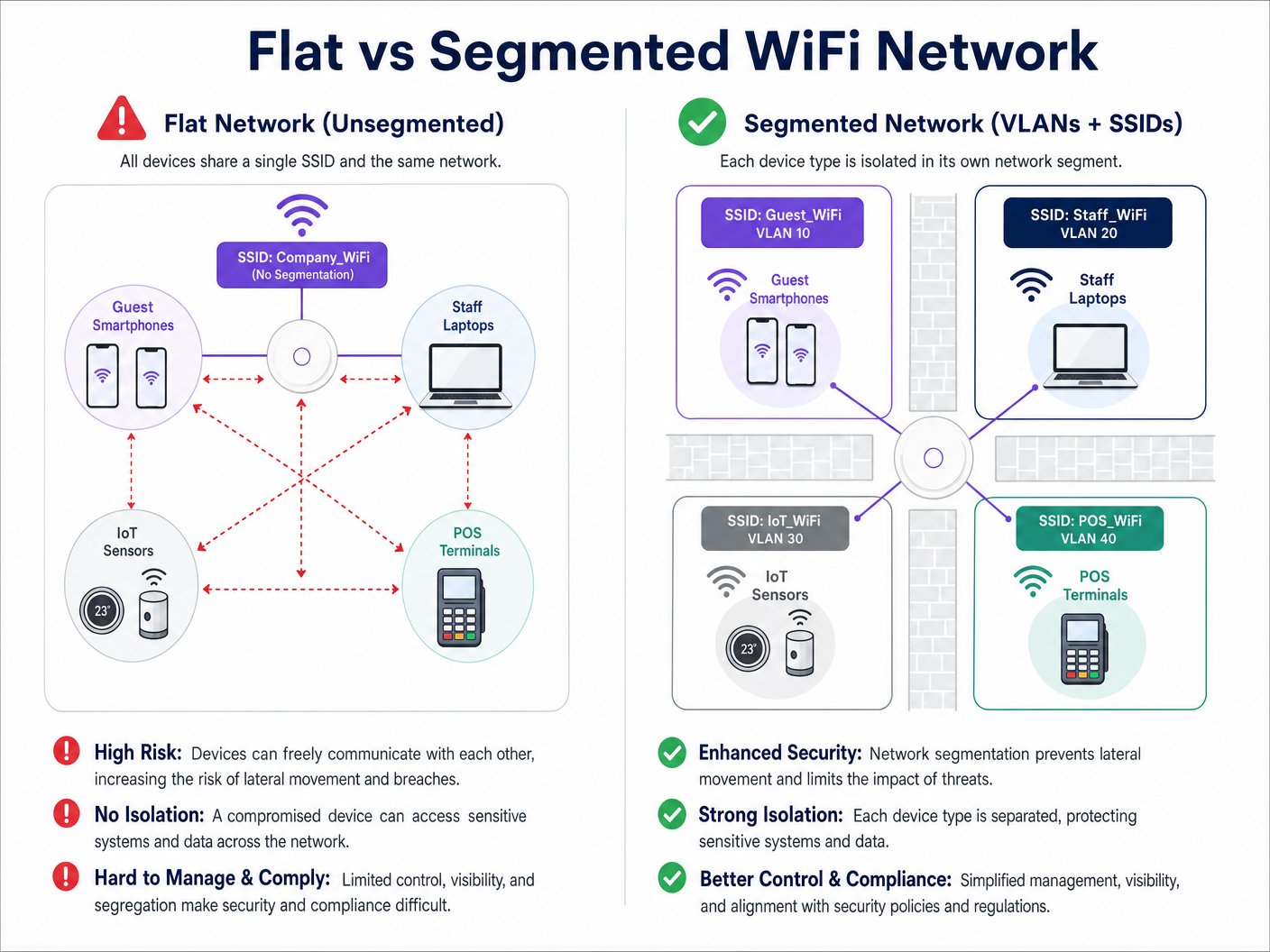
Der primäre Treiber für die Netzwerksegmentierung ist die Risikominderung. In einem flachen Netzwerk kann ein kompromittiertes IoT-Gerät oder ein böswilliger Akteur im Gastnetzwerk problemlos interne Systeme sondieren und sich lateral bewegen, um auf sensible Daten zuzugreifen. Die Segmentierung stoppt diese laterale Bewegung.
Darüber hinaus erfordern Compliance-Frameworks eine Isolation:
- PCI DSS: Erfordert eine strikte Isolation der Cardholder Data Environment (CDE) von allem anderen Netzwerk-Traffic.
- GDPR: Schreibt Datenschutz durch Design vor; die Isolation des Gast-Traffics stellt sicher, dass öffentliche Benutzer nicht auf Systeme zugreifen können, die persönlich identifizierbare Informationen (PII) enthalten.
- Gesundheitsstandards: Wie in unserem Leitfaden zu WiFi in Krankenhäusern: Ein Leitfaden für sichere klinische Netzwerke detailliert beschrieben, müssen klinische Geräte strikt von Patienten- und Besuchernetzwerken getrennt werden.
Implementierungsleitfaden: Ein Phasenansatz
Die Bereitstellung einer segmentierten drahtlosen Architektur erfordert eine sorgfältige Planung. Befolgen Sie diesen phasenweisen Ansatz, um eine sichere und leistungsstarke Bereitstellung zu gewährleisten.
Phase 1: Traffic-Klassifizierung und -Audit
Bevor Sie Switch-Ports konfigurieren, führen Sie ein umfassendes Audit aller Gerätetypen durch, die am Standort betrieben werden. Kategorisieren Sie diese Geräte in logische Gruppen: Gäste, Unternehmensmitarbeiter, Führungskräfte, IoT-Sensoren, POS-Systeme und Gebäudemanagement. Jede Kategorie repräsentiert eine eigene Traffic-Klasse, die ein eigenes VLAN und eine eigene Sicherheitsrichtlinie erfordert.
Phase 2: VLAN- und Subnetz-Design
Weisen Sie jeder Traffic-Klasse eine eindeutige VLAN ID und ein dediziertes IP-Subnetz zu. Stellen Sie unbedingt sicher, dass das Gast-VLAN in einem vollständig separaten Subnetz von Ihrem internen RFC 1918 Adressraum betrieben wird.
Auf Firewall-Ebene implementieren Sie eine Default-Deny-Richtlinie für das Inter-VLAN-Routing. Das Gast-VLAN sollte eine explizite Regel haben, die ausgehenden Traffic ins Internet (Ports 80 und 443) erlaubt, und explizite Regeln, die den Zugriff auf alle internen Subnetze verweigern.
Phase 3: SSID-Konfiguration und Client-Isolation
Konfigurieren Sie die erforderlichen SSIDs auf Ihrem Wireless LAN Controller oder Ihrer Cloud-Management-Plattform.
- SSID-Anzahl begrenzen: Senden Sie nicht mehr als drei oder vier SSIDs pro Funkband. Übermäßige SSIDs erzeugen einen erheblichen Overhead an Management-Frames (Beaconing), was die gesamte Sendezeit und den Durchsatz beeinträchtigt. FürWeitere Informationen zur Optimierung der AP-Leistung finden Sie in Ihrem Leitfaden zu einem Wireless Access Point Ruckus .
- Client-Isolation aktivieren: Auf der Gast-SSID ist es unerlässlich, die Client-Isolation zu aktivieren (manchmal auch AP-Isolation oder Peer-to-Peer-Blocking genannt). Dies verhindert, dass Geräte, die mit demselben Gastnetzwerk verbunden sind, miteinander kommunizieren, und schützt Gäste vor Peer-to-Peer-Angriffen.
Phase 4: Authentifizierung und Zugriffskontrolle
Passen Sie die Authentifizierungsmethode an das Segment an:
- Unternehmen/Mitarbeiter: Implementieren Sie WPA3-Enterprise unter Verwendung der IEEE 802.1X-Authentifizierung gegen einen RADIUS-Server (z. B. Active Directory). Dies ermöglicht eine Authentifizierung pro Benutzer und eine dynamische VLAN-Zuweisung. Für persönliche Geräte lesen Sie unseren Leitfaden BYOD WiFi Security: How to Safely Let Personal Devices on Your Network .
- Guest WiFi: Verwenden Sie eine offene SSID in Verbindung mit einem Captive Portal. Hier zeichnet sich die Purple-Plattform aus, indem sie nahtlose Authentifizierung, GDPR-konforme Datenerfassung und umfassende WiFi Analytics bietet.
- IoT: Verwenden Sie WPA3-SAE (oder WPA2-PSK mit einer starken, regelmäßig wechselnden Passphrase) in Kombination mit MAC-Adressfilterung und strengen Firewall-ACLs, da die meisten IoT-Geräte 802.1X nicht unterstützen.
Phase 5: Bandbreitenmanagement
Um zu verhindern, dass ein einzelner Benutzer oder eine kleine Gruppe von Benutzern den Internet-Uplink des Veranstaltungsortes überlastet, implementieren Sie eine Ratenbegrenzung pro Client auf dem Gast-VLAN. Die Begrenzung der Gastbandbreite (z. B. auf 5-10 Mbit/s pro Gerät) gewährleistet ein konsistentes Basiserlebnis für alle Benutzer und bewahrt gleichzeitig Kapazität für kritischen Betriebsdatenverkehr.
Best Practices für Unternehmensstandorte
- Eine Default-Deny-Haltung einnehmen: Die Grundlage einer sicheren Segmentierung ist die Firewall. Wenn ein Datenfluss für den Geschäftsbetrieb nicht explizit erforderlich ist, muss er verweigert werden.
- Die kabelgebundene Infrastruktur sichern: Die drahtlose Segmentierung kann leicht umgangen werden, wenn das zugrunde liegende kabelgebundene Netzwerk flach ist. Stellen Sie sicher, dass alle physischen Switch-Ports in öffentlichen Bereichen (z. B. Hotelzimmer, Konferenzzentren) dem Gast-VLAN zugewiesen oder durch 802.1X portbasierte Authentifizierung geschützt sind.
- Purple für Gastidentität nutzen: Integrieren Sie bei der Bereitstellung des Gastsegments das Captive Portal von Purple. Unter der Connect-Lizenz fungiert Purple als kostenloser Identitätsanbieter für Dienste wie OpenRoaming, wodurch die sichere Gastaufnahme optimiert und gleichzeitig wertvolle First-Party-Daten erfasst werden.
- Regelmäßige Überprüfung der Trunk-Ports: Ein häufiger Fehler ist die Fehlkonfiguration eines Trunk-Ports (der mehrere VLANs transportiert) als Access-Port. Dies entfernt die VLAN-Tags und führt dazu, dass der Datenverkehr auf ein einziges Netzwerk zusammenfällt. Regelmäßige Konfigurationsprüfungen sind unerlässlich.
Fehlerbehebung & Risikominderung
Auch bei einem robusten Design können bei Segmentierungsbereitstellungen Probleme auftreten. Hier sind häufige Fehlerursachen und Minderungsstrategien:
| Fehlerursache | Symptom | Minderungsstrategie |
|---|---|---|
| SSID-Overhead | Hohe Kanalnutzung, langsame Client-Geschwindigkeiten, Verbindungsabbrüche. | SSIDs konsolidieren. Auf Gast, Unternehmen und IoT beschränken. Veraltete oder ungenutzte SSIDs entfernen. |
| VLAN-Bleed | Gastgeräte erhalten IP-Adressen aus dem Unternehmens-DHCP-Bereich. | Switch-Port-Konfigurationen prüfen. Sicherstellen, dass AP-Uplinks als getaggte Trunk-Ports und nicht als ungetaggte Access-Ports konfiguriert sind. |
| Captive Portal-Fehler | Gäste verbinden sich mit WiFi, aber das Portal lädt nicht. | Firewall-ACLs prüfen. Sicherstellen, dass das Gast-VLAN die externen DNS-Server und die Purple Captive Portal-IP-Adressen erreichen kann. |
| IoT-Konnektivitätsprobleme | Headless-Geräte können sich nicht mit dem Netzwerk verbinden. | Authentifizierungskompatibilität überprüfen. Wenn das Gerät keine 802.1X-Unterstützung hat, sicherstellen, dass es sich mit der WPA2/3-PSK IoT SSID verbindet. |
ROI & Geschäftsauswirkungen
Die Implementierung einer segmentierten WiFi-Architektur liefert messbare Ergebnisse in Bezug auf Sicherheit, Compliance und Marketingoperationen.
Aus Sicherheitssicht wird der ROI in der Risikovermeidung gemessen. Durch die Eliminierung lateraler Bewegungen reduzieren Veranstaltungsorte den potenziellen finanziellen und reputativen Schaden eines Datenlecks drastisch. Darüber hinaus vereinfacht die Segmentierung Compliance-Audits für PCI DSS und GDPR, wodurch der Betriebsaufwand zur Aufrechterhaltung der Zertifizierung reduziert wird.
Kommerziell ermöglicht die Segmentierung die Bereitstellung eines dedizierten, leistungsstarken Gastnetzwerks. Durch die Weiterleitung dieses Datenverkehrs über die Purple-Plattform verwandeln Veranstaltungsorte ein Kostenzentrum in einen umsatzgenerierenden Vermögenswert. Das isolierte Gastnetzwerk erfasst umfassende demografische und verhaltensbezogene Daten, die personalisierte Marketingkampagnen vorantreiben, die Besucherfrequenz erhöhen und die Kundenbindung stärken – all dies, während das Unternehmensnetzwerk hermetisch abgeriegelt bleibt.
Hören Sie das Briefing
Für einen tieferen Einblick in die in diesem Leitfaden besprochenen Bereitstellungsstrategien hören Sie unseren 10-minütigen technischen Briefing-Podcast.
Schlüsselbegriffe & Definitionen
VLAN (Virtual Local Area Network)
A logical grouping of network devices that behave as if they are on the same physical network, regardless of their actual physical location.
Used by IT teams to isolate different types of traffic (e.g., guest vs. corporate) on the same physical switches and cabling.
SSID (Service Set Identifier)
The public name of a wireless network that users see on their devices when searching for WiFi.
Enterprise APs broadcast multiple SSIDs, mapping each one to a specific VLAN to enforce segmentation at the wireless edge.
Client Isolation
A wireless controller setting that prevents devices connected to the same SSID from communicating directly with each other.
Crucial for Guest WiFi networks to prevent a malicious user's device from attacking another guest's device on the same network.
Lateral Movement
The technique used by cyber attackers to move through a network, searching for sensitive data or high-value assets after gaining initial access.
Network segmentation is the primary defence against lateral movement, stopping a breach in the guest network from reaching the corporate servers.
Trunk Port
A switch port configured to carry traffic for multiple VLANs simultaneously by using 802.1Q tags.
The connection between a network switch and an enterprise access point must be a trunk port to support multiple SSIDs mapped to different VLANs.
802.1X
An IEEE standard for port-based network access control that provides an authentication mechanism to devices wishing to attach to a LAN or WLAN.
The gold standard for corporate network authentication, ensuring only authorised staff with valid credentials can access the internal VLAN.
Captive Portal
A web page that the user of a public-access network is obliged to view and interact with before access is granted.
Used on the Guest VLAN to capture user consent, present terms of service, and collect marketing data via platforms like Purple.
PCI DSS
Payment Card Industry Data Security Standard; a set of security standards designed to ensure that all companies that accept, process, store or transmit credit card information maintain a secure environment.
Requires strict network segmentation to isolate point-of-sale terminals from general corporate and guest traffic.
Fallstudien
A 300-room hotel currently operates a single flat network for guests, back-office staff, and smart room thermostats. The IT Director needs to secure the network to achieve PCI DSS compliance for the front desk while ensuring guests cannot access the thermostats.
The IT team must implement a segmented architecture using three distinct VLANs. VLAN 10 (Guest) is mapped to the 'Hotel_Guest' SSID with client isolation enabled and a captive portal for authentication. VLAN 20 (Corporate/POS) is mapped to a hidden SSID using WPA3-Enterprise (802.1X) for staff and POS terminals. VLAN 30 (IoT) is mapped to a hidden 'Hotel_IoT' SSID using WPA3-SAE for the thermostats. The core firewall is configured to block all routing between VLAN 10, 20, and 30, with VLAN 10 only permitted outbound internet access.
A large retail chain is deploying Purple Guest WiFi across 50 stores. They want to capture customer data via a captive portal but are concerned that guests might consume all available bandwidth, disrupting the store's inventory scanners.
The network architect deploys two VLANs: VLAN 50 for the inventory scanners (mapped to a WPA3-Enterprise SSID) and VLAN 60 for Guest WiFi (mapped to an open SSID with the Purple captive portal). On the wireless LAN controller, the architect configures a per-client rate limit of 5 Mbps downstream and 2 Mbps upstream specifically for the Guest SSID. Furthermore, QoS (Quality of Service) tags are applied at the switch level to prioritize traffic from VLAN 50 over VLAN 60.
Szenarioanalyse
Q1. A stadium IT team wants to deploy a new fleet of wireless digital signage screens. They currently have a Guest SSID (VLAN 10) and a Staff SSID (VLAN 20). The signage vendor requests the screens be put on the Guest network so they can easily pull updates from the internet. What is the correct architectural decision?
💡 Hinweis:Consider the security implications of placing unmanaged devices on a public network, and the impact of client isolation.
Empfohlenen Ansatz anzeigen
Do not place the screens on the Guest VLAN. Create a new, dedicated IoT/Signage VLAN (e.g., VLAN 30) and map it to a hidden SSID. The Guest network has client isolation enabled, which might interfere with local management of the screens. More importantly, placing corporate assets on a public network exposes them to tampering from guests. The new VLAN 30 should have firewall rules allowing outbound internet access for updates, but blocking inbound traffic from the Guest network.
Q2. After deploying a new segmented network, the network administrator notices that devices connected to the 'Corp_Secure' SSID are receiving IP addresses in the 192.168.10.x range, which is the subnet designated for the Guest VLAN. What is the most likely configuration error?
💡 Hinweis:Think about how VLAN tags are processed between the access point and the switch.
Empfohlenen Ansatz anzeigen
The switch port connecting to the access point is likely misconfigured as an 'Access' port on VLAN 10, rather than a 'Trunk' port. Because it is not operating as a trunk, it is stripping the 802.1Q VLAN tags from the AP's traffic and dumping all traffic (from both the Guest and Corp SSIDs) onto the native VLAN configured on that port (in this case, the Guest VLAN).
Q3. A retail client wants to broadcast 8 different SSIDs to cater to various internal departments (Sales, Management, Warehouse, etc.) in addition to Guest WiFi. How should the Senior Solutions Architect advise them?
💡 Hinweis:Consider the impact of management frame overhead on wireless performance.
Empfohlenen Ansatz anzeigen
The architect should advise against this. Broadcasting 8 SSIDs will consume a massive amount of airtime just for beacon frames, severely degrading actual data throughput for all users. The solution is to consolidate the internal departments onto a single 'Corporate' SSID using WPA3-Enterprise (802.1X). The RADIUS server can then dynamically assign users to different VLANs (Sales VLAN, Warehouse VLAN) based on their Active Directory credentials, keeping the SSID count to a maximum of 3 or 4.




