

Segmentação de Rede WiFi: VLANs, SSIDs e Tráfego de Convidados
Este guia abrangente explora o papel crítico da segmentação de rede WiFi usando VLANs e múltiplos SSIDs. Ele fornece estratégias de implementação acionáveis para líderes de TI nos setores de hotelaria, varejo e público para proteger redes, isolar o tráfego de convidados e garantir a conformidade sem sacrificar o desempenho.
🎧 Ouça este Guia
Ver Transcrição
Resumo Executivo
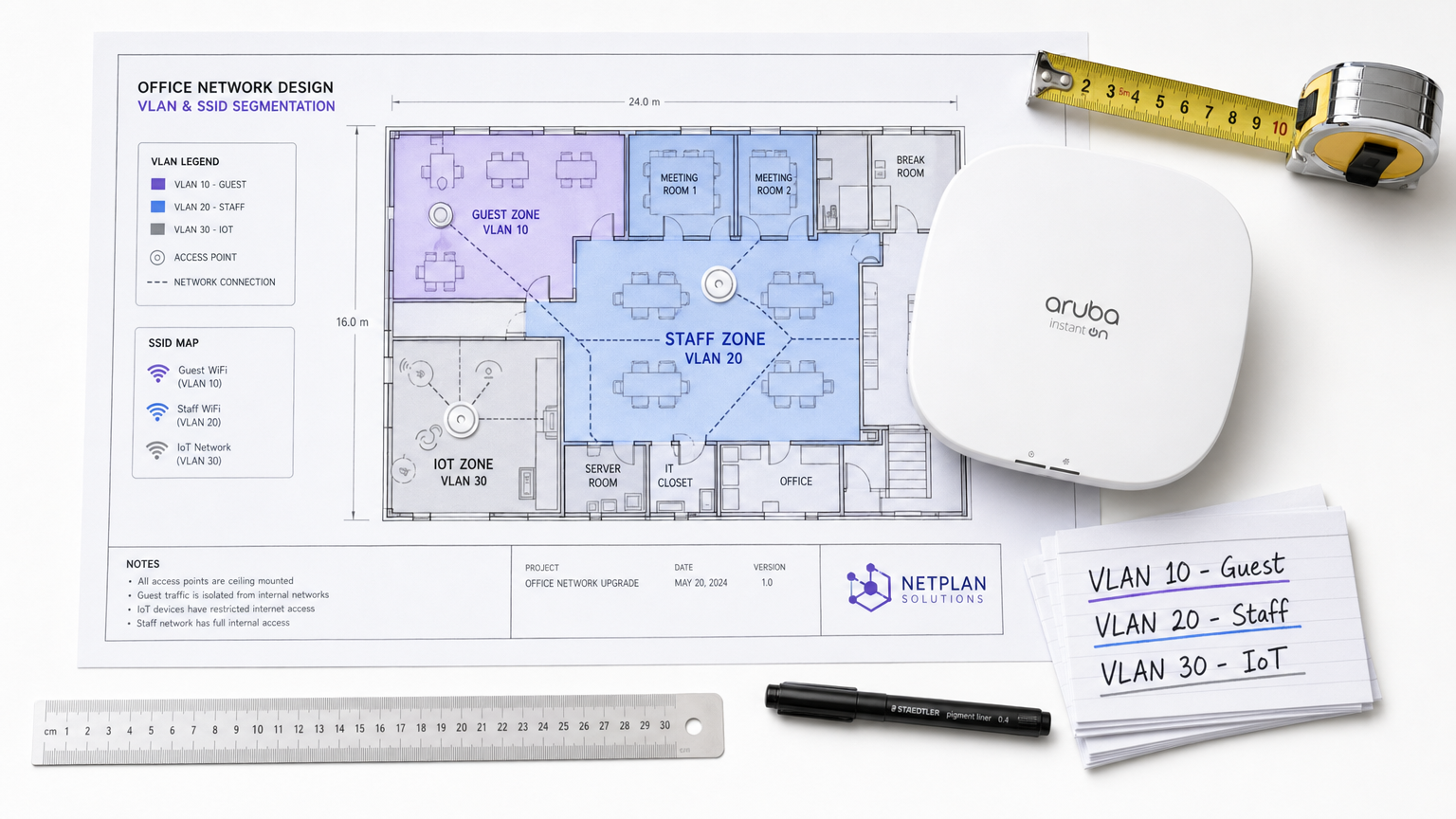
Para locais corporativos — seja um movimentado ambiente de Varejo , uma cadeia de Hotelaria com múltiplos locais, ou um complexo campus de Saúde — os dias da rede sem fio plana ficaram para trás. Os arquitetos de rede de hoje enfrentam uma enxurrada de demandas concorrentes: suportar milhares de dispositivos de convidados simultâneos, proteger dados corporativos sensíveis, habilitar sistemas de ponto de venda e integrar uma frota crescente de sensores IoT.
Tentar executar essas classes de tráfego díspares em uma única rede não segmentada não é apenas ineficiente; é uma vulnerabilidade de segurança crítica. A segmentação de rede WiFi, implementada via Virtual Local Area Networks (VLANs) e Service Set Identifiers (SSIDs), é a arquitetura fundamental necessária para mitigar riscos de movimento lateral, garantir a conformidade regulatória (como PCI DSS e GDPR) e oferecer desempenho previsível.
Este guia fornece aos profissionais de TI seniores um plano abrangente e neutro em relação ao fornecedor para projetar, implantar e validar uma rede sem fio segmentada. Exploramos a mecânica subjacente da Camada 2, detalhamos o processo de implementação passo a passo e destacamos como a integração de uma plataforma gerenciada de Guest WiFi como a Purple pode impulsionar tanto a segurança quanto a análise do local.
Análise Técnica Aprofundada: A Mecânica da Segmentação
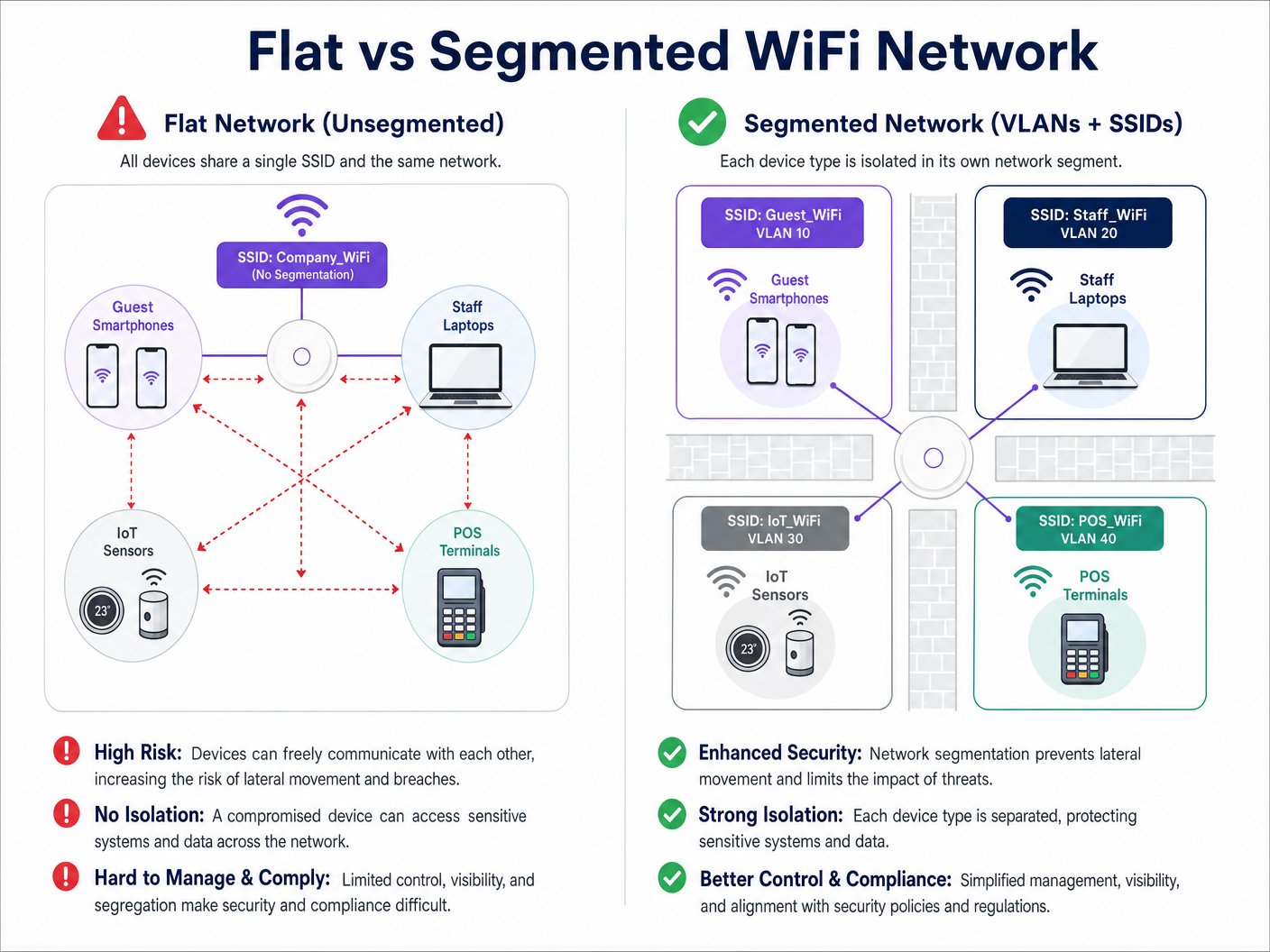
Em sua essência, a segmentação de rede WiFi é a prática de dividir uma única infraestrutura física sem fio em múltiplos domínios de broadcast logicamente isolados. Esse isolamento garante que o tráfego de um segmento — como o smartphone de um convidado — não possa interagir com dispositivos em outro segmento, como um laptop corporativo ou um dispositivo clínico.
O Papel das VLANs (IEEE 802.1Q)
O principal mecanismo para essa separação lógica é a VLAN, definida pelo padrão IEEE 802.1Q. Uma VLAN permite que os administradores de rede particionem um único switch físico ou ponto de acesso em múltiplas redes distintas. À medida que os pacotes de dados atravessam a rede, eles são marcados com um ID de VLAN específico (variando de 1 a 4094). Essa marcação dita o roteamento do pacote e garante que ele permaneça confinado ao seu caminho lógico designado.
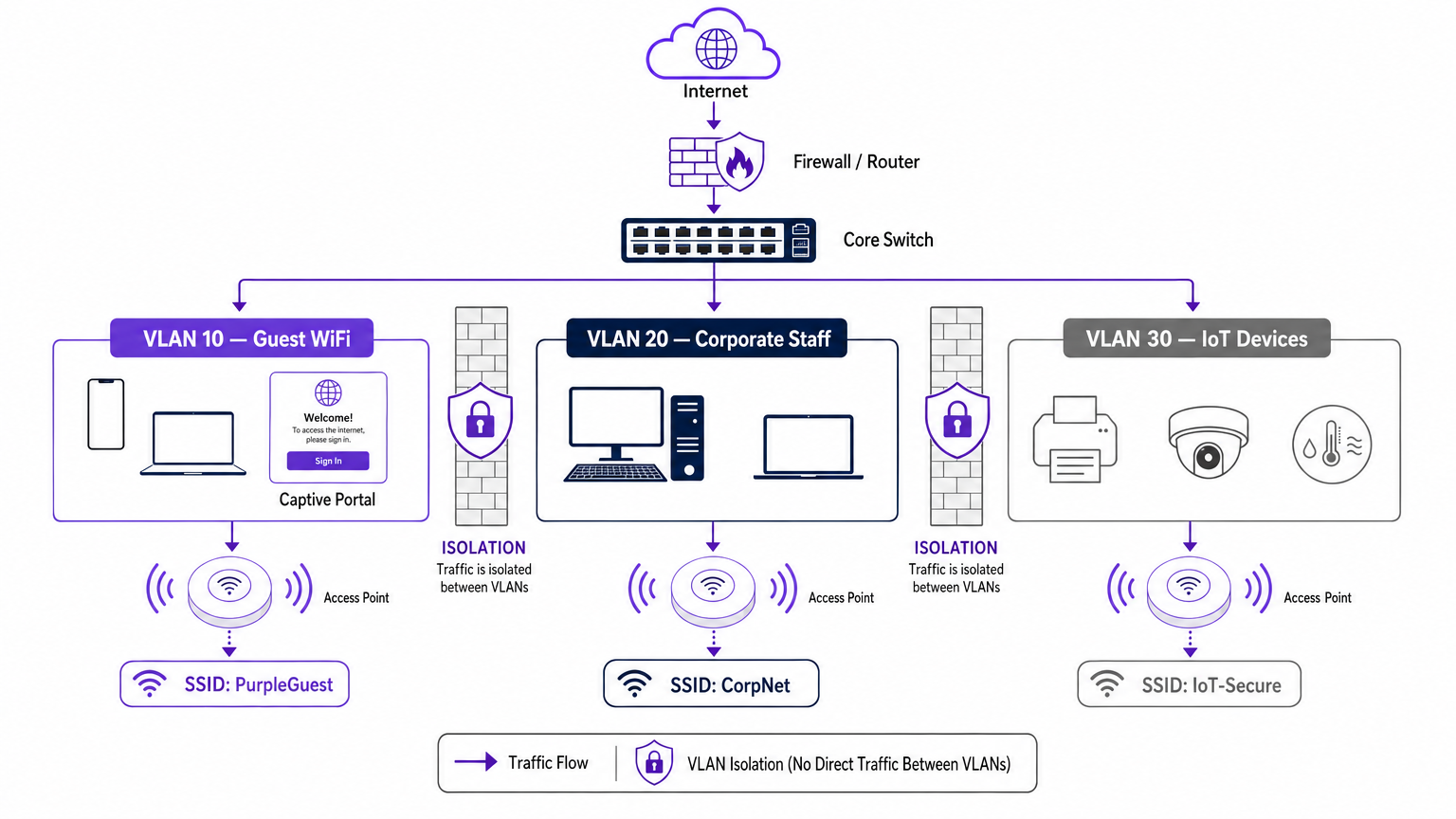
Em uma implantação empresarial típica, o tráfego é categorizado em VLANs específicas. Por exemplo:
- VLAN 10: WiFi de Convidados
- VLAN 20: Corporativo/Equipe
- VLAN 30: IoT e Gerenciamento de Edifícios
- VLAN 40: Terminais de Ponto de Venda (POS)
Mapeando SSIDs para VLANs
Enquanto as VLANs lidam com o backhaul com fio e o roteamento lógico, o SSID (Service Set Identifier) é a face sem fio da rede. Pontos de acesso empresariais modernos podem transmitir múltiplos SSIDs simultaneamente. O passo crucial na segmentação é mapear cada SSID para sua VLAN correspondente.
Quando um usuário se conecta ao SSID "Guest_WiFi", o ponto de acesso automaticamente marca todo o tráfego desse dispositivo com o ID de VLAN atribuído à rede de convidados (por exemplo, VLAN 10). Esse tráfego é então encaminhado de volta para o switch central e firewall, onde listas de controle de acesso (ACLs) rigorosas ditam seu fluxo — tipicamente permitindo apenas acesso à internet de saída e bloqueando todo o roteamento interno.
Impulsionadores de Segurança e Conformidade
O principal impulsionador para a segmentação de rede é a mitigação de riscos. Em uma rede plana, um dispositivo IoT comprometido ou um ator malicioso na rede de convidados pode facilmente sondar sistemas internos, movendo-se lateralmente para acessar dados sensíveis. A segmentação impede esse movimento lateral.
Além disso, as estruturas de conformidade exigem isolamento:
- PCI DSS: Requer isolamento rigoroso do Ambiente de Dados do Titular do Cartão (CDE) de todo o tráfego de rede.
- GDPR: Exige proteção de dados por design; isolar o tráfego de convidados garante que usuários públicos não possam acessar sistemas que armazenam informações de identificação pessoal (PII).
- Padrões de Saúde: Conforme detalhado em nosso guia WiFi em Hospitais: Um Guia para Redes Clínicas Seguras , dispositivos clínicos devem ser estritamente segregados das redes de pacientes e visitantes.
Guia de Implementação: Uma Abordagem Faseada
A implantação de uma arquitetura sem fio segmentada requer planejamento rigoroso. Siga esta abordagem faseada para garantir uma implantação segura e de alto desempenho.
Fase 1: Classificação e Auditoria de Tráfego
Antes de configurar quaisquer portas de switch, realize uma auditoria abrangente de todos os tipos de dispositivos operando no local. Categorize esses dispositivos em grupos lógicos: convidados, equipe corporativa, executivos, sensores IoT, sistemas POS e gerenciamento de edifícios. Cada categoria representa uma classe de tráfego distinta que requer sua própria VLAN e política de segurança.
Fase 2: Design de VLAN e Sub-rede
Atribua um ID de VLAN exclusivo e uma sub-rede IP dedicada a cada classe de tráfego. Crucialmente, garanta que a VLAN de convidados opere em uma sub-rede completamente separada do seu espaço de endereço RFC 1918 interno.
No nível do firewall, implemente uma política de negação padrão para o roteamento inter-VLAN. A VLAN de convidados deve ter uma regra explícita permitindo o tráfego de saída para a internet (portas 80 e 443) e regras explícitas negando acesso a todas as sub-redes internas.
Fase 3: Configuração de SSID e Isolamento de Cliente
Configure os SSIDs necessários em seu controlador de LAN sem fio ou plataforma de gerenciamento em nuvem.
- Limite o Número de SSIDs: Não transmita mais de três ou quatro SSIDs por banda de rádio. SSIDs excessivos geram uma sobrecarga significativa de quadros de gerenciamento (beaconing), o que degrada o tempo de ar e a taxa de transferência geral. Paramais sobre como otimizar o desempenho do AP, consulte Seu Guia para um Ponto de Acesso Sem Fio Ruckus .
- Habilitar Isolamento de Cliente: No SSID de convidado, é imperativo habilitar o isolamento de cliente (às vezes chamado de isolamento de AP ou bloqueio peer-to-peer). Isso impede que dispositivos conectados à mesma rede de convidado se comuniquem entre si, protegendo os convidados de ataques peer-to-peer.
Fase 4: Autenticação e Controle de Acesso
Adapte o método de autenticação ao segmento:
- Corporativo/Funcionários: Implemente WPA3-Enterprise usando autenticação IEEE 802.1X contra um servidor RADIUS (por exemplo, Active Directory). Isso fornece autenticação por usuário e atribuição dinâmica de VLAN. Para dispositivos pessoais, revise nosso guia Segurança WiFi BYOD: Como Permitir Dispositivos Pessoais em Sua Rede com Segurança .
- Guest WiFi: Utilize um SSID aberto emparelhado com um Captive Portal. É aqui que a plataforma Purple se destaca, fornecendo autenticação contínua, captura de dados em conformidade com a GDPR e WiFi Analytics ricos.
- IoT: Use WPA3-SAE (ou WPA2-PSK com uma senha forte e rotacionada) combinado com filtragem de endereço MAC e ACLs de firewall rigorosas, pois a maioria dos dispositivos IoT não suporta 802.1X.
Fase 5: Gerenciamento de Largura de Banda
Para evitar que um único usuário ou um pequeno grupo de usuários sature o uplink de internet do local, implemente limitação de taxa por cliente na VLAN de convidado. Limitar a largura de banda do convidado (por exemplo, a 5-10 Mbps por dispositivo) garante uma experiência básica consistente para todos os usuários, preservando a capacidade para o tráfego operacional crítico.
Melhores Práticas para Locais Corporativos
- Adote uma Postura de Negação Padrão: A base da segmentação segura é o firewall. Se um fluxo de tráfego não for explicitamente exigido para operações de negócios, ele deve ser negado.
- Proteja a Infraestrutura Cabeada: A segmentação sem fio é facilmente contornada se a rede cabeada subjacente for plana. Garanta que todas as portas físicas do switch em áreas públicas (por exemplo, quartos de hotel, centros de conferências) sejam atribuídas à VLAN de convidado ou sejam protegidas por autenticação baseada em porta 802.1X.
- Aproveite Purple para Identidade de Convidado: Ao implantar o segmento de convidado, integre o Captive Portal da Purple. Sob a licença Connect, Purple atua como um provedor de identidade gratuito para serviços como OpenRoaming, otimizando o onboarding seguro de convidados enquanto captura dados valiosos de primeira parte.
- Audite Regularmente as Portas Trunk: Um modo de falha comum é a configuração incorreta de uma porta trunk (que transporta várias VLANs) como uma porta de acesso. Isso remove as tags de VLAN e colapsa o tráfego em uma única rede. Auditorias regulares de configuração são essenciais.
Solução de Problemas e Mitigação de Riscos
Mesmo com um design robusto, as implantações de segmentação podem encontrar problemas. Aqui estão os modos de falha comuns e as estratégias de mitigação:
| Modo de Falha | Sintoma | Estratégia de Mitigação |
|---|---|---|
| Sobrecarga de SSID | Alta utilização de canal, velocidades lentas do cliente, conexões perdidas. | Consolide os SSIDs. Limite para Convidado, Corporativo e IoT. Remova SSIDs legados ou não utilizados. |
| Vazamento de VLAN | Dispositivos de convidado recebendo endereços IP do escopo DHCP corporativo. | Audite as configurações das portas do switch. Garanta que os uplinks do AP estejam configurados como portas trunk marcadas, não como portas de acesso não marcadas. |
| Falha do Captive Portal | Convidados se conectam ao WiFi, mas o portal não carrega. | Verifique as ACLs do firewall. Garanta que a VLAN de convidado possa alcançar os servidores DNS externos e os endereços IP do Captive Portal da Purple. |
| Problemas de Conectividade IoT | Dispositivos sem interface falham ao se conectar à rede. | Verifique a compatibilidade de autenticação. Se o dispositivo não tiver suporte 802.1X, garanta que ele esteja se conectando ao SSID IoT WPA2/3-PSK. |
ROI e Impacto nos Negócios
A implementação de uma arquitetura WiFi segmentada oferece retornos mensuráveis em segurança, conformidade e operações de marketing.
Do ponto de vista da segurança, o ROI é medido na prevenção de riscos. Ao eliminar o movimento lateral, os locais reduzem drasticamente os potenciais danos financeiros e de reputação de uma violação de dados. Além disso, a segmentação simplifica as auditorias de conformidade para PCI DSS e GDPR, reduzindo a sobrecarga operacional necessária para manter a certificação.
Comercialmente, a segmentação permite a implantação de uma rede de convidado dedicada e de alto desempenho. Ao rotear esse tráfego através da plataforma da Purple, os locais transformam um centro de custo em um ativo gerador de receita. A rede de convidado isolada captura dados demográficos e comportamentais ricos, impulsionando campanhas de marketing personalizadas, aumentando o fluxo de visitantes e turbinando a fidelidade do cliente — tudo isso mantendo a rede corporativa hermeticamente selada.
Ouça o Briefing
Para um aprofundamento nas estratégias de implantação discutidas neste guia, ouça nosso podcast de briefing técnico de 10 minutos.
Termos-Chave e Definições
VLAN (Virtual Local Area Network)
A logical grouping of network devices that behave as if they are on the same physical network, regardless of their actual physical location.
Used by IT teams to isolate different types of traffic (e.g., guest vs. corporate) on the same physical switches and cabling.
SSID (Service Set Identifier)
The public name of a wireless network that users see on their devices when searching for WiFi.
Enterprise APs broadcast multiple SSIDs, mapping each one to a specific VLAN to enforce segmentation at the wireless edge.
Client Isolation
A wireless controller setting that prevents devices connected to the same SSID from communicating directly with each other.
Crucial for Guest WiFi networks to prevent a malicious user's device from attacking another guest's device on the same network.
Lateral Movement
The technique used by cyber attackers to move through a network, searching for sensitive data or high-value assets after gaining initial access.
Network segmentation is the primary defence against lateral movement, stopping a breach in the guest network from reaching the corporate servers.
Trunk Port
A switch port configured to carry traffic for multiple VLANs simultaneously by using 802.1Q tags.
The connection between a network switch and an enterprise access point must be a trunk port to support multiple SSIDs mapped to different VLANs.
802.1X
An IEEE standard for port-based network access control that provides an authentication mechanism to devices wishing to attach to a LAN or WLAN.
The gold standard for corporate network authentication, ensuring only authorised staff with valid credentials can access the internal VLAN.
Captive Portal
A web page that the user of a public-access network is obliged to view and interact with before access is granted.
Used on the Guest VLAN to capture user consent, present terms of service, and collect marketing data via platforms like Purple.
PCI DSS
Payment Card Industry Data Security Standard; a set of security standards designed to ensure that all companies that accept, process, store or transmit credit card information maintain a secure environment.
Requires strict network segmentation to isolate point-of-sale terminals from general corporate and guest traffic.
Estudos de Caso
A 300-room hotel currently operates a single flat network for guests, back-office staff, and smart room thermostats. The IT Director needs to secure the network to achieve PCI DSS compliance for the front desk while ensuring guests cannot access the thermostats.
The IT team must implement a segmented architecture using three distinct VLANs. VLAN 10 (Guest) is mapped to the 'Hotel_Guest' SSID with client isolation enabled and a captive portal for authentication. VLAN 20 (Corporate/POS) is mapped to a hidden SSID using WPA3-Enterprise (802.1X) for staff and POS terminals. VLAN 30 (IoT) is mapped to a hidden 'Hotel_IoT' SSID using WPA3-SAE for the thermostats. The core firewall is configured to block all routing between VLAN 10, 20, and 30, with VLAN 10 only permitted outbound internet access.
A large retail chain is deploying Purple Guest WiFi across 50 stores. They want to capture customer data via a captive portal but are concerned that guests might consume all available bandwidth, disrupting the store's inventory scanners.
The network architect deploys two VLANs: VLAN 50 for the inventory scanners (mapped to a WPA3-Enterprise SSID) and VLAN 60 for Guest WiFi (mapped to an open SSID with the Purple captive portal). On the wireless LAN controller, the architect configures a per-client rate limit of 5 Mbps downstream and 2 Mbps upstream specifically for the Guest SSID. Furthermore, QoS (Quality of Service) tags are applied at the switch level to prioritize traffic from VLAN 50 over VLAN 60.
Análise de Cenário
Q1. A stadium IT team wants to deploy a new fleet of wireless digital signage screens. They currently have a Guest SSID (VLAN 10) and a Staff SSID (VLAN 20). The signage vendor requests the screens be put on the Guest network so they can easily pull updates from the internet. What is the correct architectural decision?
💡 Dica:Consider the security implications of placing unmanaged devices on a public network, and the impact of client isolation.
Mostrar Abordagem Recomendada
Do not place the screens on the Guest VLAN. Create a new, dedicated IoT/Signage VLAN (e.g., VLAN 30) and map it to a hidden SSID. The Guest network has client isolation enabled, which might interfere with local management of the screens. More importantly, placing corporate assets on a public network exposes them to tampering from guests. The new VLAN 30 should have firewall rules allowing outbound internet access for updates, but blocking inbound traffic from the Guest network.
Q2. After deploying a new segmented network, the network administrator notices that devices connected to the 'Corp_Secure' SSID are receiving IP addresses in the 192.168.10.x range, which is the subnet designated for the Guest VLAN. What is the most likely configuration error?
💡 Dica:Think about how VLAN tags are processed between the access point and the switch.
Mostrar Abordagem Recomendada
The switch port connecting to the access point is likely misconfigured as an 'Access' port on VLAN 10, rather than a 'Trunk' port. Because it is not operating as a trunk, it is stripping the 802.1Q VLAN tags from the AP's traffic and dumping all traffic (from both the Guest and Corp SSIDs) onto the native VLAN configured on that port (in this case, the Guest VLAN).
Q3. A retail client wants to broadcast 8 different SSIDs to cater to various internal departments (Sales, Management, Warehouse, etc.) in addition to Guest WiFi. How should the Senior Solutions Architect advise them?
💡 Dica:Consider the impact of management frame overhead on wireless performance.
Mostrar Abordagem Recomendada
The architect should advise against this. Broadcasting 8 SSIDs will consume a massive amount of airtime just for beacon frames, severely degrading actual data throughput for all users. The solution is to consolidate the internal departments onto a single 'Corporate' SSID using WPA3-Enterprise (802.1X). The RADIUS server can then dynamically assign users to different VLANs (Sales VLAN, Warehouse VLAN) based on their Active Directory credentials, keeping the SSID count to a maximum of 3 or 4.




