
WiFi Network Segmentation: VLANs, SSIDs and Guest Traffic
This authoritative guide explores the critical role of WiFi network segmentation using VLANs and multiple SSIDs. It provides actionable implementation strategies for IT leaders across hospitality, retail, and public sectors to secure networks, isolate guest traffic, and ensure compliance without sacrificing performance.
Listen to this guide
View podcast transcript
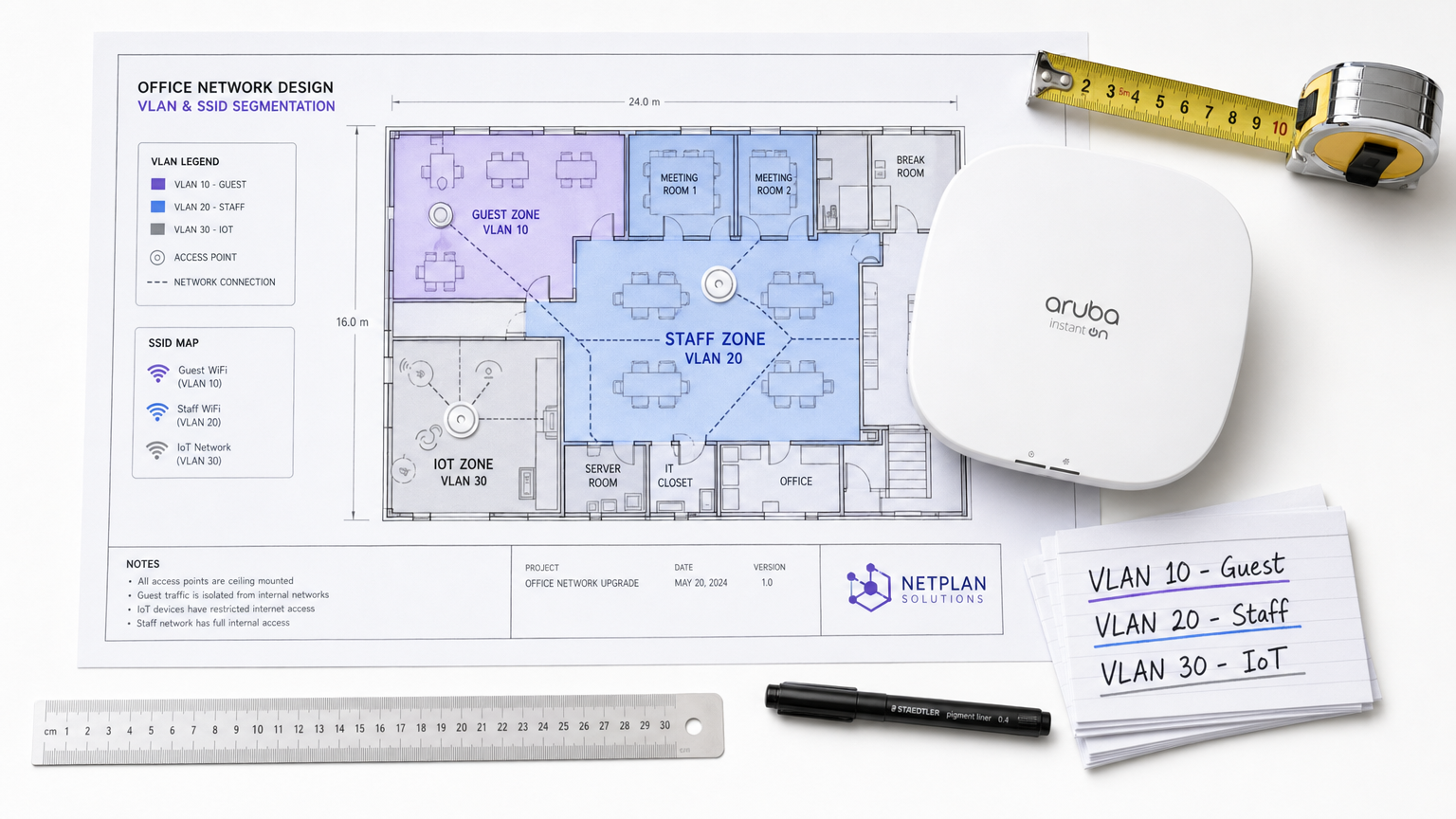
Executive Summary
For enterprise venues—whether a bustling Retail environment, a multi-site Hospitality chain, or a complex Healthcare campus—the days of the flat wireless network are long gone. Today's network architects face a barrage of competing demands: supporting thousands of concurrent guest devices, securing sensitive corporate data, enabling point-of-sale systems, and onboarding a rapidly growing fleet of IoT sensors.
Attempting to run these disparate traffic classes over a single, unsegmented network is not just inefficient; it is a critical security vulnerability. WiFi network segmentation, implemented via Virtual Local Area Networks (VLANs) and Service Set Identifiers (SSIDs), is the foundational architecture required to mitigate lateral movement risks, ensure regulatory compliance (such as PCI DSS and GDPR), and deliver predictable performance.
This guide provides senior IT professionals with a comprehensive, vendor-neutral blueprint for designing, deploying, and validating a segmented wireless network. We explore the underlying Layer 2 mechanics, detail the step-by-step implementation process, and highlight how integrating a managed Guest WiFi platform like Purple can supercharge both security and venue analytics.
Technical Deep-Dive: The Mechanics of Segmentation
At its core, WiFi network segmentation is the practice of dividing a single physical wireless infrastructure into multiple logically isolated broadcast domains. This isolation ensures that traffic from one segment—such as a guest's smartphone—cannot interact with devices on another segment, such as a corporate laptop or a clinical device.
The Role of VLANs (IEEE 802.1Q)
The primary mechanism for this logical separation is the VLAN, defined by the IEEE 802.1Q standard. A VLAN allows network administrators to partition a single physical switch or access point into multiple distinct networks. As data packets traverse the network, they are tagged with a specific VLAN ID (ranging from 1 to 4094). This tag dictates the packet's routing and ensures it remains confined to its designated logical path.
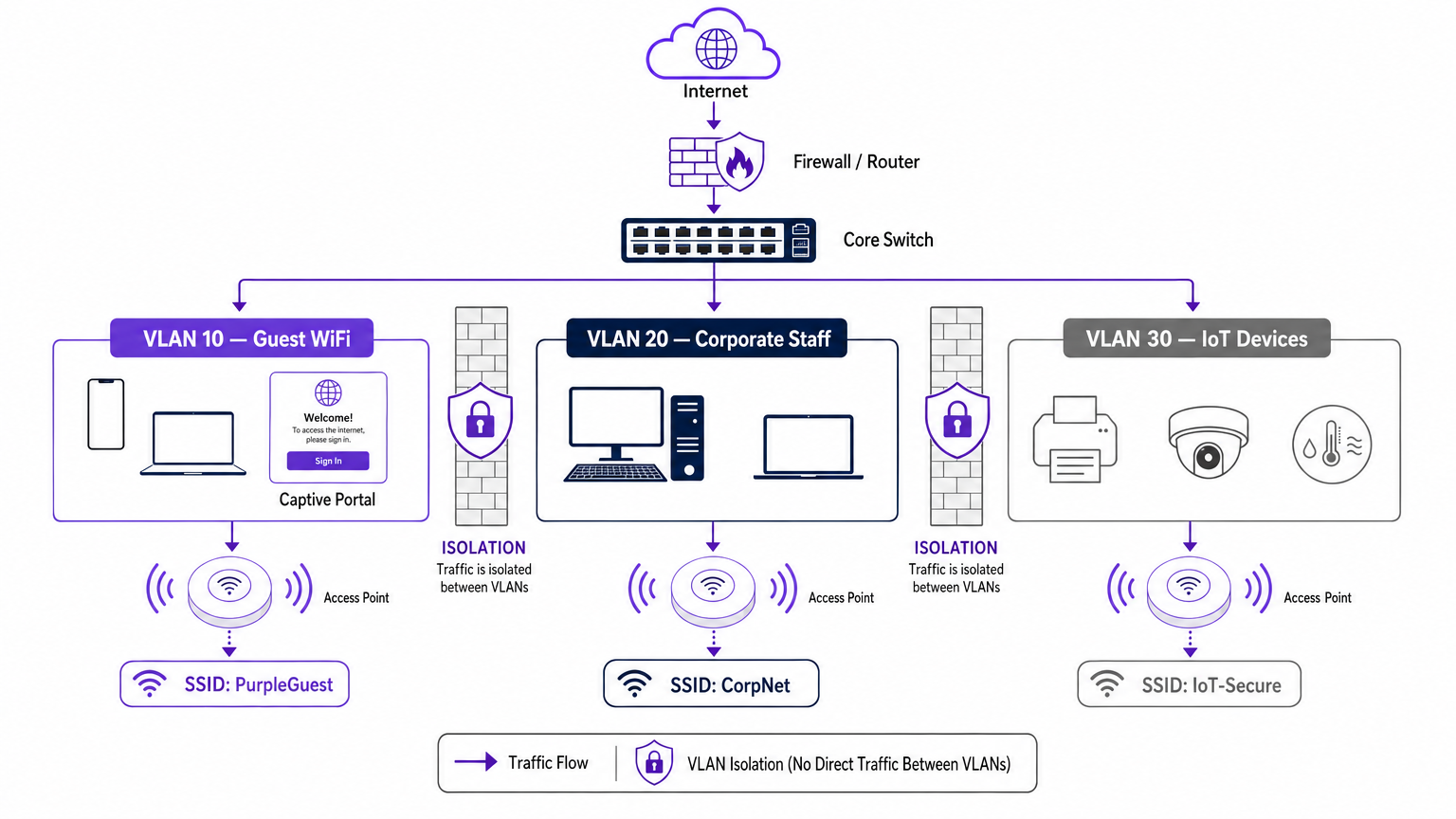
In a typical enterprise deployment, traffic is categorised into specific VLANs. For instance:
- VLAN 10: Guest WiFi
- VLAN 20: Corporate/Staff
- VLAN 30: IoT and Building Management
- VLAN 40: Point of Sale (POS) Terminals
Mapping SSIDs to VLANs
While VLANs handle the wired backhaul and logical routing, the SSID (Service Set Identifier) is the wireless face of the network. Modern enterprise access points can broadcast multiple SSIDs simultaneously. The crucial step in segmentation is mapping each SSID to its corresponding VLAN.
When a user connects to the "Guest_WiFi" SSID, the access point automatically tags all traffic from that device with the VLAN ID assigned to the guest network (e.g., VLAN 10). This traffic is then trunked back to the core switch and firewall, where strict access control lists (ACLs) dictate its flow—typically allowing only outbound internet access and blocking all internal routing.
Security and Compliance Drivers
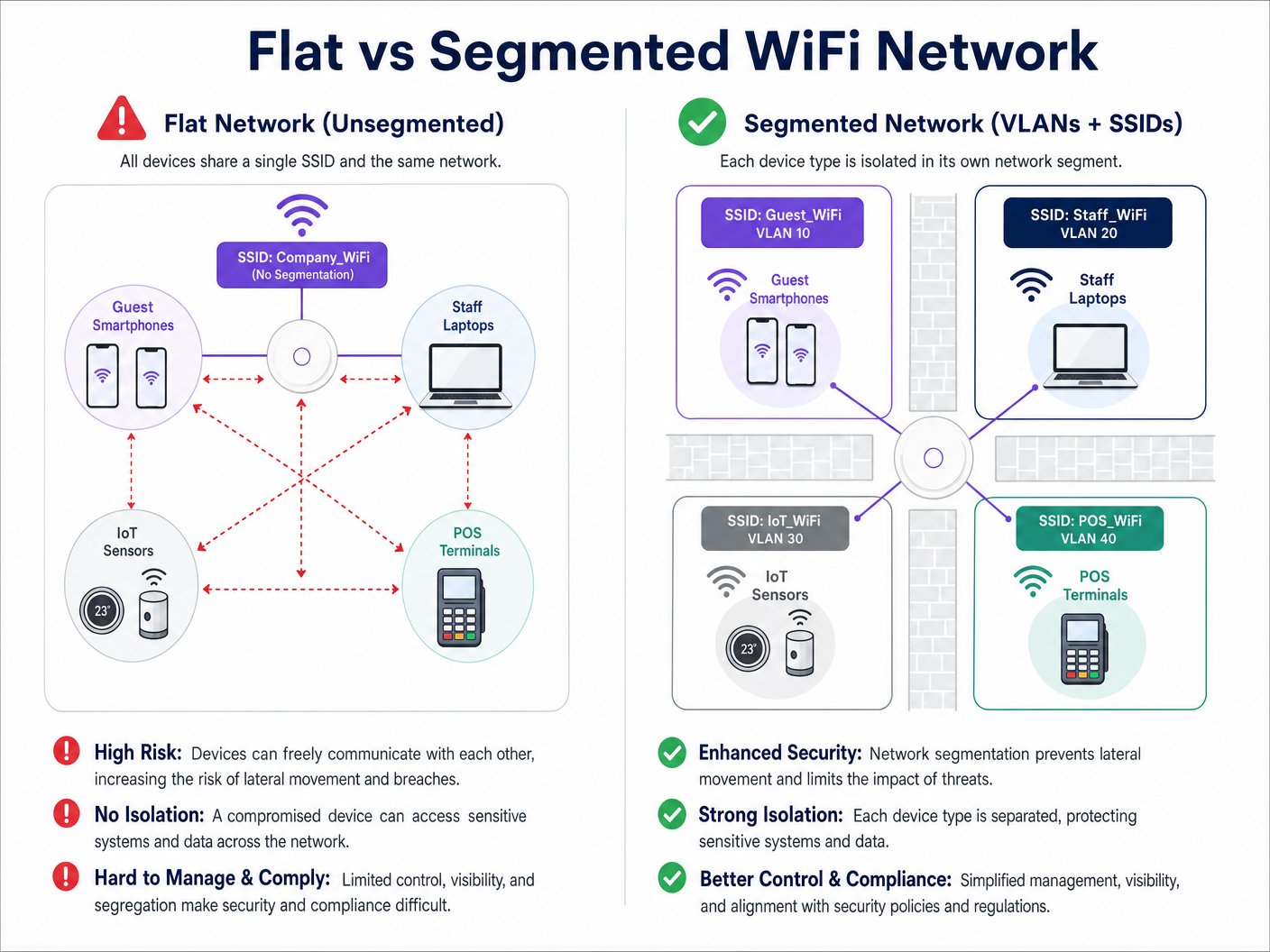
The primary driver for network segmentation is risk mitigation. In a flat network, a compromised IoT device or a malicious actor on the guest network can easily probe internal systems, moving laterally to access sensitive data. Segmentation halts this lateral movement.
Furthermore, compliance frameworks demand isolation:
- PCI DSS: Requires strict isolation of the Cardholder Data Environment (CDE) from all other network traffic.
- GDPR: Mandates data protection by design; isolating guest traffic ensures that public users cannot access systems housing personally identifiable information (PII).
- Healthcare Standards: As detailed in our guide to WiFi in Hospitals: A Guide to Secure Clinical Networks , clinical devices must be strictly segregated from patient and visitor networks.
Implementation Guide: A Phased Approach
Deploying a segmented wireless architecture requires rigorous planning. Follow this phased approach to ensure a secure, performant deployment.
Phase 1: Traffic Classification and Auditing
Before configuring any switch ports, conduct a comprehensive audit of all device types operating within the venue. Categorise these devices into logical groups: guests, corporate staff, executives, IoT sensors, POS systems, and building management. Each category represents a distinct traffic class that requires its own VLAN and security policy.
Phase 2: VLAN and Subnet Design
Assign a unique VLAN ID and a dedicated IP subnet to each traffic class. Crucially, ensure that the guest VLAN operates on a completely separate subnet from your internal RFC 1918 address space.
At the firewall level, implement a default-deny policy for inter-VLAN routing. The guest VLAN should have an explicit rule permitting outbound traffic to the internet (ports 80 and 443) and explicit rules denying access to all internal subnets.
Phase 3: SSID Configuration and Client Isolation
Configure the required SSIDs on your wireless LAN controller or cloud management platform.
- Limit SSID Count: Do not broadcast more than three or four SSIDs per radio band. Excessive SSIDs generate significant management frame overhead (beaconing), which degrades overall airtime and throughput. For more on optimizing AP performance, see Your Guide to a Wireless Access Point Ruckus .
- Enable Client Isolation: On the guest SSID, it is imperative to enable client isolation (sometimes called AP isolation or peer-to-peer blocking). This prevents devices connected to the same guest network from communicating with one another, protecting guests from peer-to-peer attacks.
Phase 4: Authentication and Access Control
Tailor the authentication method to the segment:
- Corporate/Staff: Implement WPA3-Enterprise using IEEE 802.1X authentication against a RADIUS server (e.g., Active Directory). This provides per-user authentication and dynamic VLAN assignment. For personal devices, review our BYOD WiFi Security: How to Safely Let Personal Devices on Your Network guide.
- Guest WiFi: Utilise an open SSID paired with a captive portal. This is where the Purple platform excels, providing seamless authentication, GDPR-compliant data capture, and rich WiFi Analytics .
- IoT: Use WPA3-SAE (or WPA2-PSK with a strong, rotated passphrase) combined with MAC address filtering and strict firewall ACLs, as most IoT devices do not support 802.1X.
Phase 5: Bandwidth Management
To prevent a single user or a small group of users from saturating the venue's internet uplink, implement per-client rate limiting on the guest VLAN. Capping guest bandwidth (e.g., at 5-10 Mbps per device) ensures a consistent baseline experience for all users while preserving capacity for critical operational traffic.
Best Practices for Enterprise Venues
- Adopt a Default-Deny Posture: The foundation of secure segmentation is the firewall. If a traffic flow is not explicitly required for business operations, it must be denied.
- Secure the Wired Infrastructure: Wireless segmentation is easily bypassed if the underlying wired network is flat. Ensure all physical switch ports in public areas (e.g., hotel rooms, conference centres) are assigned to the guest VLAN or are protected by 802.1X port-based authentication.
- Leverage Purple for Guest Identity: When deploying the guest segment, integrate Purple's captive portal. Under the Connect license, Purple acts as a free identity provider for services like OpenRoaming, streamlining secure guest onboarding while capturing valuable first-party data.
- Regularly Audit Trunk Ports: A common failure mode is misconfiguring a trunk port (which carries multiple VLANs) as an access port. This strips the VLAN tags and collapses traffic onto a single network. Regular configuration audits are essential.
Troubleshooting & Risk Mitigation
Even with a robust design, segmentation deployments can encounter issues. Here are common failure modes and mitigation strategies:
| Failure Mode | Symptom | Mitigation Strategy |
|---|---|---|
| SSID Overhead | High channel utilization, slow client speeds, dropped connections. | Consolidate SSIDs. Limit to Guest, Corporate, and IoT. Remove legacy or unused SSIDs. |
| VLAN Bleed | Guest devices receiving IP addresses from the corporate DHCP scope. | Audit switch port configurations. Ensure AP uplinks are configured as tagged trunk ports, not untagged access ports. |
| Captive Portal Failure | Guests connect to WiFi but the portal does not load. | Check firewall ACLs. Ensure the guest VLAN can reach the external DNS servers and the Purple captive portal IP addresses. |
| IoT Connectivity Issues | Headless devices fail to join the network. | Verify authentication compatibility. If the device lacks 802.1X support, ensure it is connecting to the WPA2/3-PSK IoT SSID. |
ROI & Business Impact
Implementing a segmented WiFi architecture delivers measurable returns across security, compliance, and marketing operations.
From a security standpoint, the ROI is measured in risk avoidance. By eliminating lateral movement, venues drastically reduce the potential financial and reputational damage of a data breach. Furthermore, segmentation simplifies compliance audits for PCI DSS and GDPR, reducing the operational overhead required to maintain certification.
Commercially, segmentation enables the deployment of a dedicated, high-performance guest network. By routing this traffic through Purple's platform, venues transform a cost centre into a revenue-generating asset. The isolated guest network captures rich demographic and behavioural data, driving personalised marketing campaigns, increasing footfall, and supercharging customer loyalty—all while keeping the corporate network hermetically sealed.
Listen to the Briefing
For a deeper dive into the deployment strategies discussed in this guide, listen to our 10-minute technical briefing podcast.
Key Definitions
VLAN (Virtual Local Area Network)
A logical grouping of network devices that behave as if they are on the same physical network, regardless of their actual physical location.
Used by IT teams to isolate different types of traffic (e.g., guest vs. corporate) on the same physical switches and cabling.
SSID (Service Set Identifier)
The public name of a wireless network that users see on their devices when searching for WiFi.
Enterprise APs broadcast multiple SSIDs, mapping each one to a specific VLAN to enforce segmentation at the wireless edge.
Client Isolation
A wireless controller setting that prevents devices connected to the same SSID from communicating directly with each other.
Crucial for Guest WiFi networks to prevent a malicious user's device from attacking another guest's device on the same network.
Lateral Movement
The technique used by cyber attackers to move through a network, searching for sensitive data or high-value assets after gaining initial access.
Network segmentation is the primary defence against lateral movement, stopping a breach in the guest network from reaching the corporate servers.
Trunk Port
A switch port configured to carry traffic for multiple VLANs simultaneously by using 802.1Q tags.
The connection between a network switch and an enterprise access point must be a trunk port to support multiple SSIDs mapped to different VLANs.
802.1X
An IEEE standard for port-based network access control that provides an authentication mechanism to devices wishing to attach to a LAN or WLAN.
The gold standard for corporate network authentication, ensuring only authorised staff with valid credentials can access the internal VLAN.
Captive Portal
A web page that the user of a public-access network is obliged to view and interact with before access is granted.
Used on the Guest VLAN to capture user consent, present terms of service, and collect marketing data via platforms like Purple.
PCI DSS
Payment Card Industry Data Security Standard; a set of security standards designed to ensure that all companies that accept, process, store or transmit credit card information maintain a secure environment.
Requires strict network segmentation to isolate point-of-sale terminals from general corporate and guest traffic.
Worked Examples
A 300-room hotel currently operates a single flat network for guests, back-office staff, and smart room thermostats. The IT Director needs to secure the network to achieve PCI DSS compliance for the front desk while ensuring guests cannot access the thermostats.
The IT team must implement a segmented architecture using three distinct VLANs. VLAN 10 (Guest) is mapped to the 'Hotel_Guest' SSID with client isolation enabled and a captive portal for authentication. VLAN 20 (Corporate/POS) is mapped to a hidden SSID using WPA3-Enterprise (802.1X) for staff and POS terminals. VLAN 30 (IoT) is mapped to a hidden 'Hotel_IoT' SSID using WPA3-SAE for the thermostats. The core firewall is configured to block all routing between VLAN 10, 20, and 30, with VLAN 10 only permitted outbound internet access.
A large retail chain is deploying Purple Guest WiFi across 50 stores. They want to capture customer data via a captive portal but are concerned that guests might consume all available bandwidth, disrupting the store's inventory scanners.
The network architect deploys two VLANs: VLAN 50 for the inventory scanners (mapped to a WPA3-Enterprise SSID) and VLAN 60 for Guest WiFi (mapped to an open SSID with the Purple captive portal). On the wireless LAN controller, the architect configures a per-client rate limit of 5 Mbps downstream and 2 Mbps upstream specifically for the Guest SSID. Furthermore, QoS (Quality of Service) tags are applied at the switch level to prioritize traffic from VLAN 50 over VLAN 60.
Practice Questions
Q1. A stadium IT team wants to deploy a new fleet of wireless digital signage screens. They currently have a Guest SSID (VLAN 10) and a Staff SSID (VLAN 20). The signage vendor requests the screens be put on the Guest network so they can easily pull updates from the internet. What is the correct architectural decision?
Hint: Consider the security implications of placing unmanaged devices on a public network, and the impact of client isolation.
View model answer
Do not place the screens on the Guest VLAN. Create a new, dedicated IoT/Signage VLAN (e.g., VLAN 30) and map it to a hidden SSID. The Guest network has client isolation enabled, which might interfere with local management of the screens. More importantly, placing corporate assets on a public network exposes them to tampering from guests. The new VLAN 30 should have firewall rules allowing outbound internet access for updates, but blocking inbound traffic from the Guest network.
Q2. After deploying a new segmented network, the network administrator notices that devices connected to the 'Corp_Secure' SSID are receiving IP addresses in the 192.168.10.x range, which is the subnet designated for the Guest VLAN. What is the most likely configuration error?
Hint: Think about how VLAN tags are processed between the access point and the switch.
View model answer
The switch port connecting to the access point is likely misconfigured as an 'Access' port on VLAN 10, rather than a 'Trunk' port. Because it is not operating as a trunk, it is stripping the 802.1Q VLAN tags from the AP's traffic and dumping all traffic (from both the Guest and Corp SSIDs) onto the native VLAN configured on that port (in this case, the Guest VLAN).
Q3. A retail client wants to broadcast 8 different SSIDs to cater to various internal departments (Sales, Management, Warehouse, etc.) in addition to Guest WiFi. How should the Senior Solutions Architect advise them?
Hint: Consider the impact of management frame overhead on wireless performance.
View model answer
The architect should advise against this. Broadcasting 8 SSIDs will consume a massive amount of airtime just for beacon frames, severely degrading actual data throughput for all users. The solution is to consolidate the internal departments onto a single 'Corporate' SSID using WPA3-Enterprise (802.1X). The RADIUS server can then dynamically assign users to different VLANs (Sales VLAN, Warehouse VLAN) based on their Active Directory credentials, keeping the SSID count to a maximum of 3 or 4.
Continue reading in this series
Staff WiFi vs. Guest WiFi: Best Practices for Corporate Network Segmentation
A comprehensive technical guide for IT leaders on segmenting staff and guest WiFi networks. It covers VLAN architecture, 802.1X authentication, firewall policies, and the business impact of secure network design.
Staff WiFi vs. Guest WiFi: Best Practices for Corporate Network Segmentation
A comprehensive technical guide for IT leaders on segmenting staff and guest WiFi networks. It covers VLAN architecture, 802.1X authentication, firewall policies, and the business impact of secure network design.
Nama guild iPSK: a comprehensive guide for businesses
This guide explains Identity Pre-Shared Key (iPSK) architecture for property developers, BTR operators, and landlords deploying multi-tenant WiFi. It covers RADIUS integration, dynamic VLAN assignment, Layer 2 isolation, and automated credential lifecycle management to deliver an instant-on resident experience at scale. It also details the business case for eliminating per-unit consumer routers and the operational advantages of integrating iPSK with identity providers like Microsoft Entra ID, Okta, and Google Workspace.