La maggior parte dei consigli sui migliori access point inizia dal punto sbagliato. Si chiede quale modello sia il più veloce, quale radio sia la più recente o quale fornitore abbia la lista di funzionalità più lunga.
Questo conta, ma non è la prima decisione da prendere.
Nelle distribuzioni reali, il miglior access point è quello che si adatta al modello di identità, al modello operativo e all'ambiente fisico del sito. Un ospedale non acquista il WiFi allo stesso modo di un centro commerciale. Un hotel che desidera un accesso continuo per gli ospiti abituali non dovrebbe valutare l'hardware allo stesso modo di un operatore di alloggi per studenti che cerca di isolare centinaia di residenti su un'infrastruttura condivisa.
Le schede tecniche sono utili. I percorsi utente sono decisivi. Se la rete non è in grado di supportare l'accesso sicuro del personale, una registrazione sensata degli ospiti e una segmentazione pulita per i dispositivi non gestiti, il "miglior" AP sulla carta diventa solo un costoso ornamento da soffitto.
Un modo migliore per valutare i migliori access point è porsi prima quattro domande:
- Chi si connette: personale, ospiti, residenti, appaltatori, dispositivi IoT o tutti quanti.
- Come si autenticano: password condivisa, Captive Portal, accesso basato su certificati, SSO o roaming senza password.
- Cosa deve rimanere isolato: traffico ospiti, sistemi di pagamento, sistemi clinici, controlli dell'edificio, reti degli inquilini.
- Come viene gestito il patrimonio: un solo sito, molti siti, IT in outsourcing, IT centrale o un modello ibrido.
Questo cambia rapidamente la selezione finale. Previene anche un errore comune. I team spesso acquistano in eccesso capacità radio grezze e sottospecificano la compatibilità di gestione, segmentazione e autenticazione. Il risultato è una rete che ottiene ottimi benchmark in laboratorio e frustra le persone in produzione.
Oltre la velocità: scegliere i migliori access point
L'idea che un singolo dispositivo sia il miglior access point per ogni ambiente non è mai stata vera. Lo è ancora meno oggi.
Un moderno AP è solo una parte di un sistema di accesso più ampio che include identità, policy, analisi, switching, alimentazione e posizionamento fisico. La maggior parte dei contenuti sui migliori access point si ferma ancora alle metriche prestazionali dell'hardware e salta lo strato di autenticazione che modella l'esperienza dell'utente, anche se le strutture hanno sempre più bisogno di valutare gli AP in base alla compatibilità di autenticazione, alla velocità di provisioning e alla predisposizione per l'analisi, come rilevato in questa discussione sullo strato di autenticazione mancante nella selezione degli AP.

Inizia con il percorso dell'utente
Un ospite in un hotel desidera un accesso senza ostacoli. Un infermiere con un dispositivo gestito ha bisogno di una connettività sicura e basata su policy. Un residente in un complesso build-to-rent si aspetta la semplicità di una rete privata e domestica. Si tratta di modelli di servizio diversi, e la scelta degli AP dovrebbe basarsi su di essi.
Se una struttura desidera un accesso di ritorno con un solo tocco, il supporto hardware per standard come Passpoint e una più ampia integrazione dell'identità contano più di qualsiasi altra promessa di marketing sulla velocità di picco. Se il personale ha bisogno di un accesso basato su certificati collegato all'identità di directory, la piattaforma AP deve integrarsi perfettamente con quel modello di policy.
Cosa funziona e cosa no
Ciò che funziona è scegliere l'hardware dopo aver definito le classi di accesso e i vincoli operativi.
Ciò che non funziona è basare l'acquisto solo sulle frequenze radio.
Una lista ristretta e pratica dovrebbe confrontare i vendor su queste domande fin da subito:
| Area decisionale | Cosa cercare | Perché è importante |
|---|---|---|
| Adattabilità dell'autenticazione | Supporto per i moderni modelli di identità di ospiti e personale | L'esperienza di accesso influisce sull'adozione e sul carico di lavoro del supporto |
| Segmentazione | Separazione netta delle policy per il traffico di ospiti, personale, IoT e inquilini | Le falle di sicurezza iniziano spesso con un isolamento debole |
| Modello di gestione | Autonomia cloud, con controller o locale in linea con le competenze IT | Un'architettura di gestione errata crea costi operativi a lungo termine |
| Integrazioni di analytics | Dati utili su eventi e sessioni | Il WiFi dovrebbe supportare la visibilità operativa e di business |
| Idoneità fisica | Diagramma di radiazione dell'antenna, requisiti PoE, opzioni di montaggio | Una scheda tecnica perfetta fallisce comunque se non può essere distribuita correttamente |
Acquista l'AP per il servizio che devi erogare, non per il benchmark che vuoi citare.
Una migliore definizione di "migliore"
I migliori access point sono quelli che supportano una rete incentrata sull'utente. Ciò significa un onboarding sicuro, un roaming affidabile, una forte applicazione delle policy e operazioni gestibili in tutta la struttura.
Per il settore alberghiero, retail, sanitario e multi-tenant, questo di solito porta a una decisione più disciplinata: scegliere la piattaforma che rende semplici l'identità, la segmentazione e la gestione del ciclo di vita. Successivamente, confrontare le prestazioni radio all'interno di quel campo ristretto.
Decostruire le Moderne Architetture degli Access Point
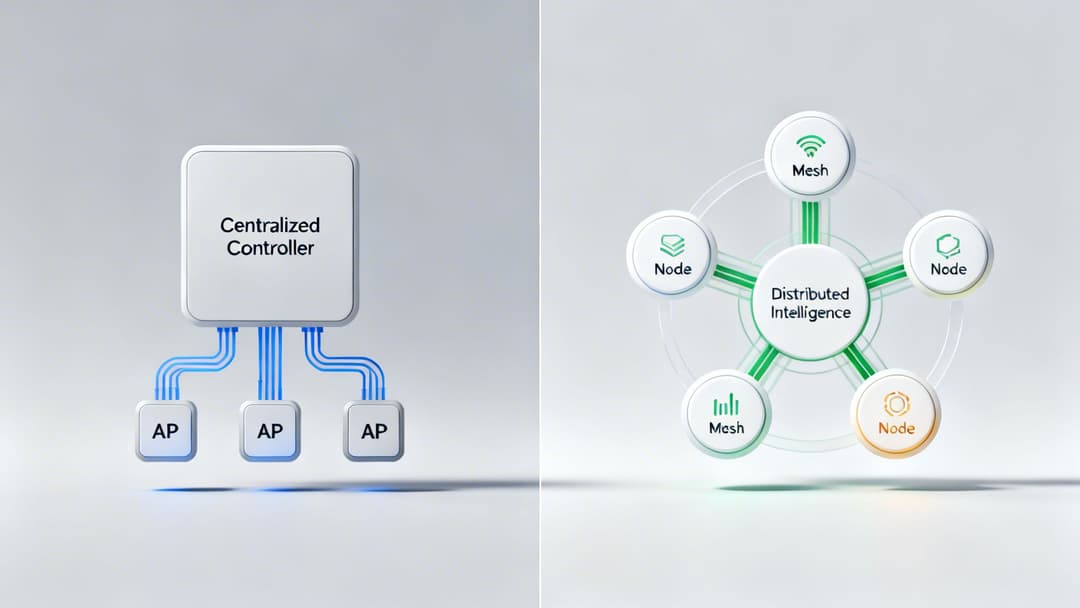
Prima di confrontare i modelli, è utile comprendere i tre stili operativi che li caratterizzano. L'AP sul soffitto può sembrare simile tra i vari vendor, ma l'architettura sottostante cambia il modo in cui distribuisci, risolvi i problemi, proteggi e scali la rete.
Nel mercato del Regno Unito, questo cambiamento è visibile da anni. Aruba deteneva il 13.8% della quota di unità spedite tramite distributori nel mercato degli access point wireless aziendali nel Regno Unito nel 2013, in crescita rispetto al 10.7% dell'anno precedente, riflettendo il passaggio a piattaforme WiFi aziendali scalabili piuttosto che a dispositivi isolati, secondo il riepilogo dei dati di spedizione dei distributori di CRN.
AP Standalone
Gli AP standalone rappresentano il modello più semplice. Ogni dispositivo viene configurato singolarmente e ciascuno di essi si gestisce in gran parte in autonomia.
Questo approccio può ancora essere accettabile per un sito molto piccolo con requisiti di modifica minimi. Un bar con un singolo AP e nessuna complessità di policy centrale può tollerare questa soluzione.
Tuttavia, gli svantaggi emergono rapidamente:
- Disallineamento della configurazione: un AP viene aggiornato, un altro no.
- Scarsa coerenza: le impostazioni di SSID, VLAN e radio si discostano nel tempo.
- Supporto lento: la risoluzione dei problemi richiede l'accesso ai dispositivi uno per uno.
Il modello standalone funziona al meglio quando la struttura è minuscola e stabile. Smette di funzionare in presenza di più sedi, più SSID o qualsiasi esigenza di governance centrale.
Wireless basato su controller
I progetti basati su controller collocano il processo decisionale in una piattaforma dedicata, solitamente on premises. Gli AP diventano parte di un sistema gestito centralmente.
Questo modello si adatta ancora ad alcuni ambienti sicuri, in particolare dove il controllo delle policy, l'ancoraggio del traffico e la governance locale contano più della facilità di amministrazione remota. Le strutture sanitarie, di ricerca e i siti altamente regolamentati spesso preferiscono ancora la prevedibilità di un progetto locale strettamente controllato.
Il compromesso è il peso operativo. C'è più infrastruttura da aggiornare, sottoporre a backup, monitorare e sostituire. Se la proprietà è distribuita su molte filiali, l'architettura con controller può diventare complessa, a meno che il team non sia già attrezzato per gestirla al meglio.
Wireless gestito in cloud
Gli AP gestiti in cloud spostano l'amministrazione in un servizio centrale. Policy, firmware, monitoraggio e modelli diventano molto più facili da gestire in tutte le sedi distribuite.
Per le catene di vendita al dettaglio, i gruppi alberghieri e gli operatori multi sito, questo è solitamente il modello operativo più lineare. È possibile standardizzare gli SSID, applicare modelli e delegare diritti di amministrazione limitati senza dover inviare un controller in ogni regione.
Questo non rende il cloud automaticamente adatto a tutti. È comunque necessario valutare:
- Dipendenza operativa: cosa succede se la raggiungibilità di internet viene compromessa.
- Struttura delle licenze: se le funzionalità sono incluse in un unico pacchetto o suddivise in più abbonamenti.
- Gestione dei dati: se i requisiti di governance sono in linea con il modello della piattaforma.
La scelta dell'architettura dovrebbe riflettere il modo in cui lavora il tuo team IT, non l'aspetto della demo del fornitore.
Un modo semplice di pensare al problema
Usa questa analogia.
Un AP autonomo è come gestire i turni del personale su fogli di carta separati in ogni sede. Un modello con controller è un ufficio centrale che gestisce il sistema dei turni internamente. Un modello gestito in cloud è un servizio centrale accessibile ovunque con modelli condivisi e accesso basato sui ruoli.
Nessuno di questi è universalmente corretto. Quello giusto dipende dalla scala, dalla governance e dalla tolleranza del team per i costi operativi.
L'aspetto pratico da considerare
Quando i clienti chiedono quali siano i migliori access point, la prima domanda sull'architettura non riguarda il design radio. È questa: dove vuoi che risieda il controllo e chi lo gestirà ogni settimana dopo l'avvio?
La risposta a questa domanda restringe il mercato più velocemente di qualsiasi confronto di velocità.
Valutare le Funzionalità Chiave degli AP e il loro Impatto nel Mondo Reale
Le schede tecniche sono caotiche. Mescolano funzionalità importanti con caratteristiche che contano solo in casi di nicchia o in condizioni di laboratorio.
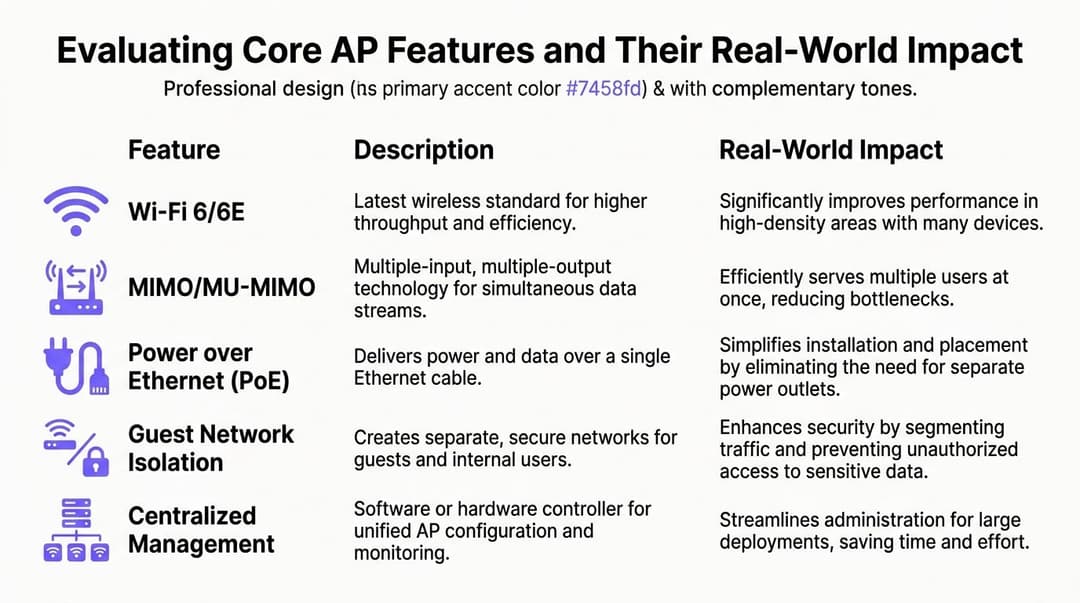
Per le sedi affollate, mi concentro su ciò che cambia l'esperienza dell'utente, la semplicità operativa e la resilienza sotto carico. I migliori AP aziendali previsti per il 2025 possono supportare oltre 1.000 dispositivi simultanei per AP con prestazioni multi-gigabit, utilizzando funzionalità come 4x4 MU-MIMO e porte 2.5GbE, come descritto nella recensione di Meter sugli access point aziendali. Questo è un contesto utile, ma i titoli sulla capacità richiedono comunque un'interpretazione.
La generazione di WiFi conta, ma solo nel giusto contesto
Il Wi-Fi 6 rimane una base di partenza sensata per la maggior parte dei progetti di aggiornamento. Migliora l'efficienza in ambienti client densi e gestisce parchi dispositivi misti meglio delle piattaforme più vecchie.
Il Wi-Fi 6E può essere interessante dove la congestione dello spettro è grave e il supporto dei client è sufficientemente forte da giustificarlo. In alcune sedi, la banda extra può alleggerire la pressione sui canali. In altre, il guadagno è limitato perché la maggior parte dei dispositivi client trascorre ancora il tempo sulle bande più consolidate.
L'errore è considerare il nome dello standard come la decisione finale. È solo uno dei tanti fattori.
Se stai progettando per ambienti ad alta densità come hospitality, sanità o retail, chiediti se il parco clienti e il mix di applicazioni possono trarre vantaggio dalle funzionalità più recenti. In caso contrario, la pianificazione dei canali, il posizionamento e il design dell'autenticazione potrebbero offrire più valore rispetto al semplice passaggio all'ultimo modello sul mercato.
Design radio e densità dei client
Un modo utile per leggere le schede tecniche degli AP è tradurre il design radio nel comportamento di gestione della folla.
- Il MIMO 2x2 può andare bene per stanze più piccole, spazi a minore densità o posizioni periferiche.
- Il MU-MIMO 4x4 è il punto in cui molte implementazioni aziendali serie diventano più performanti sotto un carico costante di client.
- I design di fascia più alta possono offrire un margine di tolleranza maggiore, ma non tutti i siti ne hanno bisogno.
Il punto chiave non è solo il numero di antenne di per sé. È se l'AP è in grado di pianificare il tempo di trasmissione in modo efficiente quando molti dispositivi sono attivi contemporaneamente.
L'atrio di un centro commerciale, la sala d'attesa di una clinica, un'aula magna o il foyer di un evento metteranno subito a dura prova radio sottodimensionate. Un corridoio tranquillo sul retro dell'ufficio non lo farà.
Vincoli di uplink e switching
I team spesso acquistano AP potenti per poi creare colli di bottiglia con uplink deboli o uno switching inadeguato.
Un AP moderno con funzionalità multi-gig merita uno switching e una pianificazione PoE all'altezza. Se il livello dello switch non è in grado di fornire alimentazione o throughput sufficienti, le prestazioni pubblicizzate dell'AP diventano irrilevanti.
Verifica questi aspetti prima di approvare qualsiasi selezione:
| Funzionalità | Ottimo motivo per interessarsene | Errore comune | |---|---| | Uplink multi-gig | Preserva il margine di tolleranza dell'AP in ambienti densi | Lasciare AP premium su switch di accesso sottopotenziati | | Budget PoE | Supporta il consumo energetico dell'AP e le funzioni opzionali | Contare le porte ma ignorare la potenza totale | | Design della catena radio | Migliora la capacità in caso di contesa dei client | Acquistare per la velocità di picco anziché per il mix di client | | Supporto di sicurezza | Consente policy più solide per il personale e gli ospiti | Trattare il supporto WPA solo come una casella da spuntare | | Gestione centralizzata | Velocizza l'implementazione e la risoluzione dei problemi | Presumere che tutte le dashboard cloud siano ugualmente usabili |
OFDMA, pianificazione e parchi dispositivi misti
Nei luoghi reali e affollati, il problema è raramente un singolo laptop che esegue uno speed test. Si tratta di un parco misto di telefoni, tablet, scanner, schermi, sensori e dispositivi non gestiti che competono tutti per il tempo di trasmissione.
Le funzionalità che migliorano l'efficienza di pianificazione contano più delle dichiarazioni sulle velocità di picco fittizie. Negli ambienti sanitari e immobiliari in particolare, molti dispositivi a basso throughput possono creare un sovraccarico di gestione sproporzionato se la piattaforma AP non gestisce bene la contesa.
Questo è uno dei motivi per cui un lavoro di progettazione corretto conta quanto l'hardware. Un solido approccio con mappe di calore WiFi aiuta i team a collegare la capacità dell'AP alla densità degli utenti e alla planimetria del locale, anziché affidarsi a linee guida generiche dei fornitori.
Funzionalità di sicurezza che non sono opzionali
Alcune funzionalità degli AP non dovrebbero più essere considerate extra premium.
Il supporto WPA3 deve far parte dei requisiti fondamentali per qualsiasi nuova installazione aziendale che punti a una postura di sicurezza moderna. Lo stesso vale per opzioni chiare di policy per l'isolamento degli ospiti, la segmentazione del personale e la separazione dei dispositivi per classe.
L'accesso ospiti e l'accesso interno non dovrebbero condividere un modello di fiducia solo perché utilizzano lo stesso hardware a soffitto. Se la piattaforma AP rende complicata la segmentazione, l'intera installazione risulterà inefficiente.
Un buon design wireless non confonde i gruppi di utenti. Offre a ciascun gruppo il corretto percorso di accesso con il minimo attrito operativo.
Cosa metterei al primo posto
Se dovessi ridurre un lungo elenco di vendor a una selezione ristretta per i migliori access point, darei la priorità a questo ordine:
- Idoneità operativa: se il team è in grado di gestirlo bene su scala.
- Compatibilità con identità e policy: se può supportare il modello di autenticazione e segmentazione previsto.
- Capacità radio per il profilo di densità effettivo: non la densità di marketing, ma la densità reale.
- Allineamento di switching e alimentazione: nessuna discrepanza nascosta nell'infrastruttura.
- Usabilità di analisi e risoluzione dei problemi: se gli operatori possono individuare e risolvere i problemi rapidamente.
L'hardware migliore non è la piattaforma con più acronimi. È quella le cui funzionalità chiave superano la prova pratica con la tua sede, i tuoi utenti e il tuo team di supporto.
Strategie di dimensionamento e posizionamento degli AP per i settori chiave
Un posizionamento errato rovina un ottimo hardware. Questa è una delle lezioni più costose nel mondo del wireless.
La maggior parte dei consigli sul posizionamento online rimane generica. Suggeriscono di posizionare gli AP in punti aperti, centrali ed elevati. Questo va bene in linea di principio, ma non affronta l'isolamento multi-tenant, i vincoli degli edifici storici o le realtà di conformità delle sedi nel Regno Unito. Queste lacune sono esattamente il motivo per cui le linee guida tradizionali spesso falliscono per hotel, alloggi per studenti e proprietà a uso condiviso, come rilevato in questa discussione sui consigli di posizionamento privi di considerazioni multi-tenant e normative.

Hotel e hospitality
I design che prevedono l'installazione dei soli corridoi compaiono ancora negli hotel perché sulla carta sembrano più economici. Spesso però deludono nella pratica, specialmente in edifici con pareti spesse, montanti scomodi o disposizioni delle camere irregolari.
Il posizionamento all'interno o in prossimità delle stanze produce solitamente una migliore esperienza utente quando la struttura richiede streaming affidabile in camera, traffico di lavoro e continuità della voce o della messaggistica. I progetti nei corridoi possono ancora funzionare in alcuni edifici, ma richiedono rilevamenti rigorosi e aspettative realistiche.
Nel settore hospitality, la risposta corretta è raramente "meno AP con potenza maggiore". Una potenza inferiore, un design più pulito delle celle e una migliore adiacenza delle stanze sono solitamente le soluzioni vincenti.
Linee guida pratiche:
- Dai la priorità all'esperienza in camera: i reclami degli ospiti iniziano in camera da letto, non nel vuoto del soffitto del corridoio.
- Controlla tempestivamente i materiali delle pareti: le finiture decorative e la struttura degli edifici più vecchi alterano drasticamente la propagazione.
- Progetta per le transizioni di roaming: gli ospiti si spostano tra camera, reception, ristorante e aree conferenze.
Retail e centri commerciali
Il WiFi per il retail ha due compiti. Deve connettere gli utenti in modo affidabile e deve supportare informazioni operative basate sulla posizione, dove richiesto.
Ciò significa che il posizionamento deve considerare gli ingressi, le zone di sosta, le aree di coda e gli spazi di ancoraggio, non solo la copertura globale. Se il retailer desidera servizi di analisi o basati sulla posizione, la geometria degli AP conta tanto quanto l'intensità del segnale.
I casi d'uso variano a seconda del formato:
- Negozio in centro: l'affidabilità dell'area anteriore del negozio e della zona cassa è l'aspetto più importante.
- Grande magazzino: ogni piano può comportarsi come un ambiente RF separato.
- Centro commerciale: le aree comuni, le food court e i confini dei locatari complicano la pianificazione dei canali.
Ambienti sanitari
Gli ospedali e le cliniche mettono rapidamente in luce i progetti deboli. I dispositivi medici, il fitto movimento del personale, le stanze schermate, i vani ascensore, le vecchie strutture e i layout variabili lavorano tutti contro le regole di posizionamento troppo semplicistiche.
La copertura non è sufficiente. Il design deve preservare un servizio affidabile durante lo spostamento dei dispositivi e la congestione locale, soprattutto dove i flussi di lavoro clinici dipendono da un accesso wireless stabile.
Per la pianificazione, inizia dai flussi di lavoro clinici piuttosto che dalle sole planimetrie.
- Mappa i percorsi di cura: dove si spostano i dispositivi e il personale.
- Tratta le stanze specialistiche separatamente: le aree di diagnostica per immagini e gli spazi ricchi di impianti richiedono spesso un'attenzione distinta.
- Pianifica per un mix di dispositivi: i dispositivi clinici non gestiti si comportano diversamente dai laptop e dai telefoni del personale.
Alloggi per studenti e build-to-rent
Il WiFi residenziale condiviso è il settore in cui i consigli aziendali generici spesso falliscono del tutto. I residenti si aspettano una semplicità di tipo domestico, ma l'operatore ha bisogno di una separazione e di una supportabilità di livello enterprise.
Questo non è solo un problema di copertura. È un problema di coesistenza e isolamento. Il Tenant A non dovrebbe risentire delle decisioni di progettazione della rete del Tenant B. Dispositivi legacy, console da gioco, smart TV e IoT non gestito aumentano le criticità se l'architettura è troppo rigida.
Un buon processo di progettazione include sia i limiti RF che quelli di servizio. Ecco perché strumenti come un access point calculator per la pianificazione iniziale sono utili come punto di partenza, anche se non dovrebbero mai sostituire una vera e propria analisi in loco.
Regole di posizionamento che resistono alla prova dei progetti reali
Progettare per il contenimento, non solo per la portata
Celle più grandi non sono automaticamente celle migliori. In molte strutture, la progettazione corretta contiene deliberatamente la copertura in modo che i client si connettano dove previsto.
Separare l'obiettivo del servizio dalla praticità della planimetria
La via di cablaggio più vicina non è sempre la posizione corretta per l'AP. Un cablaggio semplice spesso produce risultati scadenti per l'utente.
Rispettare i vincoli strutturali
Edifici storici, interni di pregio e restrizioni del proprietario possono bloccare i punti di montaggio ideali. Affrontate questi limiti fin da subito. I compromessi nascosti scoperti in ritardo di solito comportano costosi rifacimenti.
Il piano di posizionamento degli AP dovrebbe riflettere chi ha bisogno del servizio, come si sposta e cosa deve rimanere isolato. La copertura è solo il punto di partenza.
La vostra checklist per un'autenticazione WiFi a prova di futuro
L'aggiornamento degli access point dovrebbe essere valutato in base all'esperienza di accesso che può supportare nei prossimi anni, non solo in base al giorno in cui viene installato.
In questa fase, molti processi di acquisto diventano troppo incentrati sull'hardware. Le radio possono essere solide, ma la piattaforma non è in grado di supportare il percorso degli ospiti previsto, il modello di identità del personale o la strategia per i dispositivi legacy. È allora che i team iniziano ad aggiungere scomode soluzioni temporanee.
La mia lista di controllo per la predisposizione all'autenticazione
Supporto per i moderni standard di accesso ospiti
Se una struttura desidera visite di ritorno degli ospiti senza attriti e una migliore esperienza di prima connessione, la piattaforma AP deve essere valutata per il supporto a Passpoint e ai relativi approcci orientati al roaming.
Questo non significa che ogni struttura abbia bisogno dello stesso percorso per gli ospiti. Significa che l'hardware non deve rappresentare un ostacolo.
Opzioni di autenticazione enterprise solide
Per il personale e i dispositivi gestiti, cercate un supporto pulito per l'accesso basato su certificati in stile 802.1X ed EAP-TLS. Questi metodi si adattano a una postura zero-trust più solida rispetto alle credenziali condivise e riducono i problemi a lungo termine legati al ricambio delle password.
La questione non è solo se l'AP dichiara di supportare l'autenticazione enterprise. Una domanda chiave è se la piattaforma nel suo complesso renda gestibili le policy, l'uso dei certificati e le modifiche al ciclo di vita.
Integrazione di dispositivi legacy e IoT
Molti locali dispongono ancora di vecchi dispositivi che non riescono a integrarsi perfettamente nei moderni flussi di identità. Stampanti, schermi, sistemi di controllo, apparecchiature specialistiche e dispositivi residenziali di tipo consumer sono tutti presenti negli ambienti reali.
È qui che il supporto a soluzioni come iPSK si rivela prezioso. Offre un percorso più controllato per gestire classi di dispositivi complesse senza dover appiattire l'intera rete su un'unica chiave segreta condivisa.
Le prestazioni contano ancora, ma nella giusta corsia
Mettere l'autenticazione al primo posto non significa ignorare la velocità di trasmissione. Significa legare le prestazioni al modello di servizio previsto.
Per ambienti ad alta densità di client, cercate AP WiFi 6 in grado di offrire oltre 4.8 Gbps via etere su 5 GHz con 4x4 MIMO e velocità reali multi-client superiori a 2.0 Gbps con oltre 150 client, in base al riferimento comparativo di LazyAdmin per questa classe di funzionalità AP. Questi dati aiutano a identificare l'hardware che ha meno probabilità di collassare in condizioni di uso misto intenso.
Una checklist pratica per l'acquisto
Utilizzate questo elenco per restringere il campo di scelta:
- Compatibilità con il percorso dell'ospite: la piattaforma AP è in grado di supportare un modello di registrazione degli ospiti a basso attrito anziché forzare un'esperienza di Captive Portal obsoleta.
- Allineamento con la directory: la piattaforma si adatta ai moderni flussi di lavoro per l'identità del personale e all'accesso basato su certificati.
- Opzioni IoT e legacy: i dispositivi complessi possono essere isolati senza dover ricorrere a un'unica password per tutto.
- Chiarezza delle policy: i controlli di accesso basati sui ruoli sono comprensibili e facili da gestire.
- Semplicità operativa: il team è in grado di revocare, registrare e risolvere i problemi senza dover compiere acrobazie da specialisti.
I migliori access point per il prossimo ciclo di rinnovo tecnologico sono quelli che lasciano spazio a decisioni più solide in materia di identità in un secondo momento. L'hardware dovrebbe ampliare le opzioni di accesso, non limitarle.
Mettere in Sicurezza e Acquistare i Nuovi Access Point
Le decisioni di sicurezza prese in fase di acquisto sono più economiche rispetto alle correzioni apportate dopo l'implementazione. Questo è particolarmente vero nel settore wireless, dove le ipotesi errate si diffondono rapidamente in ogni sede.
Molti team si concentrano sulla crittografia e si fermano lì. La crittografia è importante, ma è solo uno dei livelli. Un parco wireless sicuro richiede anche segmentazione, una mappatura sensata dei ruoli, la consapevolezza dei dispositivi non autorizzati e un modello di applicazione delle patch che l'organizzazione possa sostenere.
Controlli di sicurezza su cui vale la pena insistere
Una piattaforma AP seria dovrebbe supportare una separazione pratica tra gruppi di utenti e tipi di dispositivi.
Come minimo, verificate queste aree:
- Accesso alla rete basato sui ruoli: personale, ospiti, appaltatori e IoT non dovrebbero rientrare nello stesso set di policy.
- Isolamento degli ospiti: gli utenti ospiti non dovrebbero essere in grado di individuare o raggiungere i sistemi interni per impostazione predefinita.
- Visibilità dei rogue AP: la piattaforma dovrebbe aiutare gli operatori a rilevare infrastrutture wireless sospette o impreviste.
- Patching del ciclo di vita: gli aggiornamenti del firmware devono essere prevedibili, supportabili e visibili.
Per una panoramica più ampia sulle aree di rischio wireless, questa guida alle pratiche di rete wireless sicura rappresenta un utile riferimento operativo.
Domande di procurement per esporre le opzioni deboli
Le demo dei vendor appaiono solitamente impeccabili. È la disciplina in fase di procurement che fa emergere i futuri grattacapi.
Poni queste domande prima della selezione finale:
| Area di procurement | Cosa chiedere |
|---|---|
| Licenze | Quali funzionalità richiedono un abbonamento continuo e quali sono incluse nativamente? |
| Ciclo di vita dell'hardware | Per quanto tempo si prevede che la piattaforma riceverà supporto e manutenzione del firmware? |
| Risposta alla sicurezza | In che modo vengono comunicate e risolte le vulnerabilità? | Strumenti operativi | Gli amministratori possono delegare l'accesso in modo sicuro in base al ruolo o alla sede? |
| Percorso di migrazione | Quanto è difficile sostituire o aggiungere AP in un secondo momento senza dover riprogettare l'intero sistema? |
Compromessi che meritano una discussione franca
Alcune piattaforme a basso costo sono perfettamente adeguate in contesti modesti. Ma se consentono di risparmiare rendendo le policy macchinose, il firmware incerto o le operazioni multi-sede complesse, il risparmio svanisce nei costi di supporto.
Allo stesso modo, alcune piattaforme premium sono giustificate solo se l'organizzazione utilizzerà i loro controlli e strumenti di analisi più avanzati. Acquistare una piattaforma avanzata per poi gestirla come un router consumer è uno spreco.
Il procurement dovrebbe testare se la piattaforma rimane gestibile in un giorno qualsiasi, non solo durante la settimana del proof-of-concept.
Un controllo finale prima dell'acquisto
Prima di emettere un ordine d'acquisto, conferma quattro cose:
- Lo strato di switching può alimentare e collegare correttamente gli AP in uplink.
- Il modello di autenticazione è definito, non rimandato.
- Il design RF è stato convalidato per l'edificio.
- Il modello di supporto e licenza è accettabile per l'intera durata dell'hardware.
Questo è il punto in cui i "migliori access point" diventano una decisione aziendale basata su sicurezza, operazioni ed esperienza utente, piuttosto che sulla preferenza per un brand.
Domande frequenti sugli Access Point
Cosa rende un access point di livello enterprise
Il livello enterprise di solito significa qualcosa in più rispetto alla semplice velocità pura. Significa un controllo delle policy più rigoroso, una gestione centralizzata più pulita, una migliore gestione del ciclo di vita, un supporto di autenticazione più ampio e un comportamento più prevedibile sotto carico.
Gli AP prosumer possono funzionare in ambienti più piccoli e meno regolamentati. Diventano rischiosi quando sono necessarie una segmentazione disciplinata, una governance multi-sito o la responsabilità del supporto.
Ogni quanto tempo dovrebbero essere aggiornati gli access point
Non esiste una pianificazione unica adatta a ogni realtà. La tempistica di aggiornamento dipende dalle richieste dei client, dalle modifiche alle applicazioni, dal ciclo di vita del supporto del fornitore e dal fatto che la piattaforma esistente supporti ancora il modello di sicurezza e identità di cui hai bisogno.
Consiglio ai clienti di effettuare l'aggiornamento quando si verifica una di queste tre condizioni: la supportabilità diminuisce, le aspettative degli utenti superano le capacità della piattaforma o l'architettura di rete inizia a imporre soluzioni alternative.
L'IA nel WiFi è utile
A volte. Le parti utili sono solitamente ordinarie piuttosto che magiche.
La sintonizzazione radio automatizzata, il rilevamento delle anomalie e una più semplice correlazione dei guasti possono aiutare i team operativi. Ma l'"IA" non salva un design debole. Migliora una distribuzione solida più di quanto non ne corregga una scadente.
Posso combinare marche diverse di AP in un'unica rete
Puoi farlo, ma raramente lo consiglio per un singolo servizio gestito centralmente, a meno che non ci sia un motivo valido.
Le infrastrutture multi-vendor creano spesso una gestione incoerente delle policy, flussi di lavoro di risoluzione dei problemi disomogenei e una gestione frammentata del firmware. Se viene utilizzato un marchio specifico in un'area speciale, documentane il motivo e accetta l'onere di supporto aggiuntivo.
Gli AP più costosi sono sempre i migliori access point
No. Gli AP di fascia premium valgono la pena solo quando la densità del sito, il design del servizio o il modello operativo li giustificano.
Molti progetti ottengono prestazioni migliori con un design bilanciato che utilizza hardware scelto con criterio, un posizionamento migliore e un modello di autenticazione più forte, rispetto a un AP di alto livello distribuito male.
Gli ospiti e il personale dovrebbero utilizzare lo stesso SSID
Non per impostazione predefinita. Gli SSID condivisi possono essere praticabili in alcuni design, ma solo se il modello di policy distingue chiaramente utenti e dispositivi dietro le quinte.
In molti ambienti, una presentazione separata dei servizi rimane più facile da governare e spiegare. La risposta corretta dipende da come è progettata l'architettura di identità e accesso.
Se stai pianificando un aggiornamento del WiFi e desideri abbinare l'hardware scelto a un accesso sicuro e senza password per ospiti, personale e ambienti multi-tenant, vale la pena dare un'occhiata a Purple. Funziona con i principali fornitori di rete, supporta moderni percorsi di accesso basati sull'identità e aiuta gli operatori a trasformare il WiFi da un semplice livello di connettività a una piattaforma per una migliore esperienza utente e informazioni operative più chiare.