WPA to WPA2 enterprise migration and security advisor
Model cryptographic risk, eliminate TKIP airtime throttling, plan Cloud RADIUS 802.1X workloads, and design zero-downtime cutover sequences for enterprise wireless estates.
Migration parameters
Migration risk & capacity analysis
Secure Risk ProfileProbabilmente ti trovi a gestire una rete che nessuno ha voluto toccare per anni. Potrebbe trattarsi di un vecchio SSID ospiti in un hotel, di una WLAN di servizio per scanner portatili o di una rete d'ufficio "temporanea" che è diventata permanente per caso. Funziona ancora, gli utenti continuano a connettersi e, poiché modificare il WiFi può interrompere le attività operative, viene lasciata così com'è.
È esattamente così che una sicurezza wireless debole sopravvive in produzione.
Una migrazione da WPA a WPA2 non è solo una pulizia della configurazione. È il momento in cui decidete se il confine wireless della vostra azienda rimarrà basato su un segreto condiviso o se passerà a un accesso basato sull'identità che potete controllare, verificare e revocare in modo pulito. Se vi limitate a sostituire un acronimo con un altro, migliorerete le cose. Se sfruttate questo cambiamento per spostare l'accesso sensibile su un'autenticazione per singolo utente, risolverete il problema alla radice.
Perché la tua rete WPA è una bomba a orologeria
Se un vecchio SSID WPA è ancora attivo, non è un'eredità innocua. È un punto debole attivo. Lo schema tipico è noto: un profilo AP dimenticato, una rete ospiti che non è mai stata riprogettata o un SSID operativo da cui dipendono ancora alcuni dispositivi ostinati. Nessuno vuole causare un'interruzione del servizio, quindi il WPA rimane in uso ben oltre il ciclo di vita sicuro.
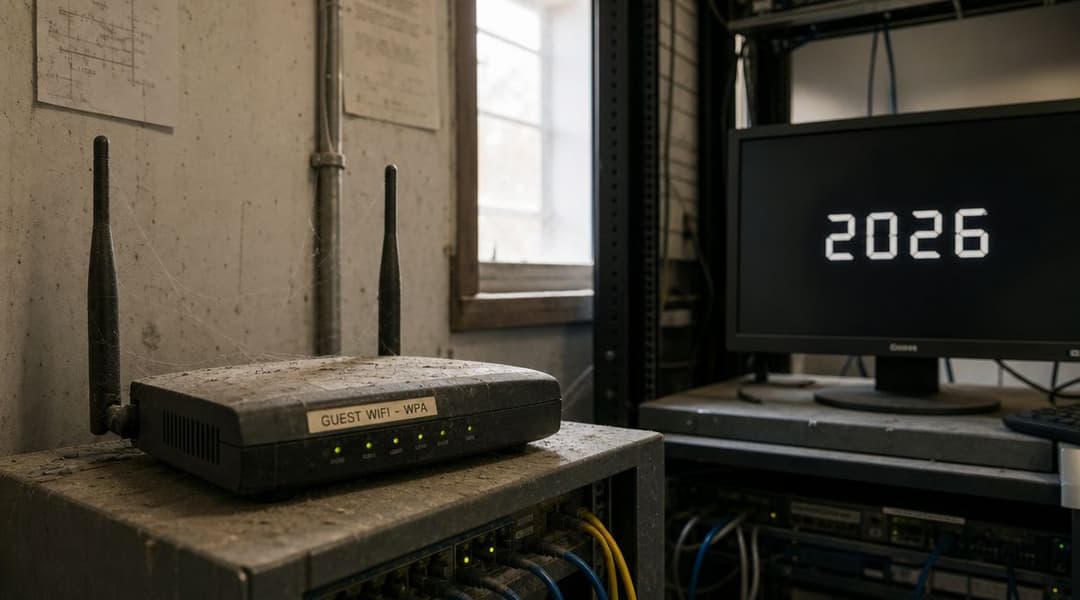
Perché WPA è il posto sbagliato dove fermarsi
Il WPA è stato introdotto come soluzione temporanea dopo il WEP. Il WPA2 è poi diventato lo standard di riferimento dopo la sua ratifica e il lancio della certificazione nel 2004, sostituendo il WPA e passando al CCMP basato su AES con chiave a 128 bit invece del precedente approccio TKIP del WPA, aggiungendo al contempo il supporto formale all'autenticazione Enterprise per le credenziali per singolo utente, come descritto nella storia del Wi-Fi Protected Access. Questo cambiamento è fondamentale perché la sicurezza wireless ha smesso di riguardare solo la crittografia ed è passata a riguardare il controllo degli accessi.
La presenza del protocollo TKIP è un chiaro campanello d'allarme. Se la tua rete dipende ancora da un protocollo progettato come wrapper di transizione attorno a vecchi sistemi crittografici, non stai gestendo una WLAN moderna. Stai accumulando un debito di compatibilità nella parte più esposta della tua rete.
Per molte organizzazioni del Regno Unito, questo non è un caso ipotetico. Una rete per i visitatori, un SSID per il back-office o un bridge wireless per dispositivi legacy possono diventare impercettibilmente la via d'accesso più semplice in un ambiente che altrimenti disporrebbe di controlli adeguati.
Regola pratica: se hai ancora WPA abilitato da qualche parte, trattalo come un incidente in attesa della giusta opportunità.
La vera decisione non è tra WPA o WPA2
Il passaggio tecnico da WPA a WPA2 è semplice. La scelta strategica non lo è. Hai due strade a disposizione:
- WPA2-Personal è rapido da implementare e si rivela ideale quando è necessaria una sostituzione veloce.
- WPA2-Enterprise utilizza credenziali individuali ed è perfetto per ambienti in cui l'accesso del personale, la separazione degli ospiti o la tracciabilità sono fondamentali.
Questa distinzione conta più di quanto molte guide alla migrazione vogliano ammettere. Sostituire il WPA con il WPA2-PSK migliora il modello di crittografia, ma ti lascia comunque dipendente da una password condivisa. Passare a Enterprise cambia completamente il modello operativo.
Se stai valutando le opzioni relative ai tipi di sicurezza WiFi, questo è il momento di smettere di pensare solo alla compatibilità e iniziare a considerare l'identità, la revoca e il controllo.
Verifica della rete e dei dispositivi per WPA2
Prima di modificare un singolo SSID, crea un inventario accurato. La maggior parte delle migrazioni wireless non fallisce perché il protocollo WPA2 è difficile da implementare. Fallisce perché si scopre troppo tardi che uno scanner di magazzino, una stampante, una cassa, un controller per ascensori o un dispositivo clinico non riescono a riconnettersi dopo il passaggio.
Inizia da ciò che è effettivamente in uso, non da ciò che dovrebbe essere in uso.
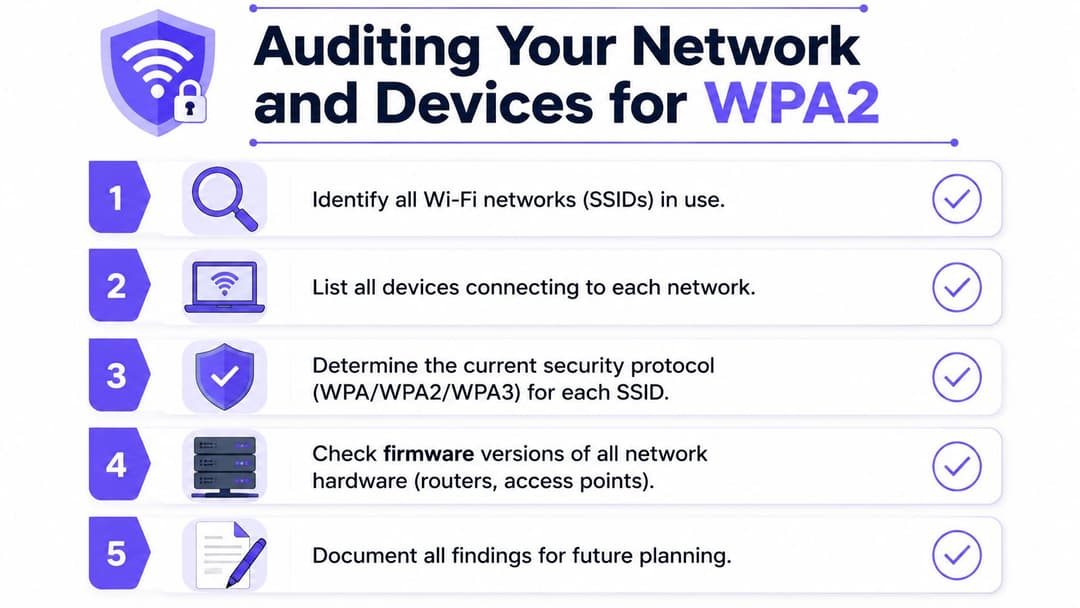
Costruisci l'inventario a partire dal perimetro WLAN verso l'interno
Un audit utile si sviluppa a livelli. Per prima cosa, identifica ogni SSID trasmesso. Poi, mappa quali gruppi di AP, siti e VLAN vi si trovano dietro. Infine, elenca i dispositivi che si associano a ciascun SSID.
Utilizza i dati dei controller provenienti da piattaforme come Meraki, Aruba, Mist, Ruckus, UniFi o dalla console di gestione del tuo attuale fornitore. Non affidarti solo ai nomi. I vari "Guest-old", "scanner-temp" e "backoffice2" sono spesso i luoghi in cui sopravvive una sicurezza obsoleta.
Un inventario pratico dovrebbe includere:
- SSID e scopo. Specifica se serve ospiti, personale, IoT, operazioni o appaltatori.
- Modalità di sicurezza. Registra se il SSID utilizza WPA, WPA2-Personal, WPA2-Enterprise o una configurazione mista.
- Dipendenza dall'autenticazione. Verifica se il SSID si appoggia a una chiave condivisa, a un servizio RADIUS interno o a qualche eccezione non documentata.
- Tipologia di client. Raggruppa i dispositivi in laptop, cellulari, stampanti, scanner, apparecchiature AV, sensori, casse e terminali specialistici.
- Responsabile aziendale. Ogni SSID ha bisogno di un responsabile designato che possa approvare le finestre di modifica e accettare la dismissione dei dispositivi non conformi.
Verifica l'infrastruttura, non solo i client
Un access point può supportare WPA2 in teoria e comunque ostacolare la migrazione all'atto pratico a causa di firmware obsoleti, template ereditati o profili in modalità mista. Verifica il firmware degli AP, le versioni dei controller e le impostazioni di sicurezza radio ereditate. Se il tuo parco macchine copre diverse generazioni di hardware, controlla ogni singolo sito anziché dare per scontato che un unico template si applichi perfettamente a tutti.
I vecchi SSID spesso sopravvivono perché sono legati a vecchi oggetti di policy. Elimina i presupposti prima di eliminare i profili.
Il punto in cui le organizzazioni vengono colte di sorpresa è il comportamento di fallback. Potresti pensare di migrare un SSID WPA a WPA2, ma la configurazione ereditata consente ancora modalità di transizione che mantengono attivo un comportamento debole sotto un'etichetta diversa.
Un audit wireless deve inoltre affiancarsi a test di esposizione più ampi. Se stai già esaminando i percorsi di accesso remoto, i sistemi rivolti a Internet e i limiti di accesso degli ospiti, vale la pena considerare di mettere in sicurezza il tuo perimetro esterno contemporaneamente. La debolezza del wireless e una debole esposizione esterna spesso derivano dalla stessa abitudine operativa: eccezioni che sono diventate permanenti.
Decidere cosa fare con i dispositivi legacy
Alcuni parchi dispositivi meno recenti possono passare a WPA2 senza problemi. Altri invece non possono. È qui che la maggior parte delle linee guida smette di essere d'aiuto, perché "aggiornare il dispositivo" non è un piano operativo realizzabile quando il dispositivo è vincolato a un contratto di assistenza o controlla un processo attivo.
La pianificazione della migrazione per i parchi dispositivi più datati nel Regno Unito è una vera sfida. La risposta pratica consiste nel segmentare i client legacy, mantenere l'accesso solo WPA2 strettamente isolato e utilizzare le modalità di transizione solo come ponte temporaneo, specialmente in realtà con dispositivi a lungo ciclo di vita, dispositivi dei visitatori e un mix di BYOD, come descritto in questa discussione della community sulla migrazione.
Una semplice tabella decisionale aiuta:
| Tipo di dispositivo | Se supporta WPA2 in modo affidabile | Se non lo supporta |
|---|---|---|
| Laptop e telefoni del personale | Spostare sul SSID di destinazione per il personale | Rimuovere dal vecchio SSID e risolvere |
| Dispositivi guest | Spostare sul flusso di onboarding guest WPA2 o superiore | Non preservare l'accesso debole per questi dispositivi |
| Stampanti e scanner | Testare prima su un segmento WPA2 isolato | Mantenere su un segmento legacy isolato durante la sostituzione |
| Sistemi IoT e dell'edificio | Posizionare su una VLAN dedicata con policy restrittiva | Mantenere isolati e documentare il percorso di dismissione |
La chiave è la priorità. Sposta prima le persone, poi i dispositivi principali, quindi l'hardware marginale. Non lasciare che l'endpoint più problematico decida la postura di sicurezza per tutti gli altri.
WPA2-Personal vs WPA2-Enterprise Una Scelta Strategica
Questo viene spesso presentato come un problema di complessità. Non lo è. È una questione di controllo.
Se scegli WPA2-Personal, scegli un accesso condiviso. Se scegli WPA2-Enterprise, scegli un'identità individuale. Si tratta di modelli di sicurezza differenti, non solo di schermate di configurazione diverse.
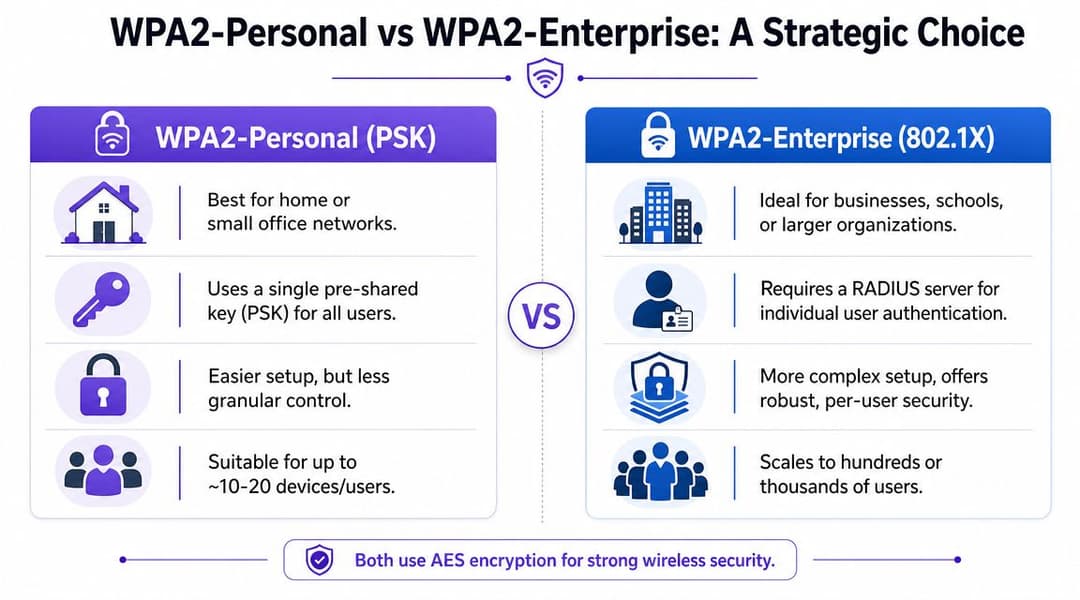
Dove si colloca WPA2-Personal
WPA2-Personal è utile quando l'ambiente è piccolo, statico e poco complesso. Un piccolo bar, un ufficio di progetto temporaneo o una rete operativa a scopo singolo possono accettare questo compromesso poiché la velocità di implementazione conta più della granularità dell'identità.
L'attrattiva è evidente:
- È rapido da configurare. Si imposta una passphrase sull'SSID e si aggiornano i client.
- Non richiede RADIUS. Questo elimina il sovraccarico dell'infrastruttura.
- Funziona per semplici casi d'uso di rete guest o di servizio. Soprattutto dove gli utenti non necessitano di un accesso differenziato.
Ma la debolezza è strutturale. Ogni utente e dispositivo condivide lo stesso segreto. Il controllo delle modifiche diventa caotico. L'offboarding diventa drastico. La responsabilità scompare.
Perché WPA2-Enterprise cambia le regole del gioco
WPA2-Enterprise è la scelta giusta quando utenti, dispositivi e diritti di accesso devono essere distinti. Utilizza lo standard 802.1X/RADIUS, il che significa che la rete può autenticare ogni utente o dispositivo singolarmente, invece di consentire l'accesso a chiunque con un'unica password.
Questo ti offre diversi vantaggi:
- Credenziali per utente o per dispositivo invece di una singola PSK per tutti
- Revoca più semplice quando qualcuno lascia l'azienda o un dispositivo viene smarrito
- Migliore verificabilità per il personale e gli endpoint gestiti
- Opzioni di segmentazione più forti perché la policy può seguire l'identità
Se hai bisogno di un ripasso su come funziona un server RADIUS nell'autenticazione WiFi, può essere utile immaginare l'access point come il guardiano del cancello e il RADIUS come l'autorità che decide chi può passare.
Le password condivise sono facili da rilasciare e difficili da controllare. Le credenziali individuali sono più difficili da avviare e molto più facili da gestire nel tempo.
Quale scegliere
Usa questa regola empirica:
- Utilizza WPA2-Personal se l'SSID ha una portata limitata, la base di utenti è piccola e l'impatto di una compromissione è contenuto.
- Scegli WPA2-Enterprise quando si connette il personale, più sedi condividono policy, i collaboratori esterni vanno e vengono, o il traffico guest e quello aziendale devono rimanere operativamente separati.
Per qualsiasi rete aziendale che gestisce l'accesso del personale, WPA2-Enterprise rappresenta la strada più sicura. È anche il trampolino di lancio ideale per un futuro passaggio a un accesso senza password e basato sull'identità. WPA2-Personal può essere una soluzione temporanea valida, ma non dovrebbe costituire la progettazione a lungo termine per gli SSID sensibili.
Guida alla Configurazione Migrazione dei tuoi SSID a WPA2
Una volta completato l'audit, procedi con cautela e fai in modo che la migrazione sia il più lineare possibile. I passaggi più sicuri sono quelli con poche sorprese, responsabilità chiare e nessuna impostazione di fallback nascosta.
Il punto tecnico più importante è semplice: nelle migrazioni da WPA a WPA2, la modalità di guasto a più alto rischio è lasciare abilitato il TKIP o il fallback in modalità mista. Il metodo pratico consiste nel forzare solo WPA2-AES/CCMP, disabilitare il WPS e convalidare la riassociazione dei client dopo aver modificato il profilo di sicurezza del SSID. La stessa guida evidenzia anche la debolezza operativa di WPA2-Personal: una singola PSK compromessa influisce sull'intera rete, motivo per cui è preferibile spostare i SSID sensibili su WPA2-Enterprise (802.1X/RADIUS), come spiegato in questa panoramica sulla migrazione a WPA2 e WPA3.
Opzione uno per WPA2-Personal
Se decidi di seguire la strada delle PSK, mantienila limitata e intenzionale.
Crea un registro delle modifiche con lo stato finale esatto
Annota le impostazioni correnti del SSID, le impostazioni di cifratura finali, la mappatura VLAN, lo scope DHCP, le ACL, il comportamento dello splash se pertinente e le azioni di rollback. Se qualcosa va storto, la memoria non ti salverà.Imposta il SSID solo su WPA2 con solo AES/CCMP
Non lasciare abilitata la modalità mista WPA/WPA2 per comodità. In questo modo la vecchia vulnerabilità rimarrebbe disponibile, vanificando lo scopo della migrazione.Disabilita WPS
Il WPS non ha spazio sull'infrastruttura aziendale. Se è abilitato, disattivalo mentre sei qui.Usa una PSK nuova, non una riciclata
Non prendere la vecchia chiave segreta condivisa per inserirla in una nuova modalità di sicurezza. Una migrazione è il momento giusto per ruotarla completamente e controllare chi la riceve.Sposta prima i dispositivi pilota a basso rischio
Fai un test con un laptop rappresentativo, un telefono gestito e un dispositivo operativo per ciascuna classe chiave. Se il pilota funziona, espandi la migrazione a fasi.Ritiro rapido del vecchio SSID WPA una volta stabilizzato il passaggio
Mantenere entrambi attivi in parallelo troppo a lungo invita gli utenti e i dispositivi non gestiti a tornare all'opzione meno sicura.
Percorso due per WPA2-Enterprise
La modalità Enterprise richiede più pianificazione, ma offre una rete che puoi effettivamente governare.
A livello tradizionale, gli elementi in gioco sono noti:
- Autenticatore. L'access point o il controller WLAN
- Supplicant. Il dispositivo client
- Server di autenticazione. Di solito RADIUS
- Origine dell'identità. Una directory o un identity provider utilizzato per convalidare l'utente o il dispositivo
In passato, la procedura standard prevedeva l'installazione di un server RADIUS on-premise, la sua integrazione con Active Directory o un'altra directory di origine, la definizione di policy di rete e la gestione manuale delle impostazioni dei supplicant. Questo metodo funziona ancora e, in alcuni ambienti regolamentati o altamente personalizzati, potrebbe essere ancora appropriato.
Cosa funziona e cosa di solito no
Cosa funziona:
- Onboarding di certificati o credenziali gestite
- Chiara separazione degli SSID per personale, guest e IoT
- Policy associate a gruppi di directory o classi di dispositivi
- Un roll-out graduale con profili di dispositivo notoriamente validi
Cosa di solito non funziona:
- WiFi del personale basata solo su password con scarsa disciplina di offboarding
- Un singolo SSID Enterprise che tenta di servire ogni categoria di dispositivo
- Configurazione ad hoc del supplicant da parte degli utenti finali
- Mantenere la PSK come "vero" fallback per chiunque riscontri problemi
Se il piano del tuo helpdesk per il wireless è "fornisci la password di riserva", non hai implementato Enterprise. Hai implementato una scappatoia.
Un modello più moderno consiste nel mantenere il modello 802.1X spostando però l'onere operativo su una piattaforma gestita, anziché creare e mantenere l'intero stack da soli. È qui che i servizi basati sull'identità gestiti in cloud possono rivelarsi utili. Ad esempio, Purple supporta WPA2-Enterprise e WPA3-Enterprise con 802.1X, si integra con directory come Entra ID, Google Workspace e Okta, e può sostituire i flussi di lavoro con password condivise con un processo di onboarding e revoca basato su certificati e collegato alle variazioni di identità.
Sequenza generica di passaggio che supera le differenze tra vendor
Sia che utilizzi Meraki, Aruba, Ruckus, Mist, UniFi o un'altra WLAN enterprise, la sequenza è sostanzialmente la stessa:
- Clona il SSID esistente in un profilo di staging invece di modificare direttamente quello attivo alla cieca.
- Applica la modalità di sicurezza finale. Solo WPA2-AES/CCMP per la destinazione della migrazione.
- Conferma la VLAN e la policy del firewall prima dei test di autenticazione. Un'associazione riuscita non equivale a un accesso utilizzabile.
- Testa il roaming e la riassociazione su almeno due AP.
- Controlla i log per individuare associazioni non riuscite, negazioni di policy e tentativi ripetuti.
- Migra per coorte. Prima il personale, poi i dispositivi specialistici, infine i client legacy problematici.
- Rimuovi il percorso vulnerabile una volta che lo stato finale è consolidato.
Quest'ultimo passaggio è fondamentale. Le impostazioni di fallback temporanee hanno il vizio di diventare un'architettura permanente.
Validazione della Migrazione e Pianificazione del Rollback
Un passaggio di rete wireless non è terminato quando i dispositivi si connettono. È terminato quando si connettono i dispositivi corretti, quelli non autorizzati vengono esclusi e i team di supporto sanno come si presenta una situazione di normalità dopo la modifica.
Convalida per tipo di utente e classe di dispositivo
Non limitarti a fare test con il tuo laptop personale per poi considerare il lavoro finito. Crea una breve lista di validazione che copra l'utilizzo reale:
- Test degli endpoint del personale. Connettersi alla rete, eseguire il roaming tra gli AP, bloccare e riattivare il dispositivo, quindi riconnettersi dopo la modalità di sospensione.
- Test dei dispositivi mobili. Verificare un telefono iPhone o Android corrente se rientrano nell'ambito del test.
- Test dei dispositivi operativi. Includere almeno uno scanner, una stampante, un terminale di pagamento o un endpoint specializzato, laddove pertinente.
- Test del flusso di lavoro degli ospiti. Se l'SSID serve i visitatori, convalidare l'intero percorso dall'associazione fino all'accesso a internet.
Per le implementazioni Enterprise, esamina anche i log di autenticazione. I tentativi falliti rivelano spesso discrepanze nelle policy, problemi con i certificati o dispositivi che cercano di utilizzare profili obsoleti della vecchia WLAN.
Usa una checklist per il Giorno 1
Il primo giorno dopo il passaggio è il momento in cui compaiono i problemi più nascosti. Mantieni l'analisi semplice e ripetibile.
| Verifica del Giorno 1 | Cosa cercare |
|---|---|
| Errori di associazione | Dispositivi bloccati durante la connessione o che tentano ripetutamente |
| Log di autenticazione | Account del personale rifiutati, credenziali scadute, discrepanze nelle policy |
| Comportamento in roaming | Utenti che perdono chiamate o sessioni durante gli spostamenti |
| Trend dell'helpdesk | Stesso modello di dispositivo o sede che si presenta ripetutamente |
| Sconfinamento su legacy | Utenti che si riconnettono ai vecchi SSID o che richiedono l'accesso di fallback |
Le migrazioni più pulite sono quelle in cui il rollback è documentato ma raramente necessario.
Prepara il piano di rollback prima del go-live
Un piano di rollback non deve essere elaborato. Deve essere specifico. Registra le precedenti impostazioni di sicurezza SSID, il vecchio metodo di autenticazione, eventuali associazioni VLAN originali e i passaggi esatti per riabilitarli nel caso in cui un servizio critico dovesse fallire.
Stabilisci anche chi può autorizzare il rollback. Se il responsabile di un magazzino segnala un problema a un singolo dispositivo, questo non è un motivo sufficiente per ripristinare l'intero sistema. Se invece si blocca un sistema per i pazienti, un flusso di pagamento o un processo operativo fondamentale, potrebbe essere necessario agire rapidamente.
Un piano di rollback pratico include:
- Screenshot salvati o configurazione esportata dal precedente profilo WLAN
- Responsabili designati per l'approvazione del rollback
- Un limite di tempo per osservare il problema prima di annullare le modifiche
- Un template di comunicazione per il service desk e i team di sede
Una buona pianificazione del rollback riduce il panico. Rende anche i team più propensi a rimuovere le impostazioni legacy deboli perché sanno di poter ripristinare la situazione in sicurezza se necessario.
Da WPA2 a Zero Trust Il Futuro dell'Accesso di Rete
Una migrazione di successo da WPA a WPA2 è un passo che vale la pena compiere. Elimina una sicurezza wireless obsoleta, ti porta a una baseline più solida e crea lo spazio per ripulire anni di eccezioni ereditate.
Non è ancora lo stato finale.
Il WPA2 risale a un'era precedente della progettazione di rete. Persino il WPA2-Enterprise, pur essendo molto più sicuro della PSK, dipende ancora da modelli che molti team ritengono operativamente pesanti se devono sviluppare tutto internamente. Ecco perché le moderne strategie wireless si stanno muovendo verso un accesso basato sull'identità, un onboarding basato su certificati e policy che seguono gli utenti e i dispositivi anziché basarsi su una chiave condivisa.
Cosa cambia in un modello Zero Trust
Zero Trust a livello wireless significa che la rete smette di considerare il possesso di una password come prova di legittimità. L'accesso è associato a un'identità verificata, allo stato del dispositivo o a un onboarding gestito, e la revoca avviene quando cambia lo stato nella directory, non quando qualcuno si ricorda di cambiare la password della rete WiFi.
Questo cambiamento risolve diversi problemi di lunga data:
- L'offboarding del personale diventa immediato perché l'accesso può essere revocato attraverso il sistema di identità
- L'accesso degli ospiti diventa più pulito perché gli utenti non hanno bisogno di una password condivisa e riutilizzata
- Gli ambienti multi-tenant e a uso misto diventano gestibili perché l'accesso può essere segmentato senza creare una proliferazione di password
- Le eccezioni legacy diventano visibili perché si distinguono rispetto a un'impostazione predefinita basata sull'identità
Perché questo rende la migrazione WPA2 parte di un piano più ampio
Il valore pratico di un progetto di migrazione da WPA a WPA2 risiede nel fatto che impone una revisione rigorosa di SSID, classi di dispositivi e modelli di accesso. Questo è utile perché lo stesso lavoro supporta la fase successiva: ridurre del tutto la dipendenza da PSK e dall'onboarding manuale.
Le piattaforme basate su Passpoint, Hotspot 2.0, OpenRoaming e sull'integrazione con le directory stanno cambiando il volto del "WiFi sicuro" in ambienti reali come hotel, punti vendita, strutture sanitarie, hub di trasporto e complessi multi-tenant. Invece di chiedere chi conosce la password, la rete si domanda se l'utente o il dispositivo disponga di un'identità valida e della policy corretta.
Se stai pianificando questa fase successiva, il Zero Trust network access rappresenta lo schema ideale. Posiziona il WiFi nella stessa discussione sulla sicurezza che riguarda la gestione degli endpoint, l'SSO e l'accesso condizionale, anziché trattare la rete wireless come un'eccezione a sé stante.
Lo stato finale pratico
Per i progetti futuri, il modello più duraturo si presenta così:
- Gli ospiti utilizzano un onboarding fluido e crittografato anziché soluzioni alternative tramite Captive Portal
- Il personale accede con credenziali gestite o certificati
- I dispositivi IoT e legacy ottengono un accesso strettamente limitato, spesso su policy isolate
- Le modifiche agli accessi seguono la directory, non la password scritta sulla bacheca
Questo non rende il WPA2 irrilevante. Lo rende transizionale. Per molte infrastrutture, WPA2-Enterprise è il ponte da una WLAN debole con password condivisa a qualcosa di molto più vicino al Zero Trust.
Se esegui la migrazione da WPA a WPA2 solo perché richiesto da un audit, otterrai semplicemente una rete più sicura. Se invece sfrutti questa migrazione per sostituire una fiducia condivisa con un'identità verificata, otterrai una progettazione solida che non dovrai rimettere in discussione l'anno prossimo.
Se il vostro team sta abbandonando il protocollo WPA e vuole evitare di finire in un altro vicolo cieco legato alle password condivise, vale la pena valutare Purple come parte della fase successiva. Supporta WPA2-Enterprise e WPA3-Enterprise con 802.1X, si connette a provider di identità come Entra ID, Google Workspace e Okta, e aiuta a sostituire i PSK e gli ostacoli del Captive Portal con un accesso WiFi senza password e basato sull'identità per ospiti, personale e ambienti multi-tenant.