
2.4GHz vs 5GHz in azienda: quando usare quale
Una guida tecnica di riferimento completa per direttori IT e architetti di rete sull'ottimizzazione delle WLAN aziendali. Dettaglia le caratteristiche fisiche delle bande 2.4GHz e 5GHz, le migliori pratiche per la segmentazione degli SSID e come configurare il band steering per massimizzare il throughput supportando al contempo i dispositivi legacy.
Ascolta questa guida
Visualizza trascrizione del podcast
Riepilogo Esecutivo
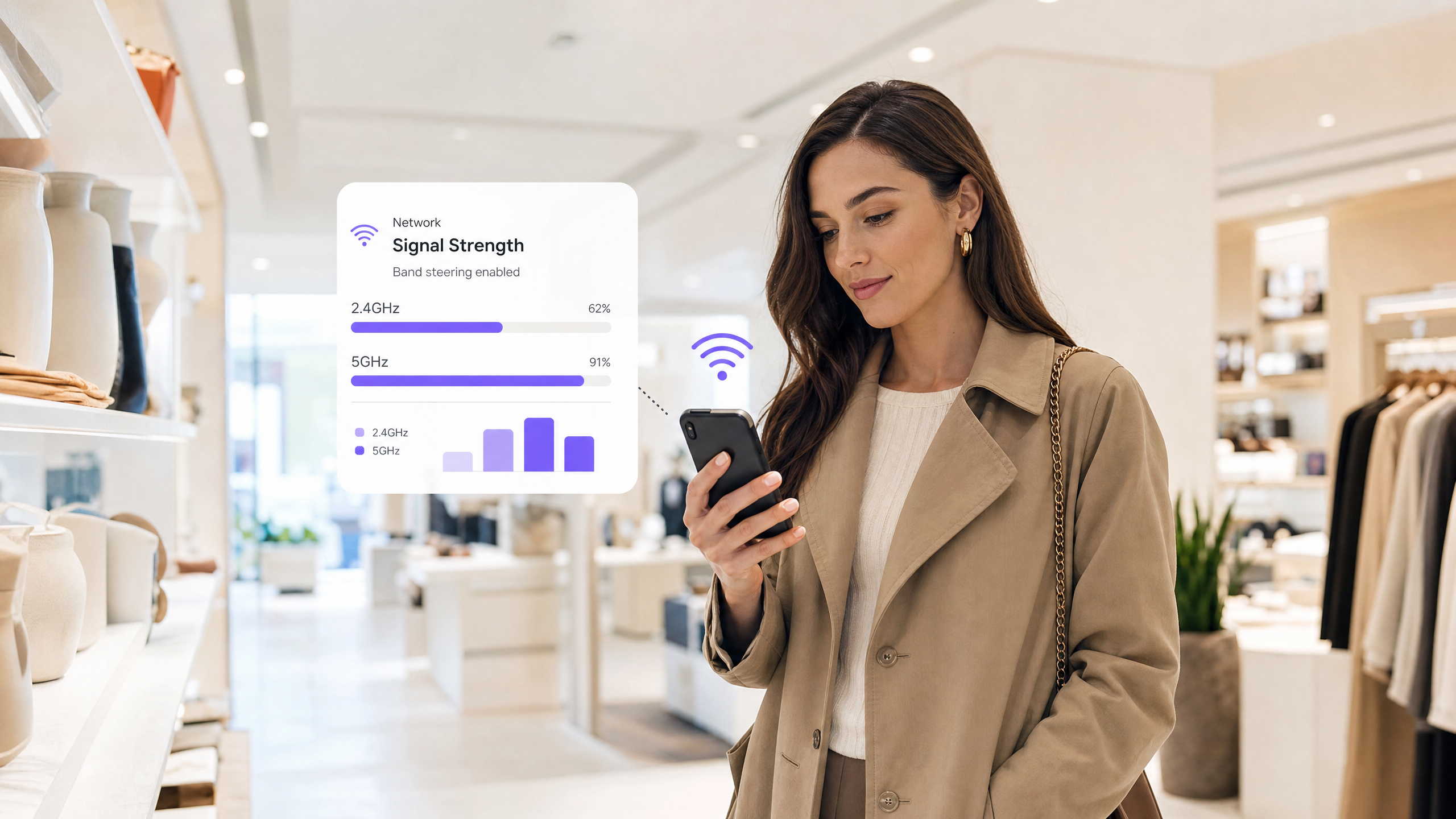
Per le sedi aziendali, dagli stadi ad alta densità ai vasti spazi commerciali, la scelta tra 2.4GHz e 5GHz non è più una semplice dicotomia. È una decisione strategica che incide direttamente sull'efficienza operativa, sull'esperienza degli ospiti e sui risultati economici. Questa guida fornisce informazioni utili per direttori IT e architetti di rete su quando implementare quale banda, come configurare efficacemente il band steering e le implicazioni reali di queste scelte.
La fisica fondamentale rimane invariata: la 2.4GHz offre una penetrazione e una portata superiori a scapito della capacità del canale e della congestione, mentre la 5GHz fornisce un throughput massiccio e disponibilità di canali ma soffre di rapida attenuazione. Nelle implementazioni moderne, il successo si basa su una coesistenza intelligente. Sfruttando entrambe le bande con SSID appositamente costruiti e un preciso band steering, le organizzazioni possono supportare i dispositivi IoT legacy fornendo al contempo velocità gigabit all'hardware consumer moderno.
Questo documento di riferimento delinea l'architettura tecnica, le migliori pratiche di implementazione e le strategie di mitigazione del rischio necessarie per ottimizzare la vostra WLAN sia per le operazioni aziendali che per la monetizzazione del Guest WiFi .
Approfondimento Tecnico: Fisica, Canali e Capacità
Comprendere le differenze fondamentali tra le due bande è essenziale per progettare un'architettura di rete robusta.
La Banda 2.4GHz: Il Cavallo di Battaglia della Penetrazione
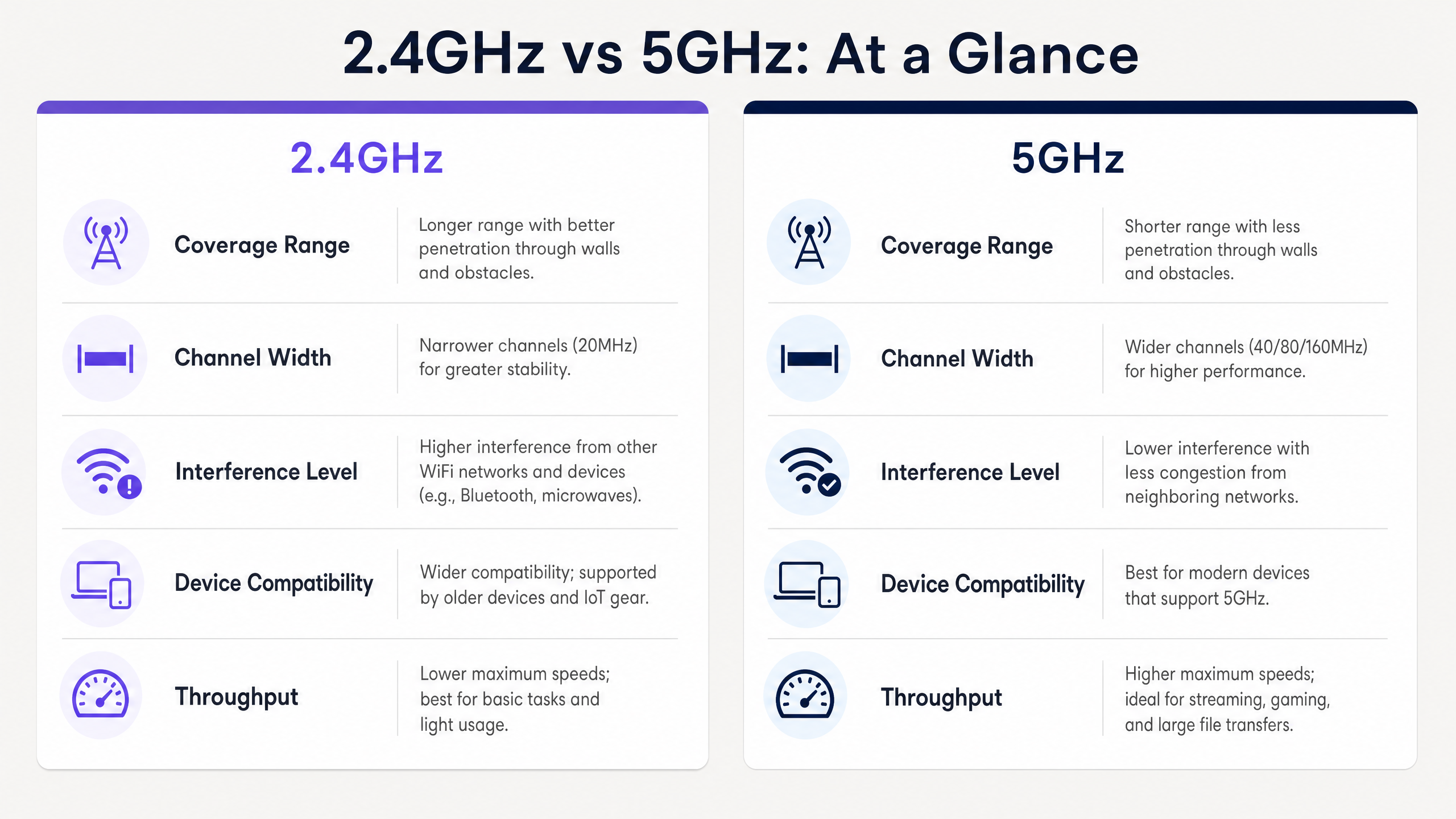
Operando a una frequenza inferiore, la banda 2.4GHz presenta lunghezze d'onda maggiori che penetrano facilmente ostacoli fisici come muri di cemento, scaffalature in acciaio e vani ascensore. Questo la rende ideale per ambienti Hospitality con pareti interne spesse o ampi spazi di magazzino.
Tuttavia, lo spettro 2.4GHz è gravemente limitato dalla sua architettura di canali. Nella maggior parte dei domini normativi, ci sono solo tre canali 20MHz non sovrapposti (Canali 1, 6 e 11). Questa scarsità porta a significative interferenze co-canale (CCI) e interferenze di canale adiacente (ACI), specialmente in ambienti densi dove reti vicine, dispositivi Bluetooth e persino microonde competono per il tempo di trasmissione.
La Banda 5GHz: L'Autostrada ad Alta Capacità
Al contrario, la banda 5GHz opera a una frequenza più alta, con conseguenti lunghezze d'onda più corte. Sebbene ciò riduca la sua capacità di penetrare le barriere fisiche, offre una vasta estensione di spettro disponibile. A seconda del dominio normativo e dell'uso dei canali Dynamic Frequency Selection (DFS), è possibile accedere fino a 25 canali 20MHz non sovrapposti.
Questa abbondanza consente il channel bonding (larghezze di 40MHz, 80MHz o anche 160MHz), abilitando l'elevato throughput richiesto per le applicazioni moderne. Sotto IEEE 802.11ac (Wi-Fi 5) e 802.11ax (Wi-Fi 6), le reti 5GHz possono fornire velocità gigabit, rendendola la banda preferita per ambienti ad alta densità come centri congressi e hub di Transport .
Guida all'Implementazione: Coesistenza Intelligente
L'implementazione di una moderna WLAN aziendale richiede un approccio sfumato all'allocazione delle bande. L'obiettivo è scaricare i dispositivi capaci sulla banda 5GHz, preservando la banda 2.4GHz per i dispositivi che ne hanno veramente bisogno.
1. Segmentazione degli SSID
La strategia più efficace per gestire popolazioni di dispositivi misti è la segmentazione degli SSID. Create SSID dedicati per diversi casi d'uso:
- SSID Operativo (solo 2.4GHz): Riservato per hardware legacy, sensori IoT, scanner di codici a barre e terminali EPOS. Questo assicura un tempo di trasmissione pulito per gli strumenti operativi critici.
- SSID Ospiti/Aziendale (Dual-Band o 5GHz Primario): Progettato per smartphone, tablet e laptop moderni. Questo SSID dovrebbe sfruttare il band steering per indirizzare i client capaci verso la 5GHz.
2. Configurazione del Band Steering
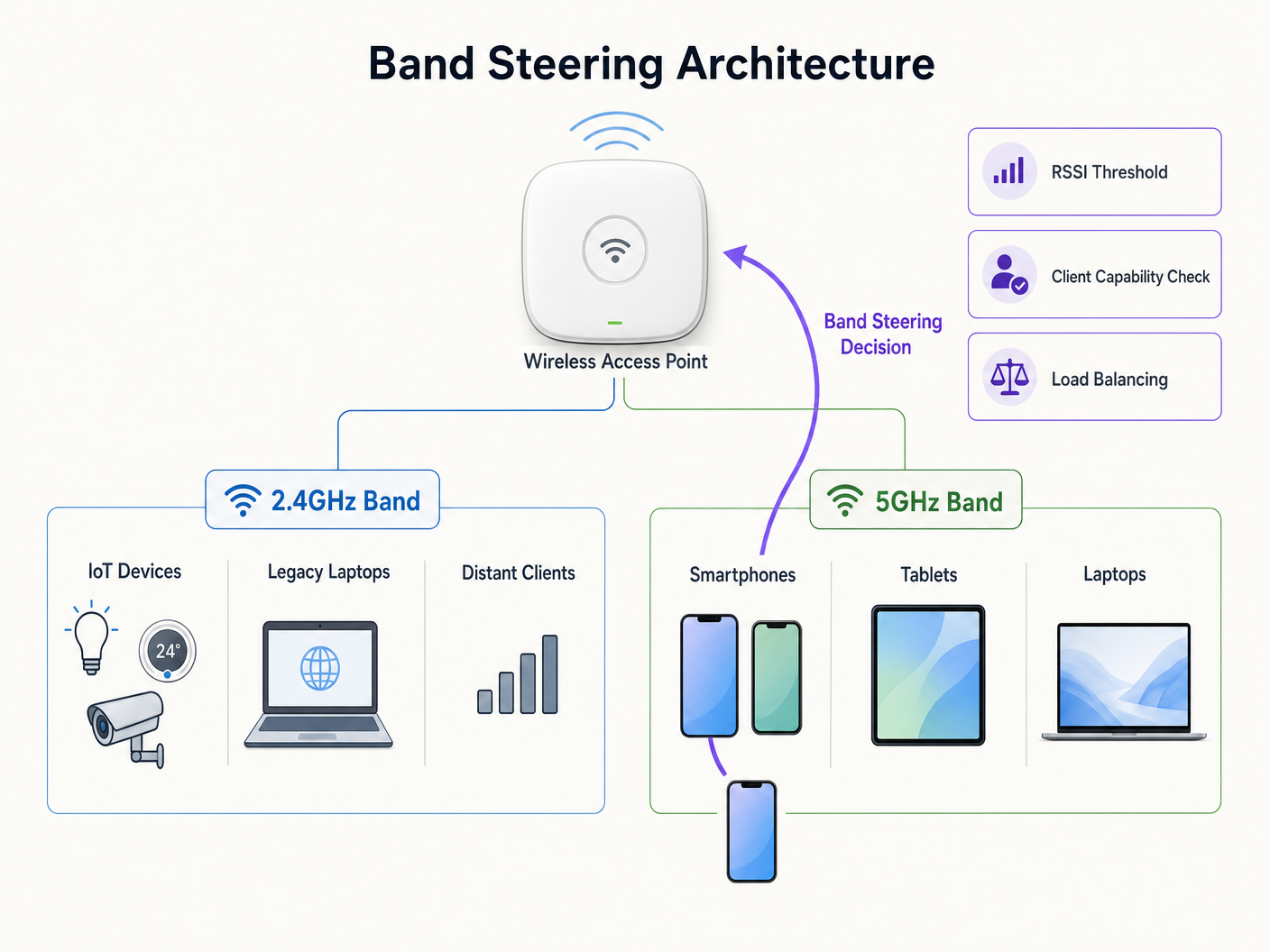
Il band steering è il meccanismo con cui l'infrastruttura wireless incoraggia i client dual-band ad associarsi alla radio 5GHz.
Quando si configura il band steering, considerare i seguenti parametri:
- Soppressione della Risposta di Probe: L'AP ignora le richieste di probe sulla banda 2.4GHz da client che sa essere compatibili con la 5GHz, forzandoli ad associarsi sulla 5GHz.
- Soglie RSSI: Implementare soglie rigorose per l'Indicatore di Forza del Segnale Ricevuto (RSSI). Se il segnale 5GHz di un client scende al di sotto di un certo livello (es. -72 dBm), l'AP dovrebbe consentire al client di tornare alla 2.4GHz in modo elegante per prevenire interruzioni di connessione.
3. Validazione del Design RF
Il band steering non è una panacea per una cattiva progettazione di rete. Se la vostra copertura 5GHz presenta lacune, un band steering aggressivo comporterà frequenti disconnessioni e una scarsa esperienza utente. Convalidate sempre il vostro design RF con un'indagine completa del sito prima di abilitare le funzionalità di steering.
Migliori Pratiche e Considerazioni sulla Sicurezza
Ottimizzazione della Larghezza del Canale
Mentre i canali 80MHz offrono un throughput teorico impressionante, consumano quattro canali standard 20MHz, aumentando la probabilità di CCI in implementazioni ad alta densità. Per la maggior parte degli ambienti aziendali, la standardizzazione su larghezze di canale 40MHz sulla banda 5GHz fornisce l'equilibrio ottimale tra throughput e disponibilità di canali.
Sicurezza e Conformità
La natura congestionata della banda 2.4GHz la rende più suscettibile a certi tipi di interferenze e attacchi di deautenticazione. Per mantenere una forte postura di sicurezza, specialmente per ambienti soggetti a PCI DSS o GDPR:
- Applicare WPA3 con Protected Management Frames (PMF) su tutti gli SSID aziendali.
- Garantire una rigorosa segregazione VLAN tra il traffico degli ospiti e le reti aziendali/di pagamento.
- Eseguire regolarmente auditil tuo ambiente per AP non autorizzati, che sono più diffusi sulla banda 2.4GHz facilmente accessibile.
Per maggiori informazioni sulla gestione sicura dei dati di rete, consulta la nostra guida su Il costo nascosto dei dati di telemetria sulle WLAN aziendali (disponibile anche in francese: Le coût caché des données de télémétrie sur les WLAN d'entreprise ).
Risoluzione dei Problemi e Mitigazione del Rischio
Quando sorgono problemi, spesso si manifestano come interruzioni di connettività o prestazioni scarse. Ecco le modalità di guasto comuni e come mitigarle:
- Client "Sticky": Dispositivi che si aggrappano a un segnale 2.4GHz debole anche quando è disponibile un segnale 5GHz forte. Mitigazione: Regola le soglie RSSI e abilita 802.11k/v/r (Fast BSS Transition) per assistere le decisioni di roaming dei client.
- Interferenza Canali DFS: I sistemi radar possono costringere gli AP a liberare i canali DFS, interrompendo la connettività. Mitigazione: Monitora i log del controller per eventi DFS. Se frequenti, escludi i canali interessati dal tuo piano di assegnazione dinamica dei canali.
- Guasti di Connettività IoT: Molti dispositivi smart non dispongono di radio 5GHz e faticano con autenticazioni complesse. Mitigazione: Assicurati che il tuo SSID IoT dedicato operi strettamente su 2.4GHz e utilizzi metodi di autenticazione più semplici (es. WPA2-PSK o MAC Authentication Bypass) mantenendo una rigorosa isolamento della rete.
ROI e Impatto sul Business
Ottimizzare la tua strategia di banda ha un impatto diretto sul bilancio della tua organizzazione. Una rete ben configurata riduce i ticket di supporto, aumenta l'efficienza operativa per il personale che utilizza dispositivi mobili e migliora l'esperienza degli ospiti.
Se integrato con WiFi Analytics , un'implementazione robusta a 5GHz fornisce i dati di localizzazione ad alta fedeltà necessari per iniziative di marketing avanzate. Come visto negli sviluppi recenti, ad esempio come un wi fi assistant Enables Passwordless Access in 2026 , la connettività senza interruzioni è la base per promuovere l'inclusione digitale e massimizzare il valore del tuo spazio fisico. Inoltre, funzionalità come Offline Maps Mode si basano su connessioni iniziali stabili per scaricare gli asset necessari, sottolineando l'importanza di un ambiente RF affidabile.
Ascolta il nostro briefing podcast completo qui sotto per un approfondimento su queste strategie:
Definizioni chiave
Band Steering
A network infrastructure feature that detects dual-band capable clients and actively encourages them to connect to the less congested 5GHz band rather than the 2.4GHz band.
Crucial for optimizing airtime utilization in environments with a mix of modern smartphones and legacy IoT devices.
Co-Channel Interference (CCI)
Interference that occurs when two or more access points operate on the exact same frequency channel, forcing them to share the available airtime.
A primary cause of slow network performance on the 2.4GHz band due to the limited number of non-overlapping channels.
Dynamic Frequency Selection (DFS)
A mechanism that allows Wi-Fi networks to use 5GHz channels typically reserved for radar systems, provided the AP can detect radar pulses and automatically switch to a different channel.
Unlocks additional 5GHz channels for enterprise use, but requires careful planning to avoid sudden channel changes that disconnect clients.
RSSI (Received Signal Strength Indicator)
A measurement of the power level being received by the antenna, typically expressed in negative decibels (dBm). Closer to zero is stronger.
Used by network administrators to set thresholds for roaming and band steering decisions (e.g., steering clients to 2.4GHz when 5GHz RSSI drops below -75 dBm).
SSID Segmentation
The practice of broadcasting different network names (SSIDs) for different user groups or device types, often tied to specific frequency bands or security policies.
Essential for isolating vulnerable IoT devices on 2.4GHz from high-speed corporate traffic on 5GHz.
Attenuation
The gradual loss of signal strength as radio waves travel through space or pass through physical objects like walls and floors.
Explains why 5GHz signals require denser AP placement compared to 2.4GHz signals in environments with heavy structural interference.
Spatial Stream
Multiple independent data signals transmitted simultaneously over different antennas using MIMO (Multiple Input, Multiple Output) technology to increase throughput.
Determines the maximum potential speed of a connection; modern 5GHz clients often support 2x2 or 3x3 spatial streams for gigabit performance.
Protected Management Frames (PMF)
A security standard (mandatory in WPA3) that encrypts the management frames used to control Wi-Fi connections, preventing deauthentication attacks.
Critical for securing the easily accessible 2.4GHz band against malicious actors attempting to disrupt network operations.
Esempi pratici
A 200-room hotel is experiencing poor guest WiFi performance in the lobby during peak check-in times, while in-room connectivity remains stable. The current configuration uses a single dual-band SSID across the entire property.
Implement a dual-strategy approach. First, enable band steering on the guest SSID with a strict RSSI threshold (-70 dBm) to force modern smartphones and laptops in the dense lobby area onto the high-capacity 5GHz band. Second, reduce the 2.4GHz transmit power on the lobby APs to shrink the cell size and reduce co-channel interference. Finally, ensure 5GHz channel widths are set to 40MHz to maximize available non-overlapping channels in the high-density space.
A large [Retail](/industries/retail) chain is rolling out new 2.4GHz-only wireless barcode scanners for inventory management. Simultaneously, they want to offer high-speed Guest WiFi to shoppers. How should the network be configured to prevent the consumer devices from degrading scanner performance?
Deploy SSID segmentation. Create a dedicated 'Ops-Inventory' SSID broadcast only on the 2.4GHz radio, utilizing WPA3-Personal or 802.1X for security, and assign it to a restricted VLAN. Create a separate 'Guest-WiFi' SSID broadcast on both bands, but with aggressive band steering enabled to push consumer devices to 5GHz. Apply Quality of Service (QoS) policies prioritizing traffic from the operational VLAN.
Domande di esercitazione
Q1. You are deploying a new WLAN in a large, open-plan warehouse. The primary devices are legacy 802.11b/g barcode scanners used by forklift operators. There are very few modern devices in the space. Which band strategy should you prioritize?
Suggerimento: Consider the capabilities of the primary client devices and the physical environment.
Visualizza risposta modello
Prioritize a robust 2.4GHz design. Since the legacy scanners only support 2.4GHz, a 5GHz-focused design would be useless for operations. Ensure AP placement provides adequate 2.4GHz coverage and carefully manage channel planning (using only channels 1, 6, and 11) to minimize co-channel interference in the open space.
Q2. During a busy conference, attendees are complaining of slow WiFi speeds, despite showing full signal strength on their devices. A packet capture reveals heavy utilization on channels 1, 6, and 11, but channels 36-48 are relatively quiet. What is the most likely configuration issue?
Suggerimento: Think about why modern devices might be congregating on the congested channels instead of the available ones.
Visualizza risposta modello
Band steering is likely disabled or configured incorrectly. The devices are defaulting to the 2.4GHz band (channels 1, 6, 11) because it often presents a stronger initial signal, leading to congestion. Enabling band steering would force the capable modern devices onto the quiet 5GHz channels (36-48), alleviating the congestion and improving speeds.
Q3. A hospital IT team wants to implement 80MHz channel widths on their 5GHz network to support high-resolution medical imaging transfers. However, they operate in a high-density environment with many APs deployed close together. What is the primary risk of this approach?
Suggerimento: Consider the relationship between channel width and the number of available non-overlapping channels.
Visualizza risposta modello
The primary risk is a massive increase in Co-Channel Interference (CCI). Using 80MHz channels consumes four standard 20MHz channels per AP. In a high-density deployment, this drastically reduces the number of non-overlapping channels available, meaning neighboring APs will likely end up on the same frequency, causing interference that degrades overall network performance rather than improving it.