
Il costo nascosto dei dati di telemetria sulle WLAN aziendali
Questa guida analizza nel dettaglio i costi nascosti in termini di larghezza di banda e conformità della telemetria IoT non richiesta sulle WLAN aziendali. Fornisce strategie di architettura pratiche, tra cui la segmentazione VLAN e il filtraggio DNS edge, per mitigare i rischi e recuperare throughput per i servizi aziendali critici.
Ascolta questa guida
Visualizza trascrizione del podcast
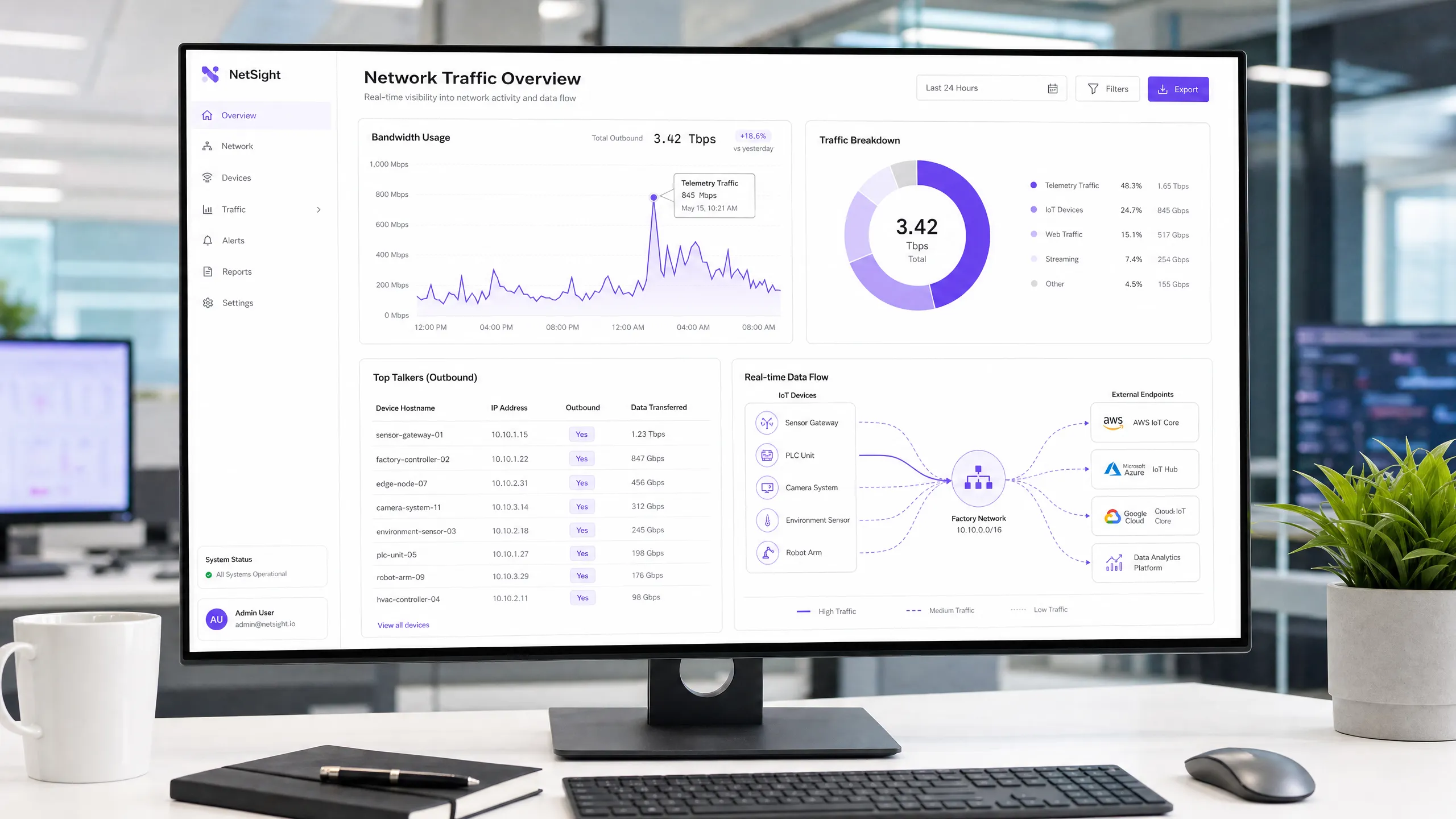
এক্সিকিউটিভ সামারি
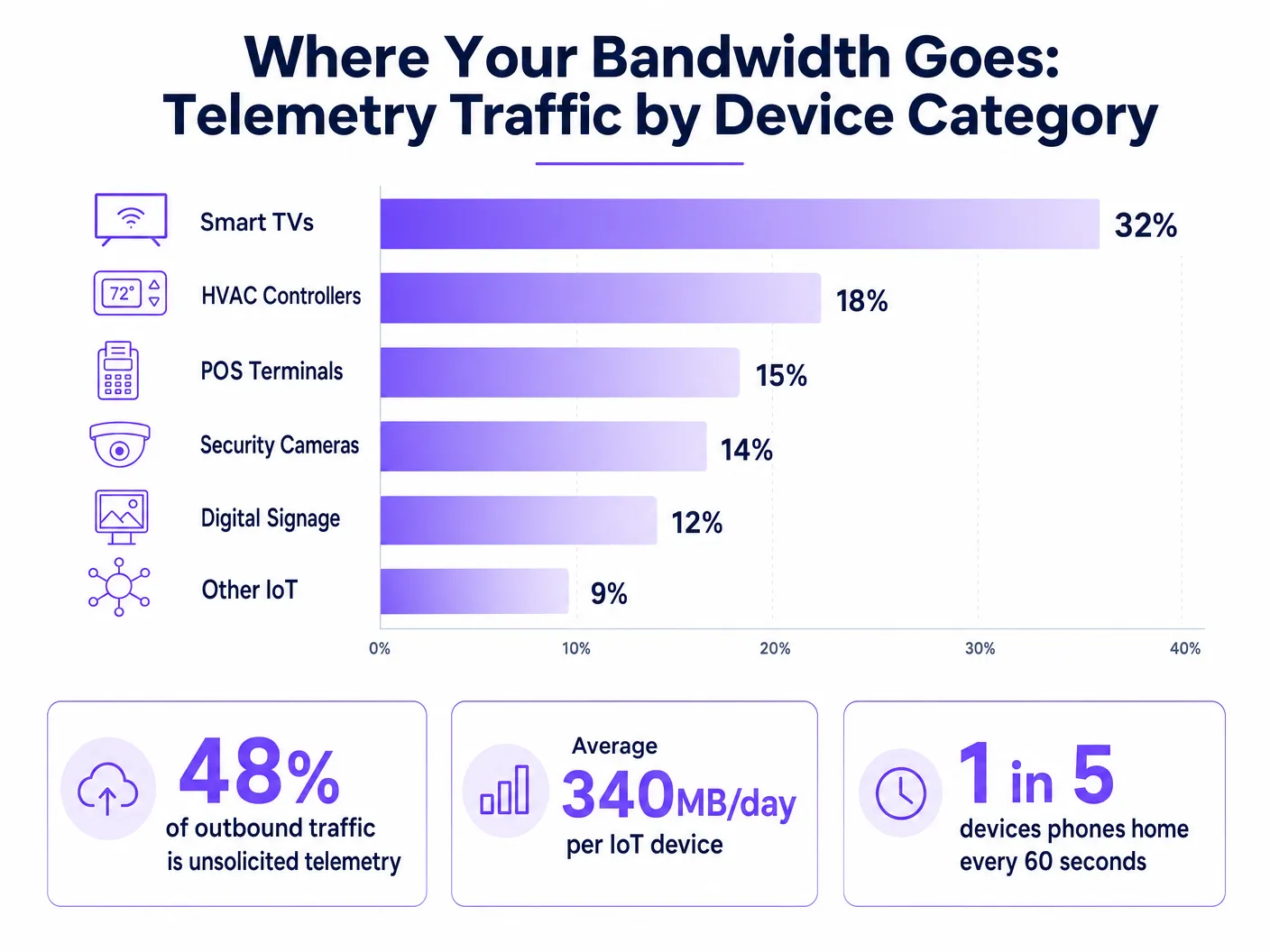
হসপিটালিটি, রিটেইল এবং পাবলিক সেক্টর জুড়ে হাই-ডেনসিটি পরিবেশ পরিচালনা করা CTO এবং নেটওয়ার্ক আর্কিটেক্টদের জন্য, IoT ডিভাইসের ব্যাপক বৃদ্ধি কর্পোরেট WLAN-এ একটি লুকানো কর বা হিডেন ট্যাক্স যুক্ত করেছে: অযাচিত টেলিমেট্রি ডেটা। প্রতিটি স্মার্ট টিভি, HVAC কন্ট্রোলার এবং POS টার্মিনাল ক্রমাগত ভেন্ডর এন্ডপয়েন্টগুলোতে ডায়াগনস্টিক ডেটা, ব্যবহারের পরিসংখ্যান এবং ফার্মওয়্যার চেক পাঠাতে থাকে। সামগ্রিকভাবে, এই ট্র্যাফিক আউটবাউন্ড ব্যান্ডউইথের ৪৮% পর্যন্ত ব্যবহার করতে পারে, যা বৈধ Guest WiFi এবং কর্পোরেট কার্যক্রমে মারাত্মক প্রভাব ফেলে। থ্রুপুট কমার পাশাপাশি, অনিয়ন্ত্রিত টেলিমেট্রি GDPR এবং PCI DSS-এর অধীনে একটি উল্লেখযোগ্য কমপ্লায়েন্স ঝুঁকি তৈরি করে, যা আনঅডিটেড ডেটা এক্সফিলট্রেশন ভেক্টর তৈরি করে। এই গাইডটি এজ-এ টেলিমেট্রি ট্র্যাফিক শনাক্ত, আইসোলেট এবং ফিল্টার করার জন্য একটি টেকনিক্যাল ব্লুপ্রিন্ট প্রদান করে, যা IT টিমগুলোকে গুরুত্বপূর্ণ ডিভাইসের কার্যকারিতা ব্যাহত না করেই ব্যান্ডউইথ পুনরুদ্ধার করতে, সিকিউরিটি পলিসি প্রয়োগ করতে এবং সামগ্রিক নেটওয়ার্ক ROI উন্নত করতে সহায়তা করে।
টেকনিক্যাল ডিপ-ডাইভ
IoT টেলিমেট্রির মূল চ্যালেঞ্জ হলো এটি স্ট্যান্ডার্ড নেটওয়ার্ক পলিসির আওতার বাইরে স্বয়ংক্রিয়ভাবে কাজ করে। ডিভাইসগুলো ভেন্ডর-নিয়ন্ত্রিত এন্ডপয়েন্টগুলোর সাথে যোগাযোগ করার জন্য হার্ডকোড করা থাকে, এবং কানেক্টিভিটি ব্যাহত হলে প্রায়শই অ্যাগ্রেসিভ রিট্রাই লজিক ব্যবহার করে।
টেলিমেট্রি ট্র্যাফিকের অ্যানাটমি
টেলিমেট্রি পেলোড ভেন্ডর অনুযায়ী ভিন্ন হয়, তবে সাধারণত এতে ডিভাইসের হেলথ মেট্রিক্স, এরর লগ এবং ব্যবহারের প্যাটার্ন অন্তর্ভুক্ত থাকে। উদাহরণস্বরূপ, হোটেলের রুমের একটি স্মার্ট টিভি প্রতি কয়েক মিনিটে Samsung বা LG সার্ভারে পিং করতে পারে। যদিও প্রতিটি প্যাকেট ছোট, হাজার হাজার ডিভাইস জুড়ে এর সামগ্রিক ভলিউম যথেষ্ট বড়। আমাদের বিশ্লেষণে দেখা গেছে যে, গড় এন্টারপ্রাইজ IoT ডিভাইস প্রতিদিন প্রায় ৩৪০MB আউটবাউন্ড ট্র্যাফিক তৈরি করে।
সিকিউরিটি এবং কমপ্লায়েন্সের প্রভাব
আনফিল্টার করা টেলিমেট্রি নেটওয়ার্ক সিকিউরিটিতে একটি ব্লাইন্ড স্পট তৈরি করে। যখন ডিভাইসগুলো বাহ্যিকভাবে যোগাযোগ করার জন্য প্রাতিষ্ঠানিক নিয়ন্ত্রণগুলোকে বাইপাস করে, তখন তারা প্রিন্সিপাল অফ লিস্ট প্রিভিলেজ লঙ্ঘন করে। কঠোর রেগুলেটরি ফ্রেমওয়ার্কের অধীনস্থ পরিবেশগুলোতে এটি বিশেষভাবে সমস্যামূলক।
PCI DSS v4.0-এর অধীনে, কার্ডহোল্ডার ডেটা এনভায়রনমেন্ট (CDE)-এর সাথে নেটওয়ার্ক সেগমেন্ট শেয়ার করা যেকোনো ডিভাইস কমপ্লায়েন্সের আওতাভুক্ত। যদি কোনো POS টার্মিনাল আউটবাউন্ড টেলিমেট্রি তৈরি করে, তবে এটিকে কঠোরভাবে আইসোলেট করতে হবে। একইভাবে, GDPR আর্টিকেল ৩২ ডেটা সুরক্ষিত করার জন্য উপযুক্ত প্রযুক্তিগত ব্যবস্থা গ্রহণ করা বাধ্যতামূলক করে। আনঅডিটেড আউটবাউন্ড কানেকশন, এমনকি যদি তা আপাতদৃষ্টিতে ক্ষতিকারক নাও হয়, তবুও এই মান পূরণে ব্যর্থ হয়। যদিও IEEE 802.1X শক্তিশালী পোর্ট-লেভেল অথেনটিকেশন প্রদান করে, এটি অথেনটিকেটেড ডিভাইসগুলোর পেলোড পরিদর্শন বা নিয়ন্ত্রণ করে না। WPA3 ওয়্যারলেস ট্রান্সমিশন সুরক্ষিত করে কিন্তু ডিভাইসটিকে টেলিমেট্রি কানেকশন শুরু করা থেকে বিরত রাখতে কিছুই করে না।
এজ ফিল্টারিংয়ের প্রয়োজনীয়তা
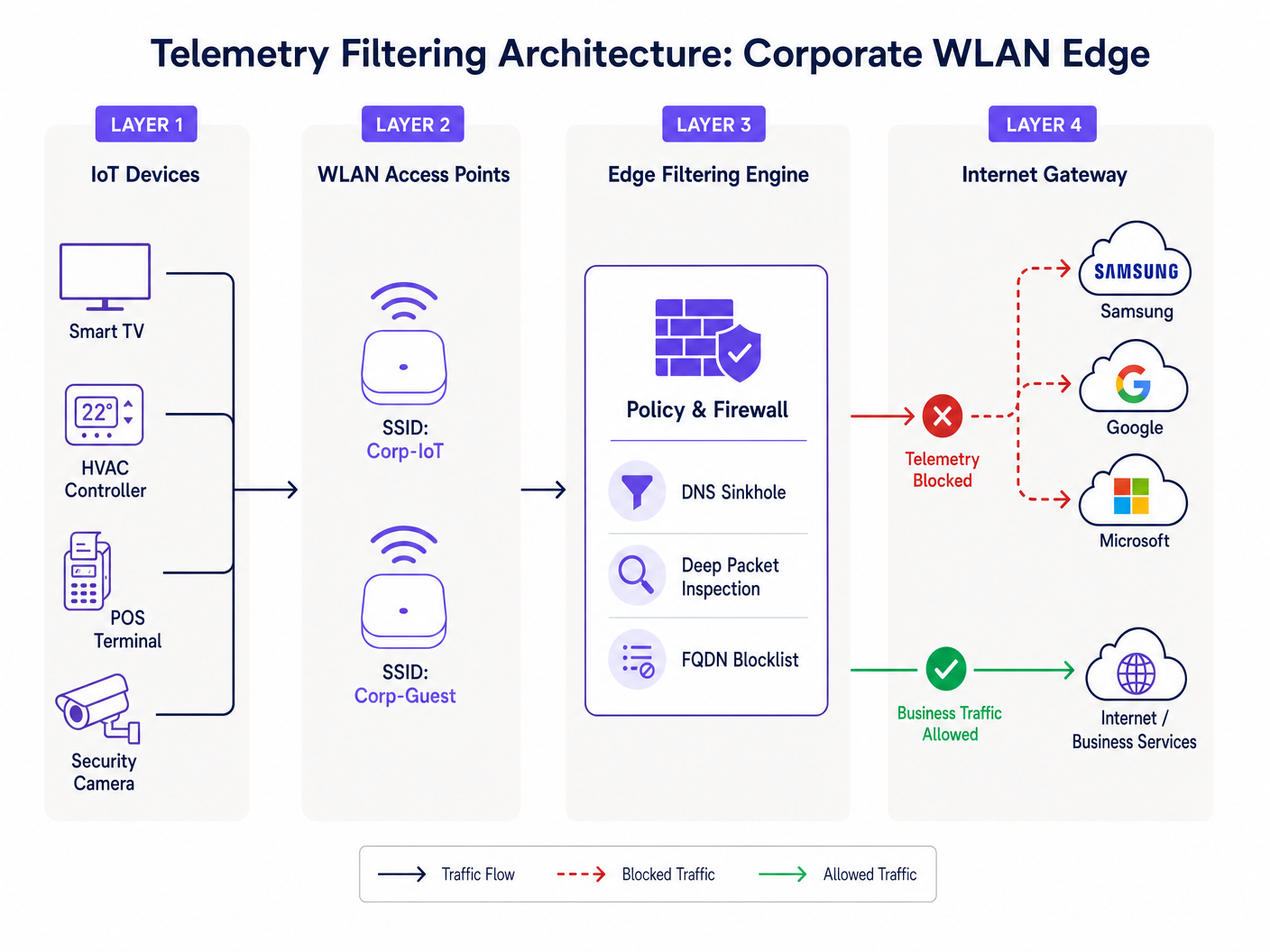
এটি সমাধানের জন্য, প্রতিষ্ঠানগুলোকে অবশ্যই নেটওয়ার্ক এজে ফিল্টারিং প্রয়োগ করতে হবে। এর মধ্যে একটি মাল্টি-লেয়ারড পদ্ধতি জড়িত: পরিচিত টেলিমেট্রি ডোমেইনগুলোর রেজোলিউশন রিকোয়েস্ট ইন্টারসেপ্ট করার জন্য DNS সিঙ্কহোলিং, এবং হার্ডকোড করা IP কমিউনিকেশন ধরার জন্য FQDN ব্লকলিস্টের সাথে ডিপ প্যাকেট ইন্সপেকশন (DPI)। এই আর্কিটেকচার নিশ্চিত করে যে শুধুমাত্র অনুমোদিত বিজনেস ট্র্যাফিক ইন্টারনেট গেটওয়ে অতিক্রম করে, যা আমাদের Improving WiFi Speeds by Blocking Ad Networks at the Edge গাইডে বিস্তারিত আলোচনা করা হয়েছে।
ইমপ্লিমেন্টেশন গাইড
একটি শক্তিশালী টেলিমেট্রি ফিল্টারিং আর্কিটেকচার ডিপ্লয় করার জন্য একটি নিয়মতান্ত্রিক পদ্ধতি প্রয়োজন, যাতে বৈধ অপারেশনাল ট্র্যাফিক ব্যাহত না হয়।
ফেজ ১: নেটওয়ার্ক সেগমেন্টেশন
প্রাথমিক পদক্ষেপ হলো কঠোর VLAN সেগমেন্টেশন। IoT ডিভাইসগুলো কখনোই কর্পোরেট ব্যবহারকারী, গেস্ট নেটওয়ার্ক বা PCI-স্কোপড সিস্টেমের মতো একই সাবনেটে থাকা উচিত নয়। কঠোর অ্যাক্সেস কন্ট্রোল লিস্ট (ACLs) সহ ডেডিকেটেড IoT VLAN তৈরি করুন যা ডিফল্টভাবে ইন্টার-VLAN রাউটিং ডিনাই করে।
ফেজ ২: ট্র্যাফিক অডিটিং এবং বেসলাইনিং
ব্লক প্রয়োগ করার আগে, একটি ট্র্যাফিক বেসলাইন স্থাপন করুন। আউটবাউন্ড কানেকশনগুলো মনিটর করতে ফ্লো অ্যানালাইসিস টুল (NetFlow/sFlow) ডিপ্লয় করুন অথবা একটি কমপ্রিহেন্সিভ WiFi Analytics প্ল্যাটফর্ম ব্যবহার করুন। টপ টকারদের শনাক্ত করুন এবং তাদের ডেস্টিনেশন এন্ডপয়েন্টগুলো ম্যাপ করুন। এই অডিট টেলিমেট্রি সমস্যার প্রকৃত মাত্রা প্রকাশ করবে।
ফেজ ৩: DNS সিঙ্কহোলিং
একটি ইন্টারনাল, পলিসি-এনফোর্সিং DNS রিভলভার অ্যাসাইন করতে IoT VLAN-এর জন্য DHCP স্কোপ কনফিগার করুন। পরিচিত টেলিমেট্রি এবং ডায়াগনস্টিক এন্ডপয়েন্টগুলোর জন্য ক্যাটাগরি-ভিত্তিক ব্লকিং প্রয়োগ করুন। কমিউনিটি-কিউরেটেড ব্লকলিস্ট বা কমার্শিয়াল থ্রেট ইন্টেলিজেন্স ফিড ব্যবহার করুন। ব্লকগুলো প্রয়োগ করার আগে সম্ভাব্য ফলস পজিটিভ শনাক্ত করতে 'রিপোর্ট-অনলি' মোডে ৭২ ঘণ্টার জন্য লগগুলো মনিটর করুন।
ফেজ ৪: ইগ্রেস ফিল্টারিং এবং DPI
যেসব ডিভাইস হার্ডকোড করা IP অ্যাড্রেস ব্যবহার করে DNS বাইপাস করে, তাদের জন্য পেরিমিটার ফায়ারওয়ালে ইগ্রেস ফিল্টারিং প্রয়োগ করুন। টেলিমেট্রি সিগনেচার শনাক্ত এবং ড্রপ করতে DPI রুল কনফিগার করুন। ভেন্ডর ইনফ্রাস্ট্রাকচারের পরিবর্তনের সাথে তাল মেলাতে এই রুলগুলো নিয়মিত আপডেট করা নিশ্চিত করুন।
বেস্ট প্র্যাকটিস
- IoT-এর জন্য ডিফল্ট-ডিনাই পোসচার গ্রহণ করুন: ডিফল্টভাবে, IoT VLAN-গুলোর কোনো ইন্টারনেট অ্যাক্সেস থাকা উচিত নয়। শুধুমাত্র ডিভাইসের মূল কার্যকারিতার জন্য প্রয়োজনীয় FQDN এবং পোর্টগুলোকে (যেমন, NTP, নির্দিষ্ট API এন্ডপয়েন্ট) স্পষ্টভাবে হোয়াইটলিস্ট করুন।
- রেট লিমিটিং প্রয়োগ করুন: এমনকি অনুমোদিত ট্র্যাফিকও ব্যান্ডউইথ শেপিংয়ের আওতাভুক্ত হওয়া উচিত। IoT সেগমেন্টগুলোর জন্য উপলব্ধ সর্বোচ্চ থ্রুপুট সীমাবদ্ধ করতে QoS পলিসি প্রয়োগ করুন, যাতে তারা ম্যাস ফার্মওয়্যার আপডেটের সময় আপলিংক স্যাচুরেট করতে না পারে।
- নিয়মিত ব্লকলিস্ট মেইনটেন্যান্স: টেলিমেট্রি এন্ডপয়েন্টগুলো পরিবর্তিত হয়। কার্যকারিতা বজায় রাখতে আপনার এজ ফিল্টারিং ইঞ্জিনে আপডেট করা FQDN ব্লকলিস্টগুলোর ইনজেশন স্বয়ংক্রিয় করুন।
- গেস্ট নেটওয়ার্ক মনিটর করুন: গেস্ট নেটওয়ার্কেও একই ধরনের ফিল্টারিং নীতি প্রয়োগ করুন। যদিও আপনি গেস্ট ডিভাইসগুলো নিয়ন্ত্রণ করতে পারবেন না, তবে আপনি তাদের টেলিমেট্রিকে শেয়ার্ড এক্সপেরিয়েন্সের মান কমানো থেকে আটকাতে পারেন।
ট্রাবলশুটিং এবং রিস্ক মিটিগেশন
টেলিমেট্রি ফিল্টারিংয়ের সবচেয়ে বড় ঝুঁকি হলো ওভার-ব্লকিং, যা ডিভাইসের কার্যকারিতা ব্যাহত করতে পারে। উদাহরণস্বরূপ, কোনো ভেন্ডরের CDN ব্লক করলে তা অজান্তেই গুরুত্বপূর্ণ সিকিউরিটি আপডেট ব্লক করে দিতে পারে।
- লক্ষণ: ম্যানেজমেন্ট কনসোলে ডিভাইসগুলো অফলাইন স্ট্যাটাস দেখায়।
- প্রতিকার: প্রভাবিত ডিভাইসের IP থেকে ব্লক করা কোয়েরিগুলোর জন্য DNS লগগুলো পর্যালোচনা করুন। সাময়িকভাবে ব্লক করা ডোমেইনটি হোয়াইটলিস্ট করুন এবং কার্যকারিতা পুনরুদ্ধার হয়েছে কিনা তা যাচাই করুন। প্রায়শই, ভেন্ডররা টেলিমেট্রি এবং ম্যানেজমেন্টের জন্য আলাদা সাবডোমেইন ব্যবহার করে (যেমন,
telemetry.vendor.comবনামapi.vendor.com)।
আরেকটি সাধারণ ফেইলিওর মোড হলো অসম্পূর্ণ সেগমেন্টেশন, যেখানে একটি ম্যানেজমেন্ট VLAN অজান্তেই IoT সেগমেন্টকে কর্পোরেট নেটওয়ার্কের সাথে যুক্ত করে। আইসোলেশন যাচাই করার জন্য নিয়মিত পেনিট্রেশন টেস্টিং এবং VLAN অডিট অপরিহার্য।
ROI এবং বিজনেস ইমপ্যাক্ট
টেলিমেট্রি ফিল্টারিং প্রয়োগ করলে তাৎক্ষণিক এবং পরিমাপযোগ্য রিটার্ন পাওয়া যায়।
- ব্যান্ডউইথ রিকভারি: প্রতিষ্ঠানগুলো সাধারণত আউটবাউন্ড WAN ইউটিলাইজেশনে ১৫-৩০% হ্রাস দেখতে পায়, যা ব্যয়বহুল ব্যান্ডউইথ আপগ্রেডকে বিলম্বিত করে।
- উন্নত ইউজার এক্সপেরিয়েন্স: পুনরুদ্ধার করা ব্যান্ডউইথ সরাসরি গেস্ট এবং এমপ্লয়িদের জন্য দ্রুত, আরও নির্ভরযোগ্য কানেক্টিভিটি প্রদান করে, যা Hospitality এবং Retail পরিবেশে স্যাটিসফ্যাকশন স্কোর উন্নত করে।
- ঝুঁকি হ্রাস: অননুমোদিত আউটবাউন্ড কানেকশনগুলো দূর করা অ্যাটাক সারফেসকে উল্লেখযোগ্যভাবে হ্রাস করে এবং কমপ্লায়েন্স অডিটকে সহজ করে, যা রেগুলেটরি জরিমানার ঝুঁকি কমায়।
পাবলিক সেক্টর ডিপ্লয়মেন্টের ক্ষেত্রে, যেখানে বাজেট সীমিত এবং নজরদারি বেশি, নির্ভরযোগ্য পরিষেবা প্রদানের জন্য এই দক্ষতাগুলো অত্যন্ত গুরুত্বপূর্ণ, যা ডিজিটাল ইনক্লুশন চালানোর উদ্যোগগুলোর সাথে সামঞ্জস্যপূর্ণ, যেমনটি আমাদের সাম্প্রতিক ঘোষণায় আলোচনা করা হয়েছে: Purple Appoints Iain Fox as VP Growth – Public Sector to Drive Digital Inclusion and Smart City Innovation ।
ব্রিফিংটি শুনুন
আর্কিটেকচারাল বিষয়গুলো সম্পর্কে আরও গভীরভাবে জানতে, আমাদের ১০ মিনিটের টেকনিক্যাল ব্রিফিংটি শুনুন:
Definizioni chiave
Dati di telemetria
Trasmissione automatizzata di dati operativi, diagnostici o di utilizzo da un dispositivo connesso al relativo produttore o a un servizio cloud di terze parti.
Spesso trasmessi senza l'autorizzazione esplicita del reparto IT, consumano larghezza di banda e creano punti ciechi per la conformità.
DNS Sinkhole
Un server DNS configurato per fornire indirizzi IP errati (spesso 0.0.0.0) per specifici nomi di dominio, impedendo di fatto ai dispositivi di connettersi a tali domini.
Utilizzato come metodo leggero e altamente efficace per bloccare gli endpoint noti di telemetria e tracciamento al perimetro della rete.
Deep Packet Inspection (DPI)
Filtraggio avanzato dei pacchetti di rete che esamina la parte dati (e possibilmente l'intestazione) di un pacchetto mentre passa attraverso un punto di ispezione, alla ricerca di non conformità ai protocolli, virus, spam, intrusioni o criteri definiti.
Necessario per identificare e bloccare il traffico di telemetria che utilizza indirizzi IP hardcoded o porte non standard, aggirando i controlli DNS.
Blocklist FQDN
Un elenco di Fully Qualified Domain Names (ad es. telemetry.vendor.com) a cui viene esplicitamente negato l'accesso attraverso il gateway di rete o il risolutore DNS.
Più preciso del blocco degli IP, poiché gli endpoint di telemetria ospitati in cloud cambiano frequentemente indirizzo IP ma mantengono nomi di dominio coerenti.
Segmentazione VLAN
La pratica di suddividere una rete fisica in più reti logiche per isolare il traffico, migliorare le prestazioni e rafforzare la sicurezza.
Il primo passo fondamentale nella gestione dei dispositivi IoT, che garantisce che il loro traffico di telemetria non possa attraversare i segmenti di rete aziendali o soggetti a PCI.
Filtraggio in uscita (Egress Filtering)
La pratica di monitorare e potenzialmente limitare il flusso di informazioni in uscita da una rete verso un'altra, in genere internet.
Cruciale per prevenire l'esfiltrazione non autorizzata di dati e applicare la postura "Default-Deny" per i segmenti IoT.
Ambito PCI DSS
Tutti i componenti di sistema, le persone e i processi inclusi o connessi all'ambiente dei dati dei titolari di carta (CDE).
La telemetria non controllata proveniente da dispositivi presenti sullo stesso segmento di rete dei terminali di pagamento può inavvertitamente includere tali dispositivi nell'ambito di audit.
IEEE 802.1X
Uno standard IEEE per il controllo dell'accesso alla rete basato su porta (PNAC), che fornisce un meccanismo di autenticazione ai dispositivi che desiderano connettersi a una LAN o WLAN.
Sebbene protegga l'accesso alla rete, non ispeziona né controlla i payload di telemetria inviati dai dispositivi autenticati.
Esempi pratici
Un resort da 400 camere riscontra una grave congestione di rete ogni mattina tra le 2:00 e le 4:00, con un impatto negativo sugli ospiti mattinieri e sulle operazioni di back-office. Il team di rete sospetta che la causa siano le smart TV installate di recente in ogni camera. Come dovrebbero diagnosticare e risolvere il problema?
- Diagnosi: Distribuire un raccoglitore NetFlow sullo switch centrale per analizzare il traffico durante la finestra di congestione. L'analisi rivela che tutte le 400 TV scaricano simultaneamente aggiornamenti firmware e caricano la telemetria sull'utilizzo giornaliero aggregato sul CDN del produttore. 2. Risoluzione: In primo luogo, assicurarsi che le TV si trovino su una VLAN IoT dedicata. In secondo luogo, implementare una policy QoS sul firewall per limitare la velocità del traffico in uscita e in entrata per la VLAN IoT al 10% della capacità totale del collegamento WAN. In terzo luogo, implementare il DNS sinkholing per bloccare gli FQDN specifici utilizzati per il caricamento della telemetria, consentendo al contempo gli FQDN utilizzati per gli aggiornamenti firmware. Infine, scaglionare le finestre di aggiornamento se la console di gestione del fornitore lo consente.
Una grande catena di vendita al dettaglio con 200 punti vendita utilizza un mix di sistemi POS legacy e moderni. Durante un audit PCI DSS, l'analista rileva che diversi terminali POS moderni generano traffico HTTPS in uscita verso endpoint cloud sconosciuti. In che modo l'architetto di rete dovrebbe rimediare a questo risultato?
- Contenimento immediato: Verificare che i terminali POS si trovino su una VLAN CDE (Cardholder Data Environment) rigorosamente isolata. 2. Analisi del traffico: Eseguire acquisizioni di pacchetti (PCAP) sull'interfaccia di uscita per la VLAN CDE. Identificare gli indirizzi IP di destinazione ed eseguire ricerche DNS inverse per determinare il fornitore. 3. Applicazione delle policy: Implementare una regola di uscita "Default-Deny" sul firewall per la VLAN CDE. Consentire in whitelist solo gli indirizzi IP e le porte esplicitamente richiesti per l'elaborazione dei pagamenti e il traffico di gestione autorizzato. 4. Documentazione: Documentare gli endpoint inseriti in whitelist e la giustificazione aziendale per ciascuno di essi nella base di regole del firewall, fornendo questa documentazione all'analista PCI.
Domande di esercitazione
Q1. Stai distribuendo una nuova flotta di controller HVAC intelligenti in un campus aziendale. Il fornitore dichiara che i controller richiedono l'accesso a Internet per inviare i dati diagnostici alla propria piattaforma cloud per il supporto in garanzia. Come integri questi dispositivi in modo sicuro?
Suggerimento: Considera il principio del minimo privilegio e come bilanciare i requisiti operativi con i controlli di sicurezza.
Visualizza risposta modello
- Posizionare i controller HVAC su una VLAN IoT dedicata e isolata. 2. Richiedere al fornitore gli FQDN e le porte specifici richiesti per l'invio della diagnostica. 3. Configurare il firewall perimetrale con una regola di uscita default-deny per la VLAN IoT. 4. Creare una regola di autorizzazione esplicita solo per gli FQDN e le porte forniti dal fornitore. 5. Implementare il rate limiting sulla VLAN per evitare che i controller consumino una larghezza di banda eccessiva.
Q2. Durante una revisione di routine dei log, noti un volume significativo di richieste DNS provenienti dalla VLAN IoT che vengono bloccate dal DNS sinkhole. Tuttavia, il team operativo segnala che i display della segnaletica digitale non aggiornano più i loro contenuti. Qual è la causa probabile e la relativa soluzione?
Suggerimento: Pensa a come i fornitori strutturano spesso i loro servizi cloud e ai rischi di un blocco eccessivo.
Visualizza risposta modello
La causa probabile è un blocco eccessivo (over-blocking). Il fornitore sta probabilmente utilizzando lo stesso dominio (o un sottodominio strettamente correlato) sia per l'invio della telemetria che per la distribuzione dei contenuti. Soluzione: 1. Identificare il dominio specifico bloccato nei log DNS. 2. Inserire temporaneamente il dominio in whitelist. 3. Utilizzare l'acquisizione dei pacchetti per analizzare il traffico verso quel dominio. 4. Se possibile, utilizzare la DPI sul firewall per bloccare i percorsi URI di telemetria specifici consentendo al contempo i percorsi di aggiornamento dei contenuti, oppure collaborare con il fornitore per identificare FQDN distinti per ciascuna funzione.
Q3. Il direttore IT di uno stadio desidera implementare il filtraggio della telemetria, ma è preoccupato per il sovraccarico di elaborazione sul firewall principale durante i giorni delle partite, quando sono connessi 50.000 tifosi. Quale architettura offre il filtraggio più efficiente?
Suggerimento: Quale metodo di filtraggio consuma meno cicli di CPU sul firewall?
Visualizza risposta modello
L'approccio più efficiente consiste nell'affidarsi principalmente al DNS sinkholing per la maggior parte del filtraggio. Configurando i server DHCP in modo che indirizzino i dispositivi client verso un risolutore DNS interno che blocca i domini di telemetria noti, il traffico viene interrotto prima ancora che venga tentata una connessione, risparmiando voci nella tabella di stato del firewall e cicli di elaborazione DPI. Il firewall dovrebbe essere utilizzato solo come misura secondaria per IP hardcoded o regole di blocco altamente specifiche.
Continua a leggere questa serie
Comprendere l'RSSI e la potenza del segnale per una pianificazione ottimale dei canali
Questa guida offre un approfondimento tecnico completo su RSSI, Signal-to-Noise Ratio (SNR) e principi di propagazione RF per una pianificazione ottimale dei canali. Fornisce a IT manager, architetti di rete e direttori operativi delle strutture strategie pratiche per mitigare l'interferenza co-canale e adiacente, ottimizzare il posizionamento degli AP e sfruttare gli analytics per un impatto aziendale misurabile nei settori dell'ospitalità, del retail e pubblico.
20MHz vs 40MHz vs 80MHz: quale ampiezza di canale dovresti utilizzare?
Questa guida fornisce un riferimento tecnico definitivo e neutrale rispetto ai vendor per IT manager, architetti di rete e direttori operativi di location sulla selezione della corretta ampiezza di canale WiFi — 20MHz, 40MHz o 80MHz — nelle implementazioni aziendali nei settori dell'ospitalità, del retail, degli eventi e del settore pubblico. Copre i meccanismi IEEE 802.11 alla base, i compromessi di capacità nel mondo reale e una guida all'implementazione passo-passo per aiutare i team a prendere la decisione giusta in questo trimestre. Comprendere la selezione dell'ampiezza di canale è una delle decisioni a più alto impatto in qualsiasi progettazione di LAN wireless, influenzando direttamente il throughput, le interferenze, il supporto alla densità dei client e l'affidabilità dei servizi rivolti agli ospiti.
Wi-Fi 6 vs Wi-Fi 5: Risolve l'Interferenza di Canale?
Questa guida offre un approfondimento tecnico su come il Wi-Fi 6 (802.11ax) affronti l'interferenza di canale in ambienti aziendali ad alta densità attraverso OFDMA e BSS Coloring. Fornisce a IT manager, architetti di rete e CTO strategie di implementazione pratiche, casi di studio reali nei settori dell'ospitalità e della sanità, e un framework per valutare il ROI degli aggiornamenti infrastrutturali nei luoghi in cui le prestazioni wireless sono fondamentali per il business.