
The Hidden Cost of Telemetry Data on Corporate WLANs
This guide details the hidden bandwidth and compliance costs of unsolicited IoT telemetry on corporate WLANs. It provides actionable architecture strategies, including VLAN segmentation and DNS edge filtering, to mitigate risks and reclaim throughput for critical business services.
Video overview
Listen to this guide
View podcast transcript
Part of our core series: Guest WiFi Guide →
Executive Summary
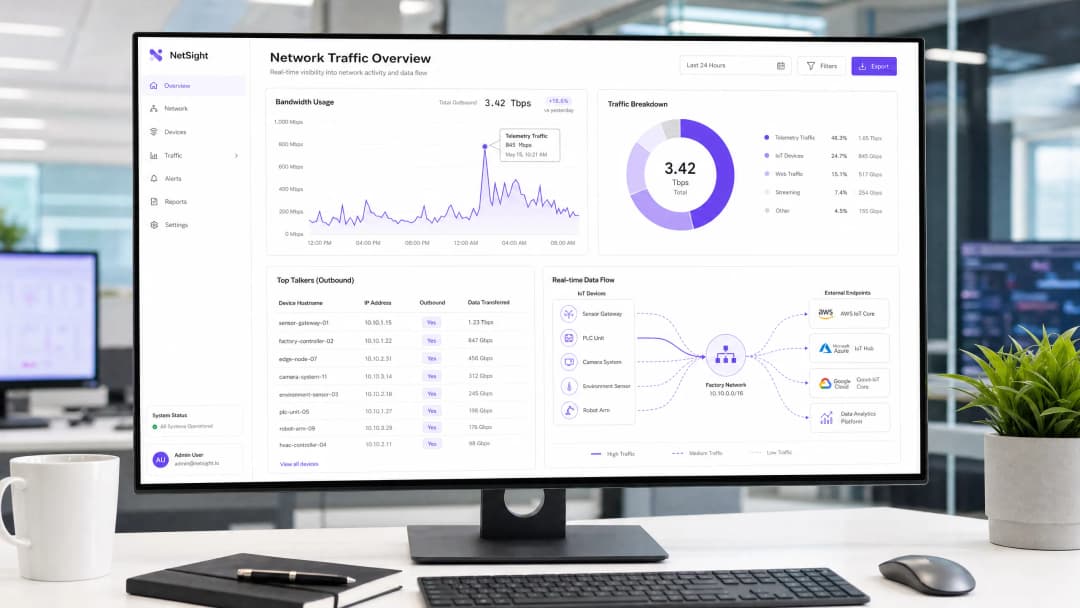
For CTOs and network architects managing high-density environments across hospitality, retail, and the public sector, the proliferation of IoT devices has introduced a hidden tax on corporate WLANs: unsolicited telemetry data. Every smart TV, HVAC controller, and POS terminal continuously sends diagnostic data, usage statistics, and firmware checks to vendor endpoints. In aggregate, this traffic can consume up to 48% of outbound bandwidth, severely impacting legitimate Guest WiFi and corporate operations. In addition to reducing throughput, unmanaged telemetry poses a significant compliance risk under CCPA/CPRA and PCI-DSS, creating unaudited data exfiltration vectors. This guide provides a technical blueprint to identify, isolate, and filter telemetry traffic at the edge, helping IT teams reclaim bandwidth, enforce security policies, and improve overall network ROI without disrupting critical device functionality.
Technical Deep-Dive
The core challenge of IoT telemetry is that it operates autonomously outside standard network policies. Devices are hardcoded to communicate with vendor-controlled endpoints, and often employ aggressive retry logic if connectivity is disrupted.
Anatomy of Telemetry Traffic
Telemetry payloads vary by vendor, but typically include device health metrics, error logs, and usage patterns. For example, a smart TV in a hotel room might ping Samsung or LG servers every few minutes. Although each individual packet is small, the cumulative volume across thousands of devices is substantial. Our analysis shows that the average enterprise IoT device generates approximately 340MB of outbound traffic per day.

Security and Compliance Implications
Unfiltered telemetry creates a blind spot in network security. When devices bypass organizational controls to communicate externally, they violate the principle of least privilege. This is particularly problematic in environments subject to strict regulatory frameworks.
Under PCI DSS v4.0, any device sharing a network segment with the Cardholder Data Environment (CDE) falls within the scope of compliance. If a POS terminal generates outbound telemetry, it must be strictly isolated. Similarly, CCPA/CPRA mandates the implementation of appropriate technical measures to secure data. Unaudited outbound connections, even if seemingly benign, fail to meet this standard. While IEEE 802.1X provides robust port-level authentication, it does not inspect or control the payload of authenticated devices. WPA3 secures wireless transmission but does nothing to prevent a device from initiating telemetry connections.
The Necessity of Edge Filtering
To address this, organizations must implement filtering at the network edge. This involves a multi-layered approach: DNS sinkholing to intercept resolution requests for known telemetry domains, and Deep Packet Inspection (DPI) with FQDN blocklists to catch hardcoded IP communications. This architecture ensures that only authorized business traffic traverses the internet gateway, as discussed in detail in our guide on Improving WiFi Speeds by Blocking Ad Networks at the Edge.

Got questions about your specific setup?
Our team works with venue operators, IT managers, and network engineers across 80,000 venues. Book a 20-minute call and we will show you how others like you solved it.
Implementation Guide
Deploying a robust telemetry filtering architecture requires a systematic approach to ensure that legitimate operational traffic is not disrupted.
Phase 1: Network Segmentation
The primary step is strict VLAN segmentation. IoT devices should never reside on the same subnet as corporate users, guest networks, or PCI-scoped systems. Create dedicated IoT VLANs with strict Access Control Lists (ACLs) that deny inter-VLAN routing by default.
Phase 2: Traffic Auditing and Baselining
Before enforcing blocks, establish a traffic baseline. Deploy flow analysis tools (NetFlow/sFlow) or use a comprehensive WiFi Analytics platform to monitor outbound connections. Identify top talkers and map their destination endpoints. This audit will reveal the true scale of the telemetry problem.
Phase 3: DNS Sinkholing
Configure the DHCP scope for the IoT VLAN to assign an internal, policy-enforcing DNS resolver. Implement category-based blocking for known telemetry and diagnostic endpoints. Use community-curated blocklists or commercial threat intelligence feeds. Monitor logs in 'report-only' mode for 72 hours to identify potential false positives before enforcing blocks.
Phase 4: Egress Filtering and DPI
For devices that bypass DNS by using hardcoded IP addresses, implement egress filtering at the perimeter firewall. Configure DPI rules to identify and drop telemetry signatures. Ensure these rules are updated regularly to keep pace with changes in vendor infrastructure.
Best Practices
- Adopt a default-deny posture for IoT: By default, IoT VLANs should have no internet access. Explicitly whitelist only the FQDNs and ports required for the device's core functionality (e.g., NTP, specific API endpoints).
- Implement rate limiting: Even authorized traffic should be subject to bandwidth shaping. Apply QoS policies to limit the maximum throughput available to IoT segments, preventing them from saturating the uplink during mass firmware updates.
- Regular blocklist maintenance: Telemetry endpoints change. Automate the ingestion of updated FQDN blocklists into your edge filtering engine to maintain effectiveness.
- Monitor guest networks: Apply similar filtering principles to guest networks. While you cannot control guest devices, you can prevent their telemetry from degrading the quality of the shared experience.
Troubleshooting and Risk Mitigation
The greatest risk of telemetry filtering is over-blocking, which can disrupt device functionality. For example, blocking a vendor's CDN might inadvertently block critical security updates.
- Symptom: Devices show an offline status in the management console.
- Remedy: Review DNS logs for blocked queries from the affected device's IP. Temporarily whitelist the blocked domain and verify if functionality is restored. Often, vendors use separate subdomains for telemetry and management (e.g.,
telemetry.vendor.comversusapi.vendor.com).
Another common failure mode is incomplete segmentation, where a management VLAN inadvertently bridges the IoT segment to the corporate network. Regular penetration testing and VLAN audits are essential to verify isolation.
ROI and Business Impact
Implementing telemetry filtering yields immediate and measurable returns.
- Bandwidth recovery: Organizations typically see a 15 - 30% reduction in outbound WAN utilization, deferring costly bandwidth upgrades.
- Improved user experience: Reclaimed bandwidth directly translates to faster, more reliable connectivity for guests and employees, improving satisfaction scores in Hospitality and Retail environments.
- Risk mitigation: Eliminating unauthorized outbound connections significantly reduces the attack surface and simplifies compliance audits, lowering the risk of regulatory fines.
In public sector deployments, where budgets are tight and scrutiny is high, these efficiencies are crucial for delivering reliable services that align with initiatives to drive digital inclusion, as discussed in our recent announcement: Purple Appoints Iain Fox as VP Growth - Public Sector to Drive Digital Inclusion and Smart City Innovation.
Listen to the Briefing
To dive deeper into the architectural considerations, listen to our 10-minute technical briefing:
Key Definitions
Telemetry Data
Automated transmission of operational, diagnostic, or usage data from a connected device back to its manufacturer or a third-party cloud service.
Often transmitted without explicit IT authorization, consuming bandwidth and creating compliance blind spots.
DNS Sinkhole
A DNS server configured to hand out incorrect IP addresses (often 0.0.0.0) for specific domain names, effectively preventing devices from connecting to those domains.
Used as a lightweight, highly effective method to block known telemetry and tracking endpoints at the network edge.
Deep Packet Inspection (DPI)
Advanced network packet filtering that examines the data part (and possibly the header) of a packet as it passes an inspection point, searching for protocol non-compliance, viruses, spam, intrusions, or defined criteria.
Necessary for identifying and blocking telemetry traffic that uses hardcoded IP addresses or non-standard ports, bypassing DNS controls.
FQDN Blocklist
A list of Fully Qualified Domain Names (e.g., telemetry.vendor.com) that are explicitly denied access through the network gateway or DNS resolver.
More precise than IP blocking, as cloud-hosted telemetry endpoints frequently change IP addresses but maintain consistent domain names.
VLAN Segmentation
The practice of dividing a physical network into multiple logical networks to isolate traffic, improve performance, and enhance security.
The critical first step in managing IoT devices, ensuring their telemetry traffic cannot traverse corporate or PCI-scoped network segments.
Egress Filtering
The practice of monitoring and potentially restricting the flow of information outbound from one network to another, typically the internet.
Crucial for preventing unauthorized data exfiltration and enforcing the "Default-Deny" posture for IoT segments.
PCI DSS Scope
All system components, people, and processes that are included in or connected to the Cardholder Data Environment (CDE).
Uncontrolled telemetry from devices on the same network segment as payment terminals can inadvertently bring those devices into audit scope.
IEEE 802.1X
An IEEE Standard for port-based Network Access Control (PNAC), providing an authentication mechanism to devices wishing to attach to a LAN or WLAN.
While it secures network entry, it does not inspect or control the telemetry payloads sent by authenticated devices.
Worked Examples
A 400-room resort is experiencing severe network congestion every morning between 2:00 AM and 4:00 AM, impacting early-rising guests and back-office operations. The network team suspects the recently installed smart TVs in every room are responsible. How should they diagnose and resolve this?
- Diagnosis: Deploy a NetFlow collector on the core switch to analyze traffic during the congestion window. The analysis reveals that all 400 TVs are simultaneously downloading firmware updates and uploading aggregated daily usage telemetry to the manufacturer's CDN. 2. Resolution: First, ensure the TVs are on a dedicated IoT VLAN. Second, implement a QoS policy on the firewall to rate-limit outbound and inbound traffic for the IoT VLAN to 10% of the total WAN link capacity. Third, implement DNS sinkholing to block the specific FQDNs used for telemetry upload, while allowing the FQDNs used for firmware updates. Finally, stagger the update windows if the vendor management console permits.
A large retail chain with 200 locations uses a mix of legacy and modern POS systems. During a PCI DSS audit, the assessor notes that several modern POS terminals are generating outbound HTTPS traffic to unknown cloud endpoints. How should the network architect remediate this finding?
- Immediate Containment: Verify that the POS terminals are on a strictly isolated CDE (Cardholder Data Environment) VLAN. 2. Traffic Analysis: Perform packet captures (PCAP) on the egress interface for the CDE VLAN. Identify the destination IP addresses and attempt reverse DNS lookups to determine the vendor. 3. Policy Enforcement: Implement a 'Default-Deny' egress rule on the firewall for the CDE VLAN. Only explicitly whitelist the IP addresses and ports required for payment processing and authorized management traffic. 4. Documentation: Document the whitelisted endpoints and the business justification for each in the firewall rule base, providing this documentation to the PCI assessor.
Practice Questions
Q1. You are deploying a new fleet of smart HVAC controllers across a corporate campus. The vendor states that the controllers require internet access to report diagnostic data to their cloud platform for warranty support. How do you integrate these devices securely?
Hint: Consider the principle of least privilege and how to balance operational requirements with security controls.
View model answer
- Place the HVAC controllers on a dedicated, isolated IoT VLAN. 2. Request the specific FQDNs and ports required for the diagnostic reporting from the vendor. 3. Configure the perimeter firewall with a default-deny egress rule for the IoT VLAN. 4. Create an explicit allow rule only for the vendor-provided FQDNs and ports. 5. Implement rate limiting on the VLAN to prevent the controllers from consuming excessive bandwidth.
Q2. During a routine log review, you notice a significant volume of DNS requests from the IoT VLAN being blocked by the DNS sinkhole. However, the operations team reports that the digital signage displays are no longer updating their content. What is the likely cause and remediation?
Hint: Think about how vendors often structure their cloud services and the risks of over-blocking.
View model answer
The likely cause is over-blocking. The vendor is probably using the same domain (or a closely related subdomain) for both telemetry reporting and content delivery. Remediation: 1. Identify the specific blocked domain in the DNS logs. 2. Temporarily whitelist the domain. 3. Use packet capture to analyze the traffic to that domain. 4. If possible, use DPI on the firewall to block the specific telemetry URI paths while allowing the content update paths, or work with the vendor to identify distinct FQDNs for each function.
Q3. A stadium IT director wants to implement telemetry filtering but is concerned about the processing overhead on the core firewall during game days when 50,000 fans are connected. What architecture provides the most efficient filtering?
Hint: Which filtering method consumes the least CPU cycles on the firewall?
View model answer
The most efficient approach is to rely heavily on DNS sinkholing for the bulk of the filtering. By configuring the DHCP servers to point client devices to an internal DNS resolver that blocks known telemetry domains, the traffic is dropped before a connection is even attempted, saving firewall state table entries and DPI processing cycles. The firewall should only be used as a secondary measure for hardcoded IPs or highly specific block rules.
Continue reading in this series
How to Scan for WiFi Interference and Find the Best Channel
This comprehensive technical guide provides enterprise IT leaders with actionable methodologies for identifying RF interference and selecting the optimal 5GHz channels. It covers spectrum analysis, DFS considerations, and practical deployment strategies to optimize throughput and reduce latency without requiring new hardware investments.
How to Improve WiFi Speed Without Buying New Access Points
This guide details how enterprise venues can reclaim 30%+ of their WiFi bandwidth without purchasing new access points. By implementing DNS filtering, band steering, and QoS policies, IT teams can extend hardware lifespans, reduce CapEx, and improve network performance and security.
Reducing Latency on High-Density WiFi Networks
This guide details how eliminating unnecessary DNS lookups for tracking domains drastically lowers latency on high-density WiFi networks. It provides actionable architecture, implementation, and ROI guidance for IT leaders managing congested venue environments.
Got questions about your specific setup?
Our team works with venue operators, IT managers, and network engineers across 80,000 venues. Book a 20-minute call and we will show you how others like you solved it.