

Accesso Ospiti Sicuro: Implementazione di NAC per Dispositivi Non Gestiti
Questa guida di riferimento tecnico autorevole descrive in dettaglio l'architettura, l'implementazione e le considerazioni sulla conformità per l'implementazione del Network Access Control (NAC) per proteggere i dispositivi ospiti non gestiti. Fornisce indicazioni pratiche per i responsabili IT al fine di ottenere un accesso ospiti sicuro senza compromettere l'infrastruttura aziendale.
Listen to this guide
View podcast transcript
Riepilogo Esecutivo
Per le sedi aziendali — che si tratti di ospitalità, vendita al dettaglio o settore pubblico — fornire un accesso WiFi senza interruzioni a ospiti e appaltatori è una necessità commerciale. Tuttavia, i dispositivi non gestiti presentano una superficie di attacco significativa. Ogni smartphone, tablet e dispositivo IoT che si connette alla vostra rete è un'entità sconosciuta, che opera al di fuori del controllo della vostra infrastruttura di Mobile Device Management (MDM). La sfida per i responsabili IT è facilitare questo accesso, segmentando rigorosamente questi dispositivi dalle risorse aziendali e garantendo la conformità a framework come PCI DSS e GDPR.
Questa guida fornisce un'analisi approfondita sull'implementazione del Network Access Control (NAC) specificamente per i dispositivi non gestiti. Andiamo oltre le chiavi pre-condivise di base per esplorare la segmentazione della rete basata sull'identità e applicata tramite policy. Sfruttando i Captive Portal integrati con motori di policy basati su RADIUS, le organizzazioni possono applicare rigorose posture di sicurezza senza introdurre attriti inaccettabili all'esperienza utente. Tratteremo la progettazione architetturale, le metodologie di implementazione e l'integrazione di piattaforme come Guest WiFi per gestire identità e consenso su larga scala.
Analisi Tecnica Approfondita: Architettura NAC per Dispositivi Non Gestiti
Il Network Access Control è l'applicazione di un accesso basato su policy alle risorse di rete. Mentre il tradizionale 802.1X con EAP-TLS è lo standard d'oro per i dispositivi gestiti — spesso basandosi sulla distribuzione di certificati tramite SCEP (vedi Il Ruolo di SCEP e NAC nell'Infrastruttura MDM Moderna ) — questo approccio è impraticabile per gli ospiti temporanei. I dispositivi non gestiti richiedono un'architettura che bilanci una sicurezza robusta con un onboarding a basso attrito.
L'Architettura a Tre Livelli
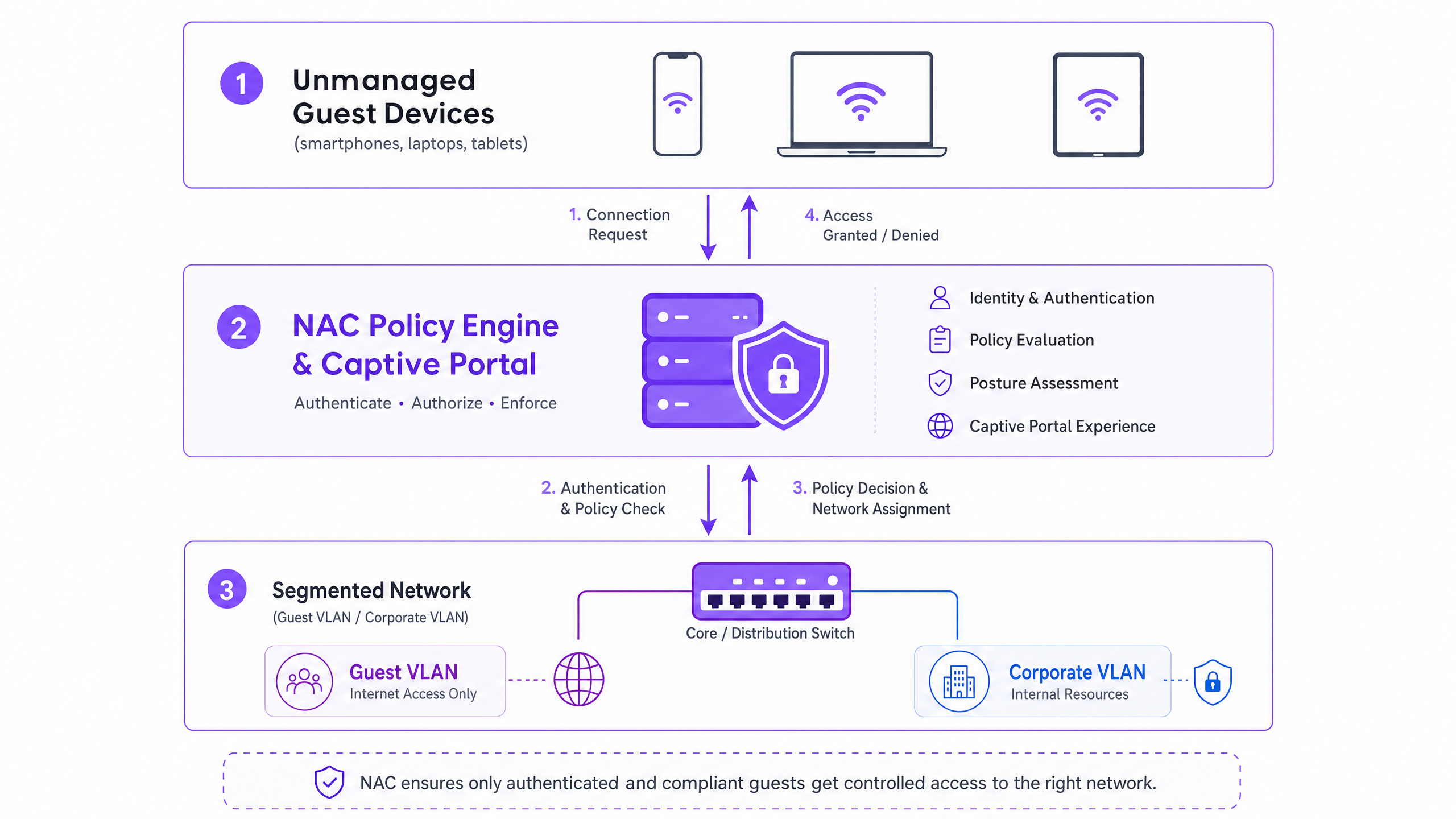
L'architettura per l'accesso sicuro degli ospiti comprende tre livelli funzionali:
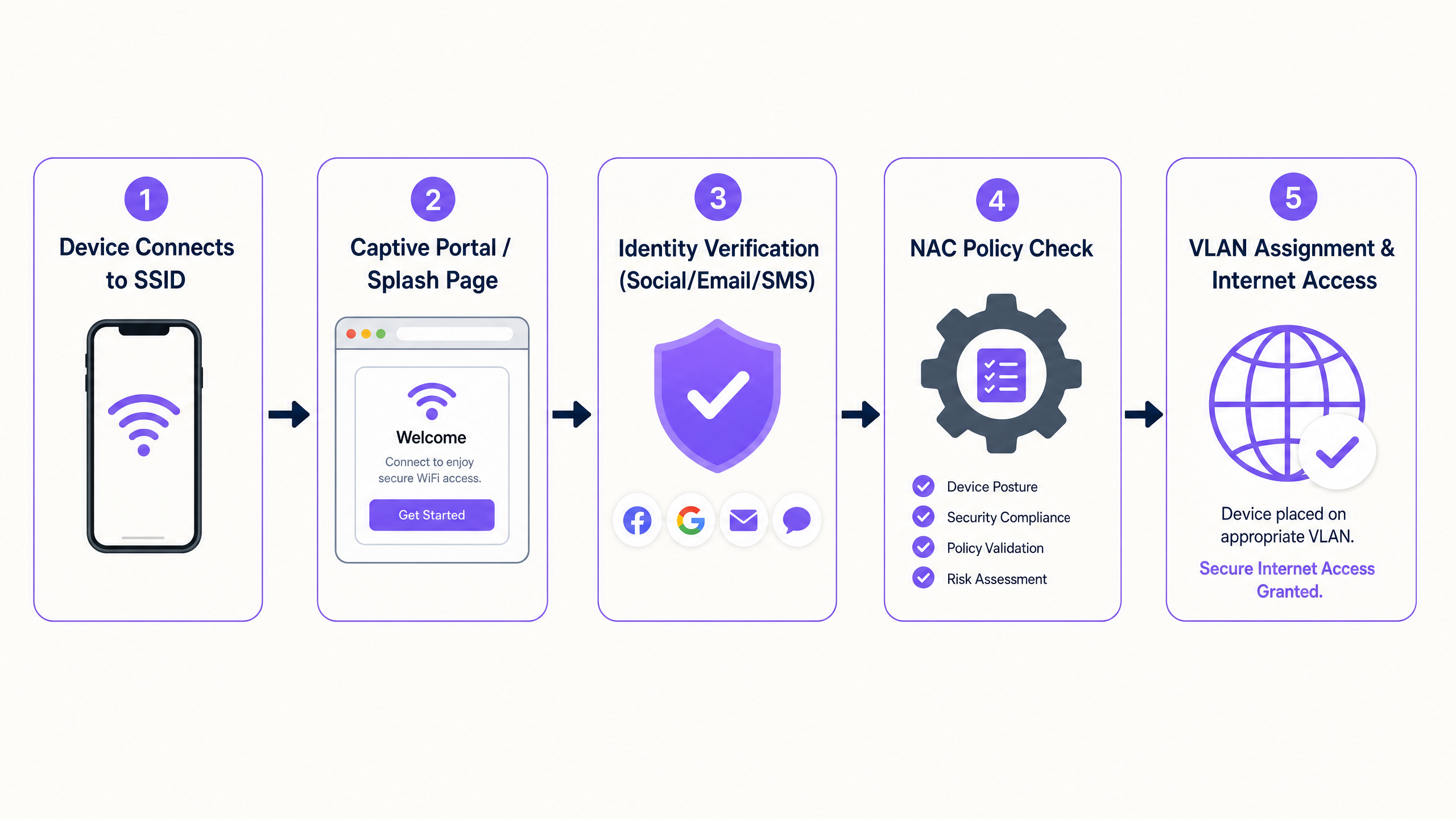
- Autenticazione e Acquisizione dell'Identità: Poiché 802.1X è impraticabile per i dispositivi non gestiti, il livello di autenticazione si basa su un Captive Portal. Questa interfaccia basata sul web intercetta la richiesta HTTP/HTTPS iniziale, reindirizzando l'utente a un flusso di autenticazione. Qui, piattaforme come Guest WiFi di Purple operano come provider di identità, acquisendo le credenziali tramite social login, verifica e-mail o SMS.
- Motore di Policy (RADIUS/NAC): Una volta stabilita l'identità, il motore di policy valuta la richiesta rispetto alle regole di accesso definite. Il sistema determina il segmento di rete appropriato in base all'identità autenticata, al tipo di dispositivo o all'ora del giorno.
- Applicazione al Bordo della Rete: Gli access point wireless e gli switch di bordo applicano la decisione della policy. Il sistema NAC comunica tramite il protocollo RADIUS. Al successo dell'autenticazione, viene restituito un messaggio
Access-Acceptcon attributi specifici di assegnazione VLAN, posizionando il dispositivo sul segmento designato.
WPA3 e Crittografia Wireless Opportunistica (OWE)
La transizione a WPA3 è fondamentale per la sicurezza wireless moderna. Mentre WPA3-SAE sostituisce il vulnerabile WPA2-PSK per le reti personali, WPA3-OWE (Opportunistic Wireless Encryption) è lo standard per le reti ospiti pubbliche. OWE fornisce una crittografia dei dati individualizzata tra il dispositivo client e l'access point senza richiedere una password. Questo elimina la vulnerabilità di trasmissione in chiaro inerente ai tradizionali SSID ospiti aperti, fornendo una base sicura prima ancora che la policy NAC venga applicata.
Randomizzazione dell'Indirizzo MAC e Collegamento dell'Identità
I moderni sistemi operativi (iOS 14+, Android 10+, Windows 10) implementano la randomizzazione dell'indirizzo MAC per proteggere la privacy dell'utente. I dispositivi generano un indirizzo MAC unico e randomizzato per ogni SSID a cui si connettono. Questo rompe fondamentalmente le policy NAC legacy che si basano sull'indirizzo MAC come identificatore persistente per gli ospiti di ritorno.
La soluzione architetturale è spostare il modello di identità dal dispositivo all'utente. Quando un ospite si autentica tramite il Captive Portal, la sessione deve essere collegata alla sua identità verificata (ad esempio, e-mail o numero di telefono) piuttosto che all'indirizzo MAC effimero. La piattaforma WiFi Analytics di Purple gestisce questo in modo nativo, mantenendo profili utente persistenti e registri di conformità tra le sessioni, indipendentemente dalla rotazione dell'indirizzo MAC.
Guida all'Implementazione
L'implementazione di NAC per dispositivi non gestiti richiede un approccio sistematico per garantire la sicurezza senza interrompere le operazioni.
Fase 1: Definire la Segmentazione della Rete e le VLAN
Prima di configurare le policy NAC, la segmentazione della rete sottostante deve essere rigorosa.
- VLAN di Pre-Autenticazione (Quarantena): I dispositivi vengono collocati qui alla connessione iniziale. Questa VLAN deve consentire solo la risoluzione DNS e il traffico HTTP/HTTPS destinato agli indirizzi IP del Captive Portal. Tutto il resto del traffico deve essere bloccato.
- VLAN Ospiti: Dopo l'autenticazione, i dispositivi vengono spostati qui. Questa VLAN deve avere accesso diretto a internet ma negare rigorosamente tutto il routing verso le sottoreti aziendali (spazio RFC 1918) e altri client ospiti (isolamento client).
- VLAN Appaltatori/Fornitori: Un segmento separato per terze parti note che richiedono l'accesso a risorse interne specifiche, controllato da ACL del firewall granulari.
Fase 2: Implementare e Configurare l'Infrastruttura RADIUS
Il server RADIUS agisce come intermediario tra il bordo della rete e il provider di identità. Per le implementazioni aziendali, l'integrazione di un servizio RADIUS ospitato nel cloud con la vostra piattaforma Captive Portal riduce il sovraccarico operativo e migliora la ridondanza. Assicurarsi che i segreti condivisi RADIUS siano crittograficamente robusti e ruotati in base alla vostra policy di sicurezza.
Fase 3: Configurare il Captive Portal e il Flusso di Identità
Configurare il Captive Portal per gestire il flusso di autenticazione. Ciò include l'impostazione del "walled garden" (l'elenco di indirizzi IP e domini accessibili prima dell'autenticazione) per garantire che il portale si carichi correttamente. Fondamentale, il DNS deve funzionare all'interno della VLAN di pre-autenticazione.
Fase 4: Test e Validazione End-to-End
I test devono convalidare sia l'esperienza utente che i confini di sicurezza. Verificare che un dispositivo di test completi con successo il flusso del Captive Portal e riceva la corretta assegnazione VLAN tramite attributi RADIUS. Ancora più importante, convalidare la segmentazione: tentare di effettuare un ping o instradare il traffico dalla Guest VLAN a un indirizzo IP aziendale noto. Questo deve fallire.
Migliori Pratiche e Conformità
- Conformità PCI DSS: Per le sedi nel Retail e nell' Hospitality , il PCI DSS impone un rigoroso isolamento dell'ambiente di dati dei titolari di carta (CDE). Il Guest WiFi deve essere fisicamente o logicamente separato dal CDE, senza routing consentito. Il NAC impone questo a livello di accesso.
- GDPR e Privacy dei Dati: Quando si acquisiscono dati degli ospiti tramite il portale, è necessario ottenere il consenso esplicito. Il Captive Portal deve presentare termini di utilizzo e politiche sulla privacy chiari. La piattaforma sottostante deve supportare politiche automatizzate di conservazione dei dati e richieste di accesso da parte degli interessati.
- Gestione delle Sessioni: Implementare timeout di sessione appropriati. Per gli ambienti retail, un timeout di 2-4 ore è tipico. Per l'hospitality, allineare la durata della sessione al soggiorno dell'ospite. Configurare sempre un timeout di inattività (ad es. 30 minuti) per eliminare le sessioni inattive e liberare i lease DHCP.
Risoluzione dei Problemi e Mitigazione del Rischio
- Errata Configurazione dello Split-Tunnel: Il rischio più grave è una regola del firewall configurata in modo errato che consente il traffico dalla Guest VLAN alla rete aziendale. È essenziale un audit automatizzato regolare degli ACL del firewall.
- Errori di Risoluzione DNS: Se gli ospiti si lamentano che la "pagina di accesso non si carica", il problema è quasi sempre il DNS. Assicurarsi che l'ambito DHCP per la VLAN di pre-autenticazione fornisca un server DNS affidabile e che il firewall consenta il traffico DNS (porta UDP 53) verso tale server.
- Gestione del Timeout RADIUS (Fail-Closed): Configurare gli access point per "fail-closed" (chiusura in caso di errore) se il server RADIUS diventa irraggiungibile. Le configurazioni "fail-open" (apertura in caso di errore) concedono l'accesso non autenticato durante un'interruzione, rappresentando un rischio di sicurezza inaccettabile.
ROI e Impatto sul Business
L'implementazione di un accesso ospite sicuro tramite NAC offre un valore aziendale misurabile:
- Mitigazione del Rischio: Riduzione quantificabile della superficie di attacco garantendo che i dispositivi non gestiti non possano sondare le risorse aziendali.
- Efficienza Operativa: L'onboarding automatizzato riduce i ticket dell'helpdesk IT relativi all'accesso ospite.
- Acquisizione Dati: Utilizzando piattaforme come Purple, il processo di onboarding sicuro acquisisce contemporaneamente dati di prima parte, alimentando la piattaforma WiFi Analytics per aumentare il ROI del marketing.
Key Definitions
Network Access Control (NAC)
A security framework that enforces policy-based access to network resources, evaluating identity and posture before granting access.
Used to ensure that unmanaged guest devices are properly segmented and authenticated before accessing the network.
Captive Portal
A web page that a user of a public-access network is obliged to view and interact with before access is granted.
The primary authentication mechanism for unmanaged devices that cannot use 802.1X certificates.
RADIUS
Remote Authentication Dial-In User Service; a networking protocol that provides centralized Authentication, Authorization, and Accounting (AAA) management.
The protocol used by the NAC policy engine to communicate VLAN assignments to the wireless access points.
Dynamic VLAN Assignment
The process of assigning a network device to a specific Virtual Local Area Network based on authentication credentials rather than the physical port or SSID.
Allows a single guest SSID to securely serve different types of users (guests, contractors) by placing them on different network segments.
WPA3-OWE
Opportunistic Wireless Encryption; a WiFi standard that provides individualized data encryption for open networks without requiring a password.
Secures the wireless transmission for guest networks, preventing passive eavesdropping on public SSIDs.
MAC Address Randomisation
A privacy feature in modern operating systems where the device generates a temporary MAC address for each wireless network it connects to.
Breaks legacy systems that use MAC addresses to track returning guests, necessitating identity-based authentication.
Walled Garden
A restricted environment that controls the user's access to web content and services prior to full authentication.
Required to allow unauthenticated devices to access the captive portal and necessary identity providers (like Facebook or Google) during the login process.
Client Isolation
A wireless network security feature that prevents devices connected to the same access point from communicating directly with each other.
Essential for guest networks to prevent infected guest devices from spreading malware to other guests.
Worked Examples
A large retail chain is rolling out guest WiFi across 500 stores. They need to ensure PCI compliance for their Point of Sale (POS) systems while allowing guests to connect and authenticate via a captive portal. How should the network be segmented and authenticated?
The implementation requires strict logical separation using VLANs and firewall ACLs. 1. The POS systems are placed on a dedicated, highly restricted Corporate VLAN (e.g., VLAN 10). 2. A Pre-Authentication VLAN (VLAN 20) is created for unauthenticated guests, allowing only DNS and HTTPS traffic to the captive portal domain. 3. A Guest VLAN (VLAN 30) is created for authenticated guests, allowing outbound internet access but explicitly denying all RFC 1918 (internal) IP addresses. The NAC system uses RADIUS to move devices from VLAN 20 to VLAN 30 upon successful portal authentication.
A hospital provides WiFi for patients and visitors but is experiencing issues where returning patients must re-authenticate every day because their smartphones randomize their MAC addresses. How can the IT team provide a seamless experience without compromising security?
The IT team must shift the authentication binding from the MAC address to the user identity. They implement a captive portal integrated with a platform like Purple Guest WiFi. When a patient first connects, they authenticate via SMS or email. The platform creates a persistent user profile. Even when the device generates a new MAC address on subsequent visits, the platform recognizes the user upon re-authentication and seamlessly applies the correct NAC policy without requiring a full re-registration.
Practice Questions
Q1. A hotel IT manager is configuring the pre-authentication VLAN for a new captive portal deployment. Guests are reporting that their devices connect to the WiFi, but the login page never appears. What is the most likely configuration error?
Hint: Consider what network services a device needs before it can load a web page via a domain name.
View model answer
The most likely error is a DNS resolution failure within the pre-authentication VLAN. Before a device can load the captive portal, it must resolve the portal's domain name. The DHCP scope for the pre-authentication VLAN must provide a valid DNS server, and the firewall must allow UDP port 53 traffic to that server prior to authentication.
Q2. You are designing the network policy for a stadium. The requirement is to provide internet access to fans while ensuring that the stadium's ticketing scanners (which connect to the same physical access points) have access to internal servers. How do you achieve this securely?
Hint: How can a single physical infrastructure support different logical networks based on identity?
View model answer
Implement dynamic VLAN assignment using 802.1X for the ticketing scanners and a captive portal for the fans. The ticketing scanners authenticate via certificates (802.1X) and are assigned by the RADIUS server to a secure Operations VLAN. Fans connect to an open (or OWE) SSID, authenticate via the captive portal, and are assigned by RADIUS to an isolated Guest VLAN with internet-only access.
Q3. During a security audit, it is discovered that devices on the Guest WiFi can ping the management IP addresses of the network switches. What specific configuration is missing or misconfigured?
Hint: Think about how traffic is controlled between different network segments.
View model answer
The firewall or Layer 3 switch is missing the necessary Access Control Lists (ACLs) to restrict routing from the Guest VLAN. A rule must be implemented that explicitly denies traffic originating from the Guest VLAN subnet destined for any internal subnets (RFC 1918 space), followed by a rule permitting traffic to the internet (0.0.0.0/0).