
Architettura WiFi per hotel: integrazione PMS, Captive Portals e controllo della larghezza di banda
Questa guida fornisce un framework completo per la progettazione di reti WiFi aziendali per hotel. Delinea i requisiti tecnici per la segmentazione VLAN, l'integrazione PMS tramite FIAS, il design del captive portal e il controllo della larghezza di banda per client per garantire sicurezza, conformità e prestazioni ottimali.
Ascolta questa guida
Visualizza trascrizione del podcast
Parte della nostra serie principale: Captive Portal Guide →
Executive Summary
Hotel WiFi architecture is no longer just about coverage; it is about secure segmentation, seamless authentication, and converting a utility cost into a strategic data asset. For IT managers and network architects deploying infrastructure across Hospitality venues, treating guest, staff, and building systems as a single flat network is a critical failure point. This guide details the technical requirements for enterprise-grade hotel WiFi, focusing on three core pillars: integrating the captive portal with your Property Management System (PMS) via FIAS for seamless guest validation, deploying robust VLAN segmentation to meet PCI DSS requirements, and enforcing per-room bandwidth controls to ensure consistent performance. By aligning your hardware strategy - whether deploying Cisco Meraki, HPE Aruba, or Juniper Mist - with intelligent Guest WiFi authentication, you secure your environment while capturing the high-quality first-party data necessary to drive loyalty and revenue.
Listen to the Briefing
Technical Deep-Dive: Architecture and Segmentation
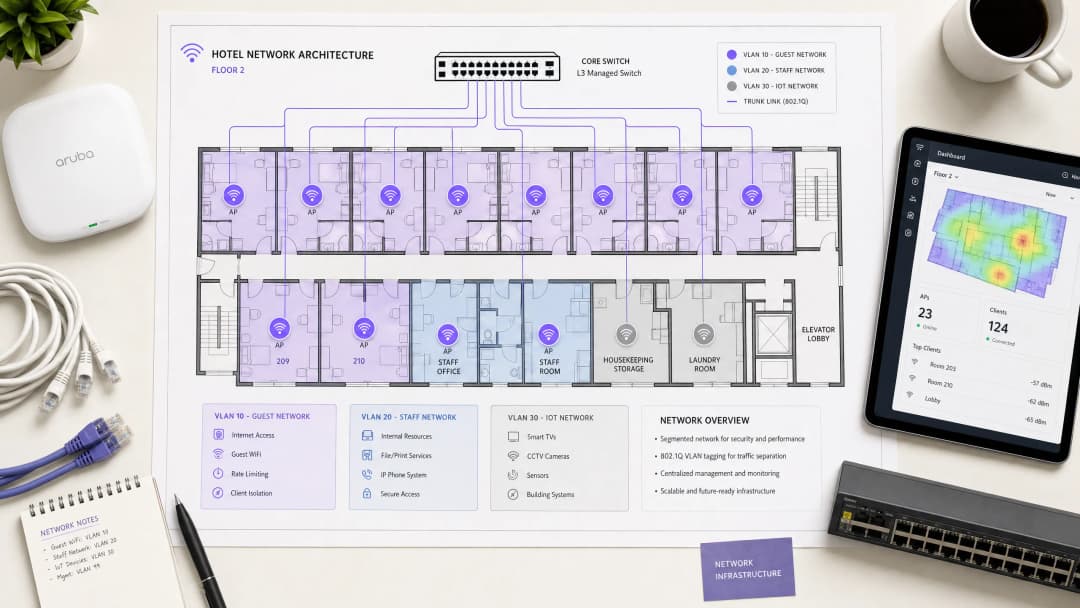
A hospitality network must simultaneously serve guests, staff, and operational technology without compromising the security or performance of any single group. The foundational requirement is logical separation using Virtual Local Area Networks (VLANs) governed by the IEEE 802.1Q standard.
You must isolate traffic at the switch level. Guest WiFi requires its own VLAN, firewalled entirely from internal resources. Staff access should operate on a separate VLAN, secured by 802.1X authentication against a RADIUS server (integrating with identity providers like Microsoft Entra ID or Okta). A third VLAN must isolate IoT devices - smart thermostats, door locks, and CCTV. Finally, any point-of-sale systems must sit on an isolated VLAN to maintain PCI DSS compliance. This segmentation eliminates the lateral movement attack vector, ensuring a compromised guest device cannot probe your property management systems.
Wireless Layer and Access Point Placement
For the radio frequency (RF) layer, WiFi 6 (IEEE 802.11ax) is the baseline standard for new deployments. It introduces Orthogonal Frequency Division Multiple Access (OFDMA), which allows a single access point to serve multiple clients simultaneously. This provides roughly four times the throughput capacity of WiFi 5 and significantly reduces latency in high-density environments.
The physical placement of access points (APs) dictates performance. The traditional model of deploying APs in corridors forces signals to penetrate thick fire doors and bathroom plumbing before reaching the guest. You must deploy an in-room AP model - one AP per room, or one AP per two rooms at minimum. Every AP requires a wired Cat 6A connection back to a PoE switch; mesh backhaul is unsuitable for enterprise hospitality environments.
Property Management System (PMS) Integration
The PMS is the central source of truth for hotel operations. Integrating your WiFi authentication layer with the PMS transforms the guest experience and radically improves data quality.
Authentication via FIAS
When a guest connects to the network, they are redirected to a captive portal. Instead of relying on a generic password or an unverified email form, PMS integration allows the guest to authenticate using their surname and room number. The captive portal platform queries the PMS in real time - typically using the Fidelio Interface Application Specification (FIAS) protocol - to validate the credentials against active reservations. This API validation occurs in under 500 milliseconds.

Session Management and Data Quality
This integration automates session lifecycles. When a guest checks out, the PMS triggers an event that revokes WiFi access immediately. If a guest extends their stay, the network session extends automatically.
More importantly, PMS integration solves the data quality problem. Standard email capture forms often yield error rates of 30%. By validating against the PMS, you capture a verified guest record linked to specific stay data. Purple has processed 440 million logins in 2024, and our data shows that PMS-integrated captive portals achieve validation rates of 70% to 80%. This consented, first-party data flows directly into your CRM, enabling targeted WiFi Analytics and post-stay marketing.
Hai domande sulla tua configurazione specifica?
Il nostro team collabora con gestori di sedi, responsabili IT e ingegneri di rete in 80.000 sedi. Prenota una chiamata di 20 minuti e ti mostreremo come altri professionisti come te hanno risolto il problema.
Captive Portal Design and Security
The captive portal is your primary mechanism for data capture and compliance. It operates by assigning a restricted IP address to the guest device and using a DNS intercept to redirect HTTP traffic to the splash page. Once the guest authenticates and accepts the terms, the RADIUS server authorises the MAC address, and full internet access is granted.
GDPR and Unbundled Consent
Your captive portal must present explicit, granular consent options. Consent to use the network cannot be bundled with consent for marketing communications. Purple's platform handles this natively, tying verifiable consent records to individual user profiles.
Encryption and Client Isolation
You must enable client isolation on the guest SSID. This prevents peer-to-peer communication, stopping one guest device from scanning or accessing another. For encryption, WPA3 is the standard. While WPA3-Enterprise secures the staff network, guest networks should utilise Opportunistic Wireless Encryption (OWE) where supported, providing individualised encryption for open networks without requiring a shared password. For further details on secure access, review our guide on EAP Method WiFi: A Guide to Secure Network Access.
Bandwidth Control and QoS
Bandwidth management is the final pillar of a stable architecture. The primary cause of guest complaints is an under-provisioned internet uplink.
Provisioning the Uplink
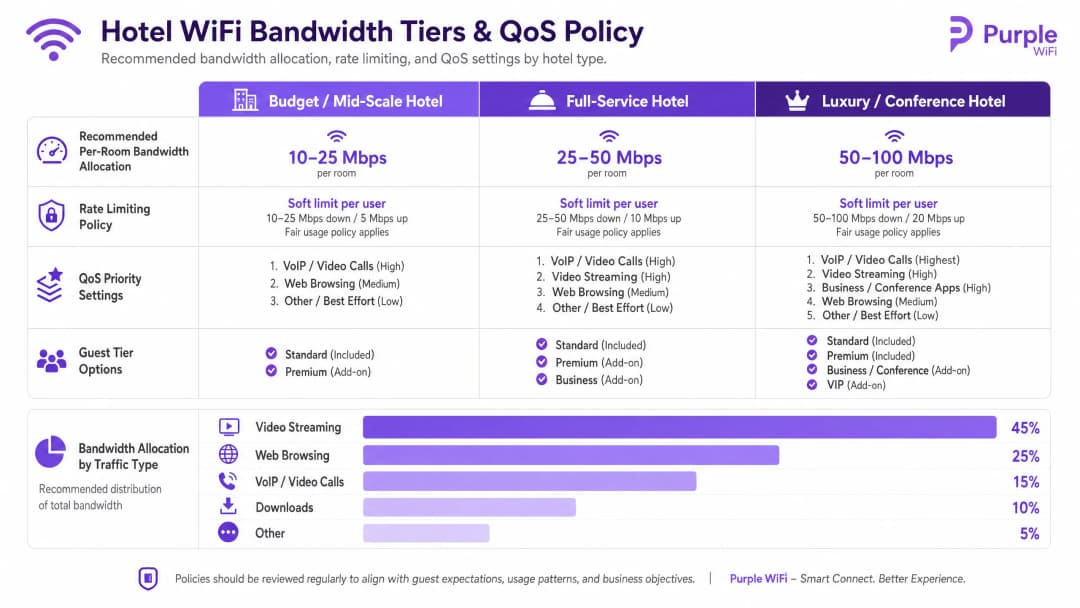
You must provision bandwidth based on peak concurrent demand, not average usage. The recommended allocations are:
- Budget / Mid-Scale: 10-25 Mbps per room
- Full-Service: 25-50 Mbps per room
- Luxury / Conference: 50-100 Mbps per room
For a 200-room property at 80% occupancy, allocating 25 Mbps per room requires a minimum committed uplink of 4 Gbps. A dedicated leased line is mandatory.
Rate Limiting and QoS Policy
To prevent a single user from saturating the uplink, you must enforce per-client rate limiting at the controller level. Whether you deploy Cisco Meraki, HPE Aruba, or Ubiquiti UniFi, configure a hard cap on both downstream and upstream traffic per device.
Above rate limiting sits Quality of Service (QoS). Using the WMM (WiFi Multimedia) standard, you must prioritise traffic into four queues. VoIP and video calls require high priority, ensuring that a guest's Microsoft Teams call is not degraded by another guest downloading a large file on the best-effort queue.
Implementation Guide
Follow this sequence for a successful deployment:
- Conduct an RF Site Survey: Walk the property with a spectrum analyser to identify interference sources before planning AP placement.
- Design the VLAN Architecture: Document your Guest, Staff, IoT, and POS VLANs. Configure explicit default-deny firewall rules between them.
- Size the Uplink: Calculate peak demand based on the 25 Mbps per room baseline and procure a dedicated leased line.
- Deploy the Captive Portal: Integrate the portal with your PMS. Test the authentication flow, consent capture, and session revocation across iOS, Android, and Windows devices.
- Monitor and Adjust: Post-deployment, monitor AP association counts and uplink utilisation to identify dead zones or bandwidth bottlenecks.
Troubleshooting & Risk Mitigation
The most frequent failure modes in hotel WiFi deployments stem from poor planning rather than hardware failure.
- The "Slow WiFi" Complaint: This is rarely an RF issue. First, check your internet uplink utilisation. If the circuit is saturated, no amount of AP tuning will fix the problem. Second, check client distribution across APs; if one AP has 40 clients and an adjacent AP has 5, your band steering configuration requires adjustment.
- The "Data Silo" Pitfall: Deploying a captive portal without a downstream integration wastes the investment. The data captured at login must flow automatically into your marketing automation tools to drive Retail or hospitality loyalty programmes.
- The Flat Network Risk: Failing to segment the wired network undermines wireless security. If a guest plugs a laptop into an exposed Ethernet port in a conference room and accesses the staff VLAN, your architecture has failed. Ensure switch ports in public areas are assigned to the guest VLAN or disabled entirely.
ROI & Business Impact
Enterprise WiFi requires significant capital expenditure, but it delivers measurable returns when architected correctly. The ROI is realised through three channels:
- Operational Efficiency: PMS integration eliminates manual voucher generation and front-desk troubleshooting, returning hours of staff time per week.
- First-Party Data Acquisition: An authenticated captive portal builds a database of verified guest profiles. This data powers direct-booking campaigns, reducing reliance on Online Travel Agencies (OTAs) and their associated commission fees.
- Guest Satisfaction: Reliable, high-speed WiFi is a primary driver of positive reviews. A segmented, properly provisioned network eliminates the friction that leads to negative feedback, directly impacting the property's reputation and average daily rate.
Definizioni chiave
VLAN (Virtual Local Area Network)
Una sottorete logica che raggruppa una collezione di dispositivi sulla stessa infrastruttura fisica, isolando il loro traffico di broadcast dalle altre VLAN.
Essenziale per separare il traffico degli ospiti dai sistemi interni dell'hotel e garantire la conformità PCI DSS.
Captive Portal
Una pagina web che intercetta il traffico di rete e richiede agli utenti di autenticarsi o di accettare i termini prima di concedere l'accesso completo a Internet.
Il punto di contatto principale per l'autenticazione degli ospiti, il consenso GDPR e l'acquisizione di dati di prima parte.
FIAS (Fidelio Interface Application Specification)
Un protocollo universale utilizzato dai sistemi di property management (come Oracle Opera) per comunicare in tempo reale con sistemi di terze parti.
Utilizzato dal Captive Portal per convalidare il numero di camera e il cognome di un ospite rispetto ai record PMS attivi.
WPA3-Enterprise
Il massimo livello di sicurezza WiFi, che richiede ai singoli utenti o dispositivi di autenticarsi utilizzando credenziali uniche tramite un server RADIUS (802.1X).
Lo standard obbligatorio per proteggere le reti del personale e i dispositivi aziendali all'interno dell'hotel.
Client Isolation
Una funzionalità del controller wireless che impedisce ai dispositivi connessi allo stesso SSID di comunicare direttamente tra loro.
Deve essere abilitato su tutte le reti ospiti per prevenire attacchi peer-to-peer e proteggere la privacy degli ospiti.
Rate Limiting
La pratica di limitare la larghezza di banda massima (velocità di upload e download) disponibile per un singolo dispositivo client.
Fondamentale per evitare che un singolo ospite che scarica file di grandi dimensioni comprometta l'esperienza di rete per tutti gli altri.
QoS (Quality of Service) / WMM
Meccanismi di rete che danno priorità a determinati tipi di traffico (come voce o video) rispetto a traffico meno sensibile al fattore tempo (come il download di file).
Garantisce che le chiamate VoIP degli ospiti o gli strumenti di comunicazione del personale funzionino in modo affidabile anche quando la rete è sotto carico pesante.
OFDMA
Orthogonal Frequency Division Multiple Access; una funzionalità del WiFi 6 che consente a un access point di servire più client contemporaneamente dividendo i canali in sotto-canali più piccoli.
Migliora drasticamente le prestazioni e riduce la latenza in aree ad alta densità come le sale conferenze e le lobby degli hotel.
Esempi pratici
Un hotel full-service da 150 camere riscontra frequenti reclami da parte degli ospiti per la lentezza del WiFi durante i picchi serali (19:00 - 22:00). La struttura dispone attualmente di una connessione a banda larga da 1 Gbps e utilizza un'unica rete flat con una password WPA2 condivisa.
- Aggiornare l'uplink internet a una linea dedicata che fornisca almeno 3,75 Gbps (150 camere * 25 Mbps). 2. Implementare la segmentazione VLAN, spostando gli ospiti su una VLAN 10 isolata. 3. Distribuire un captive portal integrato con il PMS Oracle Opera dell'hotel tramite FIAS, consentendo agli ospiti di autenticarsi con numero di camera e cognome. 4. Imporre una limitazione della velocità per singolo client di 25 Mbps in download / 10 Mbps in upload sul controller wireless per evitare che i singoli dispositivi saturino l'uplink.
Un resort di lusso deve implementare un WiFi sicuro per i tablet del personale utilizzati per il servizio di pulizia e manutenzione, assicurando al contempo che i dispositivi degli ospiti non possano accedere ai sistemi di gestione della proprietà.
Creare una VLAN Staff dedicata (VLAN 20) separata dalla VLAN Guest (VLAN 10). Configurare l'SSID dello Staff per utilizzare WPA3-Enterprise, autenticando i tablet rispetto al server RADIUS aziendale tramite 802.1X. Applicare rigide regole di routing inter-VLAN sul firewall: rifiuto predefinito di tutto il traffico tra VLAN 10 e VLAN 20 e autorizzazione per la sola VLAN 20 a raggiungere gli indirizzi IP e le porte specifici richiesti per l'applicazione di pulizia.
Domande di esercitazione
Q1. Un direttore delle operazioni alberghiere desidera implementare una rete WiFi singola e aperta sia per gli ospiti che per le nuove smart TV nelle camere, al fine di "semplificare le cose". Come rispondi in qualità di network architect?
Suggerimento: Considera le implicazioni del movimento laterale e la dimensione del dominio di broadcast.
Visualizza risposta modello
Sconsiglia questo approccio. I dispositivi degli ospiti e i dispositivi IoT (smart TV) devono essere segmentati su VLAN separate. Posizionarli sulla stessa rete aperta espone le TV all'accesso diretto dai dispositivi degli ospiti, creando una vulnerabilità di sicurezza significativa. Inoltre, aumenta il dominio di broadcast, il che può compromettere le prestazioni complessive della rete. Le TV dovrebbero essere collocate su una VLAN IoT isolata (ad es., VLAN 30) con regole firewall rigide.
Q2. Durante un sopralluogo per una nuova struttura da 300 camere, l'appaltatore del cablaggio suggerisce di risparmiare sui costi posizionando un access point nel corridoio ogni quattro camere. Perché questo è problematico?
Suggerimento: Pensa all'attenuazione RF e agli ostacoli fisici in un ambiente alberghiero.
Visualizza risposta modello
Il posizionamento nei corridoi è un approccio di progettazione errato per gli hotel. Il segnale RF deve penetrare pesanti porte tagliafuoco, armadi a specchio e bagni piastrellati per raggiungere il dispositivo dell'ospite in camera, con conseguente grave attenuazione del segnale e scarse prestazioni. Il design corretto prevede un modello AP in camera (un AP per camera, o al minimo uno ogni due camere) per garantire una linea di vista diretta o una copertura con ostruzioni minime.
Q3. Il team di marketing desidera iscrivere automaticamente alla newsletter promozionale settimanale dell'hotel ogni ospite che accede al WiFi. Come dovrebbe essere configurato il Captive Portal per gestire questo aspetto?
Suggerimento: Considera i requisiti del GDPR relativi al consenso combinato.
Visualizza risposta modello
Il Captive Portal deve essere configurato con opzioni di consenso esplicite e separate. Ai sensi del GDPR, il consenso per accedere alla rete WiFi non può essere condizionato al consenso alle comunicazioni di marketing. La splash page deve fornire una casella di opt-in separata e non selezionata per la newsletter. La piattaforma di Purple applica questa separazione in modo nativo, garantendo la conformità e registrando al contempo i consensi verificabili.
Continua a leggere questa serie
Ubiquiti UniFi guest portal non reindirizza: cause e soluzioni
Questa guida isola un errore di reindirizzamento del portale ospiti UniFi analizzando in sequenza lo stato dell'ospite, il reindirizzamento, il percorso di pre-autorizzazione e l'autorizzazione del controller. Fornisce ai team IT locali un metodo collaudato per risolvere i dubbi tra rete ospiti e Hotspot, i passaggi ai portali esterni, i requisiti correnti degli account UniFi OS e i test di isolamento DNS.
Cisco Meraki splash page non funzionante: un diagramma di flusso per la risoluzione dei problemi
Questa guida pratica per il secondo giorno isola i punti in cui un flusso splash Cisco Meraki ha fallito: autorizzazione del client, avvio del reindirizzamento HTTP, raggiungibilità del walled garden o sign-on RADIUS. Fornisce ai team IT delle sedi un percorso di verifica controllato, in modo da poter ripristinare il Guest WiFi senza apportare modifiche generiche a un'intera infrastruttura attiva.
Guida alla configurazione del WiFi ospiti aziendale: segmentazione VLAN, sicurezza e Captive Portals
Questa guida tecnica mostra ai team IT come configurare il WiFi ospiti come servizio di accesso internet controllato, utilizzando la segmentazione VLAN, le policy del firewall e un Captive Portal. Spiega inoltre come i moduli di registrazione e i controlli di onboarding di Purple supportino un'esperienza per i visitatori proporzionata senza indebolire il perimetro che circonda il personale, i pagamenti e i sistemi operativi.
Hai domande sulla tua configurazione specifica?
Il nostro team collabora con gestori di sedi, responsabili IT e ingegneri di rete in 80.000 sedi. Prenota una chiamata di 20 minuti e ti mostreremo come altri professionisti come te hanno risolto il problema.