

Aumentare la produttività del personale filtrando annunci e tracker intrusivi
Questa guida di riferimento tecnico fornisce strategie attuabili per i responsabili IT e gli architetti di rete per implementare il filtraggio a livello DNS sulle reti aziendali. Esplora come il blocco di annunci e tracker intrusivi mitighi i rischi per la sicurezza come il malvertising, recuperando al contempo significativamente la larghezza di banda e aumentando la produttività del personale.
Ascolta questa guida
Visualizza trascrizione del podcast
Riepilogo Esecutivo
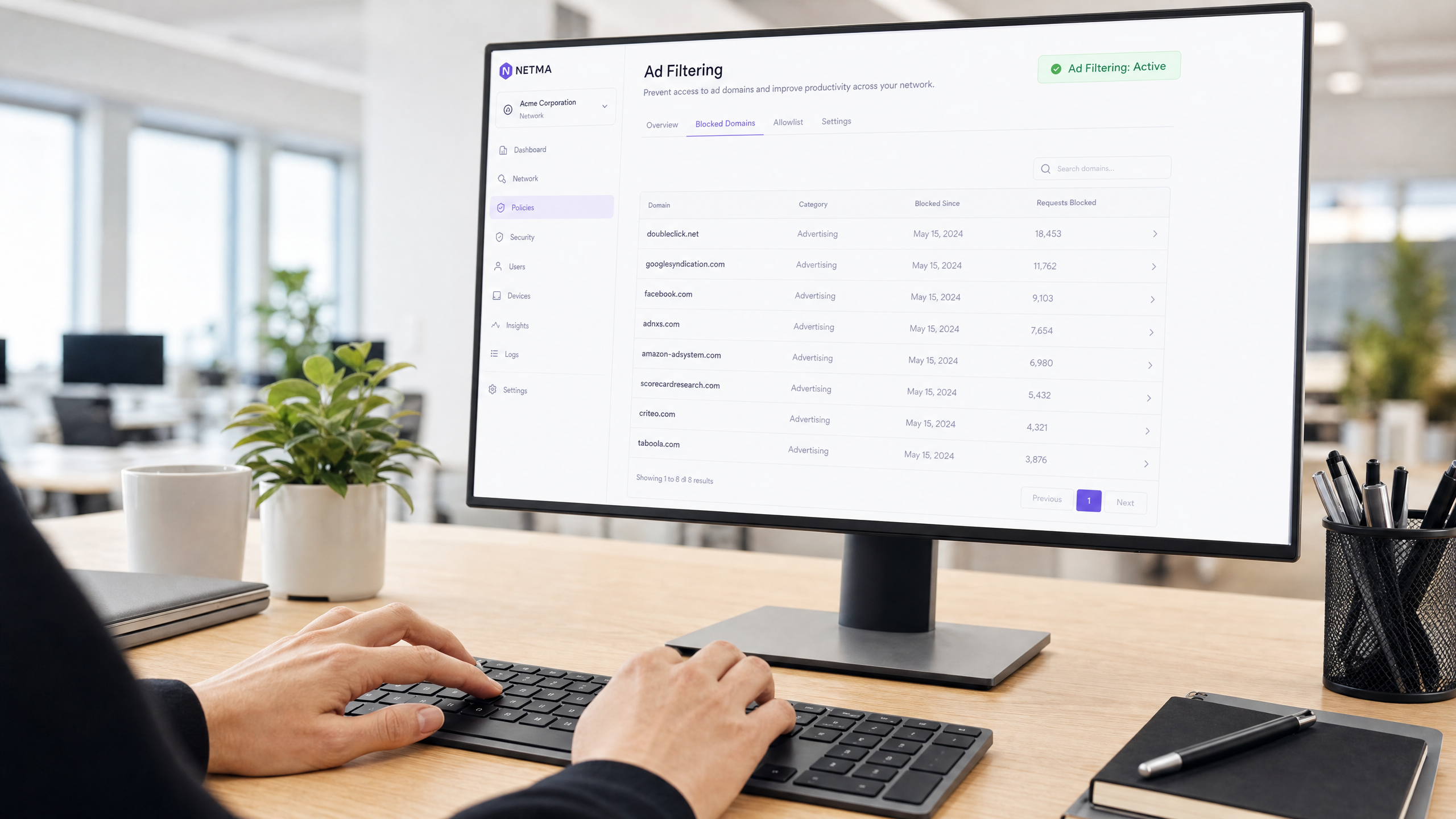
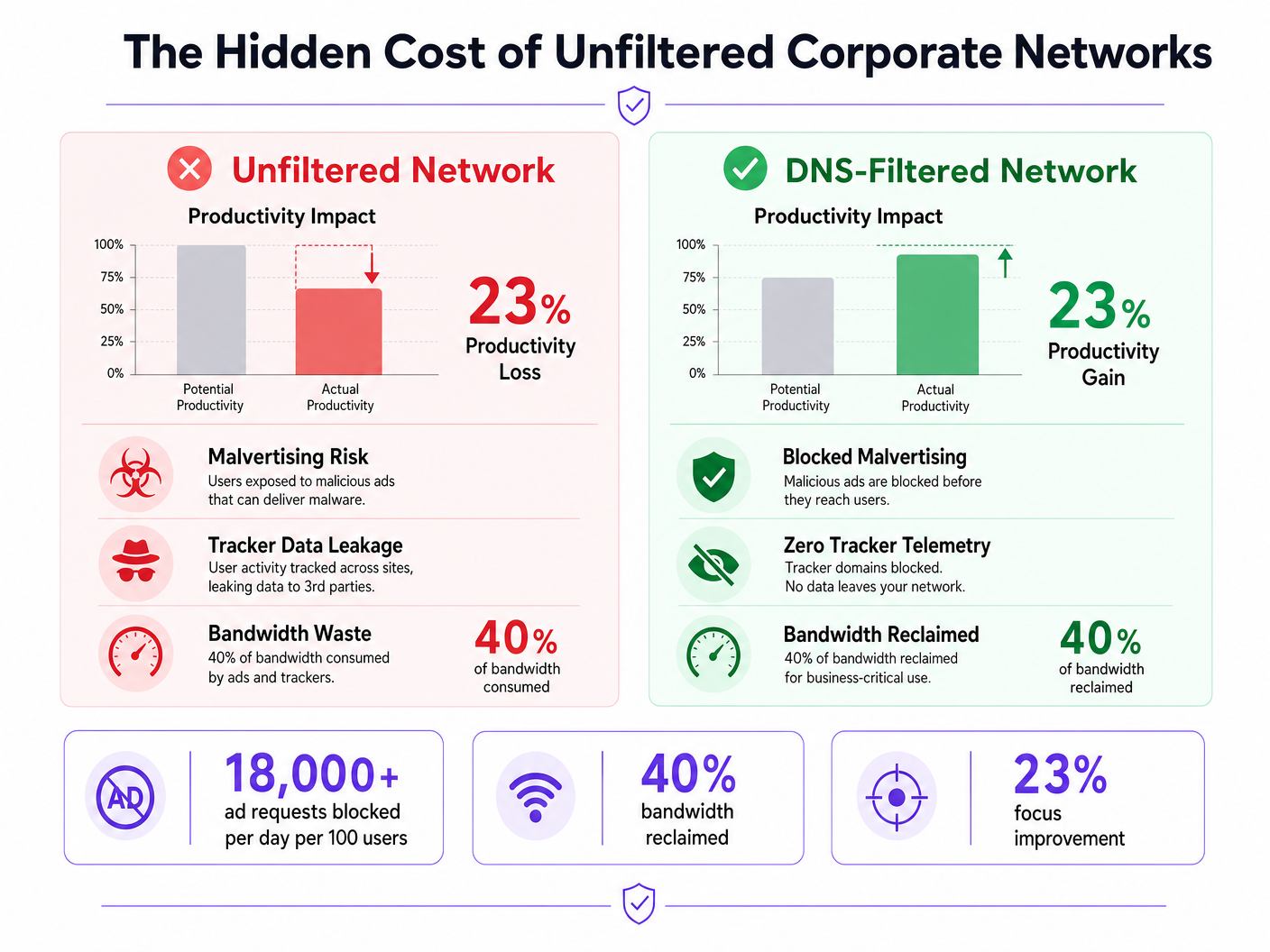
Le reti aziendali non filtrate espongono le organizzazioni a significative vulnerabilità di sicurezza e a perdite di produttività nascoste. Quando i dispositivi del personale si connettono a internet, fino al 40% delle query DNS può provenire da reti pubblicitarie, tracker di terze parti e endpoint di telemetria. Questo traffico in background non solo consuma preziosa larghezza di banda, ma introduce anche vettori di malvertising direttamente nell'ambiente aziendale.
Per i responsabili IT e gli architetti di rete che operano in Ospitalità , Vendita al Dettaglio , Sanità e Trasporti , l'implementazione del filtraggio di annunci e tracker a livello di rete è un intervento ad alto ROI. Intercettando le richieste a livello DNS, le organizzazioni possono impedire l'esecuzione di payload dannosi, garantire la conformità alle normative sulla privacy dei dati come il GDPR e recuperare la produttività persa. Questa guida illustra l'architettura tecnica del filtraggio DNS, le strategie di implementazione indipendenti dal fornitore e gli impatti aziendali misurabili per le moderne reti aziendali.
Approfondimento Tecnico
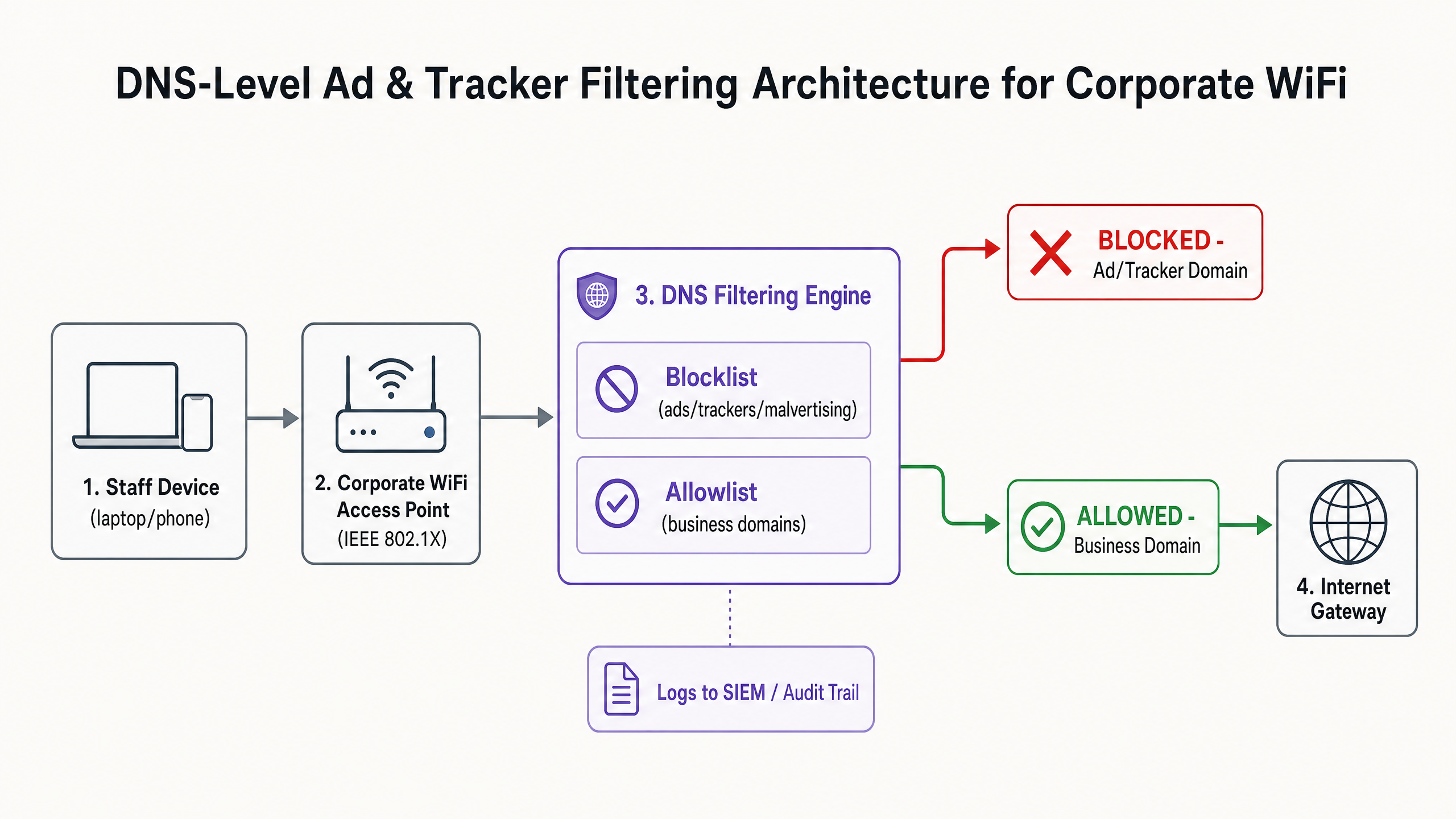
La base per un'efficace mitigazione di annunci e tracker è il filtraggio a livello DNS. A differenza delle estensioni basate su browser che operano a livello di applicazione e richiedono la gestione individuale degli endpoint, il filtraggio DNS fornisce un'applicazione a livello di infrastruttura. Quando un dispositivo—sia esso gestito dall'azienda o Bring Your Own Device (BYOD)—tenta di risolvere un dominio, il resolver DNS verifica la query rispetto a blocklist di threat intelligence curate.
Architettura e Flusso
Il motore di filtraggio si trova tra l'access point e il gateway internet. Se un dominio richiesto corrisponde a una rete pubblicitaria nota (ad esempio, doubleclick.net) o a un tracker, il resolver restituisce una risposta nulla (0.0.0.0) o un errore NXDOMAIN. Il contenuto dannoso o distraente non raggiunge mai l'endpoint.
Threat Intelligence e Blocklist
Un'architettura di filtraggio robusta si basa su una threat intelligence dinamica. Le blocklist statiche sono insufficienti contro i domini di malvertising che ruotano rapidamente. Le implementazioni aziendali aggregano tipicamente più fonti, incluse liste open-source (come EasyList ed EasyPrivacy) e feed di minacce commerciali. Queste liste devono categorizzare i domini in modo accurato per prevenire falsi positivi che potrebbero interrompere le applicazioni business-critical.
Gestione del DNS Crittografato (DoH/DoT)
I moderni sistemi operativi e browser si affidano sempre più al DNS over HTTPS (DoH) o al DNS over TLS (DoT), crittografando le query verso resolver esterni come Cloudflare (1.1.1.1) o Google (8.8.8.8). Questo aggira il filtraggio DNS locale. Per mantenere il controllo, gli architetti di rete devono configurare i firewall di bordo per bloccare la porta TCP/UDP 853 (DoT) in uscita e intercettare o bloccare gli indirizzi IP noti dei provider DoH, costringendo i client a ripiegare sul resolver locale fornito.
Guida all'Implementazione
L'implementazione del filtraggio DNS richiede un approccio graduale per evitare di interrompere le operazioni. Un'implementazione improvvisa e aggressiva di blocklist romperà inevitabilmente le applicazioni SaaS legittime e genererà ticket di helpdesk.
Fase 1: Segmentazione della Rete e Autenticazione
Prima di modificare la risoluzione DNS, assicurarsi che la rete del personale sia logicamente separata dagli ambienti Guest WiFi e IoT utilizzando le VLAN. Implementare WPA3-Enterprise con autenticazione IEEE 802.1X. Ciò garantisce che solo gli utenti autenticati accedano all'SSID aziendale e consente l'applicazione di policy per utente. Se si fa ancora affidamento su chiavi pre-condivise (PSK), l'aggiornamento del modello di autenticazione è il passo preliminare. Per ulteriori approfondimenti sulla modernizzazione della vostra infrastruttura, consultate la nostra guida su Office Wi Fi: Ottimizzate la Vostra Moderna Rete Wi-Fi per Ufficio .
Fase 2: Implementazione del Resolver
Selezionare un'architettura di filtraggio DNS che si allinei con le vostre capacità operative:
- Appliance On-Premises: Offre la latenza più bassa e garantisce che tutti i log delle query rimangano all'interno della vostra infrastruttura, cruciale per i requisiti di sovranità dei dati.
- Servizio Cloud-Based: Delega la manutenzione della threat intelligence al fornitore, ideale per ambienti di vendita al dettaglio o ospitalità distribuiti.
- Modello Ibrido: Utilizza un forwarder locale per la risoluzione DNS interna, instradando le query esterne a un servizio cloud filtrato.
Fase 3: Modalità Solo Monitoraggio
Implementare il motore di filtraggio in modalità solo monitoraggio per 14-28 giorni. Non bloccare alcun traffico. Invece, acquisire i log delle query nel vostro SIEM per stabilire una baseline. Analizzare i domini più bloccati rispetto alle vostre applicazioni aziendali.
Fase 4: Configurazione e Applicazione della Allowlist
Basandosi sulla fase di monitoraggio, costruire una allowlist esplicita per i domini di terze parti necessari utilizzati dal vostro CRM, ERP o gateway di pagamento. Una volta verificata la allowlist, passare il motore alla modalità di applicazione. Assicurarsi di mantenere un chiaro audit trail di tutte le modifiche di configurazione e degli eventi bloccati.
Best Practice
Per garantire un'implementazione di successo e mantenere l'integrità della rete, attenersi alle seguenti best practice indipendenti dal fornitore:
- Comunicare Prima dell'Applicazione: Notificare il personale prima di attivare il filtraggio. Inquadrarlo come un aggiornamento di sicurezza e prestazioni piuttosto che una misura di sorveglianza delle risorse umane. Fornire un processo chiaro, supportato da SLA, affinché gli utenti possano richiedere lo sblocco dei domini.
- Applicare l'Assegnazione DNS DHCP: Impedire agli utenti di configurare manualmente server DNS alternativi applicando l'uso del resolver fornito da DHCP.
- Rivedere Regolarmente la Allowlist: Le applicazioni aziendali si evolvono. Condurre revisioni trimestrali della vostra allowlist per rimuovere i domini deprecati e valutarenuovi requisiti.
- Integrare con la protezione degli endpoint: Il filtraggio DNS è una difesa perimetrale. Deve essere abbinato a robuste soluzioni di Endpoint Detection and Response (EDR) per proteggere dalle minacce introdotte tramite USB o allegati e-mail.
Risoluzione dei problemi e mitigazione del rischio
Il rischio più significativo durante l'implementazione è l'eccessivo blocco, che ha un impatto diretto sulle operazioni aziendali.
Falsi positivi
Quando un servizio legittimo non si carica, spesso si affida a un dominio di tracciamento in background per l'autenticazione o l'analisi.
- Mitigazione: Fornire all'helpdesk capacità di bypass temporaneo o un flusso di lavoro di allowlisting semplificato. Utilizzare i log delle query per identificare lo specifico dominio bloccato che causa il fallimento.
Bypass DNS crittografato
Utenti tecnicamente esperti o malware sofisticati potrebbero tentare di bypassare il resolver locale utilizzando DoH/DoT.
- Mitigazione: Implementare regole firewall rigorose che bloccano il traffico in uscita verso resolver DoH noti. Monitorare i log del firewall per tentativi di connessione ripetuti alla porta 853.
Interferenza della rete ospite
L'applicazione di politiche di filtraggio aggressive per il personale alla rete ospite può degradare l'esperienza del visitatore.
- Mitigazione: Mantenere un rigoroso isolamento VLAN. Applicare un profilo di filtraggio più leggero e incentrato sulla sicurezza (blocco di malware e contenuti per adulti) alla rete ospite, gestito tramite una piattaforma WiFi Analytics dedicata.
ROI e impatto aziendale
L'impatto aziendale del filtraggio a livello di rete si estende oltre la sicurezza; è un fattore di produttività misurabile.
Recupero della larghezza di banda
Eliminando fino al 40% delle richieste in background non necessarie, le organizzazioni recuperano una larghezza di banda significativa. Ciò riduce la necessità di costosi aggiornamenti dei circuiti WAN e migliora le prestazioni delle applicazioni cloud critiche.
Aumento della produttività
Ridurre l'esposizione ad annunci intrusivi e malvertising minimizza le interruzioni cognitive. Sebbene le cifre esatte varino, mitigare queste distrazioni recupera centinaia di ore di lavoro focalizzato annualmente in tutta l'azienda. Per strategie simili applicate ad ambienti educativi, consultare la nostra guida su Minimising Student Distractions with Network-Level Ad Blocking e la versione spagnola Minimizar las distracciones de los estudiantes con el bloqueo de anuncios a nivel de red .
Conformità e riduzione del rischio
Il filtraggio dei tracker a livello di rete dimostra una conformità proattiva con i framework di protezione dei dati come GDPR e PCI DSS. Prevenendo l'esfiltrazione dei dati e bloccando i payload di malvertising prima che raggiungano l'endpoint, le organizzazioni riducono significativamente la loro esposizione al rischio e i potenziali costi di risposta agli incidenti.
Ascolta il Briefing
Per un approfondimento sulle strategie di implementazione, ascolta il nostro briefing audio:
Definizioni chiave
DNS-Level Filtering
The process of blocking access to specific domains by intercepting DNS queries and returning a null response or redirect, preventing the device from connecting to the target server.
Used by IT teams to enforce security and productivity policies across an entire network without requiring endpoint software.
Malvertising
The use of online advertising to distribute malware. Malicious code is injected into legitimate advertising networks and displayed on trusted websites.
A primary vector for ransomware and spyware, making ad blocking a critical cybersecurity control, not just a productivity tool.
DNS over HTTPS (DoH)
A protocol for performing remote Domain Name System resolution via the HTTPS protocol, encrypting the data between the DoH client and the DoH-based DNS resolver.
While improving user privacy, DoH can bypass corporate DNS filtering policies if not actively managed and blocked at the firewall.
IEEE 802.1X
An IEEE Standard for port-based Network Access Control (PNAC), providing an authentication mechanism to devices wishing to attach to a LAN or WLAN.
Essential for enterprise WiFi security, replacing shared passwords (PSKs) with individual user credentials or certificates.
Telemetry
The automatic recording and transmission of data from remote or inaccessible sources to an IT system in a different location for monitoring and analysis.
Often generated by software and devices tracking user behaviour; blocking unnecessary telemetry reclaims bandwidth and protects privacy.
False Positive
An error in data reporting in which a test result improperly indicates presence of a condition, such as when a legitimate business domain is incorrectly categorised as malware or advertising.
The main cause of operational disruption during DNS filtering rollouts, mitigated by proper allowlisting.
SIEM (Security Information and Event Management)
A solution that provides real-time analysis of security alerts generated by applications and network hardware.
DNS query logs should be exported to the SIEM to identify compromised devices attempting to contact command-and-control servers.
Allowlist
A mechanism that explicitly allows access to specific entities (domains, IP addresses) while denying access to all others by default, or overriding a broader blocklist.
Critical for ensuring third-party integrations (like payment gateways or CRMs) function correctly behind a strict DNS filter.
Esempi pratici
A 200-room hotel needs to secure its staff network (used by reception, housekeeping, and management) against malvertising, while ensuring the property management system (PMS) remains fully operational. The current network uses a single WPA2-PSK SSID for all staff.
- Upgrade the staff network to WPA3-Enterprise using IEEE 802.1X authentication to ensure individual accountability and encryption.
- Segment the staff network onto a dedicated VLAN, isolated from the guest WiFi.
- Deploy a cloud-based DNS filtering service with a local forwarder.
- Run the filter in monitor-only mode for 14 days.
- Analyze logs to identify all domains accessed by the PMS (e.g., third-party booking engine APIs, payment gateways) and add them to the allowlist.
- Enforce blocking for 'Advertising', 'Trackers', and 'Malware' categories.
- Block outbound TCP/UDP port 853 at the firewall to prevent DoT bypass.
A retail chain is experiencing high latency on its point-of-sale (POS) terminals during peak hours. Packet analysis reveals 35% of DNS traffic consists of tracking and telemetry requests from staff BYOD devices connected to the corporate network.
- Implement DNS-level filtering targeting 'Trackers' and 'Advertising' categories.
- Ensure POS terminals are on a strictly isolated VLAN with restricted outbound internet access (PCI DSS Requirement 1.3).
- Route the BYOD staff VLAN through the DNS filtering engine.
- Communicate the change to staff, emphasising the performance benefits for the POS systems.
- Monitor bandwidth utilisation post-enforcement to quantify the reclaimed capacity.
Domande di esercitazione
Q1. Your organisation is implementing DNS filtering. During the monitor-only phase, you notice that a high volume of requests to 'api.segment.io' are being flagged under the 'Trackers' category. This domain is used by your marketing team's analytics dashboard. How should you proceed?
Suggerimento: Consider the impact of blocking versus the business requirement for the tool.
Visualizza risposta modello
Add 'api.segment.io' to the explicit allowlist before moving to enforcement mode. While it is technically a tracker, it is a sanctioned business application. Failing to allowlist it will break the marketing dashboard and generate support tickets.
Q2. After deploying DNS filtering, you observe that devices using the latest version of a popular web browser are still loading ads and resolving domains that should be blocked. Older devices are filtered correctly. What is the most likely cause?
Suggerimento: Modern browsers often try to encrypt their DNS queries.
Visualizza risposta modello
The modern browser has likely enabled DNS over HTTPS (DoH) by default, bypassing the local DNS resolver and communicating directly with an external provider (like Cloudflare). You must configure the firewall to block or intercept known DoH IP addresses to force the browser to fall back to the local filtered DNS.
Q3. A venue operations director asks if they can use the same aggressive ad-blocking DNS policy on the public Guest WiFi as they do on the corporate Staff WiFi to save bandwidth. What is the architectural recommendation?
Suggerimento: Consider the user experience and the different risk profiles of staff versus guests.
Visualizza risposta modello
No. The Staff and Guest networks must remain on isolated VLANs with separate DNS policies. Applying aggressive corporate filtering to the Guest WiFi will likely break captive portals, cause false positives on diverse guest devices, and lead to a poor user experience. Guest networks should use a lighter filtering profile focused strictly on malware and legal compliance.