
Bar e Pub WiFi: Guida Completa all'Installazione e al Marketing
Questa guida tecnica completa illustra l'architettura, l'implementazione e la monetizzazione del guest WiFi di livello enterprise per bar e pub. Fornisce piani d'azione per i responsabili IT al fine di implementare reti sicure e ad alte prestazioni che favoriscano la conformità, acquisiscano dati dei clienti di prima parte e alimentino campagne di marketing mirate per aumentare il ROI.
Ascolta questa guida
Visualizza trascrizione del podcast
Riepilogo Esecutivo
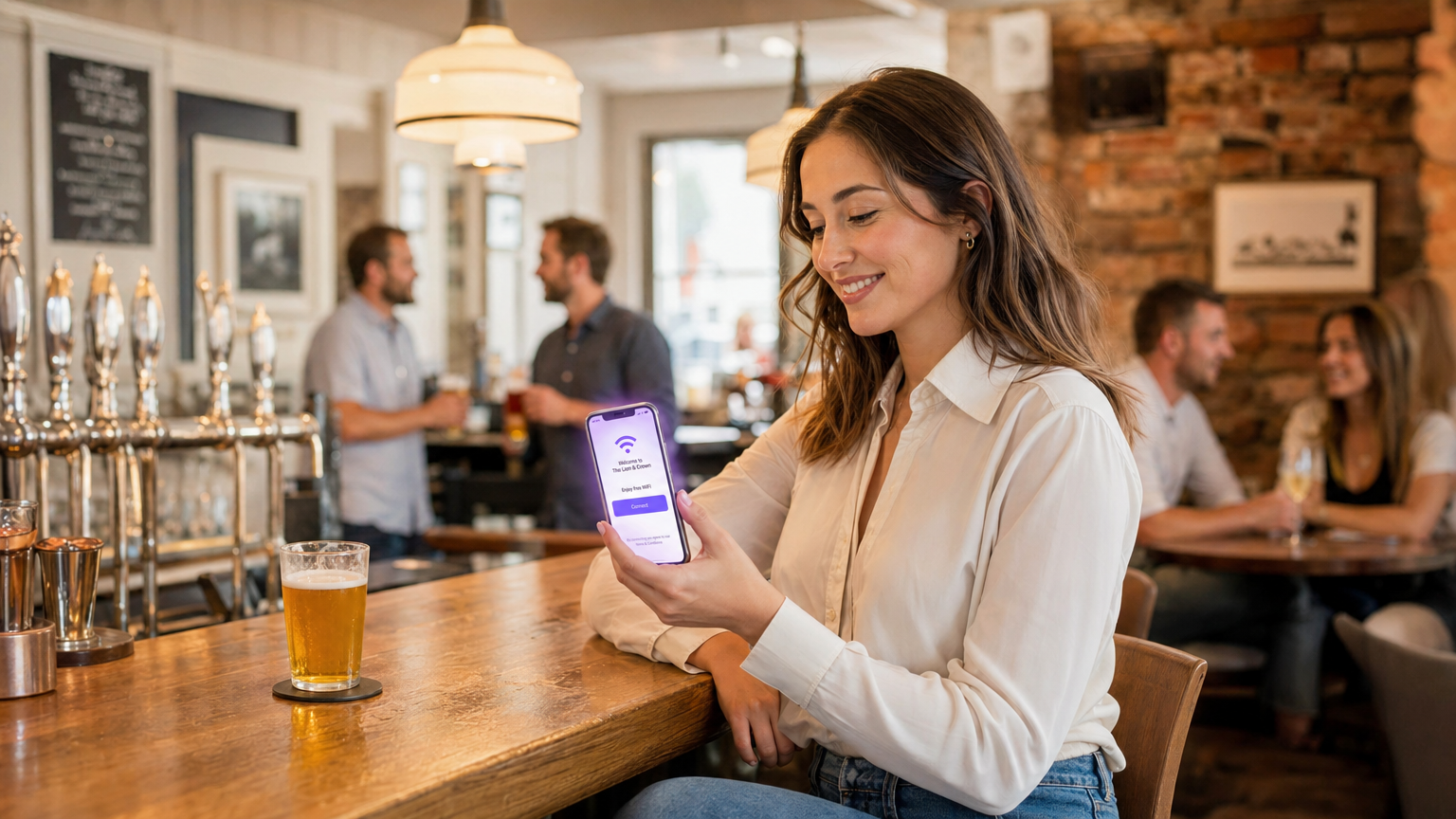
Implementare un robusto WiFi per bar e pub non è più semplicemente un costo operativo; è un requisito fondamentale per aumentare l'affluenza, migliorare la fidelizzazione dei clienti e sbloccare nuove fonti di reddito. Per i responsabili IT, i CTO e i direttori delle operazioni delle strutture ricettive, la sfida consiste nel passare da connessioni internet legacy e non gestite a reti di livello enterprise, sicure e ricche di dati. Questa guida fornisce un piano completo per l'architettura, l'implementazione e la monetizzazione del guest WiFi per ristoranti, bar e pub.
Integrando un sofisticato Captive Portal con analisi robuste, le strutture possono raccogliere senza problemi dati dei clienti di prima parte, rimanendo pienamente conformi agli standard GDPR e PCI DSS. Questa infrastruttura non solo garantisce un'esperienza di connettività ad alte prestazioni per gli avventori, ma alimenta anche campagne di marketing mirate che trasformano i visitatori occasionali in sostenitori fedeli. Sia che gestiate una singola location premium o una vasta proprietà, l'implementazione di queste best practice neutrali rispetto al fornitore trasformerà il vostro WiFi da centro di costo a motore misurabile del ROI.
Approfondimento Tecnico
Architettura di Rete e Selezione Hardware
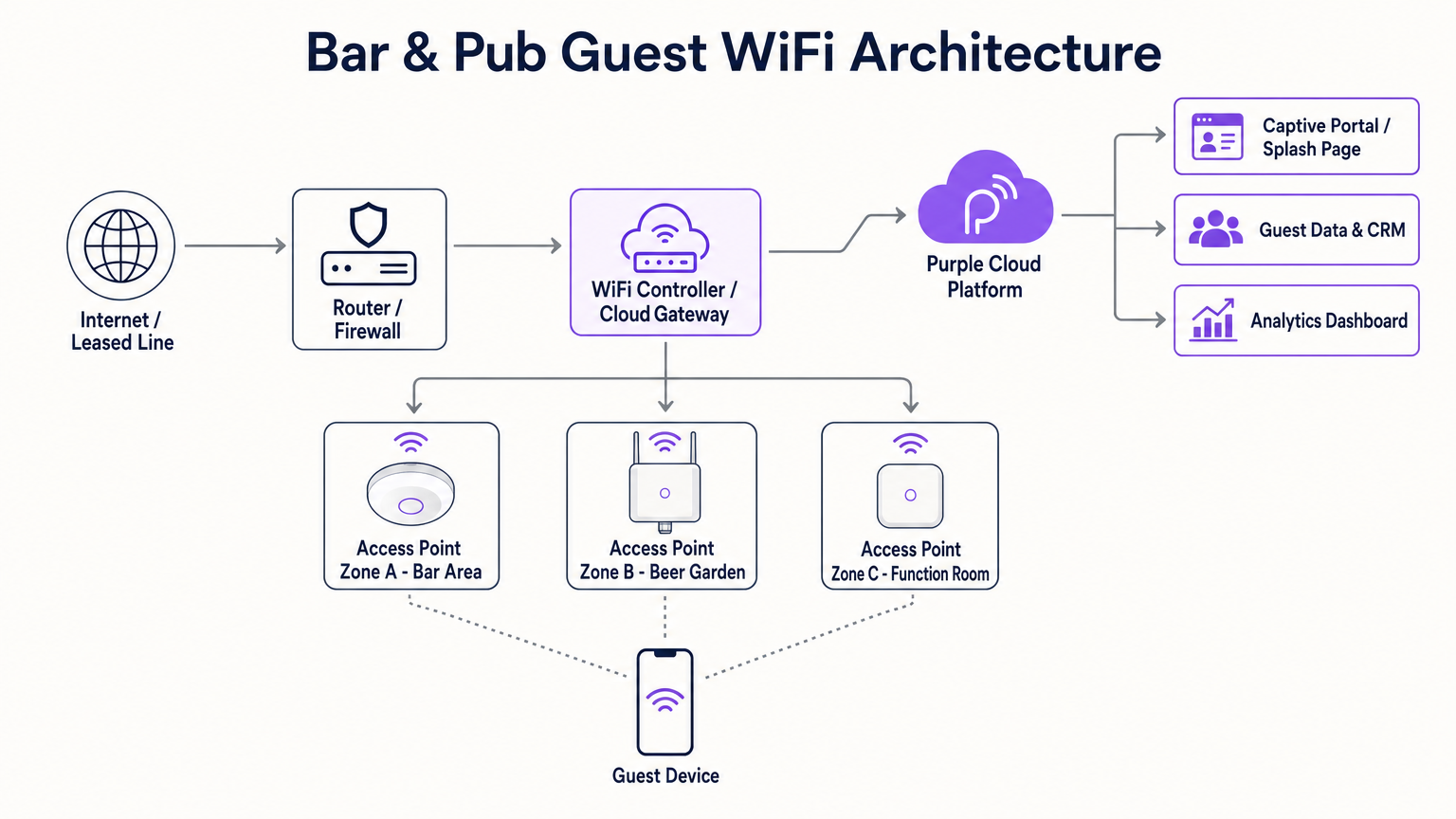
La base di qualsiasi implementazione WiFi ad alte prestazioni nel settore dell'ospitalità è un'architettura di rete resiliente e scalabile. I router di livello consumer sono del tutto insufficienti per le esigenze di densità e throughput di un bar o pub moderno. Al contrario, le strutture richiedono access point (AP) di livello enterprise gestiti tramite un controller LAN wireless centralizzato o un gateway basato su cloud. Ciò consente il roaming senza interruzioni, l'applicazione unificata delle policy e il monitoraggio proattivo su tutta la proprietà.
Nella scelta dell'hardware, gli AP dual-band che supportano 802.11ac (Wi-Fi 5) o, preferibilmente, 802.11ax (Wi-Fi 6) sono essenziali. Il Wi-Fi 6 offre vantaggi significativi in ambienti ad alta densità, utilizzando l'Orthogonal Frequency-Division Multiple Access (OFDMA) e il Multi-User Multiple Input Multiple Output (MU-MIMO) per gestire in modo efficiente le connessioni simultanee. Per la pianificazione della copertura, una regola generale è un AP ogni 1.500-2.000 piedi quadrati di spazio interno, sebbene ciò debba essere convalidato tramite un'indagine di sito professionale predittiva e attiva per tenere conto dell'attenuazione dovuta a pareti in mattoni, infissi metallici e alta densità di avventori.
Le aree esterne, come i giardini della birra e le terrazze, richiedono AP specializzati con classificazione IP67 per resistere ai fattori ambientali. Inoltre, la connettività di backhaul è fondamentale. Mentre una connessione FTTC standard può essere sufficiente per un piccolo pub, le strutture più grandi o quelle che dipendono fortemente dai sistemi Point of Sale (POS) basati su cloud dovrebbero investire in una linea dedicata. Come dettagliato nella nostra guida su Cos'è una linea dedicata? Internet aziendale dedicato , questa fornisce una connessione simmetrica e non contesa, garantendo che il traffico degli ospiti non rallenti le operazioni aziendali critiche.
Segmentazione della Rete e Sicurezza
Sicurezza e conformità sono fondamentali. La rete WiFi per gli ospiti deve essere rigorosamente separata dalla rete aziendale, in particolare dall'infrastruttura POS e di elaborazione dei pagamenti. Ciò si ottiene tipicamente tramite Virtual Local Area Networks (VLAN) e robuste regole firewall. La mancata segmentazione della rete costituisce una grave violazione della conformità PCI DSS, esponendo la struttura a significativi rischi finanziari e reputazionali.
Inoltre, l'implementazione di un Captive Portal non è solo uno strumento di marketing; è un controllo di sicurezza critico. Il portale autentica gli utenti e impone l'accettazione di una Politica di Utilizzo Accettabile (AUP), mitigando la responsabilità della struttura per attività illegali condotte sulla rete. Il filtraggio dei contenuti a livello DNS o firewall dovrebbe essere implementato anche per bloccare domini dannosi e contenuti inappropriati, garantendo un ambiente di navigazione sicuro.
Guida all'Implementazione
Fase 1: Indagine del Sito e Pianificazione della Capacità
Prima di acquistare l'hardware, condurre un'indagine completa del sito. Identificare le zone ad alta densità (ad esempio, il bar principale, le sale eventi) e le potenziali fonti di interferenza. Calcolare il numero previsto di dispositivi simultanei, considerando che la maggior parte degli avventori porta almeno uno, e spesso due, dispositivi connessi. Questi dati determineranno la densità AP richiesta, il budget PoE dello switch e la capacità di backhaul internet.
Fase 2: Acquisizione e Installazione Hardware
Selezionare apparecchiature di rete di livello enterprise da fornitori affidabili. Assicurarsi che gli switch forniscano sufficiente Power over Ethernet (PoE+) per alimentare tutti gli AP. Quando si montano gli AP, il posizionamento a soffitto è generalmente ottimale per una propagazione senza ostacoli. Assicurarsi che i cablaggi siano correttamente certificati e che gli AP esterni siano correttamente messi a terra e sigillati contro le intemperie.
Fase 3: Configurazione e Segmentazione della Rete
Configurare il router core e gli switch per stabilire VLAN isolate per il traffico aziendale, i sistemi POS, i dispositivi IoT (ad esempio, illuminazione intelligente, HVAC) e il guest WiFi. Implementare politiche di bandwidth shaping e Quality of Service (QoS) sulla VLAN degli ospiti per impedire ai singoli utenti di monopolizzare la connessione, garantendo un livello di servizio di base per tutti gli avventori. Per maggiori informazioni sulla pianificazione della larghezza di banda, consultare la nostra guida completa: Hotel WiFi Speed: What Guests Expect and How to Deliver It . (I parlanti tedeschi possono anche consultare Hotel WiFi-Geschwindigkeit: Was Gäste erwarten und wie man es liefert ).
Fase 4: Configurazione del Captive Portal e dell'Autenticazione
Integrare una robusta soluzione Captive Portal, come la piattaforma Guest WiFi di Purple.. Progetta la splash page in linea con il branding del locale, mantenendo il processo di autenticazione il più semplice possibile. I metodi di autenticazione comuni includono la registrazione via email, la verifica SMS o il social login. Fondamentale è assicurarsi che il processo di acquisizione dati includa caselle di spunta esplicite e granulari per il consenso alle comunicazioni di marketing, accompagnate da un chiaro link all'informativa sulla privacy per mantenere la conformità GDPR.
Fase 5: Integrazione di Analytics e CRM
Collega la piattaforma WiFi al tuo CRM o software di email marketing esistente. Ciò consente il trasferimento senza interruzioni dei dati del profilo acquisiti e delle metriche comportamentali (ad esempio, frequenza delle visite, tempo di permanenza). Configura flussi di lavoro automatizzati, come l'invio di un'email di benvenuto ai visitatori per la prima volta o un'offerta di re-engagement ai clienti che non hanno visitato il locale negli ultimi 30 giorni.
Migliori Pratiche
- Prioritizzare l'Onboarding Senza Attriti: Il captive portal dovrebbe essere intuitivo e ottimizzato per i dispositivi mobili. Evita di richiedere troppe informazioni personali in anticipo; un indirizzo email o un numero di telefono sono sufficienti per la profilazione iniziale.
- Sfruttare l'Autenticazione Basata su Profilo: Come discusso nella nostra analisi sul futuro del WiFi sicuro e senza interruzioni, l'autenticazione basata su profilo (come OpenRoaming) consente agli ospiti di ritorno di connettersi automaticamente senza dover effettuare nuovamente l'autenticazione, migliorando significativamente l'esperienza utente e continuando a registrare preziosi dati analitici. Purple agisce come fornitore di identità gratuito per servizi come OpenRoaming con la licenza Connect.
- Garantire la Conformità GDPR by Design: Non utilizzare mai caselle preselezionate per il consenso al marketing. Separa chiaramente l'accettazione dei termini di servizio dai consensi di marketing.
- Monitorare e Ottimizzare Continuamente: Rivedi regolarmente la dashboard WiFi Analytics per identificare le zone morte di copertura, monitorare i tempi di utilizzo di punta e valutare i tassi di conversione delle tue campagne di marketing.
Risoluzione dei Problemi e Mitigazione del Rischio
Anche le reti più meticolosamente progettate incontrano problemi. Ecco le modalità di guasto comuni e le strategie di mitigazione:
- Modalità di Guasto: Esaurimento DHCP. In ambienti ad alto turnover come i pub affollati, il server DHCP potrebbe esaurire gli indirizzi IP da assegnare, impedendo la connessione di nuovi dispositivi.
- Mitigazione: Riduci il tempo di lease DHCP sulla VLAN ospite a 1 o 2 ore, assicurando che gli indirizzi IP vengano rapidamente restituiti al pool quando i clienti se ne vanno. Espandi l'ambito della sottorete DHCP (ad esempio, da una /24 a una /22 o /21) per accogliere più dispositivi contemporaneamente.
- Modalità di Guasto: Interferenza Co-Canale. Se più AP operano sullo stesso canale di frequenza, i loro segnali interferiscono, degradando gravemente la velocità di trasmissione.
- Mitigazione: Implementa l'assegnazione dinamica dei canali tramite il controller wireless. Assicurati che le radio a 2.4 GHz utilizzino solo canali non sovrapposti (1, 6 e 11) e minimizza l'uso di canali ampi (ad esempio, 40 MHz o 80 MHz) in implementazioni dense, a meno che non si operi esclusivamente nelle bande a 5 GHz o 6 GHz.
- Modalità di Guasto: Problemi di Bypass del Captive Portal. I moderni sistemi operativi mobili impiegano la randomizzazione MAC e rigorosi controlli di sicurezza che a volte possono interferire con il reindirizzamento del captive portal.
- Mitigazione: Assicurati che la rete utilizzi un certificato SSL affidabile per il captive portal. Inserisci nella whitelist i domini essenziali (ad esempio, gli URL di rilevamento del captive portal di Apple e Google) nella configurazione del "walled garden" del firewall per garantire che il sistema operativo possa attivare in modo affidabile la richiesta di login.
ROI e Impatto sul Business
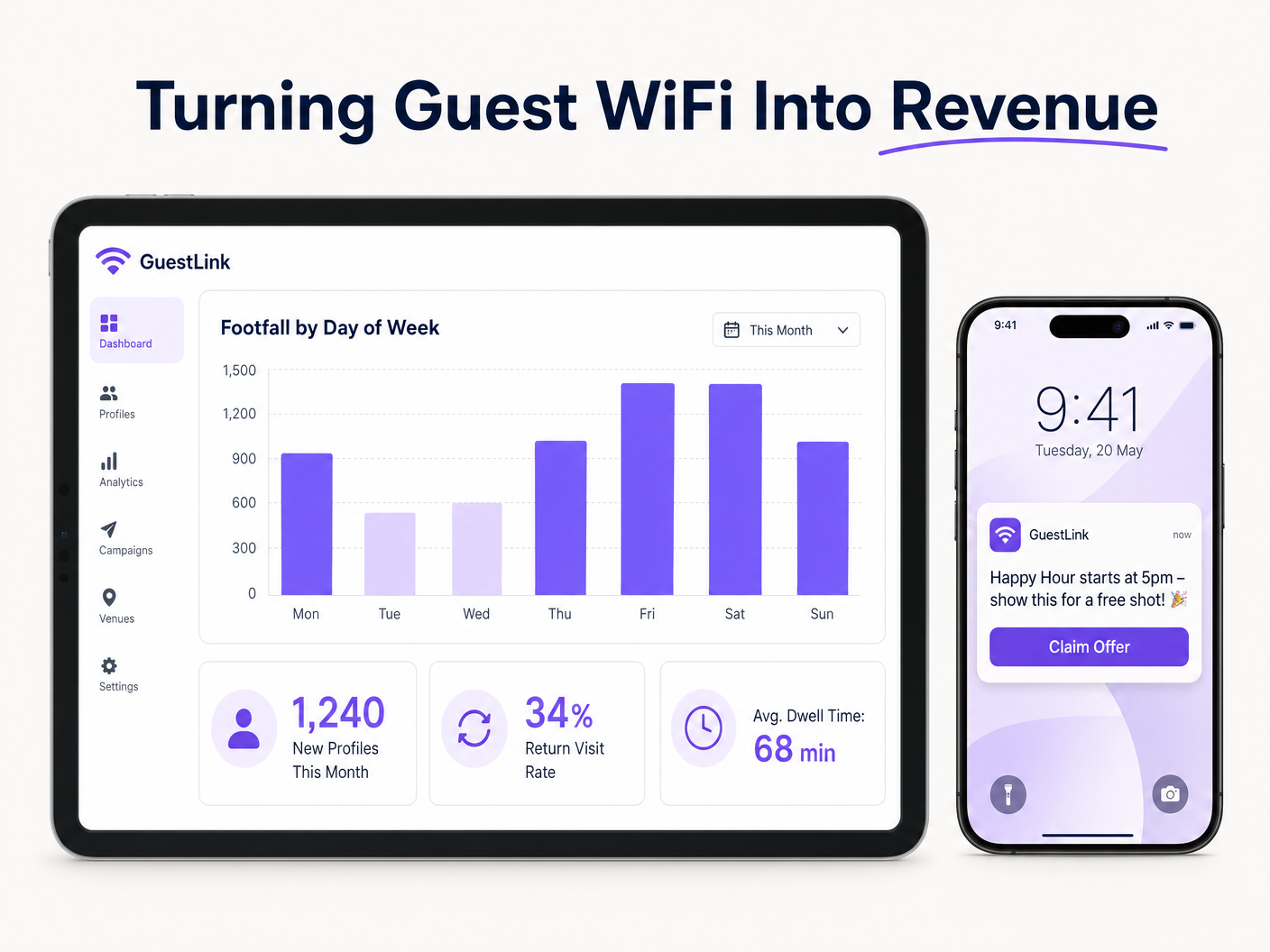
Il vero valore del WiFi per bar risiede nella sua capacità di generare business intelligence azionabile. Trasformando il traffico pedonale anonimo in un database clienti strutturato, i locali possono eseguire iniziative di marketing altamente mirate.
Considera uno scenario in cui l'analisi rivela un calo significativo del traffico pedonale il martedì sera. Utilizzando i dati acquisiti tramite il WiFi ospite, il team di marketing può segmentare il database per identificare i clienti che visitano frequentemente nei fine settimana ma raramente nei giorni feriali. Una campagna email automatizzata e personalizzata che offre una promozione valida solo il martedì può essere inviata a questa specifica coorte. Questo approccio mirato produce tassi di conversione nettamente superiori rispetto al marketing broadcast generico.
Il ROI non si misura solo nel volume di dati raccolti, ma nel fatturato incrementale generato da queste campagne mirate, nella riduzione del tasso di abbandono dei clienti e nell'efficienza operativa migliorata ottenuta tramite insight sugli orari di punta e sui tempi di permanenza. Questo approccio basato sui dati è sempre più critico in tutti i settori, dall' Ospitalità e Retail alla Sanità e ai Trasporti . Inoltre, con l'evoluzione del settore, i leader stanno riconoscendo l'impatto più ampio dell'infrastruttura connessa, una tendenza evidenziata da sviluppi come Purple Signals Higher Education Ambitions with Appointment of VP Education Tim Peers e la crescente importanza della connettività senza interruzioni negli ambienti mobili, come dettagliato in Wi Fi in Auto: The Complete 2026 Enterprise Guide .
Definizioni chiave
Captive Portal
A web page that a user of a public-access network is obliged to view and interact with before access is granted.
Crucial for authenticating users, presenting Acceptable Use Policies, and capturing first-party data for marketing.
VLAN (Virtual Local Area Network)
A logical subnetwork that groups a collection of devices from different physical LANs.
Used to isolate guest WiFi traffic from sensitive corporate and POS traffic, ensuring security and compliance.
Leased Line
A dedicated, fixed-bandwidth, symmetric data connection connecting a business directly to the internet.
Necessary for high-capacity venues to ensure consistent throughput that isn't shared with neighboring premises.
Wi-Fi 6 (802.11ax)
The latest generation of the Wi-Fi standard, designed to improve efficiency and performance in dense environments.
Essential for venues with high concurrent device counts, utilizing technologies like OFDMA to handle multiple users simultaneously.
DHCP Exhaustion
A state where the DHCP server has allocated all available IP addresses in its pool, preventing new devices from connecting.
A common issue in high-turnover hospitality environments; mitigated by reducing DHCP lease times and expanding subnet sizes.
PCI DSS (Payment Card Industry Data Security Standard)
An information security standard for organizations that handle branded credit cards.
Mandates strict network segmentation to ensure guest WiFi users cannot access payment processing infrastructure.
Profile-Based Authentication
A method where returning users are automatically authenticated based on their device profile without needing to interact with the captive portal again.
Improves user experience and encourages seamless connectivity, facilitating ongoing analytics tracking.
Co-Channel Interference
Performance degradation caused when multiple access points operate on the same frequency channel, causing them to compete for airtime.
Addressed through careful RF planning, dynamic channel assignment, and utilizing non-overlapping channels.
Esempi pratici
A busy city-centre pub with a capacity of 300 patrons and a large outdoor beer garden is experiencing severe WiFi performance degradation on Friday nights. The current setup consists of two consumer-grade ISP routers. The venue wants to upgrade the network to ensure reliable connectivity and begin capturing customer data for marketing.
- Replace the consumer routers with a dedicated enterprise firewall/router and a PoE+ managed switch. 2. Provision a dedicated leased line (e.g., 100Mbps symmetrical) to handle the backhaul traffic. 3. Deploy three indoor Wi-Fi 6 access points (ceiling-mounted) in the main bar area and two IP67-rated outdoor APs in the beer garden. 4. Configure the switch to create isolated VLANs for the corporate network, POS terminals, and guest WiFi. 5. Integrate the Purple Guest WiFi platform, configuring a branded captive portal with email authentication and explicit GDPR-compliant marketing opt-ins. 6. Reduce the DHCP lease time on the guest VLAN to 2 hours to prevent IP exhaustion.
A regional chain of 15 sports bars wants to standardize their guest WiFi to build a centralized CRM database. Currently, each venue manages its own standalone network with varying SSIDs and no data capture mechanisms.
- Standardize the hardware stack across all venues using cloud-managed APs and switches from a single vendor. 2. Deploy a centralized cloud controller to manage configurations and firmware updates across the entire estate. 3. Implement a unified SSID (e.g., 'Free_SportsBar_WiFi') across all 15 locations. 4. Deploy the Purple analytics platform centrally, configuring a consistent captive portal experience. 5. Enable profile-based authentication so a guest registering at Venue A automatically connects when visiting Venue B. 6. Integrate the centralized WiFi database via API with the chain's primary CRM system to trigger automated loyalty campaigns.
Domande di esercitazione
Q1. A historic pub with thick stone walls is planning a WiFi upgrade. The manager wants to place a single high-powered AP in the centre of the venue to save on cabling costs. As the IT architect, what is your recommendation?
Suggerimento: Consider how building materials affect RF propagation and the limitations of client device transmit power.
Visualizza risposta modello
Advise against a single AP deployment. Thick stone walls severely attenuate RF signals, particularly in the 5 GHz band. Even if a high-powered AP can transmit a signal to the edges of the venue, mobile devices (which have weak transmitters) will struggle to send data back, resulting in a poor user experience. Recommend a professional site survey and a multi-AP deployment using lower transmit power to ensure adequate coverage and capacity throughout the venue.
Q2. During an audit, you discover that the guest WiFi network is operating on the same VLAN as the venue's cloud-based EPOS system. The venue owner argues that because the EPOS is cloud-based, local segmentation is unnecessary. How do you respond?
Suggerimento: Focus on compliance standards and the risks of lateral movement within a flat network.
Visualizza risposta modello
Explain that this configuration is a critical security vulnerability and a direct violation of PCI DSS compliance. Even if the EPOS communicates with the cloud, placing guest devices on the same local subnet allows malicious actors to attempt lateral movement, sniff local traffic, or launch attacks against the EPOS hardware. Immediate remediation is required to implement VLAN segregation and strict firewall rules isolating the guest network.
Q3. A venue's marketing team complains that they are capturing thousands of email addresses via the captive portal, but their email marketing campaigns have an extremely high bounce rate and low engagement. What technical or configuration issue might be causing this?
Suggerimento: Consider the user experience during onboarding and how users might bypass data entry requirements.
Visualizza risposta modello
The high bounce rate is likely due to users entering fake or disposable email addresses to bypass the captive portal quickly. To mitigate this, implement email verification (requiring the user to click a link in an email to gain full internet access) or SMS authentication. Additionally, review the captive portal design to ensure it is not overly demanding, which incentivizes users to provide false information.
Continua a leggere questa serie
Cos'è una Probe Request? Capire come i dispositivi scoprono le reti
Questa guida di riferimento tecnico offre un'analisi approfondita delle probe request IEEE 802.11, della scansione attiva versus passiva e dell'impatto della randomizzazione MAC sull'analisi dei dati dei luoghi. Fornisce strategie di implementazione attuabili per gli architetti di rete al fine di ottimizzare le implementazioni ad alta densità, mitigare le probe storm e garantire una raccolta dati accurata e conforme al GDPR utilizzando livelli di identità autenticati.
Come Risolvere il WiFi Lento Senza Aggiornare il Tuo Piano Internet
Una guida tecnica di riferimento completa per IT managers e network architects sull'ottimizzazione delle prestazioni WiFi aziendali senza aumentare la ISP bandwidth. Copre RF tuning, la gestione della densità dei client, l'implementazione di QoS e come sfruttare WiFi analytics per diagnosticare e risolvere i colli di bottiglia.
La Checklist per la Migrazione da NAC Legacy a NAC Cloud-Native
Questa guida tecnica di riferimento autorevole fornisce una checklist strutturata in tre fasi per la migrazione da Network Access Control (NAC) legacy a un'architettura cloud-native. Fornisce a manager IT e architetti di rete strategie attuabili per gestire l'integrazione dell'identità, la parità delle policy e la conformità senza interrompere le operazioni della sede.