

Captive Portal basato su cloud vs. on-premise: Qual è quello giusto per la tua attività?
Un confronto tecnico completo tra le architetture di Captive Portal basate su cloud e on-premise. Questa guida valuta la velocità di implementazione, le strutture dei costi, la scalabilità e le implicazioni di conformità per aiutare i leader IT a prendere decisioni informate sull'infrastruttura.
🎧 Ascolta questa guida
Visualizza trascrizione
Riepilogo Esecutivo
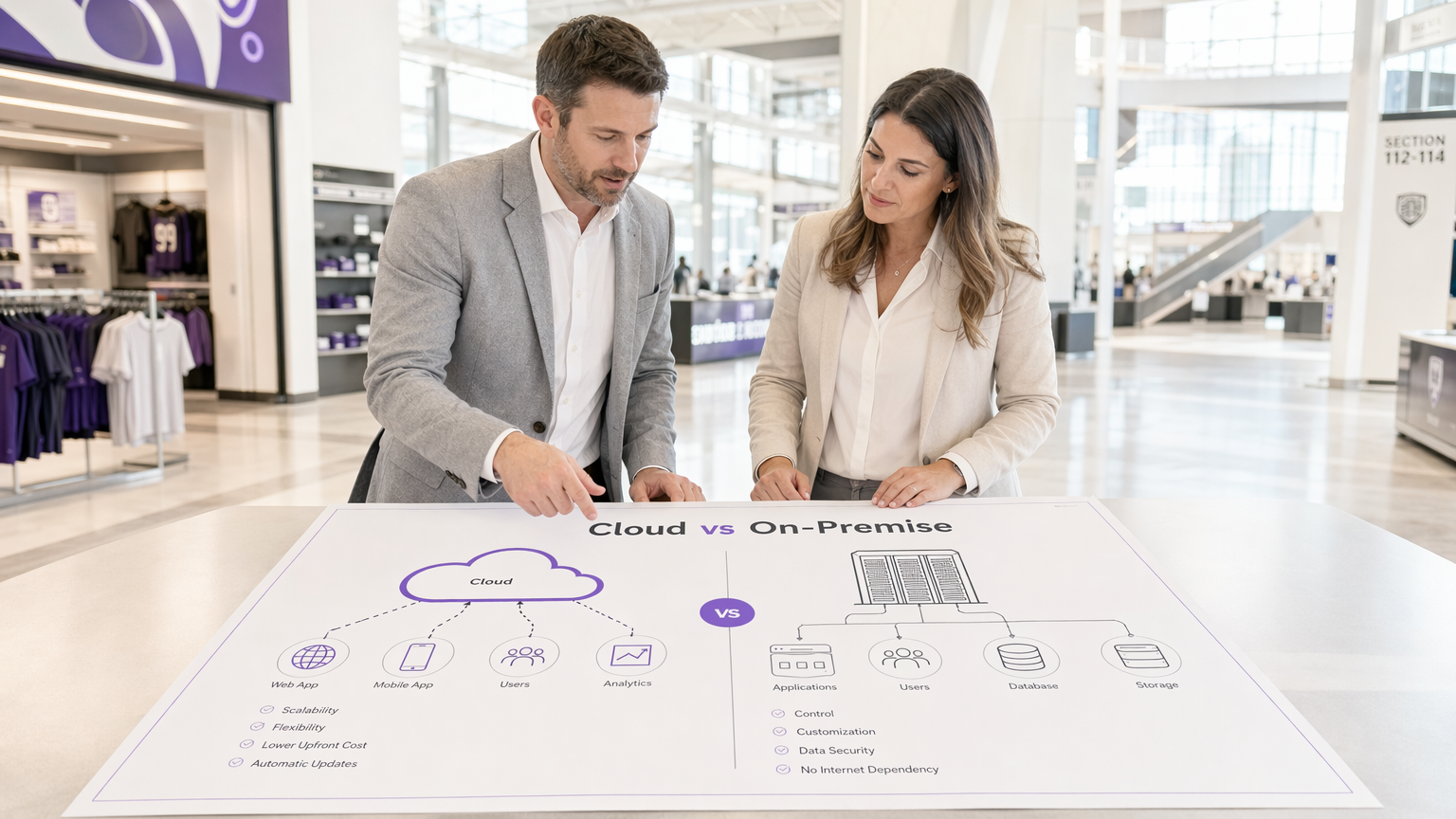
Nella progettazione di un'architettura WiFi per ospiti, la scelta tra un Captive Portal basato su cloud e un server Captive Portal on-premise determina i costi dell'infrastruttura, l'overhead operativo e la postura di conformità per l'intero ciclo di vita dell'implementazione. Per i responsabili IT, gli architetti di rete e i CTO, questa non è semplicemente una preferenza software; è una decisione architettonica fondamentale.
Un Captive Portal basato su cloud sposta i carichi di lavoro di autenticazione e rendering del portale in un ambiente gestito dal fornitore, offrendo scalabilità elastica e manutenzione significativamente ridotta. Al contrario, un sistema Captive Portal on-premise mantiene tutti i dati e la logica di autenticazione all'interno del perimetro della rete locale, fornendo un controllo assoluto a scapito di maggiori spese in conto capitale e oneri operativi.
Questa guida fornisce un rigoroso confronto tecnico di entrambi i modelli di implementazione. Esamineremo l'architettura, valuteremo il costo totale di proprietà e delineeremo scenari di implementazione specifici per aiutarti a determinare quale software Captive Portal si allinea ai tuoi obiettivi aziendali e ai requisiti normativi.
Approfondimento Tecnico: Architettura e Flussi di Autenticazione
Comprendere la distinzione tra un Captive Portal ospitato e una soluzione on-premise richiede l'esame del flusso di autenticazione e di dove vengono eseguiti i processi sottostanti.
L'Architettura del Captive Portal Basato su Cloud
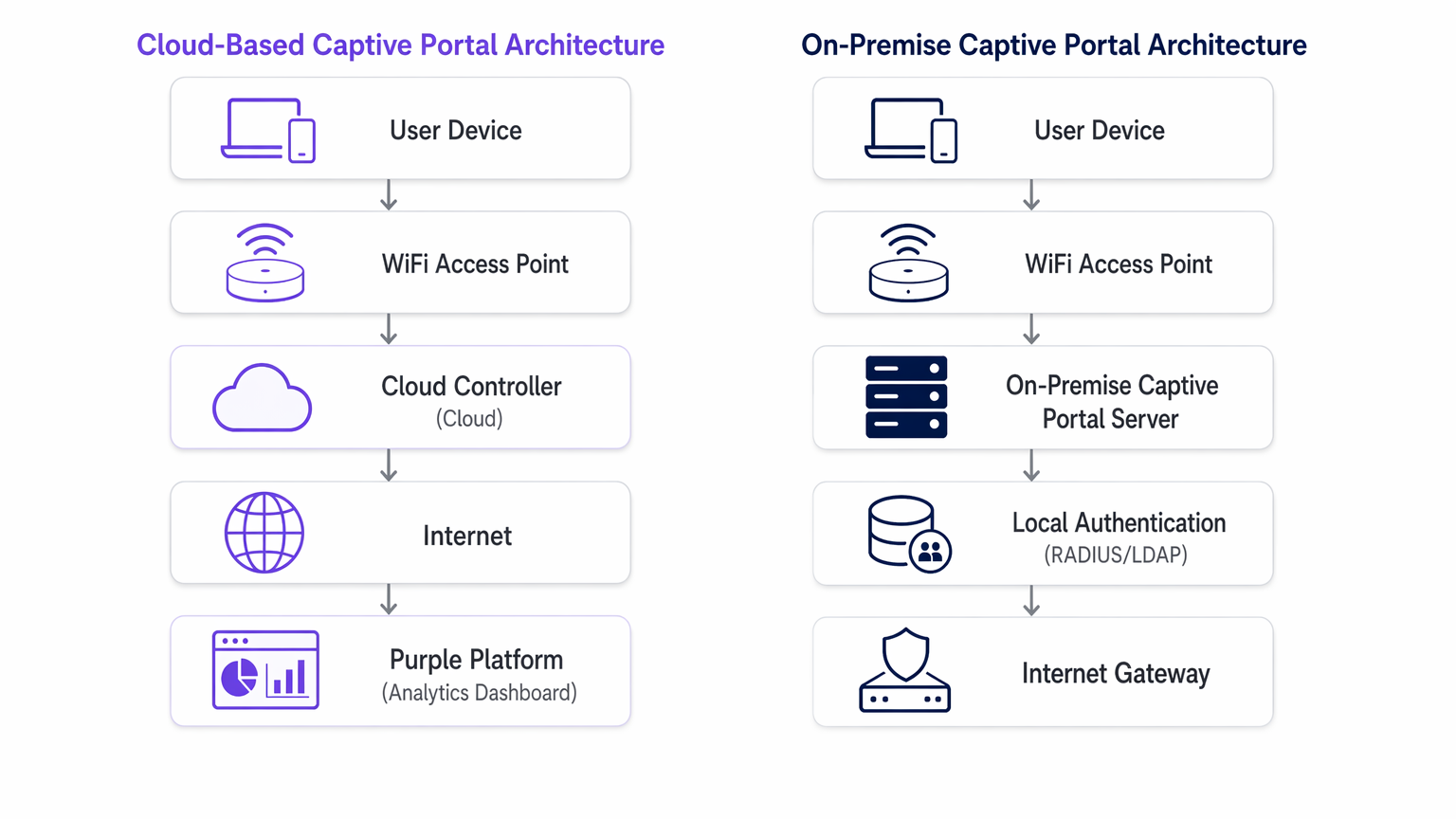
In un modello basato su cloud, la logica del Captive Portal, l'autenticazione RADIUS e i database di acquisizione dati risiedono su infrastrutture di terze parti (es. AWS, Azure, GCP) gestite da un fornitore come Purple.
Quando un dispositivo client si associa all'SSID ospite, l'access point (AP) locale o il controller LAN wireless (WLC) intercetta la richiesta HTTP/HTTPS iniziale. Poiché il dispositivo non è autenticato, il controller reindirizza il browser a un URL ospitato nel cloud. L'utente interagisce con il portale — accettando i termini, autenticandosi tramite social login o compilando un modulo. Dopo un'autenticazione riuscita, la piattaforma cloud comunica al controller locale (spesso tramite RADIUS o un'API specifica del fornitore) per autorizzare l'indirizzo MAC del client, concedendo l'accesso a internet.
Questa architettura è altamente elastica. Durante i picchi di carico — come l'intervallo in uno stadio o una grande vendita nel Retail — l'infrastruttura cloud si scala automaticamente per gestire migliaia di richieste di autenticazione simultanee senza richiedere aggiornamenti hardware locali. Inoltre, piattaforme come Purple forniscono analisi Guest WiFi e fungono da fornitore di identità gratuito per servizi come OpenRoaming con la licenza Connect, aggiungendo un valore significativo oltre il controllo di accesso di base.
L'Architettura del Server Captive Portal On-Premise
Un server Captive Portal on-premise richiede l'implementazione di hardware dedicato o macchine virtuali (VM) all'interno della tua infrastruttura di rete locale. Il server web del portale, il server RADIUS (es. FreeRADIUS, Microsoft NPS) e il database utenti sono tutti mantenuti localmente dal tuo team IT.
Il processo di reindirizzamento è simile, ma il client viene indirizzato a un indirizzo IP interno anziché a un URL pubblico. La transazione di autenticazione avviene interamente all'interno della rete locale (LAN). Questo modello garantisce che nessun dato degli ospiti attraversi internet pubblico durante la fase di autenticazione, il che è spesso un requisito rigoroso per il Healthcare o le strutture governative governate da rigorose politiche di sovranità dei dati.
Tuttavia, la capacità di throughput di un sistema on-premise è strettamente limitata dall'hardware fornito. La pianificazione della capacità deve tenere conto delle sessioni simultanee di picco, spesso con conseguente significativo sovradimensionamento. Inoltre, il team IT si assume la piena responsabilità per il patching del sistema operativo, il rinnovo dei certificati SSL, la manutenzione del database e la configurazione di coppie di failover ad alta disponibilità.
Guida all'Implementazione: Raccomandazioni Indipendenti dal Fornitore
La selezione dell'architettura appropriata dipende dalle tue specifiche limitazioni operative.
Quando Scegliere un Captive Portal Basato su Cloud
- Implementazioni Multi-Sito: Se gestisci un portfolio distribuito, come una catena di Hospitality o una rete di hub di Transport , un Captive Portal basato su cloud fornisce una gestione centralizzata. Puoi distribuire aggiornamenti del portale, modifiche al branding e modifiche alle policy su centinaia di siti contemporaneamente.
- Operazioni IT Snelle: Quando il tuo team di rete è focalizzato sull'infrastruttura core piuttosto che sulla manutenzione delle applicazioni, l'affidamento del sistema Captive Portal a un fornitore SaaS riduce l'overhead operativo.
- Integrazione Marketing e Analytics: Le piattaforme cloud facilitano intrinsecamente l'aggregazione dei dati. Se il tuo obiettivo è sfruttare i WiFi Analytics per promuovere l'engagement dei clienti, un Captive Portal ospitato fornisce le integrazioni necessarie pronte all'uso.
Quando Scegliere un Captive Portal On-Premise
- Rigorosa Sovranità dei Dati: Se i quadri normativi proibiscono ai dati degli ospiti di lasciare le tue sedi fisiche o i confini nazionali, un'implementazione on-premise è obbligatoria.
- Ambienti Air-Gapped o ad Alta Latenza: Le sedi con uplink internet inaffidabili non possono dipendere da un gateway di autenticazione cloud. Se il collegamento WAN fallisce, un portale cloud fallisce; un portale on-premise può comunque autenticare gli utenti per l'accesso alla rete locale.
- Deep Integrazione personalizzata: Quando il portale deve interfacciarsi direttamente con sistemi di gestione della proprietà (PMS) legacy, ospitati localmente, tramite API proprietarie che non possono essere esposte a internet.
Migliori pratiche per la distribuzione di Captive Portal
Indipendentemente dal modello di distribuzione, l'adesione agli standard di settore è fondamentale per la sicurezza e l'esperienza utente.
- Segmentazione VLAN: Isolare sempre la rete WiFi guest su una VLAN dedicata, completamente separata dalle risorse aziendali.
- Gestione dei certificati SSL/TLS: Un captive portal deve servire le sue pagine tramite HTTPS. I certificati scaduti attiveranno gravi avvisi del browser, bloccando il flusso di autenticazione. Per le distribuzioni on-premise, automatizzare il rinnovo dei certificati utilizzando protocolli come ACME (es. Let's Encrypt). I fornitori cloud gestiscono questo automaticamente.
- Considerazioni su WPA3 e 802.1X: Sebbene WPA3-Enterprise con 802.1X sia lo standard d'oro per i dispositivi aziendali, è impraticabile per le reti guest dove non è possibile distribuire certificati a dispositivi non gestiti. Pertanto, una rete aperta con un captive portal, o WPA3-Personal (Opportunistic Wireless Encryption - OWE), rimane lo standard per l'accesso pubblico.
- Accordi sul trattamento dei dati (DPA): Quando si utilizza un captive portal ospitato, esaminare rigorosamente il DPA del fornitore. Assicurarsi che siano conformi a GDPR, PCI DSS e definiscano chiaramente i loro sub-processori e le posizioni di residenza dei dati.
Risoluzione dei problemi e mitigazione dei rischi
Le modalità di guasto comuni differiscono significativamente tra le due architetture.
Rischi basati su cloud
- Interruzioni WAN: Il rischio principale è la perdita di connettività internet. Senza un uplink, il controller cloud non può essere raggiunto e l'autenticazione fallisce. Mitigare questo con collegamenti WAN ridondanti (es. fibra primaria, 5G/LTE secondario) o considerare I principali vantaggi di SD WAN per le aziende moderne per garantire alta disponibilità.
- Errori di risoluzione DNS: Se il DNS locale non riesce a risolvere l'URL del portale cloud, il reindirizzamento si interrompe. Garantire un'infrastruttura DNS locale robusta.
Rischi on-premise
- Guasto hardware: Un singolo server captive portal è un singolo punto di guasto. È necessario distribuire in un cluster attivo-passivo o attivo-attivo per garantire alta disponibilità.
- Esaurimento della capacità: Picchi inaspettati nella densità degli utenti possono sovraccaricare il server RADIUS locale o il server web, causando timeout. Monitorare rigorosamente CPU, memoria e metriche delle sessioni concorrenti.
- Gestione delle patch: I server portal non patchati sono obiettivi primari per lo sfruttamento. Implementare una rigorosa gestione delle vulnerabilità e programmi di distribuzione delle patch.
Per scenari in cui il portale sta causando più attrito che valore, consultare Come rimuovere un login Captive Portal (e quando dovresti farlo) .
ROI e impatto aziendale
I modelli finanziari per queste architetture sono fondamentalmente diversi.
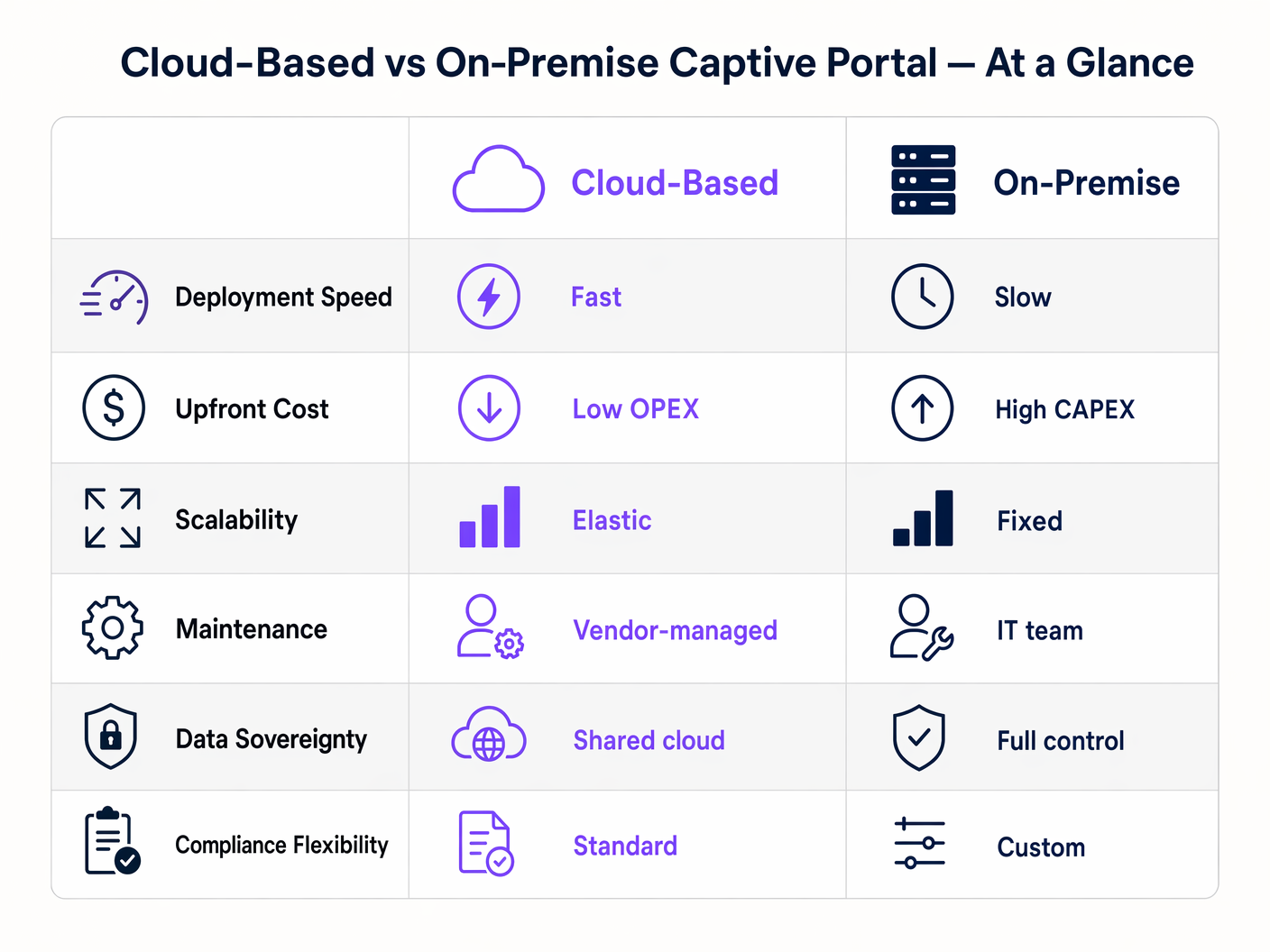
Una distribuzione di software captive portal on-premise è un modello di spesa in conto capitale (CAPEX). Si incorrono costi iniziali significativi per hardware, licenze hypervisor e infrastruttura ridondante. I costi continui sono nascosti nelle spese operative (OPEX) del tempo del team IT dedicato alla manutenzione e alla risoluzione dei problemi.
Un captive portal basato su cloud opera su un modello OPEX. I costi iniziali sono minimi, limitati agli access point e alla configurazione iniziale. Si paga una quota di abbonamento prevedibile e ricorrente. Il ROI di una piattaforma cloud si realizza spesso attraverso la riduzione del carico di lavoro IT e la monetizzazione dei dati acquisiti tramite analisi avanzate e integrazioni di marketing, trasformando il WiFi guest da centro di costo a risorsa generatrice di entrate.
Termini chiave e definizioni
Captive Portal
A web page that a user of a public access network is obliged to view and interact with before access is granted.
The primary mechanism for authenticating guests and capturing marketing consent on public WiFi networks.
RADIUS (Remote Authentication Dial-In User Service)
A networking protocol that provides centralized Authentication, Authorization, and Accounting (AAA) management for users who connect and use a network service.
The backend protocol used by both cloud and on-premise portals to signal the access point that a user is authorized.
Data Sovereignty
The concept that data is subject to the laws and governance structures within the nation it is collected.
A critical deciding factor for government and healthcare venues evaluating cloud vs. on-premise architectures.
MAC Address Authorization
The process of using a device's Media Access Control address to identify it and grant network access after initial authentication.
How the network controller remembers a device so the user doesn't have to log in every time they roam between access points.
WPA3-Enterprise
The latest Wi-Fi security standard requiring 802.1X authentication and a RADIUS server, providing individualized encryption.
The standard for corporate networks, which operates separately from the open/OWE guest network where the captive portal resides.
VLAN Segmentation
The practice of dividing a physical network into multiple logical networks.
Essential for security, ensuring guest WiFi traffic (and the captive portal) is isolated from internal corporate data.
Data Processing Agreement (DPA)
A legally binding contract that states the rights and obligations of each party concerning the protection of personal data.
Mandatory documentation when utilizing a hosted captive portal to ensure GDPR compliance.
OpenRoaming
A federation of Wi-Fi networks that allows users to automatically and securely connect to participating networks without manual login.
An advanced authentication method supported by platforms like Purple, offering a frictionless alternative to traditional captive portals.
Casi di studio
A national retail chain with 400 locations needs to deploy a standardized guest WiFi experience. Their IT team consists of 5 network engineers based at headquarters. They require detailed analytics on customer dwell time and visit frequency to integrate with their CRM.
Deploy a cloud-based captive portal system. The lean IT team cannot manage 400 on-premise portal servers or complex VPN routing back to a centralized on-premise data center. A hosted captive portal allows centralized policy management, immediate scalability, and native API integration for CRM data syncing.
A large NHS hospital trust requires guest WiFi across its campus. Strict patient data confidentiality policies dictate that no MAC addresses, device identifiers, or user information can be stored on servers outside the UK, and all authentication traffic must remain within the hospital's private network.
Deploy an on-premise captive portal server. The hospital must provision a high-availability cluster of portal servers within their local data center, integrated with their local Active Directory or a dedicated FreeRADIUS instance for guest accounts.
Analisi degli scenari
Q1. A hotel chain is experiencing frequent authentication timeouts during large conferences because their local captive portal server reaches maximum CPU utilization. What is the most operationally efficient architectural solution?
💡 Suggerimento:Consider which deployment model handles elastic scaling automatically.
Mostra l'approccio consigliato
Migrate to a cloud-based captive portal system. Cloud architectures provide elastic scalability, automatically absorbing authentication spikes without requiring the local IT team to provision, configure, or maintain additional hardware.
Q2. A government facility must deploy guest WiFi but has a strict policy that no external DNS resolution or outbound internet traffic is permitted from the management VLAN. Which captive portal architecture must be deployed?
💡 Suggerimento:Evaluate how a cloud portal redirects clients.
Mostra l'approccio consigliato
An on-premise captive portal server must be deployed. A cloud-based portal requires the client to resolve and reach an external URL for authentication. Without outbound internet access from the management/guest VLAN, the redirection will fail. The authentication process must be handled entirely locally.
Q3. You are calculating the total cost of ownership (TCO) for an on-premise captive portal deployment. Beyond the initial server hardware and software licensing, what critical infrastructure component must be included to ensure network resilience?
💡 Suggerimento:Consider the impact of a single server failure.
Mostra l'approccio consigliato
You must include the cost of a secondary server configured for high availability (active-passive or active-active failover). Relying on a single on-premise server creates a single point of failure; if it goes offline, the entire guest network becomes inaccessible.




