
Captive Portal WiFi: Cos'è e come ottimizzarlo
Questa guida autorevole descrive in dettaglio l'architettura, l'implementazione e l'ottimizzazione dei Captive Portal WiFi. Fornisce strategie attuabili per i responsabili IT al fine di aumentare i tassi di completamento del login, garantire la conformità al GDPR e acquisire dati di prima parte di alta qualità.
Ascolta questa guida
Visualizza trascrizione del podcast
📚 Part of our core series: The Ultimate Guide to Captive Portals →
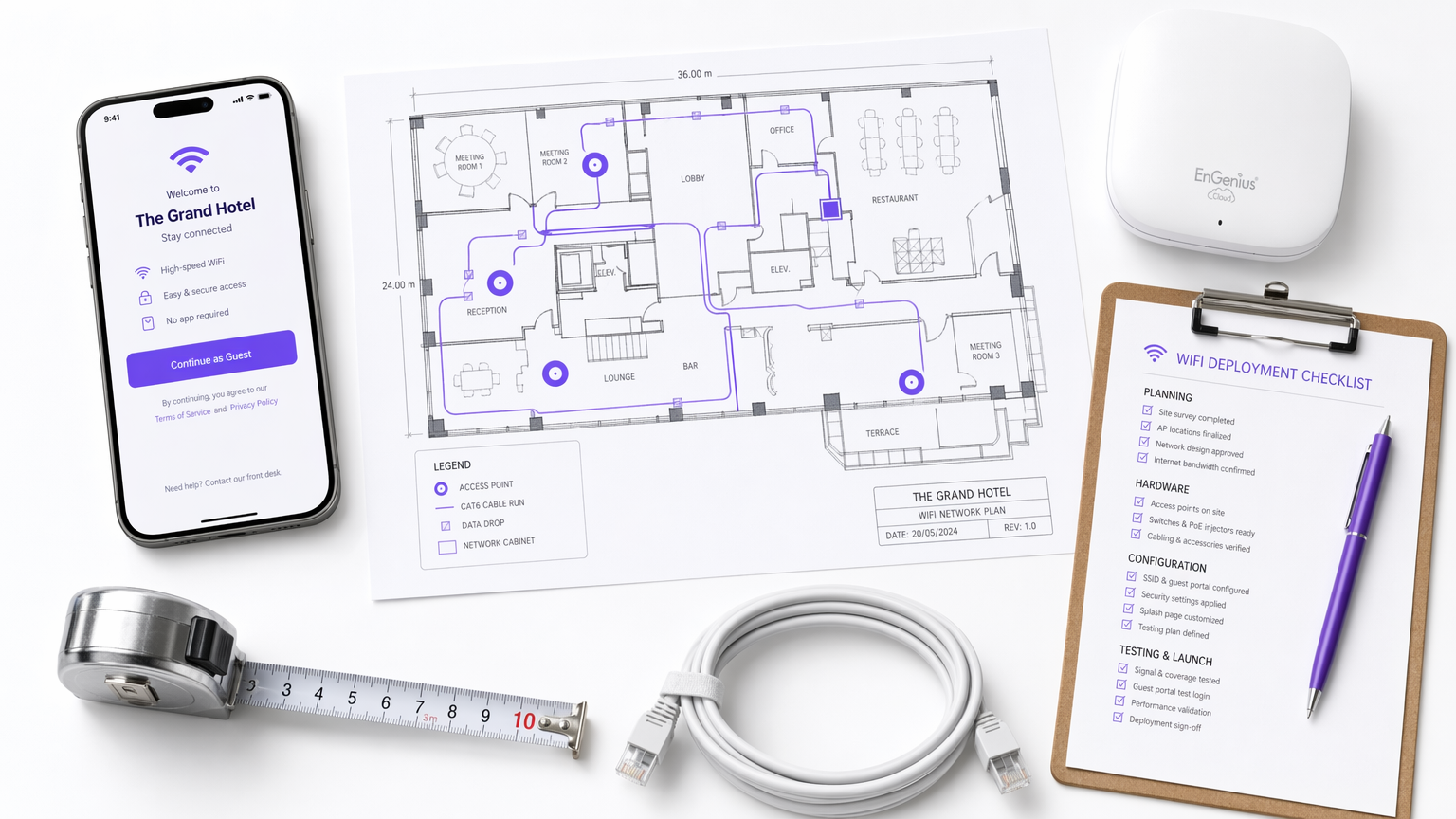
Sintesi Esecutiva
Il Captive Portal WiFi, spesso chiamato captive portal o splash page, è l'intersezione critica tra il controllo dell'accesso alla rete, l'esperienza utente e la strategia dati aziendale. Per i responsabili IT, gli architetti di rete e i direttori delle operazioni delle sedi, l'implementazione di un Captive Portal non riguarda più solo la fornitura di accesso a internet. Si tratta di architettare un gateway sicuro e conforme che acquisisca dati di prima parte di alta qualità, riducendo al minimo l'attrito per l'utente.
Questa guida fornisce un riferimento tecnico completo su cos'è un Captive Portal, come funzionano i protocolli di autenticazione sottostanti e le precise leve disponibili per ottimizzare il percorso di login. Che tu stia implementando in una catena di negozi, uno stadio o un marchio globale di ospitalità, i principi rimangono coerenti: proteggere la rete, ridurre la fatica dei moduli e integrare i dati acquisiti nei sistemi aziendali a valle. Andando oltre il semplice accesso click-through, le organizzazioni possono trasformare la loro infrastruttura Guest WiFi da centro di costo a motore misurabile di coinvolgimento dei clienti e di entrate.
Approfondimento Tecnico
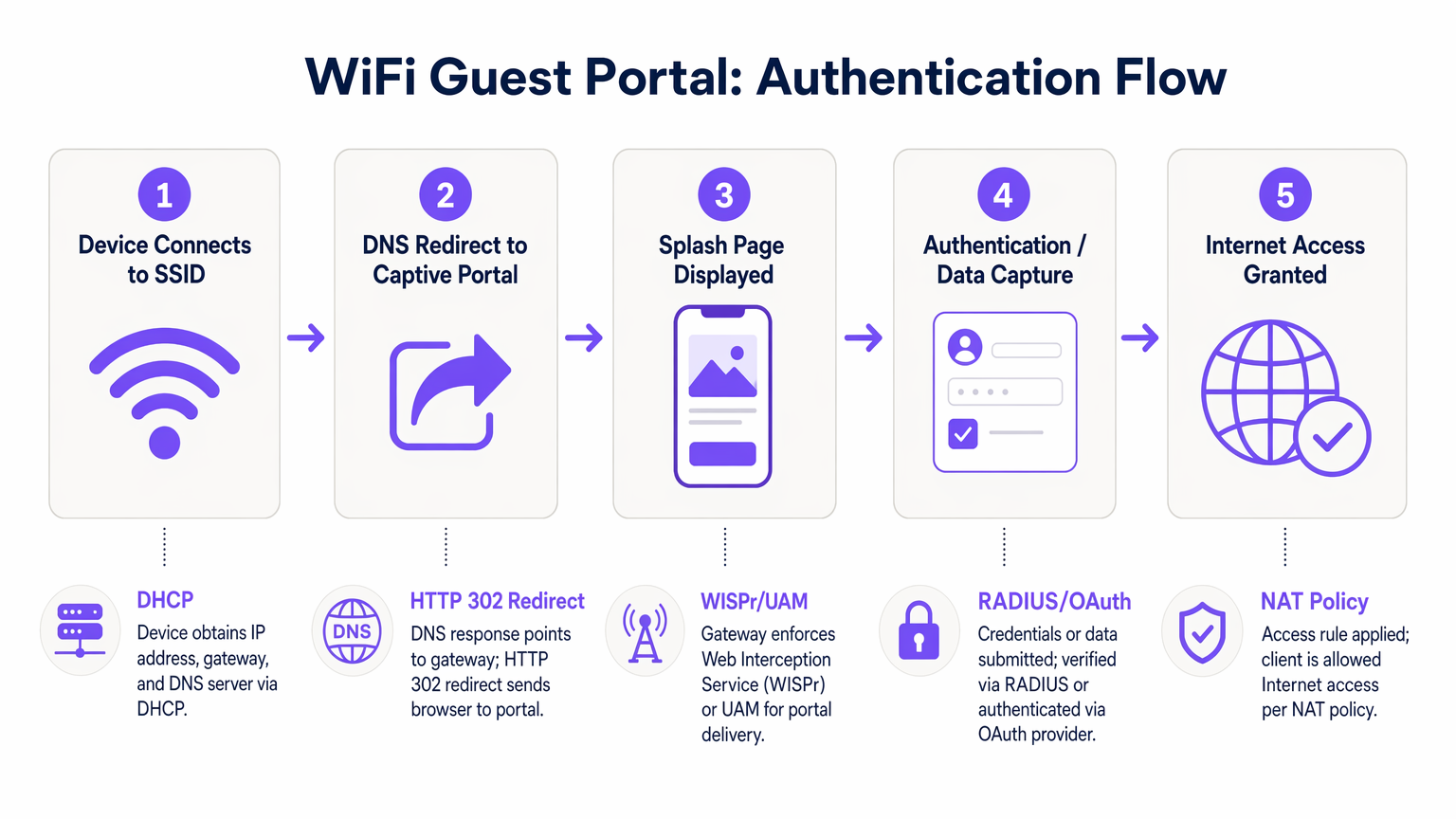
Comprendere la meccanica di un Captive Portal WiFi richiede l'esame della sequenza di eventi che si verificano dal momento in cui un dispositivo si associa a un SSID fino al punto in cui viene concesso l'accesso completo a internet. Questo processo si basa su una combinazione di protocolli di rete e meccanismi di reindirizzamento web.
Quando un dispositivo client si connette alla rete guest, negozia per la prima volta un indirizzo IP, una subnet mask e un gateway predefinito tramite DHCP. A questo punto, il dispositivo viene posto in uno stato di "walled garden" dal controller di accesso. Il walled garden è un ambiente di rete ristretto in cui tutto il traffico HTTP e HTTPS in uscita viene intercettato. Il controller consente l'accesso solo a domini esplicitamente inseriti nella whitelist, come i server di hosting del Captive Portal, i provider di autenticazione e le risorse CDN necessarie.
Quando l'utente apre un browser o il Captive Network Assistant (CNA) nativo del dispositivo rileva il walled garden, il controller emette un reindirizzamento HTTP 302. Questo reindirizzamento indirizza il client all'URL della splash page. Questa intercettazione è regolata dal protocollo Wireless Internet Service Provider roaming (WISPr) o dal Universal Access Method (UAM).
L'autenticazione avviene quindi sulla splash page. I metodi principali includono:
- Click-Through: L'utente accetta termini e condizioni senza fornire dati personali.
- Registrazione basata su modulo: L'utente invia dettagli come nome ed email.
- Social Login: Autenticazione tramite OAuth 2.0 utilizzando provider come Google, Facebook o Apple.
- Verifica SMS: L'utente riceve una One-Time Passcode (OTP) via SMS per verificare la propria identità.
Una volta che l'utente si autentica con successo, il Captive Portal comunica con il controller di accesso, tipicamente tramite RADIUS (Remote Authentication Dial-In User Service) o una API proprietaria. Il controller aggiorna quindi le sue politiche NAT o le regole del firewall, passando l'indirizzo MAC del client dal walled garden a uno stato autorizzato, concedendo l'accesso completo a internet.
Guida all'Implementazione
L'implementazione di un Captive Portal robusto richiede un approccio sistematico che dia priorità alla sicurezza, all'esperienza utente e all'integrazione dei dati. I seguenti passaggi delineano una metodologia di implementazione indipendente dal fornitore.
Innanzitutto, stabilire la segmentazione della rete. L'SSID guest deve essere isolato dalla rete aziendale utilizzando VLAN dedicate. Ciò impedisce ai dispositivi guest di accedere a risorse interne, sistemi POS o interfacce di gestione. Implementare l'isolamento del client all'interno della VLAN guest per impedire ai dispositivi di comunicare tra loro, mitigando il rischio di movimento laterale da parte di attori malevoli.
In secondo luogo, configurare con precisione il walled garden. La causa più comune di fallimento del Captive Portal è una whitelist del walled garden incompleta. Assicurarsi che tutte le risorse necessarie per il rendering della splash page, inclusi file CSS, font e endpoint dei provider di autenticazione (ad esempio, accounts.google.com), siano accessibili prima dell'autenticazione. La mancata osservanza di ciò comporterà un rendering della pagina interrotto o un fallimento dei social login.
In terzo luogo, progettare il modello di dati e il flusso di autenticazione. Determinare i dati minimi vitali richiesti dall'utente. Per la maggior parte delle implementazioni commerciali, un indirizzo email e un consenso esplicito al marketing sono sufficienti per il login iniziale. Implementare opzioni di social login per ridurre l'attrito e migliorare l'accuratezza dei dati. Quando si integra con piattaforme di WiFi Analytics , assicurarsi che il modello di dati sia allineato con lo schema del proprio CRM.
In quarto luogo, integrare i sistemi a valle. Il valore di un Captive Portal si realizza pienamente quando i dati acquisiti fluiscono senza soluzione di continuità in piattaforme di marketing automation o sistemi CRM. Configurare webhooks o integrazioni API per trasferire i dati del profilo in tempo reale, consentendo un coinvolgimento automatizzato post-login, come email di benvenuto o inviti a programmi fedeltà.
Best Practices
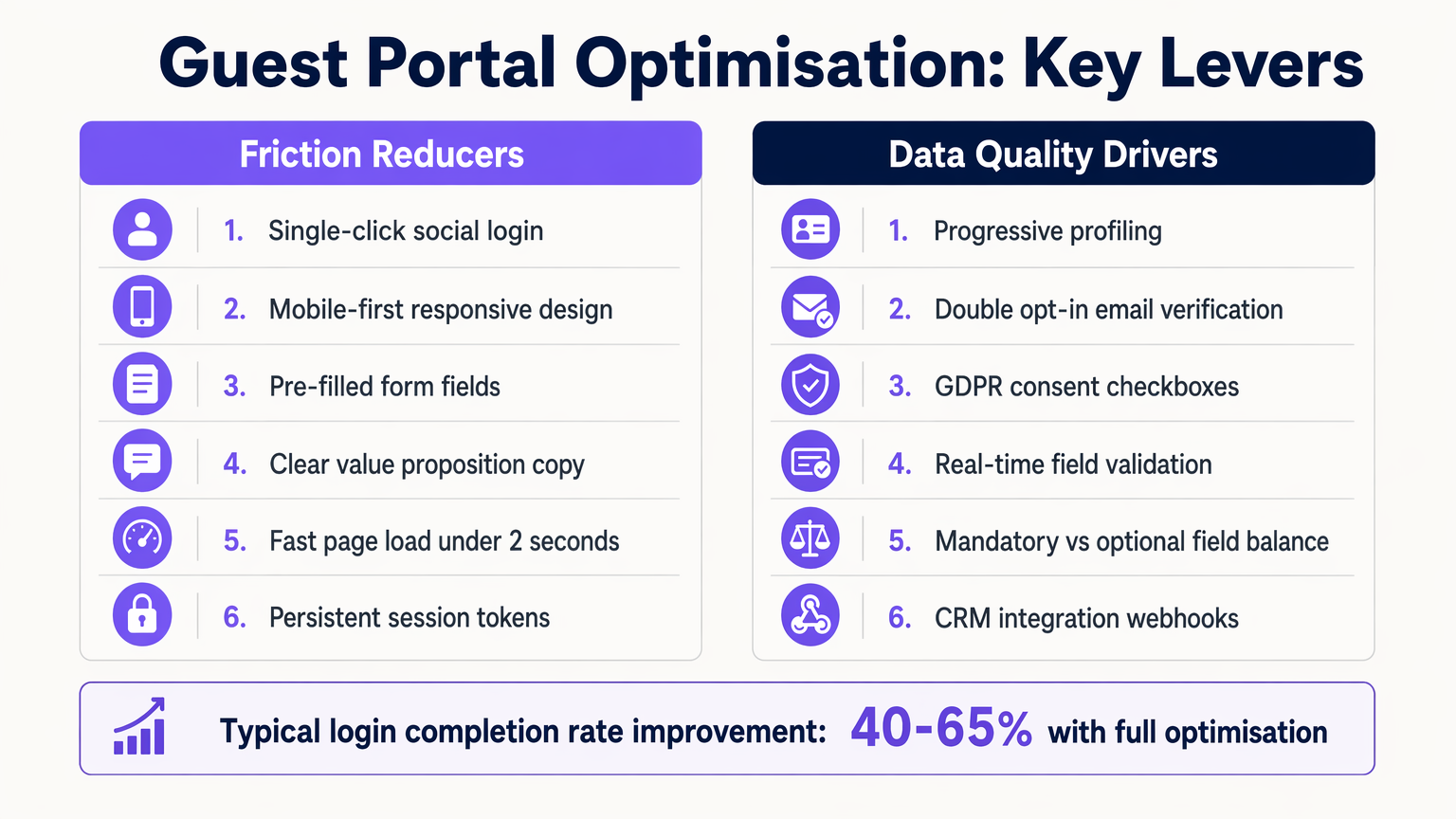
L'ottimizzazione dell'esperienza del Captive Portal è un processo continuo. Le best practice standard del settore impongono un focus su velocità, reattività mobile e profilazione progressiva.
1. Design Mobile-First La stragrande maggioranza delle interazioni con il Captive Portal avviene su dispositivi mobili. Assicurarsi che la splash page sia completamente responsive, con aree di tocco dimensionate in modo appropriato (minimo 44x44 pixel) e campi modulo che attivino la tastiera virtuale corretta (ad esempio, la tastiera email per i campi email).
2. Profilazione Progressiva Evitare la fatica dei moduli raccogliendo solo i dati essenziali durante la prima connessione. Nelle visite successive, utilizzare il riconoscimento dell'indirizzo MAC o i token di sessione persistenti per identificare gli utenti di ritorno e richieder loro informazioni aggiuntive, come la data di nascita o le preferenze. Questo approccio aumenta significativamente il tasso di completamento complessivo.
3. Chiaro Scambio di Valore Il testo sulla splash page deve articolare chiaramente il beneficio per l'utente. Sostituite frasi generiche come "Registrati per accedere alla rete" con proposte di valore convincenti come "Goditi il WiFi ad alta velocità—connettiti in pochi secondi."
Risoluzione dei Problemi e Mitigazione dei Rischi
Anche le implementazioni ben architettate possono incontrare problemi. Comprendere le modalità di errore comuni è essenziale per mantenere l'uptime e la soddisfazione dell'utente.
Guasti del Captive Network Assistant (CNA)
I sistemi operativi moderni utilizzano i CNA per rilevare automaticamente i Captive Portal. Se il controller di accesso non risponde correttamente alla sonda iniziale del sistema operativo (ad esempio, captive.apple.com di Apple), il CNA potrebbe non avviarsi, lasciando l'utente confuso. Assicurarsi che il firmware del controller sia aggiornato e gestisca correttamente queste sonde.
Errata Configurazione del Timeout di Sessione Impostare un timeout di sessione troppo breve costringe gli utenti a riautenticarsi frequentemente, degradando l'esperienza. Al contrario, impostarlo troppo lungo può gonfiare le metriche degli utenti concorrenti ed esaurire i pool di indirizzi IP. Una tipica sede commerciale dovrebbe configurare un timeout di sessione da 8 a 24 ore, con gli utenti di ritorno autenticati senza interruzioni tramite MAC caching.
Rischi di Conformità Secondo il GDPR e framework simili, è richiesto il consenso esplicito per le comunicazioni di marketing. Caselle preselezionate o consenso raggruppato (ad esempio, combinare i Termini di Servizio con l'opt-in di marketing) non sono conformi. Assicurarsi che il portale mantenga un log di audit immutabile dei registri di consenso, inclusi timestamp e la specifica versione della politica sulla privacy accettata.
ROI e Impatto sul Business
La misura ultima del successo di un guest portal è il suo contributo agli obiettivi aziendali. Passando da un semplice meccanismo di accesso a una piattaforma intelligente di acquisizione dati, le organizzazioni possono generare un ROI misurabile.
Negli ambienti Retail , l'acquisizione di indirizzi email consente campagne di re-marketing mirate, aumentando il traffico e il valore a vita del cliente. Nel settore Hospitality , l'integrazione del portale con i sistemi di gestione della proprietà consente esperienze personalizzate per gli ospiti e richieste automatizzate di recensioni su TripAdvisor.
L'impatto è quantificato attraverso metriche come il Tasso di Completamento del Login (la percentuale di utenti che vedono il portale e si autenticano con successo), il Tasso di Opt-In (la percentuale di utenti che concedono il consenso al marketing) e il Punteggio di Qualità dei Dati (la percentuale di indirizzi email validi e consegnabili). Piattaforme come Purple forniscono gli strumenti analitici necessari per monitorare questi KPI, dimostrando il valore tangibile dell'infrastruttura WiFi.
Definizioni chiave
Captive Portal
A web page that the user of a public-access network is obliged to view and interact with before access is granted.
The fundamental mechanism for controlling guest access and capturing data.
Walled Garden
A restricted network environment that allows access only to explicitly permitted IP addresses or domains prior to authentication.
Critical for allowing the splash page and authentication providers to load before the user has full internet access.
WISPr
Wireless Internet Service Provider roaming. A protocol that allows users to roam between different wireless providers.
The underlying standard that enables the HTTP redirect to the captive portal.
RADIUS
Remote Authentication Dial-In User Service. A networking protocol that provides centralized Authentication, Authorization, and Accounting (AAA) management.
The backend system that verifies credentials and tells the controller to grant access.
MAC Caching
The process of storing a device's Media Access Control address after initial authentication to automatically recognize and authorize it on subsequent visits.
Essential for providing a seamless experience for returning visitors without requiring re-login.
Progressive Profiling
A method of gradually gathering information about a user across multiple interactions rather than asking for all data upfront.
Used to balance the need for detailed marketing data with the necessity of high login completion rates.
Captive Network Assistant (CNA)
A feature in modern operating systems (like iOS and Android) that automatically detects a captive portal and opens a pseudo-browser for login.
IT teams must ensure their controllers respond correctly to CNA probes to trigger the automatic popup.
VLAN Segmentation
The practice of dividing a physical network into multiple logical networks. Guest traffic is placed on a separate VLAN from corporate traffic.
A non-negotiable security requirement to protect internal enterprise systems from guest devices.
Esempi pratici
A 200-room hotel is experiencing a 60% drop-off rate on their guest WiFi portal. The current portal requires guests to input their First Name, Last Name, Room Number, Email Address, and Date of Birth on a single screen before granting access. How should the IT Director redesign this flow to improve completion rates?
The IT Director should implement a progressive profiling strategy. The initial login screen should be reduced to two options: 'Connect with Google/Apple' (Social Login) or a simple form requiring only 'Email Address' and an unchecked GDPR consent box. The Room Number requirement should be removed unless PMS integration is actively used for tiered bandwidth billing. The Date of Birth field should be moved to a post-login email campaign ('Tell us your birthday for a free drink at the bar'). Finally, MAC address caching should be enabled so returning guests bypass the form entirely for the duration of their stay.
A large stadium IT team is deploying a new guest portal for 50,000 concurrent users. During testing, users report that the splash page takes over 8 seconds to load, and many abandon the process. The portal features a 3MB high-resolution background image and loads three external tracking scripts. What immediate technical remediations are required?
The IT team must immediately optimize the portal payload. First, the 3MB background image must be compressed and resized, ideally replaced with a CSS-based gradient or an optimized WebP image under 200KB. Second, all non-essential third-party tracking scripts must be removed from the critical rendering path; only essential scripts should load asynchronously. Third, the team must verify the Walled Garden configuration on the access controllers to ensure the CDN hosting the portal assets is explicitly whitelisted, preventing the controller from throttling or blocking the asset delivery.
Domande di esercitazione
Q1. You are designing the portal for a busy transport hub. The marketing team wants to collect Name, Email, Phone Number, and Destination. The network team is concerned about throughput and user complaints. What is the optimal approach?
Suggerimento: Consider the impact of form length on completion rates and the principle of progressive profiling.
Visualizza risposta modello
Push back on the marketing team's request for all four fields upfront. Implement a portal requiring only Email Address and marketing consent, or offer Social Login. Use post-login email automation to ask for the Destination data once the user is connected and settled. This satisfies marketing's need for data over time while addressing the network team's concern about immediate throughput and user friction.
Q2. After deploying a new guest portal, users report that the splash page appears, but when they click 'Login with Facebook', the page times out and fails to authenticate. What is the most likely technical cause?
Suggerimento: Think about the network state the device is in before authentication is complete.
Visualizza risposta modello
The Walled Garden whitelist is incomplete. The access controller is blocking the device from reaching Facebook's OAuth servers (e.g., graph.facebook.com) because the device is not yet authenticated. The IT team must add the necessary Facebook domains to the Walled Garden whitelist so the authentication handshake can complete.
Q3. Your organisation is updating its guest WiFi to comply with GDPR. The current portal has a single checkbox that says 'I agree to the Terms of Service and to receive marketing emails'. Why is this problematic, and how must it be fixed?
Suggerimento: Review the requirements for lawful consent under GDPR regarding 'bundling'.
Visualizza risposta modello
This is non-compliant because it relies on 'bundled consent'. Under GDPR, consent for marketing must be freely given, specific, informed, and unambiguous. You cannot make access to the service (WiFi) conditional on accepting marketing. The fix is to separate this into two actions: a mandatory acceptance of the Terms of Service, and an optional, unticked checkbox for marketing consent.
Continua a leggere questa serie
Captive Portal vs Splash Page
Questa guida autorevole analizza la distinzione fondamentale tra Captive Portal e splash page nelle reti WiFi per gli ospiti. Chiarisce come il meccanismo di intercettazione di rete sottostante funzioni in sinergia con l'interfaccia visiva per gli ospiti, aiutando i responsabili IT e i gestori delle strutture a prendere decisioni architetturali e di acquisto informate.
Login al Captive Portal: Risoluzione dei problemi e guida esplicativa
Questa guida fornisce un riferimento tecnico completo per comprendere, implementare e risolvere i problemi dei sistemi di login al captive portal in ambienti WiFi aziendali per ospiti. Spiega gli esatti meccanismi di reindirizzamento HTTP e di dirottamento DNS utilizzati dai moderni captive portal, descrive in dettaglio come l'HSTS e i browser HTTPS sicuri possano bloccare i reindirizzamenti locali e fornisce una checklist di risoluzione dei problemi chiara e pratica che copre sia le soluzioni lato client (disattivazione delle VPN, disattivazione della randomizzazione MAC, utilizzo di NeverSSL) sia le risoluzioni lato operatore (configurazione del walled garden, ottimizzazione del tempo di lease DHCP, verifica dell'intercettazione DNS). I gestori delle sedi, i responsabili IT e gli architetti di rete troveranno questa guida essenziale per ridurre al minimo i ticket di supporto degli ospiti e massimizzare il ROI della loro infrastruttura wireless.
Come configurare un hotspot WiFi per la tua attività
Questa guida autorevole fornisce a leader IT, architetti di rete e direttori delle operazioni di sede un modello pratico e indipendente dal fornitore per l'implementazione di hotspot WiFi per ospiti sicuri, conformi e che migliorano il business. Copre decisioni architetturali critiche — dalla segmentazione VLAN e configurazione del Captive Portal alla conformità GDPR e alla modellazione del traffico — e dimostra come trasformare l'infrastruttura di rete da un centro di costo a una piattaforma di analisi che genera entrate utilizzando le capacità di Guest WiFi e analisi di Purple.