
Come analizzare e modificare il canale WiFi per la massima velocità
Questa guida di riferimento tecnica e autorevole fornisce ai responsabili IT e agli architetti di rete le metodologie per analizzare gli ambienti RF e implementare piani di canali WiFi ottimali. Offre framework pratici per mitigare l'interferenza co-canale, massimizzare il throughput e garantire una connettività robusta in distribuzioni aziendali ad alta densità.
Ascolta questa guida
Visualizza trascrizione del podcast
Parte della nostra serie principale: Guest WiFi Guide →
Executive Summary
Negli ambienti aziendali ad alta densità - che si tratti di un hotel da 500 camere, di un punto vendita multisuperficie o di un campus del settore pubblico - le prestazioni wireless non sono più solo un servizio aggiuntivo; sono un'infrastruttura operativa critica. Eppure, molte installazioni soffrono di un throughput ridotto, di tassi di tentativi di trasmissione elevati e di problemi di connettività intermittenti, tutti riconducibili a un'unica causa principale risolvibile: una pianificazione dei canali non ottimale. Affidarsi alle configurazioni predefinite del fornitore o a semplici algoritmi di canale automatico in ambienti RF complessi porta inevitabilmente a interferenze co-canale e alla congestione dello spettro.
Questa guida di riferimento tecnica fornisce una metodologia neutrale rispetto ai fornitori e basata sull'ingegneria per analizzare l'attuale ambiente RF e implementare un piano di canali definitivo. Esamineremo la fisica operativa delle bande a 2.4 GHz, 5 GHz e 6 GHz, delineeremo un approccio strutturato all'analisi dello spettro e forniremo framework pratici per mitigare le interferenze. Trattando l'ottimizzazione dei canali come una disciplina operativa continua piuttosto che come un'attività di implementazione una tantum, i team di rete possono ottenere miglioramenti misurabili del throughput, ridurre il volume dei ticket di supporto e garantire una connettività affidabile sia per i dispositivi degli ospiti che per l'infrastruttura operativa critica.
Approfondimento Tecnico: Capire lo Spettro RF
Per prendere decisioni informate sull'allocazione dei canali, gli architetti di rete devono comprendere i meccanismi alla base degli standard 802.11 e il modo in cui le diverse bande di frequenza si comportano nell'ambiente fisico.
La Banda a 2.4 GHz: Gestire la Scarsità
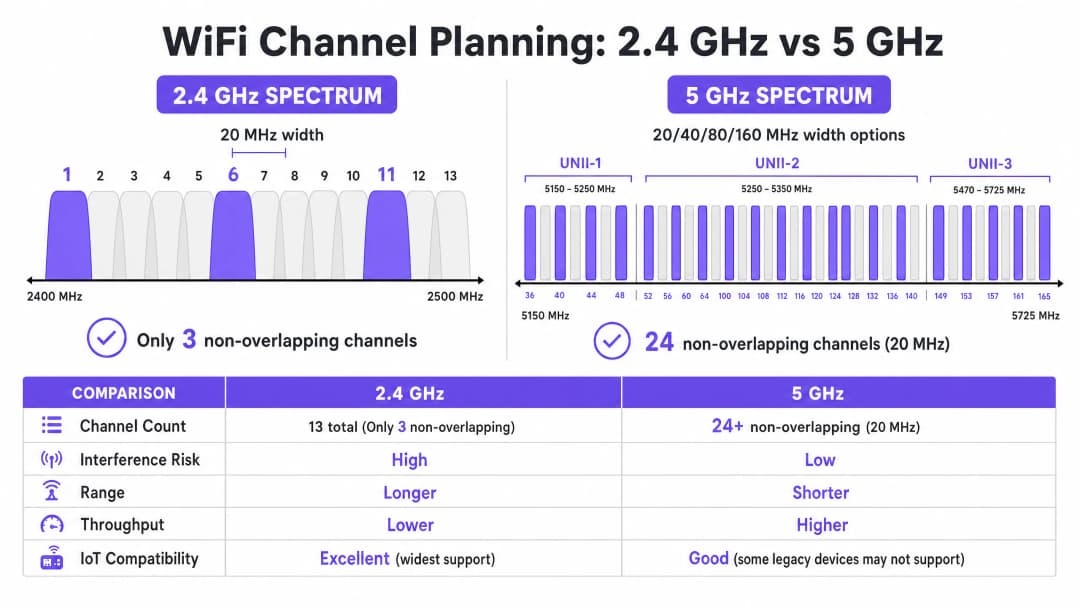
La banda a 2.4 GHz è la porzione più trafficata dello spettro non licenziato. Sebbene offra caratteristiche di propagazione superiori - consentendo ai segnali di penetrare pareti e pavimenti in modo più efficace rispetto alle frequenze più elevate - la struttura dei suoi canali è fondamentalmente limitata. Nella maggior parte dei domini normativi (inclusi l'Europa e il Nord America), questa banda offre canali che hanno una larghezza di 20 MHz ma che sono distanziati di soli 5 MHz.
Questa matematica impone la disponibilità di soli tre canali non sovrapposti: 1, 6 e 11. Qualsiasi implementazione che utilizzi canali al di fuori di questo trio (ad esempio, i canali 2, 3 o 4) introduce interferenze da canale adiacente. A differenza dell'interferenza co-canale, in cui i dispositivi possono coordinare il tempo di trasmissione radio utilizzando il CSMA/CA, l'interferenza da canale adiacente corrompe le trasmissioni, con conseguenti elevati tassi di tentativi e un grave degrado del throughput.
Inoltre, la banda a 2.4 GHz è condivisa con numerosi elementi di disturbo non WiFi, tra cui dispositivi Bluetooth, forni a microonde e sensori IoT legacy. Quando si ottimizza questa banda, l'obiettivo primario è la mitigazione delle interferenze piuttosto che il massimo throughput.
La Banda a 5 GHz: Capacità e Complessità
La banda a 5 GHz offre una capacità significativamente superiore, fornendo 24 o più canali a 20 MHz non sovrapposti a seconda del dominio normativo. Questo spettro è suddiviso in sotto-bande Unlicensed National Information Infrastructure (UNII):
- UNII-1 (Canali 36-48): Questi canali non richiedono la Dynamic Frequency Selection (DFS) e rappresentano il punto di partenza più sicuro per le distribuzioni ad alta densità.
- UNII-2 (Canali 52-144): Questi canali richiedono la DFS, il che significa che gli access point devono monitorare le firme radar (come i radar meteorologici o militari) e liberare il canale se rilevate. Sebbene la DFS aggiunga complessità operativa, l'uso di UNII-2 è essenziale per ottenere il riutilizzo dei canali necessario in ambienti densi.
- UNII-3 (Canali 149-165): Questi canali sono tipicamente non-DFS ma sono soggetti a diverse restrizioni di potenza a seconda della regione.
Nella banda a 5 GHz, i progettisti di rete devono bilanciare la larghezza di banda del canale e la sua disponibilità. Sebbene i canali a 80 MHz (il valore predefinito per 802.11ac e Wi-Fi 6) offrano un throughput di picco più elevato per i singoli client, consumano quattro canali a 20 MHz, riducendo significativamente il numero di canali non sovrapposti disponibili per il riutilizzo. Nei luoghi ad alta densità, i canali più ampi causano spesso interferenze co-canale, riducendo la capacità complessiva.
La frontiera dei 6 GHz (Wi-Fi 6E e Wi-Fi 7)
L'introduzione della banda a 6 GHz rappresenta la più significativa espansione dello spettro WiFi in due decenni, aggiungendo fino a 1200 MHz di spettro greenfield. Fornisce 59 canali aggiuntivi a 20 MHz, completamente esenti da interferenze di dispositivi legacy e requisiti DFS. Per le strutture che aggiornano l'hardware, la banda a 6 GHz consente l'implementazione pratica di canali a 80 MHz o 160 MHz in aree ad alta densità. Tuttavia, la sua lunghezza d'onda più corta comporta una portata e una penetrazione inferiori, richiedendo un posizionamento più denso degli access point.
Hai domande sulla tua configurazione specifica?
Il nostro team collabora con gestori di sedi, responsabili IT e ingegneri di rete in 80.000 sedi. Prenota una chiamata di 20 minuti e ti mostreremo come altri professionisti come te hanno risolto il problema.
Guida all'implementazione: Workflow di ottimizzazione dei canali
L'ottimizzazione del piano dei canali WiFi richiede un approccio sistematico che va dalla misurazione di base alla progettazione ingegneristica e alla distribuzione validata.
Passaggio 1: Audit RF di base
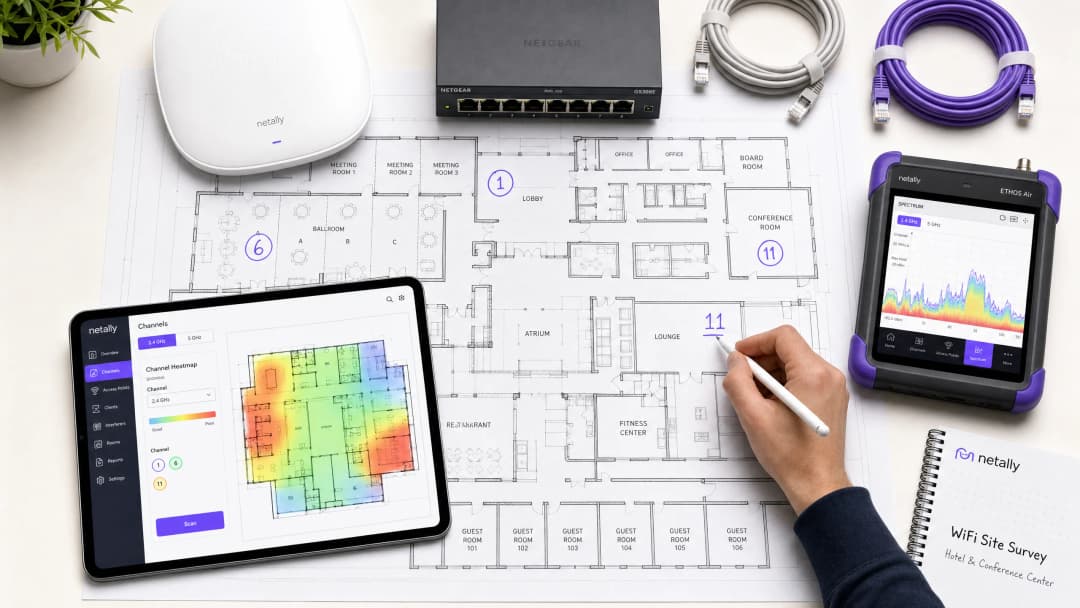
Prima di apportare qualsiasi modifica alla configurazione, è necessario comprendere lo stato attuale dell'ambiente RF. Ciò richiede strumenti di misurazione completi, non solo un'app per smartphone.
- Analisi passiva dello spettro: Utilizzare un analizzatore di spettro dedicato (ad esempio, Ekahau Sidekick, NetAlly AirCheck) per misurare il rumore di fondo e identificare le fonti di interferenza non WiFi. Un ambiente pulito presenta tipicamente un rumore di fondo di circa -95 dBm.
- Rilevamento delle reti adiacenti: elenca tutti i Basic Service Set Identifier (BSSID) visibili, i relativi canali operativi e i Received Signal Strength Indicator (RSSI). In ambienti come parchi commerciali o edifici per uffici multi-tenant, le reti esterne rappresentano una fonte primaria di interferenze incontrollabili.
- Metriche sulle prestazioni dei client: analizza il rapporto segnale-rumore (SNR) invece del solo RSSI. Un SNR inferiore a 20 dB costringerà i client a utilizzare un indice di Modulation and Coding Scheme (MCS) inferiore, riducendo la velocità di trasmissione. Punta a un SNR di 25 dB o superiore per garantire prestazioni affidabili.
Passaggio 2: Progettazione del piano dei canali
Sulla base dei dati di riferimento, progetta un piano dei canali definitivo.
- Strategia per la banda a 2,4 GHz: imponi rigorosamente l'uso dei canali 1, 6 e 11. Se la densità è estremamente elevata, disabilita in modo selettivo le radio a 2,4 GHz su determinati access point per creare una disposizione alternata, riducendo l'interferenza co-canale e mantenendo al contempo la copertura per i dispositivi IoT legacy.
- Strategia per la banda a 5 GHz: utilizza il numero massimo di canali non sovrapposti, inclusi i canali DFS se l'attività radar nella tua zona è bassa.
- Selezione della larghezza del canale: standardizza su canali a 20 MHz per aree ad alta densità (ad es. sale conferenze, stadi). Utilizza canali a 40 MHz in aree a media densità (ad es. camere d'albergo, uffici open space). Evita i canali a 80 MHz a meno che non si tratti di scenari ad altissima velocità di trasmissione e a bassissima densità.
- Regolazione della potenza di trasmissione: la pianificazione dei canali e la potenza di trasmissione sono indissolubilmente legate. Riduci la potenza di trasmissione per restringere la dimensione della cella di ciascun access point, riducendo così al minimo la sovrapposizione (e quindi l'interferenza) tra gli AP sullo stesso canale. Punta a una separazione di 15-20 dBm tra gli AP co-canale.

Passaggio 3: Rollout graduale e convalida
Non applicare mai modifiche globali ai canali contemporaneamente su l'intera infrastruttura o durante l'orario di lavoro.
- Finestre di manutenzione: pianifica le modifiche durante i periodi di minor utilizzo (in genere tra le 02:00 e le 05:00) per ridurre al minimo i disservizi causati dai riavvii radio.
- Distribuzione a zone: implementa il nuovo piano in zone logiche (ad es. un piano o un'ala alla volta).
- Convalida post-modifica: dopo aver applicato il nuovo piano, convalida le modifiche utilizzando gli stessi strumenti impiegati nell'audit iniziale. Assicurati che l'interferenza co-canale sia diminuita e che gli obiettivi di SNR vengano raggiunti.
Ascolta il nostro briefing tecnico di 10 minuti sulle strategie di ottimizzazione dei canali:
Best practice e mitigazione dei rischi
Le insidie degli algoritmi di auto-channel
La maggior parte dei controller WLAN aziendali offre la gestione automatica delle risorse radio - Radio Resource Management (RRM) - o la selezione automatica dei canali. Sebbene siano comodi per le implementazioni più piccole, questi algoritmi sono spesso dannosi in ambienti ad alta densità. Essi prendono decisioni basate sulla prospettiva del singolo AP locale anziché su una visione globale dell'ambiente a radiofrequenza, portando frequentemente ad assegnazioni di canali non ottimali e a cambiamenti di canale a cascata e di disturbo durante le ore lavorative.
Best Practice: Nei contesti complessi, disattiva la selezione automatica dei canali. Implementa un piano di canali statici progettato manualmente sulla base di rigorosi sopralluoghi sul sito. Utilizza le funzioni RRM del controller solo per ricevere avvisi su variazioni significative della radiofrequenza, non per la correzione automatica.
Risoluzione dell'interferenza co-canale (CCI)
La CCI è il principale fattore di riduzione delle prestazioni nelle installazioni ad alta densità. Per una comprensione più approfondita delle tecniche di mitigazione, consulta la nostra guida completa su come Risolvere l'interferenza co-canale nelle installazioni aziendali.
L'importanza del monitoraggio continuo
Un piano di canali statici tenderà a deteriorarsi nel tempo con l'evolversi dell'ambiente a radiofrequenza - comparsa di nuove reti vicine, modifiche strutturali o installazione di nuovi dispositivi IoT. L'ottimizzazione dei canali non è un'attività da configurare una volta sola e poi dimenticare.
Best Practice: Implementa un monitoraggio continuo utilizzando una piattaforma di analisi. Purple's WiFi Analytics fornisce una visibilità essenziale sulla densità dei client, sulla qualità delle sessioni e sulle tendenze di throughput a livello di intera struttura. Imposta avvisi di soglia per il degrado del rapporto segnale-rumore (SNR) o per l'aumento dei tassi di ritrasmissione, per identificare in modo proattivo quando il piano dei canali richiede una revisione.
ROI e impatto aziendale
Investire tempo e strumenti nell'ottimizzazione del piano dei canali WiFi richiede impegno, ma il ritorno sull'investimento (ROI) è sostanziale e misurabile.
- Aumento del throughput aggregato: Riducendo al minimo l'interferenza co-canale e ottimizzando la larghezza di banda del canale, le strutture possono spesso ottenere un aumento del 20-40% della capacità di rete aggregata senza implementare nuovo hardware.
- Riduzione dei costi di supporto: Un ambiente a radiofrequenza stabile riduce significativamente i ticket di assistenza relativi a "WiFi lento" o disconnessioni intermittenti, abbassando i costi di supporto operativo.
- Miglioramento dell'esperienza utente: Per gli ambienti che si affidano al Guest WiFi, come l'Hospitality o il Retail, una connettività affidabile si correla direttamente con punteggi di soddisfazione dei clienti più elevati e un maggiore coinvolgimento con il Captive Portal.
- Affidabilità operativa: Dai terminali dei punti vendita ai lettori di codici a barre portatili per l'inventario, i sistemi aziendali critici si affidano a una connettività wireless robusta. Un piano di canali pulito garantisce che questi sistemi funzionino senza interruzioni, proteggendo i ricavi e l'efficienza operativa.Trattando lo spettro RF come una risorsa critica e gestibile, i leader IT possono trasformare la loro infrastruttura wireless da una fonte di frustrazione a una base affidabile per le operazioni aziendali.
Definizioni chiave
Interferenza co-canale (CCI)
Interferenza che si verifica quando due o più access point funzionano sullo stesso canale di frequenza entro la portata reciproca, costringendo i dispositivi a condividere il tempo di trasmissione radio e ad attendere che il mezzo si liberi.
La CCI è la causa principale del degrado del throughput nelle installazioni ad alta densità in cui il riutilizzo dei canali è pianificato male.
Interferenza da canale adiacente (ACI)
Interferenza causata da frequenze sovrapposte (ad esempio, utilizzando i canali 1 e 3 nella banda a 2.4 GHz), che corrompe le trasmissioni anziché condividere il tempo di trasmissione radio.
L'ACI è altamente distruttiva e deve essere evitata rispettando rigorosamente l'assegnazione di canali non sovrapposti.
Dynamic Frequency Selection (DFS)
Un requisito normativo nella banda a 5 GHz in cui gli access point devono monitorare i segnali radar e liberare il canale se ne viene rilevato uno.
Sebbene i canali DFS (UNII-2) aumentino la complessità operativa, sono essenziali per ottenere un riutilizzo dei canali adeguato negli ambienti ad alta densità.
Rapporto segnale-rumore (SNR)
La differenza in decibel (dB) tra la potenza del segnale ricevuto e il rumore di fondo.
L'SNR è un indicatore più accurato delle prestazioni del client rispetto al solo RSSI. Un SNR più elevato consente velocità di modulazione più rapide.
Modulation and Coding Scheme (MCS)
Un valore di indice che rappresenta la combinazione di tipo di modulazione e tasso di codifica utilizzati per una trasmissione, determinando la velocità dei dati.
Un ambiente RF pulito con un SNR elevato consente ai client di negoziare indici MCS più alti, garantendo un throughput più rapido.
Carrier Sense Multiple Access with Collision Avoidance (CSMA/CA)
Il protocollo utilizzato dalle reti 802.11 in cui i dispositivi ascoltano il mezzo wireless prima di trasmettere per evitare collisioni.
Il CSMA/CA gestisce il tempo di trasmissione su canali condivisi, ma comporta un sovraccarico significativo e un throughput ridotto in ambienti con elevata CCI.
Noise Floor
La misura dell'energia RF di fondo presente nell'ambiente, solitamente espressa in dBm.
Un noise floor elevato riduce il valore SNR effettivo, degradando le prestazioni. Identificare e mitigare le fonti di rumore RF è un passaggio fondamentale per l'ottimizzazione dei canali.
Received Signal Strength Indicator (RSSI)
Una misurazione della potenza presente in un segnale radio ricevuto.
Sebbene sia utile per la mappatura della copertura di base, l'RSSI deve essere valutato insieme al noise floor (per determinare l'SNR) per un'analisi accurata delle prestazioni.
Esempi pratici
Un hotel da 300 camere in un ambiente urbano denso riscontra scarse prestazioni della rete WiFi durante le ore di punta serali. L'installazione attuale utilizza canali a 80 MHz sulla banda a 5 GHz ed è abilitata la selezione automatica del canale. Gli ospiti segnalano frequenti disconnessioni e velocità di streaming ridotte.
- Condurre un'analisi dello spettro di base durante le ore di punta per quantificare l'interferenza.
- Disabilitare la selezione automatica del canale sul controller WLAN per prevenire ripristini radio destabilizzanti.
- Riconfigurare le radio a 5 GHz riducendo l'ampiezza del canale da 80 MHz a 20 MHz. Questo aumenta il numero di canali non sovrapposti disponibili da 6 a oltre 24.
- Implementare un piano di canali statico, assicurando che gli access point adiacenti funzionino su canali diversi e che gli access point co-canale siano separati da almeno 15 - 20 dBm di attenuazione del segnale.
- Convalidare la nuova configurazione misurando il valore SNR e i tassi di tentativi nelle aree precedentemente problematiche.
Un grande magazzino di vendita al dettaglio si affida a scanner portatili a 2.4 GHz per la gestione dell'inventario. Gli scanner perdono frequentemente la connessione alla rete, costringendo il personale a riavviare i dispositivi. Gli access point sono attualmente configurati per utilizzare i canali 1, 4, 8 e 11.
- Eseguire una scansione RF passiva per identificare fonti di interferenza non-WiFi nella banda a 2.4 GHz (ad esempio, beacon Bluetooth, telecamere di sicurezza legacy).
- Riconfigurare tutte le radio a 2.4 GHz per utilizzare solo i canali non sovrapposti: 1, 6 e 11.
- Regolare la potenza di trasmissione per ridurre al minimo la sovrapposizione delle celle, assicurando che gli scanner effettuino il roaming in modo fluido tra gli access point senza agganciarsi a segnali distanti e deboli (sticky client).
- Implementare il monitoraggio per tracciare il comportamento di roaming e i tassi di tentativi degli scanner portatili.
Domande di esercitazione
Q1. Stai progettando l'installazione WiFi per un centro congressi ad alta densità. La struttura richiede la massima capacità complessiva per supportare migliaia di dispositivi client simultanei. Quale strategia di ampiezza del canale dovresti adottare per la banda a 5 GHz?
Suggerimento: Considera il compromesso tra il throughput massimo individuale e il numero di canali non sovrapposti disponibili per il riutilizzo.
Visualizza risposta modello
Standardizzare su canali a 20 MHz. Sebbene i canali a 80 MHz offrano un throughput di picco più elevato per un singolo utente, riducono drasticamente il numero di canali non sovrapposti disponibili. In un ambiente ad alta densità, l'utilizzo di canali a 20 MHz massimizza il riutilizzo dei canali, riduce l'interferenza co-canale e fornisce la massima capacità complessiva per la struttura.
Q2. Durante un'indagine in loco di un parco commerciale, scopri che diverse attività vicine utilizzano i propri access point sul canale 4 nella banda a 2.4 GHz. Come dovresti configurare i tuoi access point di conseguenza?
Suggerimento: Valuta l'impatto dell'interferenza da canale adiacente rispetto all'interferenza co-canale.
Visualizza risposta modello
È necessario configurare i propri access point per utilizzare i canali 1, 6 o 11, selezionando specificamente il canale (probabilmente l'11) che è più lontano dal canale interferente 4. L'utilizzo del canale 4 causerebbe gravi interferenze da canale adiacente. Anche l'utilizzo del canale 6 potrebbe risentire di una parziale sovrapposizione dovuta a segnali forti sul canale 4. È preferibile accettare una parte di interferenza co-canale su un canale standard (1, 6, 11) piuttosto che introdurre un'interferenza da canale adiacente.
Q3. Dopo aver implementato un nuovo piano canali statico in un ospedale, noti che i client in un reparto specifico riscontrano velocità ridotte, nonostante segnalino un RSSI forte (-65 dBm). Qual è la causa più probabile e come procedi con l'analisi?
Suggerimento: L'RSSI misura solo la potenza del segnale, non la sua qualità. Quale metrica determina l'effettivo segnale utilizzabile?
Visualizza risposta modello
La causa più probabile è un noise floor elevato che comporta un basso rapporto segnale-rumore (SNR). Anche con un RSSI forte, se il noise floor è alto (ad esempio, -75 dBm), l'SNR risultante (10 dB) è troppo basso per una modulazione ad alta velocità. È necessario utilizzare un analizzatore di spettro per identificare la fonte del rumore RF in quel reparto specifico e mitigarla.
Continua a leggere questa serie
Comprendere l'RSSI e la potenza del segnale per una pianificazione ottimale dei canali
Questa guida offre un approfondimento tecnico completo su RSSI, Signal-to-Noise Ratio (SNR) e principi di propagazione RF per una pianificazione ottimale dei canali. Fornisce a IT manager, architetti di rete e direttori delle operazioni delle strutture strategie pratiche per mitigare le interferenze co-canale e adiacenti, ottimizzare il posizionamento degli AP e sfruttare l'analisi dei dati per un impatto aziendale misurabile nei settori dell'ospitalità, del retail e pubblico.
WiFi 6 vs WiFi 5: Risolve l'Interferenza di Canale?
Questa guida fornisce un approfondimento tecnico su come il WiFi 6 (802.11ax) affronti l'interferenza di canale in ambienti aziendali ad alta densità attraverso l'OFDMA e il BSS Coloring. Offre a IT manager, architetti di rete e CTO strategie di implementazione pratiche, casi di studio reali nei settori hospitality e healthcare, e un framework per valutare il ROI degli aggiornamenti infrastrutturali in ambienti in cui le prestazioni wireless sono critiche per il business.
Migliori canali WiFi per luoghi ad alta densità
Un riferimento tecnico definitivo per la selezione e l'ottimizzazione dei canali WiFi in ambienti ad alta densità come stadi, arene e grandi spazi pubblici. Copre la fisica delle radiofrequenze, le strategie di riutilizzo dei canali nelle bande a 5 GHz e 6 GHz e linee guida pratiche di implementazione per i leader IT.
Hai domande sulla tua configurazione specifica?
Il nostro team collabora con gestori di sedi, responsabili IT e ingegneri di rete in 80.000 sedi. Prenota una chiamata di 20 minuti e ti mostreremo come altri professionisti come te hanno risolto il problema.