
Come cambiare i canali WiFi per prevenire le interferenze
Questa guida tecnica completa fornisce a IT manager, architetti di rete e direttori operativi delle strutture un approccio definitivo e dettagliato per identificare le fonti di interferenza WiFi e cambiare strategicamente i canali WiFi per eliminarle. Copre la pianificazione delle bande a 2.4 GHz e 5 GHz, l'analisi dello spettro, la gestione delle risorse radio (RRM) e le considerazioni sul DFS, basandosi sugli standard IEEE 802.11 e su scenari di implementazione reali. L'applicazione di queste strategie offre miglioramenti misurabili in termini di throughput di rete, stabilità dei client e ROI dell'infrastruttura senza richiedere spese di capitale per nuovo hardware.
Ascolta questa guida
Visualizza trascrizione del podcast
Parte della nostra serie principale: Guest WiFi Guide →
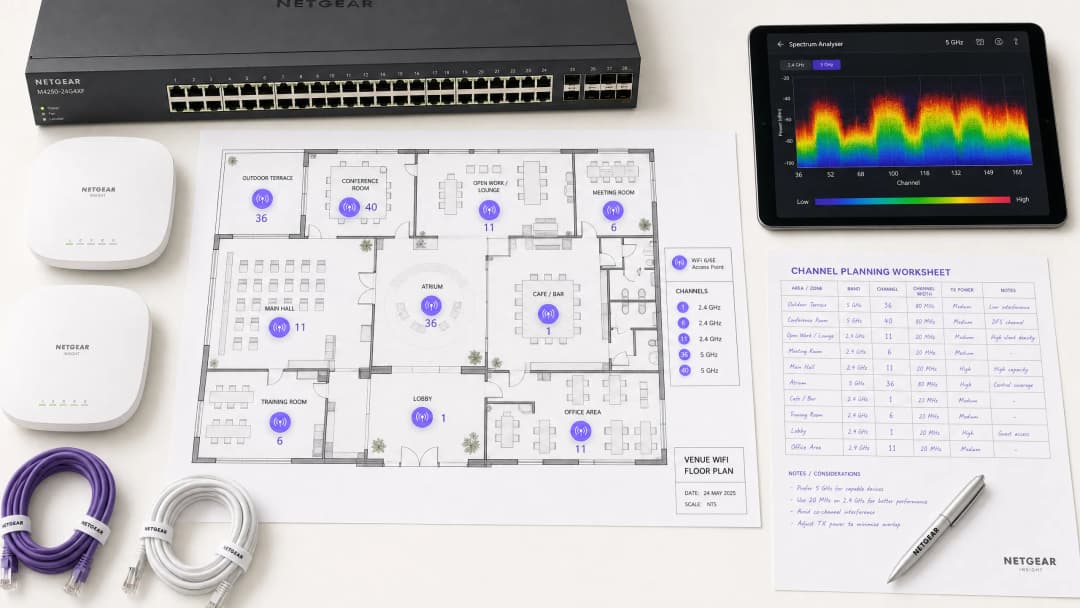
Panoramica
Per gli ambienti enterprise - dai complessi spazi per l' hospitality alle dense aree retail - un WiFi affidabile non è più un optional, ma un'infrastruttura critica. L'interferenza rimane la causa principale di connessioni interrotte, latenza elevata e throughput scadente, con un impatto diretto sull'efficienza operativa e sull'esperienza di guest WiFi. Questa guida fornisce ai network architect e agli IT manager una metodologia definitiva, passo dopo passo, per identificare le fonti di interferenza e modificare strategicamente i canali WiFi per mitigarle.
Implementando le best practice di gestione dello spettro indipendenti dal vendor, le organizzazioni possono massimizzare il ROI delle proprie infrastrutture, garantire un roaming dei client senza interruzioni e supportare la crescente densità di dispositivi IoT e utenti senza compromettere gli standard di sicurezza o conformità, inclusi PCI-DSS e GDPR. Il principio fondamentale è semplice: l'interferenza è un problema di gestione dello spettro, non un problema hardware. Configurare correttamente l'infrastruttura esistente risolve, nella maggior parte dei casi, i problemi di prestazioni che le organizzazioni attribuiscono erroneamente a un'insufficiente densità di AP o a hardware obsoleto.
Approfondimento Tecnico
Prima di eseguire qualsiasi modifica di configurazione, è essenziale comprendere il livello fisico delle reti IEEE 802.11. Lo spettro a radiofrequenza (RF) è un mezzo condiviso regolato dai protocolli CSMA/CA (Carrier Sense Multiple Access with Collision Avoidance) e l'interferenza rientra generalmente in due categorie distinte: Interferenza Co-Canale (CCI) e Interferenza da Canali Adiacenti (ACI).
L'Interferenza Co-Canale (CCI) si verifica quando più access point o client trasmettono sullo stesso canale. Sebbene il protocollo 802.11 gestisca questa situazione tramite CSMA/CA - in cui i dispositivi ascoltano prima di trasmettere - una CCI eccessiva costringe i dispositivi ad attendere tempi di clear-to-send, riducendo drasticamente il throughput e aumentando la latenza. Si tratta essenzialmente di un problema di congestione piuttosto che di vero rumore RF, e il meccanismo CSMA/CA lo gestisce in modo efficiente fino a un certo punto.
L'Interferenza da Canali Adiacenti (ACI) è molto più distruttiva. Si verifica quando gli AP operano su frequenze sovrapposte (ad esempio, i canali 2 e 4 sulla banda a 2.4 GHz). Poiché le trasmissioni si sovrappongono ma non possono essere decodificate da CSMA/CA, vengono trattate come puro rumore, innalzando la soglia di rumore di fondo e causando perdite di pacchetti e ritrasmissioni. Nelle sedi affollate, l'ACI può degradare il throughput effettivo del 60 - 70% ed è l'errore di configurazione più comune nelle distribuzioni enterprise.
Il Dilemma dei 2.4 GHz
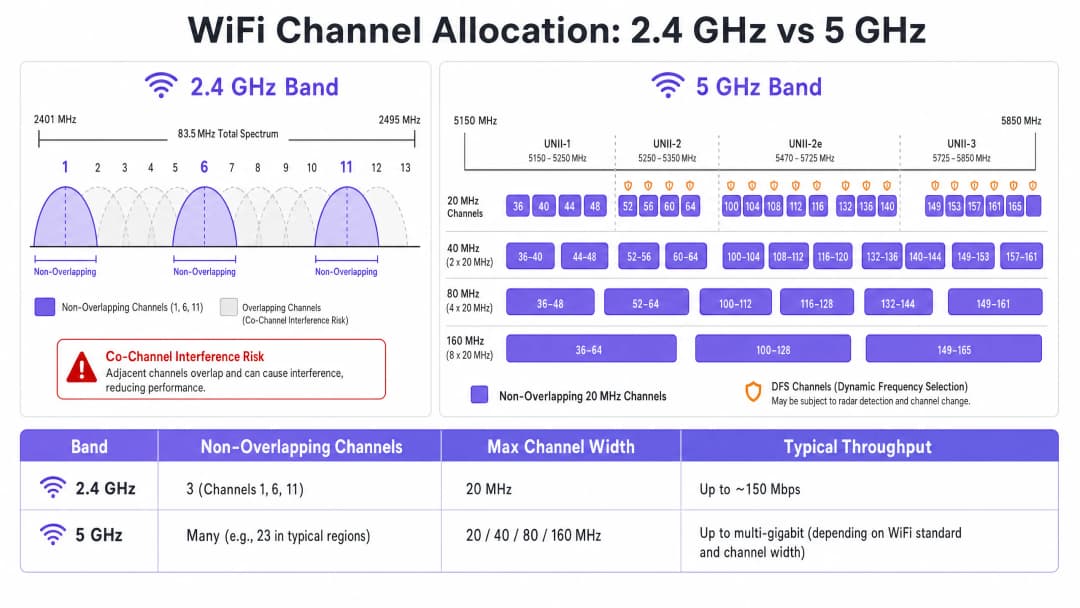
La banda a 2.4 GHz offre una portata e una penetrazione delle pareti migliori, ma è fortemente limitata dal suo spettro ristretto - circa 83.5 MHz in totale. Sebbene siano disponibili da 11 a 14 canali a seconda del dominio normativo, solo tre non sono effettivamente sovrapposti: Canali 1, 6 e 11. L'uso di qualsiasi altro canale in una distribuzione multi-AP garantisce ACI. Inoltre, questa banda è affollata da interferenze non-WiFi, inclusi dispositivi Bluetooth, forni a microonde e telefoni cordless DECT che operano nello stesso spettro. Per un'analisi dettagliata di come il Bluetooth Low Energy coesiste con l'infrastruttura WiFi, consulta la nostra guida Enterprise BLE Low Energy Decoded. Per una trattazione più ampia sulla selezione delle bande, consulta Wi-Fi Frequencies: The 2026 Guide to Wi-Fi Frequencies.
Il vantaggio dei 5 GHz
La banda a 5 GHz offre una quantità di spettro significativamente maggiore, fornendo un'abbondanza di canali a 20 MHz non sovrapposti tra le sotto-bande UNII-1, UNII-2, UNII-2e e UNII-3. Questa banda è la scelta predefinita corretta per il traffico client aziendale. Tuttavia, introduce due complessità critiche: i compromessi del channel bonding e la Dynamic Frequency Selection (DFS).
Il channel bonding - combinando canali a 20 MHz in larghezze di 40, 80 o 160 MHz - aumenta la velocità di picco per un singolo client ma riduce il numero totale di canali indipendenti disponibili. In ambienti ad alta densità, ciò causa gravi CCI. I canali DFS (principalmente UNII-2 e UNII-2e) richiedono che gli AP monitorino i segnali radar e liberino immediatamente il canale se rilevati, causando disconnessioni dei client. Questa è una considerazione critica per le sedi situate vicino ad aeroporti, stazioni meteorologiche o installazioni militari.
Hai domande sulla tua configurazione specifica?
Il nostro team collabora con gestori di sedi, responsabili IT e ingegneri di rete in 80.000 sedi. Prenota una chiamata di 20 minuti e ti mostreremo come altri professionisti come te hanno risolto il problema.
Playbook di implementazione
Il cambio dei canali WiFi non deve mai basarsi su supposizioni. Richiede un approccio sistematico e basato sui dati.
Passaggio 1: Eseguire un'analisi dello spettro
Prima di apportare qualsiasi modifica alla configurazione, stabilisci una baseline empirica. Distribuisci un analizzatore di spettro - hardware dedicato o strumenti integrati nei controller WLAN aziendali - per esaminare l'ambiente RF su entrambe le bande. Documenta quanto segue: AP non autorizzati o vicini e le loro allocazioni di canale, il rumore di fondo per canale, la presenza di interferenze non-WiFi e i livelli di potenza di trasmissione attuali degli AP. Questa baseline è il tuo punto di riferimento per misurare l'impatto delle modifiche successive.
Passaggio 2: Sviluppare un piano dei canali
Per la banda a 2.4 GHz: Limita rigorosamente il tuo pool di canali ai canali 1, 6 e 11. Imposta tutte le larghezze di canale a 20 MHz - questo non è negoziabile. Se la densità degli AP è sufficientemente alta da causare CCI significative anche con uno schema 1-6-11, considera di disattivare selettivamente le radio a 2.4 GHz secondo un pattern a scacchiera, dimezzando efficacemente la densità degli AP a 2.4 GHz pur mantenendo la copertura attraverso gli AP rimanenti. Per la banda a 5 GHz: Massimizza l'uso dei canali non sovrapposti disponibili. Nelle distribuzioni ad alta densità - centri congressi, stadi, hub di trasporto - applica ampiezze di canale a 20 MHz per massimizzare il numero di canali indipendenti. Aumenta a 40 MHz solo in zone a bassa densità dove la CCI non rappresenta un problema. Valuta attentamente l'inclusione dei canali DFS in base alla tua posizione specifica e alla vicinanza a sorgenti radar. Consulta l'elenco di disponibilità dei canali regionali specifico della tua autorità di regolamentazione nazionale.
Passaggio 3: Configurare gli Access Point
Accedi al tuo Wireless LAN Controller (WLC) o alla dashboard di gestione cloud per applicare il tuo piano dei canali. La maggior parte delle piattaforme enterprise offre funzionalità di Radio Resource Management (RRM) o Auto-RF che allocano dinamicamente i canali e i livelli di potenza.
| Metodologia | Ideale per | Rischi |
|---|---|---|
| Pianificazione Statica Manuale | Ambienti complessi, ad alta densità o adiacenti a sistemi radar | Richiede sondaggi periodici al variare dell'ambiente |
| Auto-RF / RRM | Distribuzioni più semplici e a minore densità | Può causare il channel flapping in ambienti RF fluttuanti |
| Modalità Ibrida | La maggior parte delle distribuzioni enterprise | Richiede un'attenta configurazione dei vincoli |
In ambienti altamente complessi, la pianificazione manuale statica dei canali basata su sondaggi predittivi offre spesso una stabilità migliore rispetto al solo affidamento su Auto-RF. La potenza di trasmissione deve essere regolata in parallelo - abbassando la potenza di trasmissione degli AP a 5 GHz a 10–14 dBm nelle distribuzioni dense per ridurre le dimensioni delle celle e l'interferenza tra AP.
Passaggio 4: Verificare e Monitorare
Dopo aver applicato le modifiche, esegui un sondaggio del sito post-implementazione per convalidare il nuovo piano dei canali. Monitora i Key Performance Indicators (KPI) tramite la tua piattaforma di WiFi analytics, concentrandoti su tassi di tentativi (retry rates), utilizzo dell'airtime per AP, conteggio delle associazioni client e comportamento di roaming. Un ambiente RF ben sintonizzato dovrebbe mostrare tassi di tentativi inferiori al 10% e un utilizzo dell'airtime inferiore al 70% durante i periodi di picco.

Best Practice
Applica un'ampiezza di 20 MHz in ambienti ad alta densità. In ambienti come centri congressi o stadi, dai la priorità alla capacità - più canali non sovrapposti - rispetto al throughput di picco del singolo client ottenuto con canali più ampi. Le prestazioni complessive della rete miglioreranno in modo significativo.
Implementa attivamente il band steering. Configura il band steering per spingere i client compatibili con i 5 GHz lontano dalla banda congestionata a 2.4 GHz e verso i 5 GHz. La maggior parte dei controller enterprise moderni supporta questa funzione nativamente. Riserva i 2.4 GHz per i dispositivi IoT e l'hardware legacy che non può funzionare a 5 GHz.
Disabilita i data rate legacy. Disabilita i data rate 802.11b (1, 2, 5.5, 11 Mbps) su tutti gli SSID. Questi data rate legacy consumano una quantità sproporzionata di tempo di trasmissione e rallentano l'intera rete. Imposta il data rate minimo a 12 o 24 Mbps, costringendo i client a effettuare il roaming prima e riducendo l'overhead dei frame di gestione.
Pianifica audit RF regolari. Gli ambienti RF sono dinamici. Nuove reti vicine, ristrutturazioni di edifici e nuovi dispositivi alterano il panorama delle interferenze. Pianifica audit RF trimestrali per mantenere aggiornato il tuo piano dei canali.
Integra la sicurezza e la gestione della rete. Assicurati che il rilevamento e la mitigazione dei rogue AP siano abilitati per impedire a dispositivi non autorizzati di causare interferenze o vulnerabilità di sicurezza. Per un contesto di cybersecurity più ampio, incluso il filtraggio dei contenuti sulle reti guest, consulta What is DNS Filtering? How to Block Harmful Content on Guest WiFi. Per strategie di ottimizzazione specifiche per l'ufficio, consulta Office Wi-Fi: Optimising Your Modern Office Wi-Fi Network.
Risoluzione dei Problemi e Mitigazione dei Rischi
Sintomo: Segnale forte, throughput scarso. Questo è un segno distintivo dell'interferenza co-canale. Il rumore di fondo è basso, ma il tempo di trasmissione è saturo. Esegui un audit delle assegnazioni dei canali e della potenza di trasmissione degli AP. Riduci la potenza di trasmissione e imponi ampiezze di canale di 20 MHz per liberare tempo di trasmissione e migliorare il riutilizzo dello spazio.
Sintomo: Disconnessioni casuali dei client in aree specifiche. Controlla immediatamente i log degli eventi DFS. Se gli AP in quell'area si trovano su canali UNII-2 o UNII-2e e sono vicini a una sorgente radar, sono legalmente obbligati a liberare il canale, causandone la disconnessione. Escludi quei canali DFS specifici dal piano dei canali nell'area interessata.
Sintomo: Il piano dei canali cambia costantemente in automatico. Si tratta di channel flapping causato da un algoritmo Auto-RF eccessivamente sensibile che reagisce a interferenze transitorie. Limita le impostazioni di sensibilità RRM, aumenta i timer di attesa o passa a un piano dei canali statico basato sui dati dei rilievi.
Sintomo: Buon segnale ma prestazioni scarse in aree specifiche. Le interferenze non WiFi provenienti da forni a microonde, telefoni DECT o apparecchiature industriali potrebbero innalzare il rumore di fondo. Un analizzatore di spettro identificherà queste sorgenti. La soluzione consiste nel rimuovere la sorgente o migrare gli AP interessati alle bande a 5 GHz o 6 GHz, che sono immuni alla maggior parte delle sorgenti di interferenza non WiFi a 2.4 GHz.
ROI e Impatto Aziendale
L'ottimizzazione dei canali WiFi è un aggiornamento infrastrutturale a costo zero che offre ritorni immediati e misurabili. Le organizzazioni che implementano una corretta pianificazione dei canali RF registrano in genere una riduzione del 30-40% dei ticket di assistenza relativi al WiFi entro il primo trimestre. Nei contesti sanitari, un ambiente RF ben sintonizzato garantisce il flusso ininterrotto di dati telemetrici critici e supporta la conformità ai requisiti di comunicazione dei dispositivi clinici. Nel settore retail, garantisce il funzionamento continuo dei sistemi di cassa mobili, analisi di localizzazione accurate e applicazioni affidabili per la gestione dell'inventario.
Dal punto di vista del CapEx, una corretta pianificazione dei canali spesso elimina la necessità percepita di ulteriore hardware AP. Molte organizzazioni che ritengono di avere un problema di densità di AP hanno in realtà un problema di pianificazione dei canali. È prassi standard affrontare i problemi di configurazione RF prima dell'acquisto di hardware aggiuntivo durante qualsiasi valutazione rigorosa della rete. Un ambiente RF ben sintonizzato estende inoltre il ciclo di vita operativo dell'infrastruttura esistente, posticipando i costosi cicli di aggiornamento hardware e offrendo un ritorno immediato e quantificabile sugli investimenti di capitale esistenti.
Definizioni chiave
Co-Channel Interference (CCI)
Interferenza che si verifica quando più access point o dispositivi client trasmettono contemporaneamente sullo stesso identico canale di frequenza.
Gestito da CSMA/CA, ma causa congestione e riduzione del throughput se eccessivo. Il sintomo principale è l'elevato utilizzo del tempo di trasmissione con un basso throughput.
Adjacent-Channel Interference (ACI)
Interferenza causata da dispositivi che trasmettono su canali di frequenza sovrapposti ma non identici, creando un rumore RF che il CSMA/CA non può decodificare o gestire.
Più distruttiva della CCI. Innalza il rumore di fondo, causa la perdita di pacchetti e costringe a ritrasmissioni. Causata dall'uso di canali diversi da 1, 6 e 11 sulla banda a 2.4 GHz.
Dynamic Frequency Selection (DFS)
Un meccanismo IEEE 802.11h che richiede agli access point WiFi di monitorare i segnali radar su determinati canali a 5 GHz e di liberare immediatamente il canale se viene rilevato un radar.
Interessa i canali UNII-2 e UNII-2e. Considerazione critica per le sedi vicine a aeroporti, stazioni meteorologiche o siti militari, dove il rilevamento frequente dei radar causa la disconnessione dei client.
Radio Resource Management (RRM)
Algoritmi automatizzati all'interno dei controller WLAN aziendali che regolano dinamicamente l'assegnazione dei canali e i livelli di potenza di trasmissione in base alle condizioni RF in tempo reale.
Utile per adattarsi ai cambiamenti degli ambienti RF, ma può causare il "channel churn" - frequenti cambi di canale - in ambienti volatili, interrompendo la connettività dei client.
Channel Bonding
Il processo di combinazione di più canali adiacenti da 20 MHz in canali più ampi da 40, 80 o 160 MHz per aumentare il throughput di picco del singolo client.
Riduce il numero totale di canali non sovrapposti disponibili, aumentando il rischio di CCI nelle distribuzioni dense. Dovrebbe essere evitato in ambienti aziendali ad alta densità.
Band Steering
Una funzionalità del controller WLAN che incoraggia i dispositivi client con funzionalità dual-band a connettersi alla banda a 5 GHz anziché alla banda congestionata a 2.4 GHz.
Essenziale per il bilanciamento del carico nelle distribuzioni aziendali. Preserva lo spettro limitato a 2.4 GHz per i dispositivi IoT e l'hardware legacy che non possono funzionare a 5 GHz.
CSMA/CA
Carrier Sense Multiple Access with Collision Avoidance. Il protocollo di controllo dell'accesso al mezzo utilizzato dallo standard WiFi IEEE 802.11, che richiede ai dispositivi di verificare che il canale sia libero prima di trasmettere.
Il meccanismo che regola il modo in cui i dispositivi WiFi condividono il mezzo RF. Una CCI elevata costringe i dispositivi ad attendere più a lungo per avere tempo di trasmissione libero, riducendo direttamente il throughput e aumentando la latenza.
Rumore di fondo
Il livello complessivo di energia RF di fondo presente in una determinata banda di frequenza, misurato in dBm. Un rumore di fondo più elevato riduce il rapporto segnale-rumore (SNR) effettivo per le trasmissioni WiFi.
Innalzato da ACI, interferenze non WiFi e pianificazione inadeguata dei canali. Un rumore di fondo elevato costringe i dispositivi a utilizzare schemi di modulazione e velocità di trasmissione dei dati inferiori, riducendo il throughput.
Riutilizzo spaziale
La capacità di più access point di trasmettere contemporaneamente sullo stesso canale senza interferire tra loro, resa possibile dalla separazione fisica e da livelli di potenza di trasmissione adeguati.
Il meccanismo fondamentale che consente di scalare le reti WiFi ad alta densità. Viene massimizzato riducendo la potenza di trasmissione degli AP e utilizzando l'ampiezza minima dei canali necessaria.
Esempi pratici
Un hotel da 200 camere riscontra frequenti lamentele per la lentezza del WiFi durante il picco serale. L'attuale implementazione utilizza canali a 40 MHz sulla banda a 2.4 GHz su 80 AP, con Auto-RF abilitato. I log del controller WLAN mostrano frequenti cambi di canale durante tutta la serata.
Fase 1 - Risoluzione immediata: riconfigurare immediatamente tutte le radio a 2.4 GHz su larghezze di canale a 20 MHz. Limitare il pool di canali a 2.4 GHz solo ai canali 1, 6 e 11 all'interno del controller. Questo da solo eliminerà l'interferenza da canale adiacente (ACI) in tutta l'installazione.
Fase 2 - Stabilizzare Auto-RF: esaminare i log degli eventi di Auto-RF. Se gli AP cambiano canale più di una volta all'ora, l'algoritmo sta reagendo a interferenze transitorie. Aumentare il timer di hold-down RRM e ridurre la soglia di sensibilità. Se l'instabilità persiste, migrare a un piano di canali statici.
Fase 3 - Band steering: abilitare un band steering aggressivo per spostare i dispositivi dual-band sulla banda a 5 GHz. Ciò riduce significativamente il carico a 2.4 GHz durante i periodi di picco.
Fase 4 - Validazione: implementare un analizzatore di spettro dopo la modifica e monitorare i tassi di tentativi e l'utilizzo dell'airtime tramite la dashboard di analisi WiFi per 48 ore per confermare il miglioramento.
Una grande catena di vendita al dettaglio ha installato AP ogni 12 metri in un centro di distribuzione di 4.000 metri quadrati. Anche sulla banda a 5 GHz utilizzando canali a 20 MHz, l'interferenza co-canale (CCI) è elevata, il throughput è scarso e i dispositivi di scansione mobile subiscono frequenti disconnessioni durante le ore di picco del turno.
Fase 1 - Controllo della potenza di trasmissione: gli AP sono quasi certamente configurati alla massima potenza TX (in genere 20 - 23 dBm). Con una spaziatura di 12 metri, questo crea una massiccia sovrapposizione delle celle. Ridurre la potenza TX a 10 - 12 dBm su 5 GHz per rimpicciolire le dimensioni delle celle e ridurre l'interferenza tra AP.
Fase 2 - Disabilitare le velocità di trasmissione legacy: disabilitare tutte le velocità di trasmissione 802.11b/g inferiori a 12 Mbps. Questo costringe i dispositivi di scansione a effettuare il roaming verso l'AP più vicino anziché rimanere associati a un AP lontano a una velocità di trasmissione bassa, consumando una quantità sproporzionata di airtime.
Fase 3 - Revisione del piano dei canali: assicurarsi che il piano dei canali a 5 GHz utilizzi il numero massimo di canali non sovrapposti disponibili. Con un'elevata densità di AP, ogni singolo canale è fondamentale.
Fase 4 - Validazione con rilievo post-modifica: condurre un rilievo sul campo con un analizzatore di spettro per confermare la riduzione della sovrapposizione tra AP e il miglioramento del rapporto segnale-rumore (SNR) in tutta l'area.
Domande di esercitazione
Q1. Stai implementando una nuova rete wireless in un edificio per uffici multi-tenant. La scansione dello spettro mostra un utilizzo intenso sui canali 1, 6 e 11 da parte dei tenant vicini. Un ingegnere junior suggerisce di utilizzare i canali 3, 8 e 13 per "evitare la congestione". Come rispondi e qual è la configurazione corretta?
Suggerimento: Considera la differenza tra Co-Channel Interference (CCI) e Adjacent-Channel Interference (ACI) e quale sia più dannosa per le prestazioni della rete.
Visualizza risposta modello
Il suggerimento dell'ingegnere junior non è corretto e causerebbe un grave degrado delle prestazioni. I canali 3, 8 e 13 si sovrappongono rispettivamente ai canali 1, 6 e 11, il che introdurrebbe un'interferenza da canale adiacente (Adjacent-Channel Interference) - la forma più distruttiva di interferenza WiFi. L'ACI si manifesta come puro rumore RF che il CSMA/CA non può gestire, causando perdita di pacchetti e ritrasmissioni. La configurazione corretta consiste nell'implementare sui canali 1, 6 e 11. Sebbene ciò causerà interferenza co-canale (Co-Channel Interference) con i tenant vicini, il CSMA/CA può gestire la CCI in modo efficiente facendo fare a turno ai dispositivi. Le prestazioni complessive saranno significativamente migliori rispetto all'uso dell'ACI.
Q2. Un'installazione in uno stadio utilizza canali a 80 MHz sulla banda a 5 GHz per pubblicizzare velocità "Gigabit WiFi" durante gli eventi. Gli utenti segnalano tempi di caricamento lenti, disconnessioni frequenti e scarsa qualità dello streaming video durante i picchi di affluenza. L'hardware degli AP è una moderna apparecchiatura WiFi 6. Qual è il difetto architetturale e quale la soluzione?
Suggerimento: Valuta il compromesso tra il throughput massimo del singolo client e la capacità complessiva della rete in un ambiente ad alta densità.
Visualizza risposta modello
Il difetto architetturale è l'uso di canali con larghezza di banda a 80 MHz in un ambiente ad alta densità. Ciascun canale a 80 MHz unisce quattro canali a 20 MHz, riducendo drasticamente il numero totale di canali non sovrapposti disponibili nell'intera installazione. Con molti AP costretti a riutilizzare gli stessi canali ampi, l'interferenza co-canale diventa grave. La soluzione consiste nel ridurre la larghezza dei canali a 20 MHz su tutti gli AP. Ciò aumenta il numero di canali indipendenti disponibili, riduce la CCI e migliora significativamente la capacità complessiva della rete. Il throughput massimo per client diminuirà, ma il numero di client che possono essere serviti contemporaneamente - e la qualità della loro esperienza - aumenterà in modo sostanziale.
Q3. La rete di un ospedale subisce disconnessioni intermittenti dei client che colpiscono i dispositivi medici nei reparti vicino all'eliporto sul tetto della struttura. Gli AP interessati sono configurati per utilizzare i canali 52, 56, 60 e 64. Qual è la causa più probabile e quale la corretta risoluzione?
Suggerimento: Considera i requisiti normativi per gli specifici canali a 5 GHz in uso e quali sistemi operano vicino a un eliporto.
Visualizza risposta modello
I canali 52, 56, 60 e 64 sono canali UNII-2 DFS. Gli elicotteri che utilizzano l'eliporto, o i sistemi radar aeronautici associati, stanno probabilmente attivando eventi di rilevamento radar DFS sugli AP in quella zona. Quando viene rilevato un radar, gli AP sono legalmente obbligati a liberare immediatamente tali canali, causando la disconnessione dei client. La corretta risoluzione consiste nell'escludere tutti i canali DFS dal piano dei canali per gli AP nelle zone vicino all'eliporto. Riconfigura tali AP per utilizzare i canali UNII-1 (36, 40, 44, 48) o i canali UNII-3 (149, 153, 157, 161, 165), che non sono soggetti ai requisiti DFS.
Continua a leggere questa serie
Comprendere l'RSSI e la potenza del segnale per una pianificazione ottimale dei canali
Questa guida offre un approfondimento tecnico completo su RSSI, Signal-to-Noise Ratio (SNR) e principi di propagazione RF per una pianificazione ottimale dei canali. Fornisce a IT manager, architetti di rete e direttori delle operazioni delle strutture strategie pratiche per mitigare le interferenze co-canale e adiacenti, ottimizzare il posizionamento degli AP e sfruttare l'analisi dei dati per un impatto aziendale misurabile nei settori dell'ospitalità, del retail e pubblico.
WiFi 6 vs WiFi 5: Risolve l'Interferenza di Canale?
Questa guida fornisce un approfondimento tecnico su come il WiFi 6 (802.11ax) affronti l'interferenza di canale in ambienti aziendali ad alta densità attraverso l'OFDMA e il BSS Coloring. Offre a IT manager, architetti di rete e CTO strategie di implementazione pratiche, casi di studio reali nei settori hospitality e healthcare, e un framework per valutare il ROI degli aggiornamenti infrastrutturali in ambienti in cui le prestazioni wireless sono critiche per il business.
Migliori canali WiFi per luoghi ad alta densità
Un riferimento tecnico definitivo per la selezione e l'ottimizzazione dei canali WiFi in ambienti ad alta densità come stadi, arene e grandi spazi pubblici. Copre la fisica delle radiofrequenze, le strategie di riutilizzo dei canali nelle bande a 5 GHz e 6 GHz e linee guida pratiche di implementazione per i leader IT.
Hai domande sulla tua configurazione specifica?
Il nostro team collabora con gestori di sedi, responsabili IT e ingegneri di rete in 80.000 sedi. Prenota una chiamata di 20 minuti e ti mostreremo come altri professionisti come te hanno risolto il problema.