
Come configurare Azure Entra ID (Azure AD) per l'autenticazione WiFi
Questa guida autorevole illustra l'architettura, i passaggi di implementazione e l'impatto aziendale dell'integrazione di Azure Entra ID con 802.1X per l'autenticazione WiFi aziendale. Fornisce ad architetti di rete e responsabili IT strategie di implementazione pratiche, sostituendo le PSK legacy con un accesso alla rete basato su certificati e zero-trust.
Ascolta questa guida
Visualizza trascrizione del podcast
Riepilogo Esecutivo
Per i CTO e gli architetti di rete che gestiscono ambienti complessi, dai grandi Hospitality agli spazi Retail dinamici, la sicurezza della rete aziendale non riguarda più solo password complesse. Le Pre-Shared Keys (PSK) legacy e l'autenticazione basata su credenziali di base sono fondamentalmente incompatibili con le moderne architetture zero-trust.
Questa guida descrive la transizione all'autenticazione WiFi basata su certificati 802.1X integrata direttamente con Azure Entra ID (precedentemente Azure AD). Passando a EAP-TLS (Extensible Authentication Protocol with Transport Layer Security), le organizzazioni possono eliminare i rischi associati al furto di credenziali, automatizzare l'onboarding dei dispositivi tramite Mobile Device Management (MDM) e garantire che solo i dispositivi conformi e gestiti possano accedere alle VLAN aziendali sensibili. Esploreremo l'architettura tecnica, i passaggi di implementazione e come questa postura di sicurezza aziendale si affianca alle strategie di rete guest gestite da piattaforme come Purple.
Approfondimento Tecnico
Il passaggio dalle credenziali ai certificati
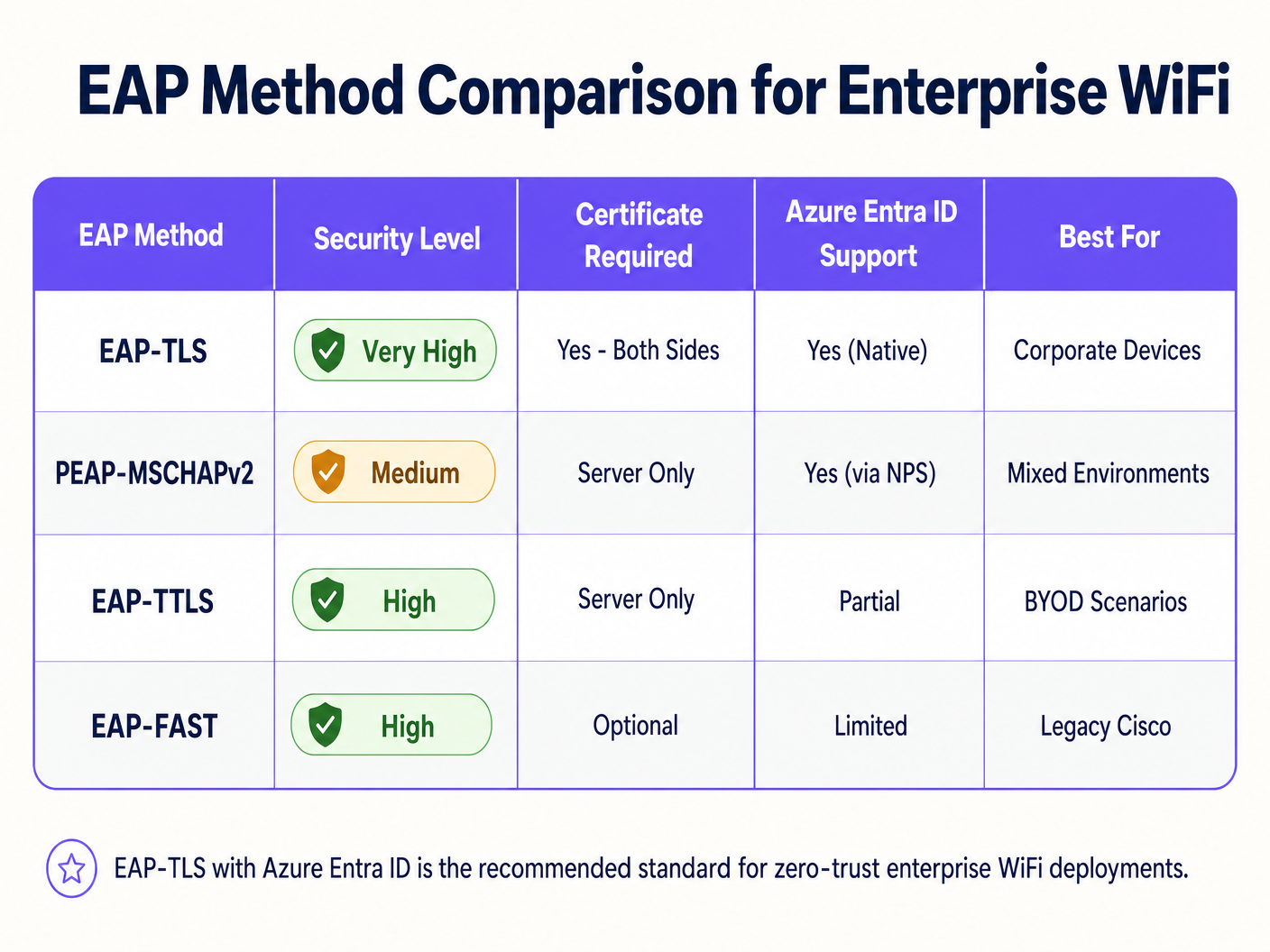
Storicamente, il WiFi aziendale si basava su PEAP-MSCHAPv2, richiedendo agli utenti di inserire le proprie credenziali di dominio. Tuttavia, Microsoft sta attivamente deprecando l'autenticazione basata su credenziali a causa della sua vulnerabilità agli attacchi adversary-in-the-middle (AiTM). Lo standard del settore è ora EAP-TLS, che utilizza l'autenticazione reciproca dei certificati.
In un'implementazione EAP-TLS, sia il server RADIUS che il dispositivo client presentano certificati digitali. Se un dispositivo non dispone di un certificato valido rilasciato dalla tua Certificate Authority (CA) fidata, il server RADIUS rifiuta la connessione prima ancora che il dispositivo ottenga un indirizzo IP.
Il ponte architetturale: RADIUS e Entra ID
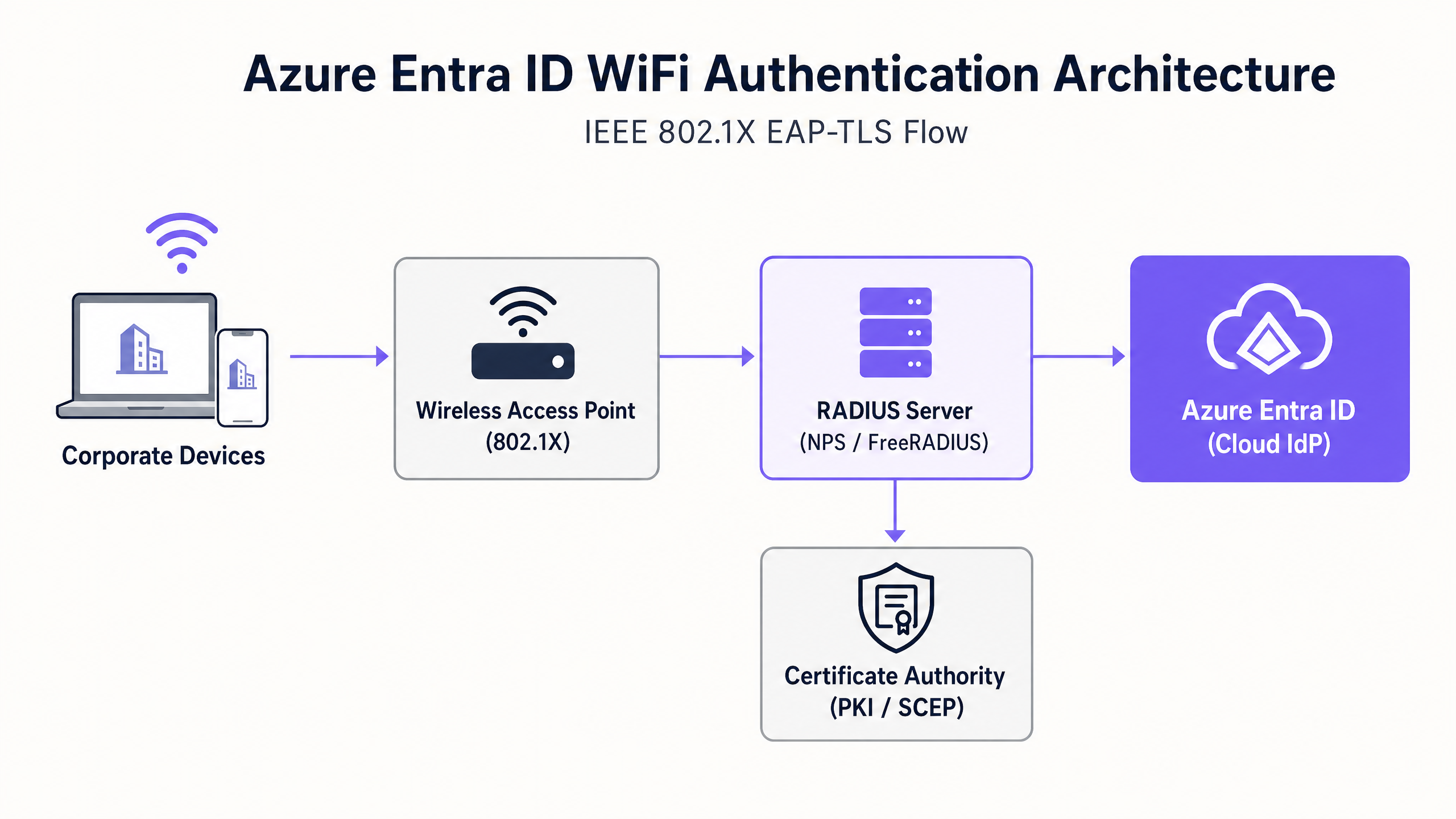
Azure Entra ID è un Identity Provider (IdP) cloud che utilizza protocolli moderni come SAML e OIDC; non parla nativamente RADIUS, il protocollo utilizzato dagli Wireless Access Points (WAPs). Per colmare questa lacuna, gli architetti di rete devono implementare un server RADIUS in grado di comunicare con Entra ID. Ciò si ottiene tipicamente tramite:
- Soluzioni RADIUS Cloud: Piattaforme appositamente costruite (ad esempio, SecureW2, SCEPman o Portnox) che si integrano direttamente con Entra ID e Intune tramite API.
- Network Policy Server (NPS) On-Premises: Utilizzando l'estensione Azure MFA, sebbene questo sia sempre più visto come un approccio legacy rispetto al RADIUS cloud-native.
Guida all'Implementazione
L'implementazione di Azure Entra ID per l'autenticazione WiFi richiede il coordinamento tra i team di identità, gestione dei dispositivi e infrastruttura di rete.
Passaggio 1: Stabilire l'infrastruttura a chiave pubblica (PKI)
È necessario stabilire una CA per rilasciare certificati client e server. In un ambiente cloud-first, questa è spesso una PKI cloud integrata con Microsoft Intune tramite il Simple Certificate Enrollment Protocol (SCEP).
Passaggio 2: Configurare il server RADIUS
Implementare l'infrastruttura RADIUS e associarla al tenant Entra ID. Il server RADIUS necessita del proprio certificato server, fidato dai dispositivi client, per provare la propria identità durante l'handshake EAP.
Passaggio 3: Distribuire i profili MDM tramite Intune
Non fare affidamento sugli utenti per configurare manualmente le proprie impostazioni WiFi. Utilizzare Intune per inviare un profilo WiFi completo che includa:
- Il certificato Root CA fidato.
- Il profilo SCEP per richiedere il certificato client.
- La configurazione WiFi stessa, definendo esplicitamente l'SSID e i nomi esatti dei server dell'infrastruttura RADIUS per prevenire attacchi Evil Twin.
Passaggio 4: Configurare il Wireless LAN Controller (WLC)
Configurare gli access point o il WLC per utilizzare WPA2/WPA3-Enterprise (802.1X). Indirizzare il traffico di autenticazione e accounting agli indirizzi IP del nuovo server RADIUS e configurare i segreti RADIUS condivisi.
> "Quando si configura 802.1X, assicurarsi che i valori di timeout RADIUS sul WLC siano sufficienti per gestire la latenza della convalida dei certificati basata su cloud, tipicamente aumentando da 2 secondi a 5 secondi." [1]
Best Practice
- Separare il traffico aziendale e guest: I dispositivi aziendali dovrebbero utilizzare 802.1X collegato a Entra ID. I dispositivi guest dovrebbero utilizzare un SSID aperto con un captive portal. Per un accesso guest e un'analisi robusti, sfruttare le soluzioni Guest WiFi . Ciò garantisce l'isolamento completo del traffico non fidato.
- Implementare attentamente il MAC Authentication Bypass (MAB): I dispositivi IoT e l'hardware legacy (ad esempio, vecchi scanner negli hub di Transport ) spesso non supportano 802.1X. Posizionarli su un SSID separato utilizzando MAB o una PSK dedicata e limitare il loro accesso alla rete tramite ACL rigorose.
- Dare priorità alla revoca dei certificati: Assicurarsi che gli endpoint della Certificate Revocation List (CRL) o dell'Online Certificate Status Protocol (OCSP) siano altamente disponibili. Se il server RADIUS non riesce a verificare lo stato di revoca, l'autenticazione fallirà.
Risoluzione dei problemi e mitigazione dei rischi
Quando le implementazioni falliscono, raramente la colpa è dell'IdP cloud. Le modalità di errore comuni includono:
- Clock Skew: EAP-TLS è altamente sensibile al tempo. Assicurarsi che tutti i componenti dell'infrastruttura, in particolare il WLC e i server RADIUS, siano sincronizzati tramite NTP.
- Ritardi di sincronizzazione Intune: Quando un nuovo dispositivo viene registrato, potrebbe essere necessario del tempo prima che il certificato SCEP venga rilasciato e il dispositivo tenti la connessione. Pianificare questa latenza durante l'onboarding.
- Mancata corrispondenza del nome del server Radius: Se il nome del server definito nel profilo WiFi di Intune non corrisponde esattamente al Common Name (CN) o Subject Alternative Name (SAN) sul certificato del server RADIUS, il client interromperà silenziosamente la connessione per proteggersi dagli AP non autorizzati.
Per maggiori informazioni sulla sicurezza della tua infrastruttura, consulta la nostra guida su come Proteggere la tua rete con DNS e sicurezza robusti .
ROI e Impatto sul Business
Il passaggio all'autenticazione WiFi con Azure Entra ID offre ritorni misurabili:
- Riduzione del Carico di Lavoro dell'Helpdesk: L'eliminazione dell'autenticazione basata su password riduce drasticamente i ticket relativi a blocchi di password e aggiornamenti delle credenziali WiFi.
- Accelerazione della Conformità: EAP-TLS fornisce la prova crittografica dell'identità richiesta da framework come PCI DSS e ISO 27001, fondamentale per gli ambienti Sanitari e di vendita al dettaglio.
- Offboarding Automatizzato: Quando un dipendente lascia l'azienda, la disabilitazione del suo account in Entra ID revoca immediatamente il suo accesso alla rete in tutte le sedi, mitigando le minacce interne.
Mettendo in sicurezza la spina dorsale aziendale, i team IT possono concentrarsi su iniziative che generano entrate, come l'utilizzo di WiFi Analytics per comprendere il comportamento dei visitatori e promuovere l'engagement.
Riferimenti
[1] Microsoft Learn. (2023). Accesso Wi-Fi sicuro con Intune ed EAP-TLS.
Definizioni chiave
802.1X
An IEEE standard for port-based network access control, requiring devices to authenticate before gaining access to the LAN or WLAN.
This is the underlying protocol that makes enterprise WiFi secure, moving beyond simple shared passwords.
EAP-TLS
Extensible Authentication Protocol with Transport Layer Security. An authentication method requiring digital certificates on both the client and the server.
Considered the most secure method for WiFi authentication, preventing credential theft and AiTM attacks.
RADIUS
Remote Authentication Dial-In User Service. A networking protocol that provides centralized Authentication, Authorization, and Accounting (AAA).
The protocol your Access Points use to ask the authentication server, 'Should I let this device on the network?'
SCEP
Simple Certificate Enrollment Protocol. A protocol used to securely issue certificates to network devices.
Used by MDM platforms like Intune to silently request and install client certificates onto corporate laptops and phones.
MAC Authentication Bypass (MAB)
A method of granting network access based on the device's MAC address rather than a username or certificate.
Used as a fallback for legacy devices (like old printers or IoT sensors) that lack the software to perform an 802.1X handshake.
Evil Twin Attack
A rogue access point masquerading as a legitimate corporate SSID to intercept traffic or steal credentials.
EAP-TLS mitigates this because the client device is configured to only trust the specific certificate of the legitimate corporate RADIUS server.
Supplicant
The software client on the endpoint device (e.g., the Windows WiFi manager) that handles the 802.1X authentication process.
IT teams must configure the supplicant via MDM to ensure it behaves securely and doesn't prompt users to accept untrusted server certificates.
Conditional Access
Azure Entra ID policies that evaluate signals (user, location, device compliance) to make access decisions.
Modern Cloud RADIUS solutions can check Conditional Access during the WiFi handshake, denying network access if Intune flags the device as non-compliant.
Esempi pratici
A 500-site retail chain needs to secure back-of-house iPads used for inventory management. Currently, they use a single shared PSK across all stores. How should they migrate to Azure Entra ID authentication?
- Enroll all iPads into Microsoft Intune.
- Deploy a Cloud RADIUS solution integrated with the corporate Entra ID tenant.
- Configure Intune to deploy a SCEP certificate to each iPad.
- Push a WiFi profile via Intune that configures the iPads to connect to the 'Corporate-BOH' SSID using EAP-TLS, validating the Cloud RADIUS server's certificate.
- Update the Meraki/Aruba access points in all 500 stores to point to the Cloud RADIUS IP addresses for the 'Corporate-BOH' SSID.
- Phased rollout: Enable the new SSID, verify iPad connectivity via Intune reporting, then decommission the legacy PSK SSID.
A university campus is migrating from on-prem Active Directory to Azure Entra ID. They have thousands of BYOD (Bring Your Own Device) student laptops that currently connect using PEAP-MSCHAPv2 (username and password). How do they handle BYOD in a cloud-first Entra ID environment?
- Deploy an onboarding portal (e.g., SecureW2 JoinNow or similar BYOD onboarding tool).
- Students connect to an open 'Onboarding' SSID, which redirects them to the portal.
- The portal prompts the student to authenticate against Azure Entra ID (using their university email and MFA).
- Upon successful authentication, the portal generates a unique client certificate and automatically configures the student's device for EAP-TLS.
- The device automatically connects to the secure 'Edu-Secure' SSID using the new certificate.
Domande di esercitazione
Q1. Your organisation is migrating to Azure Entra ID and Intune. You currently use PEAP-MSCHAPv2 for WiFi. The security team mandates that WiFi authentication must be resistant to credential theft. Which EAP method should you deploy?
Suggerimento: Which method relies entirely on certificates rather than passwords?
Visualizza risposta modello
You should deploy EAP-TLS. EAP-TLS uses mutual certificate authentication, meaning the client device must present a valid certificate issued by your PKI. Because it does not use passwords, it is highly resistant to credential theft and adversary-in-the-middle attacks.
Q2. After deploying EAP-TLS via Intune, users report they cannot connect to the WiFi. Looking at the RADIUS logs, you see 'Certificate Revocation Check Failed'. What is the most likely cause?
Suggerimento: What infrastructure must the RADIUS server communicate with to verify a certificate hasn't been compromised?
Visualizza risposta modello
The RADIUS server is unable to reach the Certificate Revocation List (CRL) or OCSP endpoint of your Certificate Authority. Ensure that the firewalls allow the RADIUS server outbound access to the HTTP URLs specified in the client certificates.
Q3. A hospital needs to connect 50 legacy heart-rate monitors to the network. These devices only support WPA2-Personal (Pre-Shared Key) and cannot be enrolled in Intune. How should you secure them while maintaining your Entra ID 802.1X deployment for corporate laptops?
Suggerimento: Do not mix authentication types on the same SSID.
Visualizza risposta modello
Create a dedicated, separate SSID specifically for the medical IoT devices. Use a strong, unique Pre-Shared Key (or Identity PSK/iPSK if supported by your network vendor) or MAC Authentication Bypass (MAB). Crucially, place this SSID on a highly restricted VLAN with strict Access Control Lists (ACLs) that only allow the monitors to communicate with their specific medical server, blocking all other lateral network access.
Continua a leggere questa serie
Cos'è l'autenticazione tramite indirizzo MAC? Quando usarla e quando evitarla
Questa guida tecnica di riferimento autorevole copre l'autenticazione tramite indirizzo MAC negli ambienti WiFi aziendali — come funziona l'autenticazione MAC basata su RADIUS al Livello 2, le sue vulnerabilità di sicurezza intrinseche (inclusi lo spoofing MAC e l'impatto della randomizzazione MAC a livello di OS), e i precisi contesti operativi in cui rimane uno strumento valido per la gestione di dispositivi IoT e headless. Fornisce indicazioni pratiche per l'implementazione a responsabili IT e architetti di rete in strutture ricettive, retail, sanitarie e del settore pubblico, con esempi pratici, framework decisionali e contesto di integrazione per la piattaforma di guest WiFi e analisi di Purple.
Come configurare il WiFi aziendale su iOS e macOS con 802.1X
Questa guida autorevole fornisce ai leader IT senior passaggi pratici per l'implementazione del WiFi aziendale 802.1X su dispositivi iOS e macOS. Copre l'autenticazione basata su certificati (EAP-TLS), i profili di configurazione MDM e l'integrazione dell'architettura per proteggere le reti aziendali supportando al contempo le iniziative BYOD.
Come configurare il WiFi aziendale sui dispositivi Android con EAP-TLS
Questa guida di riferimento tecnico fornisce ai leader IT senior un progetto completo per la distribuzione dell'autenticazione 802.1X EAP-TLS sui dispositivi Android. Copre i meccanismi architetturali, le strategie di implementazione manuale e basate su MDM e le metodologie di risoluzione dei problemi necessarie per proteggere le reti wireless aziendali.