
Come configurare il WiFi aziendale sui dispositivi Android con EAP-TLS
Questa guida di riferimento tecnico fornisce ai leader IT senior un progetto completo per la distribuzione dell'autenticazione 802.1X EAP-TLS sui dispositivi Android. Copre i meccanismi architetturali, le strategie di implementazione manuale e basate su MDM e le metodologie di risoluzione dei problemi necessarie per proteggere le reti wireless aziendali.
Ascolta questa guida
Visualizza trascrizione del podcast

Riepilogo Esecutivo
Proteggere le reti wireless aziendali contro il furto di credenziali e l'accesso non autorizzato richiede di andare oltre le password condivise. Per le flotte di dispositivi Android negli ambienti aziendali, 802.1X EAP-TLS (Extensible Authentication Protocol with Transport Layer Security) rappresenta lo standard di sicurezza definitivo. Sfruttando l'autenticazione reciproca basata su certificati, EAP-TLS elimina i rischi associati alla stanchezza da password, al phishing e alle credenziali deboli.
Questa guida di riferimento tecnico fornisce ad architetti di rete, responsabili IT e CTO strategie attuabili per la distribuzione di EAP-TLS sui dispositivi Android. Sia che si gestiscano terminali punto vendita nel Retail , dispositivi clinici nel Healthcare o operazioni di back-of-house nell' Hospitality , padroneggiare questa distribuzione garantisce una robusta conformità di sicurezza (PCI DSS, GDPR, ISO 27001) fornendo al contempo un'esperienza di connessione senza interruzioni per gli utenti finali. Copriamo sia la configurazione manuale per gli ambienti BYOD sia il provisioning MDM zero-touch per le flotte aziendali.
Ascolta il Briefing
Approfondimento Tecnico
L'Architettura 802.1X e i Meccanismi EAP-TLS
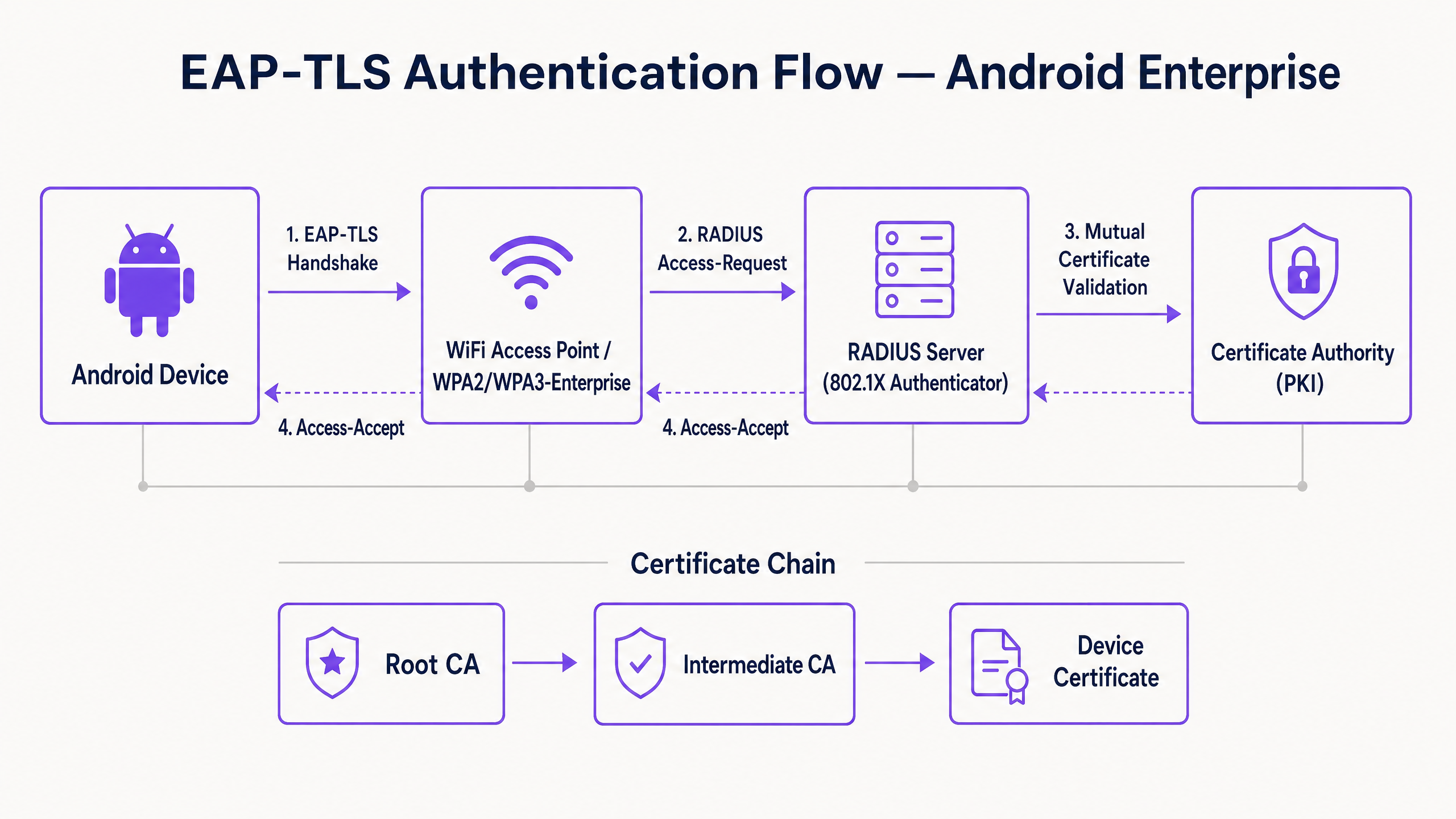
Al suo nucleo, 802.1X è uno standard IEEE per il controllo dell'accesso alla rete basato su porta. In un contesto wireless, l'access point agisce come Autenticatore, facilitando la comunicazione tra il dispositivo Android (il Richiedente) e il server RADIUS (il Server di Autenticazione).
A differenza di PEAP o TTLS che incapsulano l'autenticazione legacy basata su password all'interno di TLS, EAP-TLS si basa interamente sui certificati X.509. Questo crea un paradigma di autenticazione reciproca:
- Il server RADIUS presenta il suo certificato al dispositivo Android per dimostrare che la rete è legittima.
- Il dispositivo Android presenta il suo certificato client unico al server RADIUS per dimostrare di essere un endpoint autorizzato.
Requisiti dei Certificati Specifici per Android
La distribuzione su Android introduce vincoli specifici, in particolare da Android 11 in poi. Google ha deprecato l'opzione "Non convalidare" per i certificati server per mitigare gli attacchi man-in-the-middle (MitM). Di conseguenza, il dispositivo Android deve possedere il certificato Root CA che ha firmato il certificato del server RADIUS.
Inoltre, il certificato del server RADIUS deve contenere gli attributi Extended Key Usage (EKU) corretti, in particolare Server Authentication (OID 1.3.6.1.5.5.7.3.1). Senza questo, il richiedente Android interromperà silenziosamente l'handshake TLS.
Per il lato client, Android richiede che la chiave privata e il certificato siano raggruppati, tipicamente in formato PKCS#12 (.p12 o .pfx).
Integrazione con l'Ecosistema di Purple
Mentre EAP-TLS protegge i tuoi dispositivi aziendali e l'infrastruttura operativa, gli operatori delle sedi devono anche gestire l'accesso dei visitatori. È qui che una strategia a doppio SSID diventa fondamentale. Il tuo SSID aziendale utilizza 802.1X EAP-TLS, mentre il tuo SSID pubblico sfrutta la piattaforma Guest WiFi di Purple. Questa separazione garantisce la sicurezza operativa consentendo al team di marketing di sfruttare WiFi Analytics sulla rete ospite. Per una visione più ampia sulla sicurezza dell'infrastruttura fisica, fare riferimento a Sicurezza degli Access Point: La Tua Guida Aziendale 2026 .
Guida all'Implementazione
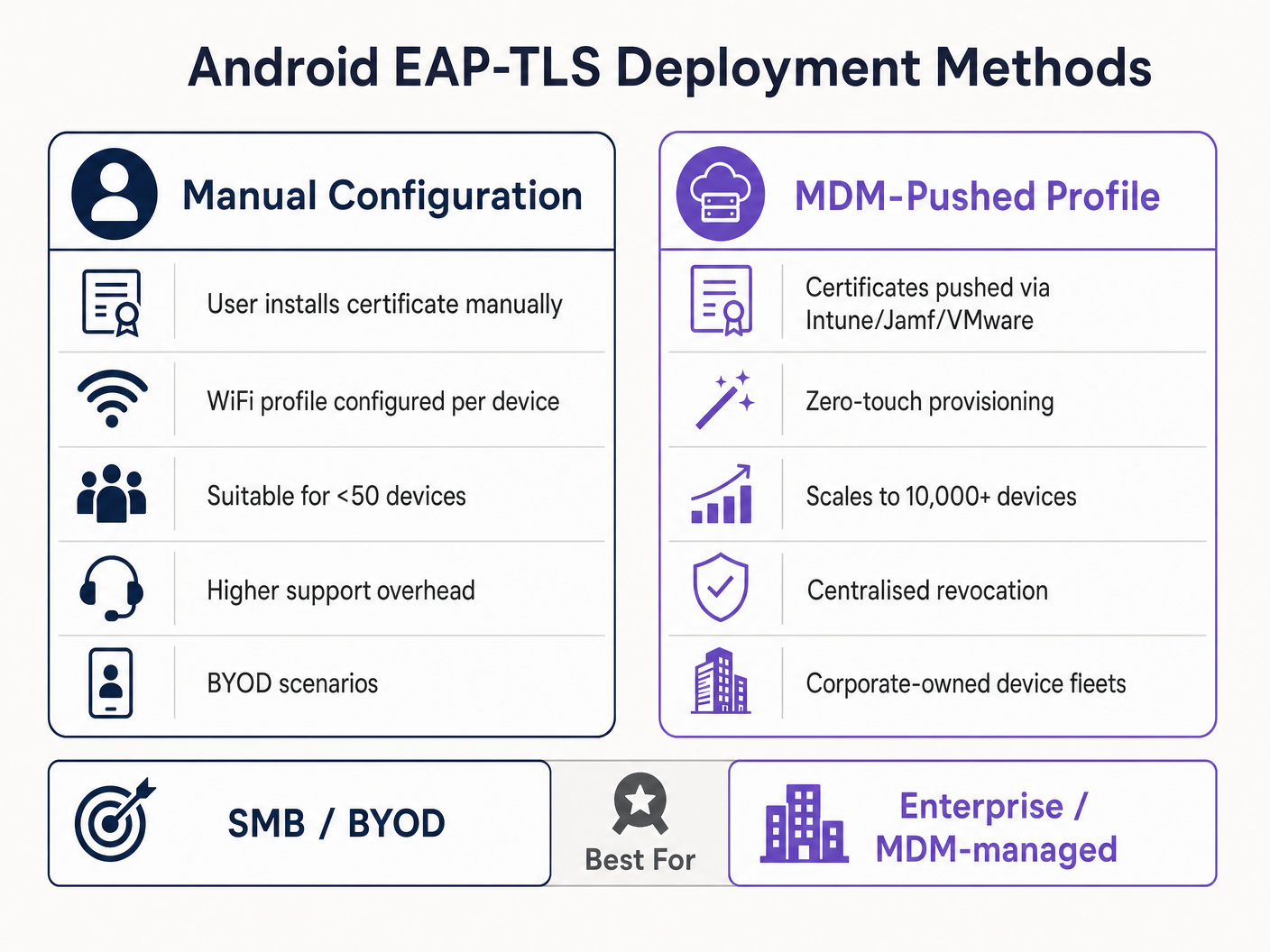
La distribuzione di EAP-TLS su Android può essere affrontata manualmente per piccole implementazioni BYOD o tramite Mobile Device Management (MDM) per scala aziendale.
Metodo 1: Configurazione Manuale (BYOD / Piccola Scala)
Questo metodo richiede un intenso supporto ed è raccomandato solo per implementazioni limitate o test.
- Consegna del Certificato: Consegnare in modo sicuro il certificato client
.p12e il file.cerdella Root CA al dispositivo Android (ad esempio, tramite portale sicuro o email crittografata). - Installazione:
- Navigare su Impostazioni > Sicurezza > Crittografia e credenziali > Installa un certificato.
- Installare la Root CA come "certificato Wi-Fi".
- Installare il file
.p12, fornendo la password di estrazione quando richiesto.
- Configurazione di Rete:
- Andare su Impostazioni > Rete e internet > Wi-Fi e selezionare "Aggiungi rete".
- Inserire l'SSID.
- Impostare Sicurezza su WPA/WPA2/WPA3-Enterprise.
- Impostare il metodo EAP su TLS.
- Impostare il certificato CA sulla Root CA installata.
- Impostare lo Stato del Certificato Online su Richiedi stato certificato.
- Impostare il Dominio in modo che corrisponda al Subject Alternative Name (SAN) del certificato del server RADIUS.
- Selezionare il certificato Client installato.
- Inserire l'Identità (solitamente l'UPN dell'utente o il MAC del dispositivo).
Metodo 2: Profilo Spinto da MDM (Scala Aziendale)
Per grandi proprietà, come un campus universitario o un hub logistico nel Trasporto , l'MDM è obbligatorio. Questo fornisce provisioning zero-touch e gestione del ciclo di vita.
- Integrazione PKI: Connettere il tuo MDM (Intune, Workspace ONE, Jamf) alla tua Autorità di Certificazione utilizzando SCEP o NDES.
- Profilo Certificato: Creare un profilo di configurazione per spingere la Root CA all'archivio di fiducia del dispositivo. Creare un secondo profilo (SCEP) per richiedere e installare automaticamente il certificato client unico.
- Profilo WiFi: Creare un profilo di configurazione Wi-Fi che colleghi il certificato distribuitotes.
- Tipo di sicurezza: WPA2/WPA3 Enterprise
- EAP Type: EAP-TLS
- Metodo di autenticazione: Certificate
- Fiducia nel server: Specificare la CA radice e il nome di dominio esatto del server.
Per istruzioni dettagliate specifiche di Microsoft, consultare la nostra guida: Come usare Microsoft Intune per distribuire certificati WiFi ai dispositivi .
Migliori pratiche
- Imporre WPA3-Enterprise: Laddove l'hardware lo supporti, rendere obbligatorio WPA3-Enterprise. La suite di sicurezza a 192 bit richiede esplicitamente EAP-TLS, garantendo i più elevati standard crittografici.
- Automatizzare il ciclo di vita dei certificati: I certificati client scadono. Se ci si affida a rinnovi manuali, si verificheranno interruzioni massicce. Implementare SCEP/NDES per rinnovare automaticamente i certificati 30 giorni prima della scadenza.
- Implementare un DNS robusto: I controlli della Certificate Revocation List (CRL) e OCSP richiedono una risoluzione DNS affidabile dal perimetro. Maggiori informazioni in Proteggi la tua rete con DNS e sicurezza robusti .
- Segmentazione VLAN: Mappare le sessioni autenticate EAP-TLS a VLAN specifiche in base agli attributi del certificato (ad esempio, separando i terminali POS dai tablet dei manager) utilizzando attributi RADIUS come
Tunnel-Private-Group-Id.
Risoluzione dei problemi e mitigazione del rischio
Quando i dispositivi Android non riescono a connettersi tramite EAP-TLS, il problema risiede quasi sempre nella catena di certificati o nella configurazione RADIUS.
- Sintomo: I dispositivi Android 11+ si disconnettono immediatamente o mostrano "Errore di autenticazione" senza chiedere all'utente.
- Causa principale: Il dispositivo non si fida del certificato del server RADIUS. Il campo "Dominio" nel profilo WiFi deve corrispondere esattamente al SAN del certificato del server e la CA radice deve essere installata.
- Sintomo: La connessione va in timeout durante l'handshake TLS.
- Causa principale: Il server RADIUS non riesce a raggiungere il punto di distribuzione CRL per verificare lo stato di revoca del certificato client. Assicurarsi che il server RADIUS abbia accesso HTTP in uscita agli endpoint CRL della propria PKI.
- Sintomo: I dispositivi Windows si connettono, ma i dispositivi Android falliscono.
- Causa principale: EKU
Server Authenticationmancante sul certificato RADIUS, o il supplicante Android sta tentando di utilizzare una suite di cifratura non supportata. Controllare i log RADIUS per errori di negoziazione TLS.
- Causa principale: EKU
ROI e impatto aziendale
La transizione a EAP-TLS richiede un investimento iniziale in infrastrutture PKI e MDM, ma il ritorno sull'investimento è sostanziale per i leader IT senior.
- Riduzione dei costi dell'helpdesk: I reset delle password rappresentano il 20-30% dei ticket dell'helpdesk IT. L'autenticazione basata su certificati elimina le politiche di rotazione delle password per l'accesso alla rete, riducendo drasticamente il carico di lavoro del supporto.
- Mitigazione del rischio: EAP-TLS offre immunità contro il furto di credenziali e gli attacchi a dizionario offline. Il costo di una singola violazione in un settore regolamentato come Sanità supera di gran lunga il costo di implementazione di una PKI.
- Continuità operativa: Il provisioning automatizzato dei certificati garantisce che i dispositivi operativi critici — dagli scanner di magazzino ai sistemi POS al dettaglio — non si disconnettano mai dalla rete a causa di credenziali scadute. Mentre Purple continua ad espandere la sua portata, evidenziata da recenti mosse strategiche come Purple segnala ambizioni nell'istruzione superiore con la nomina del Vicepresidente dell'Istruzione Tim Peers , una connettività fondamentale robusta diventa il fattore abilitante per l'analisi avanzata e l'engagement.
Definizioni chiave
802.1X
An IEEE standard for port-based Network Access Control (PNAC) that provides an authentication mechanism to devices wishing to attach to a LAN or WLAN.
The foundational framework that prevents unauthorised devices from accessing the corporate network at the edge.
EAP-TLS
Extensible Authentication Protocol with Transport Layer Security. An authentication framework that uses X.509 certificates for mutual authentication between the client and the server.
Considered the most secure EAP type, it eliminates password reliance, making it essential for high-security environments.
RADIUS
Remote Authentication Dial-In User Service. A networking protocol that provides centralised Authentication, Authorization, and Accounting (AAA) management.
The server component (e.g., Cisco ISE, Microsoft NPS) that validates the Android device's certificate against the PKI.
Supplicant
The client device (in this case, the Android smartphone or tablet) that is requesting access to the network.
Understanding the supplicant's specific OS constraints (like Android 11's strict validation) is key to a successful deployment.
Authenticator
The network device (the WiFi Access Point) that facilitates the authentication process between the Supplicant and the RADIUS server.
The AP does not make the decision; it merely enforces the port control based on the RADIUS server's response.
PKI
Public Key Infrastructure. A set of roles, policies, hardware, software, and procedures needed to create, manage, distribute, use, store, and revoke digital certificates.
The backbone of EAP-TLS. Without a robust PKI, certificate-based authentication is impossible.
SCEP
Simple Certificate Enrollment Protocol. A protocol designed to make the issuing and revocation of digital certificates as scalable as possible.
Used by MDM platforms to automatically provision client certificates to Android devices without user intervention.
SAN
Subject Alternative Name. An extension to X.509 that allows various values to be associated with a security certificate.
Android 11+ requires the 'Domain' field in the WiFi profile to match the SAN of the RADIUS server's certificate.
Esempi pratici
A national retail chain needs to deploy 5,000 Android-based point-of-sale (POS) tablets. The security team mandates that these devices must not use shared passwords and must be immune to credential phishing. How should the infrastructure team approach this deployment?
The team must deploy a Mobile Device Management (MDM) solution integrated with their internal Public Key Infrastructure (PKI) via SCEP. The MDM will push a configuration profile containing the Root CA certificate, automatically request a unique client certificate for each POS tablet, and configure the WPA3-Enterprise WiFi profile to use EAP-TLS. The RADIUS server will be configured to assign these devices to an isolated POS VLAN based on successful certificate validation.
A hospital IT manager is upgrading the wireless network. Following the upgrade, older Android 9 devices connect successfully to the EAP-TLS network, but newly procured Android 12 devices fail to authenticate, citing a trust error.
The IT manager must update the WiFi configuration profile pushed to the devices. Android 11+ enforces strict server certificate validation. The profile must be updated to explicitly define the Root CA certificate to trust and specify the exact 'Domain' (matching the RADIUS server's SAN) to prevent MitM attacks.
Domande di esercitazione
Q1. Your organisation is migrating from PEAP-MSCHAPv2 to EAP-TLS. During the pilot phase, several Android 13 devices fail to connect. The RADIUS logs show that the TLS handshake is initiated but dropped by the client before the client certificate is sent. What is the most likely configuration error?
Suggerimento: Consider the strict validation requirements introduced in recent Android versions regarding the server's identity.
Visualizza risposta modello
The most likely error is that the WiFi profile pushed to the Android 13 devices does not correctly specify the 'Domain' suffix match, or the Root CA is not properly linked in the profile. Android drops the connection to prevent a Man-in-the-Middle attack because it cannot validate the RADIUS server's certificate.
Q2. You are designing the architecture for a large stadium deployment. The client wants to use EAP-TLS for all staff devices. What specific infrastructure component must be scaled up compared to a standard WPA2-PSK network, and why?
Suggerimento: EAP-TLS involves complex cryptographic operations during the connection phase.
Visualizza risposta modello
The RADIUS server infrastructure must be significantly scaled up. EAP-TLS requires full mutual certificate validation (asymmetric cryptography), which is computationally expensive. In a stadium environment with thousands of devices potentially roaming or authenticating simultaneously, an undersized RADIUS deployment will cause authentication timeouts and connection failures.
Q3. A client certificate is compromised on a lost Android tablet. What is the exact mechanism by which the network prevents this device from connecting via EAP-TLS?
Suggerimento: How does the RADIUS server know the certificate is no longer valid before its expiration date?
Visualizza risposta modello
The IT administrator revokes the client certificate in the PKI. The PKI updates its Certificate Revocation List (CRL) or OCSP responder. When the lost tablet attempts to connect, the RADIUS server checks the client certificate against the CRL/OCSP. Seeing it is revoked, the RADIUS server rejects the authentication request.
Continua a leggere questa serie
Cos'è l'autenticazione tramite indirizzo MAC? Quando usarla e quando evitarla
Questa guida tecnica di riferimento autorevole copre l'autenticazione tramite indirizzo MAC negli ambienti WiFi aziendali — come funziona l'autenticazione MAC basata su RADIUS al Livello 2, le sue vulnerabilità di sicurezza intrinseche (inclusi lo spoofing MAC e l'impatto della randomizzazione MAC a livello di OS), e i precisi contesti operativi in cui rimane uno strumento valido per la gestione di dispositivi IoT e headless. Fornisce indicazioni pratiche per l'implementazione a responsabili IT e architetti di rete in strutture ricettive, retail, sanitarie e del settore pubblico, con esempi pratici, framework decisionali e contesto di integrazione per la piattaforma di guest WiFi e analisi di Purple.
Come configurare il WiFi aziendale su iOS e macOS con 802.1X
Questa guida autorevole fornisce ai leader IT senior passaggi pratici per l'implementazione del WiFi aziendale 802.1X su dispositivi iOS e macOS. Copre l'autenticazione basata su certificati (EAP-TLS), i profili di configurazione MDM e l'integrazione dell'architettura per proteggere le reti aziendali supportando al contempo le iniziative BYOD.
Come usare Microsoft Intune per distribuire certificati WiFi ai dispositivi
Un riferimento tecnico completo per i responsabili IT sulla distribuzione di certificati WiFi 802.1X tramite Microsoft Intune. Copre l'architettura SCEP vs PKCS, i passaggi di implementazione, la mappatura della conformità e gli scenari di distribuzione reali per ambienti aziendali.