
Come configurare l'autenticazione WiFi 802.1X: Una guida passo-passo
Questa guida tecnica fornisce una procedura passo-passo per la configurazione dell'autenticazione WiFi aziendale 802.1X. Copre la configurazione del server RADIUS, la distribuzione dei certificati e le strategie di implementazione pratiche per i responsabili IT in sedi ad alto afflusso.
Ascolta questa guida
Visualizza trascrizione del podcast
Sintesi Esecutiva
Per le reti aziendali, le PSK (Pre-Shared Keys) condivise non sono più sufficienti per proteggere l'infrastruttura aziendale. Poiché le organizzazioni devono affrontare mandati di conformità più severi (PCI DSS, GDPR) e una superficie di attacco in espansione, la transizione all'autenticazione 802.1X è un imperativo di sicurezza critico.
Questa guida fornisce una procedura di implementazione pratica e indipendente dal fornitore per la configurazione di 802.1X sugli access point aziendali. Trattiamo l'architettura principale — Supplicant, Authenticator e Authentication Server — insieme alla gestione dei certificati, alla configurazione RADIUS e alle comuni insidie di implementazione. Per i responsabili IT e gli architetti di rete che operano in ambienti di vendita al dettaglio, ospitalità o settore pubblico, questo riferimento fornisce i passaggi attuabili necessari per implementare un controllo robusto dell'accesso alla rete basato sull'identità, mantenendo il traffico aziendale e degli ospiti rigorosamente separato.
Ascolta il nostro podcast di accompagnamento qui sotto per una panoramica di 10 minuti sull'architettura e le strategie di implementazione.
Approfondimento Tecnico: L'Architettura 802.1X
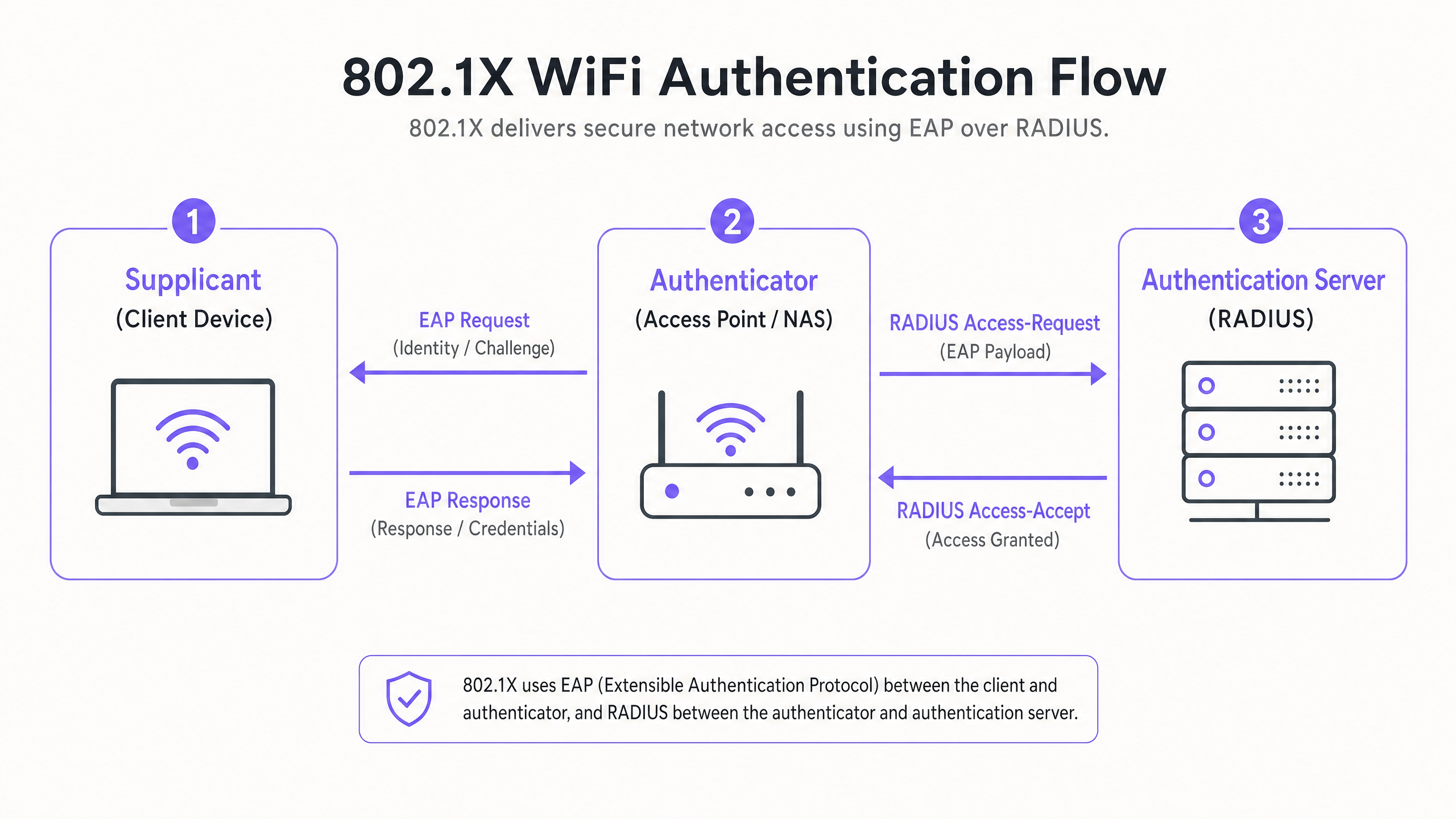
Lo standard IEEE 802.1X definisce il controllo dell'accesso alla rete basato su porta. In un contesto wireless, impedisce a un dispositivo client di inviare o ricevere traffico dati finché non si è autenticato con successo rispetto a una directory centrale.
I Tre Componenti Principali
- Il Supplicant (Dispositivo Client): Il software sul laptop, smartphone o dispositivo IoT che richiede l'accesso. Deve supportare il metodo EAP (Extensible Authentication Protocol) scelto.
- L'Authenticator (Access Point / WLC): Il dispositivo di rete che funge da guardiano. Apre una "porta controllata" che consente solo il traffico EAP fino al successo dell'autenticazione.
- L'Authentication Server (RADIUS): Il server centrale (ad es. Microsoft NPS, FreeRADIUS, Cisco ISE) che convalida le credenziali rispetto a un archivio di identità (come Active Directory) e restituisce un messaggio di Access-Accept o Access-Reject.
Metodi EAP: Scegliere la Giusta Postura di Sicurezza
La scelta del metodo EAP determina il livello di sicurezza e la complessità di implementazione.
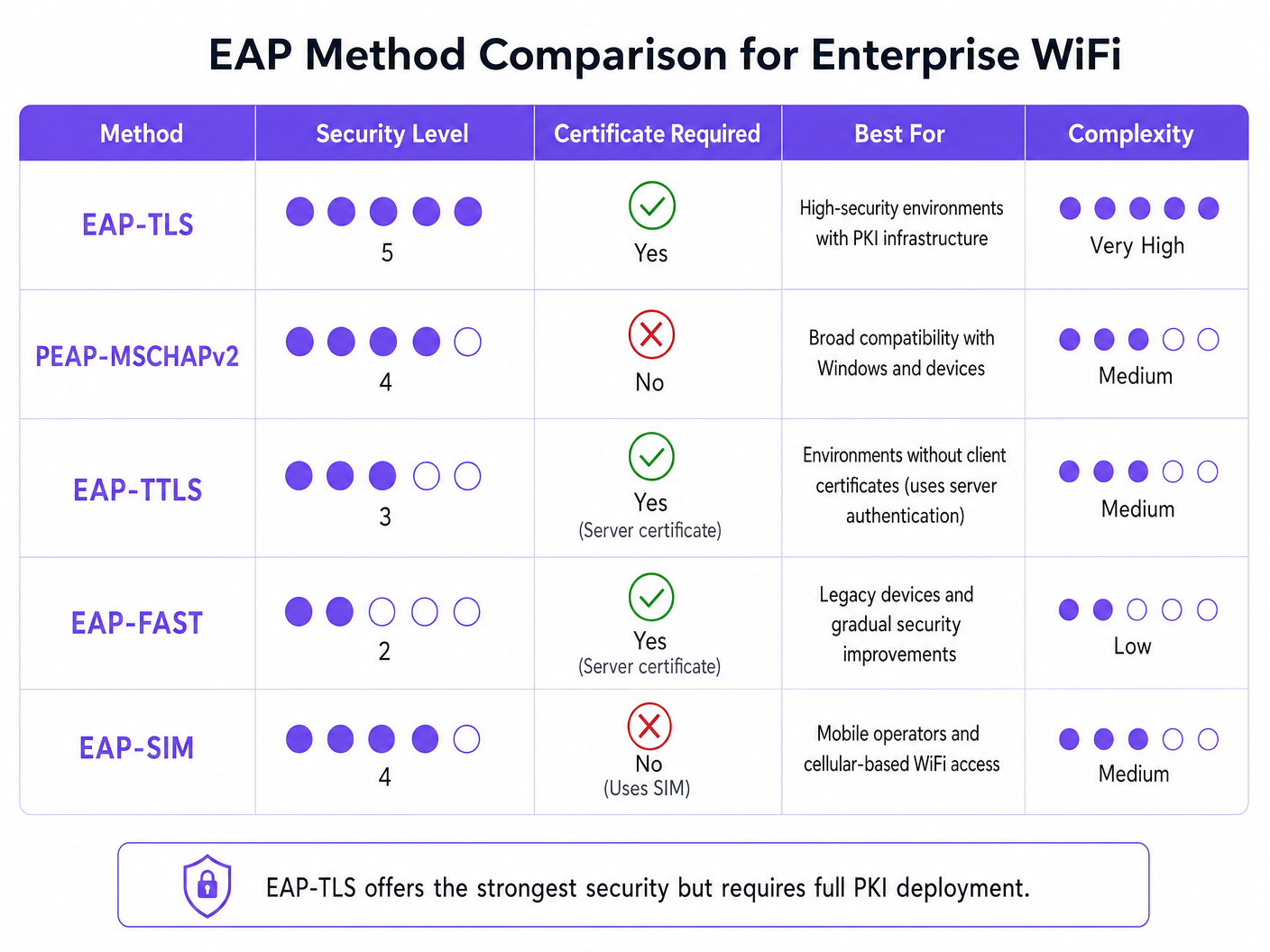
- EAP-TLS (Transport Layer Security): Lo standard d'oro. Richiede certificati sia del server che del client. Non vengono trasmesse password. Essenziale per ambienti ad alta sicurezza ma richiede una completa Public Key Infrastructure (PKI).
- PEAP-MSCHAPv2 (Protected EAP): L'implementazione aziendale più comune. Utilizza un certificato lato server per creare un tunnel TLS sicuro, all'interno del quale il client invia un nome utente e una password. Più facile da implementare ma vulnerabile alla raccolta di credenziali se i dispositivi client non sono configurati per convalidare rigorosamente il certificato del server.
- EAP-SIM/AKA: Utilizza le credenziali della SIM card per l'autenticazione. Sempre più rilevante per l'onboarding senza interruzioni negli hub di Trasporto e nei grandi luoghi pubblici.
Guida all'Implementazione: Configurazione Passo-Passo
L'implementazione di 802.1X richiede una configurazione coordinata tra il server RADIUS, gli access point e i dispositivi client.
Fase 1: Preparazione del Server RADIUS
Sia che si utilizzi Microsoft Network Policy Server (NPS) o un'alternativa, i principi fondamentali rimangono identici.
- Definire i Client RADIUS: Registrare ogni Access Point (o Wireless LAN Controller) nel server RADIUS. Assegnare una Shared Secret forte e generata casualmente (minimo 22 caratteri) per proteggere le comunicazioni tra l'AP e il server RADIUS.
- Installare il Certificato del Server: Per PEAP o EAP-TLS, installare un certificato X.509 sul server RADIUS. L'utilizzo di un certificato di un'Autorità di Certificazione (CA) pubblica fidata semplifica l'implementazione per gli ambienti BYOD, poiché il certificato radice è già considerato attendibile dai sistemi operativi client.
Fase 2: Configurazione delle Policy
Configurare le policy di rete per dettare i diritti di accesso in base all'identità.
- Policy di Richiesta di Connessione: Definire come il server RADIUS gestisce le richieste in entrata. Tipicamente, ciò comporta la corrispondenza del NAS-Port-Type (Wireless - IEEE 802.11) e l'autenticazione delle richieste localmente.
- Policy di Rete: Mappare i gruppi di Active Directory ai diritti di accesso alla rete. Ad esempio, mappare il gruppo 'Domain Computers' alla VLAN aziendale. Utilizzare gli attributi RADIUS (
Tunnel-Type=VLAN,Tunnel-Medium-Type=802,Tunnel-Private-Group-ID=[VLAN_ID]) per assegnare dinamicamente le VLAN al successo dell'autenticazione.
Fase 3: Configurazione dell'Access Point
Configurare l'SSID sull'infrastruttura wireless (ad es. Meraki, Aruba, Cisco).
- Creare un nuovo SSID e selezionare WPA2-Enterprise o WPA3-Enterprise.
- Inserire l'indirizzo IP dei server RADIUS primario e secondario.
- Inserire la Shared Secret definita nella Fase 1.
- Abilitare l'Assegnazione Dinamica VLAN se il server RADIUS sta inviando attributi VLAN.
Fase 4: Provisioning del Supplicant Client
Questo è il passaggio più critico e spesso trascurato. Non fare affidamento sugli utenti per configurare manualmente i propri dispositivi.
- Dispositivi Aziendali: Utilizzare gli Oggetti Criteri di Gruppo (GPO) o la piattaforma di Mobile Device Management (MDM) per distribuire il profilo WiFi. Il profilo deve specificare la Root CA fidata e il nome esatto del server RADIUS per prevenire attacchi Evil Twin.
- BYOD: Implementare un portale di onboarding o una soluzione MDM per distribuire profili sicuri ai dipendenti-dispositivi di proprietà.
Migliori Pratiche e Standard di Settore
Per garantire un'implementazione robusta, attenersi alle seguenti migliori pratiche architetturali:
- Validazione Rigorosa dei Certificati: Non consentire mai ai client di accettare ciecamente alcun certificato del server. Questo è il vettore primario per la raccolta di credenziali PEAP.
- Isolare il Traffico Ospiti: La vostra infrastruttura 802.1X è per l'accesso aziendale. Il traffico degli ospiti deve rimanere completamente segregato. Implementate una piattaforma Guest WiFi dedicata con il proprio captive portal e livello di analisi. Come discusso nella nostra guida su Proteggi la Tua Rete con DNS e Sicurezza Robusti , la separazione logica è fondamentale per la difesa della rete.
- Implementare la Ridondanza: RADIUS è un servizio a percorso critico. Implementate server RADIUS primari e secondari. In ambienti distribuiti come le grandi catene di Retail , considerate proxy RADIUS locali per la sopravvivenza in caso di interruzione del collegamento WAN.
Risoluzione dei Problemi e Mitigazione del Rischio
Quando le implementazioni falliscono, di solito si riduce a pochi errori di configurazione comuni:
- Errori di Timeout RADIUS: Spesso causati da un Shared Secret non corrispondente tra l'AP e il server RADIUS, o da regole del firewall che bloccano le porte UDP 1812 (Autenticazione) e 1813 (Accounting).
- Rifiuto del Client: Controllate i log eventi RADIUS (ad es., Visualizzatore Eventi di Windows -> Viste Personalizzate -> Ruoli Server -> Servizi Criteri di Rete e Accesso). Cercate l'ID Evento 6273. Le cause comuni includono certificati client scaduti o il client che non riesce a fidarsi della catena di certificati del server.
- Errori di Assegnazione VLAN: Se l'autenticazione ha successo ma il client non ottiene un indirizzo IP, verificate che la porta dello switch collegata all'AP sia configurata come porta trunk che consente la VLAN assegnata dinamicamente.
ROI e Impatto sul Business
L'implementazione di 802.1X genera un ROI operativo e di sicurezza significativo:
- Mitigazione del Rischio: Elimina il rischio che un singolo PSK compromesso violi l'intera rete aziendale, supportando direttamente gli sforzi di conformità PCI DSS e GDPR.
- Efficienza Operativa: Centralizza il controllo degli accessi. Quando un dipendente se ne va, la disabilitazione del suo account Active Directory revoca immediatamente il suo accesso WiFi. Non è necessario ruotare i PSK in tutta l'azienda.
- Visibilità della Rete: Fornisce una visibilità granulare su esattamente chi è sulla rete e quale dispositivo sta utilizzando, consentendo una migliore pianificazione della capacità e ricerca delle minacce.
Per ambienti complessi e ad alta densità come stadi o strutture Hospitality , la gestione della sicurezza aziendale insieme all'accesso degli ospiti è impegnativa. Mettendo in sicurezza le risorse aziendali con 802.1X e sfruttando una robusta piattaforma WiFi Analytics per il traffico dei visitatori, i leader IT possono fornire connettività sicura e scalabile che serve sia l'azienda che i suoi clienti. Per approfondimenti sulla gestione di ambienti ad alta densità, consultate la nostra WiFi per Zoo e Parchi a Tema: Guida alla Connettività per Luoghi ad Alto Afflusso .
Definizioni chiave
802.1X
An IEEE standard for port-based network access control that provides an authentication mechanism to devices wishing to attach to a LAN or WLAN.
The foundational protocol for enterprise WiFi security, replacing vulnerable shared passwords.
Supplicant
The client device or software application requesting access to the network.
IT teams must manage supplicant configuration via MDM to ensure secure connections.
Authenticator
The network device (Access Point or Switch) that facilitates the authentication process by acting as a proxy between the Supplicant and the Authentication Server.
Configured with the RADIUS server IP and a shared secret to securely forward EAP traffic.
RADIUS
Remote Authentication Dial-In User Service; a networking protocol that provides centralized Authentication, Authorization, and Accounting (AAA) management.
The backend server (like Microsoft NPS) that actually validates the user's credentials against a directory.
EAP (Extensible Authentication Protocol)
An authentication framework frequently used in wireless networks and point-to-point connections, supporting multiple authentication methods.
The 'language' spoken between the Supplicant and the RADIUS server.
EAP-TLS
An EAP method that uses Transport Layer Security, requiring both server and client-side certificates for mutual authentication.
The most secure method available, often mandated for high-security or classified environments.
PEAP
Protected Extensible Authentication Protocol; encapsulates EAP within an encrypted and authenticated TLS tunnel.
The most widely deployed enterprise method, balancing security with ease of deployment by only requiring a server-side certificate.
Dynamic VLAN Assignment
The process where a RADIUS server instructs the Access Point to place an authenticated user onto a specific VLAN based on their directory group membership.
Crucial for segmenting network traffic (e.g., separating HR, Engineering, and IoT devices) while broadcasting only a single corporate SSID.
Esempi pratici
A 300-room luxury hotel needs to secure its back-of-house operational network (staff tablets, VoIP phones, management laptops) while keeping it entirely separate from the guest network. They currently use a single PSK for staff.
- Deploy Microsoft NPS linked to the hotel's existing Active Directory.
- Configure PEAP-MSCHAPv2, using a public certificate (e.g., DigiCert) on the NPS server to simplify tablet onboarding.
- Create an 802.1X SSID ('Hotel_Ops') on the APs.
- Use the hotel's MDM platform to push the 'Hotel_Ops' WiFi profile to all staff tablets and laptops, explicitly configuring the profile to trust the DigiCert root CA and validate the NPS server name.
- Maintain the existing open guest SSID, routing it through Purple's captive portal for terms acceptance and analytics, ensuring guest VLANs cannot route to the operational VLANs.
A university campus is migrating to 802.1X and needs to support a massive BYOD environment for 15,000 students across various operating systems.
- Deploy a robust RADIUS cluster (e.g., FreeRADIUS or Cisco ISE) with load balancing.
- Implement PEAP-MSCHAPv2 for broad device compatibility.
- Deploy an onboarding portal (e.g., SecureW2) that automatically configures the student's device supplicant to use the correct EAP settings and trust the university's RADIUS server certificate.
- Use dynamic VLAN assignment via RADIUS attributes to place students into appropriate subnets based on their campus location to manage broadcast domains.
Domande di esercitazione
Q1. Your organisation is deploying 802.1X using PEAP-MSCHAPv2. During testing, users report they are prompted to 'Accept a Certificate' when connecting for the first time. How should you address this?
Suggerimento: Consider the security implications of allowing users to make trust decisions regarding network infrastructure.
Visualizza risposta modello
You must configure the client supplicant profiles (via MDM or Group Policy) to explicitly trust the Root CA that issued the RADIUS server's certificate, and to validate the specific server name. Relying on users to manually accept certificates trains them to ignore security warnings and leaves the network vulnerable to Evil Twin (credential harvesting) attacks.
Q2. You need to secure a fleet of warehouse barcode scanners. They support WPA2-Enterprise but do not have a mechanism to install client certificates or join Active Directory. What is the most secure deployment approach?
Suggerimento: Evaluate the EAP methods that do not require client-side certificates but still provide encrypted authentication.
Visualizza risposta modello
Deploy PEAP-MSCHAPv2. Create a dedicated service account in your directory for the scanners. Configure the RADIUS server with a server certificate to establish the TLS tunnel, and configure the scanners to authenticate using the service account credentials inside the tunnel. Ensure the RADIUS policy restricts this service account to a specific, isolated warehouse VLAN.
Q3. After configuring the APs and the RADIUS server, client devices successfully authenticate (verified in RADIUS logs with an Access-Accept), but they fail to receive an IP address and cannot access the network. What is the most likely infrastructure issue?
Suggerimento: Authentication has succeeded, meaning the 802.1X phase is complete. The issue lies in the subsequent network provisioning phase.
Visualizza risposta modello
The most likely issue is a VLAN misconfiguration on the wired network. If the RADIUS server is using dynamic VLAN assignment to place the client on a specific VLAN (e.g., VLAN 20), the switch port connecting the Access Point must be configured as an 802.1Q trunk port that allows VLAN 20. If the VLAN is not trunked to the AP, the client's DHCP requests will be dropped.
Continua a leggere questa serie
Cos'è l'autenticazione tramite indirizzo MAC? Quando usarla e quando evitarla
Questa guida tecnica di riferimento autorevole copre l'autenticazione tramite indirizzo MAC negli ambienti WiFi aziendali — come funziona l'autenticazione MAC basata su RADIUS al Livello 2, le sue vulnerabilità di sicurezza intrinseche (inclusi lo spoofing MAC e l'impatto della randomizzazione MAC a livello di OS), e i precisi contesti operativi in cui rimane uno strumento valido per la gestione di dispositivi IoT e headless. Fornisce indicazioni pratiche per l'implementazione a responsabili IT e architetti di rete in strutture ricettive, retail, sanitarie e del settore pubblico, con esempi pratici, framework decisionali e contesto di integrazione per la piattaforma di guest WiFi e analisi di Purple.
Come configurare il WiFi aziendale su iOS e macOS con 802.1X
Questa guida autorevole fornisce ai leader IT senior passaggi pratici per l'implementazione del WiFi aziendale 802.1X su dispositivi iOS e macOS. Copre l'autenticazione basata su certificati (EAP-TLS), i profili di configurazione MDM e l'integrazione dell'architettura per proteggere le reti aziendali supportando al contempo le iniziative BYOD.
Come configurare il WiFi aziendale sui dispositivi Android con EAP-TLS
Questa guida di riferimento tecnico fornisce ai leader IT senior un progetto completo per la distribuzione dell'autenticazione 802.1X EAP-TLS sui dispositivi Android. Copre i meccanismi architetturali, le strategie di implementazione manuale e basate su MDM e le metodologie di risoluzione dei problemi necessarie per proteggere le reti wireless aziendali.