

Come configurare le policy NAC per il VLAN Steering in Cisco Meraki
Questa guida autorevole fornisce a leader IT, architetti di rete e direttori delle operazioni di sede un framework pratico e passo-passo per la configurazione delle policy NAC e del VLAN Steering negli ambienti Cisco Meraki. Copre l'implementazione 802.1X, l'isolamento dei dispositivi IoT tramite MAC Authentication Bypass e l'integrazione senza soluzione di continuità con la piattaforma di analisi guest WiFi di Purple per garantire una segmentazione di rete sicura, conforme e ad alte prestazioni in implementazioni nel settore dell'ospitalità, del commercio al dettaglio e del settore pubblico.
Listen to this guide
View podcast transcript
Riepilogo Esecutivo
Per le sedi aziendali — dagli stadi ad alta densità ai complessi alberghieri estesi — una rete piatta è una rete compromessa. La trasmissione di più SSID per segmentare il traffico degrada le prestazioni RF, spreca tempo di trasmissione prezioso e crea un onere amministrativo che si adatta male alle implementazioni multi-sito. Lo standard moderno è la segmentazione dinamica: trasmettere un singolo SSID sicuro e affidarsi al Network Access Control (NAC) per profilare, autenticare e indirizzare automaticamente i dispositivi nella VLAN corretta.
Questa guida fornisce ad architetti IT senior e direttori delle operazioni un progetto pratico per la configurazione delle policy NAC per il VLAN Steering in Cisco Meraki. Ignoriamo la teoria accademica per concentrarci sulle realtà di implementazione: implementare IEEE 802.1X per i dispositivi aziendali, utilizzare il MAC Authentication Bypass (MAB) per i sistemi IoT headless e integrare senza soluzione di continuità con piattaforme Guest WiFi come Purple per garantire un accesso sicuro e conforme in Retail , Hospitality e altri ambienti aziendali. Padroneggiando queste configurazioni, le organizzazioni possono mitigare i rischi di sicurezza, garantire la conformità PCI DSS e ottimizzare il throughput della rete — tutto da un singolo SSID gestito centralmente.
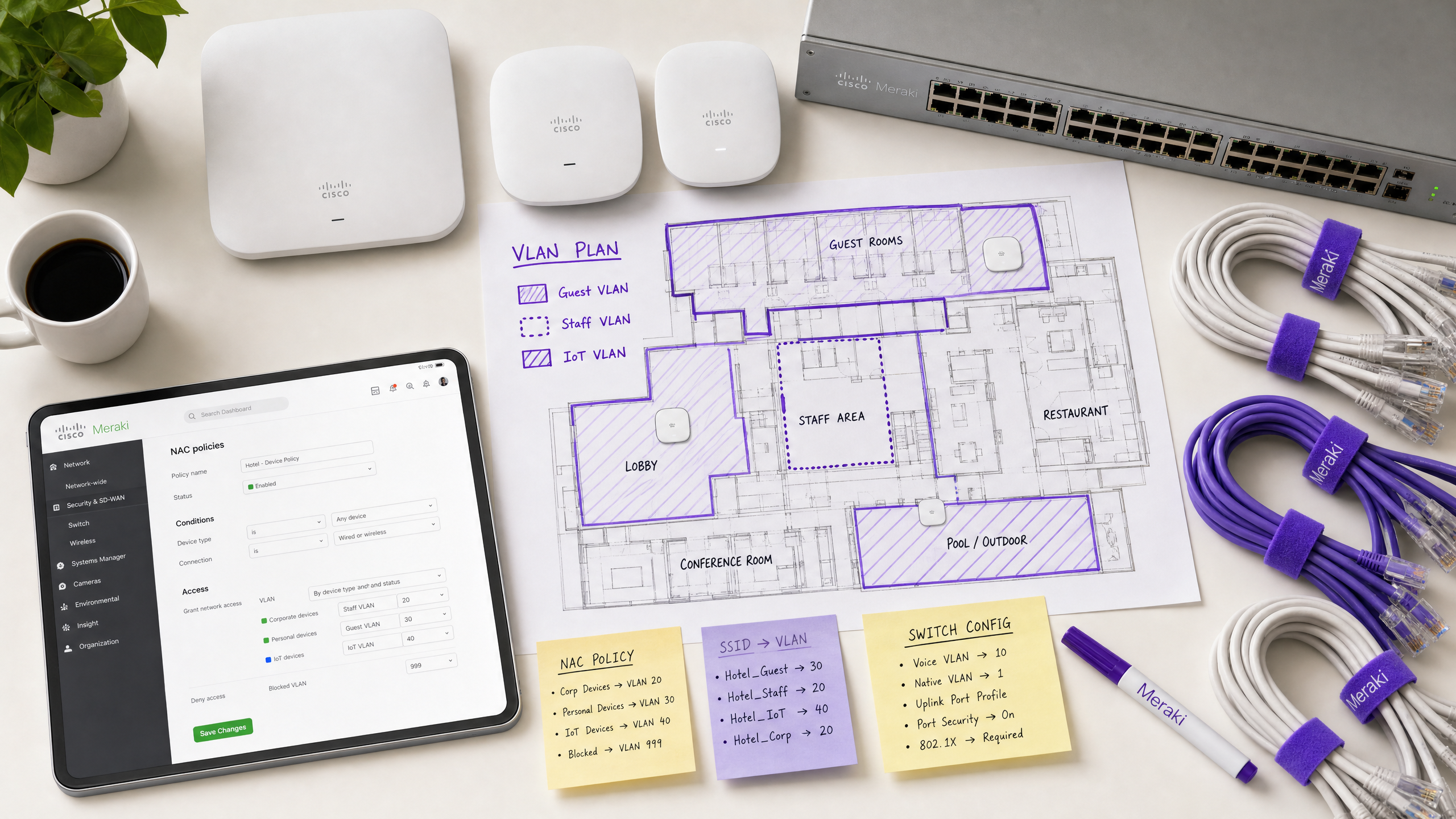
Approfondimento Tecnico
L'Architettura del VLAN Steering Dinamico
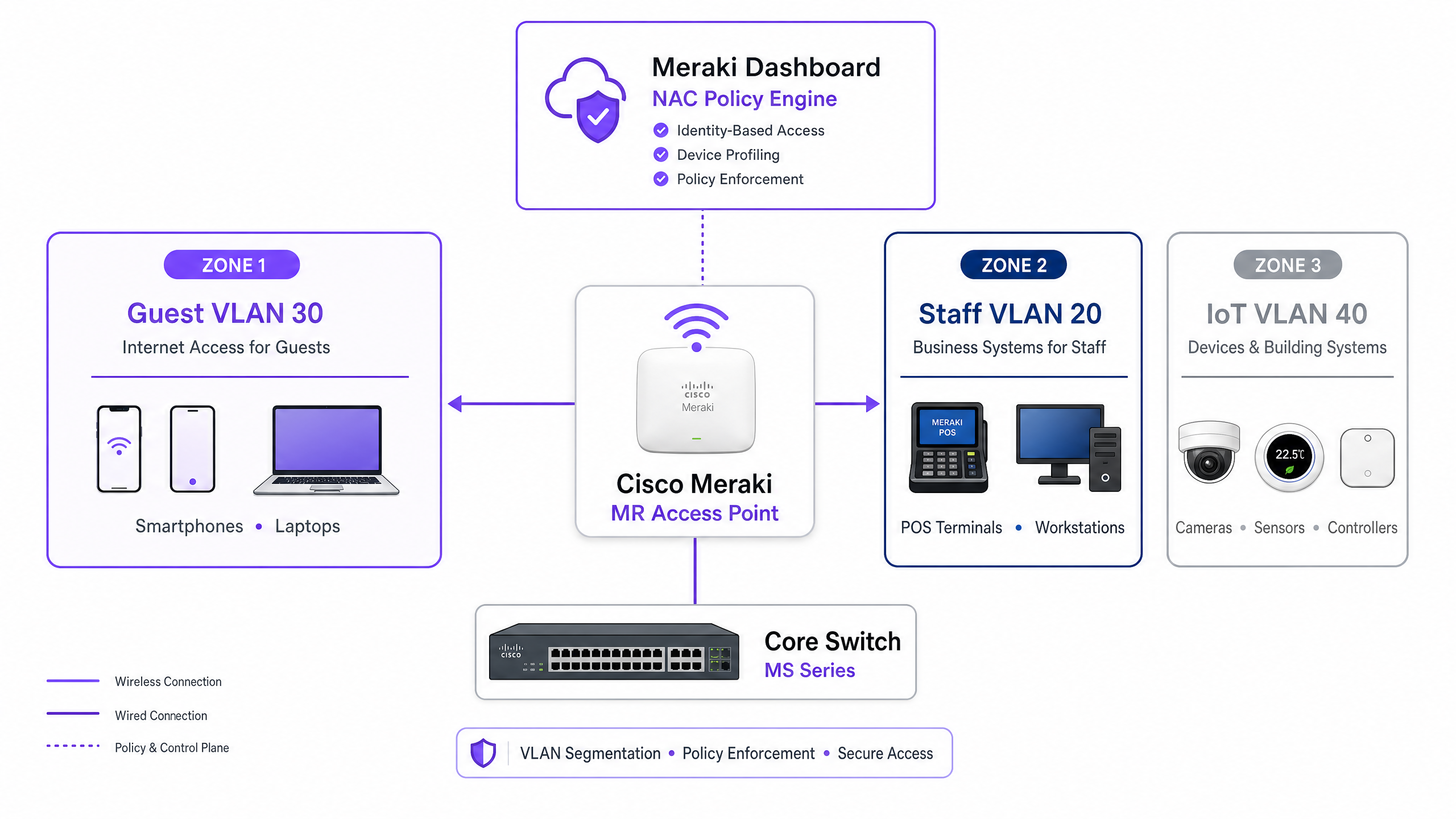
Il VLAN Steering in un ambiente Meraki si basa sull'interazione tra tre componenti principali: il Meraki Access Point (che agisce come autenticatore), il dispositivo client (il supplicante) e il server NAC/RADIUS (il server di autenticazione). Questo modello a tre parti è definito dallo standard IEEE 802.1X e costituisce la spina dorsale di qualsiasi implementazione di controllo degli accessi di livello enterprise.
Quando un dispositivo si associa alla rete, l'AP intercetta il traffico e inoltra una richiesta di accesso (Access-Request) al server RADIUS. In caso di autenticazione riuscita, il server RADIUS risponde con un messaggio di accettazione dell'accesso (Access-Accept). Fondamentalmente, affinché avvenga il VLAN Steering, questo messaggio deve includere specifici attributi RADIUS standard IETF che istruiscono l'AP su quale VLAN applicare:
| Attributo RADIUS | ID | Valore | Scopo |
|---|---|---|---|
| Tunnel-Type | 64 | 13 (VLAN) | Specifica il protocollo di tunneling |
| Tunnel-Medium-Type | 65 | 6 (802) | Specifica il mezzo di trasporto |
| Tunnel-Private-Group-ID | 81 | es., 20 |
Specifica l'ID VLAN di destinazione |
Quando l'AP Meraki riceve questi attributi, tagga dinamicamente il traffico del client con l'ID VLAN specificato prima di inoltrarlo alla porta dello switch. Questo processo è trasparente per l'utente finale e si completa entro millisecondi dall'associazione.
Meccanismi di Autenticazione
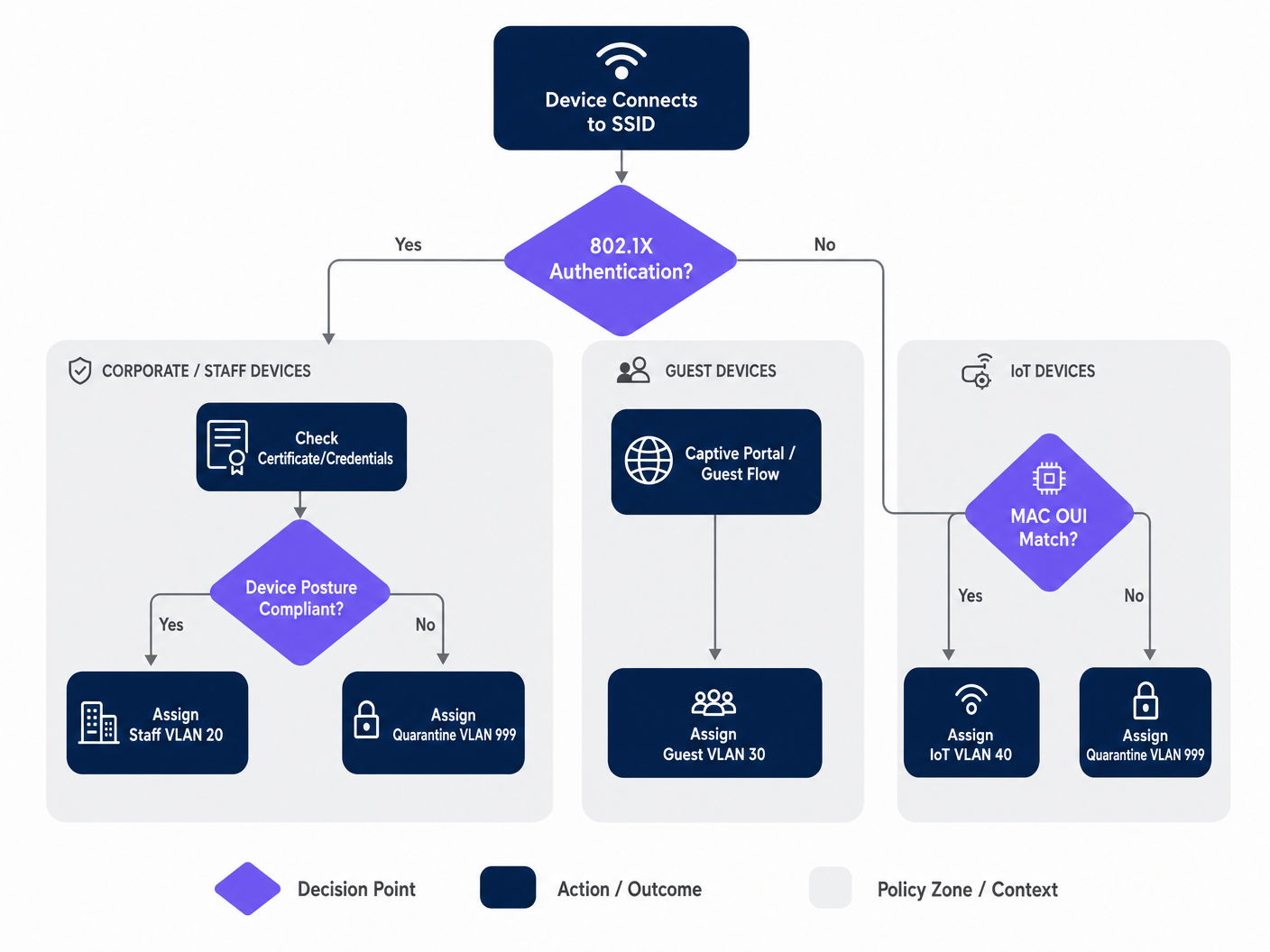
Le reti aziendali richiedono tipicamente un approccio multilivello all'autenticazione, poiché la popolazione di dispositivi in qualsiasi sede è eterogenea. I tre meccanismi principali sono:
IEEE 802.1X (EAP-TLS o PEAP) è lo standard d'oro per i dispositivi aziendali e del personale. L'autenticazione si basa su certificati digitali (EAP-TLS) o credenziali sicure (PEAP-MSCHAPv2), fornendo crittografia robusta e validazione dell'identità. Questo è l'approccio raccomandato per qualsiasi dispositivo gestito dalla piattaforma MDM dell'organizzazione.
Il MAC Authentication Bypass (MAB) è essenziale per i dispositivi headless — telecamere IP, terminali POS, sensori di gestione degli edifici e smart TV — che non possono eseguire un supplicante 802.1X. L'indirizzo MAC viene utilizzato come identificatore. Sebbene meno sicuro dell'autenticazione basata su certificati (gli indirizzi MAC possono essere falsificati), il MAB combinato con ACL VLAN rigorose fornisce una postura di sicurezza accettabile per i segmenti IoT isolati. Per un trattamento completo di questo argomento, fare riferimento alla nostra guida su Gestione della sicurezza dei dispositivi IoT con NAC e MPSK .
L'Autenticazione Captive Portal è utilizzata per l'accesso degli ospiti. I dispositivi vengono posti in uno stato di pre-autenticazione ristretto fino a quando l'utente non completa un flusso di login — tipicamente login social, registrazione e-mail o un semplice click-through — ospitato da una piattaforma come Purple. Questo acquisisce dati di prima parte mentre indirizza il dispositivo in una VLAN ospite isolata.
Guida all'Implementazione
Passaggio 1: Pianificare l'Architettura VLAN
Prima di toccare la Dashboard Meraki, definire la propria strategia di segmentazione VLAN. Un'implementazione tipica per sedi aziendali utilizza la seguente struttura:
| ID VLAN | Nome | Scopo | Metodo di Autenticazione |
|---|---|---|---|
| 10 | Gestione | Infrastruttura di rete | Statico |
| 20 | Personale | Dispositivi aziendali, sistemi interni | 802.1X (EAP-TLS) |
| 30 | Ospiti | Accesso internet visitatori | Captive Portal (Purple) |
| 40 | IoT | Telecamere, sensori, dispositivi smart | MAB |
| 50 | POS | Terminali di pagamento (ambito PCI) | 802.1X (Certificato) |
| 999 | Quarantena | Autenticazione fallita, dispositivi sconosciuti | Nessuno |
Passaggio 2: Configurare l'Infrastruttura dello Switch
Prima di configurare le impostazioni wireless, l'infrastruttura cablata deve essere preparata. Le porte dello switch che si collegano agli AP Meraki devono essere configurate come porte trunk, consentendo tutte le VLAN che l'AP potrebbe assegnare dinamicamente. Questa è la singola svista più comune nelle implementazioni fallite.
Nella Dashboard Meraki, navigare su Switch > Monitor > Porte switch, selezionare le porte connesse ai propri AP, impostare il Tipo su Trunk, configurare la VLAN Nativa (tipicamente la propria VLAN di gestione) e nel campo VLAN Consentite, specificare tutte le potenzialialle VLAN client esplicitamente (ad es. 20,30,40,50,999).
Fase 3: Configurare l'SSID Meraki per 802.1X
Accedere a Wireless > Configure > Access control e selezionare l'SSID di destinazione. Sotto Network access, selezionare Enterprise with 802.1X. Scorrere fino alla sezione RADIUS servers e aggiungere i dettagli del server NAC: indirizzo IP, porta (predefinita 1812 per l'autenticazione, 1813 per la contabilità) e il segreto condiviso. Per ridondanza, aggiungere un server RADIUS secondario.
Fase 4: Abilitare l'override RADIUS per il tagging VLAN
Questo è il passaggio critico che consente all'AP Meraki di accettare le assegnazioni VLAN dal server NAC. Sulla stessa pagina Access control, scorrere fino alla sezione Addressing and traffic. Impostare Client IP assignment su Bridge mode — questo assicura che i client ricevano gli indirizzi IP dal server DHCP locale sulla loro VLAN assegnata, non dal NAT dell'AP. Sotto VLAN tagging, selezionare Use VLAN tag from RADIUS.
Fase 5: Configurare l'accesso ospite con Purple
Per le reti ospiti, creare un SSID separato configurato con un'associazione aperta e un'integrazione con un Captive Portal. Impostare Network access su Open (no encryption) e configurare la Splash page in modo che punti all'URL del portale Purple. Impostare il VLAN tagging per assegnare tutto il traffico pre-autenticato a una VLAN ospite dedicata e isolata (ad es. VLAN 30) e abilitare l'Client isolation per prevenire movimenti laterali tra i dispositivi ospiti. La piattaforma WiFi Analytics di Purple gestirà il flusso di autenticazione e l'acquisizione dei dati.
Migliori Pratiche
Implementare una postura Fail-Closed con VLAN di autenticazione critiche. Se il server RADIUS diventa irraggiungibile, non passare a una modalità aperta e non concedere l'accesso completo alla rete. Configurare una VLAN di autenticazione critica che fornisca connettività internet di base ma blocchi l'accesso a tutte le risorse interne fino al ripristino del server NAC. Ciò è particolarmente importante per gli ambienti di vendita al dettaglio dove i terminali POS devono continuare a elaborare i pagamenti anche durante un'interruzione del RADIUS.
Abilitare la transizione rapida BSS (802.11r) per un roaming senza interruzioni. L'assegnazione dinamica di VLAN può introdurre latenza durante il roaming poiché il dispositivo deve riautenticarsi a ogni AP. L'abilitazione di 802.11r garantisce passaggi di consegna senza interruzioni per le applicazioni vocali e video in tutta la sede. Questo è non negoziabile per gli ambienti dell'ospitalità dove gli ospiti si muovono continuamente all'interno della struttura. Comprendere Wi Fi Frequencies: A Guide to Wi-Fi Frequencies in 2026 può anche aiutare a ottimizzare la pianificazione dei canali per implementazioni dense.
Segmentare il traffico IoT in modo aggressivo. Non mescolare mai i dispositivi IoT con il traffico aziendale o degli ospiti. Utilizzare MAB per identificare questi dispositivi e indirizzarli in VLAN dedicate con regole firewall Layer 3 rigorose che consentano solo le porte e le destinazioni specifiche richieste per il funzionamento del dispositivo. Una telecamera IP compromessa non dovrebbe mai essere in grado di raggiungere la rete POS o i server di file aziendali.
Imporre WPA3 sugli SSID aziendali. Laddove la compatibilità dei dispositivi lo consenta, configurare gli SSID aziendali per utilizzare WPA3-Enterprise. Ciò fornisce una crittografia più forte ed elimina le vulnerabilità associate agli attacchi WPA2 PMKID.
Risoluzione dei problemi e mitigazione del rischio
Modalità di guasto comuni
I client non riescono a ottenere un indirizzo IP. Questo è quasi sempre un problema di configurazione della porta dello switch. Verificare che la porta dello switch collegata all'AP sia configurata come trunk e che la VLAN assegnata dinamicamente sia consentita su quel trunk. Inoltre, verificare che il server DHCP abbia un ambito attivo per quella VLAN e che l'agente di inoltro DHCP (se applicabile) sia configurato correttamente.
Timeout di autenticazione. Se i dispositivi vanno in timeout durante l'handshake 802.1X, controllare la latenza di rete tra gli AP Meraki e il server RADIUS. L'elevata latenza può causare la scadenza dei timer EAP. Il Registro eventi della Dashboard Meraki mostrerà eventi 8021x_auth_timeout se ciò si verifica.
Assegnazione VLAN errata. Utilizzare il Registro eventi della Dashboard Meraki per visualizzare i messaggi RADIUS Access-Accept. Verificare che il server NAC stia inviando l'attributo Tunnel-Private-Group-ID corretto. Se è mancante o errato, il problema risiede nella configurazione della policy NAC, non nell'AP Meraki. La maggior parte delle piattaforme NAC (Cisco ISE, ClearPass) fornisce log di autenticazione RADIUS dettagliati che mostreranno esattamente quali attributi sono stati restituiti.
La randomizzazione MAC che interrompe MAB. I moderni dispositivi iOS e Android randomizzano i loro indirizzi MAC per impostazione predefinita. Per le reti ospiti gestite da Purple, questo viene gestito elegantemente attraverso il flusso del Captive Portal — l'identità è stabilita dal login dell'utente, non dall'indirizzo MAC. Per i dispositivi IoT che utilizzano MAB, assicurarsi che l'indirizzo MAC hardware effettivo sia registrato nel database degli endpoint, poiché questi dispositivi non randomizzano.
ROI e impatto sul business
L'implementazione dello steering VLAN basato su NAC offre un valore aziendale misurabile per le sedi aziendali su più dimensioni:
| Risultato aziendale | Meccanismo | Impatto misurabile |
|---|---|---|
| Riduzione del sovraccarico operativo | Meno SSID da gestire | Riduzione del 60-70% nel numero di SSID |
| Miglioramento della postura di sicurezza | Micro-segmentazione automatizzata | Raggio d'azione contenuto per le violazioni |
| Abilitazione della conformità | Controllo degli accessi basato sull'identità | Allineamento PCI DSS, GDPR, ISO 27001 |
| Acquisizione dati ospiti | Integrazione con Captive Portal Purple | Dati di prima parte su larga scala |
| Prestazioni di rete | Riduzione dell'overhead dei frame di gestione | Throughput migliorato in aree ad alta densità |
Per gli operatori Healthcare e Transport , l'argomento della conformità da solo giustifica l'investimento. La capacità di dimostrare che i dati dei pazienti si trovano su una VLAN strettamente isolata, o che i sistemi di biglietteria sono segregati dal WiFi pubblico, è una mitigazione del rischio materiale che soddisfa sia gli audit interni che i requisiti normativi esterni.
Per gli operatori dell'ospitalità e della vendita al dettaglio, l'integrazione con la piattaforma guest WiFi di Purple trasforma la rete ospite da centro di costo in generatore di entraterisorsa operativa. Ogni sessione ospite autenticata diventa un punto dati, alimentando l'automazione del marketing, i programmi fedeltà e l'analisi della sede — il tutto mentre la policy NAC sottostante garantisce che il traffico degli ospiti non tocchi mai i sistemi interni.
Ascolta il Briefing
Per un approfondimento sulle strategie di implementazione e le insidie comuni, ascolta il nostro podcast di briefing tecnico di 10 minuti:
Key Definitions
Network Access Control (NAC)
A security architecture that enforces policy on devices seeking to access network resources, typically evaluating identity, device posture, and compliance status before granting access and assigning a network segment.
IT teams deploy NAC platforms (such as Cisco ISE or Aruba ClearPass) to act as the central policy engine, deciding which VLAN a device belongs in based on who or what it is, and what state it is in.
VLAN Steering (Dynamic VLAN Assignment)
The process of automatically assigning a client device to a specific Virtual Local Area Network (VLAN) upon successful authentication, regardless of which physical port or SSID they connect to.
Essential for high-density venues to reduce the number of broadcasted SSIDs while maintaining strict security segmentation between guest, staff, and IoT device populations.
IEEE 802.1X
An IEEE standard for port-based network access control that provides an authentication mechanism to devices wishing to attach to a LAN or WLAN, using the Extensible Authentication Protocol (EAP) framework.
The gold standard for authenticating corporate laptops and staff smartphones, ensuring only verified users with valid credentials or certificates can access internal resources.
MAC Authentication Bypass (MAB)
A fallback authentication method where a device's MAC address is used as its identity credential when it cannot support 802.1X. The MAC address is sent to the RADIUS server as both the username and password.
Crucial for onboarding headless IoT devices — printers, cameras, sensors, and POS terminals — onto a secure, segmented network without requiring user intervention.
RADIUS (Remote Authentication Dial-In User Service)
A networking protocol that provides centralised Authentication, Authorisation, and Accounting (AAA) management for users and devices connecting to a network service.
The protocol used by the Meraki AP to communicate with the NAC server. The AP sends Access-Request messages; the NAC server responds with Access-Accept (including VLAN attributes) or Access-Reject.
Captive Portal
A web page that a user of a public-access network is obliged to view and interact with before full network access is granted. Typically used for terms acceptance, login, or data capture.
The primary method for onboarding guest users in hospitality, retail, and public-sector environments. Platforms like Purple host the captive portal, capturing analytics data and enforcing terms of service.
Client Isolation
A wireless security feature that prevents devices connected to the same SSID or VLAN from communicating directly with each other, forcing all traffic through the gateway.
A mandatory setting for Guest VLANs to prevent malicious actors from scanning or attacking other guests' devices. Should be enabled on any SSID where untrusted devices are expected.
Fast BSS Transition (802.11r)
An IEEE 802.11 amendment that enables fast and secure handoffs from one access point to another by pre-caching authentication keys, reducing roaming latency from hundreds of milliseconds to under 50ms.
Must be enabled when using 802.1X and dynamic VLAN assignment in venues where users are mobile, to prevent voice calls or video streams from dropping as users move between access points.
EAP-TLS (Extensible Authentication Protocol - Transport Layer Security)
A mutual authentication method within the 802.1X framework that uses digital certificates on both the client and the authentication server, providing the highest level of security for wireless authentication.
The recommended authentication method for PCI DSS-scoped devices and any environment where credential theft is a significant risk. Requires a PKI infrastructure to issue and manage client certificates.
Worked Examples
A 400-room hotel needs to deploy a secure wireless network. They require staff to access internal booking systems securely, guests to access the internet via a branded captive portal, and smart TVs in the rooms to connect to a local media server. They want to minimise SSID broadcast overhead to ensure optimal performance in high-density areas.
The IT team should deploy two SSIDs. SSID 1: 'Hotel_Secure' configured for 802.1X. Staff authenticate using EAP-TLS with corporate certificates issued by the hotel's PKI. The NAC server (Cisco ISE) recognises the staff identity and returns RADIUS attributes assigning them to VLAN 20 (Staff), which has full access to the PMS and booking systems. The Smart TVs, lacking 802.1X capabilities, are profiled using MAC Authentication Bypass (MAB). The NAC server recognises the TV MAC OUI prefixes and assigns them to VLAN 40 (IoT), which has ACLs permitting access only to the media server on port 8080 and the internet. SSID 2: 'Hotel_Guest' configured as Open with a Purple captive portal. Guests connect, are redirected to the Purple splash page, and upon successful social login or email registration, are assigned to VLAN 30 (Guest) with client isolation enabled. The Purple platform captures first-party data for the hotel's CRM and marketing automation.
A retail chain is rolling out new wireless Point-of-Sale (POS) terminals across 50 locations. These devices must be strictly segmented to comply with PCI DSS requirements. However, the IT team is concerned about what happens if the central RADIUS server goes offline during peak trading hours.
The POS terminals should connect to an 802.1X-enabled SSID, utilising certificate-based authentication (EAP-TLS) to ensure strong identity validation. The NAC policy will steer these devices into a dedicated, highly restricted POS VLAN (VLAN 50) with Layer 3 firewall rules permitting traffic only to the payment gateway IPs on the required ports. To mitigate the risk of RADIUS server failure, the IT team must configure a Critical Authentication VLAN on the Meraki access points. If the AP cannot reach the RADIUS server within the configured timeout, it will automatically drop the POS terminals into this critical VLAN. This VLAN should be configured with strict ACLs that allow traffic only to the essential payment processing gateways, ensuring transactions can continue while blocking all other network access. A secondary RADIUS server at each location provides an additional layer of redundancy.
Practice Questions
Q1. A hospital IT director reports that newly installed wireless IP cameras are failing to connect to the 'Med_Secure' SSID, which is configured for 802.1X. The cameras do not support certificate-based authentication and have no user interface. How should the network architecture be adjusted to securely onboard these devices?
Hint: Consider how headless devices are profiled and authenticated when they cannot run an 802.1X supplicant.
View model answer
The IT team must utilise MAC Authentication Bypass (MAB) on the NAC server. The cameras' MAC addresses should be added to the endpoint database and profiled as 'IoT_Camera'. When a camera attempts to connect, the NAC server will use the MAC address as the authentication credential and return the RADIUS attributes to steer the camera into an isolated IoT VLAN. Strict Layer 3 ACLs should be applied to this VLAN, permitting traffic only to the camera management server and blocking all other internal network access. The hospital should also consider using DHCP fingerprinting as a secondary profiling method to verify the device type matches the expected profile for the registered MAC address.
Q2. During a network audit at a retail chain, it is discovered that staff laptops on the dynamic VLAN are successfully authenticating via 802.1X (the Event Log shows Access-Accept messages with the correct VLAN ID) but are not receiving IP addresses. Guest devices on a separate SSID are functioning normally. What is the most likely configuration error and how would you resolve it?
Hint: The authentication is succeeding — the issue is in the data path after the VLAN tag is applied.
View model answer
The most likely issue is that the physical switchport connecting the Meraki AP to the core switch is not configured correctly. While the AP is successfully authenticating the client and tagging the traffic with the Staff VLAN ID, the switchport is likely configured as an access port (or a trunk port that is missing the Staff VLAN in its allowed list). The switchport must be configured as a trunk, and the dynamically assigned Staff VLAN must be explicitly listed in the allowed VLANs. The IT team should navigate to Switch > Monitor > Switch ports in the Meraki Dashboard, select the port connected to the AP, verify it is set to Trunk type, and confirm the Staff VLAN ID is included in the Allowed VLANs field.
Q3. A stadium wants to offer seamless WiFi to 50,000 fans during events while securely connecting point-of-sale terminals and digital signage. The current network team proposes broadcasting five different SSIDs to separate the traffic. Why is this a poor design for a high-density environment, and what is the recommended architecture?
Hint: Consider the impact of management frames on wireless airtime in a high-density environment.
View model answer
Broadcasting five SSIDs creates excessive management frame overhead — each SSID requires its own beacon frames broadcast at regular intervals by every access point. In a high-density environment like a stadium with hundreds of APs, this management frame overhead consumes a significant proportion of available airtime, directly reducing the throughput available for user data. The recommended approach is to broadcast a maximum of two SSIDs: one Open SSID with a Purple captive portal for the 50,000 fans, steering them to a Guest VLAN with client isolation; and one 802.1X-enabled secure SSID for all corporate devices. The NAC policy will then dynamically steer POS terminals into a PCI-compliant VLAN and digital signage into an IoT VLAN based on their identity, without requiring additional SSIDs.