

Come configurare un hotspot WiFi per la tua attività
Questa guida autorevole fornisce a leader IT, architetti di rete e direttori delle operazioni di sede un modello pratico e indipendente dal fornitore per l'implementazione di hotspot WiFi per ospiti sicuri, conformi e che migliorano il business. Copre decisioni architetturali critiche — dalla segmentazione VLAN e configurazione del Captive Portal alla conformità GDPR e alla modellazione del traffico — e dimostra come trasformare l'infrastruttura di rete da un centro di costo a una piattaforma di analisi che genera entrate utilizzando le capacità di Guest WiFi e analisi di Purple.
Listen to this guide
View podcast transcript
Riepilogo Esecutivo
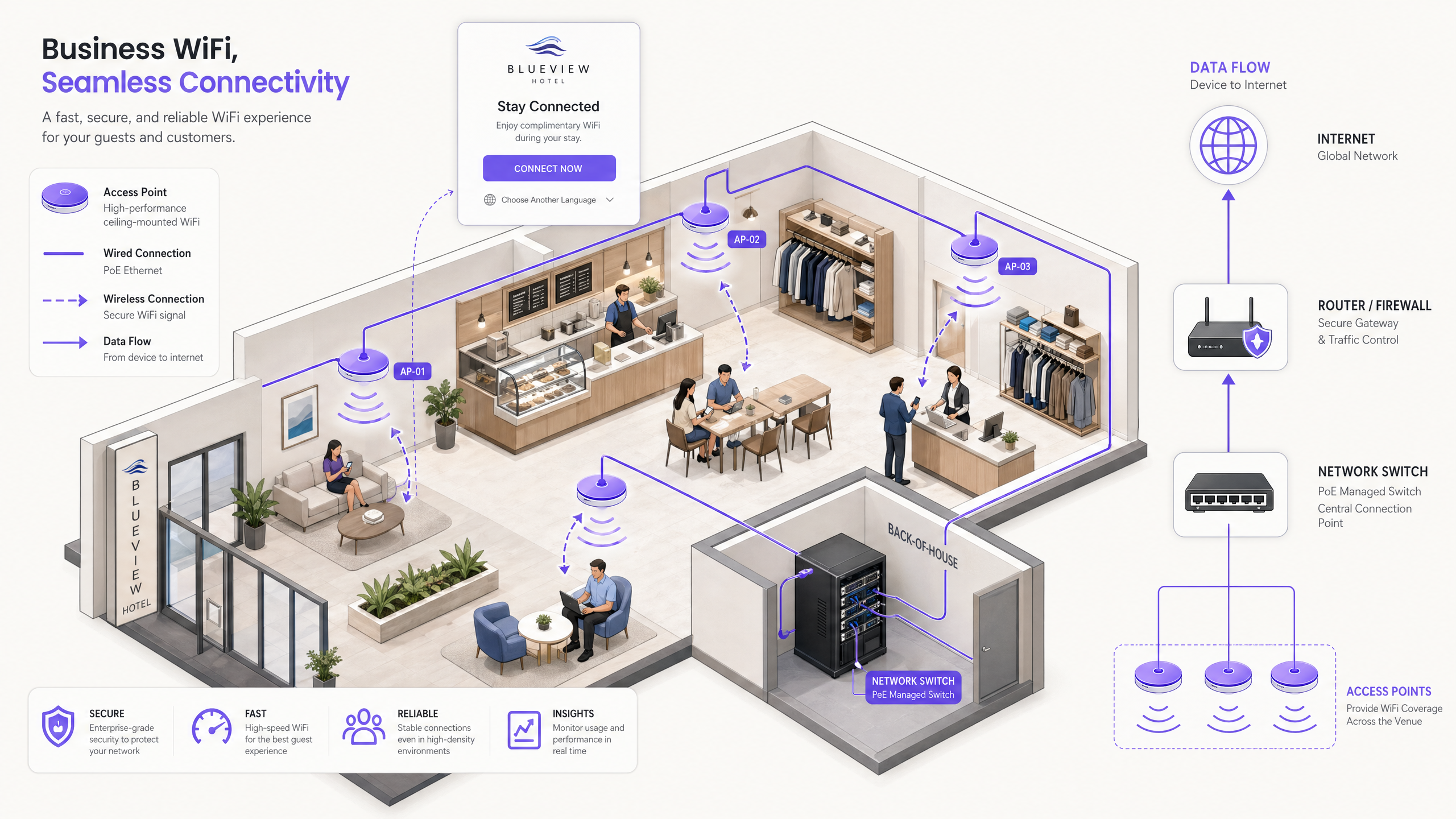
Per le sedi aziendali — siano esse catene di negozi, gruppi alberghieri, centri congressi o grandi strutture del settore pubblico — il Guest WiFi si è evoluto da un servizio discrezionale a un punto di contatto digitale critico. Ospiti e visitatori si aspettano ora una connettività affidabile e veloce come standard. Tuttavia, il divario operativo e legale tra un router di livello consumer e un hotspot aziendale correttamente implementato è sostanziale. Una rete mal implementata espone le risorse aziendali ad attacchi di movimento laterale, crea responsabilità ai sensi del GDPR e del Computer Misuse Act, e spreca l'opportunità di acquisire dati di prima parte preziosi.
Questa guida fornisce un modello pratico e indipendente dal fornitore per i responsabili IT e gli architetti di rete incaricati di implementare o aggiornare un servizio WiFi pubblico. Dettagliamo l'architettura tecnica necessaria per fornire un hotspot sicuro e segmentato, con un focus specifico sulla progettazione VLAN, i flussi di autenticazione del Captive Portal, la gestione della larghezza di banda e i mandati di conformità inclusi GDPR, PCI DSS e IEEE 802.1X. Esploriamo anche come l'integrazione di una piattaforma gestita come Guest WiFi trasformi la connettività grezza in WiFi Analytics utilizzabili, consentendo agli operatori delle sedi di comprendere i modelli di affluenza, misurare il tempo di permanenza e generare un ROI di marketing misurabile.
Approfondimento Tecnico: Architettura e Segmentazione
Il principio fondamentale di qualsiasi implementazione di hotspot aziendale è l'isolamento. Il traffico degli ospiti deve essere separato crittograficamente e logicamente dai dati aziendali a ogni livello dello stack di rete. Non applicare questa separazione è l'errore più comune e più consequenziale nelle implementazioni WiFi pubbliche.
Segmentazione della Rete tramite VLAN
L'implementazione di una rete piatta in cui ospiti e sistemi POS (Point-of-Sale) condividono la stessa sottorete è un fallimento catastrofico della sicurezza. Le implementazioni aziendali utilizzano le Virtual Local Area Networks (VLAN) per segmentare il traffico a livello di switch gestito, applicando confini logici indipendentemente dalla topologia fisica.
Un'implementazione multi-tenant standard definirà tipicamente almeno due VLAN:
| VLAN | Scopo | ID Tipico | Politica di Routing |
|---|---|---|---|
| Corporate | Dispositivi del personale, terminali POS, server di back-office | VLAN 10 | Accesso interno completo |
| Guest | Solo accesso a internet pubblico | VLAN 20 | Solo internet; nessuna rotta interna |
| IoT/Building | CCTV, HVAC, controllo accessi | VLAN 30 | Isolato; nessun accesso a internet |
Il traffico sulla Guest VLAN viene instradato direttamente a internet tramite un firewall UTM (Unified Threat Management), con liste di controllo degli accessi (ACL) rigorose configurate per eliminare qualsiasi pacchetto destinato a sottoreti interne. Questa segmentazione è un controllo obbligatorio ai sensi del Requisito PCI DSS 1.3, che impone che gli ambienti di dati dei titolari di carta siano isolati da reti non attendibili. Per gli operatori Retail e Hospitality che gestiscono terminali di pagamento sulla stessa infrastruttura fisica, questo è non negoziabile.
Il flusso di autenticazione del Captive Portal
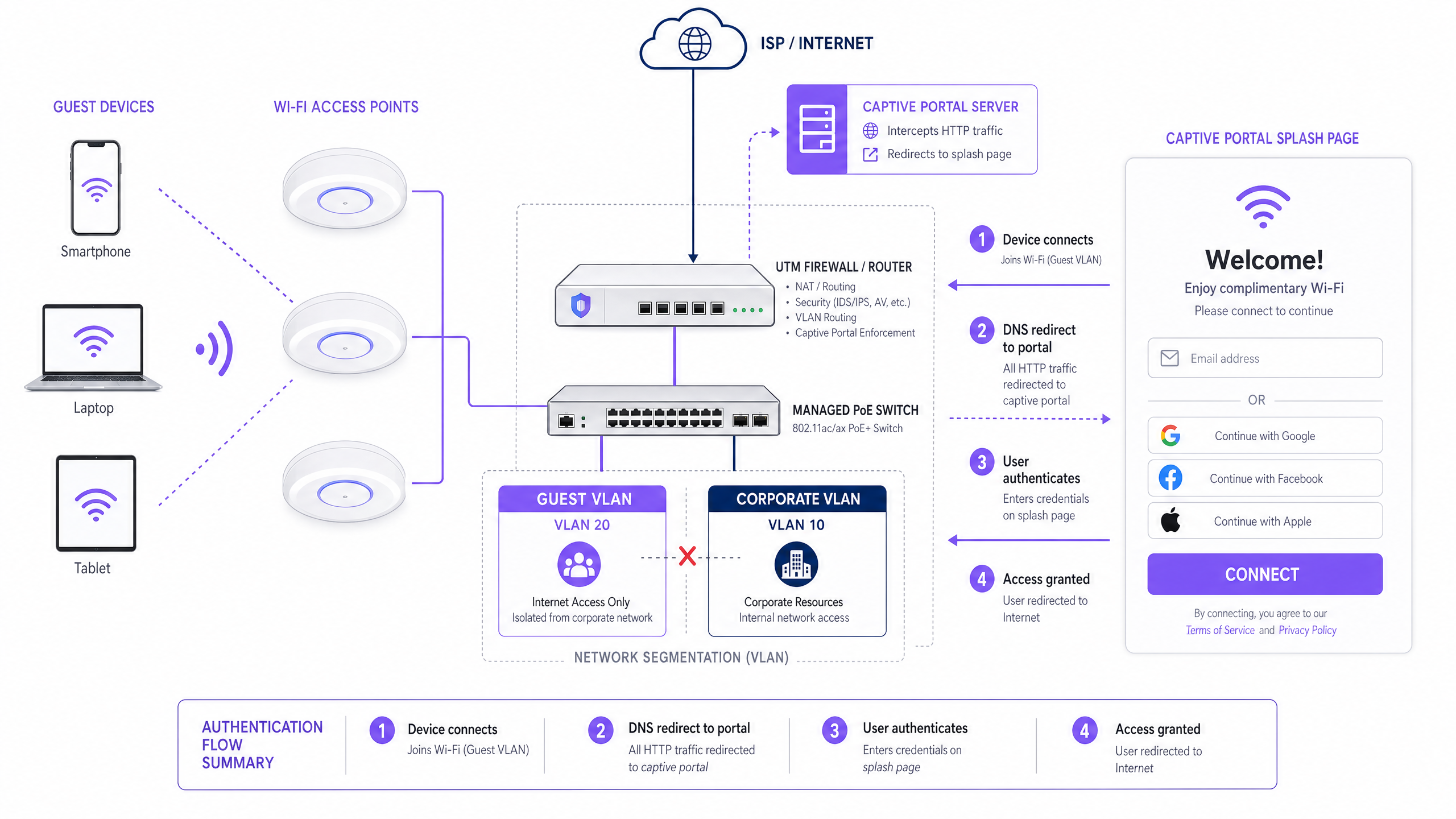
Quando un dispositivo ospite si associa a un access point (AP), riceve un indirizzo IP tramite DHCP. A questo punto, il firewall blocca tutto il traffico internet in uscita. La sequenza di autenticazione completa procede come segue:
- Associazione: Il dispositivo si connette all'SSID aperto (o a un SSID OpenRoaming sicuro utilizzando 802.1X/EAP).
- Assegnazione DHCP: Il server DHCP della Guest VLAN assegna un indirizzo IP, un gateway predefinito e un server DNS.
- Intercettazione: Quando il dispositivo tenta una richiesta HTTP (o il sistema operativo attiva una sonda del Captive Portal tramite un URL ben noto), la rete intercetta la richiesta tramite reindirizzamento DNS e instrada l'utente al server del Captive Portal.
- Autenticazione: All'utente viene presentata una splash page personalizzata. Si autentica tramite email, social login (OAuth), SMS OTP o un provider di identità senza soluzione di continuità come OpenRoaming.
- Acquisizione del Consenso: All'utente viene presentata la Politica di Utilizzo Accettabile (AUP) e, se i dati vengono raccolti per il marketing, una casella di controllo esplicita per il consenso opt-in.
- Segnale di Autorizzazione: Il server del portale comunica con il controller LAN wireless o il firewall tramite RADIUS o una REST API, autorizzando l'indirizzo MAC o l'IP del dispositivo per l'accesso a internet.
- Accesso Concesso: Le regole del firewall vengono aggiornate dinamicamente e l'utente viene reindirizzato alla sua destinazione prevista.
Per ambienti che richiedono un'autenticazione basata su certificati di livello enterprise per i dispositivi del personale insieme al portale ospiti, fare riferimento alla nostra guida su Come configurare il WiFi aziendale su iOS e macOS con 802.1X (disponibile anche in portoghese: Como Configurar WiFi Corporativo em iOS e macOS com 802.1X ).
Standard Wireless e Pianificazione delle Frequenze
Le implementazioni aziendali dovrebbero standardizzarsi su access point 802.11ax (WiFi 6) o 802.11be (WiFi 7). Il WiFi 6 introduce l'OFDMA (Orthogonal Frequency Division Multiple Access), che migliora drasticamente le prestazioni in ambienti ad alta densità consentendo a un singolo AP di servire più client contemporaneamente su sottocanali, anziché sequenzialmente. Questo è particolarmente critico nelle strutture Healthcare , nei centri congressi e nelle implementazioni negli stadi dove centinaia di dispositivi possono associarsi a un singolo AP durante i periodi di punta.
Pianificazione dell'allocazione delle bande di frequenza dovrebbe seguire questi principi. La banda a 2.4 GHz offre una maggiore portata e una migliore penetrazione attraverso le pareti, rendendola adatta per dispositivi legacy e grandi aree aperte. Tuttavia, ha solo tre canali non sovrapposti (1, 6, 11), rendendola altamente suscettibile alle interferenze co-canale in implementazioni dense. La banda a 5 GHz offre oltre 24 canali non sovrapposti e un throughput significativamente più elevato, ma con una portata ridotta. I moderni controller wireless aziendali supportano il Band Steering, che incoraggia attivamente i dispositivi dual-band compatibili a connettersi alla banda a 5 GHz, liberando lo spettro a 2,4 GHz per i client legacy.
Guida all'Implementazione: Hardware, Configurazione e Distribuzione
Fase 1: Dimensionamento ISP e Uplink
Prima di selezionare l'hardware, calcola la larghezza di banda uplink necessaria. Una stima prudente per una rete guest generica è di 1–2 Mbps per utente contemporaneo. Per una struttura che prevede 300 ospiti contemporanei, si raccomanda una connessione in fibra simmetrica minima di 500 Mbps, con una connessione da 1 Gbps che offra margine di crescita. Per gli hub Transport o grandi sedi di eventi, dovrebbero essere considerati uplink multipli aggregati o failover SD-WAN.
Fase 2: Selezione e Posizionamento degli Access Point
Utilizza access point gestiti 802.11ax di fornitori enterprise. Questi AP devono essere compatibili con PoE+ (Power over Ethernet Plus, IEEE 802.3at), consentendo a un singolo cavo Cat6 di trasportare sia dati che alimentazione dallo switch gestito all'AP. Ciò elimina la necessità di prese di corrente locali in ogni posizione dell'AP, riducendo drasticamente i costi di installazione.
Il posizionamento degli AP deve essere dettato da un'indagine RF professionale sul sito, non da congetture. L'indagine dovrebbe tenere conto di:
- Attenuazione: Perdita di segnale attraverso pareti in cemento, scaffalature metalliche e pareti divisorie in vetro.
- Sovrapposizione di Copertura: Gli AP dovrebbero sovrapporsi di circa il 15–20% per garantire un roaming senza interruzioni e senza zone morte.
- Pianificazione della Capacità: Le aree ad alta densità (sale conferenze, aree ristorazione, hall) richiedono più AP con potenza di trasmissione inferiore per servire molti client a corto raggio, piuttosto che meno AP con alta potenza.
Fase 3: Switch Gestito e Configurazione VLAN
Implementa uno switch gestito Layer 2/3 con un budget PoE+ sufficiente per alimentare tutti gli AP. Configura il tagging VLAN 802.1Q su tutte le porte uplink e trunk degli AP. Le porte di accesso che si collegano a terminali POS o workstation del personale dovrebbero essere assegnate alla VLAN aziendale come membri non taggati. Le porte degli AP dovrebbero essere configurate come porte trunk che trasportano tutte le VLAN richieste, con il controller wireless che mappa ogni SSID alla sua VLAN corrispondente.
Fase 4: Firewall e Traffic Shaping
Il firewall UTM è il punto di applicazione per tutte le politiche di sicurezza e larghezza di banda. Le configurazioni chiave includono:
- Regole di Routing VLAN: Consenti alla VLAN Guest l'accesso a internet; nega alla VLAN Guest l'accesso a tutte le sottoreti interne.
- Limiti di Larghezza di Banda per Utente: Implementa politiche di traffic shaping per limitare il throughput individuale. Un punto di partenza standard è 5 Mbps in download / 2 Mbps in upload per utente. Ciò impedisce che un singolo utente che trasmette video in 4K degradi l'esperienza per tutti gli altri ospiti.
- Controllo Applicazioni: Blocca i protocolli di condivisione file peer-to-peer (BitTorrent, eDonkey) e altre applicazioni ad alta larghezza di banda o illecite a livello di firewall.
- Filtro DNS: Implementa il filtraggio dei contenuti basato su DNS per bloccare l'accesso a domini dannosi, siti di phishing e categorie di contenuti inappropriati. Per una guida dettagliata su questo livello, consulta Proteggi la tua rete con DNS e sicurezza robusti .
Fase 5: Configurazione del Captive Portal
Il Captive Portal è il componente più visibile dell'implementazione e il principale meccanismo di acquisizione dati. Durante la configurazione del portale, assicurati che:
- La splash page sia servita tramite HTTPS con un certificato SSL valido e pubblicamente attendibile per prevenire avvisi di sicurezza del browser.
- Le opzioni di autenticazione includano almeno email/password e social login (Google, Facebook, Apple) per massimizzare i tassi di conversione.
- L'AUP sia chiaramente visualizzato e richieda un'accettazione esplicita prima che l'accesso venga concesso.
- Il consenso GDPR per le comunicazioni di marketing sia acquisito tramite una casella di spunta opt-in separata e non preselezionata.
- Gli intervalli di timeout della sessione e di riautenticazione siano configurati per bilanciare la comodità dell'utente con la sicurezza.
Migliori Pratiche e Conformità
GDPR e Privacy dei Dati
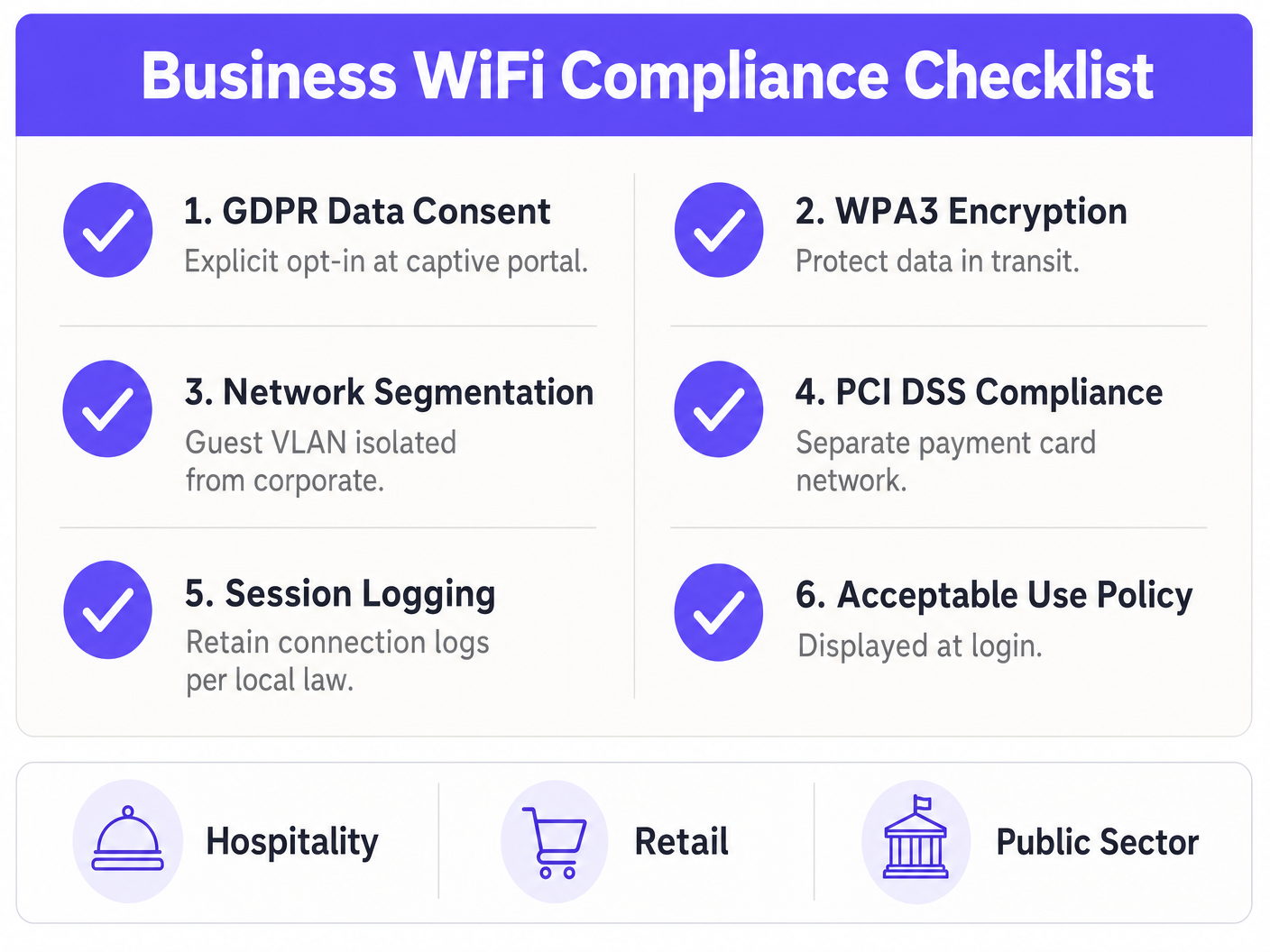
Se raccogli dati utente per scopi di marketing, il consenso esplicito e informato è obbligatorio ai sensi del GDPR del Regno Unito e del GDPR dell'UE. I requisiti legali sono inequivocabili: le caselle di consenso preselezionate sono proibite; il consenso deve essere dato liberamente, in modo specifico, informato e inequivocabile; e gli utenti devono essere in grado di ritirare il consenso con la stessa facilità con cui lo hanno dato. Il tuo Captive Portal deve indicare chiaramente quali dati vengono raccolti, la base legale per il trattamento, come verranno utilizzati e per quanto tempo verranno conservati.
Registrazione delle Sessioni e Conformità Legale
Nel Regno Unito, il Regulation of Investigatory Powers Act (RIPA) e la legislazione associata possono richiedere agli operatori di strutture di conservare i log di connessione — inclusi indirizzi MAC, timestamp e assegnazioni IP — per assistere le forze dell'ordine in caso di attività illegali sulla rete. Consulta il tuo consulente legale per determinare gli obblighi specifici di conservazione applicabili alla tua organizzazione e giurisdizione.
WPA3 e Standard di Crittografia
Per qualsiasi SSID che utilizza una chiave pre-condivisa (ad esempio, una rete del personale), imposta WPA3-Personal (SAE) anziché WPA2. WPA3 elimina la vulnerabilità agli attacchi a dizionario offline inerente all'handshake a 4 vie di WPA2. Per le reti del personale aziendale che utilizzano l'autenticazione basata su certificati 802.1X, WPA3-Enterprise con modalità a 192 bit offre il massimo livello di garanzia. Per maggiori informazioni sulla sicurezza degli strati fisici e logici della tua infrastruttura wireless, consulta Sicurezza degli Access Point: La tua Guida Aziendale 2026 .
Gestione della Randomizzazione MAC
I moderni dispositivi iOS (da iOS 14) e Android (da Android 10) utilizzano la randomizzazione MAC per impostazione predefinita, generando un indirizzo MAC casuale unico per ogni rete WiFi. Ciò significa che gli indirizzi MAC non possono più essere utilizzati in modo affidabileper identificare i visitatori di ritorno o costruire profili utente a lungo termine. La risposta architetturale corretta è quella di imporre l'autenticazione basata sull'identità al Captive Portal—richiedendo agli utenti di accedere tramite email o un account social—in modo che il profilo utente, piuttosto che l'identificatore hardware, diventi l'entità di tracciamento persistente.
Risoluzione dei Problemi e Mitigazione dei Rischi
Anche le reti ben progettate incontrano problemi operativi. La seguente tabella riassume le modalità di guasto più comuni e le relative mitigazioni raccomandate.
| Modalità di Guasto | Causa Radice | Mitigazione |
|---|---|---|
| Esaurimento DHCP | Subnet troppo piccola o tempo di lease troppo lungo per il volume di traffico | Utilizzare subnet /22 o più grande; ridurre il tempo di lease a 30–60 minuti |
| Interferenza Co-Canale | Più AP sullo stesso canale in aree di copertura sovrapposte | Abilitare l'assegnazione dinamica dei canali sul controller wireless |
| Errori SSL del Captive Portal | Certificato non valido o auto-firmato sul server del portale | Distribuire un certificato CA pubblico valido; usare Let's Encrypt |
| Roaming Lento | AP che non condividono i dati di associazione del client | Abilitare 802.11r (Fast BSS Transition) sul controller wireless |
| Saturazione della Larghezza di Banda | Nessun traffic shaping per utente configurato | Implementare politiche QoS per utente sul firewall |
| Movimento Laterale da Guest a Corporate | Rete piatta o ACL mal configurate | Verificare le ACL VLAN; eseguire penetration test sulla VLAN guest |
ROI e Impatto sul Business
Un hotspot correttamente implementato trascende la sua funzione di infrastruttura IT—diventa un motore di dati di prima parte e un canale di marketing diretto. Il business case per investire in una piattaforma WiFi guest gestita è convincente in ogni settore verticale.
Nel settore Hospitality , i dati del WiFi guest consentono agli hotel di capire quali servizi gli ospiti utilizzano prima e dopo la connessione, personalizzare le comunicazioni durante il soggiorno e promuovere prenotazioni ripetute tramite campagne post-soggiorno automatizzate. Un hotel di 300 camere che acquisisce 200 opt-in email al giorno costruisce un database di marketing di 70.000 contatti opt-in all'anno—un asset CRM significativo.
Nel settore Retail , gli analytics WiFi forniscono mappe di calore del traffico pedonale, tempo di permanenza per zona e tassi di visita ripetuta—dati che in precedenza erano disponibili solo tramite costose indagini manuali. I rivenditori possono utilizzare questi dati per ottimizzare la disposizione dei negozi, misurare l'impatto delle esposizioni promozionali e attivare campagne fedeltà quando un cliente conosciuto entra nel negozio.
Per gli operatori del settore pubblico e dei Trasporti , la proposta di valore è l'efficienza operativa: comprendere i periodi di punta della congestione, ottimizzare il personale e fornire servizi digitali accessibili a cittadini e passeggeri.
Piattaforme come Guest WiFi e WiFi Analytics di Purple forniscono lo strato di infrastruttura gestita che collega la rete grezza a questi risultati di business. Come dimostra l'espansione strategica di Purple—incluse le recenti mosse in nuovi settori verticali come evidenziato nell'annuncio dell'ingresso del VP Education Tim Peers nel team —il valore degli spazi intelligenti e connessi si sta espandendo rapidamente in tutti i settori dell'economia.
La transizione da una connessione internet di base a una rete intelligente e basata sui dati è la caratteristica distintiva di una moderna implementazione WiFi aziendale. Il costo dell'infrastruttura è in gran parte fisso; l'investimento incrementale in uno strato di piattaforma gestita offre rendimenti composti man mano che il database di marketing cresce e i flussi di lavoro di automazione maturano.
Key Definitions
Captive Portal
A web page that a user of a public access network is obliged to view and interact with before internet access is granted. It intercepts HTTP traffic via DNS redirection and presents a splash page for authentication and consent capture.
The primary mechanism for enforcing Acceptable Use Policies, authenticating users, and capturing first-party marketing data on guest WiFi networks.
VLAN (Virtual Local Area Network)
A logical subnetwork that groups a collection of devices from different physical LANs, enforced at the managed switch level via 802.1Q tagging.
Essential for isolating guest WiFi traffic from sensitive corporate networks. A mandatory control for PCI DSS compliance in any venue that processes payment card data.
Traffic Shaping (QoS)
The control of network traffic to optimize or guarantee performance by limiting the bandwidth available to individual users or application types.
Used to prevent a small number of heavy users from consuming the majority of the available uplink bandwidth, ensuring a consistent baseline experience for all concurrent guests.
MAC Randomization
A privacy feature in modern operating systems (iOS 14+, Android 10+) that generates a unique random MAC address when connecting to different WiFi networks, preventing persistent hardware-based tracking.
Forces venue operators to use identity-based captive portal logins rather than hardware address tracking to identify and re-engage returning visitors.
DHCP Exhaustion
A network failure condition where the DHCP server has assigned all available IP addresses in its configured pool, preventing new devices from obtaining an IP address and connecting to the network.
A common and easily preventable failure in high-footfall venues with undersized subnets or excessively long DHCP lease times.
Band Steering
A wireless controller feature that detects dual-band capable client devices and actively encourages or forces them to connect to the 5 GHz band rather than the more congested 2.4 GHz band.
Improves overall network performance in high-density deployments by distributing clients across the available spectrum and reducing co-channel interference on the 2.4 GHz band.
OpenRoaming
A Wireless Broadband Alliance (WBA) federation standard that enables automatic, secure WiFi connections across participating networks using 802.1X/EAP authentication, without requiring users to interact with a captive portal.
Provides a seamless, cellular-like connectivity experience for users of participating identity providers. Purple operates as an identity provider within the OpenRoaming federation under its Connect licence.
PCI DSS (Payment Card Industry Data Security Standard)
A set of security standards mandated by the major card schemes (Visa, Mastercard, Amex) requiring any organisation that accepts, processes, stores, or transmits payment card data to maintain a secure, segmented network environment.
Directly relevant to any retail or hospitality WiFi deployment where payment terminals share physical network infrastructure with guest access points. Requirement 1.3 mandates strict isolation of the cardholder data environment from untrusted networks.
UTM Firewall (Unified Threat Management)
A network security appliance that combines multiple security functions—including stateful packet inspection, intrusion prevention, application control, DNS filtering, and VPN—into a single managed platform.
The central enforcement point for VLAN routing rules, per-user bandwidth policies, and content filtering in an enterprise guest WiFi deployment.
Worked Examples
A 200-room hotel is upgrading its guest WiFi. During peak evening hours, guests complain about slow speeds and dropped connections, despite the hotel having a 1 Gbps symmetric fiber uplink. Investigation reveals the current setup uses a single flat /24 subnet for both staff and guests, with no traffic shaping configured. The hotel also wants to start capturing guest email addresses for a post-stay marketing programme.
Phase 1 — Network Redesign:
- Implement VLAN segmentation. Move all staff devices, POS terminals, and the property management system to VLAN 10 (/24 subnet). Move guests to VLAN 20 with a /22 subnet (1,022 usable IPs) to accommodate peak occupancy with multiple devices per guest.
- Configure the UTM firewall with strict ACLs: Guest VLAN 20 has internet access only; all routes to VLAN 10 are explicitly denied.
Phase 2 — Performance Optimisation: 3. Configure per-user bandwidth limits of 10 Mbps down / 5 Mbps up on the firewall. This ensures the 1 Gbps pipe is distributed fairly among 400+ concurrent devices. 4. Enable Band Steering on the wireless controller to push capable devices to the less congested 5 GHz band. 5. Reduce DHCP lease time from the default 24 hours to 2 hours to prevent IP exhaustion during peak check-in periods.
Phase 3 — Captive Portal and Data Capture: 6. Deploy a branded captive portal (e.g., via Purple Guest WiFi) requiring email authentication. 7. Configure the splash page with an explicit, un-ticked GDPR opt-in checkbox for the post-stay marketing programme. 8. Integrate the portal's API with the hotel's CRM to sync authenticated guest profiles and trigger automated post-stay email sequences.
A 50-store retail chain wants to use their free guest WiFi to build their marketing database. They currently use a WPA2 pre-shared key (password printed on receipts) across all stores and have zero visibility into who is connecting or how long they stay. The marketing team wants to send weekly promotional emails to WiFi users, and the IT team is concerned about PCI DSS compliance given that payment terminals are on the same physical switches.
Step 1 — Remove the Pre-Shared Key: Transition the guest SSID to an open network (no password) that immediately redirects to a captive portal. This eliminates the shared secret vulnerability and enables per-user authentication.
Step 2 — VLAN Segmentation for PCI DSS: Create a dedicated Guest VLAN (e.g., VLAN 20) on all managed switches. Assign POS terminals to the existing Corporate VLAN (VLAN 10). Configure ACLs on the firewall to enforce hard isolation between the two VLANs. Document this segmentation as part of the PCI DSS network diagram.
Step 3 — Captive Portal with GDPR-Compliant Consent: Deploy a managed captive portal platform. Configure the splash page to require authentication via Email, Google, or Facebook. Include a clearly worded, un-ticked opt-in checkbox: 'I agree to receive promotional emails from [Brand Name]. You can unsubscribe at any time.'
Step 4 — CRM Integration and Automation: Connect the portal's API to the retailer's CRM (e.g., Salesforce, Klaviyo). Sync authenticated user profiles, visit timestamps, and store location data. Configure an automated welcome email triggered on first connection, and a re-engagement campaign triggered when a known user has not connected for 30 days.
Practice Questions
Q1. Your marketing team wants to collect guest email addresses via the new WiFi hotspot. They suggest setting the DHCP lease time to 24 hours so guests do not have to log in repeatedly during the day. Your venue sees 3,000 unique visitors per day. Your guest subnet is a /23 (510 usable IPs). What is the architectural flaw in this request, and how do you resolve it while still meeting the marketing team's requirement?
Hint: Consider the relationship between the number of daily visitors, the subnet size, and the lease duration. Then think about how to separate the network-layer concern from the application-layer concern.
View model answer
The architectural flaw is that a 24-hour lease time on a /23 subnet with 3,000 daily visitors will cause rapid DHCP exhaustion. Once 510 devices have connected, no new devices will receive an IP address for up to 24 hours. The solution is twofold: First, expand the subnet to at least a /21 (2,046 IPs) to accommodate peak concurrent devices. Second, reduce the DHCP lease time to 30–60 minutes to recycle IP addresses as guests leave the venue. To satisfy the marketing team's requirement that guests do not have to re-authenticate repeatedly, configure the captive portal controller to remember authenticated MAC addresses (or user identity tokens) for 24 hours. This allows a returning device to obtain a new IP via DHCP but bypass the splash page, delivering the seamless experience the marketing team wants without breaking the network.
Q2. A retail client wants to implement a captive portal but is concerned about the cost of replacing their existing unmanaged switches. They ask if they can run the guest WiFi on the same physical unmanaged switches as their Point of Sale terminals, with the guest network simply using a different SSID.
Hint: VLAN enforcement requires managed switch hardware. Consider what happens to traffic on an unmanaged switch.
View model answer
This configuration is not acceptable from a security or compliance standpoint. Unmanaged switches do not support 802.1Q VLAN tagging, meaning all traffic on the switch—regardless of SSID—is on the same broadcast domain. A guest device on the 'guest' SSID would be able to reach POS terminals on the same switch, violating PCI DSS Requirement 1.3. The client must replace unmanaged switches with managed Layer 2 switches that support 802.1Q VLAN tagging. The capital cost of managed switches is modest compared to the liability exposure of a PCI DSS breach or the fines associated with a data compromise.
Q3. You are deploying access points in a high-density conference centre that hosts events with up to 1,500 concurrent WiFi users. You notice significant latency and packet loss on the 2.4 GHz spectrum during events, even though the 5 GHz spectrum appears underutilised. How should you configure the wireless controller to address this, and what additional hardware consideration should you make?
Hint: Think about how to move capable devices off the congested frequency band, and consider the relationship between AP transmit power and client density.
View model answer
Enable Band Steering on the wireless controller. This feature detects if a client device is capable of connecting to the 5 GHz band and actively encourages or forces the device to associate there, freeing up the 2.4 GHz band for legacy devices. Additionally, reduce the transmit power on all APs. Counter-intuitively, in high-density deployments, lower transmit power improves performance by reducing co-channel interference between adjacent APs and encouraging clients to associate with the nearest AP rather than a distant one at high signal strength. Consider deploying additional APs at lower power rather than fewer APs at high power. Also enable 802.11r (Fast BSS Transition) to enable seamless roaming as users move through the venue.