
Come configurare un server RADIUS per l'autenticazione WiFi
Questa guida autorevole offre ai responsabili IT e agli architetti di rete un piano d'azione completo per implementare un server RADIUS per l'autenticazione WiFi aziendale. Copre i compromessi architetturali tra implementazioni on-premise e in cloud, la selezione del metodo EAP, l'integrazione con Active Directory e l'assegnazione dinamica della VLAN. I gestori di grandi spazi e i team IT troveranno passaggi pratici di implementazione, casi di studio reali e strategie di mitigazione del rischio per passare da un ambiente PSK non sicuro a una robusta infrastruttura 802.1X entro questo trimestre.
Video overview
Ascolta questa guida
Visualizza trascrizione del podcast
Parte della nostra serie principale: Guida alla sicurezza del WiFi aziendale →
Executive Summary
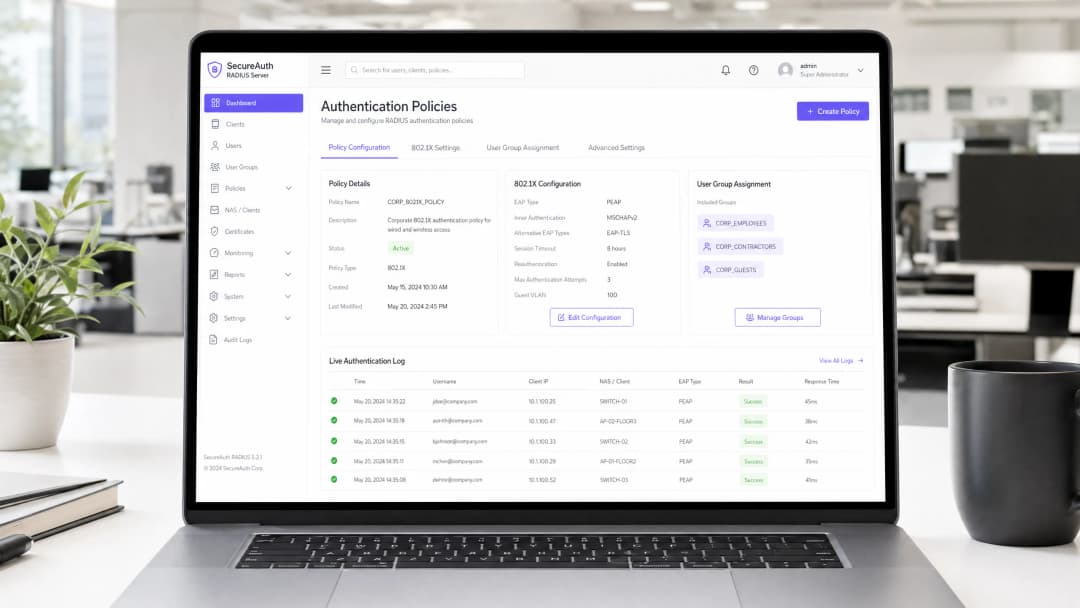
Per gli ambienti aziendali - che si tratti di un vasto campus universitario, di uno stadio ad alta densità o di una catena di vendita al dettaglio distribuita - l'affidamento a una Pre-Shared Key (PSK) per l'accesso WiFi rappresenta un rischio significativo per la sicurezza. Una singola credenziale compromessa espone l'intera rete e la revoca dell'accesso richiede la modifica della password per ogni dispositivo dell'edificio. L'implementazione dell'autenticazione 802.1X tramite un server RADIUS (Remote Authentication Dial-In User Service) elimina completamente questo problema: ogni utente si autentica individualmente, l'accesso può essere revocato istantaneamente e la segmentazione della rete viene applicata in modo dinamico.
Questa guida fornisce una roadmap definitiva per i manager IT e gli architetti di rete per implementare l'autenticazione RADIUS. Copriamo i compromessi architetturali tra installazioni on-premise e cloud, la configurazione dei metodi Extensible Authentication Protocol (EAP) e l'integrazione con i servizi di directory come Active Directory. Mostriamo inoltre come un solido livello di autenticazione si integri con le soluzioni di Guest WiFi per fornire un accesso fluido ai visitatori, acquisendo al contempo le funzioni di WiFi Analytics che trasformano la tua rete in una risorsa di business intelligence.
Approfondimento Tecnico
L'Architettura 802.1X
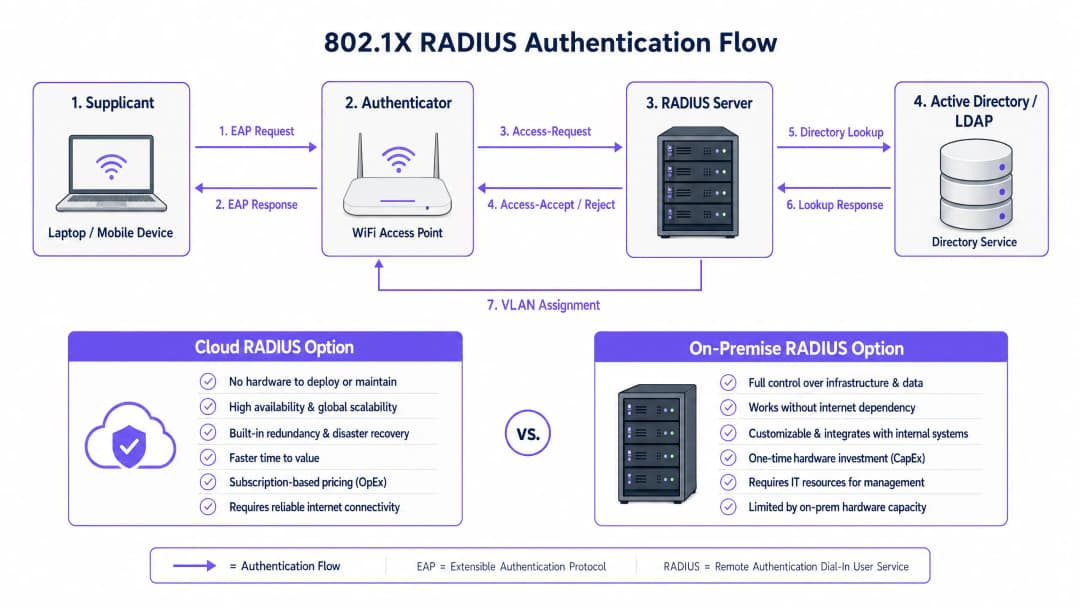
Lo standard IEEE 802.1X definisce il controllo dell'accesso alla rete basato su porte (PNAC). In un contesto wireless, coinvolge tre ruoli principali che operano in concerto:
| Ruolo | Componente | Responsabilità |
|---|---|---|
| Supplicant | Dispositivo client (laptop, smartphone) | Presenta le credenziali per richiedere l'accesso alla rete |
| Authenticator | Access Point WiFi o Controller | Applica il controllo dell'accesso; inoltra i messaggi EAP |
| Authentication Server | Server RADIUS | Convalida le credenziali; restituisce i messaggi di accettazione/rifiuto e gli attributi dei criteri |
Quando un supplicant si associa a un access point, l'AP blocca tutto il traffico dati ad eccezione dei messaggi EAP (Extensible Authentication Protocol). L'AP incapsula questi messaggi EAP in pacchetti RADIUS e li inoltra al server RADIUS. Il server verifica le credenziali rispetto a un database backend - in genere LDAP o Active Directory - e restituisce un messaggio Access-Accept o Access-Reject. Se accettato, l'AP sblocca la porta e il traffico del client scorre liberamente.
Scelta di un Metodo EAP
La sicurezza dell'installazione RADIUS dipende fortemente dal metodo EAP selezionato. I due più diffusi nelle installazioni aziendali sono:
EAP-TLS (Transport Layer Security) è lo standard di riferimento. Richiede certificati digitali sia sul server RADIUS sia su ogni dispositivo client, eliminando del tutto le password. Anche se un utente malintenzionato intercettasse l'intero scambio di autenticazione, non ci sarebbero credenziali da estrarre. Il compromesso è il sovraccarico amministrativo: la distribuzione e la gestione dei certificati client richiedono un'infrastruttura a chiave pubblica (PKI) funzionante e una soluzione MDM (ad esempio, Microsoft Intune, Jamf) per distribuire i certificati agli endpoint.
PEAP-MSCHAPv2 (Protected EAP) è il metodo più ampiamente utilizzato nella pratica. Utilizza un certificato lato server per stabilire un tunnel TLS crittografato, all'interno del quale il client si autentica con un nome utente e una password. Questo è notevolmente più semplice da implementare rispetto a EAP-TLS poiché deve essere gestito un solo certificato - quello del server. Tuttavia, comporta un avvertimento critico: se i dispositivi client non sono esplicitamente configurati per convalidare il certificato del server RADIUS, sono vulnerabili ad attacchi Man-in-the-Middle (MitM) tramite access point non autorizzati.
Nota critica sulla sicurezza: la mancata imposizione di una rigorosa convalida del certificato sui dispositivi client annulla di fatto i vantaggi di sicurezza di PEAP-MSCHAPv2. Un utente malintenzionato può implementare un AP non autorizzato, presentare un certificato fraudolento e acquisire le credenziali dell'utente in testo non crittografato. Questo non è un rischio teorico - si tratta di un vettore di attacco ampiamente documentato che è stato sfruttato in ambienti reali.
-
Guida all'implementazione
Passaggio 1: Decisione architetturale - RADIUS On-Premise vs. Cloud
La prima decisione riguarda dove ospitare l'infrastruttura RADIUS. Si tratta principalmente di una questione operativa e di costi, non di sicurezza - entrambi i modelli possono essere implementati in modo sicuro.
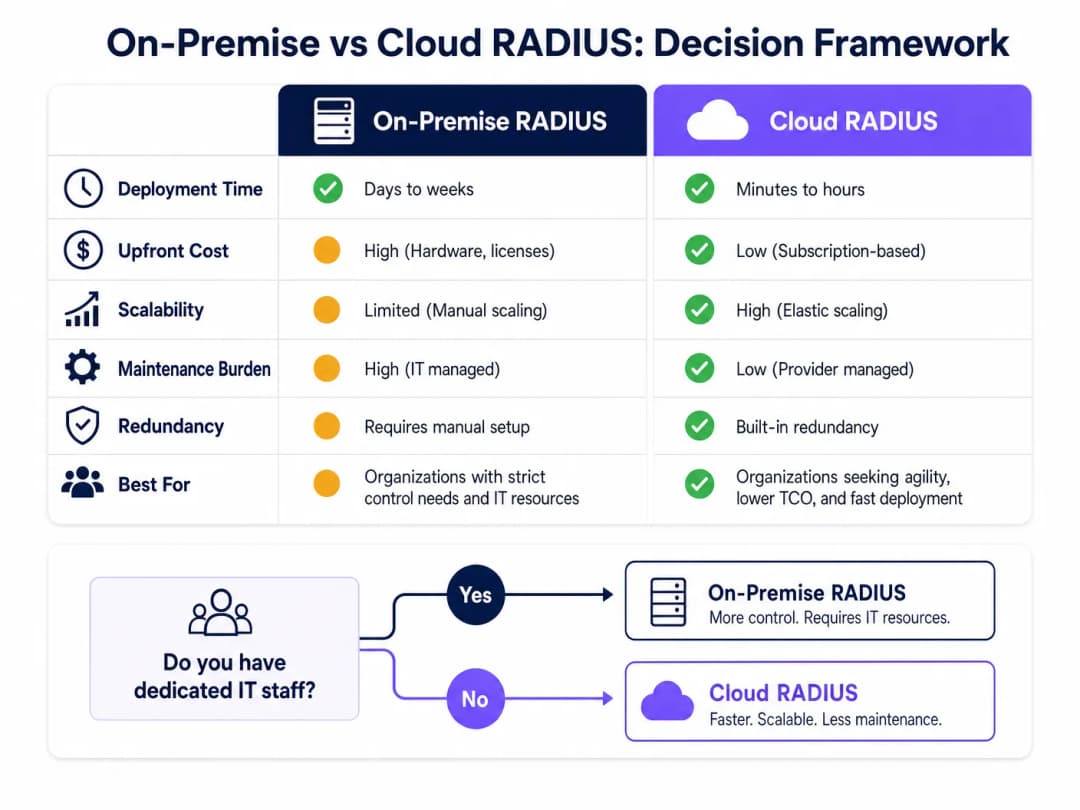
RADIUS On-Premise (ad esempio, Microsoft NPS, FreeRADIUS, Cisco ISE) è adatto per organizzazioni con personale IT dedicato, infrastruttura di directory on-premise esistente e stringenti requisiti di sovranità dei dati o conformità. Non dipende dalla connettività internet per l'autenticazione, il che rappresenta un vantaggio significativo per gli ambienti in cui la disponibilità di internet non può essere garantita.
Cloud RADIUS è sempre più il modello preferito per gli ambienti distribuiti - catene Retail, gruppi di Hospitality e hub di Transport in cui l'implementazione di server in ogni sede è operativamente impraticabile. Cloud RADIUS si integra nativamente con i provider di identità cloud (Azure AD, Google Workspace, Okta) e offre alta affidabilità integrata e scalabilità globale.
Passaggio 2: Installare e configurare il server RADIUS
Per un'implementazione on-premise che utilizza Microsoft NPS (la scelta più comune negli ambienti incentrati su Windows):
- Installare il ruolo Network Policy Server tramite Server Manager.
- Registrare il server NPS in Active Directory per consentirgli di leggere le proprietà di connessione degli utenti.
- Creare una voce RADIUS Client per ciascun access point o controller wireless, specificando l'indirizzo IP dell'AP e una chiave Shared Secret forte e univoca.
- Configurare una Network Policy che definisca le condizioni (es. appartenenza a un gruppo di utenti) e i vincoli (es. metodo EAP, timeout della sessione) per l'accesso.
- Configurare la Connection Request Policy per elaborare le richieste localmente.
Per FreeRADIUS su Linux:
- Installare tramite il gestore pacchetti:
sudo apt-get install freeradius freeradius-ldap. - Configurare
/etc/freeradius/3.0/clients.confper definire i RADIUS client (AP) e le relative chiavi shared secret. - Configurare il modulo LDAP in
/etc/freeradius/3.0/mods-available/ldappuntando al proprio server Active Directory o LDAP. - Abilitare il modulo LDAP:
sudo ln -s /etc/freeradius/3.0/mods-available/ldap /etc/freeradius/3.0/mods-enabled/. - Definire i metodi EAP in
/etc/freeradius/3.0/mods-available/eap.
Passaggio 3: Configurare gli Access Point
Sul controller wireless o sui singoli access point:
- Definire l'indirizzo o gli indirizzi IP del server RADIUS e la porta di autenticazione (predefinita: UDP 1812).
- Configurare lo Shared Secret - utilizzare un minimo di 22 caratteri, combinando caratteri alfanumerici e speciali. Utilizzare una chiave segreta univoca per ciascuna sede o gruppo di AP.
- Configurare l'SSID per utilizzare la modalità di sicurezza WPA2-Enterprise o WPA3-Enterprise con gestione delle chiavi 802.1X.
- Configurare un server RADIUS secondario per il failover.
Passaggio 4: Integrazione della Directory
Per l'integrazione con AD on-premise, il server RADIUS deve essere aggiunto al dominio o disporre dell'accesso in lettura LDAP. Assicurarsi che gli account di servizio utilizzati per l'associazione LDAP dispongano dei permessi minimi richiesti. Per il cloud RADIUS, configurare la sincronizzazione basata su API o l'integrazione SAML/OIDC con il proprio IdP.
Definire gruppi di utenti chiari nella directory, poiché questi guideranno i criteri di autorizzazione. Struttura dei gruppi consigliata:
| Gruppo | VLAN | Livello di Accesso |
|---|---|---|
Corp_Staff |
VLAN 10 | Rete interna completa |
Corp_Contractors |
VLAN 20 | Internet + risorse interne specifiche |
Corp_IoT |
VLAN 30 | Isolata, solo porte specifiche del dispositivo |
Corp_Guests |
VLAN 100 | Solo Internet tramite captive portal |
Passaggio 5: Configurazione dei Client e Validazione dei Certificati
Questo è il passaggio più critico a livello operativo. Utilizzare le Group Policy (GPO) per Windows e i profili MDM per macOS/iOS/Android per distribuire le configurazioni WiFi in background sui dispositivi gestiti. Il profilo deve specificare:
- La Root CA che ha emesso il certificato del server RADIUS.
- Il nome server previsto (CN o SAN del certificato del server).
- Il metodo EAP e il protocollo di autenticazione interno.
Per i dispositivi BYOD non gestiti, fornire istruzioni chiare per l'onboarding in modalità self-service, idealmente tramite un portale di Network Access Control (NAC).
Passaggio 6: Implementare l'Assegnazione Dinamica della VLAN
Configurare il server RADIUS per restituire gli attributi di assegnazione della VLAN nella risposta Access-Accept:
Tunnel-Type=VLAN(13)Tunnel-Medium-Type=IEEE-802(6)Tunnel-Private-Group-Id=<VLAN ID>
L'access point legge questi attributi e inserisce il client autenticato nella VLAN specificata - nessuna riconfigurazione manuale è richiesta quando gli utenti cambiano ruoli o sedi.
Hai domande sulla tua configurazione specifica?
Il nostro team collabora con gestori di sedi, responsabili IT e ingegneri di rete in 80.000 sedi. Prenota una chiamata di 20 minuti e ti mostreremo come altri professionisti come te hanno risolto il problema.
Best Practice
La ridondanza non è negoziabile. Distribuisci un minimo di due server RADIUS (primario e secondario) e configura tutti gli access point per il failover automatico. Per le distribuzioni on-premise, valuta la possibilità di collocare il server secondario in una sede fisica o in una zona di disponibilità diversa. Un'interruzione del servizio RADIUS significa che nessuno può autenticarsi, il che equivale a un'interruzione completa della rete per gli SSID protetti da 802.1X.
Monitora la scadenza dei certificati in modo proattivo. La scadenza di un certificato del server RADIUS è una delle cause più comuni di improvvisi e diffusi errori di autenticazione. Implementa un sistema di monitoraggio per avvisare gli amministratori almeno 30 giorni prima della scadenza. Questo vale sia per il certificato del server sia per qualsiasi certificato CA intermedio nella catena.
Tratta il Shared Secret come una credenziale critica. Il shared secret tra l'AP e il server RADIUS crittografa i pacchetti RADIUS. Utilizza segreti univoci per sede o gruppo di AP, memorizzali in un gestore di segreti e ruotali periodicamente. Consulta la nostra guida su come Proteggere la tua rete con DNS sicuri e sicurezza per raccomandazioni più ampie sull'igiene della sicurezza di rete.
Allineati con i framework di conformità. Per gli ambienti soggetti a PCI-DSS (ad esempio, reti di pagamento al dettaglio), l'autenticazione 802.1X supporta direttamente i requisiti per il controllo degli accessi alla rete e la registrazione dei log di audit. Per la conformità GDPR, i registri di contabilità RADIUS (porta 1813) forniscono un audit trail dettagliato di chi ha effettuato l'accesso alla rete, da dove e quando - prezioso per la risposta agli incidenti. Per gli ambienti del settore Sanità, la segmentazione della rete tramite l'assegnazione dinamica delle VLAN supporta i requisiti HIPAA per la protezione delle informazioni sanitarie protette elettroniche (ePHI).
Risoluzione dei problemi e mitigazione dei rischi
| Modalità di guasto | Sintomo | Risoluzione |
|---|---|---|
| Scadenza del certificato | Improvvisi errori di autenticazione di massa | Monitorare la scadenza; rinnovare e ridistribuire il certificato |
| Desincronizzazione NTP | Errori EAP-TLS intermittenti | Assicurarsi che il server RADIUS e i controller di dominio si sincronizzino con la stessa sorgente NTP |
| Perdita di connettività LDAP | L'autenticazione fallisce quando Active Directory non è raggiungibile | Distribuire controller di dominio ridondanti; configurare RADIUS per memorizzare nella cache le autenticazioni recenti |
| Shared Secret errato | I log dell'AP mostrano RADIUS timeout o Bad authenticator |
Verificare che il segreto corrisponda sia sull'AP che sul server RADIUS |
| Mancata corrispondenza del certificato client | Errori EAP-TLS per dispositivi specifici | Verificare che il certificato del client sia emesso da una CA attendibile; controllare il periodo di validità del certificato |
| VLAN non assegnata | Utente autenticato ma sul segmento di rete errato | Verificare che gli attributi RADIUS siano restituiti correttamente; controllare la configurazione VLAN dell'AP |
Per un approfondimento dettagliato sul processo di configurazione 802.1X, la guida Come configurare l'autenticazione WiFi 802.1X: una guida passo dopo passo fornisce procedure di configurazione dettagliate e specifiche per i diversi vendor.
ROI e impatto aziendale
Il passaggio da PSK a 802.1X supportato da RADIUS richiede un investimento iniziale nella configurazione e, potenzialmente, licenze per soluzioni cloud o hardware per installazioni on-premise. I vantaggi in termini di ROI sono evidenti:
Mitigazione del rischio: il costo medio di una violazione dei dati nel Regno Unito supera i 3 milioni di sterline (IBM Cost of a Data Breach Report). Una PSK compromessa può esporre l'intera rete. Lo standard 802.1X limita l'area di impatto a un singolo account utente compromesso, che può essere disattivato in pochi secondi tramite la directory.
Efficienza operativa: l'assegnazione dinamica della VLAN elimina la riconfigurazione manuale della rete in caso di cambio di ruolo del personale. L'onboarding di un nuovo dipendente consiste semplicemente nell'aggiungerlo al gruppo AD corretto - l'accesso alla rete segue automaticamente di conseguenza.
Conformità normativa: per le organizzazioni soggette a PCI-DSS, ISO 27001 o Cyber Essentials, lo standard 802.1X rappresenta un controllo diretto che i revisori si aspettano di trovare. L'implementazione rafforza la tua conformità e riduce i costi di risoluzione dei rilievi di audit.
Esperienza degli ospiti e analisi dei dati: per i gestori di spazi fisici, l'integrazione di RADIUS per l'autenticazione del personale con la piattaforma Guest WiFi di Purple per l'accesso dei visitatori crea un modello di accesso unificato e multilivello. Il personale si autentica in modo trasparente tramite 802.1X; gli ospiti si connettono tramite un Captive Portal personalizzato. La piattaforma di WiFi Analytics di Purple fornisce quindi visibilità in tempo reale sui tempi di permanenza dei visitatori, sui tassi di ritorno e sulle metriche di interazione - dati che informano direttamente le decisioni di spesa marketing e la gestione della location.
Per ulteriori approfondimenti, consulta la guida Como Configurar a Autenticação 802.1X WiFi: Um Guia Passo a Passo per indicazioni di implementazione in lingua portoghese, e l'articolo Che cos'è una linea dedicata? Internet aziendale dedicato per assicurarsi che la connettività di base soddisfi i requisiti aziendali.
Definizioni chiave
RADIUS (Remote Authentication Dial-In User Service)
Un protocollo di rete che fornisce una gestione centralizzata di autenticazione, autorizzazione e tracciamento (AAA) per gli utenti che si connettono a un servizio di rete. Definito in RFC 2865.
Il componente server principale che convalida le credenziali utente a fronte di una directory prima di concedere l'accesso WiFi. Ogni implementazione WiFi aziendale che utilizza lo standard 802.1X richiede un server RADIUS.
802.1X
Uno standard IEEE per il controllo dell'accesso alla rete basato su porta (PNAC). Fornisce un meccanismo di autenticazione ai dispositivi che desiderano connettersi a una LAN o WLAN, bloccando tutto il traffico non-EAP fino a quando l'autenticazione non va a buon fine.
Lo standard strutturale generale che definisce il modo in cui il Supplicant, l'Authenticator e l'Authentication Server comunicano. Quando i team IT fanno riferimento alla "sicurezza WiFi enterprise", solitamente intendono WPA2/WPA3-Enterprise con 802.1X.
Supplicant
Il dispositivo client - o più precisamente, lo stack software 802.1X su quel dispositivo - che avvia il processo di autenticazione presentando le credenziali alla rete.
Su Windows, il supplicant integrato è il servizio di configurazione automatica wireless. Su macOS e iOS, è nativo del sistema operativo. Garantire che il supplicant sia configurato correttamente (specialmente per la convalida dei certificati) è la causa più comune di problemi di implementazione.
Authenticator
Il dispositivo di rete - tipicamente un access point WiFi o un controller wireless - che funge da intermediario tra il Supplicant e il server RADIUS, applicando il controllo degli accessi in base al risultato dell'autenticazione.
L'AP blocca tutto il traffico dati sulla porta fino a quando non riceve un messaggio di Access-Accept dal server RADIUS. Legge anche gli attributi RADIUS (ad esempio, l'assegnazione della VLAN) dalla risposta Access-Accept e li applica alla sessione.
EAP (Extensible Authentication Protocol)
Un framework di autenticazione definito in RFC 3748 che fornisce un meccanismo di trasporto standardizzato per vari metodi di autenticazione (TLS, PEAP, TTLS, ecc.) tra il Supplicant e l'Authentication Server.
EAP è la "lingua" parlata tra il client e il server RADIUS. La scelta del metodo EAP (EAP-TLS rispetto a PEAP) determina il livello di sicurezza e la complessità di implementazione del sistema di autenticazione.
PEAP (Protected EAP)
Un metodo EAP che stabilisce innanzitutto un tunnel TLS utilizzando il certificato del server, quindi esegue una seconda autenticazione (solitamente MSCHAPv2 con nome utente/password) all'interno di quel tunnel crittografato.
Il metodo di autenticazione WiFi enterprise più comune grazie al suo equilibrio tra sicurezza e semplicità di implementazione. Richiede solo un certificato lato server, rendendolo molto più facile da distribuire rispetto a EAP-TLS.
Assegnazione VLAN Dinamica
Una funzionalità RADIUS in cui il server include attributi specifici della VLAN (Tunnel-Type, Tunnel-Medium-Type, Tunnel-Private-Group-Id) nella risposta Access-Accept, indicando all'AP di posizionare il client autenticato su una specifica VLAN.
Consente a un singolo SSID di servire più gruppi di utenti con requisiti di sicurezza differenti. Elimina la necessità di trasmettere più SSID per diversi gruppi di utenti, riducendo il sovraccarico di radiofrequenza e semplificando l'esperienza utente.
Segreto Condiviso
Una stringa di testo preconfigurata nota solo all'Authenticator (AP) e al server RADIUS, utilizzata per firmare e crittografare i pacchetti RADIUS, garantendo l'integrità e l'autenticità della comunicazione.
Un elemento critico per la configurazione della sicurezza. Se il segreto condiviso è debole o compromesso, un utente malintenzionato potrebbe falsificare le risposte RADIUS Access-Accept, concedendo accessi di rete non autorizzati. Utilizza segreti univoci per ciascuna sede e archiviali in un gestore di segreti.
MAC Authentication Bypass (MAB)
Un meccanismo di autenticazione di fallback in cui l'indirizzo MAC di un dispositivo viene utilizzato come credenziale di identità, consentendo l'accesso alla rete per i dispositivi che non supportano i supplicant 802.1X.
Utilizzato per dispositivi headless (stampanti, sensori IoT, telecamere IP). Poiché gli indirizzi MAC sono visibili pubblicamente e facilmente clonabili, il MAB fornisce l'identificazione del dispositivo anziché un'autenticazione forte. Associalo sempre a un'assegnazione VLAN restrittiva.
Esempi pratici
Una catena di vendita al dettaglio nazionale con 500 sedi deve implementare un WiFi sicuro per i tablet dei direttori di negozio e per i terminali POS. Attualmente utilizzano una singola PSK in tutti i negozi, che viene frequentemente condivisa con personale e collaboratori esterni non autorizzati. Utilizzano Azure AD per la gestione delle identità e non hanno personale IT dedicato nelle singole filiali.
Implementare una soluzione Cloud RADIUS integrata direttamente con Azure AD. Questo elimina la necessità di implementare e gestire server RADIUS on-premise in 500 sedi. Il team IT utilizza Microsoft Intune per distribuire un profilo WiFi a tutti i tablet dei direttori di negozio e ai terminali POS configurati per PEAP-MSCHAPv2, imponendo rigorosamente la convalida del certificato del server Cloud RADIUS. Ciascuna policy di Cloud RADIUS verifica l'appartenenza ai gruppi Azure AD dell'utente prima di concedere l'accesso: il gruppo "Store_Managers" riceve la VLAN 10 (accesso completo a POS e back-office), mentre il gruppo "Contractors" riceve la VLAN 20 (solo internet). Al termine del contratto di un collaboratore esterno, la rimozione dal gruppo Azure AD revoca immediatamente il suo accesso WiFi in tutte le 500 sedi contemporaneamente - senza richiedere alcuna modifica alla PSK.
Un hotel in centro città da 400 camere deve fornire un WiFi sicuro sia per il personale (reception, pulizie, direzione) che per gli ospiti. Il personale richiede l'accesso al sistema di gestione alberghiera (PMS) e ai server interni. Gli ospiti richiedono esclusivamente l'accesso a internet. L'hotel dispone di un unico ambiente Windows Server on-premise.
Configurare Microsoft NPS su una VM Windows Server dedicata. Configurare due SSID sull'infrastruttura wireless: "Hotel_Staff" (WPA2-Enterprise, 802.1X) e "Hotel_Guest" (aperto o WPA2-Personal, con reindirizzamento a un Captive Portal). Per l'SSID del personale, NPS convalida le credenziali rispetto ad Active Directory e restituisce assegnazioni dinamiche della VLAN: gruppo AD "Management" → VLAN 10 (accesso completo), "FrontDesk" → VLAN 20 (accesso PMS), "Housekeeping" → VLAN 30 (solo internet + app di pianificazione). Per gli ospiti, integrare il Captive Portal con la piattaforma guest WiFi di Purple per offrire un'esperienza di login personalizzata con il proprio brand, raccogliere dati di prima parte (e-mail, consenso marketing) e ottenere dati analitici sui tempi di permanenza e sulle visite ripetute. Il modello a due SSID mantiene il traffico del personale e degli ospiti completamente separato a livello di rete.
Domande di esercitazione
Q1. La tua organizzazione sta migrando 2.000 laptop Windows da una PSK condivisa a 802.1X con PEAP-MSCHAPv2. Il tuo team di sicurezza segnala che PEAP è vulnerabile alla raccolta di credenziali tramite rogue access point. Qual è la singola operazione di configurazione più importante per mitigare questo rischio e come la distribuisci su larga scala?
Suggerimento: Considera cosa impedisce a un client di fidarsi di un server RADIUS fraudolento che presenta un certificato autofirmato.
Visualizza risposta modello
Il passaggio critico consiste nel forzare la validazione rigorosa del certificato del server su ogni dispositivo client. Utilizzando i Group Policy Objects (GPO), distribuisci a tutti i 2.000 laptop un profilo WiFi che specifichi: (1) l'esatto certificato della CA radice che ha emesso il certificato del server RADIUS, (2) il nome server previsto (CN/SAN) e (3) che il client non deve chiedere all'utente di considerare attendibili nuovi certificati. Questo garantisce che, anche se un utente malintenzionato installa un rogue AP con un certificato fraudolento, il client rifiuterà l'handshake TLS e non invierà le credenziali. Senza questa configurazione, PEAP non fornisce alcuna protezione significativa contro gli attacchi tramite rogue AP.
Q2. Un direttore IT di un ospedale deve fornire l'accesso alla rete per 300 dispositivi IoT medici (pompe di infusione, apparecchiature di monitoraggio) che non supportano 802.1X. Questi dispositivi si trovano insieme alle workstation del personale sulla stessa infrastruttura wireless. In che modo l'infrastruttura RADIUS deve gestire questi dispositivi e quali controlli di rete devono essere attivi?
Suggerimento: Pensa al metodo di autenticazione disponibile per i dispositivi headless e a come compensare la sua intrinseca debolezza.
Visualizza risposta modello
Configura il MAC Authentication Bypass (MAB) sul server RADIUS per questi specifici dispositivi. Registra l'indirizzo MAC di ciascun dispositivo in un gruppo Active Directory dedicato o nel database RADIUS. Poiché gli indirizzi MAC sono facilmente falsificabili, il server RADIUS deve utilizzare il Dynamic VLAN Assignment per inserire tutti i dispositivi autenticati tramite MAB in una VLAN dedicata e altamente limitata (ad esempio, VLAN 30 - IoT). Questa VLAN deve essere protetta da firewall per consentire la comunicazione solo con specifici indirizzi IP di server medici e bloccare tutto il resto del traffico, inclusi l'accesso a internet e i movimenti laterali verso le VLAN del personale. Le workstation del personale si autenticano tramite 802.1X e vengono inserite in una VLAN separata. Questa architettura soddisfa i requisiti di segmentazione di rete HIPAA per i dispositivi adiacenti ai dati ePHI.
Q3. Sei l'architetto di rete per una catena di ristoranti con 50 sedi. L'autenticazione funziona correttamente in 49 sedi utilizzando Cloud RADIUS, ma una sede specifica segnala che tutti i dispositivi non riescono a autenticarsi. Il portale di gestione di Cloud RADIUS mostra zero richieste di autenticazione provenienti da quella sede. Qual è il tuo approccio diagnostico?
Suggerimento: Se il server RADIUS non riceve alcuna richiesta, il problema risiede nel percorso di comunicazione tra l'Authenticator e il server, non nella logica di autenticazione stessa.
Visualizza risposta modello
Poiché il server RADIUS riceve zero richieste da questa sede, il guasto risiede tra gli access point e il server cloud RADIUS. Passaggi diagnostici in ordine: (1) Verifica l'indirizzo IP del server RADIUS e la porta (UDP 1812) configurati sugli AP o sul controller wireless della sede - un errore di battitura qui è la causa più comune. (2) Controlla le regole del firewall locale o del router in quella sede per confermare che il traffico UDP 1812 in uscita sia consentito verso l'intervallo IP di cloud RADIUS. (3) Verifica che il Shared Secret configurato sugli AP corrisponda a quello configurato per quella sede nel portale Cloud RADIUS - una mancata corrispondenza fa sì che il server RADIUS scarti i pacchetti senza notifica. (4) Verifica se la connessione internet della sede funziona - il cloud RADIUS richiede una connettività internet affidabile. L'esecuzione di una cattura di pacchetti sull'AP o sul router a monte confermerà se i pacchetti RADIUS vengono inviati e se le risposte vengono ricevute.
Continua a leggere questa serie
Guida per amministratori di rete alla configurazione dell'autenticazione RADIUS per il WiFi ospiti
Un riferimento tecnico completo per gli amministratori di rete sulla distribuzione dell'autenticazione RADIUS per il WiFi ospiti. Copre l'architettura, i passaggi di configurazione indipendenti dal fornitore, le migliori pratiche di sicurezza e la risoluzione dei problemi comuni di implementazione.
Implementazione di SCEP per BYOD sicuro e WiFi 802.1X nell'istruzione superiore
Questa guida tecnica illustra come i team IT dell'istruzione superiore possono automatizzare la registrazione dei certificati 802.1X per migliaia di dispositivi BYOD tramite SCEP. Copre l'architettura, i vantaggi in termini di sicurezza e i passaggi pratici di distribuzione per sostituire il provisioning manuale con un modello di accesso alla rete sicuro e zero-touch.
Configuring RADIUS Authentication for Guest and Staff WiFi Networks
Questa guida di riferimento tecnica descrive l'architettura, la configurazione e l'implementazione dell'autenticazione RADIUS per le reti WiFi aziendali per ospiti e personale. Fornisce ai network architect e ai manager IT i protocolli esatti, gli standard di sicurezza e le metodologie di risoluzione dei problemi necessari per creare sistemi di controllo degli accessi wireless sicuri e scalabili.
Hai domande sulla tua configurazione specifica?
Il nostro team collabora con gestori di sedi, responsabili IT e ingegneri di rete in 80.000 sedi. Prenota una chiamata di 20 minuti e ti mostreremo come altri professionisti come te hanno risolto il problema.