
Come Creare una Pagina di Accesso WiFi Personalizzata per il Tuo Brand
Questa guida fornisce un riferimento completo e pronto per l'implementazione per IT manager, architetti di rete e direttori delle operazioni di sede su come creare una pagina di accesso WiFi per ospiti completamente brandizzata — coprendo l'architettura del captive portal, la personalizzazione HTML/CSS, la conformità GDPR e la strategia di acquisizione dati. Si passa dalle fondamenta tecniche agli scenari di implementazione reali nel settore dell'ospitalità e della vendita al dettaglio, con risultati di business misurabili in ogni fase. Per le organizzazioni che utilizzano la piattaforma WiFi per ospiti di Purple, la guida si collega direttamente alle capacità di creazione del portale, analytics e gestione del consenso della piattaforma.
Ascolta questa guida
Visualizza trascrizione del podcast
Riepilogo Esecutivo
La pagina di accesso WiFi per gli ospiti — comunemente definita captive portal o splash page — è spesso la prima interazione digitale brandizzata che un visitatore ha con la vostra organizzazione. Nonostante ciò, la maggior parte delle implementazioni aziendali si affida a splash screen generiche, fornite dal fornitore, che non veicolano alcuna identità di marca e non acquisiscono dati utili. Questa guida affronta direttamente tale lacuna.
Un'esperienza di accesso Guest WiFi completamente brandizzata non è un aggiornamento cosmetico. È contemporaneamente una risorsa per l'acquisizione di dati, un segnale di fiducia e uno strumento di conformità. Se implementata correttamente, può aumentare i tassi di acquisizione di email da cifre singole al 30–40 percento degli ospiti che si connettono, alimentare i dati di prima parte direttamente nel vostro CRM e fornire un registro di consenso GDPR verificabile per ogni sessione utente. Per le organizzazioni che operano in settori come ospitalità , vendita al dettaglio , sanità o trasporti , il caso commerciale è semplice.
Questa guida copre l'architettura tecnica alla base dei captive portal, il livello di personalizzazione HTML/CSS, il processo di implementazione in cinque fasi, i requisiti di conformità ai sensi del GDPR e due studi di caso dettagliati con risultati misurabili. La piattaforma WiFi Analytics di Purple è citata in tutto il testo come esempio concreto di implementazione.
Approfondimento Tecnico
Come Funziona un Captive Portal
Un captive portal opera a livello di rete, intercettando la richiesta HTTP iniziale di un dispositivo ospite e reindirizzandola a una pagina di accesso prima di concedere l'accesso completo a internet. Il meccanismo è standardizzato tra tutti i principali fornitori di LAN wireless e opera indipendentemente dallo standard di crittografia in uso — il che significa che è pienamente compatibile con le implementazioni WPA3 che utilizzano Simultaneous Authentication of Equals (SAE).
I componenti principali di una moderna architettura di captive portal sono illustrati di seguito.
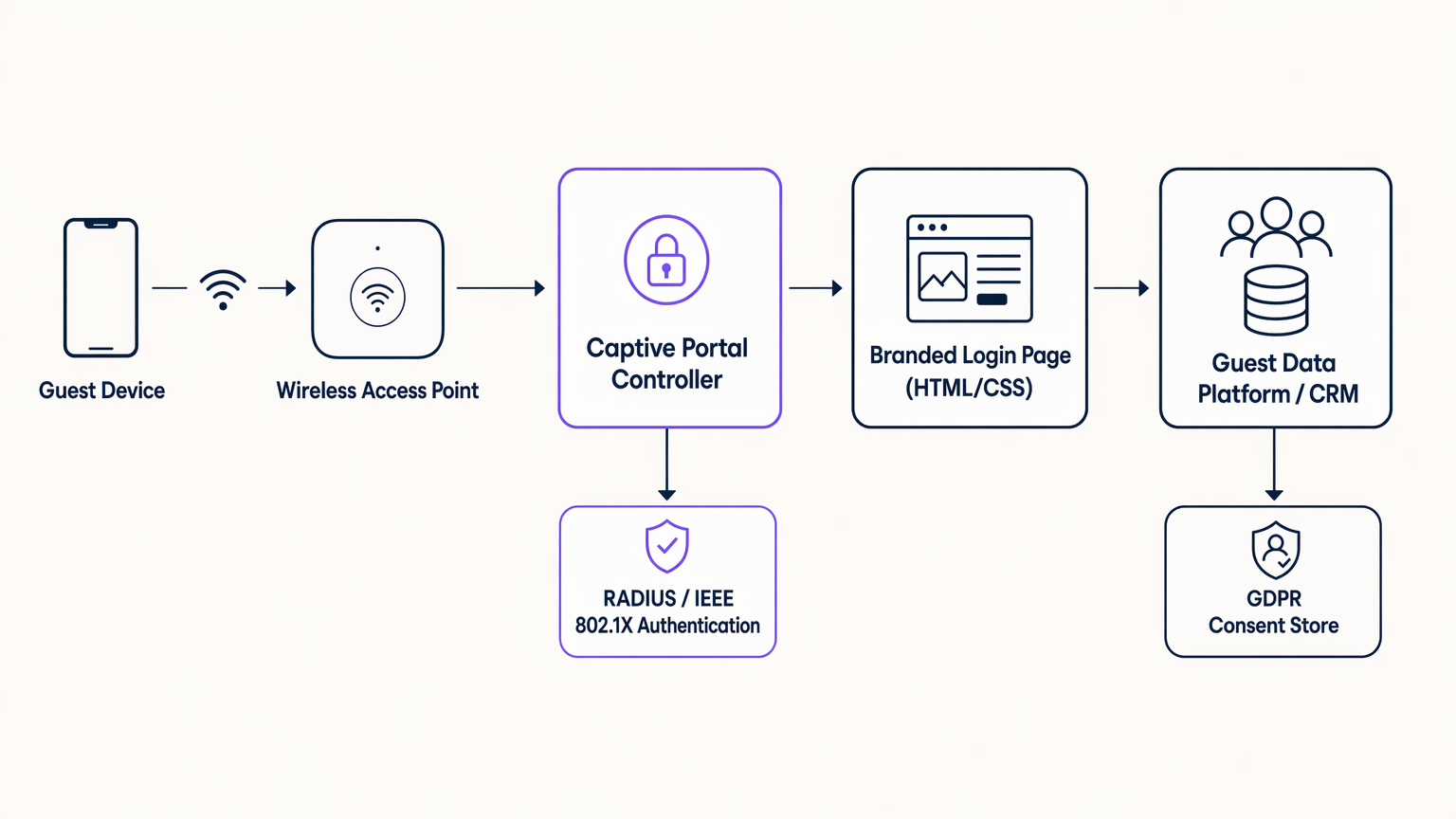
Il flusso è il seguente. Quando un dispositivo ospite si associa all'access point e tenta di caricare qualsiasi URL HTTP, il controller LAN wireless o l'appliance gateway intercetta la richiesta ed emette un reindirizzamento 302 al controller del captive portal. Il controller serve la pagina di accesso HTML/CSS brandizzata. Una volta che l'utente completa il flusso di autenticazione — sia tramite un modulo email, social login (OAuth 2.0 tramite Facebook, Google o Apple), o un metodo senza interruzioni come OpenRoaming — il controller comunica con un server RADIUS utilizzando IEEE 802.1X o MAC Authentication Bypass (MAB) per concedere al dispositivo l'accesso alla VLAN internet. I dati acquisiti durante l'autenticazione vengono contemporaneamente instradati alla piattaforma dati degli ospiti o al CRM tramite una chiamata API sicura, con il record di consenso GDPR scritto in un archivio dati conforme.
È importante notare che la pagina del captive portal stessa si carica in un ambiente browser ristretto — il Captive Network Assistant (CNA) su iOS e Android — prima che il dispositivo abbia accesso completo a internet. Ciò ha un'implicazione critica per lo sviluppo front-end: tutte le risorse devono essere auto-ospitate sul controller del portale. Risorse CDN esterne, Google Fonts e librerie JavaScript di terze parti non riusciranno a caricarsi in questo ambiente. Ogni foglio di stile, file di font e immagine deve essere incluso nella pagina del portale e servito dal server web del controller.
Il Livello di Personalizzazione HTML/CSS
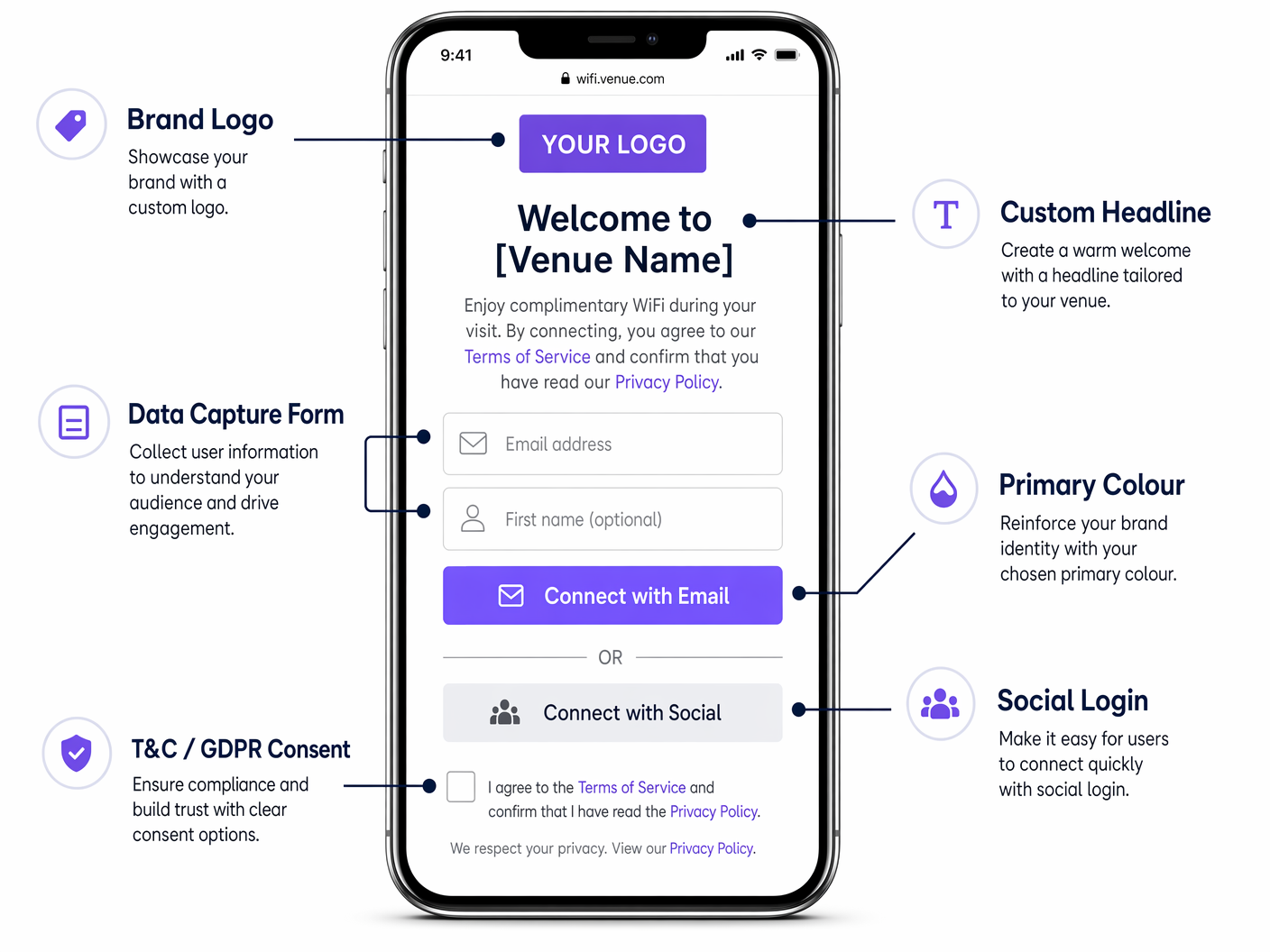
La pagina di accesso stessa è un documento HTML5 standard con un foglio di stile CSS associato. Le moderne piattaforme di captive portal — inclusa Purple — espongono un editor visuale che genera questo codice, ma comprendere la struttura sottostante è essenziale per i team IT che devono applicare gli standard del marchio o risolvere problemi di rendering.
Le variabili CSS chiave da controllare sono:
| Proprietà CSS | Elemento del Brand | Approccio Raccomandato |
|---|---|---|
background-color |
Sfondo pagina | Utilizzare un valore esadecimale piatto o un gradiente CSS; evitare immagini raster |
font-family |
Tipografia | Incorporare i file di font WOFF2 localmente; non fare riferimento a Google Fonts |
color (intestazioni) |
Colore secondario del brand | Corrispondere esattamente alle linee guida del brand |
background-color (pulsante CTA) |
Colore primario del brand | Utilizzare il valore esadecimale esatto dalle linee guida del brand |
border-radius |
Forma del pulsante e del contenitore | 12px per i contenitori, 6px per gli elementi piccoli |
max-width (contenitore modulo) |
Layout mobile-first | Massimo 480px per un rendering mobile ottimale |
Il vincolo del peso della pagina è il requisito tecnico più comunemente violato nelle implementazioni di captive portal. Il limite pratico è di 500 kilobyte totali per l'intera pagina, inclusi tutti gli asset. Ciò garantisce un rendering affidabile su connessioni lente o congestionate prima dell'autenticazione. Utilizzare il formato SVG per i loghi (tipicamente 5–20 KB), WOFF2 incorporati localmente per i font (tipicamente 30–80 KB per peso) e gradienti CSS o colori piatti anziché sfondi fotografici.
Metodi di Autenticazione
La scelta del metodo di autenticazione ha un impatto diretto sia sui tassi di acquisizione dati che sulla postura di conformità.
| Metodo | Dati Acquisiti | Tasso di Conversione | Note di Conformità |
|---|---|---|---|
| Modulo email | Email, nome, campi personalizzati | Medio (25–40%) | Controllo GDPR completo; raccomandato |
| Social login (OAuth) | Email, nome, dati del profilo | Alto (35–55%) | Richiede DPA con il fornitore social |
| SMS / OTP | Numero di cellulare | Medio (20–35%) | Richiede gateway SMS; si applica PECR |
| Click-through (nessun dato) | Nessuno | Molto alto (70–90%) | No datun valore; usare solo dove richiesto |
| OpenRoaming / Passpoint | Identità verificata dal gestore | Senza interruzioni | Ecosistema Eduroam/WBA; uso aziendale |
Per la maggior parte delle implementazioni commerciali, una combinazione di modulo e-mail e social login — con una casella di controllo per il consenso GDPR chiaramente presentata — offre l'equilibrio ottimale tra tasso di conversione e qualità dei dati.
Guida all'Implementazione
Un'implementazione di successo di un Captive Portal segue cinque fasi distinte. Saltare o comprimere qualsiasi fase è la causa principale dei problemi post-implementazione.
Fase 1 — Raccolta dei Requisiti. Convocare un gruppo di lavoro interfunzionale che includa marketing (risorse del brand, testi, linguaggio del consenso), legale (revisione GDPR, politica sulla privacy) e ingegneria di rete (architettura VLAN, configurazione RADIUS, whitelist DNS). Definire i campi dati esatti da acquisire, l'URL di reindirizzamento post-autenticazione e il linguaggio di opt-in per il consenso marketing. Ottenere l'approvazione scritta dal legale sul meccanismo di consenso prima dell'inizio dello sviluppo.
Fase 2 — Progettazione e Sviluppo. Costruire la pagina del portale come documento HTML/CSS autonomo. Applicare il limite di peso della pagina di 500 KB. Testare il rendering su iOS Safari (CNA), Android Chrome (CNA) e browser desktop. Convalidare la catena di certificati SSL — il dominio del portale deve avere un certificato attendibile, poiché un avviso di certificato non attendibile farà sì che la maggior parte degli utenti abbandoni il login. Assicurarsi che il modulo sia completamente accessibile (minimo WCAG 2.1 AA).
Fase 3 — Integrazione. Connettere il portale alla piattaforma dati ospiti o al CRM tramite l'API della piattaforma. Configurare il server RADIUS (o utilizzare il servizio RADIUS ospitato dalla piattaforma). Impostare il reindirizzamento post-autenticazione. Configurare la segmentazione VLAN per isolare il segmento di rete pre-autenticazione dalle risorse interne. Testare il flusso completo end-to-end — associazione del dispositivo, reindirizzamento del portale, autenticazione, autorizzazione RADIUS, scrittura dei dati CRM e reindirizzamento post-autenticazione — su una rete di staging prima di passare alla produzione.
Fase 4 — Implementazione Pilota. Implementare in una singola sede o in un gruppo pilota definito. Monitorare quattro metriche chiave per i primi 30 giorni: tasso di successo dell'autenticazione (obiettivo >95%), tempo medio di caricamento della pagina (obiettivo <3 secondi), tasso di acquisizione dati (misurazione di base) e fallimenti di autorizzazione RADIUS (obiettivo <1%). Risolvere eventuali problemi prima di procedere con l'implementazione completa.
Fase 5 — Ottimizzazione e Governance. Rivedere mensilmente i tassi di acquisizione dati. Testare le varianti del testo del titolo e del pulsante CTA. Aggiornare il design del portale quando cambiano le linee guida del brand. Rivedere il linguaggio del consenso GDPR ogni volta che cambiano le attività di trattamento dei dati. Condurre una revisione annuale della sicurezza dell'infrastruttura del portale, inclusi il rinnovo del certificato SSL, il patching del server RADIUS e la revisione della whitelist DNS.
Migliori Pratiche
Fedeltà al Brand
Il portale deve superare un controllo di fedeltà al Brand in cinque punti prima dell'implementazione: variante del logo corretta con dimensione minima (30px digitale); colore del pulsante principale corrispondente all'esatto valore esadecimale del brand; famiglia di font coerente con le linee guida digitali del brand; tono del titolo coerente con la voce del brand; e coerenza visiva con il sito web e l'app del brand. Qualsiasi portale che non superi questo controllo dovrebbe essere riportato alla fase di progettazione.
Architettura di Conformità GDPR
Secondo il GDPR del Regno Unito e il GDPR dell'UE, il meccanismo di consenso deve essere esplicito, scorporato e granulare. L'accettazione dei termini di servizio e l'opt-in per le comunicazioni di marketing devono essere presentati come caselle di controllo separate e non selezionate. Raggrupparle in un'unica casella di controllo non è conforme. Ogni evento di consenso deve essere registrato con un timestamp, il testo esatto del consenso presentato e l'identificatore dell'utente. La piattaforma Purple memorizza questi record in un archivio di consensi verificabile che può essere esportato per la revisione normativa.
Posizione di Sicurezza
Il segmento di rete pre-autenticazione deve essere isolato da tutte le risorse interne tramite segmentazione VLAN. Solo le voci della whitelist DNS richieste per il funzionamento del portale — il dominio del controller del portale, gli endpoint OAuth del social login e qualsiasi dominio CDN utilizzato per risorse auto-ospitate — dovrebbero essere accessibili prima dell'autenticazione. Post-autenticazione, gli ospiti dovrebbero essere collocati su una VLAN ospite dedicata con solo accesso a internet, senza alcuna rotta verso le sottoreti interne. Questa architettura si allinea con il Requisito PCI DSS 1.3 per la segmentazione della rete.
Per un confronto dettagliato dei tipi di pagina del portale, vedere WiFi Landing Page vs. Splash Page: Qual è la differenza? .
Casi di Studio Reali
Caso di Studio 1: Catena Alberghiera del Regno Unito — Ospitalità
Un gruppo alberghiero di medie dimensioni che gestisce 45 proprietà nel Regno Unito utilizzava la splash page predefinita fornita dal proprio fornitore di LAN wireless. La pagina non era brandizzata, si caricava lentamente su mobile e non presentava alcun modulo di acquisizione dati. Tasso di acquisizione e-mail: circa l'8% degli ospiti connessi.
Il team IT ha implementato la piattaforma Guest WiFi di Purple in tutte le 45 proprietà, sostituendo la splash page del fornitore con un Captive Portal completamente brandizzato. Il nuovo portale utilizzava i colori esatti del brand del gruppo alberghiero, la tipografia Poppins e un layout a schermo singolo con un campo e-mail, un campo per il nome e una casella di controllo per il consenso marketing conforme al GDPR. Il peso totale della pagina è stato ottimizzato a 380 KB. Il reindirizzamento post-autenticazione è stato impostato sulla landing page del programma fedeltà dell'hotel.
Risultati a 90 giorni: il tasso di acquisizione e-mail è aumentato dall'8% al 38% degli ospiti connessi. I dati acquisiti sono stati integrati nel CRM del gruppo alberghiero, consentendo una campagna e-mail di re-engagement mirata agli ospiti precedenti. I ricavi da prenotazioni dirette attribuibili alla campagna e-mail sono aumentati del 14% anno su anno nelle proprietà pilota. L'archivio di consensi GDPR ha fornito una traccia di audit completa per tutte le 45 sedi.
Caso di Studio 2: Rivenditore di Moda Europeo — Retail
Un rivenditore di moda che opera 120 negozi in cinque mercati europei stava implementando il WiFi per gli ospiti come parte di un programma di trasformazione digitale. Il requisito era un portale brandizzato unico, gestito centralmente, con lan per mercatolocalizzazione linguistica (inglese, francese, tedesco, spagnolo, italiano) e una singola integrazione CRM in Salesforce.
Il rivenditore ha implementato una piattaforma WiFi per ospiti gestita in cloud con una configurazione centralizzata del portale. Le risorse del marchio e il CSS sono stati gestiti da un'unica console di amministrazione, con override per sede e per regione applicati per la lingua e il linguaggio di consenso localizzato. L'integrazione con Salesforce ha utilizzato il connettore CRM nativo della piattaforma.
Risultati a sei mesi: è stato creato un patrimonio di dati di prima parte di oltre 400.000 profili di ospiti che hanno aderito, distribuiti su tutti i 120 negozi. Le campagne email a questo pubblico hanno raggiunto un tasso di apertura medio del 28%, rispetto a un benchmark di settore del 12% per il retail. Il rivenditore ha attribuito un aumento del 9% delle visite ripetute in negozio nei sei mesi successivi all'implementazione, basato sulla modellazione dell'attribuzione CRM. Consulta la piattaforma WiFi Analytics di Purple per le capacità di analisi e attribuzione utilizzate in questa implementazione.
Risoluzione dei problemi e mitigazione dei rischi
Il portale non viene visualizzato su iOS. iOS utilizza un Captive Network Assistant (CNA) che renderizza il portale in una visualizzazione WebKit ristretta. Assicurati che il dominio del portale non sia nell'elenco delle reti conosciute di Apple, che il portale risponda correttamente alla sonda di rilevamento del Captive Portal di Apple (/hotspot-detect.html) e che tutte le risorse siano servite tramite HTTP (non HTTPS) sul reindirizzamento iniziale — il CNA non segue i reindirizzamenti HTTPS alla prima richiesta.
Alto tasso di fallimento dell'autenticazione. Controlla i log del server RADIUS per codici di errore specifici. Le cause comuni includono la deriva dell'orologio tra il server RADIUS e l'access point (sincronizzazione NTP richiesta), certificati scaduti sul server RADIUS e discrepanze nel formato dell'indirizzo MAC tra l'access point e il server RADIUS.
Basso tasso di acquisizione dati nonostante l'elevato volume di connessioni. Rivedi il numero di campi del modulo — ogni campo aggiuntivo riduce la conversione di circa il 5–10%. Rivedi il tempo di caricamento della pagina — se il portale impiega più di 3 secondi per caricarsi, l'abbandono aumenta drasticamente. Rivedi il linguaggio di consenso — un testo di consenso eccessivamente legalistico riduce i tassi di adesione.
Richiesta di audit GDPR. La piattaforma di Purple esporta un record di consenso completo per qualsiasi indirizzo email o intervallo di date su richiesta. Assicurati che la tua politica di conservazione dei dati sia configurata correttamente — secondo il GDPR del Regno Unito, i dati personali non dovrebbero essere conservati oltre il periodo necessario per lo scopo dichiarato.
Incoerenza del marchio tra le sedi. Centralizza la gestione della configurazione del portale. Qualsiasi personalizzazione a livello di sede dovrebbe essere limitata a testi e lingue localizzate; i colori del marchio, la tipografia e il logo devono essere bloccati a livello di configurazione globale.
ROI e impatto sul business
Il ROI di un Captive Portal personalizzato è misurato su tre dimensioni: valore del patrimonio di dati, attribuzione diretta dei ricavi ed efficienza operativa.
Valore del patrimonio di dati. L'output primario di un'implementazione di Captive Portal è un patrimonio di dati di prima parte — un database di profili di ospiti che hanno aderito con indirizzi email verificati. Il valore di questo patrimonio è determinato dal tasso di acquisizione, dal tasso di adesione e dalla qualità dei dati. Una sede con 500 connessioni giornaliere, un tasso di acquisizione del 35% e un tasso di adesione del 70% costruirà un database di circa 44.000 profili che hanno aderito all'anno. Con un ROI di email marketing standard del settore di £42 per £1 speso, il valore commerciale di questo patrimonio è sostanziale.
Attribuzione diretta dei ricavi. La piattaforma WiFi Analytics di Purple fornisce report di attribuzione a livello CRM, collegando specifiche campagne email a visite e transazioni in sede. Ciò consente un calcolo diretto dei ricavi attribuibili al programma di acquisizione dati del Captive Portal.
Efficienza operativa. Una piattaforma portale gestita centralmente elimina la necessità di lavoro di configurazione IT per sede quando le linee guida del marchio cambiano. Un singolo aggiornamento CSS si propaga contemporaneamente a tutte le sedi, riducendo il sovraccarico operativo del mantenimento della coerenza del marchio su larga scala.
| Metrica | Portale tipico non brandizzato | Portale brandizzato (Purple) | Aumento |
|---|---|---|---|
| Tasso di acquisizione email | 5–10% | 30–40% | 3–4x |
| Tasso di adesione al marketing | N/A | 60–75% delle acquisizioni | — |
| Coinvolgimento post-autenticazione | Nessuno | Pagina fedeltà / offerta | Diretto |
| Prontezza all'audit GDPR | Manuale | Esportazione automatizzata | Significativo |
| Coerenza del marchio | Nessuno | Imposto centralmente | Completa |
Per il contesto dell'architettura di rete rilevante per le implementazioni multi-sito, consulta I principali vantaggi dell'SD-WAN per le aziende moderne , che illustra come l'SD-WAN semplifica il sottostrato di rete per le implementazioni distribuite di Captive Portal.
Definizioni chiave
Captive Portal
A network mechanism that intercepts a guest device's HTTP requests and redirects them to a login or authentication page before granting full internet access. Operates at the network layer, independent of the wireless encryption standard in use.
IT teams encounter this term when configuring wireless LAN controllers, cloud WiFi management platforms, or gateway appliances. It is the technical name for what end users experience as a 'WiFi login page'.
Captive Network Assistant (CNA)
A restricted browser environment built into iOS and Android that automatically opens when the operating system detects a captive portal. It renders the portal page in a sandboxed WebKit view with no access to cookies, local storage, or external CDN resources.
Critical for front-end developers building portal pages. Any asset that cannot be loaded from the portal controller itself will fail to render in the CNA, causing visual breakage or page load failures.
RADIUS (Remote Authentication Dial-In User Service)
A networking protocol that provides centralised authentication, authorisation, and accounting (AAA) for network access. In a captive portal deployment, the portal controller communicates with the RADIUS server to grant or deny network access after the user completes the authentication flow.
Network engineers configure RADIUS servers (or use a hosted RADIUS service provided by the portal platform) as part of the captive portal backend. IEEE 802.1X uses RADIUS as its authentication protocol.
IEEE 802.1X
An IEEE standard for port-based network access control that provides an authentication mechanism for devices connecting to a LAN or WLAN. In enterprise guest WiFi deployments, it is used in conjunction with a RADIUS server to authenticate users before granting network access.
Relevant when configuring enterprise-grade captive portals, particularly in environments where MAC Authentication Bypass (MAB) is insufficient and stronger identity verification is required.
MAC Authentication Bypass (MAB)
An authentication method in which a device's MAC address is used as its credential for network access. The access point sends the MAC address to the RADIUS server, which either approves or denies access based on a pre-configured allowlist.
Used in captive portal deployments to enable automatic re-authentication for returning devices without requiring the user to re-enter credentials. Commonly used for known corporate devices or returning guests.
GDPR Consent Record
A timestamped record of a user's explicit consent to data processing, including the exact consent text presented, the date and time of consent, and the user's identifier (typically email address). Required under UK GDPR and EU GDPR Article 7(1) as evidence that consent was obtained.
Captive portal platforms must generate and store a consent record for every user who opts in to marketing communications. This record must be exportable for regulatory audit purposes.
DNS Whitelist
A list of domain names that are accessible to a guest device before it has completed captive portal authentication. The whitelist must include the portal controller domain, any social login OAuth endpoints, and any CDN domains used for self-hosted portal assets.
Network engineers configure the DNS whitelist on the wireless LAN controller or gateway appliance. An incorrectly configured whitelist is a common cause of portal rendering failures, particularly for social login flows.
Post-Authentication Redirect
The URL to which a guest device's browser is redirected immediately after the user successfully completes the captive portal authentication flow. This is the first page the user sees with full internet access.
The post-authentication redirect is a high-value commercial touchpoint. It should be set to a landing page that drives a specific action — loyalty programme sign-up, app download, current promotion — rather than defaulting to the user's originally requested URL.
WPA3-SAE (Simultaneous Authentication of Equals)
The authentication protocol used in WPA3 Personal mode, replacing the Pre-Shared Key (PSK) handshake used in WPA2. SAE provides stronger resistance to offline dictionary attacks and forward secrecy. It is fully compatible with captive portal deployments.
IT teams evaluating network security upgrades should be aware that migrating from WPA2 to WPA3 does not require changes to the captive portal architecture. The portal mechanism operates at the network layer, above the encryption layer.
OpenRoaming
A WiFi roaming standard developed by the Wireless Broadband Alliance (WBA) that allows users to automatically connect to participating networks using their existing credentials (carrier, enterprise, or identity provider). Eliminates the need for manual captive portal authentication for enrolled users.
Relevant for enterprise and transport deployments where seamless connectivity is a priority. Purple operates as an identity provider within the OpenRoaming ecosystem under its Connect licence, enabling venues to offer automatic connection to enrolled users.
Esempi pratici
A 200-room hotel in central London wants to replace its vendor-supplied splash page with a fully branded captive portal. The hotel's brand guidelines specify a dark navy primary colour (#011638), a gold accent (#C9A84C), and the Playfair Display serif font. The IT manager is concerned about iOS compatibility and GDPR compliance. How should this be approached?
Begin with a requirements workshop involving IT, marketing, and legal. Confirm the exact brand assets: SVG logo file, hex colour values, and font files (WOFF2 format for Playfair Display). For iOS compatibility, configure the wireless LAN controller to respond correctly to Apple's captive portal detection probe at /hotspot-detect.html, and ensure the initial redirect is HTTP (not HTTPS) — the CNA on iOS does not follow HTTPS redirects on the first request. The portal page itself should be served over HTTPS once the CNA has loaded it. For GDPR, present two separate, unticked checkboxes: one for terms of service acceptance (required to connect) and one for marketing communications (optional). Record each consent event with a timestamp and the exact consent text version. Optimise the page to under 500 KB by embedding the Playfair Display WOFF2 file locally (do not reference Google Fonts), using the SVG logo, and using a CSS gradient for the background rather than a photographic image. Set the post-authentication redirect to the hotel's loyalty programme or a current promotions page. Deploy to a single floor as a pilot, monitor authentication success rate and page load time for 14 days, then roll out to the full property.
A national retail chain with 85 stores wants to deploy a consistent branded captive portal across all locations. Each store has a different wireless LAN vendor (a mix of Cisco, Aruba, and Ruckus hardware from historical acquisitions). The marketing team wants to be able to update the portal design centrally without involving IT at each site. How should the architecture be designed?
Deploy a cloud-hosted captive portal platform — such as Purple — that operates as a vendor-neutral overlay, independent of the underlying wireless hardware. The platform communicates with each access point via a RADIUS proxy or a cloud RADIUS service, meaning the portal controller is entirely decoupled from the hardware vendor. The portal page is hosted on the platform's CDN (with all assets self-hosted on the platform, not on external CDNs), and the platform's admin console allows centralised management of brand assets, CSS, and copy. Per-store customisations (store name in the headline, localised promotions) are managed via venue-level variables in the platform's template engine. When the marketing team updates the brand CSS, the change propagates to all 85 stores within minutes, with no per-site IT intervention required. The CRM integration is configured once at the platform level and applies to all venues. VLAN configuration at each site is a one-time setup task handled by the local IT team or the platform's onboarding service.
A conference centre hosting 50 events per year wants to offer event sponsors a co-branded WiFi login experience — showing the sponsor's logo alongside the venue's own branding — for the duration of each event. The IT team needs to be able to switch portal configurations between events with minimal manual effort. How should this be implemented?
Configure the captive portal platform with a library of portal templates — one master template per event type (conference, exhibition, gala dinner) — with sponsor logo and colour variables that can be updated via the admin console or API. For each event, the event operations team updates the sponsor logo URL and primary accent colour in the admin console, and the portal updates in real time. If the platform supports it, configure SSID-to-portal mapping so that a sponsor-specific SSID (e.g., 'EventName-WiFi') serves the co-branded portal, while the venue's permanent SSID serves the standard venue portal. Set the portal to revert to the standard venue template at a scheduled time after the event ends. Ensure the sponsor's logo is provided in SVG format and is pre-approved by the venue's brand team to ensure it meets the page weight and quality standards. The post-authentication redirect for event portals should point to the event's own landing page or the sponsor's campaign URL, with UTM parameters for attribution tracking.
Domande di esercitazione
Q1. Your marketing director has sent you a Figma mockup of the new branded captive portal. It includes a full-screen photographic background image (exported as a 4.2 MB JPEG), the brand's custom serif font loaded from Google Fonts, and a Facebook Login button. You need to implement this design. What changes must you make before development begins, and why?
Suggerimento: Consider the technical constraints of the Captive Network Assistant environment and the page weight limit.
Visualizza risposta modello
Three changes are required. First, the background image must be replaced with a CSS gradient or a heavily compressed WebP/SVG alternative under 100 KB — a 4.2 MB JPEG will cause the portal to time out on slow connections before it renders. Second, the Google Fonts reference must be replaced with a locally embedded WOFF2 font file served from the portal controller — the CNA environment has no internet access before authentication, so external font CDNs will fail to load. Third, the Facebook Login OAuth flow requires the Facebook OAuth endpoint domains to be added to the DNS whitelist on the wireless LAN controller, so the OAuth redirect can complete before full internet access is granted. Additionally, ensure the Facebook Login is accompanied by an email-based fallback option for users without Facebook accounts, and that the Facebook data processing agreement is in place with your legal team.
Q2. You are the IT manager for a hospital trust deploying guest WiFi across three sites. Your legal team has told you that the consent mechanism on the current portal is non-compliant with UK GDPR. You review the portal and find a single checkbox that reads: 'I agree to the Terms of Service and consent to receive marketing communications.' What is wrong with this, and how do you fix it?
Suggerimento: Consider the GDPR requirements for consent to be freely given, specific, and granular.
Visualizza risposta modello
The consent mechanism is non-compliant on two counts. First, it bundles terms of service acceptance (a contractual requirement for network access) with marketing communications consent (an optional data processing activity) into a single checkbox. Under UK GDPR Article 7 and Recital 43, consent is not freely given if it is bundled with a service that the user cannot access without consenting. Second, the checkbox appears to be pre-ticked or required — marketing consent must be presented as an unticked, optional checkbox. The fix is to separate the two into distinct checkboxes: one required checkbox for terms of service acceptance (worded as 'I agree to the Terms of Service and Privacy Policy'), and one separate, unticked, optional checkbox for marketing communications (worded as 'I would like to receive news and offers from [Organisation Name] by email'). The consent record stored for each user must capture which checkboxes were ticked, the exact text of each consent statement, and the timestamp of the consent event. In a healthcare environment, additional care must be taken to ensure the privacy policy accurately describes all data processing activities, including any sharing with third-party analytics platforms.
Q3. A stadium operator wants to deploy a branded captive portal for 40,000 concurrent users during match days. Their current wireless infrastructure supports a maximum of 500 concurrent RADIUS authentication requests per second. The match starts at 15:00, and the majority of fans arrive in the 30 minutes before kick-off. What are the key infrastructure risks, and how should they be mitigated?
Suggerimento: Consider the authentication load profile and the impact of RADIUS server capacity on the user experience.
Visualizza risposta modello
The primary risk is RADIUS server overload during the pre-match authentication surge. If 40,000 users attempt to authenticate in a 30-minute window, that is approximately 22 authentication requests per second on average — well within the 500 rps capacity. However, the arrival pattern will not be uniform: the peak surge in the final 5 minutes before kick-off could generate 5–10x the average rate, potentially exceeding 200 rps. Mitigations include: (1) deploying a load-balanced RADIUS cluster rather than a single server, with automatic failover; (2) configuring MAC Authentication Bypass (MAB) for returning devices, which bypasses the full authentication flow and significantly reduces RADIUS load for repeat visitors; (3) pre-caching the portal page on the wireless LAN controller to reduce portal controller load; (4) setting a short session timeout (e.g., 8 hours) so that devices that authenticated at a previous match do not consume RADIUS sessions unnecessarily; and (5) conducting a load test simulating the peak authentication rate before the first match day. Additionally, the portal page must be optimised for maximum performance — a slow-loading portal during a surge will cause users to abandon the login, reducing data capture rates and increasing support calls.
Continua a leggere questa serie
Captive Portal vs Splash Page
Questa guida autorevole analizza la distinzione fondamentale tra Captive Portal e splash page nelle reti WiFi per gli ospiti. Chiarisce come il meccanismo di intercettazione di rete sottostante funzioni in sinergia con l'interfaccia visiva per gli ospiti, aiutando i responsabili IT e i gestori delle strutture a prendere decisioni architetturali e di acquisto informate.
Login al Captive Portal: Risoluzione dei problemi e guida esplicativa
Questa guida fornisce un riferimento tecnico completo per comprendere, implementare e risolvere i problemi dei sistemi di login al captive portal in ambienti WiFi aziendali per ospiti. Spiega gli esatti meccanismi di reindirizzamento HTTP e di dirottamento DNS utilizzati dai moderni captive portal, descrive in dettaglio come l'HSTS e i browser HTTPS sicuri possano bloccare i reindirizzamenti locali e fornisce una checklist di risoluzione dei problemi chiara e pratica che copre sia le soluzioni lato client (disattivazione delle VPN, disattivazione della randomizzazione MAC, utilizzo di NeverSSL) sia le risoluzioni lato operatore (configurazione del walled garden, ottimizzazione del tempo di lease DHCP, verifica dell'intercettazione DNS). I gestori delle sedi, i responsabili IT e gli architetti di rete troveranno questa guida essenziale per ridurre al minimo i ticket di supporto degli ospiti e massimizzare il ROI della loro infrastruttura wireless.
Come configurare un hotspot WiFi per la tua attività
Questa guida autorevole fornisce a leader IT, architetti di rete e direttori delle operazioni di sede un modello pratico e indipendente dal fornitore per l'implementazione di hotspot WiFi per ospiti sicuri, conformi e che migliorano il business. Copre decisioni architetturali critiche — dalla segmentazione VLAN e configurazione del Captive Portal alla conformità GDPR e alla modellazione del traffico — e dimostra come trasformare l'infrastruttura di rete da un centro di costo a una piattaforma di analisi che genera entrate utilizzando le capacità di Guest WiFi e analisi di Purple.