

Come funziona l'assegnazione dinamica delle VLAN negli edifici multi-tenant
Questa guida tecnica di riferimento descrive l'architettura e l'implementazione dell'assegnazione dinamica delle VLAN utilizzando 802.1X e RADIUS in ambienti multi-tenant. Fornisce indicazioni pratiche per i responsabili IT e gli architetti di rete per ridurre l'overhead degli SSID, imporre l'isolamento Layer 2 e garantire connettività sicura e scalabile in edifici condivisi.
Ascolta questa guida
Visualizza trascrizione del podcast
Riepilogo Esecutivo
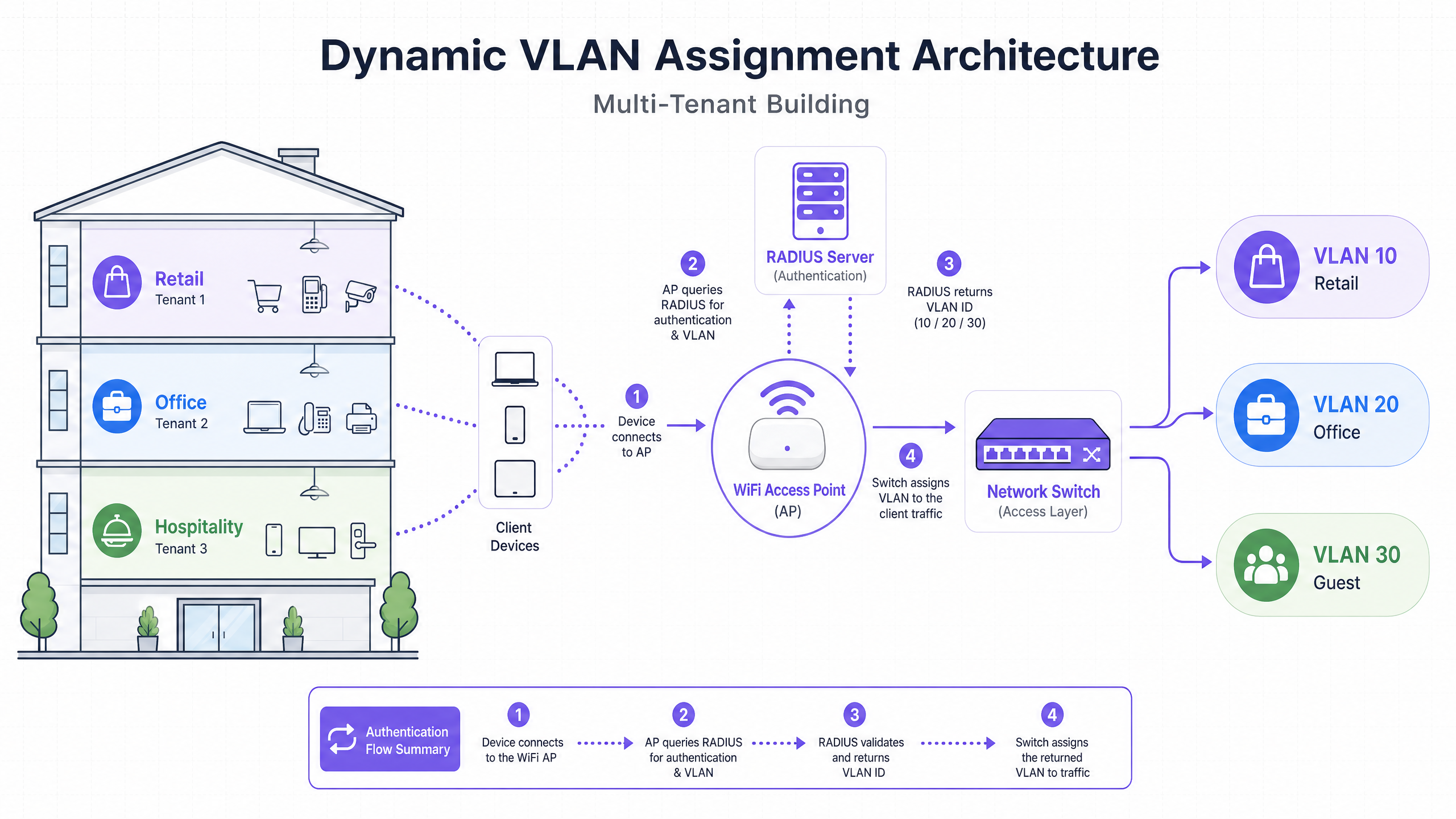
Per i responsabili IT e gli architetti di rete che supervisionano edifici multi-tenant, come uffici commerciali, complessi commerciali o ampie strutture ricettive, la gestione della segmentazione della rete è una sfida critica. Storicamente, isolare il traffico dei tenant significava implementare infrastrutture fisiche separate o trasmettere un SSID unico per ogni tenant. Entrambi gli approcci sono fondamentalmente difettosi. La separazione fisica è proibitiva in termini di costi e inflessibile, mentre la trasmissione di più SSID degrada gravemente le prestazioni RF a causa dell'eccessivo overhead dei frame di gestione.
L'assegnazione dinamica delle VLAN risolve questo problema consolidando l'ambiente wireless in un unico SSID sicuro. Sfruttando l'autenticazione IEEE 802.1X e RADIUS, la rete assegna dinamicamente gli utenti alla loro Virtual Local Area Network (VLAN) dedicata in base alla loro identità, non alla rete che scelgono. Questa guida fornisce un'analisi tecnica approfondita e completa sull'architettura, la distribuzione e la risoluzione dei problemi dell'assegnazione dinamica delle VLAN, garantendo un isolamento Layer 2 sicuro, la conformità a standard come PCI DSS e GDPR e un robusto ROI per gli operatori delle strutture.
Approfondimento Tecnico
Il problema con più SSID
In un edificio condiviso, è comune vedere decine di SSID trasmessi (ad esempio, "TenantA_Corp", "TenantB_Secure", "Building_Guest"). Ogni SSID trasmesso da un Access Point (AP) deve trasmettere frame beacon alla velocità dati obbligatoria più bassa (tipicamente 1 Mbps o 6 Mbps). All'aumentare del numero di SSID, la proporzione di tempo di trasmissione consumato dall'overhead di gestione cresce esponenzialmente, lasciando meno tempo di trasmissione per la trasmissione effettiva dei dati. Ciò si traduce in alta latenza, bassa velocità di trasmissione e una scarsa esperienza utente, indipendentemente dalla velocità della connessione internet sottostante.
L'architettura 802.1X e RADIUS
L'assegnazione dinamica delle VLAN sposta la logica di segmentazione dal livello RF al livello di autenticazione. Si basa sullo standard IEEE 802.1X per il controllo dell'accesso alla rete basato su porta, integrato con un server RADIUS (Remote Authentication Dial-In User Service).
L'architettura è composta da tre componenti principali:
- Supplicant: Il dispositivo client (laptop, smartphone) che richiede l'accesso alla rete.
- Authenticator: Il dispositivo di accesso alla rete, tipicamente l'Access Point WiFi o il controller wireless, che blocca il traffico fino a quando l'autenticazione non ha successo.
- Authentication Server: Il server RADIUS che convalida le credenziali rispetto a un archivio di identità (ad esempio, Active Directory, LDAP) e detta le policy di rete.
Il flusso di autenticazione
Quando un supplicant tenta di connettersi all'SSID unificato, si verifica il seguente flusso:
- Inizializzazione EAPOL: Il supplicant si connette all'AP. L'AP blocca tutto il traffico eccetto i pacchetti Extensible Authentication Protocol over LAN (EAPOL).
- RADIUS Access-Request: L'AP incapsula i dati EAP e li inoltra al server RADIUS come
Access-Request. - Validazione delle credenziali: Il server RADIUS verifica le credenziali dell'utente (tramite EAP-TLS, PEAP, ecc.).
- RADIUS Access-Accept: In caso di convalida riuscita, il server RADIUS risponde con un messaggio
Access-Accept. Fondamentalmente, questo messaggio include attributi RADIUS standard IETF specifici che istruiscono l'AP su quale VLAN assegnare all'utente.
Gli attributi RADIUS critici richiesti per l'assegnazione dinamica delle VLAN sono:
Tunnel-Type(64): Impostato suVLAN(Valore 13)Tunnel-Medium-Type(65): Impostato su802(Valore 6)Tunnel-Private-Group-ID(81): Impostato sull'ID VLAN specifico (ad esempio, "20" per Tenant A, "30" per Tenant B)
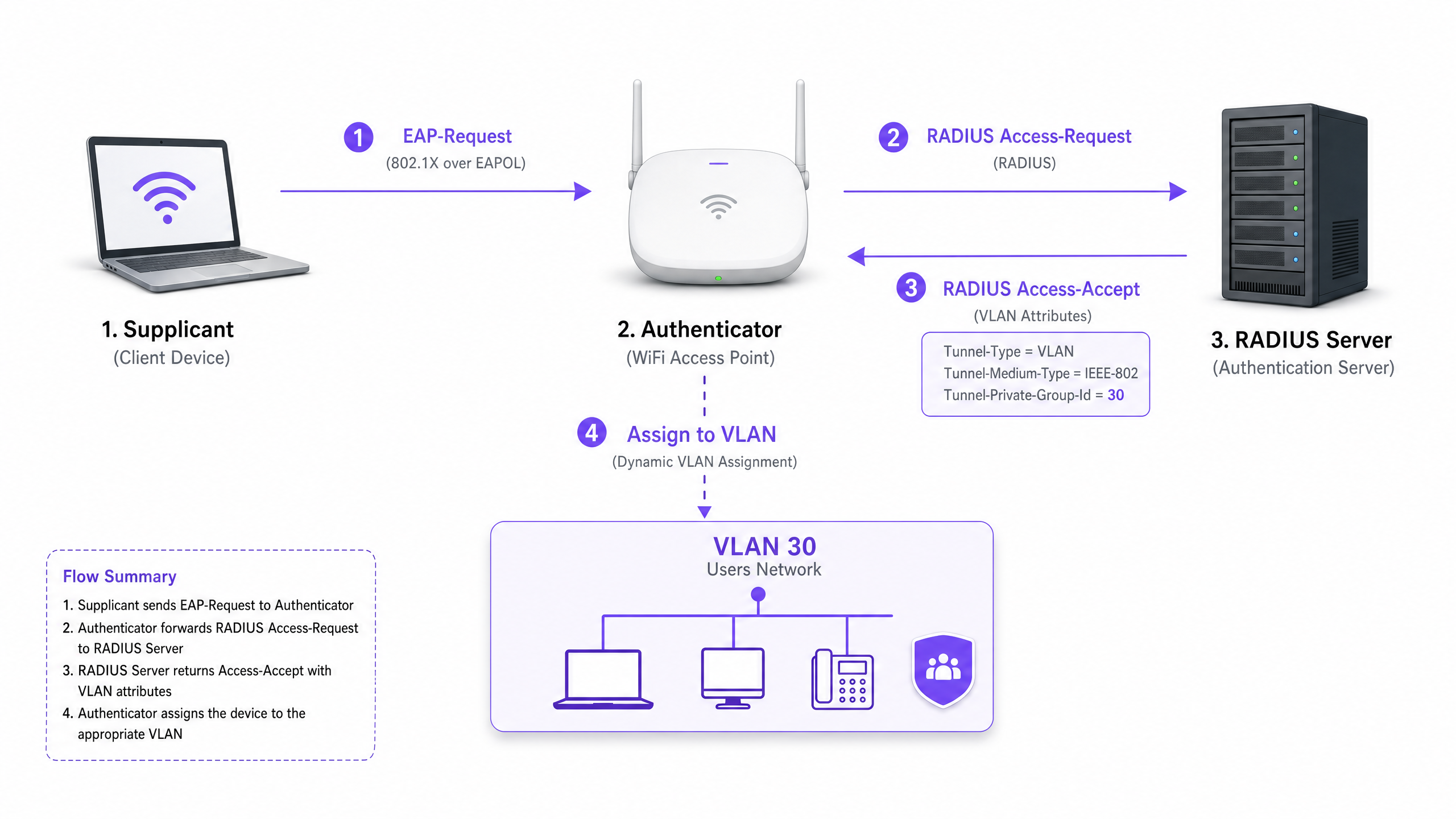
Una volta che l'AP riceve questi attributi, instrada il traffico dell'utente direttamente nella VLAN specificata. Gli switch di rete a monte gestiscono quindi il traffico come se l'utente fosse fisicamente collegato a una porta dedicata per quel tenant, garantendo un isolamento Layer 2 completo.
Guida all'Implementazione
La distribuzione dell'assegnazione dinamica delle VLAN richiede un'attenta coordinazione tra l'infrastruttura wireless, gli switch di bordo e il provider di identità. Seguire questa sequenza di implementazione indipendente dal fornitore.
Fase 1: Preparazione dell'infrastruttura di rete
- Provisioning VLAN: Definire e creare le VLAN necessarie sull'infrastruttura di routing principale e sui server DHCP. Assicurarsi che ogni VLAN del tenant abbia la propria sottorete distinta e policy di routing appropriate (ad esempio, routing verso internet, ma blocco del traffico inter-VLAN).
- Switch Trunking: Questo è un passaggio critico. Le porte dello switch che si connettono agli Access Point devono essere configurate come porte trunk 802.1Q. È necessario taggare tutte le potenziali VLAN del tenant che l'AP potrebbe dover assegnare. Se il server RADIUS assegna la VLAN 40, ma la VLAN 40 non è taggata sulla porta dello switch, il client si autenticherà ma non riuscirà a ricevere un indirizzo IP.
- Configurazione AP: Configurare gli AP per trasmettere un singolo SSID abilitato 802.1X (ad esempio, WPA3-Enterprise). Abilitare l'impostazione specifica sul controller wireless o sugli AP che consente loro di accettare attributi di override RADIUS (spesso etichettati come "AAA Override" o "Dynamic VLAN").
Fase 2: Integrazione RADIUS e Identità
- Integrazione dell'archivio di identità: Connettere il server RADIUS al servizio di directory contenente le identità degli utenti e le loro associazioni ai tenant.
- Creazione di policy di rete: Creare policy all'interno del server RADIUS che mappano i gruppi di utenti agli ID VLAN. Ad esempio, una policy che dichiara: Se l'utente appartiene al gruppo 'Retail_Staff', restituisci Tunnel-Private-Group-ID = 10.
- Gestione dei certificati: Se si utilizza EAP-TLS (consigliato per dispositivi aziendali), distribuire certificati client. Se si utilizza PEAP-MSCHAPv2 (comune per BYOD), assicurarsi che un certificato server valido e attendibile sia installato sul server RADIUS.
Fase 3: Test e implementazione graduale
- Test Pilota: Eseguire test con un piccolo gruppo di dispositivi tra diversi tenant. Verificare che, al momento della connessione, il dispositivo riceva un indirizzo IP dalla subnet corretta e non possa effettuare ping a dispositivi in altre VLAN dei tenant.
- Dispositivi IoT e Headless: Per i dispositivi che non supportano 802.1X (stampanti, smart TV), implementare il MAC Authentication Bypass (MAB). Il server RADIUS autentica il dispositivo in base al suo indirizzo MAC e assegna la VLAN appropriata. Nota: Posizionare questi dispositivi in VLAN strettamente isolate poiché gli indirizzi MAC possono essere falsificati.
Migliori Pratiche
- Consolidare gli SSID: Puntare a un massimo assoluto di tre SSID: un SSID 802.1X per tutti i tenant, uno per i dispositivi IoT legacy (utilizzando PSK o MAB) e uno per il Guest WiFi (utilizzando un captive portal).
- Applicare l'isolamento client: All'interno della rete guest e delle reti tenant non attendibili, abilitare l'isolamento client di Livello 2 a livello di AP per impedire ai dispositivi di comunicare tra loro, mitigando i rischi di movimento laterale.
- Sfruttare l'analisi avanzata: Integrare il flusso di autenticazione con una robusta piattaforma di WiFi Analytics per ottenere visibilità sull'utilizzo della sede, sui tempi di permanenza e sulle prestazioni della rete dei tenant.
- Standardizzare su WPA3: Laddove il supporto client lo consenta, imporre WPA3-Enterprise per l'SSID 802.1X per garantire il massimo livello di crittografia e protezione contro gli attacchi a dizionario.
- Contesto Settoriale: Adattare l'implementazione al settore verticale. Negli ambienti Retail , assicurarsi che i sistemi POS siano su una VLAN strettamente isolata per mantenere la conformità PCI DSS. Nel settore Hospitality , assicurarsi che le VLAN guest siano completamente separate dalle operazioni di back-office.
Risoluzione dei Problemi e Mitigazione del Rischio
Modalità di Guasto Comuni
Scenario "Autenticato ma senza IP":
- Sintomo: Il client si connette, l'autenticazione ha successo, ma il dispositivo si auto-assegna un indirizzo APIPA (169.254.x.x).
- Causa Radice: Il server RADIUS ha assegnato una VLAN, ma quella VLAN non è stata creata sul server DHCP o, più comunemente, la VLAN non è taggata sulla porta trunk che collega lo switch all'AP.
- Correzione: Verificare le configurazioni trunk 802.1Q sullo switch edge.
Timeout RADIUS / Irraggiungibile:
- Sintomo: I client rimangono bloccati su "Connessione..." o vengono ripetutamente richiesti per le credenziali.
- Causa Radice: L'AP non riesce a raggiungere il server RADIUS, oppure il segreto condiviso RADIUS non corrisponde tra l'AP e il server.
- Correzione: Verificare la connettività di rete tra l'IP di gestione dell'AP e il server RADIUS. Ricontrollare il segreto condiviso.
Scadenza del Certificato:
- Sintomo: Diffusi e improvvisi fallimenti di autenticazione per tutti gli utenti su PEAP o EAP-TLS.
- Causa Radice: Il certificato del server RADIUS è scaduto, causando il rifiuto della connessione da parte dei client.
- Correzione: Implementare un monitoraggio e un sistema di allerta aggressivi per i certificati RADIUS. Rinnovare i certificati almeno 30 giorni prima della scadenza.
Strategie di Mitigazione del Rischio
- Fail-Open vs. Fail-Closed: Definire una politica chiara per quando il server RADIUS è irraggiungibile. Per le reti aziendali dei tenant, il fail-closed (negare l'accesso) è necessario per la sicurezza. Per l'accesso guest, si potrebbe configurare una politica fail-open che indirizza gli utenti a una VLAN di "quarantena" altamente ristretta, solo internet.
- Redundancy: Distribuire sempre i server RADIUS in una coppia ad alta disponibilità (HA), preferibilmente distribuiti geograficamente se si supportano più siti.
ROI e Impatto sul Business
L'implementazione dell'assegnazione dinamica delle VLAN offre risultati di business significativi e misurabili per gli operatori di sedi:
- Riduzione dell'OpEx: La gestione centralizzata di un singolo SSID riduce drasticamente il sovraccarico IT associato al provisioning, all'aggiornamento e alla risoluzione dei problemi delle singole reti dei tenant.
- Spettro RF Ottimizzato: L'eliminazione dell'eccesso di SSID recupera tempo di trasmissione prezioso. Per una guida sulla gestione dello spettro, consulta il nostro articolo su Wi Fi Frequencies: A Guide to Wi-Fi Frequencies in 2026 . Ciò porta a un throughput più elevato e a un minor numero di ticket di supporto relativi a "WiFi lento".
- Sicurezza e Conformità Migliorate: L'isolamento rigoroso di Livello 2 garantisce che una compromissione nella rete di un tenant non si diffonda ad altri. Questo è fondamentale per soddisfare i requisiti normativi come PCI DSS e GDPR.
- Scalabilità: L'onboarding di un nuovo tenant non richiede modifiche all'infrastruttura fisica o alla configurazione wireless; si tratta semplicemente di creare una nuova policy nel server RADIUS.
Per strategie più complete sulla progettazione di reti per spazi condivisi, consulta la nostra guida su Designing a Multi-Tenant WiFi Architecture for MDU .
Definizioni chiave
802.1X
An IEEE standard for port-based network access control that provides an authentication mechanism to devices wishing to attach to a LAN or WLAN.
The foundational protocol that allows the network to demand identity before granting access, enabling dynamic policies.
RADIUS (Remote Authentication Dial-In User Service)
A networking protocol that provides centralized Authentication, Authorization, and Accounting (AAA) management for users who connect and use a network service.
The decision engine that validates credentials and tells the network which VLAN to assign to a user.
Supplicant
The client device (e.g., laptop, smartphone) or software that requests access to the network and provides credentials.
The endpoint that must be configured to support 802.1X (e.g., selecting PEAP or EAP-TLS in WiFi settings).
Authenticator
The network device (e.g., WiFi Access Point or switch) that facilitates the authentication process by relaying messages between the supplicant and the authentication server.
The gatekeeper that blocks traffic until RADIUS gives the green light, and then applies the assigned VLAN.
EAP (Extensible Authentication Protocol)
An authentication framework frequently used in wireless networks and point-to-point connections, supporting multiple authentication methods (e.g., EAP-TLS, PEAP).
The language spoken between the supplicant and the RADIUS server to securely exchange credentials.
MAB (MAC Authentication Bypass)
A technique used to authenticate devices that do not support 802.1X by using their MAC address as the credential.
Used for onboarding legacy IoT devices, printers, or smart TVs in a multi-tenant environment.
Tunnel-Private-Group-ID
The specific RADIUS attribute (Attribute 81) used to transmit the VLAN ID from the RADIUS server to the Authenticator.
The critical piece of data that actually dictates which network segment the user is dropped into.
Layer 2 Isolation
A security measure that prevents devices on the same network segment or VLAN from communicating directly with each other.
Essential for guest networks and untrusted tenant networks to prevent lateral movement of malware or unauthorized access.
Esempi pratici
A large conference centre hosts three simultaneous events. Event A requires secure corporate access, Event B requires open access for attendees, and Event C requires access to specific internal presentation servers. How should the network architect deploy this using dynamic VLANs?
The architect configures a single 802.1X SSID for staff and secure attendees, and a separate open SSID with a captive portal for general guests.
For the 802.1X SSID, the RADIUS server is configured with three policies:
- If User Group = 'Event_A_Staff', assign VLAN 100 (Internet + Corporate VPN access).
- If User Group = 'Event_C_Presenters', assign VLAN 102 (Internet + Presentation Server access).
For Event B, attendees use the open Guest SSID, which drops them into VLAN 101 (Internet only, client isolation enabled).
A retail chain operates a shared building with a coffee shop, a clothing store, and a pharmacy. The pharmacy must comply with HIPAA, and the clothing store requires PCI DSS compliance for its wireless POS terminals. How is isolation guaranteed?
The IT team deploys a single WPA3-Enterprise SSID.
- Pharmacy staff authenticate via 802.1X, and RADIUS assigns them to VLAN 50, which has strict firewall rules preventing access to any other internal subnets.
- The clothing store's POS terminals authenticate using EAP-TLS (certificate-based) and are assigned to VLAN 60. VLAN 60 is routed directly to the payment processor gateway and isolated from all other traffic.
- The coffee shop uses a separate Guest SSID for patrons, terminating on VLAN 70 with client isolation.
Domande di esercitazione
Q1. A tenant reports that they can successfully authenticate to the 802.1X SSID, but their device self-assigns an IP address (169.254.x.x) and cannot reach the internet. What is the most likely configuration error?
Suggerimento: Think about the path between the Access Point and the core network services.
Visualizza risposta modello
The most likely cause is that the VLAN assigned by the RADIUS server is not tagged on the 802.1Q trunk port connecting the edge switch to the Access Point. The AP is trying to drop the traffic onto the correct VLAN, but the switch drops the frames because it is not configured to accept them on that port.
Q2. You are designing a multi-tenant network for a shared office space. The client wants to broadcast a unique SSID for each of the 15 tenants to 'make it easy for them to find their network'. How do you advise the client?
Suggerimento: Consider the impact of management frame overhead on RF performance.
Visualizza risposta modello
Advise the client strongly against this approach. Broadcasting 15 SSIDs will consume a massive amount of airtime with beacon frames, severely degrading network performance, increasing latency, and reducing throughput for all users. Recommend deploying a single 802.1X SSID and using Dynamic VLAN Assignment via RADIUS to securely segment the tenants on the backend.
Q3. A multi-tenant building requires network access for several headless IoT devices (e.g., smart thermostats, digital signage) that do not support 802.1X supplicants. How can these devices be securely onboarded onto the correct tenant VLANs?
Suggerimento: Consider alternative authentication methods supported by RADIUS.
Visualizza risposta modello
Implement MAC Authentication Bypass (MAB). The Access Point will send the device's MAC address to the RADIUS server as the username and password. The RADIUS server can be configured to recognize these specific MAC addresses and return the appropriate VLAN ID. Because MAC addresses can be spoofed, these devices should be placed in strictly isolated VLANs with limited network access.