
Vai al contenuto principale

Come l'aggiornamento in background delle app uccide le prestazioni del WiFi pubblico

Questa guida tecnica esamina il grave impatto dell'aggiornamento in background delle app sulla capacità e le prestazioni del WiFi pubblico. Fornisce strategie di mitigazione attuabili a livello di rete per i responsabili IT al fine di recuperare tempo di trasmissione e migliorare l'esperienza degli ospiti.

📖 3 minuti di lettura📝 561 parole🔧 2 esempi pratici3 domande di esercitazione📚 8 definizioni chiave

Ascolta questa guida

Visualizza trascrizione del podcast
How Background App Refresh Kills Public WiFi Performance — A Purple Technical Briefing. Welcome. If you're responsible for a guest WiFi network — whether that's a hotel, a retail estate, a stadium, or a conference centre — this briefing is going to change how you think about your air time budget. I'm going to walk you through one of the most underestimated capacity killers in public wireless deployments: background app refresh. We'll cover what it is at a protocol level, why it's particularly destructive in high-density environments, and — most importantly — what you can do about it at the network layer today. Let's start with the scale of the problem. Every smartphone your guests carry onto your network is running somewhere between 30 and 80 installed applications. Of those, a significant proportion are configured to run background refresh cycles — polling analytics servers, syncing cloud data, fetching push notification tokens, checking for OS updates, and pinging ad networks. On iOS, Apple's Background App Refresh feature was introduced in iOS 7 and has been a persistent fixture ever since. Android has its own equivalent through JobScheduler and WorkManager APIs. The key point is this: these processes run regardless of whether the user is actively using their device. They fire silently, invisibly, and constantly. Now, on a home broadband connection with one or two devices, this is essentially invisible. But scale that up to a conference centre with 1,200 delegates, or a retail flagship store with 400 concurrent guest connections, and the arithmetic becomes uncomfortable very quickly. Research into enterprise wireless deployments consistently shows that background traffic — analytics beacons, OS update checks, ad network pings, push notification polling, cloud sync, and social media refresh cycles — can account for between 30 and 45 percent of total access point capacity on a busy guest network. That's capacity that your legitimate users — the ones trying to stream a presentation, complete a transaction, or simply browse — are being denied. Let me give you the technical picture of what's actually happening at the radio layer. In an 802.11 network, every device that associates with an access point competes for air time using CSMA/CA — Carrier Sense Multiple Access with Collision Avoidance. Every background refresh request, however small the payload, requires a full association sequence: probe request, authentication, association, DHCP if needed, and then the data exchange itself. In a high-density deployment, this contention overhead is significant. A single analytics beacon from a single app might only transfer 200 bytes of data, but the overhead of that transaction on the wireless medium can consume 10 to 20 times that in air time. With Wi-Fi 6 — IEEE 802.11ax — we have OFDMA and BSS Colouring which help manage this more efficiently. But even with these improvements, the fundamental problem remains: you cannot reclaim air time consumed by background traffic unless you intervene at the network layer. The radio doesn't know or care whether a packet is a user watching a video or an app silently phoning home to a telemetry server in Virginia. This is where deep packet inspection and traffic classification become critical tools in your architecture. A properly configured traffic classification engine, sitting inline between your wireless controller and your upstream gateway, can identify background refresh traffic by its destination, its payload signature, and its behavioural pattern. Known analytics endpoints — Google Analytics, Firebase, Crashlytics, Flurry, Amplitude, Mixpanel, and dozens of others — have well-documented IP ranges and domain patterns. Ad network endpoints from DoubleClick, AppNexus, and similar platforms are equally well-catalogued. A regularly updated block list, applied at the DNS or IP layer, can intercept these requests before they consume any meaningful bandwidth. The approach is vendor-neutral. Whether you're running Cisco Catalyst Centre, Aruba Central, Juniper Mist, or a Ruckus SmartZone deployment, the principle is the same: classify, then act. You have three options for what to do with identified background traffic. You can block it entirely — the most aggressive approach, and the most effective for capacity recovery. You can rate-limit it — allowing the traffic through but capping it to a defined bandwidth ceiling, typically 64 kilobits per second per device for background categories. Or you can deprioritise it using QoS DSCP markings, pushing it to the lowest traffic class so it only consumes air time when no other traffic is competing. For most venue operators, a combination of blocking known analytics and ad network endpoints, combined with rate-limiting of OS update traffic during peak hours, delivers the best balance of capacity recovery and user experience. Now let me walk you through two real-world deployment scenarios where this made a measurable difference. The first is a 340-room four-star hotel in the UK Midlands. The property had invested in a modern Wi-Fi 6 infrastructure — 48 access points across guest floors, conference suites, and public areas. Despite the hardware investment, guest satisfaction scores for WiFi were consistently below target. The network team ran a traffic analysis using the Purple platform and discovered that background app refresh traffic was consuming 38 percent of available air time across the guest SSID during peak check-in periods between 3 and 6 PM. A targeted block list was deployed covering 847 known analytics and ad network domains. Within two weeks, average throughput per connected device increased by 34 percent during peak periods, and guest WiFi satisfaction scores improved by 22 points on the property's internal NPS tracking. The second scenario is a regional retail chain with 60 stores across England and Wales. Each store runs a guest WiFi SSID used by both customers and in-store digital signage. The IT team had been receiving complaints about digital signage latency — screens were buffering during busy trading periods. Traffic analysis revealed that customer devices connecting to the guest SSID were generating substantial background traffic, including iOS update checks that were pulling multi-gigabyte payloads through the store network. A combination of DNS-level blocking for analytics endpoints and a hard rate cap of 1 megabit per second for identified OS update traffic resolved the signage latency issue entirely. The fix took less than four hours to deploy across the estate using centralised policy management. Let me now cover the implementation steps you need to follow to deploy this in your own environment. Step one is baseline measurement. Before you touch any configuration, you need to understand your current traffic profile. Deploy a traffic analysis tool — Purple's WiFi Analytics platform provides this natively — and run it for a minimum of five business days to capture weekday and weekend patterns. You're looking for the proportion of traffic going to known background-refresh destinations, the peak periods of background activity, and the per-device consumption rates. Step two is building your block list. Start with the OISD domain block list as your foundation — it's well-maintained, community-validated, and covers the major analytics and ad network endpoints. Supplement this with your own observations from the traffic analysis. Critically, do not block indiscriminately. Certain background traffic — particularly Apple Push Notification Service on port 5223, and Google Firebase Cloud Messaging — is required for device functionality. Blocking these will generate user complaints. Test your block list in a staging environment or on a single access point group before rolling out estate-wide. Step three is policy deployment. Apply your classification rules at the WLAN controller level, not at individual access points. This ensures consistency and simplifies ongoing management. If your controller supports application-aware QoS, use DSCP marking to deprioritise background categories rather than hard-blocking everything — this gives you a softer landing and reduces the risk of unintended consequences. Step four is ongoing monitoring. Background refresh endpoints change. New analytics SDKs emerge. App developers find new ways to phone home. Your block list needs to be reviewed and updated at minimum quarterly. Automate this where possible using threat intelligence feeds that include ad and analytics network updates. From a compliance perspective, it's worth noting that traffic classification and blocking at the network layer does not constitute interception under RIPA or equivalent legislation, provided you are not inspecting the content of encrypted payloads. You are acting on destination metadata — IP addresses and domain names — not on the content of communications. This is consistent with GDPR Article 6 legitimate interests grounds for network management, but you should document your policy and ensure it is referenced in your network acceptable use policy and privacy notice. Now, a few common pitfalls to avoid. The first is over-blocking. Teams that deploy aggressive block lists without adequate testing frequently find they've inadvertently broken app functionality that users rely on. Always maintain a whitelist for critical services, and have a rollback plan ready. The second pitfall is ignoring the 5 GHz and 6 GHz band split. Background refresh traffic tends to cluster on 2.4 GHz because older devices and IoT endpoints default to that band. If you're only analysing 5 GHz traffic, you may be missing the majority of the problem. Ensure your analysis covers all bands. The third pitfall is treating this as a one-time fix. Background refresh traffic patterns evolve continuously. A block list that was comprehensive six months ago may be missing 30 percent of current analytics endpoints. Build a review cadence into your network management calendar. Let me close with a rapid-fire set of questions I hear regularly from network architects. "Will blocking analytics traffic affect app performance for my users?" In most cases, no. Analytics beacons are fire-and-forget. The app does not wait for a response before continuing to function. The user will not notice. "Does this work with encrypted DNS?" Standard DNS-over-HTTPS traffic can bypass traditional DNS-based blocking. You need to either intercept DoH at the gateway or use IP-level blocking for known analytics ranges in addition to DNS blocking. Both approaches are supported in enterprise-grade controllers. "What about BYOD devices on a corporate SSID?" The same principles apply, but you have additional options including 802.1X authentication and per-user policy enforcement. For a corporate SSID, you can be more prescriptive about what background traffic is permitted. "How do I justify the investment to the board?" The ROI case is straightforward. Recovering 30 to 40 percent of wasted air time is equivalent to adding 30 to 40 percent more capacity to your existing infrastructure — without buying a single additional access point. For a venue that was considering a hardware refresh to address capacity complaints, network-level traffic management can defer that capital expenditure by two to three years. To summarise the key actions from this briefing. First, run a traffic baseline analysis — you cannot manage what you cannot measure. Second, deploy a maintained block list targeting known analytics and ad network endpoints. Third, use rate-limiting for OS update traffic during peak trading or event hours. Fourth, monitor continuously and update your policies quarterly. And fifth, document your approach for compliance purposes. If you want to see how Purple's platform surfaces this data and enables policy deployment across multi-site estates, the link is in the show notes. Thank you for your time.

header_image.png

Riepilogo Esecutivo

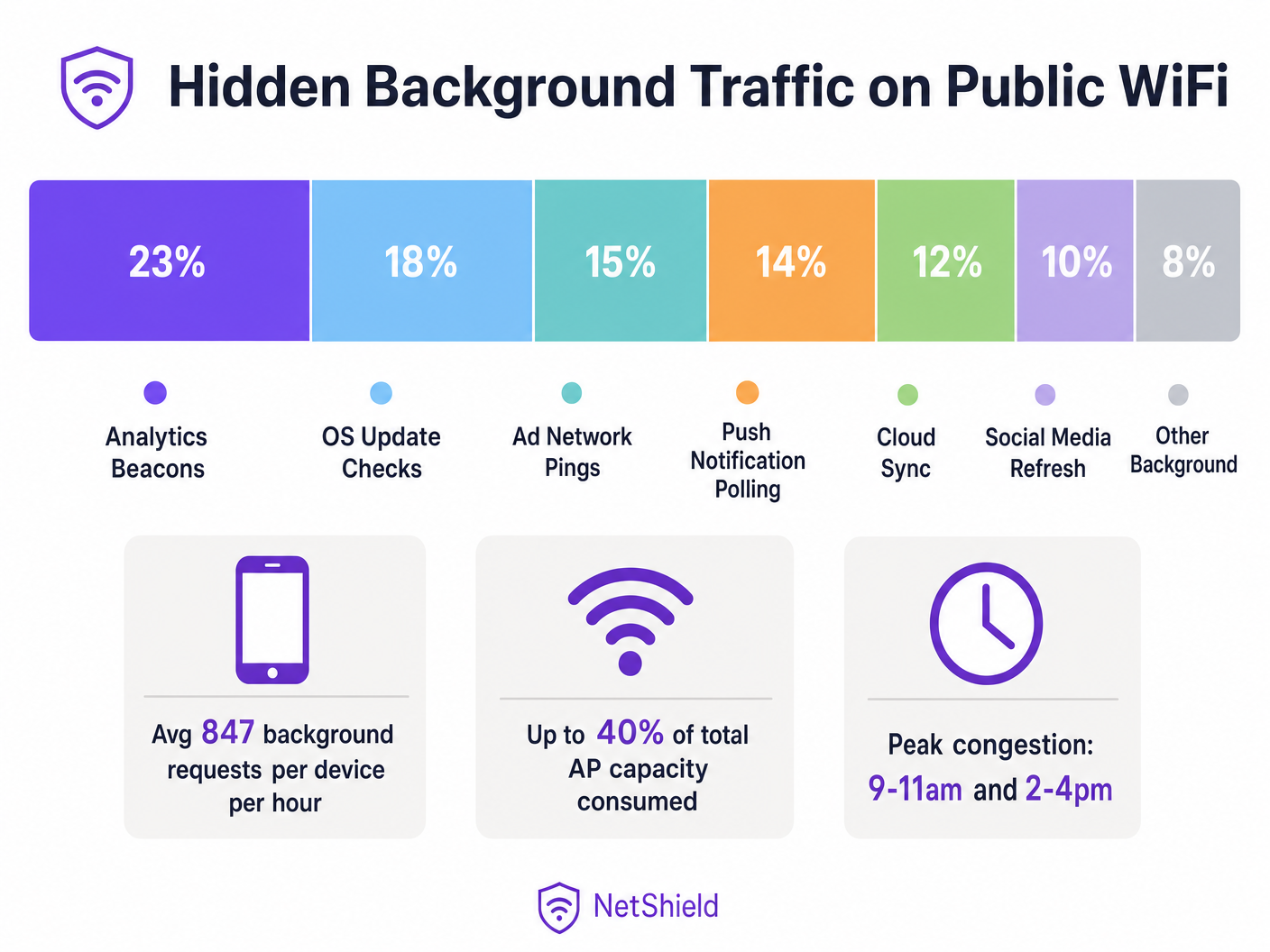
Negli ambienti wireless pubblici ad alta densità, fino al 40% della capacità degli access point può essere silenziosamente consumato dal traffico di aggiornamento in background delle app—beacon di analisi, ping di reti pubblicitarie, controlli di aggiornamento del sistema operativo e polling delle notifiche push. Questa guida fornisce ad architetti di rete e responsabili IT un modello neutrale rispetto al fornitore per identificare, classificare e mitigare il traffico in background a livello di rete. Implementando liste di blocco mirate e politiche di limitazione della velocità, le strutture possono recuperare un tempo di trasmissione significativo, posticipare costosi aggiornamenti hardware e migliorare drasticamente l'esperienza di connettività per il traffico utente legittimo.

Approfondimento Tecnico

L'Anatomia del Traffico in Background

Ogni smartphone che si connette alla tua rete Guest WiFi esegue decine di applicazioni configurate per eseguire cicli di aggiornamento in background. Questi processi operano indipendentemente dall'interazione dell'utente, avviando connessioni a server di telemetria, endpoint di sincronizzazione cloud e reti pubblicitarie.

A livello radio, l'impatto è sproporzionato rispetto alla dimensione del payload. In una rete 802.11 che utilizza CSMA/CA (Carrier Sense Multiple Access with Collision Avoidance), ogni transazione richiede una sequenza di associazione completa. Un beacon di analisi da 200 byte richiede richieste di sonda, autenticazione, associazione e negoziazione DHCP. In ambienti come il Retail o l' Hospitality , questo sovraccarico di contesa esaurisce rapidamente il tempo di trasmissione disponibile.
background_traffic_breakdown.png

Il Mito della Mitigazione con Wi-Fi 6

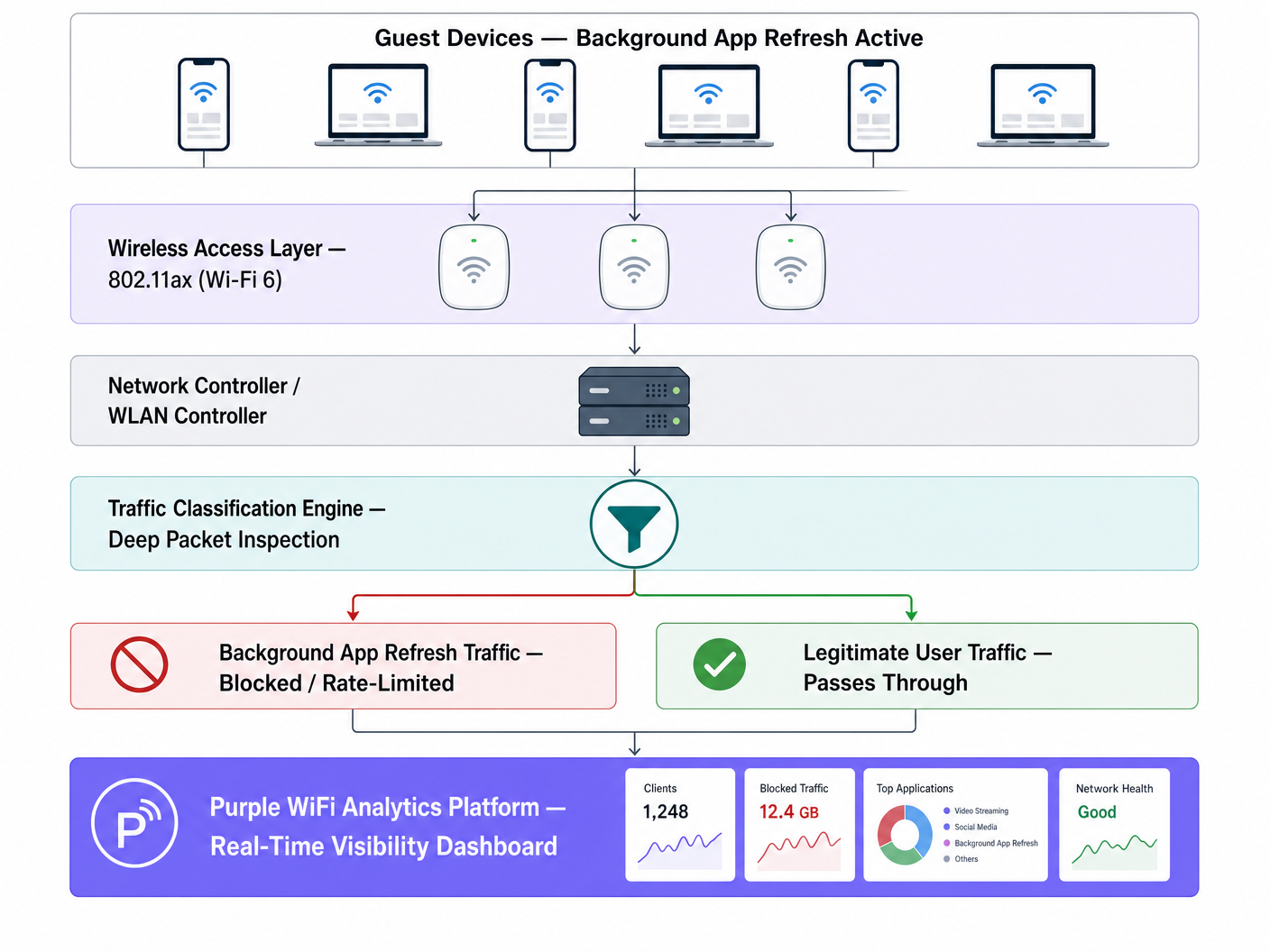
Mentre il Wi-Fi 6 (802.11ax) introduce OFDMA e BSS Colouring per gestire la contesa ad alta densità in modo più efficiente, non risolve il problema fondamentale della consegna di payload indesiderati. L'access point non può distinguere tra un utente che trasmette una presentazione in streaming e un'app che sincronizza silenziosamente dati diagnostici. L'intervento a livello di rete tramite Deep Packet Inspection (DPI) rimane essenziale.

Guida all'Implementazione

1. Classificazione del Traffico e Definizione della Baseline

Prima di implementare modifiche alle policy, stabilisci una baseline utilizzando la tua piattaforma WiFi Analytics . Monitora il traffico per almeno cinque giorni lavorativi per identificare i periodi di picco di attività in background e i domini di destinazione principali.

2. Sviluppo della Lista di Blocco

Implementa il blocco a livello DNS o IP per gli endpoint noti di analisi e reti pubblicitarie. Inizia con liste validate dalla comunità (come OISD) e integra con i tuoi dati di baseline.

Eccezione Critica: Non bloccare i servizi essenziali di notifica push (ad es. Apple Push Notification Service su TCP 5223 o Google Firebase Cloud Messaging). Il blocco di questi servizi interromperà la funzionalità principale del dispositivo e genererà reclami da parte degli utenti.

3. Applicazione delle Policy a Livello di Controller

Applica le regole di classificazione al controller WLAN piuttosto che ai singoli access point per garantire un'applicazione coerente delle policy.
network_architecture_diagram.png

Best Practice

  • Limita la velocità degli aggiornamenti del sistema operativo: Invece di bloccare completamente gli aggiornamenti del sistema operativo, applica un limite di velocità rigoroso (ad es. 1 Mbps per dispositivo) durante le ore di punta operative.
  • Implementa la marcatura QoS: Utilizza le marcature DSCP per deprioritizzare il traffico in background alla classe di traffico più bassa, consentendogli di trasmettere solo quando il canale è libero.
  • Monitoraggio Continuo: Gli endpoint in background evolvono. Rivedi e aggiorna le tue liste di blocco trimestralmente.

Risoluzione dei Problemi e Mitigazione dei Rischi

  • Blocco Eccessivo: Un blocco aggressivo senza test può compromettere la funzionalità legittima delle app. Testa sempre le policy su un singolo gruppo di AP prima dell'implementazione a livello di struttura.
  • Ignorare la divisione 5GHz/6GHz: Il traffico in background spesso si concentra sulla banda 2.4GHz a causa delle impostazioni predefinite dei dispositivi legacy. Assicurati che l'analisi del traffico copra tutte le bande. Wi Fi Frequencies: A Guide to Wi-Fi Frequencies in 2026 fornisce ulteriore contesto sulla gestione delle bande.

ROI e Impatto sul Business

Recuperare il 30-40% del tempo di trasmissione sprecato è funzionalmente equivalente ad aumentare la densità fisica dei tuoi AP della stessa percentuale. Per le strutture che affrontano vincoli di capacità, la gestione del traffico a livello di rete può posticipare significative spese in conto capitale per l'aggiornamento hardware, migliorando al contempo immediatamente i punteggi di soddisfazione degli ospiti.

Ascolta il briefing tecnico completo:

Definizioni chiave

Background App Refresh

A mobile OS feature allowing apps to check for updates, sync data, and send telemetry without active user interaction.

The primary source of hidden air time consumption on high-density public networks.

CSMA/CA

Carrier Sense Multiple Access with Collision Avoidance; the protocol WiFi uses to manage access to the shared radio medium.

Explains why even small background payloads cause significant network overhead due to contention.

Air Time

The finite amount of time available for devices to transmit data over a specific radio frequency.

The critical resource depleted by background traffic, more important than raw bandwidth in high-density deployments.

Deep Packet Inspection (DPI)

Advanced network packet filtering that examines the data part of a packet to classify traffic types.

Required to distinguish between legitimate user traffic and background telemetry.

DSCP Marking

Differentiated Services Code Point; a mechanism for classifying and managing network traffic for Quality of Service (QoS).

Used to deprioritise background traffic so it only transmits when the network is idle.

BSS Colouring

A Wi-Fi 6 feature that identifies overlapping basic service sets to improve spatial reuse.

Improves efficiency but does not eliminate the need to block unwanted background payloads.

OFDMA

Orthogonal Frequency-Division Multiple Access; allows a single AP to communicate with multiple devices simultaneously.

A Wi-Fi 6 enhancement that mitigates but does not solve background traffic contention.

Rate Limiting

Controlling the rate of traffic sent or received on a network interface.

The recommended approach for managing essential but heavy background traffic, like OS updates.

Esempi pratici

A 340-room four-star hotel is experiencing poor WiFi performance during peak check-in (3 PM - 6 PM) despite a recent Wi-Fi 6 hardware upgrade.

  1. Deploy traffic analysis via Purple WiFi Analytics.
  2. Identify that 38% of air time is consumed by background app refresh.
  3. Implement a targeted DNS block list for 847 known analytics and ad domains.
  4. Apply a 1 Mbps rate limit to identified OS update traffic during peak hours.
Commento dell'esaminatore: This approach addresses the root cause (air time contention) rather than treating the symptom (bandwidth limitation). By blocking analytics and rate-limiting updates, the hotel recovers capacity for active user sessions without breaking essential device functionality.

A regional retail chain with 60 stores reports that digital signage buffering occurs simultaneously with high guest WiFi usage.

  1. Baseline traffic across the estate.
  2. Discover iOS update checks on the guest SSID are saturating the WAN link.
  3. Deploy centralised policy via the WLAN controller to rate-limit Apple update servers to 512 Kbps per guest device.
  4. Prioritise digital signage MAC addresses via QoS.
Commento dell'esaminatore: Centralised policy management is crucial for multi-site retail. Rate-limiting rather than blocking updates prevents user frustration while protecting business-critical infrastructure.

Domande di esercitazione

Q1. A stadium IT director wants to block all traffic to Apple and Google servers during a major sporting event to preserve bandwidth. What is the risk?

Suggerimento: Consider essential device services that rely on persistent connections.

Visualizza risposta modello

Blocking all traffic to Apple and Google will break essential push notification services (APNS on TCP 5223 and Firebase Cloud Messaging). This will cause legitimate apps (like digital ticketing or emergency alerts) to fail. Instead, block specific analytics subdomains and rate-limit OS updates.

Q2. After deploying a Wi-Fi 6 upgrade, a conference centre still experiences severe latency during the morning keynote when 2,000 attendees arrive. Why didn't the hardware upgrade solve the issue?

Suggerimento: Think about what Wi-Fi 6 handles well versus what it cannot control.

Visualizza risposta modello

Wi-Fi 6 improves efficiency (via OFDMA and BSS Colouring) but cannot distinguish between a user checking email and 2,000 devices simultaneously executing background app refreshes. The sheer volume of contention overhead still depletes air time. Network-level traffic classification is required.

Q3. When configuring QoS for a guest network, how should background traffic like cloud photo sync be handled?

Suggerimento: It's not malicious, but it's not urgent.

Visualizza risposta modello

It should be classified and marked with a low DSCP value (e.g., Background/Scavenger class). This deprioritises the traffic, ensuring it only transmits when the network is idle, protecting real-time traffic like VoIP or point-of-sale transactions.