
Come offrire ai clienti al dettaglio un'esperienza personalizzata utilizzando il WiFi
Questa guida di riferimento tecnico illustra come i team IT e operativi del settore retail possono sfruttare l'infrastruttura WiFi guest esistente per offrire esperienze cliente personalizzate e basate sulla posizione. Copre architettura, acquisizione dati, integrazione CRM e conformità, dimostrando come trasformare il traffico anonimo in dati di prima parte azionabili.
Ascolta questa guida
Visualizza trascrizione del podcast
Riepilogo Esecutivo
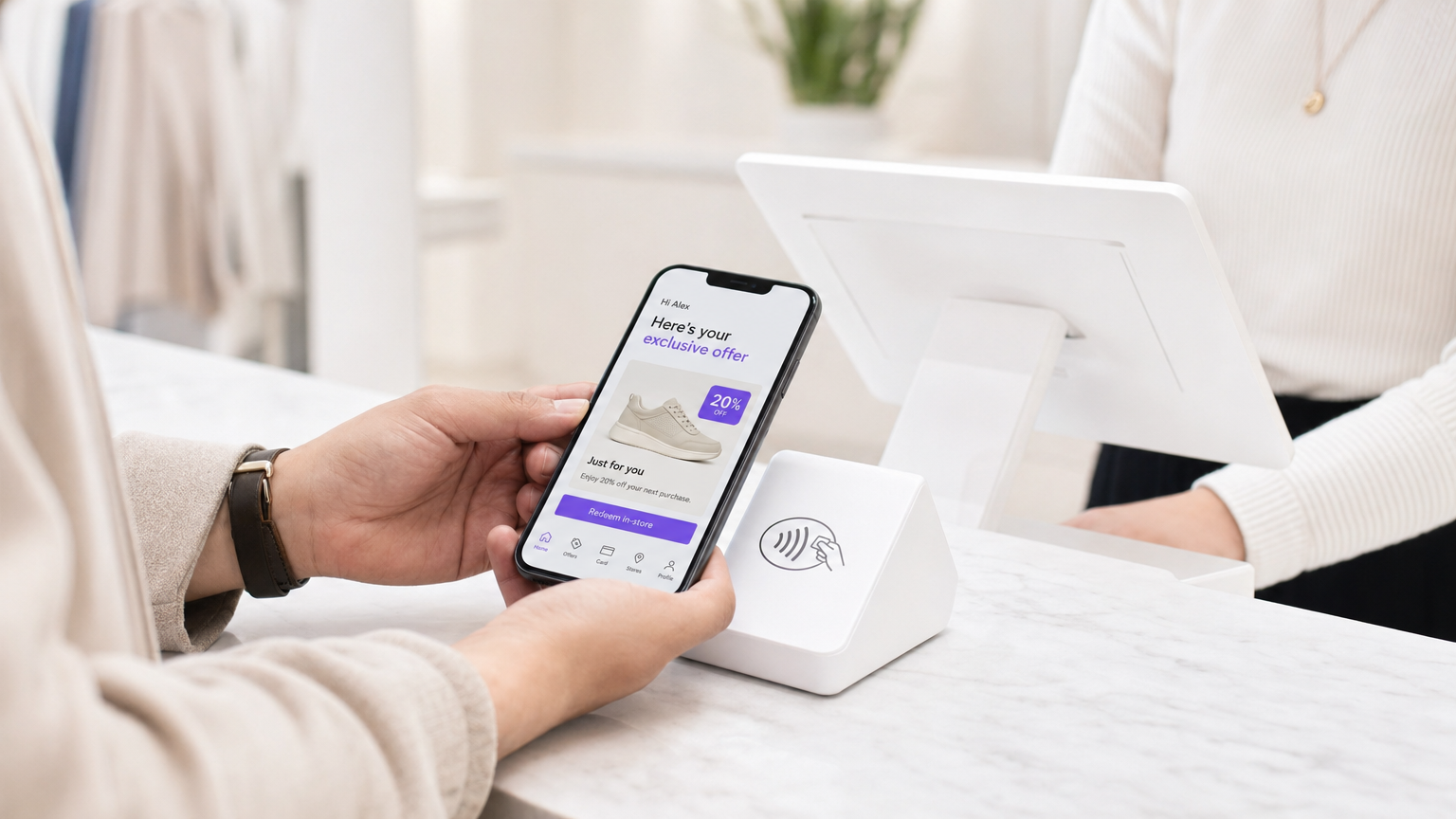
Per i responsabili IT e i direttori delle operazioni delle sedi, il mandato di offrire esperienze cliente personalizzate si traduce spesso in progetti di integrazione complessi e multi-vendor. Tuttavia, la base più efficace per la personalizzazione in negozio è probabilmente già implementata nei vostri controsoffitti: la vostra rete WiFi guest aziendale.
Sovrapponendo una sofisticata piattaforma di analisi e autenticazione all'hardware esistente (come Cisco Meraki, Aruba o Ruckus), i rivenditori possono trasformare un semplice servizio di connettività in un potente motore per l'acquisizione di dati di prima parte. Questa guida descrive come architettare, implementare e scalare una strategia di personalizzazione basata sul WiFi. Esploriamo i meccanismi di risoluzione dell'identità tramite Captive Portal, l'integrazione del tempo di permanenza e delle analisi spaziali nei sistemi CRM e l'attivazione automatica di offerte contestualmente rilevanti, il tutto mantenendo una rigorosa aderenza agli standard GDPR e PCI DSS.
Sia che gestiate un singolo negozio di punta o una vasta proprietà commerciale, l'obiettivo rimane lo stesso: convertire il traffico anonimo in clienti noti e indirizzabili, consentendo ai team di marketing di fornire il messaggio giusto nel momento preciso di massima intenzione.
Approfondimento Tecnico
Architettura e Flusso di Dati
La base di WiFi Analytics si basa su un'architettura robusta che cattura ed elabora in modo sicuro i dati dei clienti. Il modello di implementazione tipico prevede access point (AP) sottili che riportano a un controller cloud o on-premises. La piattaforma di analisi acquisisce i dati da questo controller tramite API o feed Syslog.
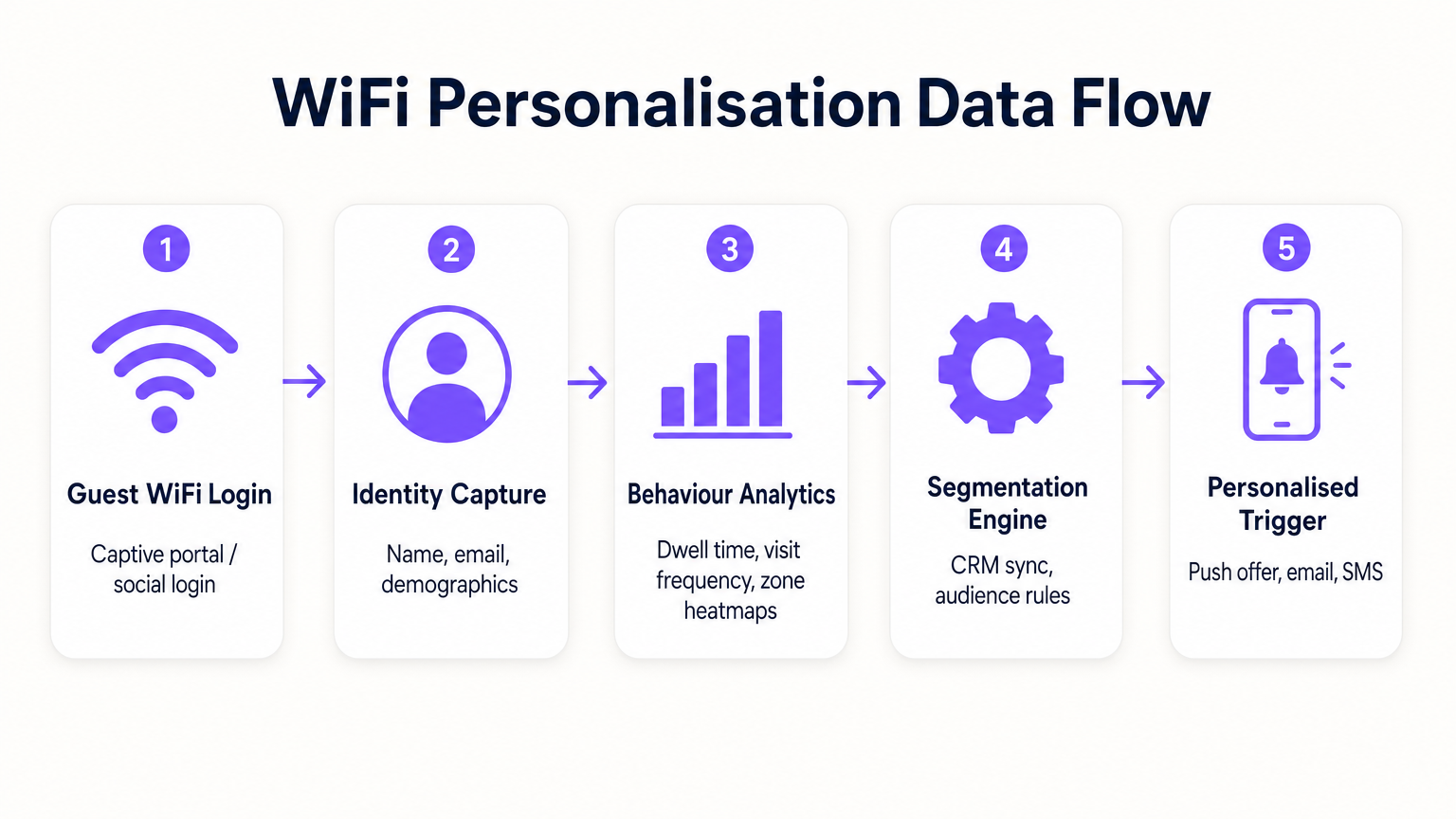
- Richieste di Probe e Associazione: Anche prima dell'autenticazione, gli AP rilevano le richieste di probe dai dispositivi mobili, catturando gli indirizzi MAC e la potenza del segnale (RSSI). Questo fornisce dati di base sul traffico e sulle zone.
- Autenticazione (Il Captive Portal): Quando un utente si associa all'SSID Guest WiFi , viene reindirizzato a un Captive Portal. Questo è il punto critico di acquisizione dell'identità. Offrendo l'autenticazione tramite e-mail, social media o SMS, il sistema collega l'indirizzo MAC precedentemente anonimo a un'identità verificata.
- Motore di Analisi: La piattaforma correla i dati di localizzazione in tempo reale (calcolati tramite trilaterazione o mappatura termica RSSI) con l'identità autenticata, costruendo un profilo completo del tempo di permanenza, della frequenza delle visite e delle preferenze di zona.
- Livello di Integrazione: Webhook o REST API inviano questi dati di profilo arricchiti a sistemi esterni (CRM, automazione del marketing, piattaforme di fidelizzazione).
Risoluzione dell'Identità e Randomizzazione MAC
I moderni sistemi operativi mobili (iOS 14+, Android 10+) implementano la randomizzazione dell'indirizzo MAC per prevenire il tracciamento persistente. Ciò rende obsoleto affidarsi esclusivamente agli indirizzi MAC per l'analisi a lungo termine. La soluzione è l'autenticazione basata su profilo. Una volta che un utente si autentica tramite il Captive Portal, la sua e-mail o il suo numero di telefono diventano l'identificatore persistente. Le visite successive, anche con un nuovo indirizzo MAC randomizzato, possono essere ricollegate al profilo principale al momento della riautenticazione, garantendo la continuità nel record del cliente.
Segmentazione e Sicurezza della Rete
La sicurezza è fondamentale. Il traffico guest deve essere rigorosamente segregato dalla rete aziendale, tipicamente tramite VLAN dedicate. Ciò garantisce la conformità con PCI DSS prevenendo qualsiasi sovrapposizione tra l'accesso a Internet pubblico e gli ambienti dati del punto vendita (POS). L'SSID guest dovrebbe idealmente utilizzare WPA3-Personal o WPA3-Enterprise (ove supportato) per crittografare il traffico over-the-air, proteggendo i dati dell'utente dall'intercettazione.
Guida all'Implementazione
L'implementazione di una strategia di personalizzazione richiede uno sforzo coordinato tra IT e marketing.
Fase 1: Valutazione dell'Infrastruttura
Prima di implementare analisi avanzate, assicurarsi che l'ambiente RF sottostante sia solido. Condurre un'indagine del sito per verificare la densità di copertura, in particolare nelle zone di alto valore. L'analisi del tempo di permanenza si basa su una ricezione costante del segnale; le zone morte distorceranno i dati.
Fase 2: Configurazione del Captive Portal
Progettare il Captive Portal per massimizzare i tassi di opt-in garantendo la conformità al GDPR. Lo scambio di valore deve essere chiaro. Invece di un login generico, offrire un incentivo: "Connettiti per offerte esclusive in negozio". Fondamentalmente, il consenso per l'accesso alla rete deve essere scorporato dal consenso per le comunicazioni di marketing. Il portale dovrebbe presentare chiaramente i termini e le condizioni e le politiche sulla privacy.
Fase 3: Integrazione e Segmentazione
Collegare la piattaforma WiFi al vostro stack di marketing esistente. Ciò consente di combinare i dati comportamentali in negozio (ad esempio, "ha visitato il reparto scarpe per 20 minuti") con i dati transazionali (ad esempio, "ha acquistato scarpe da ginnastica il mese scorso"). Creare segmenti azionabili, come "Rischio di Abbandono ad Alto Valore" (frequenti visitatori passati che non si sono connessi negli ultimi 60 giorni).
Fase 4: Trigger Automatizzati
Configurare flussi di lavoro automatizzati. Quando un cliente appartenente a un segmento specifico si autentica, attivare un'azione tramite API. Questo potrebbe essere un'offerta SMS, una notifica push tramite l'app del rivenditore o un'e-mail. La latenza tra l'autenticazione e l'esecuzione del trigger dovrebbe essere minima (meno di 30 secondi) per garantire che il messaggio venga ricevuto mentre il cliente è ancora coinvolto.
Per strategie più dettagliate sulla costruzione di questi profili, fare riferimento alla nostra guida su WiFi in Retail Stores: Building Customer Profiles From Footfall Data o all'equivalente francese, Le WiFi dans les magasins de détail : Créer des profils clients à partir des données de fréquentation .
Migliori Pratiche
- Dare priorità allo scambio di valore: I clienti condivideranno i loro dati solo se percepiscono un beneficio. Assicurati che il WiFi sia veloce e affidabile e che le offerte attivate siano realmente di valore.
- Rispettare i limiti di frequenza: Non bombardare i clienti con notifiche ogni volta che si connettono. Implementa un limite di frequenza (ad esempio, un messaggio massimo a settimana) per prevenire affaticamento e disiscrizioni.
- Sfruttare gli investimenti esistenti: Evita scenari di sostituzione completa. Le moderne piattaforme di analisi si integrano perfettamente con i principali fornitori di hardware, consentendoti di estrarre più valore dalla tua infrastruttura attuale.
- Impollinare i dati: I dati WiFi sono più potenti se combinati con altre fonti. Integrati con il tuo programma fedeltà per capire come il comportamento in negozio si correla con il valore complessivo del ciclo di vita del cliente. Questo approccio è altamente rilevante in vari settori, inclusi Retail , Hospitality e persino Healthcare .
Risoluzione dei Problemi e Mitigazione del Rischio
- Bassi tassi di adesione: Se meno del 20% dei visitatori si autentica, rivedi il design del Captive Portal. Semplifica il processo di login, chiarisci la proposta di valore e assicurati che il portale sia ottimizzato per i dispositivi mobili.
- Dati di localizzazione imprecisi: Se le analisi di zona appaiono distorte, verifica il posizionamento degli AP e conduci una nuova indagine RF. L'interferenza da ostacoli fisici o reti vicine può influenzare i calcoli RSSI.
- Errori di integrazione: Assicurati che sia presente una robusta gestione degli errori per le connessioni API ai CRM. Monitora i tassi di successo della consegna dei webhook e implementa meccanismi di riprova per i payload falliti.
- Rischi di conformità: Verifica regolarmente i tuoi flussi di consenso e le politiche di conservazione dei dati. Assicurati di avere un processo semplificato per la gestione delle Richieste di Accesso ai Dati dell'Interessato (DSAR) ai sensi del GDPR.
ROI e Impatto sul Business
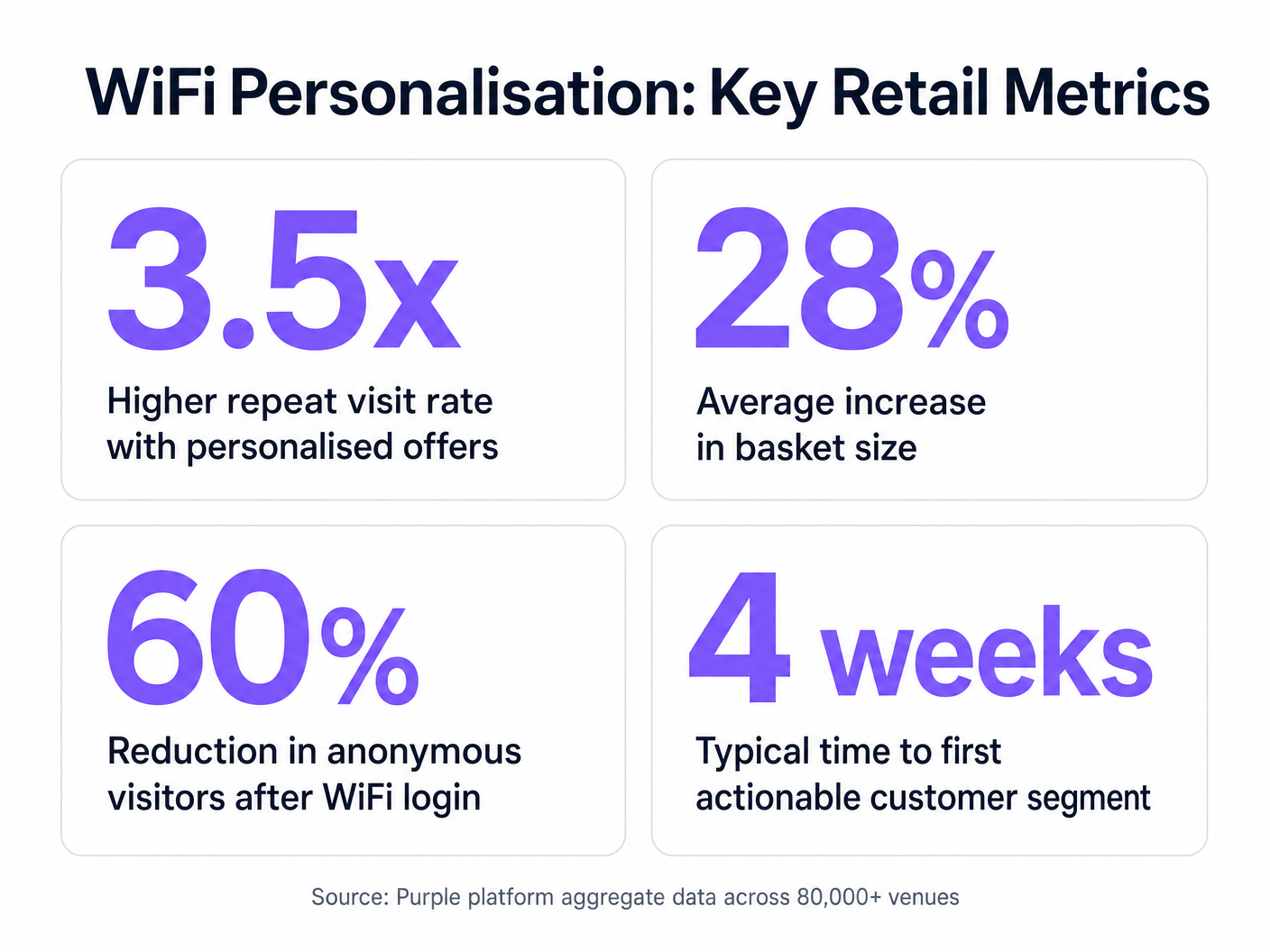
Il caso aziendale per la personalizzazione basata su WiFi è convincente. Identificando i visitatori anonimi, i rivenditori possono espandere significativamente il loro database commercializzabile. Le metriche chiave da monitorare includono:
- Tasso di crescita del database: Il volume di nuove identità verificate acquisite al mese.
- Tasso di conversione delle offerte attivate: La percentuale di clienti che riscattano un'offerta loro inviata mentre sono in negozio.
- Aumento del tempo di permanenza: Misurare se l'engagement personalizzato porta a visite più lunghe in negozio.
- Frequenza di visite ripetute: Monitorare l'impatto delle campagne di re-engagement mirate sulla fedeltà del cliente.
Andando oltre la connettività di base, i team IT possono posizionarsi come abilitatori di entrate, fornendo l'infrastruttura essenziale per operazioni di vendita al dettaglio moderne e basate sui dati.
Definizioni chiave
Captive Portal
A web page that a user is forced to view and interact with before access is granted to a public network.
The primary interface for capturing user identity and establishing consent for data processing.
MAC Address Randomisation
A privacy feature where mobile devices use a temporary, randomly generated hardware address when scanning for or connecting to networks.
Forces IT teams to rely on authenticated profiles rather than hardware identifiers for long-term customer tracking.
Dwell Time
The duration a connected or probing device remains within the coverage area of a specific access point or defined zone.
A critical metric for understanding customer engagement with specific displays, departments, or the store as a whole.
Trilateration
A method of determining the location of a device by measuring its signal strength (RSSI) relative to three or more access points.
Used by spatial analytics platforms to generate accurate heatmaps and track customer movement patterns.
Probe Request
A frame sent by a client device to discover available wireless networks in its vicinity.
Allows analytics platforms to estimate footfall and capture anonymous presence data even if the user does not authenticate.
VLAN (Virtual Local Area Network)
A logical subnetwork that groups a collection of devices, isolating their traffic from other devices on the same physical network.
Essential for security and PCI DSS compliance, ensuring guest WiFi traffic is completely segregated from corporate systems.
Webhook
A method for one application to provide real-time information to another application, typically triggered by a specific event.
Used to instantly push authentication events from the WiFi platform to a CRM, enabling real-time triggered marketing.
RSSI (Received Signal Strength Indicator)
A measurement of the power present in a received radio signal.
The fundamental metric used by access points to estimate the distance of a client device, enabling location analytics.
Esempi pratici
A mid-sized high street fashion retailer with 50 locations wants to reduce customer churn. They have Cisco Meraki APs deployed but are only offering a simple 'click-to-accept' splash page. How should the IT team approach upgrading this to a personalisation engine?
- Platform Integration: Integrate a dedicated WiFi analytics platform with the existing Meraki dashboard via API. No new hardware is required.
- Portal Upgrade: Replace the 'click-to-accept' page with a branded captive portal offering Social Login (Facebook/Google) or email authentication, coupled with an explicit marketing opt-in checkbox.
- CRM Sync: Configure a webhook to push newly authenticated identities and their visit data into the retailer's CRM (e.g., Salesforce).
- Campaign Execution: The marketing team creates a segment in the CRM for 'Customers who haven't visited in 90 days'. When a customer in this segment connects to the WiFi, an automated email offering a 15% discount is triggered immediately.
A large shopping centre operator needs to understand the flow of visitors between different anchor stores to optimize tenant placement and rent models. They currently rely on manual footfall counting at entrances.
- Network Tuning: The IT team optimizes the AP density to ensure consistent coverage across all concourses and store entrances, focusing on overlapping coverage for accurate trilateration.
- Analytics Deployment: Deploy a spatial analytics platform that ingests probe request data from the APs.
- Zone Mapping: Define specific zones within the analytics dashboard corresponding to key areas (e.g., 'Food Court', 'Anchor Store A', 'North Entrance').
- Data Analysis: Utilize the platform to generate heatmaps and flow diagrams, analyzing the typical paths taken by visitors and the dwell time in specific zones.
Domande di esercitazione
Q1. A retail client wants to trigger an immediate SMS discount to any customer who spends more than 15 minutes in the high-margin electronics section. They currently have a single access point covering the entire store. What is the primary technical constraint?
Suggerimento: Consider how the system determines location and dwell time.
Visualizza risposta modello
The primary constraint is a lack of spatial resolution. With only a single access point, the system can determine that the customer is in the store (associated with the AP), but it cannot use trilateration to pinpoint their location to a specific zone like the electronics section. The retailer must deploy additional access points to provide overlapping coverage, enabling accurate location analytics.
Q2. The marketing director is concerned that MAC address randomisation in iOS will prevent them from tracking repeat visitors. How should the IT architect respond?
Suggerimento: Focus on the transition from hardware-based tracking to identity-based tracking.
Visualizza risposta modello
The architect should explain that while MAC randomisation disrupts passive tracking of anonymous devices, it does not impact authenticated users. By implementing a captive portal that requires email or social login, the system creates a persistent profile based on the user's identity. When the user returns and reconnects (even with a new MAC address), they re-authenticate, and the new session is linked to their existing persistent profile.
Q3. A stadium operator wants to deploy guest WiFi but is concerned about PCI DSS compliance, as POS terminals for concessions share the same physical network switches. What network design principle must be enforced?
Suggerimento: Think about logical separation of network traffic.
Visualizza risposta modello
The IT team must enforce strict network segmentation using Virtual Local Area Networks (VLANs). The guest WiFi traffic must be placed on a dedicated VLAN that is completely isolated from the VLAN used by the POS terminals. Firewall rules must ensure that no traffic can route between the guest VLAN and the Cardholder Data Environment (CDE), thereby maintaining PCI DSS compliance.
Continua a leggere questa serie
Privacy by Design: Anonimizzazione dei dati WiFi per la conformità al GDPR
Questa guida autorevole illustra l'architettura tecnica e le strategie di implementazione per l'anonimizzazione dei dati WiFi al fine di garantire la conformità al GDPR. Fornisce a responsabili IT e architetti di rete framework attuabili per bilanciare analisi robuste delle sedi con rigorosi requisiti di privacy dei dati.
Heatmapping vs. Presence Analytics: Differenze Tecniche
Questa guida tecnica autorevole illustra le differenze architettoniche e operative critiche tra il WiFi heatmapping e la presence analytics per gli operatori di sedi aziendali. Fornisce a responsabili IT, architetti di rete e direttori delle operazioni framework di implementazione attuabili, scenari di implementazione reali e best practice neutrali rispetto ai fornitori per massimizzare il ROI dalla loro infrastruttura wireless esistente.
Come Calcolare il Tempo di Permanenza Utilizzando i WiFi Location Analytics
Questa guida fornisce un riferimento tecnico completo per il calcolo del tempo di permanenza WiFi utilizzando i WiFi location analytics, coprendo l'intera architettura dalla cattura delle richieste di probe 802.11 attraverso la trilaterazione basata su RSSI all'analisi delle zone geofenced. È progettata per IT manager, architetti di rete e direttori delle operazioni di sede che necessitano di implementare un'intelligence di localizzazione accurata e scalabile in ambienti di vendita al dettaglio, ospitalità, sanità e settore pubblico. I lettori otterranno indicazioni pratiche sull'implementazione, casi di studio reali e un quadro chiaro per tradurre i dati spaziali grezzi in risultati di business misurabili.