
How to leverage marketing with SMS to increase return visits
This guide details how marketing directors, CRM managers, and venue operators can build an automated SMS marketing engine using verified first-party data captured through guest WiFi. It covers the full technical architecture from captive portal data collection and OTP verification through to SMS gateway integration, audience segmentation, and campaign automation - with worked examples from hospitality and retail. The business case is direct: SMS carries a 98% open rate and, when triggered by physical presence data, drives measurable increases in return visits and incremental revenue.
Listen to this guide
View podcast transcript
Executive summary
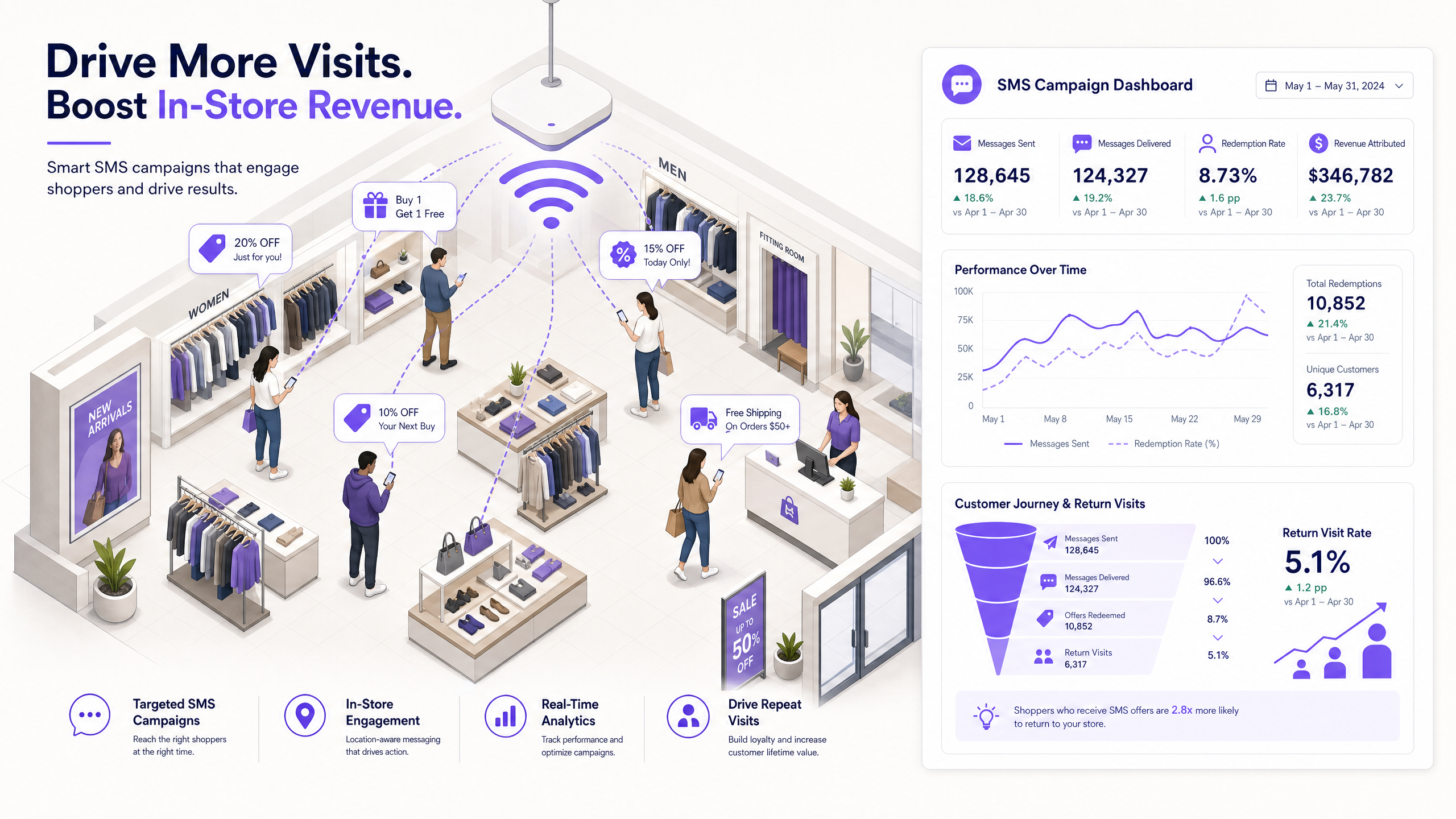
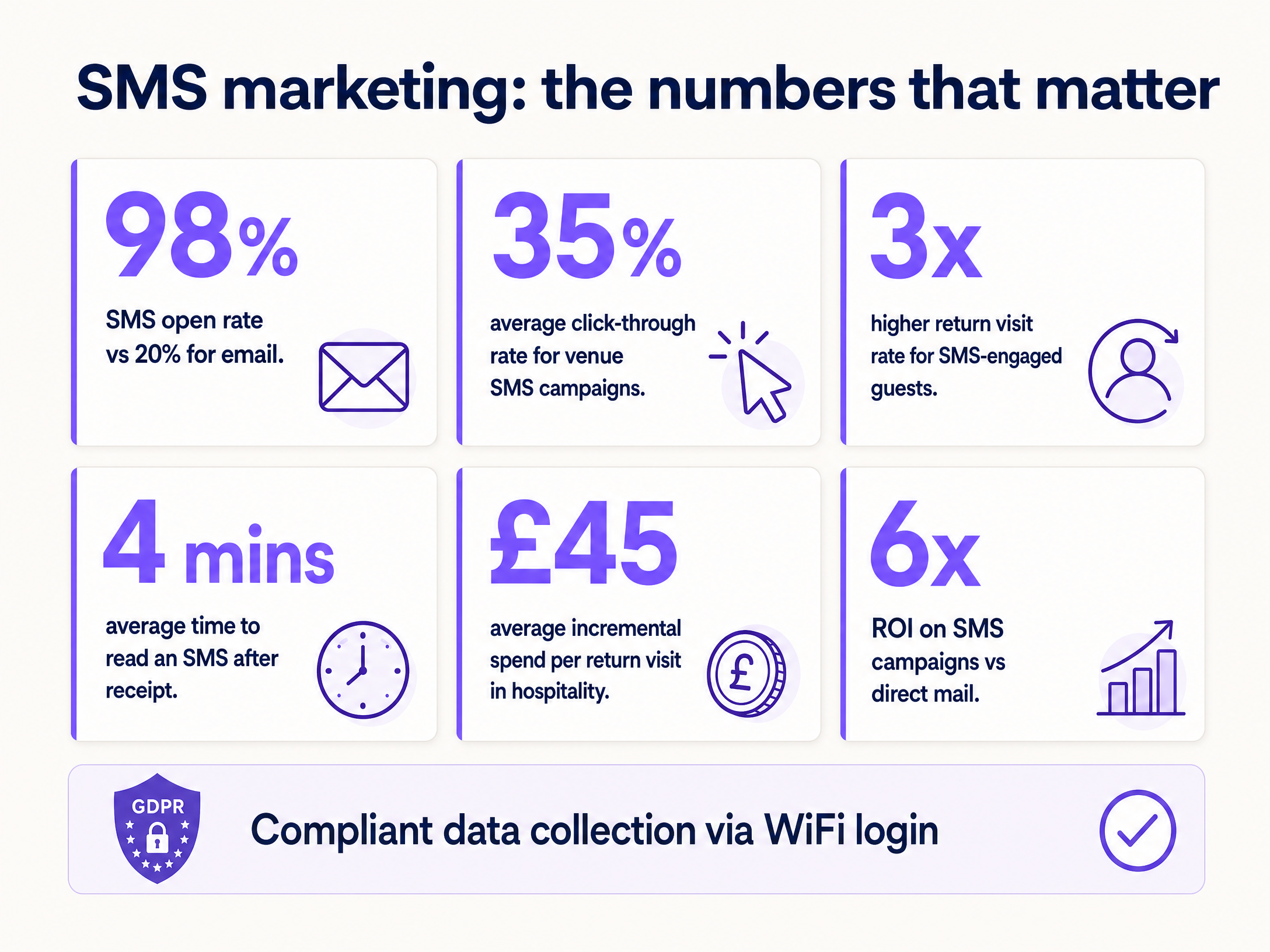
SMS marketing with WiFi-captured data is the most direct re-engagement channel available to venue operators today. SMS carries a 98% open rate - nearly five times that of email - and the average message is read within four minutes of receipt (GSMA, 2024). For hotels, retail chains, stadiums, and conference centres, that immediacy translates directly into return visits and incremental revenue.
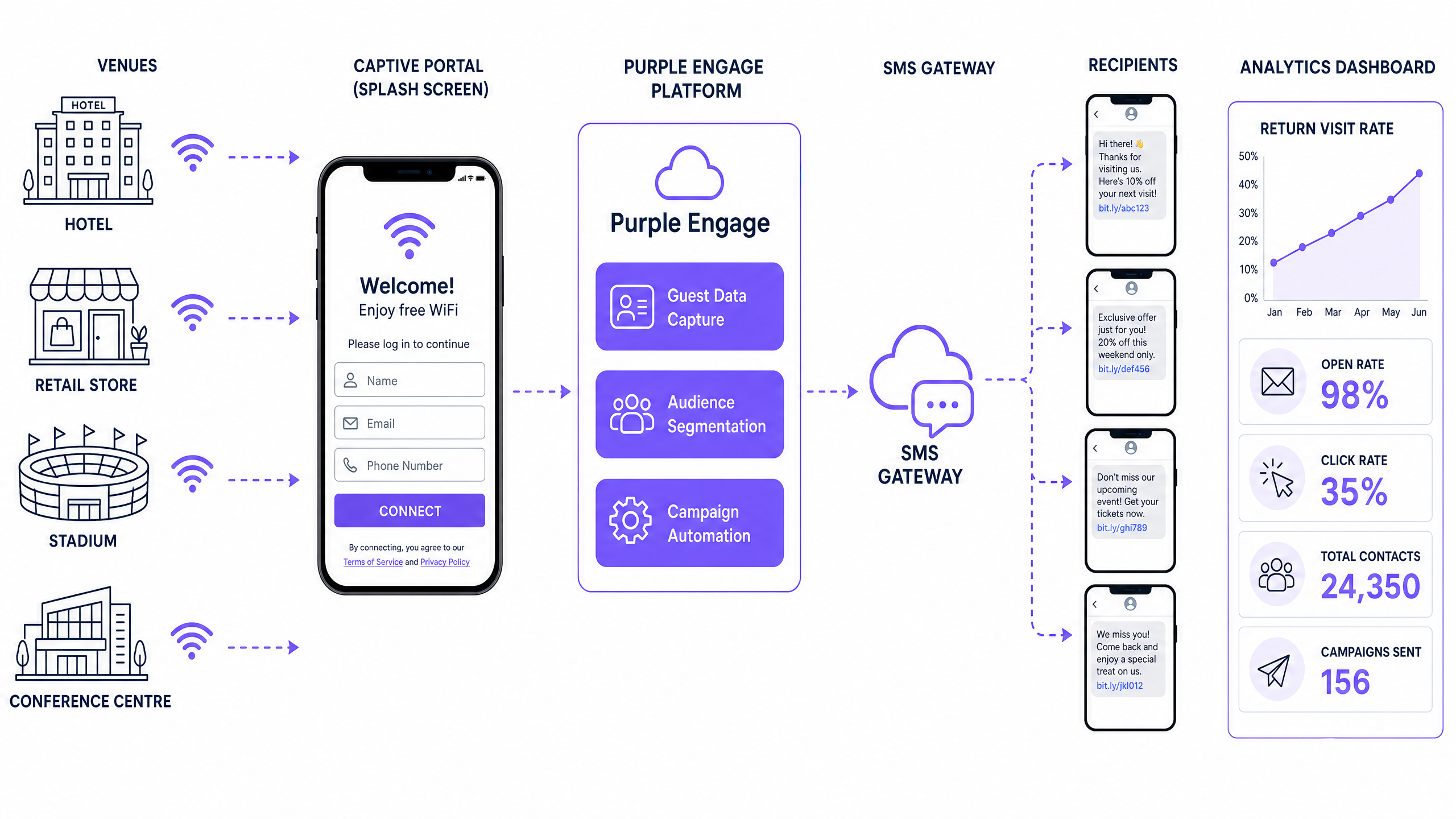
The architecture is straightforward. Purple Engage captures verified mobile numbers and explicit marketing consent at the WiFi login stage. It segments those contacts by physical presence behaviour - dwell time, visit frequency, days since last visit - and automates personalised SMS campaigns via integrated gateways including Twilio and Sinch. The result is a continuously running, compliant re-engagement engine that requires no manual intervention once configured.
This guide covers the full deployment: network configuration, portal design, OTP verification, consent mechanics, gateway integration, campaign logic, and ROI measurement. It is written for the IT manager or marketing director who needs to make a deployment decision this quarter.
Technical deep-dive
The data capture layer
The foundation of any SMS marketing programme is a clean, verified database of opted-in mobile numbers. Guest WiFi is the most effective mechanism to build that database at scale. Purple operates across 80,000+ live venues and has processed 440 million logins in 2024 (Purple internal data), making it the most proven platform for first-party data capture in physical venues.
When a guest connects to your SSID, the network controller - Cisco Meraki, HPE Aruba, Ruckus, Juniper Mist, Ubiquiti UniFi, Cambium, Extreme, or Fortinet - redirects the device's browser to a captive portal. Purple Engage serves this portal and presents a login form. You configure the form to require a mobile number field alongside the standard email and name fields.
OTP verification: the non-negotiable step
Collecting a phone number is not the same as verifying it. Without verification, a significant proportion of users will enter incorrect or fictitious numbers to bypass the login. Your database degrades rapidly, and your first SMS campaign will bounce at rates exceeding 40%.
SMS One-Time Passcode (OTP) verification solves this. When the user submits their mobile number, Purple Engage fires a six-digit code to that number via the configured SMS gateway. The user must enter the code correctly before the portal grants internet access. This single step ensures every number in your database corresponds to a device the user actually controls. It also creates a stronger implicit association between the user's identity and their device - valuable for attribution when they return.
Consent architecture
GDPR (Regulation (EU) 2016/679) and CCPA (California Consumer Privacy Act, 2018) both require explicit, informed consent for direct marketing communications. The consent mechanism on your captive portal must meet these standards:
- A separate, unticked checkbox specifically for SMS marketing communications.
- Clear language describing what the user is consenting to.
- A link to your privacy policy.
- No bundling of marketing consent with the terms of service.
Purple Engage logs the consent timestamp, the exact consent text displayed, and the user's IP address for each opt-in. This audit trail is your evidence in the event of a regulatory inquiry. Purple holds ISO 27001 certification and is GDPR and CCPA compliant.
Gateway integration and delivery architecture
Purple Engage integrates with SMS gateways via REST API. When a campaign triggers, Purple compiles the segmented audience list and pushes the message payload to the gateway. The gateway handles telecommunications routing, delivery receipts, and opt-out management.
Critically, opt-out processing must be bidirectional. When a user replies STOP to your SMS, the gateway fires a webhook to Purple Engage, which immediately updates the contact's marketing status to opted-out. This sync must be tested regularly. A broken webhook means you risk sending to opted-out contacts - a direct regulatory breach under both GDPR and the UK Privacy and Electronic Communications Regulations (PECR).
Implementation guide
Phase 1: Network configuration
Before you can capture any data, your network must be configured to route unauthenticated traffic to the Purple captive portal.
- SSID provisioning. Create a dedicated guest SSID on your access points. Isolate this SSID from your corporate and staff networks using VLAN segmentation.
- Controller configuration. In your network controller (e.g., Cisco Meraki dashboard), set the captive portal type to 'External captive portal' and enter the Purple portal URL.
- Walled garden. Whitelist the Purple portal domains and your SMS gateway's domains in the walled garden settings. This allows the portal to load and the OTP SMS to be sent before the user authenticates.
- RADIUS accounting. Configure RADIUS accounting to point at Purple's cloud servers. This enables Purple to track session start and end times, which feeds directly into dwell time calculations.
Phase 2: Portal design and data capture
- Form fields. In Purple Engage, configure the login form to include: First Name, Email Address, Mobile Number (required), and Marketing Consent checkbox (unticked by default).
- OTP activation. Enable SMS OTP verification in the portal settings. Select your configured SMS gateway as the OTP delivery method.
- Branding. Customise the portal with your venue branding. A well-designed portal increases opt-in rates. See our guide on how to make a great first impression with your guest WiFi for design principles that increase conversion.
- Testing. Before go-live, test the full flow: connect a device, complete the form, receive the OTP, verify, and confirm internet access is granted. Verify the contact appears in Purple Engage with the correct consent status.
Phase 3: Audience segmentation
Purple Engage segments contacts based on the physical presence data generated by the WiFi network. The key segmentation attributes are:
| Attribute | Description | Campaign use case |
|---|---|---|
| Last Seen | Date of most recent WiFi connection | Win-back campaigns for lapsed visitors |
| Visit Count | Total number of authenticated sessions | Loyalty tier targeting |
| Dwell Time | Average session duration in minutes | In-venue, time-sensitive offers |
| First Visit Date | Date of first authenticated session | New visitor onboarding sequences |
| Location | Specific venue or zone within a multi-site estate | Location-specific offers |
Phase 4: Campaign automation
With clean data and defined segments, you can build automated campaigns in Purple Engage.
- Define the trigger. Select the physical event that fires the campaign. Examples: 'Last Seen = 30 days ago', 'Currently connected with dwell time > 60 minutes', 'First visit today'.
- Set the schedule. For time-sensitive in-venue campaigns, set a specific send time (e.g., 2:30 PM daily). For lifecycle campaigns, set the trigger to evaluate daily.
- Write the message. Keep the message under 160 characters to avoid multi-part billing. Include the guest's first name for personalisation, a clear offer, and an opt-out instruction (e.g., 'Reply STOP to unsubscribe').
- Configure frequency capping. Set a maximum of two marketing SMS messages per contact per month to prevent fatigue and opt-out spikes.
- A/B testing. Split your audience and test two message variants. Purple Engage tracks delivery, click-through, and conversion rates for each variant.
Best practices
Timing and relevance
The single biggest driver of SMS campaign performance is timing. An offer sent at the right moment - when the guest is present, engaged, and in a position to act - will outperform a better-worded offer sent at the wrong time by a factor of three or more (Purple internal campaign data, 2024).
For in-venue campaigns, trigger on current presence. For win-back campaigns, Thursday and Friday afternoon sends consistently outperform other days for retail and hospitality verticals, as guests are planning their weekend activity.
Personalisation beyond the first name
First-name personalisation is table stakes. Use the location data available in Purple Engage to reference the specific venue or zone. For a multi-site retail chain, 'Hi Sarah, your nearest store on Market Street has a new offer' outperforms a generic 'Hi Sarah, we have a new offer' by a measurable margin.
Frequency discipline
SMS is an intimate channel. It arrives in the same inbox as messages from family and colleagues. Exceeding two marketing messages per month per contact will drive opt-out rates above 15% (industry benchmark, Mobile Marketing Association, 2023). Once a contact opts out, you cannot re-engage them via SMS. Protect your database by treating frequency as a hard constraint, not a guideline.
Multi-channel coordination
SMS and email serve different purposes in the marketing mix. Use SMS for time-sensitive, high-priority messages where immediacy matters. Use email for longer-form content, newsletters, and campaigns where rich media adds value. Purple Engage manages both channels from the same contact database, so you can coordinate sequences - for example, an email announcing a sale followed by an SMS reminder on the final day.
Troubleshooting and risk mitigation
High bounce rates
Symptom: Your SMS gateway reports delivery failure rates above 5%.
Cause: Invalid phone numbers in the database, almost always caused by users entering fictitious numbers during WiFi login.
Fix: Enable SMS OTP verification on the captive portal immediately. Audit your existing database by running a bulk number validation check via your SMS gateway's API. Remove invalid numbers before your next campaign send.
Low opt-in rates
Symptom: Fewer than 20% of authenticated users are opting in to SMS marketing.
Cause: Poor portal design, unclear consent language, or too many required fields creating friction.
Fix: Reduce the number of required fields. Make the marketing consent checkbox visible and explain the benefit clearly (e.g., 'Tick to receive exclusive offers'). A/B test portal designs in Purple Engage. A well-optimised portal should achieve 40-60% opt-in rates.
Opt-out webhook failures
Symptom: Contacts who have replied STOP are still receiving messages.
Cause: The webhook between your SMS gateway and Purple Engage is broken or misconfigured.
Fix: Test the opt-out webhook monthly. Send a test message to a controlled number, reply STOP, and verify the contact's status updates in Purple Engage within five minutes. Set up monitoring alerts on the webhook endpoint.
GDPR compliance gaps
Symptom: You cannot produce a consent record for a specific contact when requested by a data subject or regulator.
Cause: Consent was collected outside Purple Engage (e.g., via a paper form or a third-party system) and not imported with the correct metadata.
Fix: Centralise all consent collection through Purple Engage. For any legacy data imported from external systems, verify that the consent records meet GDPR standards before sending. When in doubt, re-obtain consent via a clean opt-in campaign.
-
ROI and business impact
The business case for SMS marketing via WiFi data capture is direct and measurable. The key metric is the Return Visit Rate - the percentage of unique visitors who return to the venue within a defined period.
To calculate ROI:
- Establish a baseline. Before launching SMS campaigns, measure your current Return Visit Rate for a 90-day cohort.
- Run a controlled campaign. Send SMS campaigns to 50% of your opted-in contacts. Hold the other 50% as a control group.
- Measure the delta. After 90 days, compare the Return Visit Rate of the messaged group against the control group.
- Calculate revenue impact. Multiply the incremental return visits by your average transaction value.
For a hotel operating at 200 rooms, a 5% increase in return visit rate among SMS-engaged guests - a conservative estimate based on Purple's deployment data across the hospitality vertical - translates to tens of thousands of pounds in incremental annual revenue, depending on average daily rate.
For retail, the calculation is similar. A regional retail chain with 50,000 opted-in contacts and an average basket value of £45 can attribute direct revenue to each percentage point improvement in return visit rate.
Purple's WiFi Analytics dashboard provides the data to run this analysis directly, without requiring a separate BI tool or data export. The Return Visit Rate metric is calculated automatically based on MAC address reconnection events.
For further reading on related deployment topics, see our guides on Guest WiFi architecture and our industry-specific implementations for Retail , Hospitality , Healthcare , and Transport venues.
Key Definitions
Captive portal
A web page presented to a user before they gain access to a public WiFi network. It is the primary mechanism for capturing guest data, displaying terms of service, and collecting marketing consent.
IT teams encounter this when configuring network controllers (e.g., Cisco Meraki, HPE Aruba). The captive portal URL is entered in the controller's external portal settings. Purple Engage serves and manages the portal content.
SMS OTP (One-Time Passcode)
A unique, time-limited numeric code sent via SMS to verify that the user controls the mobile number they provided. The user must enter the code correctly to complete the login process.
Critical for database hygiene. Without OTP verification, users can enter fictitious numbers to bypass the login, resulting in high SMS bounce rates and wasted campaign budget.
SMS gateway
A telecommunications service that enables computer systems to send and receive SMS messages via the mobile network. Examples include Twilio and Sinch.
Purple Engage integrates with SMS gateways via REST API. The gateway handles delivery, receipt confirmation, and opt-out (STOP) processing. Gateway costs are typically charged per message segment.
Dwell time
The duration a device remains authenticated on the WiFi network during a single session, measured in minutes.
A key segmentation attribute in Purple Engage. High dwell time indicates a settled, engaged visitor who is more likely to respond to an in-venue offer. Used to trigger real-time campaigns.
MAC address
A unique hardware identifier assigned to a network interface. Used by the WiFi network to track device presence before and after authentication.
Purple uses MAC address data to calculate return visit rates and dwell time. When the same MAC address reconnects after an absence, it triggers lifecycle campaigns such as win-back messages.
Return Visit Rate
The percentage of unique authenticated users who visit the venue more than once within a defined measurement period.
The primary KPI for measuring SMS campaign effectiveness. Calculated automatically in Purple's WiFi Analytics dashboard. Compare the rate between messaged and control groups to isolate campaign ROI.
Opt-in rate
The percentage of users who complete the WiFi login and explicitly tick the marketing consent checkbox.
A direct measure of captive portal design quality. A well-optimised portal achieves 40 - 60% opt-in rates. Below 20% indicates friction in the form design or unclear consent language.
PECR (Privacy and Electronic Communications Regulations)
UK regulations (SI 2003/2426, amended) governing direct marketing via electronic means, including SMS. Require prior consent for marketing messages to individuals.
Applies to all SMS marketing campaigns targeting UK residents. Works alongside GDPR. Failure to comply can result in ICO enforcement action and fines up to £500,000.
Walled garden
A list of domains or IP addresses that a network controller allows unauthenticated devices to access before completing the captive portal login.
IT teams must whitelist the Purple portal domains and the SMS gateway domains in the walled garden. Without this, the captive portal will not load and OTP messages cannot be sent.
Frequency capping
A campaign setting that limits the maximum number of marketing messages a single contact can receive within a defined time period.
Set in Purple Engage at the campaign or account level. Recommended maximum: two SMS marketing messages per contact per month. Prevents opt-out spikes caused by over-messaging.
Worked Examples
A 200-room hotel wants to increase food and beverage revenue during the quiet mid-afternoon period. They currently offer free WiFi but do not capture phone numbers or run any SMS campaigns.
Step 1: Update the captive portal in Purple Engage to require a mobile number field and enable SMS OTP verification. Set the marketing consent checkbox to unticked by default with clear language: 'Tick to receive exclusive offers and promotions from the hotel.' Step 2: Create an audience segment targeting guests currently authenticated on the network with a dwell time exceeding 60 minutes. This identifies guests who are settled in the hotel and likely to respond to an on-site offer. Step 3: Configure an automated SMS campaign with a 2:30 PM daily trigger: 'Hi [First Name], enjoy a free coffee with any pastry at the lobby lounge today. Show this text to redeem. Reply STOP to opt out.' Keep the message under 160 characters. Step 4: Configure a unique redemption code per campaign send so the point-of-sale team can log redemptions. Step 5: After 30 days, compare the average afternoon F&B revenue on days the campaign ran against the prior 30-day baseline.
A retail chain with 120 stores wants to re-engage shoppers who have not visited any store in 90 days. They have 50,000 verified, opted-in mobile numbers in Purple Engage collected over the past 18 months.
Step 1: Build a dynamic audience segment in Purple Engage with the filter: 'Last Seen date is 90 days ago AND Marketing Consent = True AND Opt-Out Status = Active'. Step 2: Set the segment to evaluate daily so the campaign continuously catches new contacts as they hit the 90-day threshold. Step 3: Craft the win-back SMS: 'Hi [First Name], we miss you. Come back to any of our stores this weekend for 20% off your entire purchase. Use code RETURN20. Reply STOP to opt out.' Step 4: Configure a frequency cap to ensure no contact receives more than one win-back message per 90-day period. Step 5: Track redemptions via the RETURN20 code in the point-of-sale system. Cross-reference with Purple Engage analytics to confirm the Return Visit Rate delta between the messaged cohort and the control group.
Practice Questions
Q1. You manage IT for a stadium with 40,000 capacity. During a major event, you want to send an SMS promoting merchandise discounts to fans currently in the venue. Your SMS gateway budget allows for 10,000 messages per event. How do you identify the right audience and configure the trigger?
Hint: Consider which segmentation attributes confirm physical presence at the time of send, and how to prioritise within the budget constraint.
View model answer
Build a segment in Purple Engage filtering for contacts currently authenticated on the network with a dwell time greater than 30 minutes and a valid marketing consent flag. This confirms the fan is physically present and settled - not someone who briefly connected while walking past. If the segment exceeds 10,000 contacts, prioritise by visit count (fans who have attended multiple events are higher-value targets). Set the campaign to trigger at a specific time during the event - for example, 30 minutes after kick-off when attendance is at peak. Include a short-code redemption URL pointing to the merchandise store.
Q2. After launching a new captive portal requiring phone numbers, your marketing team reports a 42% SMS bounce rate on their first campaign send. What is the most likely root cause, and what is the immediate fix?
Hint: Focus on the data collection step, not the campaign configuration.
View model answer
The high bounce rate indicates users are entering fictitious or incorrect phone numbers during the WiFi login to bypass the form. The immediate fix is to enable SMS OTP verification on the captive portal in Purple Engage. Users will not receive internet access until they verify the number with a six-digit code. Before the next campaign send, run a bulk number validation check via the SMS gateway API and remove invalid numbers from the database. Going forward, the OTP step will prevent invalid data from entering the system.
Q3. A retail client using Cisco Meraki hardware wants to send a 'Welcome Back' SMS to returning shoppers within five minutes of them entering the store. They want this to work even if the shopper does not actively open their browser to log in. Is this achievable, and if so, how?
Hint: Consider the difference between device detection and authenticated session events in the network.
View model answer
Yes, this is achievable using MAC address presence detection rather than waiting for an authenticated session. Cisco Meraki access points detect and log device MAC addresses as soon as the device probes the network - before the user opens a browser. Purple can receive these presence events via the Meraki Scanning API. Configure a trigger in Purple Engage based on the 'Device Seen' event for a known MAC address (i.e., a returning visitor whose MAC is already in the database), with a five-minute delay to confirm the device is settled in the venue rather than passing by. This fires the SMS without requiring the user to complete the captive portal login on that visit.
Q4. You are deploying SMS marketing across a 50-site retail chain. Each site has a different local offer. How do you manage campaign personalisation at scale without creating 50 separate campaigns?
Hint: Think about how Purple Engage uses location attributes in segmentation and message templates.
View model answer
Use Purple Engage's location-based segmentation and dynamic message variables. Configure each venue as a named location in the platform. Build a single campaign template using dynamic variables: 'Hi [First Name], your [Location Name] store has a special offer this weekend: [Offer Text]. Reply STOP to opt out.' Create a single audience segment that includes all opted-in contacts, with the location variable populated automatically based on the venue where the contact last authenticated. The campaign runs once but delivers a personalised, location-specific message to each contact. Review the offer text for each location in the campaign configuration, but manage the delivery logic centrally.