
Come Risolvere il WiFi Lento Senza Aggiornare il Tuo Piano Internet
Una guida tecnica di riferimento completa per IT managers e network architects sull'ottimizzazione delle prestazioni WiFi aziendali senza aumentare la ISP bandwidth. Copre RF tuning, la gestione della densità dei client, l'implementazione di QoS e come sfruttare WiFi analytics per diagnosticare e risolvere i colli di bottiglia.
Ascolta questa guida
Visualizza trascrizione del podcast
Riepilogo Esecutivo
Per i CTO e i direttori delle operazioni di sede che gestiscono ambienti ad alta densità in Hospitality , Retail e Transport , il WiFi lento è un rischio critico per l'esperienza del cliente e l'efficienza operativa. L'istinto immediato è spesso quello di aggiornare la ISP connection sottostante. Tuttavia, nella stragrande maggioranza delle enterprise deployments, la internet pipe è raramente il collo di bottiglia. La causa principale delle scarse prestazioni risiede tipicamente nell'ambiente locale a radiofrequenza (RF), nella configurazione subottimale degli access point (AP) o nella gestione inadeguata della client density.
Questa guida fornisce un framework tecnico, vendor-neutral, per diagnosticare e risolvere i colli di bottiglia della rete locale. Implementando una corretta pianificazione dei canali, applicando le politiche di Quality of Service (QoS), gestendo il comportamento di roaming e sfruttando WiFi Analytics , i team IT possono migliorare drasticamente il throughput e ridurre la latenza senza incorrere in costi ISP mensili aggiuntivi. Questo approccio non solo estende il ciclo di vita dell'hardware esistente, ma garantisce anche la conformità agli standard di protezione dei dati durante l'implementazione di soluzioni Guest WiFi .
Approfondimento Tecnico
Interferenza RF e Sovrapposizione dei Canali
La causa più diffusa di WiFi lento è l'interferenza co-canale (CCI). Lo standard IEEE 802.11 detta un protocollo listen-before-talk (CSMA/CA). Quando più AP operano sullo stesso canale o su canali sovrapposti, devono attendere che l'airtime sia libero prima di trasmettere. Questa contesa riduce drasticamente il throughput aggregato.
Nella 2.4 GHz band, solo i canali 1, 6 e 11 non si sovrappongono. Affidarsi agli algoritmi predefiniti di assegnazione automatica dei canali spesso porta a selezioni di canali sovrapposti, specialmente in dense deployments.
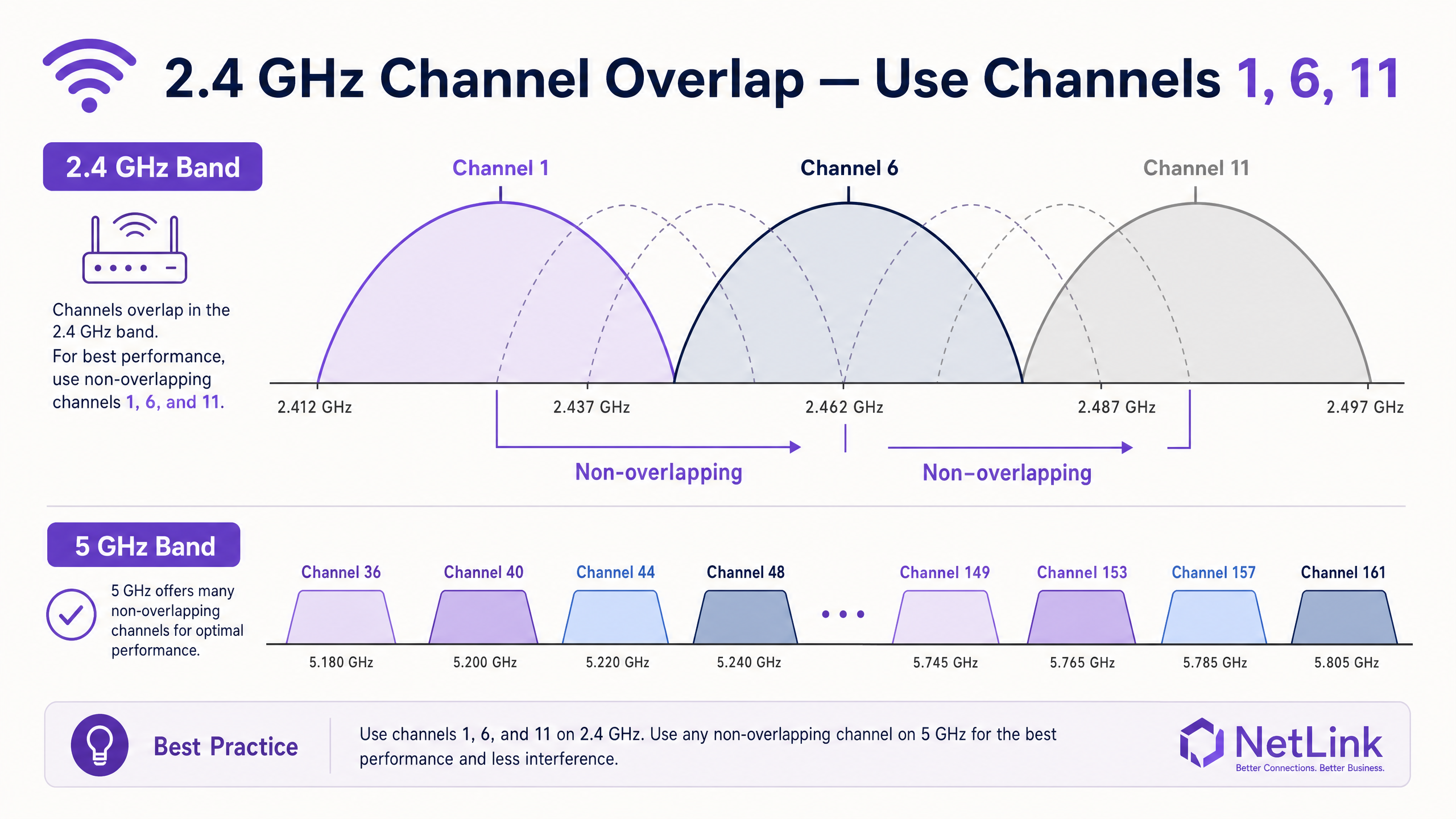
La migrazione dei client alla 5 GHz band è essenziale. Lo spettro a 5 GHz offre fino a 24 canali non sovrapposti (inclusi i DFS channels nel Regno Unito), riducendo significativamente la CCI. Gli enterprise controllers dovrebbero essere configurati con band steering aggressivo per forzare i client compatibili sulla radio a 5 GHz.
Densità dei Client e Equità dell'Airtime
Il WiFi è un mezzo condiviso. Un AP valutato per 1.2 Gbps di throughput aggregato avrà difficoltà se costretto a servire 100 client contemporaneamente. Inoltre, i client legacy che operano a basse data rates (ad esempio, 1 Mbps o 2 Mbps) consumano una quantità sproporzionata di airtime per trasmettere la stessa quantità di dati di un moderno Wi-Fi 6 client.
Per affrontare questo problema, gli amministratori devono disabilitare le data rates legacy. Impostando la data rate minima obbligatoria a 12 Mbps o 24 Mbps, i client legacy sono costretti ad associarsi a una velocità superiore o a disconnettersi, liberando airtime per dispositivi più veloci. Questo principio di airtime fairness è critico in ambienti ad alta densità come centri congressi e stadi.
Guida all'Implementazione
1. Baseline e Audit
Prima di implementare le modifiche, stabilire una baseline delle prestazioni. Utilizzare The Best WiFi Analyzer Tools for Troubleshooting Channel Overlap per mappare l'attuale RF environment. Documentare l'utilizzo del canale, il signal-to-noise ratio (SNR) e il posizionamento degli AP esistenti.
2. RF Tuning
- Assegnazione Statica dei Canali: Assegnare manualmente canali non sovrapposti (1, 6, 11) sulla 2.4 GHz band in base al vostro site survey.
- Riduzione della Potenza di Trasmissione: In dense deployments, ridurre la potenza di trasmissione (Tx) delle radio a 2.4 GHz. Questo riduce la cella di copertura di ogni AP, diminuendo la sovrapposizione e la CCI. Le radio a 5 GHz possono tipicamente operare a una Tx power più elevata a causa della maggiore attenuazione dei segnali a 5 GHz.
- Disabilitare le Tariffe Legacy: Rimuovere il supporto per le 802.11b rates (1, 2, 5.5, 11 Mbps) per migliorare l'efficienza complessiva della cella.
3. Prioritizzazione del Traffico (QoS)
Implementare Quality of Service (QoS) per proteggere le applicazioni sensibili alla latenza. Senza QoS, un singolo utente che scarica un file di grandi dimensioni può interrompere le chiamate VoIP o le POS transactions attraverso l'intero BSSID.
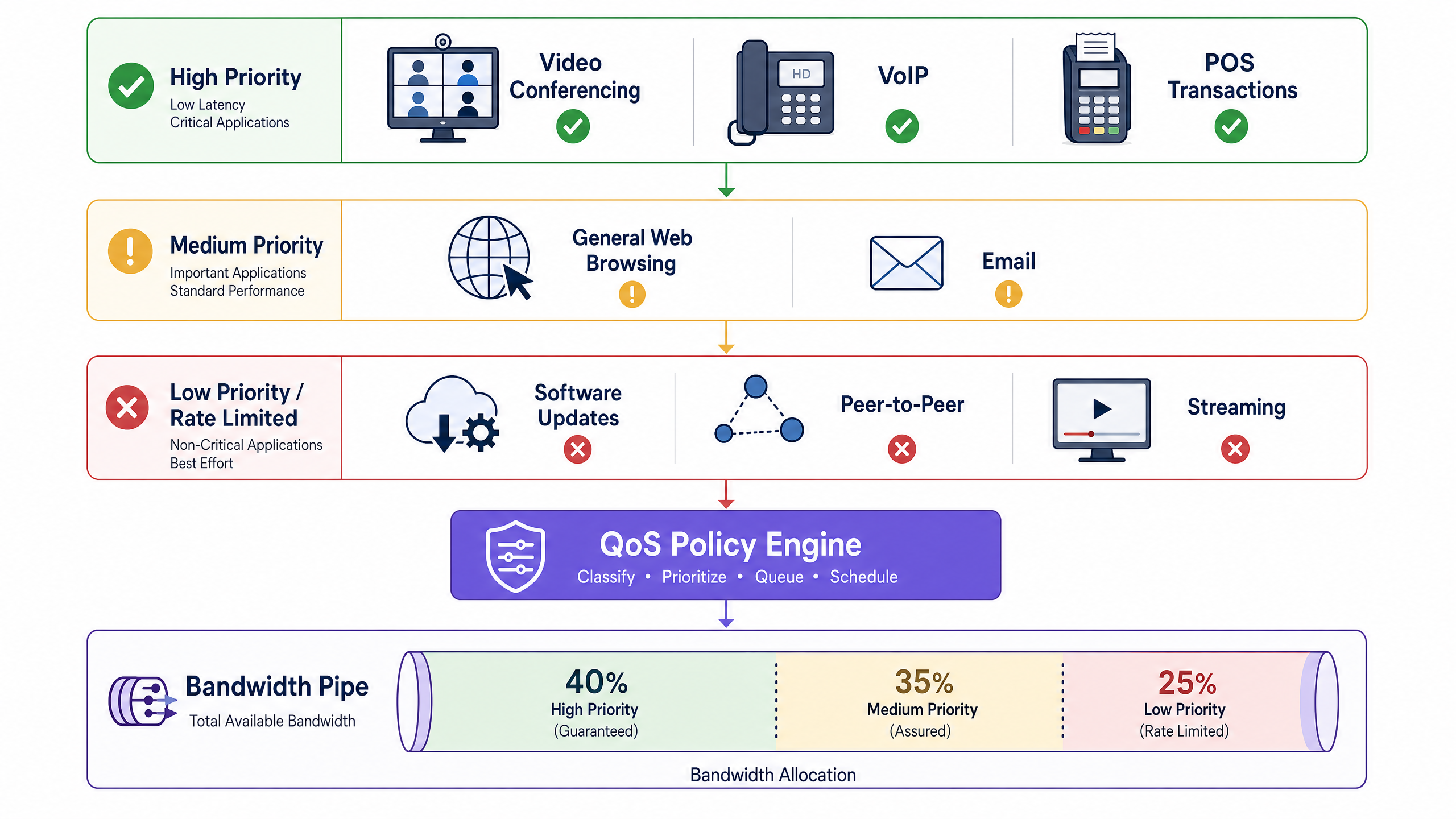
Configurare le marcature DSCP (Differentiated Services Code Point) a livello di controller per classificare il traffico in tre livelli:
- Alta Priorità (Garantita): VoIP, Video Conferencing, POS systems.
- Media Priorità (Assicurata): Navigazione web generale, email, applicazioni aziendali.
- Bassa Priorità (Limitata in Velocità): Peer-to-peer, aggiornamenti software, download di grandi media.
4. Ottimizzazione del Roaming
I client "sticky" — dispositivi che si aggrappano a un segnale AP debole piuttosto che passare a un AP più vicino e più forte — degradano le prestazioni per l'intera cella. Abilitare la 802.11 RRM suite (802.11r, 802.11k e 802.11v) sul vostro controller. Questi standard facilitano la fast BSS transition e forniscono ai client rapporti sui vicini, incoraggiandoli a effettuare il roaming in modo proattivo.
Best Practices
- Razionalizzazione degli SSID: Ogni SSID broadcast comporta un overhead di frame di gestione (beacon). Limitare il numero di SSID broadcast a un massimo di tre o quattro per AP. Utilizzare il VLAN tagging per segmentare il traffico dinamicamente (ad esempio, tramite 802.1X RADIUS attributes) piuttosto che creare SSID separati per diversi gruppi di utenti.
- Sicurezza e Conformità: Durante l'implementazione di reti pubbliche, garantire la conformità con PCI DSS e GDPR. Passare a WPA3-Enterprise o utilizzare metodi di autenticazione sicuri basati su profilo come How a wi fi assistant Enables Passwordless Access in 2026 mitiga i rischi migliorando l'esperienza utente.
- Monitoraggio Continuo: Implementare un livello di analisi indipendente dall'hardware. Le piattaforme che offrono una visibilità approfondita sulla durata delle sessioni, la densità dei client e l'analisi spaziale consentono ai team IT di identificare proattivamente i colli di bottiglia. Per grandi sedi, l'integrazione di Purple Launches Offline Maps Mode for Seamless, Secure Navigation to WiFi Hotspots può migliorare ulteriormente l'esperienza del visitatore fornendo al contempo dati di localizzazione preziosi.
Risoluzione dei Problemi e Mitigazione dei Rischi
- Rilevamento Radar DFS: Quando si utilizzano canali DFS a 5 GHz, gli AP devono rilevare le firme radar. Se viene rilevato un radar, l'AP cambierà immediatamente canale, disconnettendo temporaneamente i client. In ambienti vicini ad aeroporti o stazioni meteorologiche, potrebbe essere necessario escludere specifici canali DFS dal piano dei canali.
- Esaurimento del Budget PoE: Gli AP moderni Wi-Fi 6 e Wi-Fi 6E spesso richiedono PoE+ (802.3at) o PoE++ (802.3bt). Se collegato a uno switch 802.3af più vecchio, l'AP potrebbe avviarsi ma operare con radio disabilitate o potenza Tx ridotta. Verificare sempre il budget PoE dello switch rispetto ai requisiti dell'AP.
- Colli di Bottiglia Uplink: Assicurarsi che le porte dello switch che collegano gli AP negozino a velocità Gigabit o Multi-Gigabit complete. Un cavo difettoso che causa la negoziazione di una porta a 100 Mbps rallenterà gravemente un AP ad alta capacità.
ROI e Impatto sul Business
L'ottimizzazione dell'ambiente RF locale offre un ROI immediato e misurabile. Ritardando gli aggiornamenti non necessari della larghezza di banda ISP, le organizzazioni possono reindirizzare l'OPEX verso iniziative IT strategiche.
Inoltre, una rete stabile e ad alte prestazioni è fondamentale per i servizi che generano entrate. Nel commercio al dettaglio e nell'ospitalità, la connettività affidabile consente l'implementazione di applicazioni multimediali avanzate e campagne di marketing mirate. Come evidenziato quando Purple Appoints Iain Fox as VP Growth – Public Sector to Drive Digital Inclusion and Smart City Innovation , un'infrastruttura robusta è il prerequisito per progetti avanzati di smart city e inclusione digitale. Il successo dovrebbe essere misurato non solo dai tempi di ping, ma dall'aumento del tempo di permanenza degli utenti, da tassi di conversione più elevati sui captive portals e dalla riduzione dei ticket di supporto IT.
Ascolta il Briefing Audio
Per un approfondimento su questi concetti, ascolta il nostro architetto di soluzioni senior illustrare il framework diagnostico e le priorità di implementazione in questo briefing tecnico di 10 minuti.
Definizioni chiave
Co-Channel Interference (CCI)
Interference caused when two or more APs operate on the same channel, forcing them to share the available airtime.
When IT teams encounter high latency despite low user counts, CCI from poorly planned channel assignments or neighbouring networks is usually the cause.
Band Steering
A controller feature that encourages or forces dual-band client devices to connect to the less congested 5 GHz or 6 GHz bands rather than the crowded 2.4 GHz band.
Essential for balancing load across the AP's radios and ensuring modern devices get the throughput they expect.
Airtime Fairness
A mechanism that allocates equal transmission time to all clients, rather than equal packet counts, preventing slow legacy devices from dragging down the performance of the entire network.
Critical in mixed-device environments like public venues, where a single old smartphone can otherwise cripple the AP for everyone else.
Dynamic Frequency Selection (DFS)
A requirement for APs operating on certain 5 GHz channels to detect and avoid interfering with military or weather radar systems.
IT managers must be aware of DFS when designing networks near airports; if radar is detected, the AP must immediately vacate the channel, causing temporary client disconnects.
Minimum Mandatory Data Rate
The lowest speed at which an AP will allow a client to connect. Disabling lower rates (1, 2, 5.5 Mbps) forces clients to use faster modulation schemes or roam to a closer AP.
A primary tool for eliminating 'sticky clients' and improving overall cell efficiency.
802.11r (Fast BSS Transition)
An IEEE standard that allows a client device to roam seamlessly between APs without needing to re-authenticate to the RADIUS server every time.
Vital for maintaining active VoIP calls or video streams as a user walks through a large facility.
Quality of Service (QoS)
Network policies that prioritise certain types of traffic (e.g., voice or POS data) over less critical traffic (e.g., guest downloads).
Necessary to ensure business-critical operations remain stable even when the guest network is heavily utilised.
Spatial Streams
Multiple independent data signals transmitted simultaneously over different antennas (e.g., 2x2, 4x4 MIMO) to increase throughput.
When evaluating AP hardware, higher spatial streams indicate greater capacity to handle dense client environments.
Esempi pratici
A 200-room hotel in a dense urban environment is experiencing severe WiFi complaints during the evening peak (7 PM - 10 PM). The ISP connection is 1 Gbps symmetric, but guest throughput drops below 5 Mbps. The controller shows high channel utilisation on the 2.4 GHz band.
- Conduct an RF survey to identify overlapping APs from neighbouring buildings. 2. Manually assign non-overlapping channels (1, 6, 11) on 2.4 GHz and reduce Tx power by 3-6 dBm to shrink the cell size. 3. Enable aggressive band steering to force 5 GHz-capable devices off the congested 2.4 GHz band. 4. Increase the minimum mandatory data rate to 12 Mbps to prevent sticky legacy clients from consuming excessive airtime. 5. Implement QoS to rate-limit bulk downloads while prioritising streaming and VoIP traffic.
A large retail chain wants to deploy a new POS system over WiFi, but the current network supports 8 different SSIDs (Guest, Staff, IoT, Scanners, Managers, CCTV, HVAC, Vendors). Performance is sluggish even when the store is empty.
Consolidate the SSIDs to a maximum of three: 'Retail-Guest' (Open/Captive Portal), 'Retail-Secure' (802.1X), and 'Retail-IoT' (PSK/MPSK). Use RADIUS attributes via the 802.1X authentication on the 'Retail-Secure' SSID to dynamically assign staff, POS terminals, and managers to their respective VLANs. This drastically reduces the management frame overhead (beacons) that is currently consuming a large percentage of the available airtime.
Domande di esercitazione
Q1. A stadium deployment is experiencing poor throughput in the VIP seating area. The APs are configured to maximum transmit power on both 2.4 GHz and 5 GHz to 'ensure coverage'. What is the likely result of this configuration, and how should it be corrected?
Suggerimento: Consider how clients decide when to roam, and the impact of large coverage cells overlapping.
Visualizza risposta modello
Maximum Tx power creates massive overlapping coverage cells, leading to severe Co-Channel Interference (CCI) and 'sticky clients' that refuse to roam to closer APs because they still hear a strong signal from distant APs. The correction is to significantly reduce the Tx power (especially on 2.4 GHz) to create smaller, non-overlapping micro-cells, forcing clients to roam appropriately and increasing aggregate capacity.
Q2. You are auditing a network with 6 SSIDs broadcast across all APs. The client complains that the network feels 'sluggish' even when only a few users are connected. Why is this happening?
Suggerimento: Think about the management frames that APs must broadcast for every active SSID.
Visualizza risposta modello
Each SSID must broadcast beacon frames (typically every 100ms) at the lowest mandatory data rate. With 6 SSIDs, the management frame overhead is consuming a massive percentage of the available airtime before any actual user data is transmitted. The solution is to consolidate to 3 or fewer SSIDs and use 802.1X/RADIUS to dynamically assign VLANs.
Q3. A school has upgraded to 1 Gbps fibre, but laptops in a classroom with 30 students are struggling to load web pages. The AP is a modern Wi-Fi 6 model. A packet capture shows several legacy 802.11g devices connected. What is the most immediate fix?
Suggerimento: Consider how legacy devices affect the transmission time for the entire BSSID.
Visualizza risposta modello
The legacy 802.11g devices are connecting at very low data rates (e.g., 1 or 2 Mbps) and monopolising the airtime, dragging down performance for the modern Wi-Fi 6 laptops. The immediate fix is to disable legacy data rates by raising the minimum mandatory data rate to 12 Mbps or 24 Mbps, forcing the older devices off the network or requiring them to use faster modulation.