
Comprendere il BSSID e gli algoritmi di selezione del canale
Questa guida di riferimento tecnico autorevole spiega l'architettura BSSID e gli algoritmi di selezione dinamica dei canali per le installazioni wireless aziendali. Offre strategie di implementazione pratiche per architetti IT e team operativi delle strutture per eliminare i client sticky, mitigare l'interferenza co-canale e costruire una base RF resiliente. Un BSSID stabile e un piano dei canali accurato sono anche prerequisiti diretti per un'analisi accurata della posizione e della business intelligence attraverso piattaforme come Purple.
Video overview
Ascolta questa guida
Visualizza trascrizione del podcast
Parte della nostra serie principale: WiFi RF Engineering Guide →

Sintesi Esecutiva
Per i responsabili IT aziendali che gestiscono ambienti complessi - dagli stadi ad alta densità ai vasti campus ospedalieri - la copertura wireless grezza non è più la sfida principale. Nelle moderne distribuzioni wireless, i guasti si verificano prevalentemente ai confini del roaming, guidati principalmente da una scarsa gestione della transizione del BSSID e da un'allocazione dei canali non ottimale.
Questa guida di riferimento tecnica fornisce un'analisi approfondita e neutrale rispetto ai fornitori dei meccanismi dei Basic Service Set Identifier (BSSID) e degli algoritmi di selezione dinamica dei canali. Comprendendo come i dispositivi client interpretano i BSSID e come i controller aziendali gestiscono lo spettro RF, gli architetti IT possono eliminare i "client appiccicosi" (sticky client), ridurre l'interferenza co-canale e garantire un roaming fluido in qualsiasi struttura, indipendentemente dalle dimensioni. Inoltre, una base RF stabile è un prerequisito diretto per estrarre dati di localizzazione precisi tramite WiFi Analytics, con un impatto diretto sulla business intelligence e sul ROI. Che si gestisca una catena alberghiera, un patrimonio retail o una struttura del settore pubblico, i principi di questa guida sono applicabili universalmente.
Approfondimento Tecnico
Differenze tra BSSID e SSID
Quando un utente si connette alla rete Guest WiFi, vede l'SSID - Service Set Identifier. Questa è l'etichetta leggibile dall'utente trasmessa dalla rete, come "Hotel_Guest" o "RetailWiFi". L'SSID è un identificatore interamente logico. L'effettiva associazione 802.11 avviene a livello fisico con il BSSID.
BSSID (Basic Service Set Identifier) è l'indirizzo MAC della specifica interfaccia radio dell'access point che trasmette quell'SSID. In un ambiente multi-AP, un singolo SSID viene trasmesso da decine o centinaia di BSSID univoci. Un access point a doppia radio che trasmette un SSID presenterà due BSSID distinti - uno per ciascuna banda radio. Un access point Wi-Fi 6E a tripla radio ne presenterà tre.
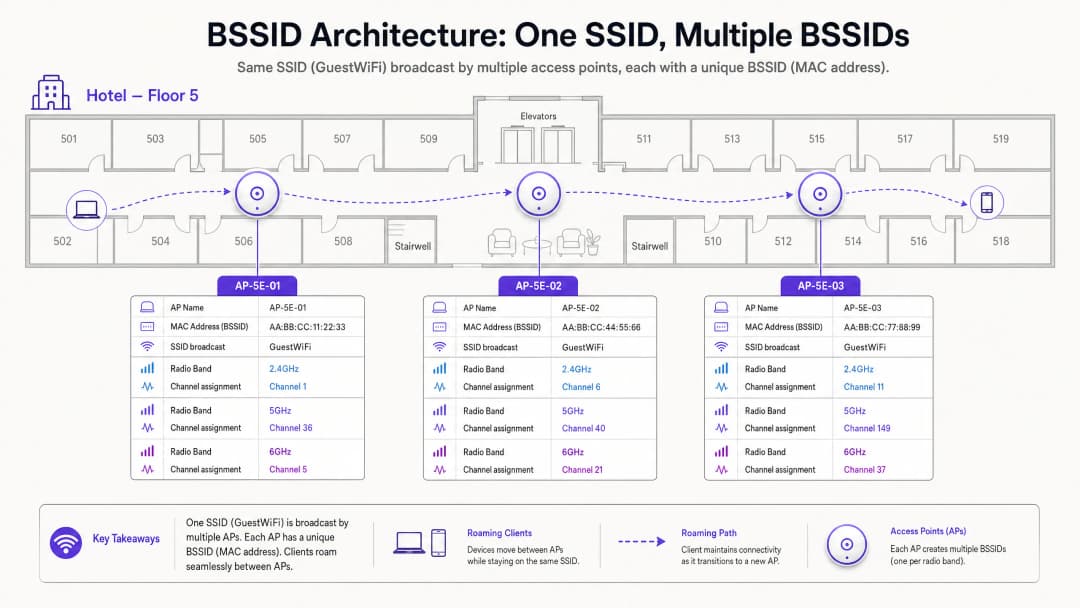
Questa distinzione ha implicazioni operative significative. Quando si risolve un problema di roaming, non si sta esaminando l'SSID - si stanno esaminando le transizioni BSSID. Gli strumenti di diagnostica lato client come wpa_cli su Linux o l'utility di diagnostica wireless di macOS riveleranno lo specifico BSSID (indirizzo MAC) a cui è associato un dispositivo, insieme al canale e al valore RSSI.
Meccanismi di Roaming: Chi ha Veramente il Controllo?
Questo è l'aspetto più frainteso dell'architettura wireless aziendale. Lo standard 802.11 delega la decisione di roaming interamente al dispositivo client. L'infrastruttura di rete non può forzare un client a eseguire il roaming. Può solo influenzare le condizioni che rendono il roaming più o meno probabile.
Un dispositivo client valuta il Received Signal Strength Indicator (RSSI) e il Signal-to-Noise Ratio (SNR) del suo attuale BSSID rispetto ai BSSID vicini. Quando l'attuale BSSID scende al di sotto di una soglia specifica del dispositivo - in genere intorno a -70 dBm per i dispositivi Apple iOS e -75 dBm per molti dispositivi Android - il client avvia una scansione per un BSSID migliore trasmettendo probe request. Gli access point vicini rispondono con probe response. Il client valuta queste risposte e avvia un'autenticazione 802.11 e una riassociazione con il BSSID selezionato.
Se la pianificazione dei canali è scarsa, il client potrebbe risentire dell'interferenza da canale adiacente, che corrompe i beacon frame dei BSSID limitrofi. Ciò porta al fenomeno del "client appiccicoso" (sticky client) - un dispositivo rimane agganciato a un BSSID debole e lontano perché non riesce a sentire chiaramente l'alternativa più forte e vicina. Il risultato è una riduzione della velocità di trasmissione, chiamate VoIP interrotte e sessioni applicative fallite.
Selezione dei canali: Le fondamenta dell'architettura RF
Limitazioni della banda a 2.4 GHz
La banda a 2.4 GHz copre 83.5 MHz di spettro da 2.400 GHz a 2.4835 GHz. Ogni canale 802.11 è largo 20 MHz. A causa della spaziatura di 5 MHz tra le frequenze centrali dei canali, si verifica una sovrapposizione significativa tra canali adiacenti. Nella banda a 2.4 GHz, solo i canali 1, 6 e 11 non si sovrappongono.
L'uso di canali diversi da 1, 6 o 11 nella banda a 2.4 GHz crea interferenza da canale adiacente (ACI). L'ACI è dimostrabilmente peggiore dell'interferenza co-canale (CCI) perché corrompe completamente i pacchetti dati, rendendo necessarie le ritrasmissioni. La CCI, d'altra parte, costringe i dispositivi a condividere il tempo di trasmissione in modo cooperativo tramite CSMA/CA, il che riduce la velocità di trasmissione ma non corrompe i pacchetti. La regola è assoluta: le implementazioni a 2.4 GHz devono utilizzare solo i canali 1, 6 e 11.

Per una comprensione più ampia di come interagiscono le bande di frequenza nei moderni ambienti aziendali, consulta la nostra guida WiFi Frequencies: A Guide to WiFi Frequencies in 2026.
Opportunità a 5 GHz e complicazioni DFS
La banda a 5 GHz offre una quantità di spettro significativamente maggiore. Nei domini normativi del Regno Unito e dell'UE, sono disponibili fino a 19 canali a 20 MHz non sovrapposti tra UNII-1 (5.150 - 5.250 GHz), UNII-2A (5.250 - 5.350 GHz), UNII-2C (5.470 - 5.725 GHz) e UNII-3 (5.735 - 5.835 GHz).
Tuttavia, i canali UNII-2A e UNII-2C rientrano nella gamma DFS (Dynamic Frequency Selection). Questi canali sono condivisi con radar meteorologici, radar militari e sistemi di controllo del traffico aereo. Se un access point rileva un impulso radar su un canale DFS, deve abbandonare immediatamente il canale e rimanere in silenzio su di esso per 30 minuti. Si tratta di un obbligo normativo previsto dallo standard ETSI EN 301 893 in Europa e dalla FCC Part 15 negli Stati Uniti.
Per le sedi vicine ad aeroporti, installazioni militari o stazioni meteorologiche - situazioni comuni nelle installazioni nei settori Hospitality e Transport - gli eventi DFS possono verificarsi più volte al giorno, causando cambi improvvisi di canale degli AP e disconnessioni dei client.
Dynamic Channel Assignment (DCA)
I moderni controller LAN wireless aziendali gestiscono i canali attraverso algoritmi di Dynamic Channel Assignment (DCA). Questi algoritmi valutano costantemente:
| Metrica | Descrizione | Impatto |
|---|---|---|
| Utilizzo del canale | Percentuale di tempo in cui il mezzo è occupato | Un utilizzo elevato attiva la valutazione di un cambio di canale |
| Rumore di fondo | Interferenza RF non-802.11 (Bluetooth, forni a microonde, ecc.) | Un rumore di fondo elevato riduce il rapporto segnale - rumore (SNR) effettivo |
| RSSI AP vicini | Potenza del segnale degli AP sul canale co-canale e adiacente | Una sovrapposizione elevata attiva il ribilanciamento dei canali |
| Evento DFS | Rilevamento radar sul canale corrente | Cambio di canale immediato obbligatorio |
Sebbene la funzionalità DCA sia essenziale per mantenere un ambiente RF ottimale, impostazioni dell'algoritmo troppo aggressive introducono instabilità nella rete. Ogni volta che un AP cambia canale, tutti i client connessi vengono temporaneamente disconnessi e devono riassociarsi. In un centro congressi durante una presentazione principale, o in un punto vendita del settore Retail durante le ore di punta, questo è inaccettabile dal punto di vista operativo.
L'approccio consigliato consiste nel configurare la DCA per l'esecuzione su base programmata - in genere durante una finestra di manutenzione notturna - con una soglia di attivazione del cambio non programmato pari o superiore al 30% di interferenza. Gli eventi obbligatori di elusione del radar DFS rappresentano l'unica eccezione a questa pianificazione.
Hai domande sulla tua configurazione specifica?
Il nostro team collabora con gestori di sedi, responsabili IT e ingegneri di rete in 80.000 sedi. Prenota una chiamata di 20 minuti e ti mostreremo come altri professionisti come te hanno risolto il problema.
Guida all'implementazione
I seguenti passaggi di implementazione, indipendenti dal fornitore, sono applicabili alle installazioni aziendali nei settori Hospitality, Retail, Healthcare e negli ambienti della pubblica amministrazione.
Passo 1 - Disabilitare le velocità di trasmissione legacy. Rimuovere le velocità di trasmissione 802.11b (1, 2, 5.5 e 11 Mbps) da tutti i profili radio degli access point. Queste velocità legacy consumano una quantità sproporzionata di tempo di trasmissione radio e sono una delle cause principali del fenomeno dei client "sticky". Quando vengono disabilitate, la velocità minima di connessione effettiva aumenta, costringendo i client a raggiungere la propria soglia di roaming nella corretta posizione fisica.
Step 2 - Ridurre la potenza di trasmissione dell'AP. L'esecuzione degli AP alla massima potenza di trasmissione (20 dBm) crea celle sovradimensionate e impedisce il corretto roaming BSSID. Ridurre la potenza di trasmissione a 2.4 GHz a 8 - 12 dBm e la potenza di trasmissione a 5 GHz a 12 - 17 dBm, che dovrebbe essere calibrata per corrispondere alla potenza di trasmissione del dispositivo client più debole nel vostro ambiente.
Step 3 - Limitare l'ampiezza del canale. In ambienti ad alta densità, limitare i canali a 5 GHz a 20 MHz. Sebbene il bonding dei canali a 40 MHz e 80 MHz aumenti il throughput teorico del singolo dispositivo, riduce il numero di canali non sovrapposti disponibili e innalza il rumore di fondo, provocando gravi CCI nelle implementazioni dense.
Step 4 - Configurare la finestra di manutenzione DCA. Impostare l'algoritmo DCA del controller per l'esecuzione durante una finestra di manutenzione notturna. Configurare una soglia di interferenza del 30% per i trigger non programmati. Ciò mantiene l'igiene RF prevenendo al contempo variazioni di canale dirompenti durante le ore operative.
Step 5 - Pianificare una strategia di fallback DFS. Per le sedi con vicinanza radar nota, escludere i canali DFS dal pool DCA per gli AP mission-critical. Affidarsi ai canali non-DFS in UNII-1 (36, 40, 44, 48) e UNII-3 (149, 153, 157, 161, 165) come piano di canali primario. Per indicazioni sulla modernizzazione più ampia del controllo degli accessi di rete, consultare La lista de verificación para migrar de NAC heredado a NAC nativo de la nube.
Step 6 - Abilitare il band steering. Configurare il band steering per spingere i client compatibili con dual-band verso la banda a 5 GHz, liberando lo spettro a 2.4 GHz per i dispositivi legacy e le apparecchiature IoT. Per il contesto sulla coesistenza di IoT e BLE in ambienti aziendali, consultare BLE Low Energy Explained for Enterprise.
Best Practices
Le seguenti best practices sono allineate agli standard IEEE 802.11, ai requisiti di certificazione della WiFi Alliance e alle linee guida di implementazione aziendali indipendenti dai fornitori.
Soglia RSSI minima: Configurare gli access point per rifiutare le associazioni da parte di client con un RSSI inferiore a -80 dBm. Ciò impedisce ai client deboli di associarsi ad AP distanti e di consumare tempo di trasmissione a velocità di trasmissione dati basse. La maggior parte dei controller aziendali esprime questo valore come soglia di "RSSI minimo" o "esclusione client".
Transizione rapida BSS 802.11r: Abilitare 802.11r (Fast BSS Transition) su tutti gli SSID che supportano applicazioni vocali o in tempo reale. Questo riduce il tempo di handoff del roaming da 50 - 200 ms (riassociazione standard) a meno di 50 ms, prevenendo la caduta delle chiamate VoIP durante le transizioni BSSID.
Report dei vicini 802.11k e 802.11v: Abilitare 802.11k (Radio Resource Management) e 802.11v (BSS Transition Management) per fornire ai client elenchi di AP vicini e raccomandazioni di transizione. Sebbene il client prenda comunque la decisione finale sul roaming, questi protocolli gli forniscono le informazioni necessarie per effettuare scelte più rapide e informate.
WPA3 e OWE: Per le reti guest, distribuisci WPA3-SAE o Opportunistic Wireless Encryption (OWE) per fornire la crittografia per sessione senza richiedere una password. Questo è in linea con gli obblighi di protezione dei dati del GDPR per i dati dei guest in transito ed è un requisito PCI-DSS per qualsiasi segmento di rete che tratta i dati dei titolari di carta.
Audit RF regolari: Conduci un rilevamento RF passivo ogni 12 mesi o dopo qualsiasi cambiamento fisico significativo nel locale (nuove pareti divisorie, installazione di apparecchiature, riorganizzazione dei mobili). I cambiamenti fisici alterano la propagazione RF e possono invalidare il piano dei canali.
-
Risoluzione dei problemi e mitigazione dei rischi
La trappola del DFS
Nelle distribuzioni per l'hospitality vicino ad aeroporti o stazioni meteorologiche, gli eventi DFS rappresentano un rischio comune e sottovalutato. Quando un AP rileva un radar su un canale DFS, deve abbandonare immediatamente il canale. Se il canale di riserva è assegnato staticamente a una frequenza già congestionata, l'AP attiverà una cascata di CCI sugli AP adiacenti.
Mitigazione: Mantieni un elenco dinamico di canali di riserva sicuri all'interno della configurazione DCA. Prendi in considerazione l'esclusione completa dei canali DFS sugli AP che servono aree critiche come le hall degli hotel, i palchi delle conferenze o le zone dei punti vendita al dettaglio.
La trappola dell'alta potenza
In modo controintuitivo, far funzionare gli AP alla massima potenza di trasmissione è una delle cause più comuni di scarse prestazioni wireless. Gli AP ad alta potenza creano celle grandi con una sovrapposizione significativa, causando CCI e impedendo ai client di passare in roaming all'AP più vicino.
Mitigazione: Implementa il controllo della potenza di trasmissione (TPC) e calibra la potenza degli AP per creare celle che si sovrappongono di circa il 15 - 20% sulla linea di contorno di -67 dBm. Ciò fornisce una copertura trasparente senza interferenze eccessive.
La trappola del canale ampio
Negli ambienti densi, le configurazioni dei canali a 80 MHz o 160 MHz sono spesso raccomandate dai fornitori per massimizzare i benchmark di throughput. In realtà, queste riducono il numero di canali non sovrapposti disponibili nella banda a 5 GHz a 2 - 3, garantendo gravi CCI in qualsiasi installazione con più di una manciata di AP.
Mitigazione: Limita la larghezza del canale a 20 MHz in ambienti ad alta densità. Riserva le configurazioni a 40 MHz o 80 MHz per aree a bassa densità con una significativa separazione fisica tra gli AP.
-
ROI e impatto aziendale
Un ambiente RF pianificato meticolosamente ha un impatto diretto e misurabile sui risultati aziendali in tutti i tipi di locali.
Soddisfazione degli ospiti e ricavi: Negli ambienti dell'hospitality, la qualità del WiFi si colloca costantemente tra i primi tre fattori nei sondaggi sulla soddisfazione degli ospiti. Il roaming BSSID trasparente previene l'interruzione delle videochiamate, i timeout delle applicazioni e le interruzioni dello streaming. Per i gestori di hotel, questo influisce direttamente sui punteggi delle recensioni e sui tassi di prenotazione ripetuta.
Precisione degli Analytics: la piattaforma WiFi Analytics di Purple si basa sulla costante associazione del BSSID dei client per generare conteggi accurati delle presenze, metriche sul tempo di permanenza e mappe di calore a livello di zona. Se i client perdono continuamente le connessioni a causa di interferenze di canale, i dati di associazione sottostanti diventano frammentati e inaffidabili. Un ambiente RF stabile non è solo un requisito di prestazioni - è un requisito di qualità dei dati.
Efficienza Operativa: un piano di canali ben coordinato e una configurazione di roaming riducono significativamente il volume di ticket di assistenza relativi a "WiFi lento" o "disconnessioni continue". Nelle installazioni in grandi spazi, questo può rappresentare una riduzione misurabile dei costi di supporto Tier-1. Per linee guida sull'ottimizzazione delle installazioni su scala aziendale, consulta Office WiFi: Optimize Your Modern Office WiFi Network.
Conformità: una corretta gestione dei canali e gli standard di crittografia (WPA3, 802.1X) supportano direttamente la conformità PCI-DSS per gli operatori del settore retail e hospitality, e la conformità GDPR per qualsiasi organizzazione che elabori dati personali tramite il WiFi per gli ospiti. Un registro di controllo RF documentato supporta inoltre i requisiti di certificazione ISO 27001.
Ascolta il podcast informativo per l'executive board qui sopra per una panoramica di 10 minuti in stile consulenziale sull'architettura BSSID e sulle strategie di selezione dei canali.
Definizioni chiave
BSSID (Basic Service Set Identifier)
L'indirizzo MAC della specifica interfaccia radio su un access point che trasmette un SSID. In una distribuzione multi-AP, ciascuna radio presenta un BSSID univoco, anche quando tutti gli AP trasmettono lo stesso SSID.
I team IT incontrano i BSSID durante la risoluzione dei problemi di roaming, l'analisi dei log di associazione dei client o l'interpretazione dei dati analitici WiFi. La cronologia di associazione dei BSSID di un client rivela il suo percorso di movimento fisico all'interno di una struttura.
SSID (Service Set Identifier)
Il nome della rete leggibile dall'utente trasmesso agli utenti finali (ad es. 'Purple_Guest'). Un singolo SSID è tipicamente supportato da centinaia di BSSID sottostanti in una distribuzione aziendale.
Gli utenti interagiscono con gli SSID; gli ingegneri di rete risolvono i problemi relativi ai BSSID. Confondere i due elementi è la causa più comune di diagnosi errate sul roaming.
Co-Channel Interference (CCI)
Interferenza causata quando due o più access point operanti sullo stesso identico canale di frequenza possono rilevare le rispettive trasmissioni. La CCI costringe gli AP a condividere il tempo di trasmissione radio tramite CSMA/CA.
La CCI è gestibile attraverso la riduzione delle dimensioni delle celle (controllo della potenza di trasmissione). Riduce il throughput in modo proporzionale, ma non corrompe i pacchetti.
Adjacent Channel Interference (ACI)
Interferenza causata quando gli AP operano su canali di frequenza sovrapposti ma differenti (ad es. i canali 1 e 3 nella banda a 2.4 GHz). L'ACI corrompe le trasmissioni di dati, richiedendo ritrasmissioni.
L'ACI è categoricamente peggiore della CCI e deve essere eliminata attraverso una rigorosa pianificazione dei canali. Nella banda a 2.4 GHz, l'uso di qualsiasi canale diverso da 1, 6 o 11 genera ACI.
DFS (Dynamic Frequency Selection)
Un requisito normativo che impone alle apparecchiature WiFi di rilevare i sistemi radar su determinati canali a 5 GHz e di passare immediatamente a un canale non radar. Disciplinato dallo standard ETSI EN 301 893 in Europa e dal regolamento FCC Part 15 negli Stati Uniti.
Gli eventi DFS causano cambi improvvisi di canale degli AP e disconnessioni dei client. Le strutture situate vicino ad aeroporti, stazioni meteorologiche o installazioni militari sono particolarmente sensibili.
RSSI (Received Signal Strength Indicator)
Una misura del livello di potenza di un segnale radio ricevuto, tipicamente espressa in dBm negativi (ad es. -65 dBm). Valori assoluti più elevati (più vicini a 0) indicano segnali più forti.
L'RSSI è la metrica principale utilizzata dai dispositivi client per valutare la qualità del BSSID e attivare le decisioni di roaming. Una soglia di roaming comune è -70 dBm.
SNR (Signal-to-Noise Ratio)
La differenza in dB tra la potenza del segnale ricevuto e il rumore di fondo RF. Un SNR più elevato consente schemi di modulazione di ordine superiore (ad es. 1024-QAM) e un throughput maggiore.
L'SNR è un indicatore di prestazioni più affidabile rispetto all'RSSI puro. Un segnale forte (-60 dBm) in un ambiente ad alto rumore di fondo (-80 dBm) produce un SNR di soli 20 dB, il che limita notevolmente il throughput.
DCA (Dynamic Channel Assignment)
Un algoritmo automatizzato utilizzato dai controller wireless LAN per assegnare e riassegnare periodicamente i canali agli access point in base alle condizioni RF correnti, inclusi l'utilizzo, il rumore di fondo e l'interferenza dei dispositivi vicini.
La DCA deve essere calibrata per evitare cambi di canale eccessivi durante le ore di attività. Impostazioni DCA troppo aggressive causano disconnessioni dei client nell'intera infrastruttura.
Sticky Client
Un dispositivo client che mantiene l'associazione con un BSSID debole e distante invece di effettuare il roaming verso un access point più vicino e potente. Tipicamente causato da celle AP sovradimensionate (elevata potenza di trasmissione) o dall'abilitazione di velocità di trasmissione dati legacy.
Gli sticky client sono la causa più comune di reclami relativi a scarse prestazioni del WiFi nelle sedi aziendali. Consumano un tempo di trasmissione sproporzionato a velocità di trasmissione dati basse, degradando le prestazioni per tutti gli utenti sul canale.
Esempi pratici
Un hotel di lusso con 400 camere riscontra continui reclami per chiamate VoIP interrotte quando il personale si sposta tra la hall e il centro congressi. La rete utilizza un singolo SSID su 150 access point, tutti impostati su una potenza di trasmissione di 20 dBm con velocità di trasmissione dati legacy abilitate.
Fase 1 - Diagnosi: È stata eseguita una cattura dei pacchetti tramite Wireshark nel corridoio interessato. L'analisi ha confermato che i dispositivi rimanevano collegati al BSSID dell'AP della hall fino a quando il segnale non scendeva a -85 dBm - ben oltre il punto in cui l'AP del centro congressi era disponibile a -62 dBm. Causa principale: celle sovradimensionate e velocità di trasmissione dati legacy che consentono associazioni a bassa velocità a distanza.
Fase 2 - Risoluzione:
- Disabilitate le velocità di trasmissione dati legacy 802.11b (1, 2, 5.5, 11 Mbps) su tutti i profili radio degli AP.
- Ridotta la potenza di trasmissione a 2.4 GHz da 20 dBm a 11 dBm sugli AP della hall e dei corridoi.
- Ridotta la potenza di trasmissione a 5 GHz da 20 dBm a 15 dBm.
- Abilitato il Fast BSS Transition 802.11r sull'SSID del personale.
- Verificato che gli AP adiacenti nella zona di transizione utilizzassero canali non sovrapposti (1 e 6 a 2.4 GHz; 36 e 40 a 5 GHz).
Fase 3 - Validazione: Eseguita nuovamente la cattura dei pacchetti dopo le modifiche. I dispositivi ora effettuano il roaming a -68 dBm, ampiamente entro la soglia di qualità VoIP. Il tasso di interruzione delle chiamate si è azzerato nel corridoio interessato.
Una catena di negozi ha distribuito nuovi access point Wi-Fi 6 in un centro commerciale ad alta densità con 40 unità commerciali. Nonostante i valori elevati di potenza del segnale, i clienti e il personale segnalano una latenza enorme e una scarsa velocità di trasmissione, in particolare nella banda a 2.4 GHz.
Fase 1 - Diagnosi: L'analisi dello spettro RF mediante un analizzatore di spettro dedicato ha rivelato gravi interferenze co-canale e da canali adiacenti sulla banda a 2.4 GHz. L'analisi della configurazione del controller ha rivelato che l'algoritmo DCA aveva assegnato i canali 1, 4, 7 e 11 in tutta l'installazione - un piano a quattro canali che introduce interferenze da canali adiacenti tra i canali 1 e 4, e tra 7 e 11.
Fase 2 - Risoluzione:
- Riconfigurato il profilo DCA a 2.4 GHz per utilizzare rigorosamente solo i canali 1, 6 e 11.
- Abilitato il Band Steering per spingere i client compatibili con i 5 GHz (circa l'85% dei dispositivi) lontano dallo spettro congestionato a 2.4 GHz.
- Ridotta la potenza di trasmissione a 2.4 GHz a 10 dBm per ridurre le dimensioni delle celle e limitare la CCI tra unità adiacenti.
- Limitata l'ampiezza del canale a 5 GHz a 20 MHz per massimizzare il riutilizzo dei canali nell'installazione ad alta densità.
Fase 3 - Validazione: L'analisi dello spettro post-modifica ha confermato l'eliminazione delle interferenze da canali adiacenti. La latenza media a 2.4 GHz è scesa da 280 ms a 18 ms. La velocità di trasmissione dei dispositivi del personale è passata da una media di 2 Mbps a 24 Mbps.
Domande di esercitazione
Q1. Stai distribuendo una rete WiFi ad alta densità in uno stadio da 50.000 posti. L'ingegnere di prevendita del fornitore consiglia di utilizzare canali a 80 MHz sulla banda a 5 GHz per massimizzare il throughput teorico per l'elevato volume di utenti simultanei. Accetti questa raccomandazione?
Suggerimento: Considera quanti canali non sovrapposti a 80 MHz sono disponibili nella banda a 5 GHz e l'impatto che questo ha sull'interferenza co-canale quando centinaia di AP sono distribuiti in stretta prossimità fisica.
Visualizza risposta modello
No. In un ambiente ad alta densità, l'utilizzo di canali a 80 MHz riduce lo spettro non sovrapposto disponibile a circa 5 - 6 canali nella banda a 5 GHz. Con centinaia di AP in uno stadio, questo garantisce una grave interferenza co-canale poiché decine di AP competono per gli stessi canali. L'approccio corretto è imporre larghezze di canale di 20 MHz per massimizzare il riutilizzo dei canali. Sebbene il throughput dei singoli dispositivi sia teoricamente inferiore, la capacità complessiva della rete e l'esperienza per utente saranno significativamente migliori grazie alla riduzione della CCI.
Q2. Il team IT del tuo ospedale riferisce che il roaming funziona correttamente per i laptop e gli smartphone moderni, ma i vecchi badge di comunicazione VoIP indossati dal personale infermieristico perdono costantemente le chiamate quando si spostano lungo i corridoi, nonostante mostrino una forte intensità di segnale sul display.
Suggerimento: Considera chi prende la decisione di roaming, quali metriche utilizza e quali caratteristiche specifiche dei dispositivi legacy potrebbero causare un roaming più tardivo rispetto ai dispositivi moderni.
Visualizza risposta modello
Il problema è un classico caso di "sticky client" specifico dei dispositivi legacy. I badge VoIP mantengono la connessione a un BSSID distante perché: (1) i data rate legacy (1-11 Mbps) sono abilitati, consentendo al badge di mantenere una connessione a velocità molto basse su una lunga distanza; e (2) la potenza di trasmissione dell'AP è probabilmente alta, creando celle grandi che il badge può ancora "sentire" a -80 dBm. Per risolvere questo problema, disabilita i data rate legacy 802.11b in tutti i profili AP e riduci la potenza di trasmissione degli AP a 10-12 dBm. Inoltre, abilita 802.11r Fast BSS Transition sull'SSID del personale per ridurre la latenza di handoff al di sotto della soglia di perdita dei pacchetti VoIP.
Q3. Un hotel situato a 1,5 miglia da un aeroporto regionale riscontra cambi di canale degli AP e disconnessioni dei client casuali e diffusi ogni pomeriggio tra le 14:00 e le 17:00. Gli eventi non sono correlati ai picchi di utilizzo. Qual è la causa probabile e come la risolvi?
Suggerimento: Considera quale spettro condiviso esiste nella banda a 5 GHz e quali sistemi esterni potrebbero essere attivi nel pomeriggio vicino a un aeroporto.
Visualizza risposta modello
Gli AP stanno quasi certamente operando su canali DFS (Dynamic Frequency Selection) e stanno rilevando impulsi radar provenienti dai sistemi radar di avvicinamento del vicino aeroporto, che sono tipicamente attivi durante i periodi di picco degli arrivi pomeridiani. Quando viene rilevato un radar, l'AP deve abbandonare immediatamente il canale in base alle normative ETSI EN 301 893. La soluzione consiste nell'escludere tutti i canali DFS (UNII-2A: 52-64; UNII-2C: 100-140) dal pool di canali DCA per questa sede, affidandosi esclusivamente ai canali non DFS UNII-1 (36, 40, 44, 48) e UNII-3 (149, 153, 157, 161, 165). In questo modo si eliminano completamente i cambi di canale attivati dal radar.
Domande frequenti
Qual è la differenza fondamentale tra un SSID e un BSSID nel WiFi enterprise?
Un SSID (Service Set Identifier) è il nome della rete leggibile dall'utente trasmesso agli utenti finali, come Guest_WiFi. Un BSSID (Basic Service Set Identifier) è l'indirizzo MAC a 48 bit dell'interfaccia radio specifica su un access point che trasmette quell'SSID. Nelle distribuzioni enterprise con più AP e radio, un singolo SSID è supportato da centinaia di BSSID distinti in tutta la sede fisica.
In che modo la trasmissione di più SSID aumenta l'overhead dei beacon BSSID su un canale?
Ogni trasmissione SSID su una radio di un access point richiede il proprio BSSID virtuale unico e trasmette frame di beacon di gestione periodici, in genere 10 volte al secondo (ogni 102.4ms) alla tariffa base di dati più bassa (come 1 Mbps o 6 Mbps). La trasmissione di 4 o più SSID sullo stesso canale può consumare dal 15% al 30% del tempo di trasmissione totale disponibile esclusivamente nell'overhead dei beacon prima che vengano trasmessi i dati del client.
Come funzionano gli algoritmi di dynamic channel assignment (DCA) e Radio Resource Management (RRM)?
Gli algoritmi di Dynamic Channel Assignment (DCA) monitorano continuamente le metriche RF, tra cui l'interferenza co-canale (CCI), l'interferenza da canali adiacenti (ACI), il rumore di fondo fisico, l'utilizzo dei canali non WiFi e i segnali radar (DFS). L'algoritmo modella il costo globale della rete tra gli access point vicini e pianifica le riassegnazioni dei canali per ridurre al minimo l'interferenza complessiva e massimizzare la separazione dei canali.
Perché l'interferenza da canali adiacenti (ACI) è più dannosa dell'interferenza co-canale (CCI)?
In caso di interferenza co-canale (CCI), gli access point e i client operano sulla stessa frequenza e partecipano alla valutazione del canale libero CSMA/CA (CCA), condividendo il tempo di trasmissione in modo cooperativo. In caso di interferenza da canali adiacenti (ACI), le bande laterali dei canali sovrapposti corrompono i preamboli dei pacchetti e i dati del payload senza attivare il backoff CSMA/CA, causando collisioni di pacchetti non coordinate e pesanti ritrasmissioni di frame.
In che modo la stabilità del BSSID influisce sul tracciamento delle presenze WiFi e sulle analisi della posizione all'interno della sede?
I motori di location analytics, come Purple, correlano le richieste di probe dei client e gli eventi di associazione con le coordinate fisiche del BSSID per calcolare il tempo di permanenza, le transizioni di zona e i percorsi dei visitatori. Se la selezione dinamica del canale o la gestione della potenza causano un flapping eccessivo del BSSID, i log di associazione dei client si degradano, introducendo jitter spaziale nei modelli di analisi della sede.
Continua a leggere questa serie
Comprendere l'RSSI e la potenza del segnale per una pianificazione ottimale dei canali
Questa guida offre un approfondimento tecnico completo su RSSI, Signal-to-Noise Ratio (SNR) e principi di propagazione RF per una pianificazione ottimale dei canali. Fornisce a IT manager, architetti di rete e direttori delle operazioni delle strutture strategie pratiche per mitigare le interferenze co-canale e adiacenti, ottimizzare il posizionamento degli AP e sfruttare l'analisi dei dati per un impatto aziendale misurabile nei settori dell'ospitalità, del retail e pubblico.
20MHz vs 40MHz vs 80MHz: quale ampiezza di canale dovresti usare?
Questa guida fornisce un riferimento tecnico definitivo e indipendente dai produttori per IT manager, architetti di rete e direttori operativi di grandi strutture sulla selezione della corretta ampiezza di canale WiFi - 20MHz, 40MHz o 80MHz - in implementazioni enterprise nei settori hospitality, retail, eventi e pubblica amministrazione. Copre i meccanismi IEEE 802.11 sottostanti, i compromessi di capacità nel mondo reale e una guida passo passo all'implementazione per aiutare i team a prendere la decisione corretta in questo trimestre. La scelta dell'ampiezza di canale rappresenta una delle decisioni a più alto impatto nella progettazione di qualsiasi LAN wireless, influenzando direttamente il throughput, le interferenze, il supporto alla densità dei client e l'affidabilità dei servizi rivolti agli ospiti.
WiFi 6 vs WiFi 5: Risolve l'Interferenza di Canale?
Questa guida fornisce un approfondimento tecnico su come il WiFi 6 (802.11ax) affronti l'interferenza di canale in ambienti aziendali ad alta densità attraverso l'OFDMA e il BSS Coloring. Offre a IT manager, architetti di rete e CTO strategie di implementazione pratiche, casi di studio reali nei settori hospitality e healthcare, e un framework per valutare il ROI degli aggiornamenti infrastrutturali in ambienti in cui le prestazioni wireless sono critiche per il business.
Hai domande sulla tua configurazione specifica?
Il nostro team collabora con gestori di sedi, responsabili IT e ingegneri di rete in 80.000 sedi. Prenota una chiamata di 20 minuti e ti mostreremo come altri professionisti come te hanno risolto il problema.