

Cos'è il filtro DNS? Come bloccare i contenuti dannosi sul WiFi per gli ospiti
Questa guida tecnica completa spiega come il filtro DNS opera a livello di rete per proteggere il WiFi aziendale per gli ospiti, coprendo architetture di deployment, prevenzione delle evasioni e integrazione con il Captive Portal. Fornisce indicazioni pratiche per l'implementazione ai leader IT in settori come la vendita al dettaglio, l'ospitalità e le strutture del settore pubblico che necessitano di applicare politiche sui contenuti, proteggere la reputazione del marchio e dimostrare la conformità con PCI DSS e GDPR. Casi di studio reali da ambienti alberghieri e di vendita al dettaglio illustrano i compromessi pratici e le decisioni di configurazione che determinano il successo del deployment.
Ascolta questa guida
Visualizza trascrizione del podcast
Sintesi Esecutiva
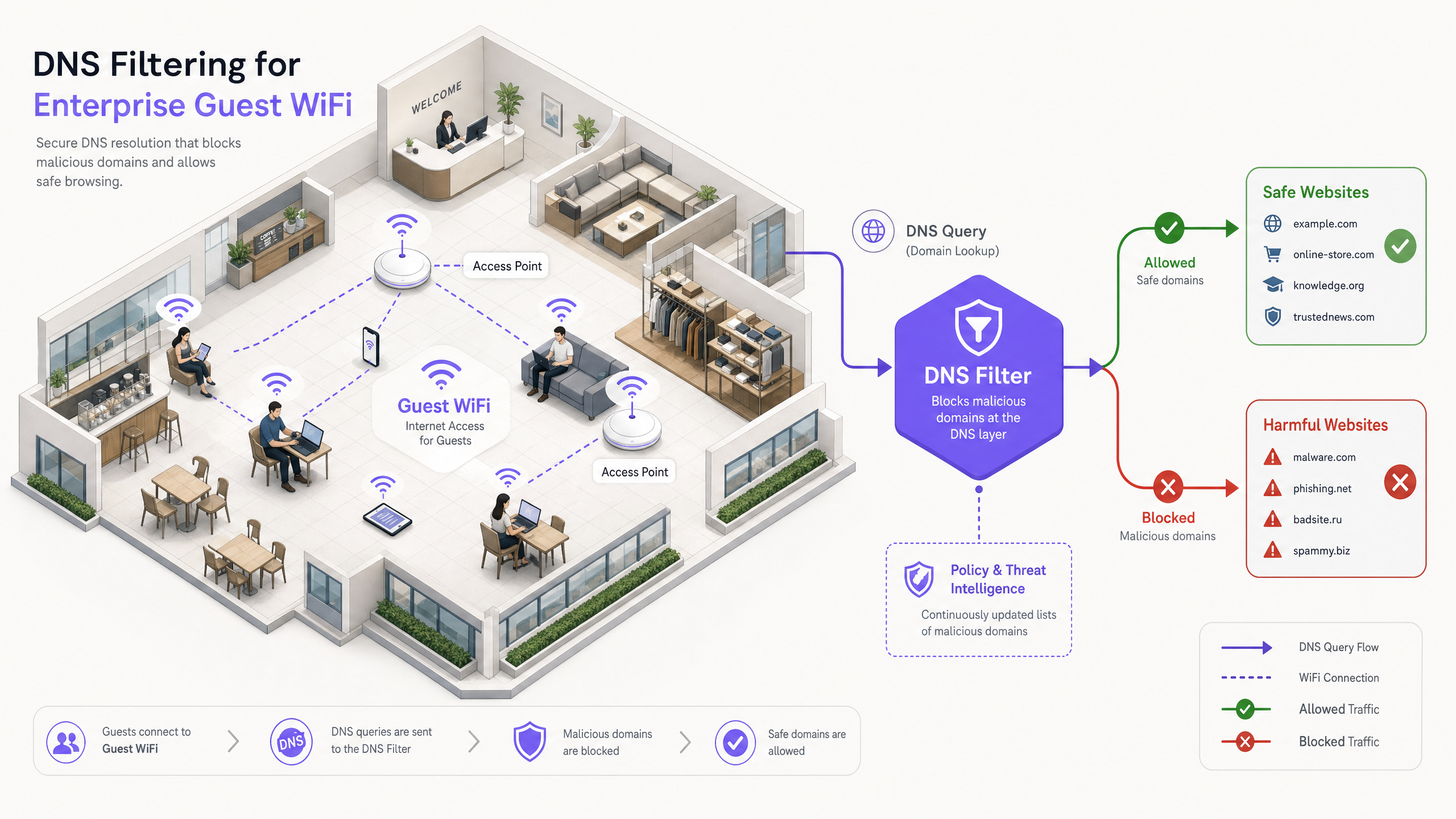
Per i leader IT aziendali che gestiscono reti pubbliche su larga scala, garantire un'esperienza di navigazione sicura, conforme e performante è un mandato operativo critico. Le reti WiFi per gli ospiti nel settore dell'ospitalità, della vendita al dettaglio e nelle strutture pubbliche sono obiettivi primari per attività dannose e violazioni delle politiche — dal traffico di comando e controllo di botnet allo streaming illegale e ai contenuti inappropriati. Questa guida fornisce un riferimento tecnico definitivo sul filtro DNS: il meccanismo più efficiente per bloccare i contenuti dannosi e mitigare i rischi al bordo della rete.
A differenza dell'ispezione approfondita dei pacchetti (DPI) ad alto consumo di risorse o delle rigide liste nere IP, il filtro DNS intercetta la richiesta iniziale di risoluzione del dominio. Valutando le query rispetto a feed di intelligence sulle minacce in tempo reale, impedisce le connessioni a domini dannosi o inappropriati prima che qualsiasi payload venga scambiato. Questo approccio garantisce un'elevata produttività e una latenza minima — essenziale per ambienti che supportano migliaia di utenti simultanei.
L'implementazione di un robusto filtro DNS non solo protegge la reputazione della struttura, ma supporta anche la conformità con le normative sulla protezione dei dati e le politiche di utilizzo adatte alle famiglie. Per le organizzazioni che utilizzano soluzioni come Guest WiFi e WiFi Analytics , l'integrazione dei controlli a livello DNS è un requisito di sicurezza fondamentale che sostiene ogni altro strato dello stack della rete ospite.
Approfondimento Tecnico: Come Funziona il Filtro DNS
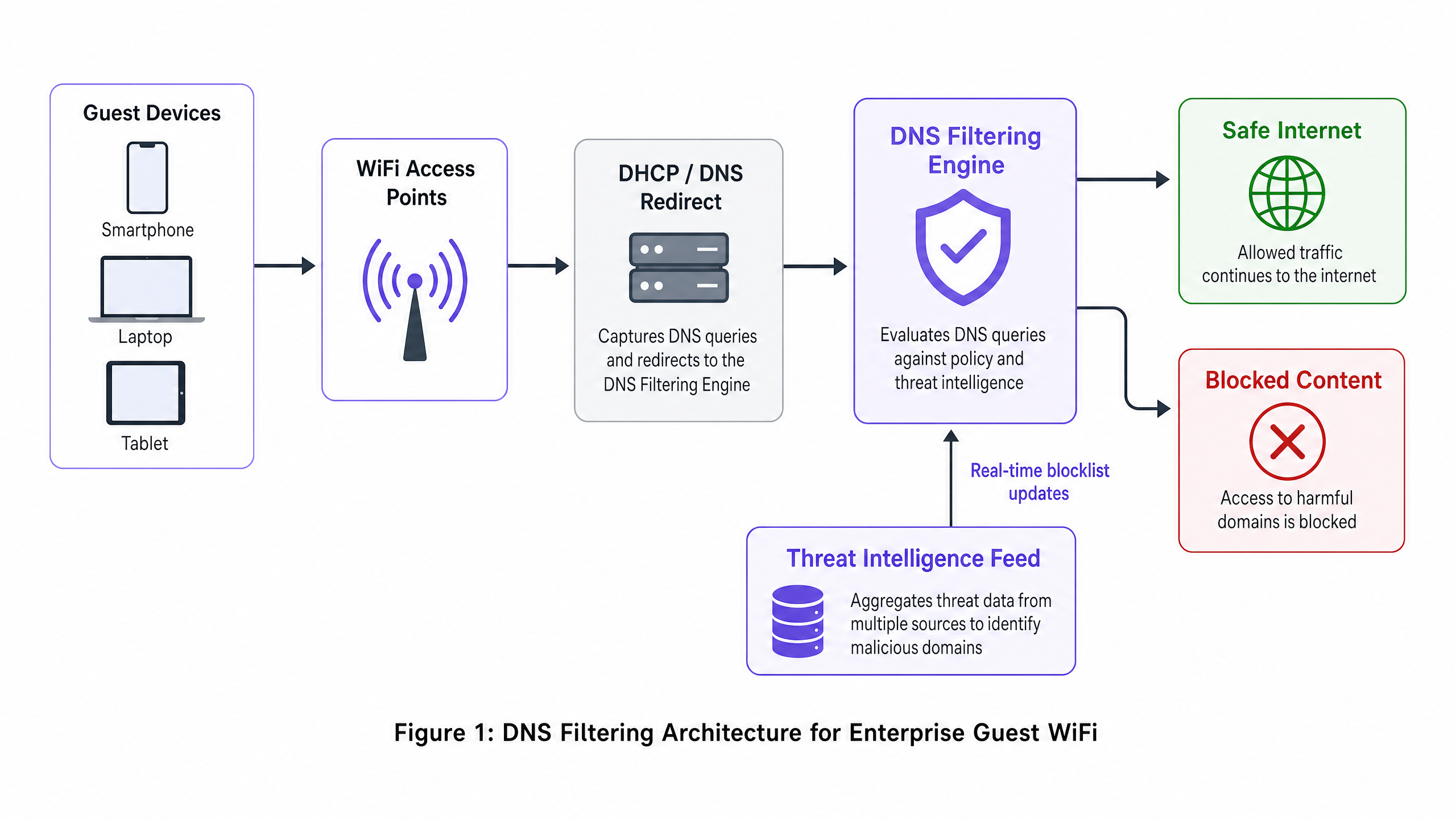
Il filtro DNS funziona come uno strato di sicurezza proattivo all'interno dell'architettura di rete. Quando un dispositivo client tenta di accedere a un dominio, il resolver DNS locale intercetta la query. Invece di restituire immediatamente l'indirizzo IP, la query viene inoltrata a un motore di filtraggio che la valuta rispetto alle politiche e all'intelligence sulle minacce prima di decidere se risolverla o bloccarla.
La Pipeline di Risoluzione
La pipeline di risoluzione del filtro DNS opera in quattro fasi distinte. Primo, intercettazione della query: il dispositivo ospite si connette alla rete e riceve la configurazione IP tramite DHCP, che specifica il server di filtro DNS come resolver primario. Secondo, valutazione della politica: il motore di filtraggio riceve la query (ad esempio, malicious-domain.com) e la confronta con liste nere categorizzate e feed dinamici di intelligence sulle minacce aggiornati in tempo reale. Terzo, risoluzione o sinkholing: se il dominio è benigno, il motore risolve l'indirizzo IP reale e la connessione procede normalmente. Se il dominio viola la politica, il motore restituisce un indirizzo IP non instradabile — una tecnica nota come sinkholing — o reindirizza l'utente a una pagina di blocco personalizzata. Quarto, registrazione: ogni query, risolta o bloccata, viene registrata per scopi di audit e analisi.
Vantaggi Architettonici
Il deployment del filtro DNS offre vantaggi distinti rispetto ai metodi alternativi di controllo dei contenuti. Il sovraccarico di latenza è trascurabile — le query DNS sono pacchetti UDP leggeri e la loro valutazione aggiunge meno di 2ms, impercettibile per l'utente finale. L'approccio è anche agnostico al protocollo: poiché il filtraggio avviene prima che la connessione sia stabilita, è efficace indipendentemente dal protocollo applicativo sottostante (HTTP, HTTPS, FTP) o dal numero di porta. Questo è un vantaggio significativo rispetto al filtraggio proxy basato su URL, che non può ispezionare il traffico HTTPS crittografato senza distribuire un certificato root personalizzato a ogni endpoint — un'impossibilità sui dispositivi ospiti non gestiti.
La scalabilità è un altro punto di forza fondamentale. Un singolo cluster DNS robusto può gestire milioni di query al secondo, rendendolo ideale per ambienti ad alta densità come stadi, grandi centri congressi o deployment Retail multi-sito. Per topologie multi-tenant complesse, il filtro DNS si integra perfettamente con le strategie di segmentazione basate su VLAN, come dettagliato in Designing a Multi-Tenant WiFi Architecture for MDU .
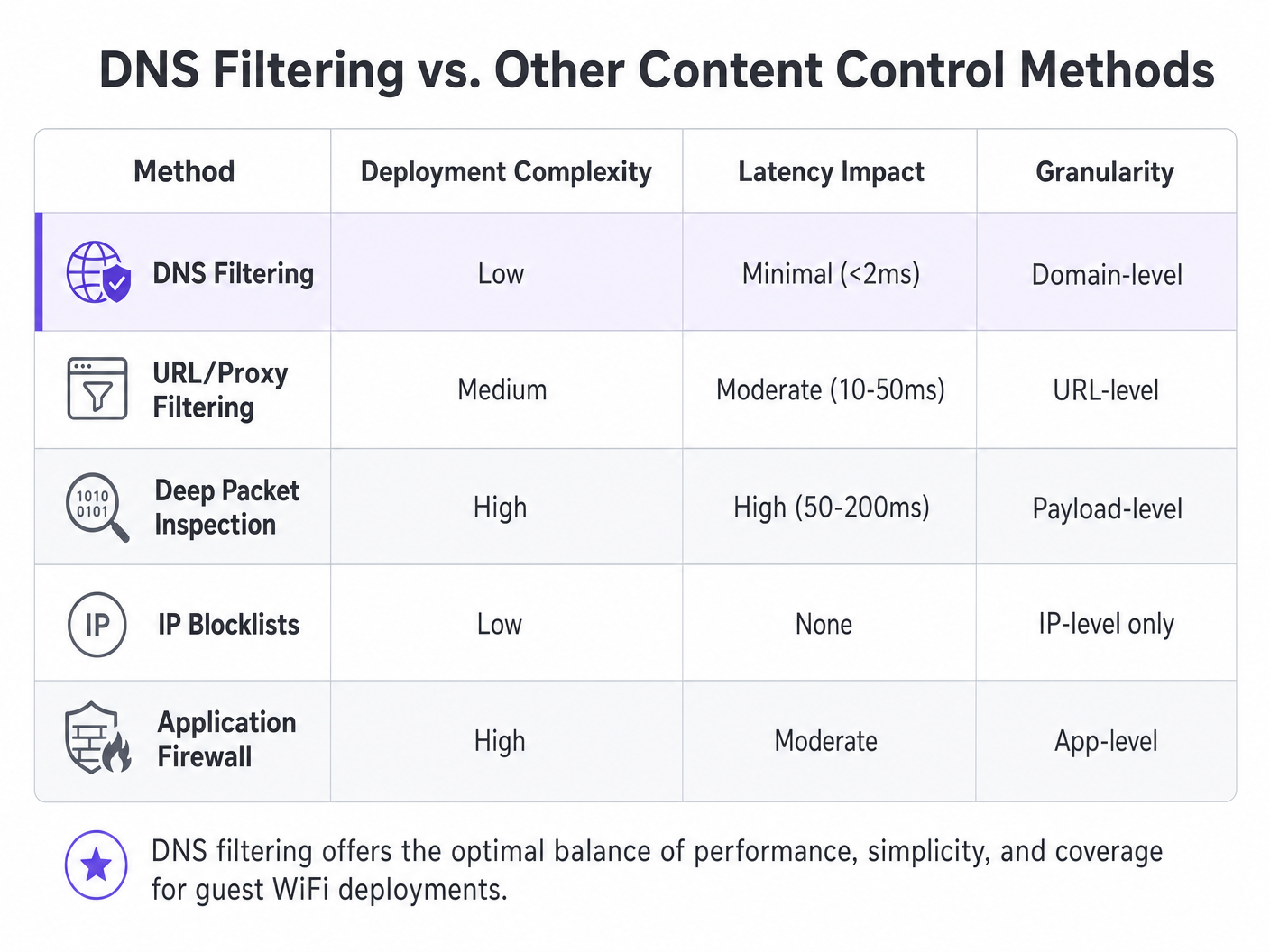
| Metodo | Complessità del Deployment | Impatto sulla Latenza | Granularità | Idoneità per Rete Ospite |
|---|---|---|---|---|
| Filtro DNS | Bassa | Minima (<2ms) | A livello di dominio | Consigliato |
| Filtro URL/Proxy | Media | Moderata (10–50ms) | A livello di URL | Limitato (problemi HTTPS) |
| Deep Packet Inspection | Alta | Alta (50–200ms) | A livello di payload | Non consigliato |
| Liste Nere IP | Bassa | Nessuno | Solo a livello IP | Solo supplementare |
| Firewall Applicativo | Alta | Moderata | A livello di app | Complementare |
Guida all'Implementazione
Il deployment del filtro DNS richiede un'attenta pianificazione per garantire una copertura completa senza interrompere il traffico legittimo. I seguenti passaggi delineano una strategia di deployment indipendente dal fornitore applicabile in ambienti Hospitality , Healthcare , Transport e di vendita al dettaglio.
Fase 1: Segmentazione della Rete e Configurazione DHCP
Il metodo di deployment più robusto consiste nel configurare il gateway di rete o il server DHCP per distribuire gli indirizzi IP del server di filtro DNS a tutti i client ospiti. Ciò garantisce che qualsiasi dispositivo che si unisce alla rete utilizzi automaticamente il resolver sicuro senza richiedere alcuna installazione di agent sull'endpoint.
Per ambientnti con topologie complesse — come quelle descritte in Progettare un'architettura WiFi multi-tenant per MDU — assicurano che le VLAN dedicate al traffico degli ospiti siano strettamente instradate attraverso il DNS filtrato, mentre le VLAN operative (PMS, POS, gestione degli edifici) continuano a utilizzare risolutori interni. Questo isolamento basato su VLAN è un prerequisito per la conformità PCI DSS, che impone una rigorosa segmentazione della rete tra gli ambienti di dati dei titolari di carta e le reti ospiti non attendibili.
Fase 2: Prevenzione dell'Evasione — Blocco della Porta 53
Questa fase è dove molti deployment falliscono. L'assegnazione dei server DNS tramite solo DHCP è insufficiente. Un utente con impostazioni DNS personalizzate configurate sul proprio dispositivo — che puntano a 8.8.8.8 o 1.1.1.1 — bypasserà completamente il filtro. La mitigazione è semplice: implementare regole firewall al gateway che bloccano tutto il traffico in uscita sulla porta 53 (UDP e TCP) verso qualsiasi indirizzo IP diverso dai server di filtraggio designati. Questo forza tutto il traffico DNS attraverso il risolutore controllato.
Inoltre, considerare il blocco di DNS over HTTPS (DoH). DoH crittografa la query DNS all'interno del traffico HTTPS sulla porta 443, rendendola indistinguibile dal normale traffico web a livello di rete. La contromisura più efficace è mantenere una blocklist di indirizzi IP noti di provider DoH (Cloudflare, Google, NextDNS) e bloccarli al firewall.
Fase 3: Definizione delle Policy e Gestione delle Categorie
Stabilire policy granulari basate sui requisiti e sul pubblico della sede. Una policy di base tipica per il WiFi pubblico include il blocco delle minacce alla sicurezza (malware, phishing, server C2 di botnet), contenuti per adulti e attività illegali (pirateria, streaming illegale). In settori specifici, categorie aggiuntive potrebbero essere appropriate: gioco d'azzardo e armi per le strutture Sanitarie , o social media durante l'orario di lavoro per le reti ospiti aziendali.
Fase 4: Integrazione del Captive Portal — Il Giardino Recintato
Questo è l'aspetto tecnicamente più sfumato del deployment. I Captive Portal richiedono agli ospiti di autenticarsi prima di ricevere l'accesso completo a Internet. Durante la fase di pre-autenticazione, il dispositivo ospite si trova in uno stato ristretto — può raggiungere solo il Captive Portal stesso. Se il filtraggio DNS è attivo durante questa fase, potrebbe bloccare i domini esterni richiesti per il social login (Google OAuth, Facebook Login) o le pagine di accettazione dei termini di servizio.
La soluzione è un walled garden configurato correttamente: un insieme di domini esplicitamente consentiti nella policy di filtraggio DNS prima che l'autenticazione sia completata. Questo elenco deve includere il dominio del Captive Portal stesso, qualsiasi dominio di provider di identità OAuth e qualsiasi endpoint CDN richiesto per il rendering degli asset del portale. La mancata configurazione corretta di questo è la causa più comune di esperienze di onboarding degli ospiti interrotte. Questa considerazione di integrazione si applica ugualmente agli ambienti d'ufficio, come discusso in Wi-Fi per Uffici: Ottimizza la Tua Rete Wi-Fi Moderna per Uffici .
Fase 5: Personalizzazione della Pagina di Blocco e Comunicazione con l'Utente
Fornire pagine di blocco chiare e brandizzate che spieghino perché il contenuto è stato limitato e offrano un percorso per richiedere una revisione se il blocco è un falso positivo. Ciò riduce significativamente i ticket dell'helpdesk e rafforza l'impegno della sede per un ambiente di navigazione sicuro. Una pagina di blocco ben progettata trasforma una restrizione in un punto di contatto del brand.
Best Practices
Per massimizzare l'efficacia del filtraggio DNS, attenersi alle seguenti raccomandazioni standard del settore.
Architettura ad Alta Disponibilità: Configurare risolutori DNS secondari e terziari. Se il motore di filtraggio primario diventa irraggiungibile, il traffico dovrebbe passare senza interruzioni a un risolutore secondario. Evitare di configurare il risolutore predefinito dell'ISP come fallback, poiché ciò bypasserebbe completamente il filtraggio durante un'interruzione.
Audit Regolari delle Policy: Esaminare continuamente i log e le analisi per identificare falsi positivi e modelli di minacce emergenti. Integrare i log delle query DNS con la tua piattaforma WiFi Analytics per correlare il comportamento di navigazione con le metriche di performance della rete.
Qualità del Feed di Threat Intelligence: L'efficacia del filtraggio DNS è direttamente proporzionale alla qualità e alla freschezza del feed di threat intelligence. Valutare i fornitori in base alla frequenza degli aggiornamenti del feed (oraria è la base; in tempo reale è preferibile), all'ampiezza della copertura delle categorie e al tasso di falsi positivi.
Validazione DNSSEC: Laddove supportato, abilitare la validazione DNSSEC sul risolutore di filtraggio. Questo previene gli attacchi di cache poisoning DNS, in cui un attaccante inietta record DNS falsi per reindirizzare gli utenti a siti malevoli.
Risoluzione dei Problemi e Mitigazione dei Rischi
Anche con un'architettura robusta, possono sorgere problemi operativi. Di seguito sono riportate le modalità di fallimento più comuni e le loro mitigazioni.
Falsi Positivi: Domini legittimi erroneamente classificati come malevoli o violanti le policy. Mantenere un processo di gestione della allowlist facilmente accessibile e un SLA di risposta rapida per i report degli utenti. Monitorare il rapporto tra query bloccate e totali; un tasso di blocco insolitamente alto è un forte indicatore di impostazioni di policy eccessivamente aggressive.
Fallimento del Captive Portal: Come descritto sopra, questo è causato da voci mancanti nel walled garden. Diagnosticare catturando le query DNS da un dispositivo di test durante la fase di pre-autenticazione e identificando quali query vengono bloccate. Aggiungere quei domini alla allowlist di pre-autenticazione.
Degrado delle Prestazioni: Un'infrastruttura DNS inadeguata può portare a una navigazione lenta, manifestandosi come tempi di caricamento delle pagine elevati piuttosto che veri e propri fallimenti. Implementare risolutori di caching locali per ridurre il carico di query sui motori di filtraggio a monte. Monitorare i tempi di risposta delle query DNS; qualsiasi valore superiore a 50ms giustifica un'indagine.
Bypass DoH: Se le analisi mostrano traffico verso provider DoH noti nonostante le regole del firewall, verificare che la blocklist degli IP dei provider DoH sia aggiornata e che le regole del firewall si applichino a tutte le VLAN guest epunti di accesso.
ROI e Impatto sul Business
Il ritorno sull'investimento per il filtraggio DNS si estende ben oltre la semplice mitigazione del rischio. Per le strutture Hospitality , garantire un ambiente adatto alle famiglie influisce direttamente sulla reputazione del marchio e sui Net Promoter Scores. Un singolo incidente in cui un ospite — in particolare un minore — accede a contenuti inappropriati sulla rete di una struttura può generare una significativa esposizione reputazionale e legale.
Bloccando lo streaming illecito ad alto consumo di banda, le strutture possono anche ottimizzare le prestazioni della rete, ritardando costosi aggiornamenti dell'infrastruttura. In un hotel di 500 camere dove una parte significativa degli ospiti effettuava streaming da siti di pirateria, l'implementazione del filtraggio DNS per bloccare tali domini può ridurre l'utilizzo di banda di picco del 20-35%, migliorando direttamente l'esperienza per tutti gli ospiti e posticipando la necessità di capacità di uplink aggiuntiva.
Da una prospettiva di conformità, dimostrare robusti controlli di sicurezza della rete è spesso un prerequisito per la certificazione PCI DSS e supporta il principio GDPR di protezione dei dati fin dalla progettazione. Il costo di un'implementazione di filtraggio DNS — tipicamente una frazione di centesimo per utente al mese per le soluzioni basate su cloud — è trascurabile rispetto al costo potenziale di una multa normativa o di un incidente di sicurezza dannoso per il marchio.
Per i team IT che gestiscono implementazioni ad alta frequenza su più siti, il sovraccarico operativo è minimo. Le soluzioni di filtraggio DNS basate su cloud non richiedono hardware on-premise, aggiornano automaticamente l'intelligence sulle minacce e forniscono una gestione centralizzata delle policy su centinaia di sedi da un'unica dashboard.
Definizioni chiave
DNS Filtering
A security technique that intercepts DNS queries and evaluates them against policy and threat intelligence before resolving or blocking the requested domain.
The primary mechanism for content control on enterprise guest WiFi networks, operating at the network layer without requiring endpoint agents.
DNS Sinkholing
The practice of returning a false, non-routable IP address in response to a DNS query for a malicious or policy-violating domain, preventing the connection from being established.
Used to neutralise malware command-and-control traffic and prevent access to harmful sites without the user receiving a standard connection error.
Captive Portal
A web page that a user of a public-access network is required to interact with before full internet access is granted, typically used for terms acceptance, authentication, or data capture.
Crucial for guest onboarding and data collection; must be carefully integrated with DNS filtering to prevent the walled garden catch-22.
Walled Garden
A set of domains that are explicitly allowed in the DNS filtering policy during the pre-authentication phase, enabling the captive portal and authentication services to function before the user has accepted terms.
Misconfiguration of the walled garden is the most common cause of broken captive portal experiences in DNS-filtered guest networks.
Deep Packet Inspection (DPI)
A form of network packet filtering that examines the data payload of packets as they pass through an inspection point, enabling content-level analysis.
A more resource-intensive alternative to DNS filtering; impractical for high-throughput guest networks and unable to inspect encrypted HTTPS traffic without certificate interception.
DNS over HTTPS (DoH)
A protocol that encrypts DNS queries within HTTPS traffic, preventing network-level interception of DNS lookups.
Can be used to bypass traditional DNS filtering; administrators should block known DoH provider IPs at the firewall to maintain filtering coverage.
VLAN (Virtual Local Area Network)
A logical network segment that groups devices independently of their physical location, enforced at the switch or router level.
Essential for isolating guest WiFi traffic from internal corporate or operational networks, a prerequisite for PCI DSS compliance.
Threat Intelligence Feed
A continuously updated data stream containing information about known malicious domains, IP addresses, and URLs, used to power security systems.
The quality and freshness of the threat intelligence feed directly determines the effectiveness of a DNS filtering deployment against newly registered malicious domains.
DNSSEC (DNS Security Extensions)
A suite of IETF specifications that add cryptographic authentication to DNS responses, preventing cache poisoning and spoofing attacks.
Should be enabled on DNS filtering resolvers where supported to prevent attackers from injecting false DNS records to redirect users.
Esempi pratici
A 500-room luxury hotel chain needs to implement content filtering on their guest WiFi. They currently experience high bandwidth utilisation due to illegal streaming and have received complaints about inappropriate content accessible in public areas. They require a solution that does not impact the performance of their property management system (PMS) which shares the same physical infrastructure via VLANs.
- Deploy a cloud-based DNS filtering solution. Configure the DHCP scope for the Guest WiFi VLAN to assign the cloud DNS filtering IPs as the primary and secondary resolvers. 2. Implement firewall rules on the gateway to block all outbound UDP and TCP traffic on port 53 from the Guest VLAN to any external IP other than the approved DNS filtering servers. 3. Create a content filtering policy blocking 'Adult Content', 'Piracy/Copyright Theft', 'Malware/Phishing', and 'Botnet C2'. 4. Configure a branded block page with the hotel's logo and a clear message. 5. Critically, ensure the PMS VLAN DHCP scope continues to use the internal DNS servers. The firewall rules blocking port 53 must be scoped exclusively to the Guest VLAN, not applied globally. 6. Monitor DNS query logs for the first 30 days to identify and resolve any false positives affecting legitimate guest services.
A large retail shopping centre wants to offer free public WiFi but must comply with strict family-friendly corporate policies. They also need to gather demographic data through a captive portal with social login options. How should they configure DNS filtering to support both requirements without breaking the onboarding flow?
- Integrate the DNS filtering solution with the existing network gateway, assigning filtering DNS IPs via DHCP on the guest SSID. 2. Before applying any blocking policy, configure the walled garden. Add the following to the pre-authentication allowlist: the captive portal's own domain and CDN endpoints, Google OAuth domains (accounts.google.com, oauth2.googleapis.com), Facebook Login domains ( www.facebook.com , graph.facebook.com), and any other identity providers in use. 3. Apply the content filtering policy (adult, gambling, malware, piracy categories) to activate only after successful authentication. 4. Implement port 53 egress blocking on the guest VLAN. 5. Customise the block page with the retail centre's branding and a clear, friendly message about family-friendly browsing. 6. Test the complete onboarding flow with multiple device types (iOS, Android, Windows) before go-live.
Domande di esercitazione
Q1. A stadium IT director reports that since deploying DNS filtering on the guest WiFi, guests are unable to complete the social login process on the captive portal. The portal uses Google and Facebook OAuth. What is the most likely architectural flaw and how would you resolve it?
Suggerimento: Consider what external resources are required during the pre-authentication phase, before the user has accepted the terms of service.
Visualizza risposta modello
The social login domains (accounts.google.com, oauth2.googleapis.com, www.facebook.com , graph.facebook.com) have not been added to the walled garden — the pre-authentication allowlist in the DNS filtering policy. The filter is blocking these queries because the user has not yet authenticated, creating a catch-22. The resolution is to explicitly add all required OAuth and identity provider domains to the pre-authentication allowlist, then re-test the full onboarding flow across iOS, Android, and Windows devices before re-deploying.
Q2. To improve network performance, a network architect proposes implementing a transparent HTTPS proxy to inspect all guest traffic instead of DNS filtering. Why is this approach fundamentally unsuitable for a public guest WiFi environment?
Suggerimento: Think about the requirements for inspecting encrypted HTTPS traffic and the nature of unmanaged guest devices.
Visualizza risposta modello
Transparent HTTPS inspection requires deploying a custom root certificate to every client device to perform a man-in-the-middle decryption of TLS traffic. On a managed corporate network this is achievable via MDM or Group Policy. On a public guest network, the venue has no control over guest endpoints, making certificate deployment impossible. Without the certificate, the proxy will generate severe TLS certificate warnings on every HTTPS site, completely breaking the browsing experience. DNS filtering is the correct approach for BYOD environments as it requires no endpoint agent or certificate.
Q3. A retail chain has deployed DNS filtering by assigning the filtering DNS IPs via DHCP on the guest SSID. Analytics show that a significant volume of adult content is still being accessed. What network configuration step was most likely missed, and what is the remediation?
Suggerimento: How might a technically capable user override the DNS settings assigned by DHCP?
Visualizza risposta modello
The network administrator failed to implement outbound firewall rules blocking port 53 (UDP and TCP) from the guest VLAN to any external IP other than the approved DNS filtering servers. Users with custom DNS settings hardcoded on their devices (e.g., 8.8.8.8) are bypassing the DHCP-assigned filtering resolvers entirely. The remediation is to add gateway firewall rules that redirect or drop all outbound port 53 traffic not destined for the filtering servers. Additionally, consider blocking known DoH provider IPs on port 443 to prevent encrypted DNS bypass.
Q4. A conference centre is planning a major international event. They expect 8,000 concurrent WiFi users over three days. Their current DNS infrastructure consists of a single on-premises filtering appliance. What architectural risks does this present and what changes would you recommend?
Suggerimento: Consider both performance capacity and availability. What happens if the single appliance fails or becomes overloaded?
Visualizza risposta modello
The single on-premises appliance presents two critical risks: a single point of failure (if it goes offline, all DNS resolution fails, taking down the entire guest network) and potential performance bottleneck under peak load. Recommendations: 1) Migrate to a cloud-based DNS filtering service with geographically distributed resolver infrastructure, capable of handling millions of queries per second. 2) Configure at least two resolver IPs in the DHCP scope (primary and secondary) pointing to different cloud resolver endpoints. 3) Implement local caching resolvers at the venue to reduce upstream query load and improve response times. 4) Conduct a load test prior to the event simulating peak concurrent users to validate the architecture.