
Cos'è la sicurezza WiFi? Una guida completa alla sicurezza delle reti wireless
Un riferimento tecnico completo per i leader IT sulla messa in sicurezza delle reti wireless aziendali. Questa guida copre l'evoluzione dei protocolli di crittografia, le migliori pratiche architetturali per la segmentazione e le strategie di difesa contro le minacce WiFi comuni.
Ascolta questa guida
Visualizza trascrizione del podcast
Sintesi Esecutiva
Per le aziende moderne—che gestiscano una catena di vendita al dettaglio globale, un'organizzazione sanitaria multi-sede o uno stadio ad alta capacità—il WiFi non è più solo un servizio; è un'infrastruttura critica. Tuttavia, con la crescente dipendenza dalle reti wireless, aumenta anche la superficie di attacco. Una rete wireless compromessa espone l'organizzazione a violazioni dei dati, violazioni della conformità (come PCI DSS e GDPR) e gravi danni alla reputazione.
Questa guida tecnica completa esplora i fondamenti della sicurezza WiFi, dettagliando l'evoluzione degli standard di crittografia, i vettori di minaccia comuni e le migliori pratiche architetturali per la messa in sicurezza degli ambienti wireless aziendali. Esamineremo come implementare una segmentazione robusta, meccanismi di autenticazione forti e sfruttare piattaforme come Guest WiFi per mantenere una rete sicura, conforme e ad alte prestazioni, estraendo al contempo informazioni aziendali utili tramite WiFi Analytics .
Approfondimento Tecnico: L'Evoluzione dei Protocolli di Sicurezza WiFi
Comprendere lo stato attuale della sicurezza WiFi richiede un breve sguardo alla sua storia. La progressione dei protocolli di sicurezza riflette una corsa agli armamenti in corso tra ingegneri di rete e attori malevoli.
WEP (Wired Equivalent Privacy)
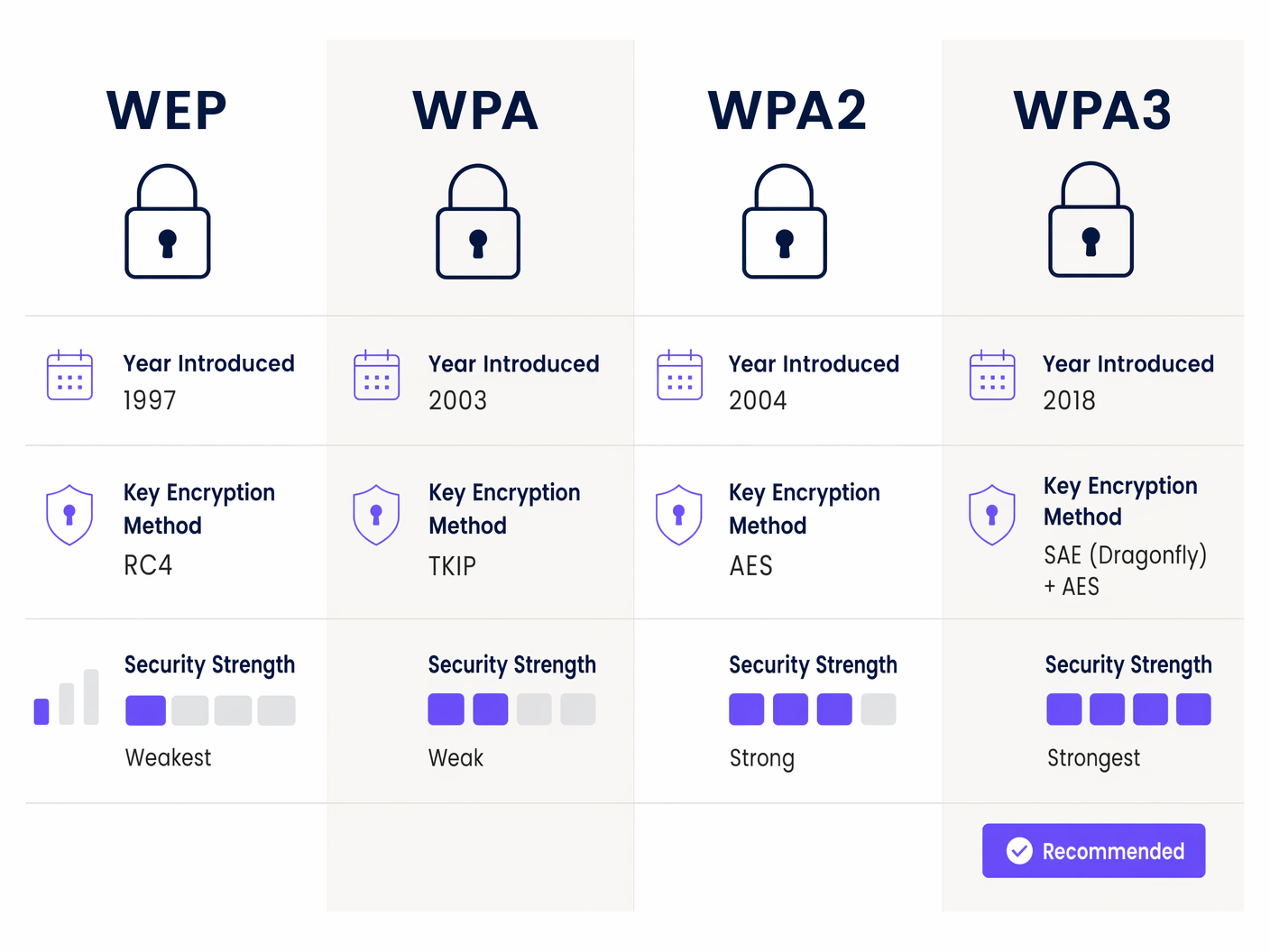
Introdotto nel 1997, WEP è stato lo standard di sicurezza 802.11 originale. Utilizzava il cifrario a flusso RC4 per la riservatezza e CRC-32 per l'integrità. Tuttavia, i difetti crittografici nella sua implementazione lo rendevano trivialmente facile da violare utilizzando strumenti prontamente disponibili. WEP è completamente deprecato e la sua presenza su qualsiasi rete moderna costituisce una vulnerabilità critica.
WPA (Wi-Fi Protected Access)
Introdotto nel 2003 come soluzione provvisoria ai difetti di WEP, WPA implementava il Temporal Key Integrity Protocol (TKIP). Sebbene migliorasse la sicurezza cambiando dinamicamente le chiavi, si basava ancora sul cifrario RC4 vulnerabile e fu infine compromesso.
WPA2
Ratificato nel 2004, WPA2 è diventato lo standard aziendale per oltre un decennio. Ha introdotto l'Advanced Encryption Standard (AES) operante in Counter Mode Cipher Block Chaining Message Authentication Code Protocol (CCMP). WPA2 forniva una sicurezza robusta ma fu infine trovato vulnerabile agli attacchi a dizionario offline contro l'handshake a quattro vie, in particolare la vulnerabilità KRACK (Key Reinstallation Attacks) scoperta nel 2017.
WPA3: Lo Standard Attuale
Introdotto nel 2018, WPA3 affronta le carenze di WPA2 ed è lo standard obbligatorio per tutti i nuovi dispositivi Wi-Fi CERTIFIED.
Miglioramenti Chiave in WPA3:
- Simultaneous Authentication of Equals (SAE): Sostituisce lo scambio di Pre-Shared Key (PSK). SAE è un protocollo di stabilimento chiave sicuro che fornisce la segretezza in avanti ed è altamente resistente agli attacchi a dizionario offline. Anche se un utente sceglie una password debole, l'handshake non può essere violato offline.
- WPA3-Enterprise: Offre una modalità opzionale di forza crittografica a 192 bit, utilizzando la crittografia Suite B (ad esempio, ECDSA con una curva a 384 bit e HMAC-SHA384). Questo è fondamentale per ambienti altamente sensibili come istituzioni governative o finanziarie.
- Opportunistic Wireless Encryption (OWE): Risponde alla domanda "il WiFi pubblico è sicuro". OWE, commercializzato come Wi-Fi Enhanced Open, fornisce crittografia dei dati individualizzata su reti aperte senza richiedere l'autenticazione dell'utente, mitigando l'intercettazione passiva.
Minacce Comuni alla Sicurezza WiFi
Le reti aziendali affrontano una varietà di minacce sofisticate. Comprendere questi vettori è cruciale per implementare contromisure efficaci.
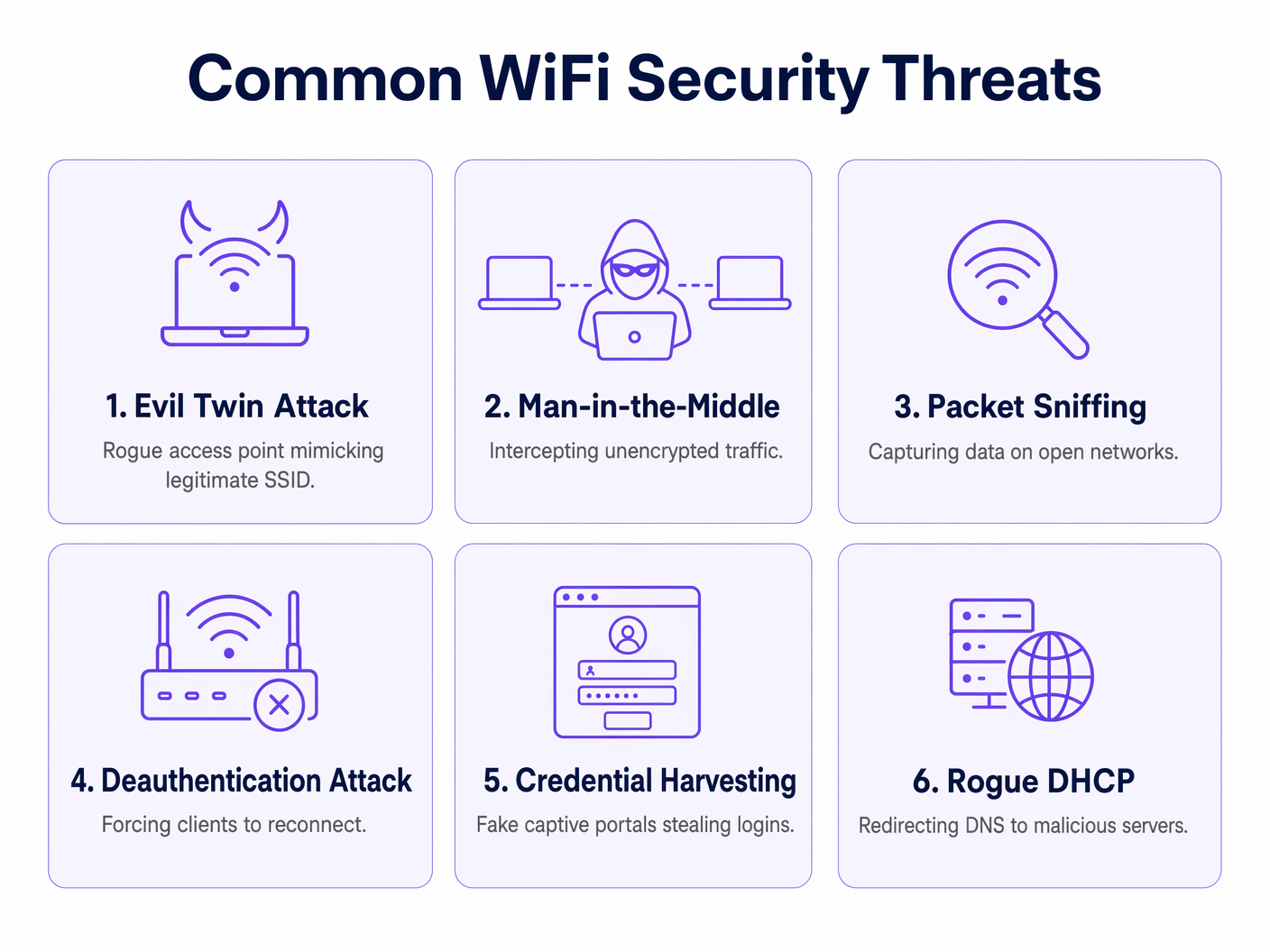
- Access Point Maligni & Evil Twin: Un attaccante collega un AP non autorizzato alla rete aziendale (Rogue AP) o trasmette un SSID dall'aspetto legittimo per ingannare gli utenti e farli connettere (Evil Twin). Ciò consente l'intercettazione del traffico e il furto di credenziali.
- Attacchi Man-in-the-Middle (MitM): Gli attaccanti si posizionano tra il client e l'AP per intercettare, leggere o modificare il traffico non crittografato.
- Attacchi di Deautenticazione: Gli attaccanti inviano frame di deautenticazione falsificati per disconnettere un client dall'AP. Questo è spesso un precursore di un attacco Evil Twin, costringendo il client a riconnettersi all'AP dell'attaccante.
- Raccolta di Credenziali: Gli attaccanti distribuiscono finti Captive Portal che imitano la pagina splash legittima, ingannando gli utenti a inserire credenziali aziendali o informazioni personali.
Guida all'Implementazione: Migliori Pratiche Architetturali
La messa in sicurezza di una rete wireless aziendale richiede un approccio di difesa in profondità, andando oltre la semplice crittografia verso una robusta segmentazione architetturale e il controllo degli accessi.
1. Segmentazione della Rete e VLAN
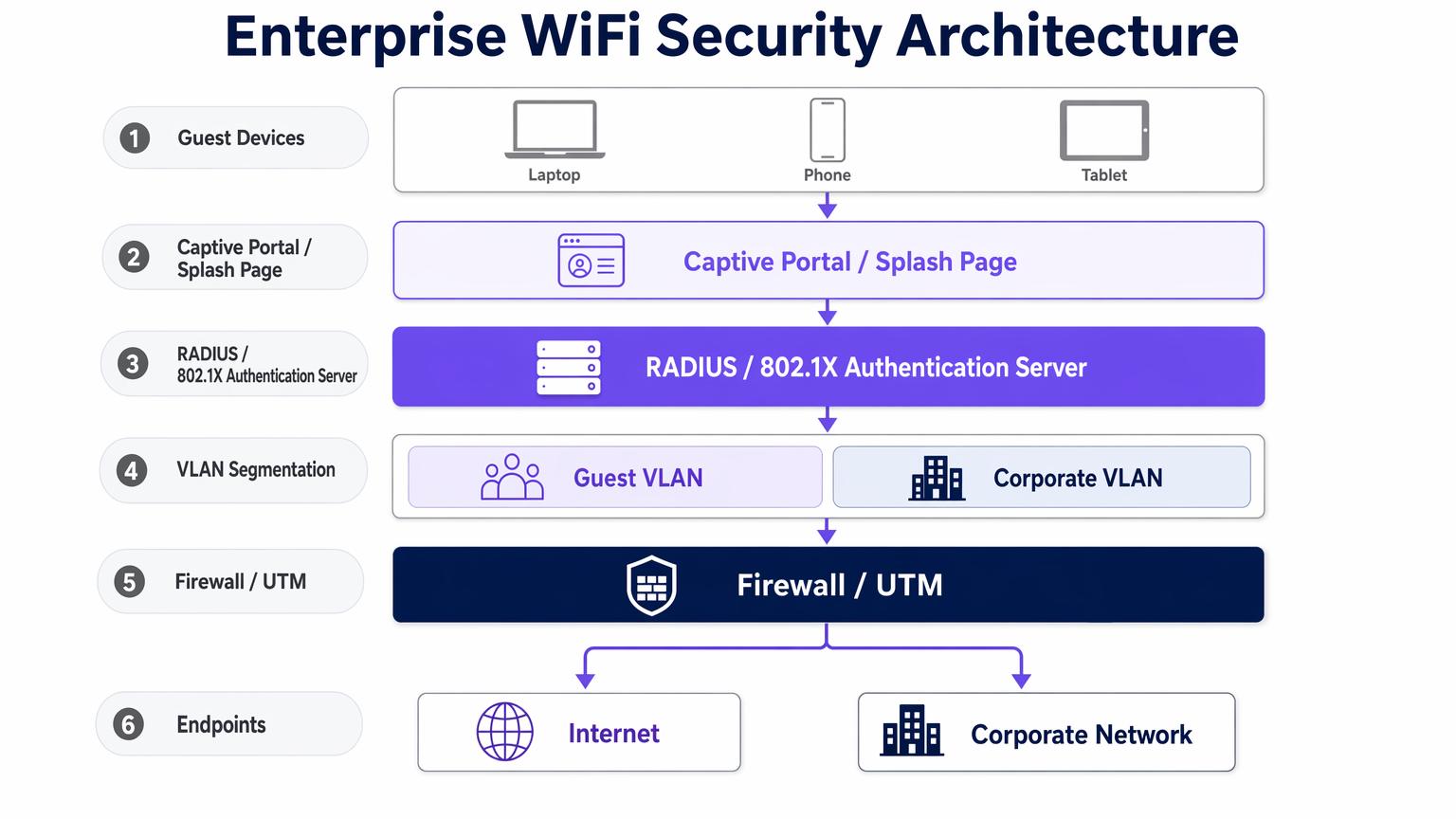
Il principio fondamentale della sicurezza della rete è l'isolamento. Il traffico degli ospiti, il traffico aziendale, i dispositivi IoT e i sistemi Point-of-Sale (PoS) devono risiedere su Virtual Local Area Networks (VLAN) logicamente separate.
- Guest VLAN: Deve essere strettamente isolata dalle sottoreti interne. Il traffico dovrebbe essere instradato direttamente al firewall internet.
- IoT VLAN: I dispositivi IoT hanno spesso posture di sicurezza deboli. Isolarli per prevenire movimenti laterali in caso di compromissione.
2. Meccanismi di Autenticazione Robusti
- Accesso Aziendale (802.1X): Mai uutilizzare chiavi pre-condivise per l'accesso aziendale. Implementare l'autenticazione 802.1X supportata da un server RADIUS, integrandosi con i servizi di directory (ad esempio, Active Directory). Ciò garantisce che l'accesso alla rete sia legato alle identità degli utenti individuali e ai certificati dei dispositivi.
- Accesso Ospiti (Captive Portals): Implementare un Captive Portal sicuro per l'onboarding degli ospiti. Una piattaforma robusta come Purple non solo gestisce l'accettazione dei termini di servizio, ma facilita anche l'autenticazione sicura tramite social login o SMS, garantendo la tracciabilità. Per esempi di implementazioni efficaci, consultare I 10 migliori esempi di pagine splash WiFi (e cosa le rende efficaci) o l'equivalente francese, Les 10 meilleurs exemples de pages de démarrage WiFi (et ce qui les rend efficaces) .
3. Implementazione dell'isolamento client
Per le reti ospiti, abilitare l'isolamento client (noto anche come isolamento AP). Ciò impedisce ai dispositivi collegati allo stesso AP o VLAN di comunicare direttamente tra loro, mitigando il rischio di attacchi peer-to-peer sulla rete pubblica.
Best Practice e Standard di Settore
- Sistemi di Prevenzione delle Intrusioni Wireless (WIPS): Implementare WIPS per monitorare continuamente lo spettro RF alla ricerca di AP non autorizzati, Evil Twin e comportamenti anomali. Un WIPS robusto può contenere automaticamente le minacce inviando frame di deautenticazione ai dispositivi non autorizzati.
- Passpoint (Hotspot 2.0): Per semplificare l'accesso sicuro degli ospiti, implementare Passpoint. Ciò consente ai dispositivi di autenticarsi automaticamente e in modo sicuro alla rete utilizzando le credenziali fornite dal loro operatore di telefonia mobile o da un provider di identità di terze parti. Purple funge da provider di identità gratuito per servizi come OpenRoaming con la licenza Connect, facilitando una connettività fluida e sicura.
- Considerazioni sulla Conformità: Assicurarsi che l'architettura WiFi sia conforme ai quadri normativi pertinenti. Ad esempio, il PCI DSS richiede una rigorosa segmentazione dell'ambiente dei dati dei titolari di carta dal WiFi pubblico, mentre il GDPR impone la gestione sicura di qualsiasi informazione di identificazione personale (PII) raccolta durante l'onboarding degli ospiti.
Risoluzione dei Problemi e Mitigazione del Rischio
- Modalità di Fallimento: Proliferazione di AP non autorizzati: In grandi strutture come gli ambienti Retail , gli AP non autorizzati possono essere facilmente collegati a porte Ethernet esposte. Mitigazione: Implementare la sicurezza delle porte (802.1X sulle porte cablate) e monitorare attivamente gli avvisi WIPS.
- Modalità di Fallimento: Sicurezza del Captive Portal debole: Un Captive Portal mal configurato può essere aggirato o falsificato. Mitigazione: Assicurarsi che il Captive Portal utilizzi HTTPS con certificati SSL validi. Implementare il rate limiting per prevenire attacchi brute-force contro i moduli di autenticazione.
- Modalità di Fallimento: Problemi di integrazione SD-WAN: Quando si integra il WiFi con architetture SD-WAN, assicurarsi che le politiche di sicurezza siano coerenti su tutta la rete overlay. Per maggiori informazioni, consultare I principali vantaggi dell'SD-WAN per le aziende moderne o Die zentralen SD-WAN-Vorteile für moderne Unternehmen .
ROI e Impatto sul Business
Investire in una robusta sicurezza WiFi non è solo un centro di costo; è un fattore abilitante fondamentale per la trasformazione digitale e la mitigazione del rischio.
- Mitigazione del Rischio: Il costo di una violazione dei dati — incluse multe normative, spese legali e danni alla reputazione — supera di gran lunga l'investimento in infrastrutture sicure (hardware WPA3, WIPS, server RADIUS).
- Efficienza Operativa: L'onboarding automatizzato tramite 802.1X e Passpoint riduce i ticket dell'helpdesk relativi a reset di password e problemi di connettività.
- Integrità dei Dati: L'onboarding sicuro degli ospiti garantisce l'integrità dei dati di prima parte raccolti per marketing e analisi. Utilizzando una piattaforma sicura per il Guest WiFi , le strutture nei settori Hospitality e Transport possono sfruttare con fiducia questi dati per promuovere programmi fedeltà e engagement personalizzato senza compromettere la privacy degli utenti.
Definizioni chiave
WPA3 (Wi-Fi Protected Access 3)
The latest Wi-Fi security standard, providing enhanced cryptographic strength and replacing the vulnerable PSK exchange with SAE.
Required for all new enterprise deployments to protect against offline dictionary attacks.
SAE (Simultaneous Authentication of Equals)
A secure key establishment protocol used in WPA3 that provides forward secrecy and prevents offline cracking of passwords.
Replaces the older 4-way handshake used in WPA2, significantly improving security for networks using shared passwords.
802.1X
An IEEE standard for port-based Network Access Control, providing an authentication mechanism to devices wishing to attach to a LAN or WLAN.
The standard for enterprise corporate access, tying network authentication to directory services via a RADIUS server.
VLAN (Virtual Local Area Network)
A logical subnetwork that groups a collection of devices from different physical LANs.
Essential for segmenting guest, corporate, and IoT traffic to limit the blast radius of a potential breach.
Client Isolation
A security feature that prevents devices connected to the same AP or VLAN from communicating with each other.
Mandatory for guest networks to prevent peer-to-peer attacks and malware propagation among public users.
WIPS (Wireless Intrusion Prevention System)
A network device that monitors the radio spectrum for the presence of unauthorized access points and can automatically take countermeasures.
Critical for detecting and neutralizing Rogue APs and Evil Twin attacks in enterprise environments.
Passpoint (Hotspot 2.0)
A standard that enables cellular-like roaming for Wi-Fi networks, allowing automatic and secure authentication.
Improves user experience and security by eliminating the need to manually connect and authenticate via captive portals.
OWE (Opportunistic Wireless Encryption)
A standard that provides individualized data encryption on open Wi-Fi networks without requiring user authentication.
Improves security on public networks (like coffee shops or airports) by protecting against passive eavesdropping.
Esempi pratici
A 200-room hotel needs to provide seamless guest WiFi while ensuring strict compliance with PCI DSS for their on-site restaurants and bars. How should the network architecture be designed?
The network must be strictly segmented using VLANs. The Guest WiFi must operate on an isolated VLAN with client isolation enabled, routing traffic directly to the internet. The PoS systems in the restaurants must reside on a separate, highly restricted VLAN (the Cardholder Data Environment), firewalled off from all other traffic. Guest onboarding should be managed via a secure captive portal to capture marketing data compliantly.
A large retail chain is experiencing frequent 'Evil Twin' attacks where malicious actors set up rogue APs to steal customer credentials. What is the recommended technical mitigation?
Deploy a dedicated Wireless Intrusion Prevention System (WIPS). The WIPS will monitor the RF spectrum for unauthorized SSIDs mimicking the corporate network. When detected, the WIPS can automatically contain the threat by transmitting deauthentication frames to prevent clients from connecting to the rogue AP.
Domande di esercitazione
Q1. You are designing the network for a large [Healthcare](/industries/healthcare) facility. They require seamless roaming for medical devices (IoT) and secure access for staff and patients. How do you segment this network?
Suggerimento: Consider the varying security capabilities of IoT devices compared to corporate laptops.
Visualizza risposta modello
Implement strict VLAN segmentation. Create a dedicated IoT VLAN with restricted access only to necessary servers (no internet access if possible). Staff devices should use 802.1X on a Corporate VLAN. Patients should use a Guest VLAN with client isolation, routed through a captive portal directly to the internet.
Q2. A venue operator wants to deploy OpenRoaming to improve the guest experience but is concerned about security compared to their existing WPA2-PSK setup. What is your advice?
Suggerimento: Compare the security of shared passwords versus individualized authentication.
Visualizza risposta modello
OpenRoaming (using Passpoint/802.1X) is significantly more secure than WPA2-PSK. It uses enterprise-grade encryption and individualized authentication, eliminating the risks associated with shared passwords (like offline dictionary attacks) and providing a seamless user experience.
Q3. During a security audit, legacy barcode scanners in a warehouse are found to only support WPA2-PSK. Upgrading them is not budgeted for this year. How do you mitigate the risk?
Suggerimento: If you can't upgrade the protocol, how can you limit the blast radius?
Visualizza risposta modello
Isolate the legacy scanners onto a dedicated, highly restricted VLAN. Implement strict firewall rules so this VLAN can only communicate with the specific inventory servers required for operation, blocking all other internal and external access. Rotate the PSK frequently.
Continua a leggere questa serie
Il Futuro della Sicurezza Wi-Fi: NAC basato su AI e Rilevamento delle Minacce
Questa guida autorevole esplora l'evoluzione della sicurezza Wi-Fi aziendale, dal WPA2 tradizionale al Network Access Control (NAC) basato su AI e al rilevamento delle minacce. Progettata per i leader IT, fornisce strategie di implementazione attuabili per la messa in sicurezza di ambienti ad alta densità come negozi al dettaglio, strutture ricettive e stadi, utilizzando le reti basate sull'identità di Purple.
Gestire la sicurezza dei dispositivi IoT con NAC e MPSK
Questa guida tecnica illustra come le aziende possano proteggere i dispositivi IoT headless utilizzando l'architettura Multiple Pre-Shared Key (MPSK) e il Network Access Control (NAC). Fornisce passaggi di implementazione pratici per ottenere la micro-segmentazione, contenere i raggi di esplosione della sicurezza e mantenere la conformità senza sacrificare la scalabilità.
RadSec: Come RADIUS su TLS migliora la sicurezza dell'autenticazione WiFi
Questo riferimento tecnico autorevole spiega come RadSec (RFC 6614) protegge l'autenticazione WiFi aziendale incapsulando il traffico RADIUS tradizionale nella crittografia TLS. Progettato per manager IT e architetti di rete, copre architettura, strategie di implementazione e passaggi pratici per mitigare i rischi del traffico RADIUS UDP non crittografato attraverso reti aziendali e guest.